
An Introduction To Software
Development Using Python
Spring Semester, 2015
Class #4.5:
Graphics
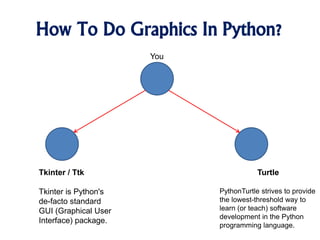
How To Do Graphics In Python?
You
Tkinter / Ttk
Tkinter is Python's
de-facto standard
GUI (Graphical User
Interface) package.
Turtle
PythonTurtle strives to provide
the lowest-threshold way to
learn (or teach) software
development in the Python
programming language.
What Is Turtle Graphics?
• Logo is an educational programming
language, designed in 1967 by Daniel G.
Bobrow, Wally Feurzeig, Seymour Papert
and Cynthia Solomon.
• Today the language is remembered
mainly for its use of "turtle graphics", in
which commands for movement and
drawing produced line graphics either on
screen or with a small robot called a
"turtle".
Image Credit: el.media.mit.edu
What Is Turtle In Python?
• Imagine a robotic turtle starting at (0, 0)
in the x-y plane.
• Execute the import turtle Python
command
• Now give it the command
turtle.forward(15), and it moves (on-
screen!) 15 pixels in the direction it is
facing, drawing a line as it moves.
• Give it the command turtle.right(25), and
it rotates in-place 25 degrees clockwise.
Image Credit: www.turtlemob.com
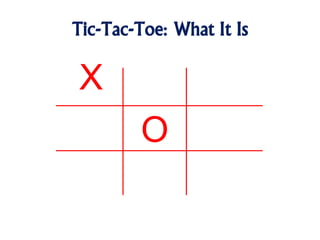
Tic-Tac-Toe: What It Is
X
O
Turtle Motion
• turtle.forward(distance)
• turtle.back(distance)
• turtle.right(angle)
• turtle.left(angle)
• turtle.goto(x, y=None)
• turtle.setx(x)
• turtle.sety(y)
• turtle.home()
Image Creditmegaicons.net
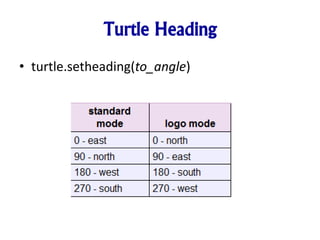
Turtle Heading
• turtle.setheading(to_angle)
Turtle Pen Control
• turtle.pendown()
• turtle.penup()
• turtle.pensize(width=None)
Image www.clipartpanda.com
Turtle Color Control
• turtle.pencolor(*args)
• turtle.fillcolor(*args)
Image www.clipartlord.com
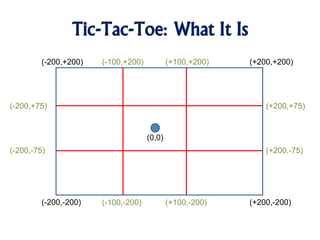
Tic-Tac-Toe: What It Is
(0,0)
(-200,+200) (+200,+200)
(+200,-200)(-200,-200)
(-100,+200) (+100,+200)
(-100,-200) (+100,-200)
(-200,-75)
(-200,+75)
(+200,-75)
(+200,+75)
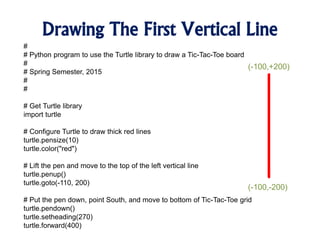
Drawing The First Vertical Line
#
# Python program to use the Turtle library to draw a Tic-Tac-Toe board
#
# Spring Semester, 2015
#
#
# Get Turtle library
import turtle
# Configure Turtle to draw thick red lines
turtle.pensize(10)
turtle.color("red")
# Lift the pen and move to the top of the left vertical line
turtle.penup()
turtle.goto(-110, 200)
# Put the pen down, point South, and move to bottom of Tic-Tac-Toe grid
turtle.pendown()
turtle.setheading(270)
turtle.forward(400)
(-100,+200)
(-100,-200)
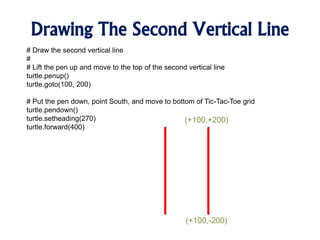
Drawing The Second Vertical Line
# Draw the second vertical line
#
# Lift the pen up and move to the top of the second vertical line
turtle.penup()
turtle.goto(100, 200)
# Put the pen down, point South, and move to bottom of Tic-Tac-Toe grid
turtle.pendown()
turtle.setheading(270)
turtle.forward(400)
(+100,+200)
(+100,-200)
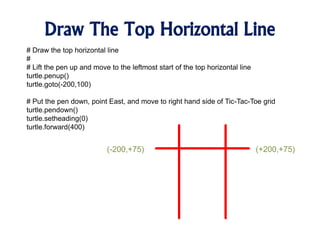
Draw The Top Horizontal Line
# Draw the top horizontal line
#
# Lift the pen up and move to the leftmost start of the top horizontal line
turtle.penup()
turtle.goto(-200,100)
# Put the pen down, point East, and move to right hand side of Tic-Tac-Toe grid
turtle.pendown()
turtle.setheading(0)
turtle.forward(400)
(-200,+75) (+200,+75)
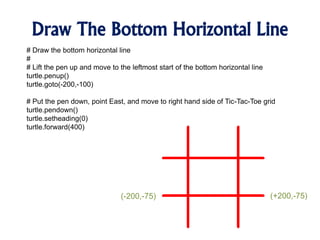
Draw The Bottom Horizontal Line
# Draw the bottom horizontal line
#
# Lift the pen up and move to the leftmost start of the bottom horizontal line
turtle.penup()
turtle.goto(-200,-100)
# Put the pen down, point East, and move to right hand side of Tic-Tac-Toe grid
turtle.pendown()
turtle.setheading(0)
turtle.forward(400)
(-200,-75) (+200,-75)
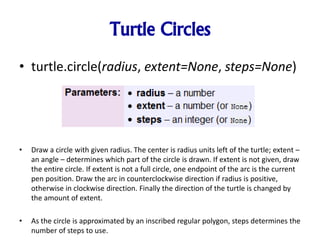
Turtle Circles
• turtle.circle(radius, extent=None, steps=None)
• Draw a circle with given radius. The center is radius units left of the turtle; extent –
an angle – determines which part of the circle is drawn. If extent is not given, draw
the entire circle. If extent is not a full circle, one endpoint of the arc is the current
pen position. Draw the arc in counterclockwise direction if radius is positive,
otherwise in clockwise direction. Finally the direction of the turtle is changed by
the amount of extent.
• As the circle is approximated by an inscribed regular polygon, steps determines the
number of steps to use.
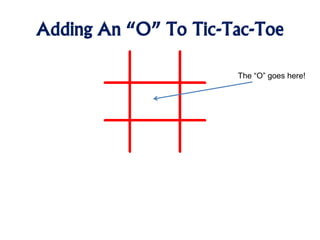
Adding An “O” To Tic-Tac-Toe
The “O” goes here!
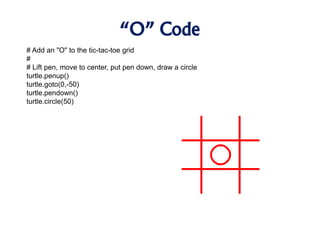
“O” Code
# Add an "O" to the tic-tac-toe grid
#
# Lift pen, move to center, put pen down, draw a circle
turtle.penup()
turtle.goto(0,-50)
turtle.pendown()
turtle.circle(50)
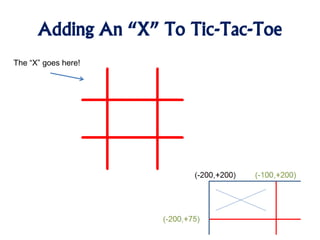
Adding An “X” To Tic-Tac-Toe
The “X” goes here!
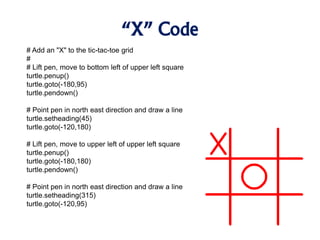
“X” Code
# Add an "X" to the tic-tac-toe grid
#
# Lift pen, move to bottom left of upper left square
turtle.penup()
turtle.goto(-180,95)
turtle.pendown()
# Point pen in north east direction and draw a line
turtle.setheading(45)
turtle.goto(-120,180)
# Lift pen, move to upper left of upper left square
turtle.penup()
turtle.goto(-180,180)
turtle.pendown()
# Point pen in north east direction and draw a line
turtle.setheading(315)
turtle.goto(-120,95)
Turtle Extras
• turtle.dot(size=None, *color)
• turtle.stamp()
• turtle.clearstamp(stampid)
• turtle.clearstamps(n=None)
• turtle.undo()
• turtle.speed(speed=None)
– If input is a number greater than 10 or smaller than 0.5, speed is set to 0. Speedstrings
are mapped to speedvalues as follows:
• “fastest”: 0
• “fast”: 10
• “normal”: 6
• “slow”: 3
• “slowest”: 1
Turtle Stamp
Image www.webweaver.nu
Turtle State
• turtle.position()
• turtle.towards(x, y=None)
• turtle.xcor()
• turtle.ycor()
• turtle.heading()
• turtle.distance(x, y=None)
Image www.clipartbest.com
Turtle Pen Control
• turtle.pendown()
• turtle.penup()
• turtle.pensize(width=None)
• turtle.isdown()
Image 4vector.com
Turtle Filling
• turtle.begin_fill()
• turtle.end_fill()
Image www.dreamstime.com
What We Covered Today
1. Turtle graphics
2. Drawing lines
3. Drawing circles
4. Filling shapes
Image Credit: http://www.tswdj.com/blog/2011/05/17/the-grooms-checklist/
What We’ll Be Covering Next Time
1. IF Statement
2. Relational Operators
Image Credit: http://merchantblog.thefind.com/2011/01/merchant-newsletter/resolve-to-take-advantage-of-these-5-e-commerce-trends/attachment/crystal-ball-fullsize/

An Introduction To Python - Graphics

  • 1.
    An Introduction ToSoftware Development Using Python Spring Semester, 2015 Class #4.5: Graphics
  • 2.
    How To DoGraphics In Python? You Tkinter / Ttk Tkinter is Python's de-facto standard GUI (Graphical User Interface) package. Turtle PythonTurtle strives to provide the lowest-threshold way to learn (or teach) software development in the Python programming language.
  • 3.
    What Is TurtleGraphics? • Logo is an educational programming language, designed in 1967 by Daniel G. Bobrow, Wally Feurzeig, Seymour Papert and Cynthia Solomon. • Today the language is remembered mainly for its use of "turtle graphics", in which commands for movement and drawing produced line graphics either on screen or with a small robot called a "turtle". Image Credit: el.media.mit.edu
  • 4.
    What Is TurtleIn Python? • Imagine a robotic turtle starting at (0, 0) in the x-y plane. • Execute the import turtle Python command • Now give it the command turtle.forward(15), and it moves (on- screen!) 15 pixels in the direction it is facing, drawing a line as it moves. • Give it the command turtle.right(25), and it rotates in-place 25 degrees clockwise. Image Credit: www.turtlemob.com
  • 5.
  • 6.
    Turtle Motion • turtle.forward(distance) •turtle.back(distance) • turtle.right(angle) • turtle.left(angle) • turtle.goto(x, y=None) • turtle.setx(x) • turtle.sety(y) • turtle.home() Image Creditmegaicons.net
  • 7.
  • 8.
    Turtle Pen Control •turtle.pendown() • turtle.penup() • turtle.pensize(width=None) Image www.clipartpanda.com
  • 9.
    Turtle Color Control •turtle.pencolor(*args) • turtle.fillcolor(*args) Image www.clipartlord.com
  • 10.
    Tic-Tac-Toe: What ItIs (0,0) (-200,+200) (+200,+200) (+200,-200)(-200,-200) (-100,+200) (+100,+200) (-100,-200) (+100,-200) (-200,-75) (-200,+75) (+200,-75) (+200,+75)
  • 11.
    Drawing The FirstVertical Line # # Python program to use the Turtle library to draw a Tic-Tac-Toe board # # Spring Semester, 2015 # # # Get Turtle library import turtle # Configure Turtle to draw thick red lines turtle.pensize(10) turtle.color("red") # Lift the pen and move to the top of the left vertical line turtle.penup() turtle.goto(-110, 200) # Put the pen down, point South, and move to bottom of Tic-Tac-Toe grid turtle.pendown() turtle.setheading(270) turtle.forward(400) (-100,+200) (-100,-200)
  • 12.
    Drawing The SecondVertical Line # Draw the second vertical line # # Lift the pen up and move to the top of the second vertical line turtle.penup() turtle.goto(100, 200) # Put the pen down, point South, and move to bottom of Tic-Tac-Toe grid turtle.pendown() turtle.setheading(270) turtle.forward(400) (+100,+200) (+100,-200)
  • 13.
    Draw The TopHorizontal Line # Draw the top horizontal line # # Lift the pen up and move to the leftmost start of the top horizontal line turtle.penup() turtle.goto(-200,100) # Put the pen down, point East, and move to right hand side of Tic-Tac-Toe grid turtle.pendown() turtle.setheading(0) turtle.forward(400) (-200,+75) (+200,+75)
  • 14.
    Draw The BottomHorizontal Line # Draw the bottom horizontal line # # Lift the pen up and move to the leftmost start of the bottom horizontal line turtle.penup() turtle.goto(-200,-100) # Put the pen down, point East, and move to right hand side of Tic-Tac-Toe grid turtle.pendown() turtle.setheading(0) turtle.forward(400) (-200,-75) (+200,-75)
  • 15.
    Turtle Circles • turtle.circle(radius,extent=None, steps=None) • Draw a circle with given radius. The center is radius units left of the turtle; extent – an angle – determines which part of the circle is drawn. If extent is not given, draw the entire circle. If extent is not a full circle, one endpoint of the arc is the current pen position. Draw the arc in counterclockwise direction if radius is positive, otherwise in clockwise direction. Finally the direction of the turtle is changed by the amount of extent. • As the circle is approximated by an inscribed regular polygon, steps determines the number of steps to use.
  • 16.
    Adding An “O”To Tic-Tac-Toe The “O” goes here!
  • 17.
    “O” Code # Addan "O" to the tic-tac-toe grid # # Lift pen, move to center, put pen down, draw a circle turtle.penup() turtle.goto(0,-50) turtle.pendown() turtle.circle(50)
  • 18.
    Adding An “X”To Tic-Tac-Toe The “X” goes here!
  • 19.
    “X” Code # Addan "X" to the tic-tac-toe grid # # Lift pen, move to bottom left of upper left square turtle.penup() turtle.goto(-180,95) turtle.pendown() # Point pen in north east direction and draw a line turtle.setheading(45) turtle.goto(-120,180) # Lift pen, move to upper left of upper left square turtle.penup() turtle.goto(-180,180) turtle.pendown() # Point pen in north east direction and draw a line turtle.setheading(315) turtle.goto(-120,95)
  • 20.
    Turtle Extras • turtle.dot(size=None,*color) • turtle.stamp() • turtle.clearstamp(stampid) • turtle.clearstamps(n=None) • turtle.undo() • turtle.speed(speed=None) – If input is a number greater than 10 or smaller than 0.5, speed is set to 0. Speedstrings are mapped to speedvalues as follows: • “fastest”: 0 • “fast”: 10 • “normal”: 6 • “slow”: 3 • “slowest”: 1 Turtle Stamp Image www.webweaver.nu
  • 21.
    Turtle State • turtle.position() •turtle.towards(x, y=None) • turtle.xcor() • turtle.ycor() • turtle.heading() • turtle.distance(x, y=None) Image www.clipartbest.com
  • 22.
    Turtle Pen Control •turtle.pendown() • turtle.penup() • turtle.pensize(width=None) • turtle.isdown() Image 4vector.com
  • 23.
    Turtle Filling • turtle.begin_fill() •turtle.end_fill() Image www.dreamstime.com
  • 24.
    What We CoveredToday 1. Turtle graphics 2. Drawing lines 3. Drawing circles 4. Filling shapes Image Credit: http://www.tswdj.com/blog/2011/05/17/the-grooms-checklist/
  • 25.
    What We’ll BeCovering Next Time 1. IF Statement 2. Relational Operators Image Credit: http://merchantblog.thefind.com/2011/01/merchant-newsletter/resolve-to-take-advantage-of-these-5-e-commerce-trends/attachment/crystal-ball-fullsize/

Editor's Notes

  • #2 New name for the class I know what this means Technical professionals are who get hired This means much more than just having a narrow vertical knowledge of some subject area. It means that you know how to produce an outcome that I value. I’m willing to pay you to do that.