Downloaded 15 times

![4 Steps To Creating A Python List
1. Convert each of the names into strings by surrounding the
data with quotes.
2. Separate each of the list items from the next with a comma.
3. Surround the list of items with opening and closing square
brackets.
4. Assign the list to an identifier (movies in the preceding code)
using the assignment operator (=).
“COP 2271c” “Introduction to Computation and Programming” 3
“COP 2271c”, “Introduction to Computation and Programming”, 3
[“COP 2271c”, “Introduction to Computation and Programming”, 3]
prerequisites = [“COP 2271c”, “Introduction to Computation and Programming”, 3]
COP 2271c Introduction to Computation and Programming 3
Image Credit: Clipart Panda](https://image.slidesharecdn.com/python-11-150215185311-conversion-gate02/85/An-Introduction-To-Python-Lists-Part-2-2-320.jpg)
![How To Access A List
• A list is a sequence of elements, each of which has an
integer position or index.
• To access a list element, you specify which index you
want to use.
• That is done with the subscript operator ([] ) in the
same way that you access individual characters in a
string.
• For example:
print(values[5]) # Prints the element at index 5
Image Credit: imgkid.com](https://image.slidesharecdn.com/python-11-150215185311-conversion-gate02/85/An-Introduction-To-Python-Lists-Part-2-3-320.jpg)
![Appending Elements
• Start with an empty list
goodFood=[]
• A new element can be appended to the end of the list with the append
method:
goodFood.append(“burgers”)
• The size, or length, of the list increases after each call to the append
method. Any number of elements can be added to a list:
goodFood.append(“ice cream”)
goodFood.append(“hotdog”)
goodFood.append(“cake”)
Image Credit: www.pinterest.coma](https://image.slidesharecdn.com/python-11-150215185311-conversion-gate02/85/An-Introduction-To-Python-Lists-Part-2-4-320.jpg)
![Inserting an Element
• Sometimes, however, the order is important and a new element has to be
inserted at a specific position in the list. For example, given this list:
friends = ["Harry", "Emily", "Bob", "Cari"]
suppose we want to insert the string "Cindy" into the list following the fist
element, which contains the string "Harry". The statement:
friends.insert(1, "Cindy")
achieves this task
• The index at which the new element is to be inserted must be between 0 and the
number of elements currently in the list. For example, in a list of length 5, valid
index values for the insertion are 0, 1, 2, 3, 4, and 5. The element is inserted
before the element at the given index, except when the index is equal to the
number of elements in the list. Then it is appended after the last element:
friends.insert(5, "Bill")
This is the same as if we had used the append method.
Image Credit: www.crazywebsite.comb](https://image.slidesharecdn.com/python-11-150215185311-conversion-gate02/85/An-Introduction-To-Python-Lists-Part-2-5-320.jpg)
![Finding An Element
• If you simply want to know whether an element is present in a list, use the in
operator:
if "Cindy" in friends :
print("She's a friend")
• Often, you want to know the position at which an element occurs. The index
method yields the index of the fist match. For example,
friends = ["Harry", "Emily", "Bob", "Cari", "Emily"]
n = friends.index("Emily") # Sets n to 1
• If a value occurs more than once, you may want to find the position of all
occurrences. You can call the index method and specify a starting position for the
search. Here, we start the search after the index of the previous match:
n2 = friends.index("Emily", n + 1) # Sets n2 to 4
Image Credit: www.theclipartdirectory.comc](https://image.slidesharecdn.com/python-11-150215185311-conversion-gate02/85/An-Introduction-To-Python-Lists-Part-2-6-320.jpg)
![Removing an Element
• Pop
– The pop method removes the element at a given position. For example, suppose we start with the
list
friends = ["Harry","Cindy","Emily","Bob","Cari","Bill"]
To remove the element at index position 1 ("Cindy") in the friends list, you use the command:
friends.pop(1)
If you call the pop method without an argument, it removes and returns the last element of the list.
For example, friends.pop() removes "Bill".
• Remove
– The remove method removes an element by value instead of by position.
friends.remove("Cari")
Image Credit: www.clipartpanda.comd](https://image.slidesharecdn.com/python-11-150215185311-conversion-gate02/85/An-Introduction-To-Python-Lists-Part-2-7-320.jpg)
![Concatenation and Replication
• The concatenation of two lists is a new list that contains the elements of the first
list, followed by the elements of the second. For example, suppose we have two
lists:
myFriends = ["Fritz", "Cindy"]
yourFriends = ["Lee", "Pat", "Phuong"]
• We want to create a new list that combines the two. Two lists can be concatenated
by using the plus (+) operator:
ourFriends = myFriends + yourFriends
# Sets ourFriends to ["Fritz", "Cindy", "Lee", "Pat", "Phuong"]
• If you want to concatenate the same list multiple times, use
the replication operator: (*). For example,
monthInQuarter = [1, 2, 3] * 4
# The list is [1, 2, 3, 1, 2, 3, 1, 2, 3, 1, 2, 3]
• One common use of replication is to initialize a list with a fixed value. For example,
monthlyScores = [0] * 12
Image Credit: www.gograph.comf](https://image.slidesharecdn.com/python-11-150215185311-conversion-gate02/85/An-Introduction-To-Python-Lists-Part-2-8-320.jpg)
![Equality Testing
• Use the == operator to compare whether two
lists have the same elements, in the same
order.
• For example, [1, 4, 9] == [1, 4, 9] is True,
but [1, 4, 9 ] == [4, 1, 9] is False.
• The opposite of == is !=. The
expression [1, 4, 9] != [4, 9]
is True.
Image Credit: www.fotosearch.comg](https://image.slidesharecdn.com/python-11-150215185311-conversion-gate02/85/An-Introduction-To-Python-Lists-Part-2-9-320.jpg)
![Sum, Maximum, Minimum
• If you have a list of numbers, the sum function yields the sum of all values in the
list. For example:
sum([1, 4, 9, 16]) # Yields 30
• For a list of numbers or strings, the max and min functions return the largest and
smallest value:
max([1, 16, 9, 4]) # Yields 16
min("Fred", "Ann", "Sue") # Yields "Ann"
Image Credit: www.clker.com](https://image.slidesharecdn.com/python-11-150215185311-conversion-gate02/85/An-Introduction-To-Python-Lists-Part-2-10-320.jpg)
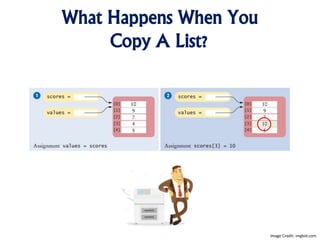
![Solving The Copying Problem
• Sometimes, you want to make a copy of a list; that is, a new list that has
the same elements in the same order as a given list.
• Use the list function:
prices = list(values)
• Now, values and prices refer to different lists. Right after the copy, both
lists have the same contents. But you can modify either without affecting
the other.
• The list function can be used to make a list out of any sequence. For
example, when the argument is a string, you get a list of all characters in
the string:
characters = list("Hello")
# The list is ["H", "e", "l", "l", "o"]
Image Credit: www.clipartpanda.com](https://image.slidesharecdn.com/python-11-150215185311-conversion-gate02/85/An-Introduction-To-Python-Lists-Part-2-12-320.jpg)



This document is an introduction to lists in Python, including how to create, access, append, insert, find, and remove elements. It also covers list operations such as concatenation, replication, and equality testing, as well as functions like sum, max, and min. Additionally, it explains how to copy lists to create independent copies and previews topics for the next class.


