Python 101
Prashant Jamkhande
$ whoami
● Fellow member in HydPy
● Software engineer, Accenture
● Python and open source enthusiast
$ touch agenda
● Intro
● First basic things
● Data structures
● Conditional statements
● Looping
$ python3
>>> # Let’s comment on what Python is ...a bit :)
>>> print(“Python is an interpreted language”)
>>> # Python as calculator
>>> import this
>>> # Declaring variables
Let’s begin to
use Python
interpreter
Operator
● Mathematical: +, -, /, %, *
● Logical: and, or
● Relational: <, <=, >, >=, ==, !=
Few basic rules
● Use 4 spaces for indentation.
● Never mix tab and spaces.
● One blank line between functions.
● Two blank lines between classes.
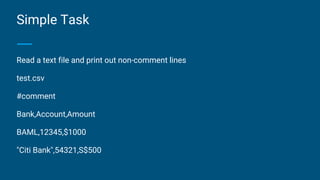
Simple Task
Read a text file and print out non-comment lines
test.csv
#comment
Bank,Account,Amount
BAML,12345,$1000
"Citi Bank",54321,S$500
Pseudocode:
open file test.csv
for each line in file
if line does not start with ‘#’
print line
Python
with open('test.csv', 'r') as f:
for l in f:
if not l.startswith('#'):
print l
Duck Type
Don't check whether something IS a duck. Check whether it QUACKS like
a duck and WALKS like a duck
-- Alex Martelli
No need to specify data types
>>> a = 12
>>> type(a)
<class 'int'>
>>> a = 1.0
>>> type(a)
<class 'float'>
>>> a = “Hello world!”
>>>type(a)
Simple data types
● bool: Boolean, e.g. True, False
● int: Integer, e.g. 12, 23345
● float: Floating point number, e.g. 3.1415, 1.1e-5
● string: Character string, e.g. "This is a string"
● ...
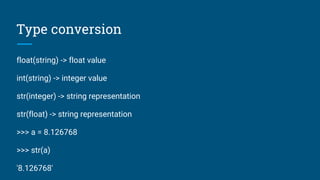
Type conversion
float(string) -> float value
int(string) -> integer value
str(integer) -> string representation
str(float) -> string representation
>>> a = 8.126768
>>> str(a)
'8.126768'
Manipulate strings
● Concatenation using + operator
● Multiplaction using *
>>> ‘India’
>>> ‘India’s best’
>>>”India’s best”
● Methods for string: split(), title(), upper(), swapcase(), isalnum() and more.
Read user input
input()
>>> help(input(“what help do you need?”))
How to print
>>> name = 'Sumith'
>>> country = 'India'
>>> print("%s is from %s" % (name, country))
Sumith is from India
>>> print("{0} is from {1}".format(name, country))
Sumith is from India
>>> print("{0} is from {0}".format(name))
Sumith is from Sumith
Multiple assignments
>>> a, b = 4, 5
>>> a
4
>>> b
5
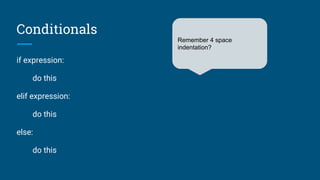
Conditionals
if expression:
do this
elif expression:
do this
else:
do this
Remember 4 space
indentation?
if x == True: if x:
do this do this
if x == False: if not x:
do this do this
Wrong way Right way
Looping
>>> while n < 11:
... print(n)
... n += 1
while condition:
statement1
statement2
for iterating_var in sequence:
statement
>>> for i in range(0, 11): # Print 0-10
... print(i)
>>> sum = 0
>>> n = 10
>>> for i in range(1, n):
... sum += 1
>>> print(sum)
for iterating_var in sequence:
statement
>>> for i in range(0, 11): # Print 0-10
... print(i)
>>> sum = 0
>>> n = 10
>>> for i in range(1, n):
... sum += 1
>>> print(sum)
For
Break and continue
>>> word = "Python3 Programming"
>>> for letter in word:
... if letter == "3":
... continue
... print(letter)
Survival functions
● help()
● dir()
And…
Documentation : https://docs.python.org/3/
Structured data types
structured data types are composed of either simple or structured types
● List
● Tuples
● Set
● Dictionary
● strings
Slicing
[start, stop, step]
Applicable to any iterable collection of elements
Lists
● Lists are mutable
● List can be declared as :
L= list() or L=[]
● Lists are versatile. Since almost any data type can be added to them
● List methods
● List comprehensions:
squares = [x**2 for x in range(10)]
Tuples
Tuples are immutable.
Tuples are created in parentheses or using a comma
T=(1,2,3,4,4,5)
Concept of tuple packing and unpacking
Set
Sets are useful in fast membership check since no duplicate elements.
Creating set: set().
Uinon : a|b
Intersection : a&b
Diffrence : a-b
Symmetric difference : a^b #Letters in a or b but not in both
Set contains immutable objects however set itself is mutable
Dictionary
Creating dictionary: Dict={} or dict()
The values of a dictionary can be of any type but keys has to be of immutable
data type
Memo: A previously computed solution can be used to avoid repetitive function
call. Dictionaries help us to do this.
Dictionaries use hash values
Functions
def functionname(params):
statement1
statement2
>>> def sum(a, b):
... return a + b
>>> res = sum(2, 3)
>>> res
References
1. http://pymbook.readthedocs.io/en/latest/
2. https://www.hackerrank.com/domains/python/py-introduction
3. http://projecteuler.net/
4.
Thank you!
Questions?
Reach out to me AT
prashantjamkhande@gmail.com

Python 101

  • 1.
  • 2.
    $ whoami ● Fellowmember in HydPy ● Software engineer, Accenture ● Python and open source enthusiast
  • 3.
    $ touch agenda ●Intro ● First basic things ● Data structures ● Conditional statements ● Looping
  • 4.
    $ python3 >>> #Let’s comment on what Python is ...a bit :) >>> print(“Python is an interpreted language”) >>> # Python as calculator >>> import this >>> # Declaring variables Let’s begin to use Python interpreter
  • 5.
    Operator ● Mathematical: +,-, /, %, * ● Logical: and, or ● Relational: <, <=, >, >=, ==, !=
  • 6.
    Few basic rules ●Use 4 spaces for indentation. ● Never mix tab and spaces. ● One blank line between functions. ● Two blank lines between classes.
  • 7.
    Simple Task Read atext file and print out non-comment lines test.csv #comment Bank,Account,Amount BAML,12345,$1000 "Citi Bank",54321,S$500
  • 8.
    Pseudocode: open file test.csv foreach line in file if line does not start with ‘#’ print line
  • 9.
    Python with open('test.csv', 'r')as f: for l in f: if not l.startswith('#'): print l
  • 10.
    Duck Type Don't checkwhether something IS a duck. Check whether it QUACKS like a duck and WALKS like a duck -- Alex Martelli
  • 11.
    No need tospecify data types >>> a = 12 >>> type(a) <class 'int'> >>> a = 1.0 >>> type(a) <class 'float'> >>> a = “Hello world!” >>>type(a)
  • 12.
    Simple data types ●bool: Boolean, e.g. True, False ● int: Integer, e.g. 12, 23345 ● float: Floating point number, e.g. 3.1415, 1.1e-5 ● string: Character string, e.g. "This is a string" ● ...
  • 13.
    Type conversion float(string) ->float value int(string) -> integer value str(integer) -> string representation str(float) -> string representation >>> a = 8.126768 >>> str(a) '8.126768'
  • 14.
    Manipulate strings ● Concatenationusing + operator ● Multiplaction using * >>> ‘India’ >>> ‘India’s best’ >>>”India’s best” ● Methods for string: split(), title(), upper(), swapcase(), isalnum() and more.
  • 15.
    Read user input input() >>>help(input(“what help do you need?”))
  • 16.
    How to print >>>name = 'Sumith' >>> country = 'India' >>> print("%s is from %s" % (name, country)) Sumith is from India >>> print("{0} is from {1}".format(name, country)) Sumith is from India >>> print("{0} is from {0}".format(name)) Sumith is from Sumith
  • 17.
    Multiple assignments >>> a,b = 4, 5 >>> a 4 >>> b 5
  • 18.
    Conditionals if expression: do this elifexpression: do this else: do this Remember 4 space indentation?
  • 19.
    if x ==True: if x: do this do this if x == False: if not x: do this do this Wrong way Right way
  • 20.
    Looping >>> while n< 11: ... print(n) ... n += 1 while condition: statement1 statement2
  • 21.
    for iterating_var insequence: statement >>> for i in range(0, 11): # Print 0-10 ... print(i) >>> sum = 0 >>> n = 10 >>> for i in range(1, n): ... sum += 1 >>> print(sum) for iterating_var in sequence: statement >>> for i in range(0, 11): # Print 0-10 ... print(i) >>> sum = 0 >>> n = 10 >>> for i in range(1, n): ... sum += 1 >>> print(sum) For
  • 22.
    Break and continue >>>word = "Python3 Programming" >>> for letter in word: ... if letter == "3": ... continue ... print(letter)
  • 24.
    Survival functions ● help() ●dir() And… Documentation : https://docs.python.org/3/
  • 25.
    Structured data types structureddata types are composed of either simple or structured types ● List ● Tuples ● Set ● Dictionary ● strings
  • 26.
    Slicing [start, stop, step] Applicableto any iterable collection of elements
  • 27.
    Lists ● Lists aremutable ● List can be declared as : L= list() or L=[] ● Lists are versatile. Since almost any data type can be added to them ● List methods ● List comprehensions: squares = [x**2 for x in range(10)]
  • 28.
    Tuples Tuples are immutable. Tuplesare created in parentheses or using a comma T=(1,2,3,4,4,5) Concept of tuple packing and unpacking
  • 29.
    Set Sets are usefulin fast membership check since no duplicate elements. Creating set: set(). Uinon : a|b Intersection : a&b Diffrence : a-b Symmetric difference : a^b #Letters in a or b but not in both Set contains immutable objects however set itself is mutable
  • 30.
    Dictionary Creating dictionary: Dict={}or dict() The values of a dictionary can be of any type but keys has to be of immutable data type Memo: A previously computed solution can be used to avoid repetitive function call. Dictionaries help us to do this. Dictionaries use hash values
  • 31.
    Functions def functionname(params): statement1 statement2 >>> defsum(a, b): ... return a + b >>> res = sum(2, 3) >>> res
  • 32.
  • 33.
  • 34.
    Reach out tome AT prashantjamkhande@gmail.com