NATIONAL AND KAPODISTRIAN UNIVESITY OF ATHENS
DEPARTMENT OF INFORMATICS AND TELECOMMUNICATIONS
iCE
Interactive cloud experimentation
in Python
George Lestaris
@glestaris
PyCon UK

20 September 2015
Coventry
Slides URL
http://bit.ly/iCE-PyConUK
/me
• University of Athens, Greece
• iCE is part of my Bachelor thesis
• Software engineer in Pivotal, London
• Cloud Foundry Container technology
• ex-CERNois
2iCE: Interactive cloud experimentation in Python
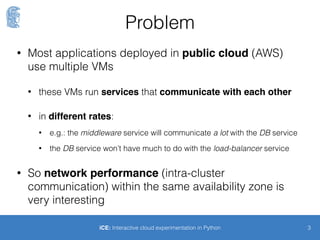
The original problem (1/2)
• Most applications deployed in public cloud (AWS)
use multiple VMs
• these VMs run services
• that communicate with each other
• in different rates
3iCE: Interactive cloud experimentation in Python
The original problem (2/2)
4iCE: Interactive cloud experimentation in Python
• So network performance (intra-cluster
communication) within the same availability zone is
very interesting and important
Web
Web
DB
Load balancer
DB
Web
Don’t really care
High bandwidthLow latency
Questions
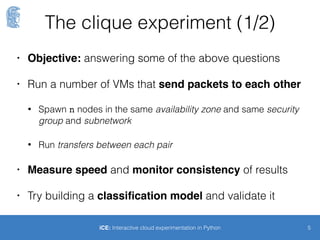
• How do we measure intra-cluster network
performance?
• How consistent it is through time?
• Can we make predictions on the network
performance? - classification
• But remember requirements change all the time
5iCE: Interactive cloud experimentation in Python
The clique experiment (1/2)
6iCE: Interactive cloud experimentation in Python
• Run a number of VMs that send packets to each other
• Spawn n nodes in the same availability zone and same security
group and subnetwork
• Run transfers between each pair
• Measure speed and monitor consistency of the
results
• Is classification of VM-pairs into classes of “network
distance” possible?
The clique experiment (2/2)
7
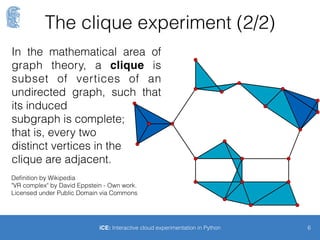
In the mathematical area of
graph theory, a clique is
subset of vertices of an
undirected graph, such that
its induced 

subgraph is complete; 

that is, every two 

distinct vertices in the 

clique are adjacent.
Definition by Wikipedia
"VR complex" by David Eppstein - Own work. 

Licensed under Public Domain via Commons
iCE: Interactive cloud experimentation in Python
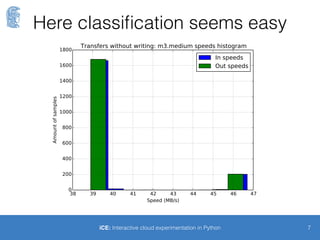
Here classification seems easy
8iCE: Interactive cloud experimentation in Python
Slow
class
Fast
class
Back to the example
9iCE: Interactive cloud experimentation in Python
D
C
B
F
A
E
Fast class
Slow class
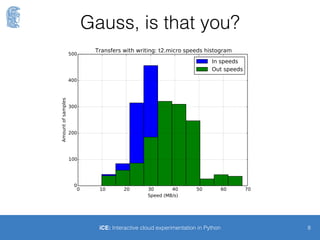
Gauss, is that you?
10iCE: Interactive cloud experimentation in Python
Gauss, is that you?
11iCE: Interactive cloud experimentation in Python
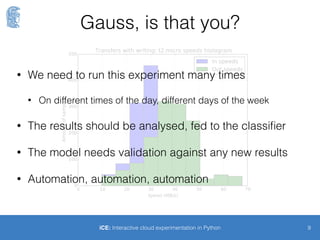
• I need to run this experiment many times
• On different times of the day, different days of the week
• The results should be analysed and plotted
• If there is a classifier it needs to be fed with results
• The resulting model needs validation against any new results
• Automation, automation, automation
There will be iCE
12
because you shouldn’t run
experiments by hand
http://github.com/glestaris/iCE
iCE
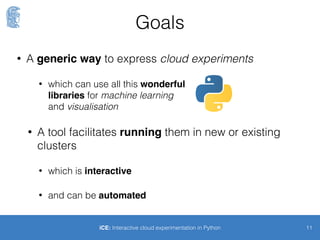
• A tool that enables interactive experimentation.
• Experiment: a Python script file with:
• tasks: run remotely in each VM of the experiment
• runners: orchestrates tasks
• Interactive Shell
• AWS integration
13iCE: Interactive cloud experimentation in Python
Components
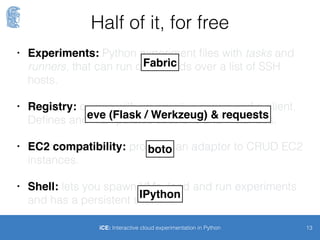
• Registry: VMs (instances) that participate in an
experiment are registered under experimentation
sessions
• Shell: facilitates spawning EC2 VMs and running
experiments
• AWS integration: create and delete EC2 VMs that will
register themselves to iCE
• Experiments: loads and runs experiments in remote
instances
14iCE: Interactive cloud experimentation in Python
• Registry: VMs (instances) that participate in an
experiment are registered under experimentation
sessions
• Shell: facilitates spawning EC2 VMs and running
experiments
• AWS integration: create and delete EC2 VMs that will
register themselves to iCE
• Experiments: loads and runs experiments in remote
instances
15iCE: Interactive cloud experimentation in Python
Half of it, for free
eve (Flask / Werkzeug) & requests
Fabric
boto
IPython
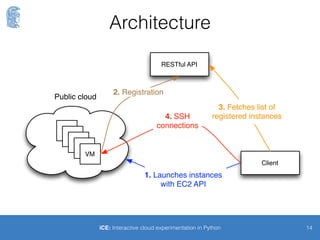
Sequence
16
RESTful API
VM
VM
VM
VM
VM
2. Registration
Public cloud
Client
1. Launches instances
with EC2 API
4. SSH
connections
3. Fetches list of
registered instances
iCE: Interactive cloud experimentation in Python
Static Demo
17
because your speaker
is a coward
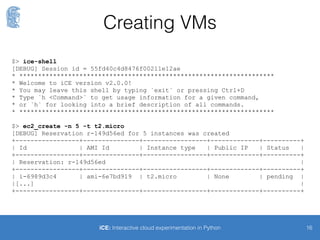
Creating VMs
18iCE: Interactive cloud experimentation in Python
$> ice-shell
[DEBUG] Session id = 55fd40c4d8476f00211e12ae
* ********************************************************************
* Welcome to iCE version v2.0.0!
* You may leave this shell by typing `exit` or pressing Ctrl+D
* Type `h <Command>` to get usage information for a given command,
* or `h` for looking into a brief description of all commands.
* ********************************************************************
$> ec2_create -n 5 -t t2.micro
[DEBUG] Reservation r-149d56ed for 5 instances was created
+-----------------+---------------+-----------------+-------------+----------+
| Id | AMI Id | Instance type | Public IP | Status |
+-----------------+---------------+-----------------+-------------+----------+
| Reservation: r-149d56ed |
+-----------------+---------------+-----------------+-------------+----------+
| i-6989d3c4 | ami-6e7bd919 | t2.micro | None | pending |
|[...] |
+-----------------+---------------+-----------------+-------------+----------+
Experimentation
session
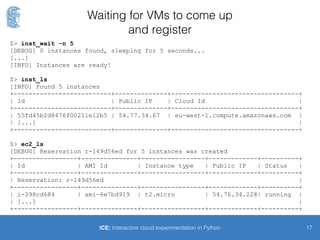
Waiting for VMs to come up
and register
19iCE: Interactive cloud experimentation in Python
$> inst_wait -n 5
[DEBUG] 0 instances found, sleeping for 5 seconds...
[...]
[INFO] Instances are ready!
$> inst_ls
[INFO] Found 5 instances
+--------------------------+--------------+----------------------------------+
| Id | Public IP | Cloud Id |
+--------------------------+--------------+----------------------------------+
| 55fd45b2d8476f00211e12b5 | 54.77.34.67 | eu-west-1.compute.amazonaws.com |
| [...] |
+--------------------------+--------------+----------------------------------+
$> ec2_ls
[DEBUG] Reservation r-149d56ed for 5 instances was created
+-----------------+---------------+-----------------+-------------+----------+
| Id | AMI Id | Instance type | Public IP | Status |
+-----------------+---------------+-----------------+-------------+----------+
| Reservation: r-149d56ed |
+-----------------+---------------+-----------------+-------------+----------+
| i-298cd684 | ami-6e7bd919 | t2.micro | 54.76.34.228| running |
| [...] |
+-----------------+---------------+-----------------+-------------+----------+
A simple experiment (1/2)
20iCE: Interactive cloud experimentation in Python
import ice # iCE package
from fabric import api as fab # Fabric API
@ice.Runner
def run(hosts):
"""A sample iCE runner. It gets the hostnames of all instances and
prints them out.
:param dict hosts: Dictionary of ice.entities.Instances objects.
"""
# Get hostnames of all instances, through fab.execute
# First argument: Python function
# Second argument: List of hosts
# It returns a dictionary with the task result as value.
hostnames = fab.execute(get_hostname, hosts)
# Prints
for key in hostnames:
print hostnames[key]
21
@ice.Task
def get_hostname(hosts):
"""A simple iCE task. It returns the FQDN hostname of the remote
instance.
:param dict hosts: Dictionary of ice.entities.Instances objects.
:rtype: str
:return: The FQDN hostname.
"""
# Get the FQDN hostname from each node
hostname = fab.run('hostname -f')
return hostname
A simple experiment (2/2)
iCE: Interactive cloud experimentation in Python
Loading and running an experiment
22iCE: Interactive cloud experimentation in Python
$> exp_load ./experiments/simple.py
[DEBUG] About to load module 'simple' from path '/Users/george/di_dev/Thesis/iCE/
experiments'
[INFO] Module `./experiments/simple.py` is successfully loaded!
$> exp_ls simple
> Module `simple`:
Runners:
* run: A sample iCE runner. It gets the hostnames of all instances and
prints them out. [...]
Tasks:
* get_hostname: A simple iCE task. It returns the FQDN hostname of the remote
instance. […]
$> exp_run simple
[ec2-user@ec2-54-77-17-214.eu-west-1.compute.amazonaws.com] run: hostname -f
[ec2-user@ec2-54-77-17-214.eu-west-1.compute.amazonaws.com] out: ip-172-31-6-35.eu-
west-1.compute.internal
[...]
ip-172-31-6-35.eu-west-1.compute.internal
ip-172-31-6-36.eu-west-1.compute.internal
[...]
Instead of a conclusion
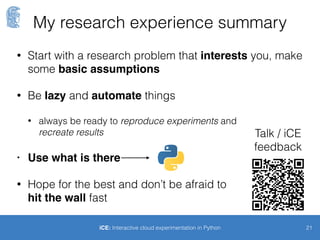
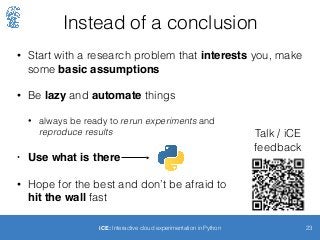
• Start with a research problem that interests you, make
some basic assumptions
• Be lazy and automate things
• always be ready to rerun experiments and

reproduce results
• Use what is there
• Hope for the best and don’t be afraid to 

hit the wall fast
23iCE: Interactive cloud experimentation in Python
Talk / iCE
feedback

PyCon UK - iCE: Interactive cloud experimentation

  • 1.
    NATIONAL AND KAPODISTRIANUNIVESITY OF ATHENS DEPARTMENT OF INFORMATICS AND TELECOMMUNICATIONS iCE Interactive cloud experimentation in Python George Lestaris @glestaris PyCon UK
 20 September 2015 Coventry Slides URL http://bit.ly/iCE-PyConUK
  • 2.
    /me • University ofAthens, Greece • iCE is part of my Bachelor thesis • Software engineer in Pivotal, London • Cloud Foundry Container technology • ex-CERNois 2iCE: Interactive cloud experimentation in Python
  • 3.
    The original problem(1/2) • Most applications deployed in public cloud (AWS) use multiple VMs • these VMs run services • that communicate with each other • in different rates 3iCE: Interactive cloud experimentation in Python
  • 4.
    The original problem(2/2) 4iCE: Interactive cloud experimentation in Python • So network performance (intra-cluster communication) within the same availability zone is very interesting and important Web Web DB Load balancer DB Web Don’t really care High bandwidthLow latency
  • 5.
    Questions • How dowe measure intra-cluster network performance? • How consistent it is through time? • Can we make predictions on the network performance? - classification • But remember requirements change all the time 5iCE: Interactive cloud experimentation in Python
  • 6.
    The clique experiment(1/2) 6iCE: Interactive cloud experimentation in Python • Run a number of VMs that send packets to each other • Spawn n nodes in the same availability zone and same security group and subnetwork • Run transfers between each pair • Measure speed and monitor consistency of the results • Is classification of VM-pairs into classes of “network distance” possible?
  • 7.
    The clique experiment(2/2) 7 In the mathematical area of graph theory, a clique is subset of vertices of an undirected graph, such that its induced 
 subgraph is complete; 
 that is, every two 
 distinct vertices in the 
 clique are adjacent. Definition by Wikipedia "VR complex" by David Eppstein - Own work. 
 Licensed under Public Domain via Commons iCE: Interactive cloud experimentation in Python
  • 8.
    Here classification seemseasy 8iCE: Interactive cloud experimentation in Python Slow class Fast class
  • 9.
    Back to theexample 9iCE: Interactive cloud experimentation in Python D C B F A E Fast class Slow class
  • 10.
    Gauss, is thatyou? 10iCE: Interactive cloud experimentation in Python
  • 11.
    Gauss, is thatyou? 11iCE: Interactive cloud experimentation in Python • I need to run this experiment many times • On different times of the day, different days of the week • The results should be analysed and plotted • If there is a classifier it needs to be fed with results • The resulting model needs validation against any new results • Automation, automation, automation
  • 12.
    There will beiCE 12 because you shouldn’t run experiments by hand http://github.com/glestaris/iCE
  • 13.
    iCE • A toolthat enables interactive experimentation. • Experiment: a Python script file with: • tasks: run remotely in each VM of the experiment • runners: orchestrates tasks • Interactive Shell • AWS integration 13iCE: Interactive cloud experimentation in Python
  • 14.
    Components • Registry: VMs(instances) that participate in an experiment are registered under experimentation sessions • Shell: facilitates spawning EC2 VMs and running experiments • AWS integration: create and delete EC2 VMs that will register themselves to iCE • Experiments: loads and runs experiments in remote instances 14iCE: Interactive cloud experimentation in Python
  • 15.
    • Registry: VMs(instances) that participate in an experiment are registered under experimentation sessions • Shell: facilitates spawning EC2 VMs and running experiments • AWS integration: create and delete EC2 VMs that will register themselves to iCE • Experiments: loads and runs experiments in remote instances 15iCE: Interactive cloud experimentation in Python Half of it, for free eve (Flask / Werkzeug) & requests Fabric boto IPython
  • 16.
    Sequence 16 RESTful API VM VM VM VM VM 2. Registration Publiccloud Client 1. Launches instances with EC2 API 4. SSH connections 3. Fetches list of registered instances iCE: Interactive cloud experimentation in Python
  • 17.
    Static Demo 17 because yourspeaker is a coward
  • 18.
    Creating VMs 18iCE: Interactivecloud experimentation in Python $> ice-shell [DEBUG] Session id = 55fd40c4d8476f00211e12ae * ******************************************************************** * Welcome to iCE version v2.0.0! * You may leave this shell by typing `exit` or pressing Ctrl+D * Type `h <Command>` to get usage information for a given command, * or `h` for looking into a brief description of all commands. * ******************************************************************** $> ec2_create -n 5 -t t2.micro [DEBUG] Reservation r-149d56ed for 5 instances was created +-----------------+---------------+-----------------+-------------+----------+ | Id | AMI Id | Instance type | Public IP | Status | +-----------------+---------------+-----------------+-------------+----------+ | Reservation: r-149d56ed | +-----------------+---------------+-----------------+-------------+----------+ | i-6989d3c4 | ami-6e7bd919 | t2.micro | None | pending | |[...] | +-----------------+---------------+-----------------+-------------+----------+ Experimentation session
  • 19.
    Waiting for VMsto come up and register 19iCE: Interactive cloud experimentation in Python $> inst_wait -n 5 [DEBUG] 0 instances found, sleeping for 5 seconds... [...] [INFO] Instances are ready! $> inst_ls [INFO] Found 5 instances +--------------------------+--------------+----------------------------------+ | Id | Public IP | Cloud Id | +--------------------------+--------------+----------------------------------+ | 55fd45b2d8476f00211e12b5 | 54.77.34.67 | eu-west-1.compute.amazonaws.com | | [...] | +--------------------------+--------------+----------------------------------+ $> ec2_ls [DEBUG] Reservation r-149d56ed for 5 instances was created +-----------------+---------------+-----------------+-------------+----------+ | Id | AMI Id | Instance type | Public IP | Status | +-----------------+---------------+-----------------+-------------+----------+ | Reservation: r-149d56ed | +-----------------+---------------+-----------------+-------------+----------+ | i-298cd684 | ami-6e7bd919 | t2.micro | 54.76.34.228| running | | [...] | +-----------------+---------------+-----------------+-------------+----------+
  • 20.
    A simple experiment(1/2) 20iCE: Interactive cloud experimentation in Python import ice # iCE package from fabric import api as fab # Fabric API @ice.Runner def run(hosts): """A sample iCE runner. It gets the hostnames of all instances and prints them out. :param dict hosts: Dictionary of ice.entities.Instances objects. """ # Get hostnames of all instances, through fab.execute # First argument: Python function # Second argument: List of hosts # It returns a dictionary with the task result as value. hostnames = fab.execute(get_hostname, hosts) # Prints for key in hostnames: print hostnames[key]
  • 21.
    21 @ice.Task def get_hostname(hosts): """A simpleiCE task. It returns the FQDN hostname of the remote instance. :param dict hosts: Dictionary of ice.entities.Instances objects. :rtype: str :return: The FQDN hostname. """ # Get the FQDN hostname from each node hostname = fab.run('hostname -f') return hostname A simple experiment (2/2) iCE: Interactive cloud experimentation in Python
  • 22.
    Loading and runningan experiment 22iCE: Interactive cloud experimentation in Python $> exp_load ./experiments/simple.py [DEBUG] About to load module 'simple' from path '/Users/george/di_dev/Thesis/iCE/ experiments' [INFO] Module `./experiments/simple.py` is successfully loaded! $> exp_ls simple > Module `simple`: Runners: * run: A sample iCE runner. It gets the hostnames of all instances and prints them out. [...] Tasks: * get_hostname: A simple iCE task. It returns the FQDN hostname of the remote instance. […] $> exp_run simple [ec2-user@ec2-54-77-17-214.eu-west-1.compute.amazonaws.com] run: hostname -f [ec2-user@ec2-54-77-17-214.eu-west-1.compute.amazonaws.com] out: ip-172-31-6-35.eu- west-1.compute.internal [...] ip-172-31-6-35.eu-west-1.compute.internal ip-172-31-6-36.eu-west-1.compute.internal [...]
  • 23.
    Instead of aconclusion • Start with a research problem that interests you, make some basic assumptions • Be lazy and automate things • always be ready to rerun experiments and
 reproduce results • Use what is there • Hope for the best and don’t be afraid to 
 hit the wall fast 23iCE: Interactive cloud experimentation in Python Talk / iCE feedback