High Performance
Web Applications
with Python and TurboGears
Alessandro Molina - @__amol__ - amol@turbogears.org
About me
● Python Developer since 2001
● Work @ on Python and iOS
● development team member since 2.1
What's this talk about?
● Some general rules which apply to any framework
● Some quick-wins for TurboGears
● Some real cases reported
● My personal experiences and preferences, feel free
to disagree!
Raw Speed
● People seem obsessed with webservers
● The truth is that it doesn't matter so much
○ You are not going to serve "Hello World"s
(If you are asking my personal stack is
nginx+mod_wsgi or nginx+Circus-Chaussette-gevent)
● Avoid the great idea of serving mostly empty pages
performing hundreds of ajax requests
○ Browser have limited concurrency
○ HTTP has overhead
○ You will actually slow down things
● Learn your framework for real
About TurboGears
● Framework for rapid development encouraging
flexibility
● Created in 2005, 2.0 was a major rewrite in 2009 to
embrace the WSGI standard.
● Object Dispatch based. Regular expressions can get
messy, write them only when you must.
● By default an XML template engine with error detection
● Declarative Models with transactional unit of work
● Built in Validation, Authentication, Authorization,
Caching, Sessions, Migrations, MongoDB Support and
many more.
Looking at the code
class RootController(BaseController):
@expose('myproj.templates.movie')
@expose('json')
@validate({'movie':SQLAEntityConverter(model.Movie)}
def movie(self, movie, **kw):
return dict(movie=movie, user=request.identity and request.identity['user'])
Serving /movie/3 as a webpage and /movie/3.json as a
json encoded response
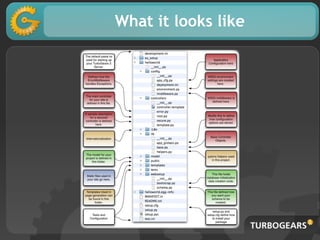
What it looks like
Features vs Speed
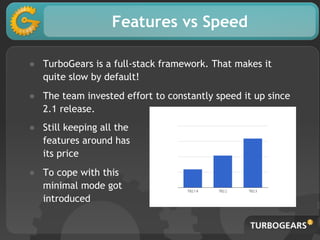
● TurboGears is a full-stack framework. That makes it
quite slow by default!
● The team invested effort to constantly speed it up since
2.1 release.
● Still keeping all the
features around has
its price
● To cope with this
minimal mode got
introduced
Use only what you need
● Only use what you really need. Disabling some features
can make a big difference:
○ full featured -> ~900 req/sec
○ browser language detection -> ~1000 req/sec
○ widgets support -> ~1200 req/sec
○ sessions -> ~1300 req/sec
○ transaction manager -> ~1400 req/sec
○ minimal mode -> ~2100 req/sec
Measures are on wsgiref, purpose is only to show delta
Avoid serving statics
Cascading files serving is a common pattern:
static_app = StaticURLParser('statics')
app = Cascade([static_app, app])
What it is really happening is a lot:
○ path gets parsed to avoid ../../../etc/passwd
○ path gets checked on file system
○ a 404 response is generated
○ The 404 response is caught by the Cascade
middleware that forwards the requests to your app
Using Caching
● Caching means preorganizing your data the way you are
going to use it, if you already did that during design
phase you are already half done. Let the template drive
your data, not the opposite.
● Frameworks usually provide various type of caching.
TurboGears specifically provides:
○ @cached_property
○ tg.cache object for custom caching
○ @beaker_cache for controllers caching
○ Template Caching
○ Entity Caching
Use HTML5 & JS
● If only small portions of your page change, cache the
page and use JS to perform minor changes.
○ Invalidating your whole cache to say: "Welcome back
Mister X" is not a great idea.
● If you are using Varnish, nginx or any other frontend
cache consider using JS+localstorage instead of cookies
for trivial customizations. Cookies will skip frontend
caching
Template Caching
● Template caching means prerendering your
template based on controller computation results.
● It's common for template to access related entities,
those will be cached for you.
● If correctly organized it's the caching behavior with
best trade-off
○ Simple to implement
○ Guarantees correctly updates results
● An updated_at field on models is often all you need
WikiPage Caching
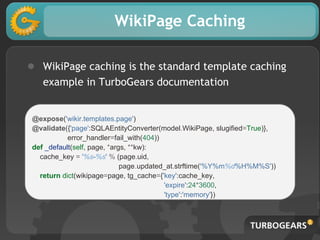
● WikiPage caching is the standard template caching
example in TurboGears documentation
@expose('wikir.templates.page')
@validate({'page':SQLAEntityConverter(model.WikiPage, slugified=True)},
error_handler=fail_with(404))
def _default(self, page, *args, **kw):
cache_key = '%s-%s' % (page.uid,
page.updated_at.strftime('%Y%m%d%H%M%S'))
return dict(wikipage=page, tg_cache={'key':cache_key,
'expire':24*3600,
'type':'memory'})
Caching Partials
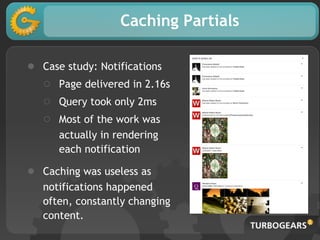
● Case study: Notifications
○ Page delivered in 2.16s
○ Query took only 2ms
○ Most of the work was
actually in rendering
each notification
● Caching was useless as
notifications happened
often, constantly changing
content.
Entity Caching
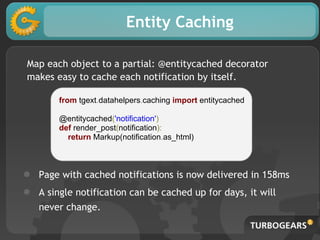
Map each object to a partial: @entitycached decorator
makes easy to cache each notification by itself.
from tgext.datahelpers.caching import entitycached
@entitycached('notification')
def render_post(notification):
return Markup(notification.as_html)
● Page with cached notifications is now delivered in 158ms
● A single notification can be cached up for days, it will
never change.
Caching can be harmful
If you content changes
too often, caching on
first reuqest can
actually be harmful.
If you have multiple
processes and a lot of
requests you can end
up having a race
condition on cache
update.
Cache Stampede
● During football matches there were thousands of users
constantly pressing "refresh" button to reload page.
● Content constantly changed due to match being reported
on real time.
● After each update, all the running processes decided that
the cache was not valid anymore at the same time,
starting to regenerate the cache.
● Sometimes the content changed even while processes were
still updating cache for previous update.
Proactive Update
● To solve cache stampede the cache generation has been
bound to an hook on the article update so it happened only
once.
● Easy to achieve using Template caching in together with
tg.template_render on article id as cache key
● SQLALchemy @event.listens_for supports even notifications
on relationships, so it's reasy to update page cache even
when related comments, tags, and so on change.
A real solution
● The source of the issue were users pressing "reload" button
like there's no tomorrow.
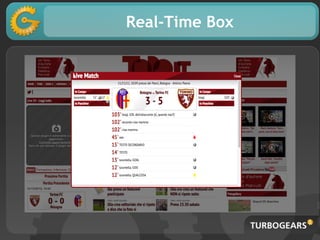
● Solutions has been to push updates to the users through a
box that updates in real-time.
○ No more insane reloads
○ Users were actually more satisfied
○ Was a lot easier to maintain
○ Not only solved match article issues but also reduced
the load on other parts of the website
Real-Time Box
Think Different
● If you are struggling too much at improving performances,
you are probabling doing something your application is not
meant to do.
● Lesson learnt?
○ Soccer fans are eager for updates (no... for real!)
○ There is only one thing that gets more visits than a
football match: Rumors on football players trading
Offload Work
● The only person that know that something changes is the
author of the change itself.
○ Only update the core cache to provide author with an
immediate feedback
○ Don't be afraid of updating related caches
asynchronously. Author usually understands that it
might take some time before his changes propagate
and other users don't know that a change happened
yet.
● You can often provide an answer to user with little instant
computation, messages and notifications are a typical
example.
Maste-Slave replication is easy
● SQLAlchemy unit of work pattern makes easy for
frameworks to do the right thing 90% of the time
○ Read from slaves unless we are flushing the session
● Won't require changes to your code for most common cases
● Exceptions are as easy as @with_engine('master')
● As easy as
sqlalchemy.master.url = mysql://masterhost/dbname
sqlalchemy.slaves.slave1.url = mysql://slavehost/dbname
sqlalchemy.slaves.slave2.url = mysql://slavehost/dbname
Fast enough
● Speed should not be your primary focus, but it makes
sense to care a lot about it, users tend to get frustrated
by slow responses.
● New Relic App Speed Index reports an average of 5.0
seconds of response time for accepted experience.
● That is End-User time, not request time, to achieve 5
seconds you have to aim a lot lower
● Mean Opinion Score degrades quickly when surpassing
200ms. Less than 200ms is perceived as "right now".
http://newrelic.com/ASI
Development Tools
● It's easy to introduce changes with heavy impacts on
performances without noticing. Development tools can
help keeping under control impact of changes
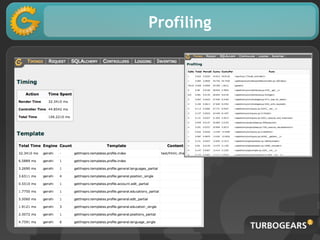
● The DebugBar provides core utilities to track your
application speed while developing:
○ Controller Profiling
○ Template & Partials Timing
○ Query Reporting
○ Query Logging for AJAX/JSON requests
Profiling
Keep an eye on your queries
Check even after release
● Users use your application more widely than you
might have expected
● Fast now, doesn't mean fast forever. Like test units
avoid breaking things, rely on a speed feedback to
keep acceptable speed.
● Keep your Apdex T index updated, user
expectations evolve!
There is no silver bullet
● Sorry, there is no silver bullet.
● Every application is a separate case, general and
framework optimizations can usually provide little
benefit when compared to domain specific
optimizations
● Understanding how users interact with your application
is the golden rule of optimization
● Don't understimate how its easy to do something really
slow unconsciously: development tools can help
catching those.

PyGrunn2013 High Performance Web Applications with TurboGears

  • 1.
    High Performance Web Applications withPython and TurboGears Alessandro Molina - @__amol__ - amol@turbogears.org
  • 2.
    About me ● PythonDeveloper since 2001 ● Work @ on Python and iOS ● development team member since 2.1
  • 3.
    What's this talkabout? ● Some general rules which apply to any framework ● Some quick-wins for TurboGears ● Some real cases reported ● My personal experiences and preferences, feel free to disagree!
  • 4.
    Raw Speed ● Peopleseem obsessed with webservers ● The truth is that it doesn't matter so much ○ You are not going to serve "Hello World"s (If you are asking my personal stack is nginx+mod_wsgi or nginx+Circus-Chaussette-gevent) ● Avoid the great idea of serving mostly empty pages performing hundreds of ajax requests ○ Browser have limited concurrency ○ HTTP has overhead ○ You will actually slow down things ● Learn your framework for real
  • 5.
    About TurboGears ● Frameworkfor rapid development encouraging flexibility ● Created in 2005, 2.0 was a major rewrite in 2009 to embrace the WSGI standard. ● Object Dispatch based. Regular expressions can get messy, write them only when you must. ● By default an XML template engine with error detection ● Declarative Models with transactional unit of work ● Built in Validation, Authentication, Authorization, Caching, Sessions, Migrations, MongoDB Support and many more.
  • 6.
    Looking at thecode class RootController(BaseController): @expose('myproj.templates.movie') @expose('json') @validate({'movie':SQLAEntityConverter(model.Movie)} def movie(self, movie, **kw): return dict(movie=movie, user=request.identity and request.identity['user']) Serving /movie/3 as a webpage and /movie/3.json as a json encoded response
  • 7.
  • 8.
    Features vs Speed ●TurboGears is a full-stack framework. That makes it quite slow by default! ● The team invested effort to constantly speed it up since 2.1 release. ● Still keeping all the features around has its price ● To cope with this minimal mode got introduced
  • 9.
    Use only whatyou need ● Only use what you really need. Disabling some features can make a big difference: ○ full featured -> ~900 req/sec ○ browser language detection -> ~1000 req/sec ○ widgets support -> ~1200 req/sec ○ sessions -> ~1300 req/sec ○ transaction manager -> ~1400 req/sec ○ minimal mode -> ~2100 req/sec Measures are on wsgiref, purpose is only to show delta
  • 10.
    Avoid serving statics Cascadingfiles serving is a common pattern: static_app = StaticURLParser('statics') app = Cascade([static_app, app]) What it is really happening is a lot: ○ path gets parsed to avoid ../../../etc/passwd ○ path gets checked on file system ○ a 404 response is generated ○ The 404 response is caught by the Cascade middleware that forwards the requests to your app
  • 11.
    Using Caching ● Cachingmeans preorganizing your data the way you are going to use it, if you already did that during design phase you are already half done. Let the template drive your data, not the opposite. ● Frameworks usually provide various type of caching. TurboGears specifically provides: ○ @cached_property ○ tg.cache object for custom caching ○ @beaker_cache for controllers caching ○ Template Caching ○ Entity Caching
  • 12.
    Use HTML5 &JS ● If only small portions of your page change, cache the page and use JS to perform minor changes. ○ Invalidating your whole cache to say: "Welcome back Mister X" is not a great idea. ● If you are using Varnish, nginx or any other frontend cache consider using JS+localstorage instead of cookies for trivial customizations. Cookies will skip frontend caching
  • 13.
    Template Caching ● Templatecaching means prerendering your template based on controller computation results. ● It's common for template to access related entities, those will be cached for you. ● If correctly organized it's the caching behavior with best trade-off ○ Simple to implement ○ Guarantees correctly updates results ● An updated_at field on models is often all you need
  • 14.
    WikiPage Caching ● WikiPagecaching is the standard template caching example in TurboGears documentation @expose('wikir.templates.page') @validate({'page':SQLAEntityConverter(model.WikiPage, slugified=True)}, error_handler=fail_with(404)) def _default(self, page, *args, **kw): cache_key = '%s-%s' % (page.uid, page.updated_at.strftime('%Y%m%d%H%M%S')) return dict(wikipage=page, tg_cache={'key':cache_key, 'expire':24*3600, 'type':'memory'})
  • 15.
    Caching Partials ● Casestudy: Notifications ○ Page delivered in 2.16s ○ Query took only 2ms ○ Most of the work was actually in rendering each notification ● Caching was useless as notifications happened often, constantly changing content.
  • 16.
    Entity Caching Map eachobject to a partial: @entitycached decorator makes easy to cache each notification by itself. from tgext.datahelpers.caching import entitycached @entitycached('notification') def render_post(notification): return Markup(notification.as_html) ● Page with cached notifications is now delivered in 158ms ● A single notification can be cached up for days, it will never change.
  • 17.
    Caching can beharmful If you content changes too often, caching on first reuqest can actually be harmful. If you have multiple processes and a lot of requests you can end up having a race condition on cache update.
  • 18.
    Cache Stampede ● Duringfootball matches there were thousands of users constantly pressing "refresh" button to reload page. ● Content constantly changed due to match being reported on real time. ● After each update, all the running processes decided that the cache was not valid anymore at the same time, starting to regenerate the cache. ● Sometimes the content changed even while processes were still updating cache for previous update.
  • 19.
    Proactive Update ● Tosolve cache stampede the cache generation has been bound to an hook on the article update so it happened only once. ● Easy to achieve using Template caching in together with tg.template_render on article id as cache key ● SQLALchemy @event.listens_for supports even notifications on relationships, so it's reasy to update page cache even when related comments, tags, and so on change.
  • 20.
    A real solution ●The source of the issue were users pressing "reload" button like there's no tomorrow. ● Solutions has been to push updates to the users through a box that updates in real-time. ○ No more insane reloads ○ Users were actually more satisfied ○ Was a lot easier to maintain ○ Not only solved match article issues but also reduced the load on other parts of the website
  • 21.
  • 22.
    Think Different ● Ifyou are struggling too much at improving performances, you are probabling doing something your application is not meant to do. ● Lesson learnt? ○ Soccer fans are eager for updates (no... for real!) ○ There is only one thing that gets more visits than a football match: Rumors on football players trading
  • 23.
    Offload Work ● Theonly person that know that something changes is the author of the change itself. ○ Only update the core cache to provide author with an immediate feedback ○ Don't be afraid of updating related caches asynchronously. Author usually understands that it might take some time before his changes propagate and other users don't know that a change happened yet. ● You can often provide an answer to user with little instant computation, messages and notifications are a typical example.
  • 24.
    Maste-Slave replication iseasy ● SQLAlchemy unit of work pattern makes easy for frameworks to do the right thing 90% of the time ○ Read from slaves unless we are flushing the session ● Won't require changes to your code for most common cases ● Exceptions are as easy as @with_engine('master') ● As easy as sqlalchemy.master.url = mysql://masterhost/dbname sqlalchemy.slaves.slave1.url = mysql://slavehost/dbname sqlalchemy.slaves.slave2.url = mysql://slavehost/dbname
  • 25.
    Fast enough ● Speedshould not be your primary focus, but it makes sense to care a lot about it, users tend to get frustrated by slow responses. ● New Relic App Speed Index reports an average of 5.0 seconds of response time for accepted experience. ● That is End-User time, not request time, to achieve 5 seconds you have to aim a lot lower ● Mean Opinion Score degrades quickly when surpassing 200ms. Less than 200ms is perceived as "right now". http://newrelic.com/ASI
  • 26.
    Development Tools ● It'seasy to introduce changes with heavy impacts on performances without noticing. Development tools can help keeping under control impact of changes ● The DebugBar provides core utilities to track your application speed while developing: ○ Controller Profiling ○ Template & Partials Timing ○ Query Reporting ○ Query Logging for AJAX/JSON requests
  • 27.
  • 28.
    Keep an eyeon your queries
  • 29.
    Check even afterrelease ● Users use your application more widely than you might have expected ● Fast now, doesn't mean fast forever. Like test units avoid breaking things, rely on a speed feedback to keep acceptable speed. ● Keep your Apdex T index updated, user expectations evolve!
  • 30.
    There is nosilver bullet ● Sorry, there is no silver bullet. ● Every application is a separate case, general and framework optimizations can usually provide little benefit when compared to domain specific optimizations ● Understanding how users interact with your application is the golden rule of optimization ● Don't understimate how its easy to do something really slow unconsciously: development tools can help catching those.