





FAST, DOCUMENTED AND RELIABLE
JSON WEBSERVICES WITH PYTHON
Alessandro Molina
@__amol__
amol@turbogears.org
Who am I
● CTO @ Axant.it mostly Python company
(with some iOS and Android)
● TurboGears2 development team member
● MongoDB fan and Ming ODM contributor
● Skeptic developer always looking for a
better solution
What's going to come
● Rapid prototyping of web services
● Tools to quickly document json services
● Using Ming and Mongo In Memory for
mongodb based fully tested webservices
● Bunch of tools to deploy TurboGears
based services
Why TurboGears
● Can start small, easy scale to a full
featured environment when required
● RestController makes easy to write REST
● ObjectDispatch makes a lot of sense for
non-rest services
● TurboGears validation copes great with API
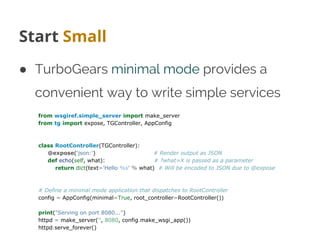
Start Small
● TurboGears minimal mode provides a
convenient way to write simple services
from wsgiref.simple_server import make_server
from tg import expose, TGController, AppConfig
class RootController(TGController):
@expose('json:') # Render output as JSON
def echo(self, what): # ?what=X is passed as a parameter
return dict(text='Hello %s' % what) # Will be encoded to JSON due to @expose
# Define a minimal mode application that dispatches to RootController
config = AppConfig(minimal=True, root_controller=RootController())
print("Serving on port 8080...")
httpd = make_server('', 8080, config.make_wsgi_app())
httpd.serve_forever()
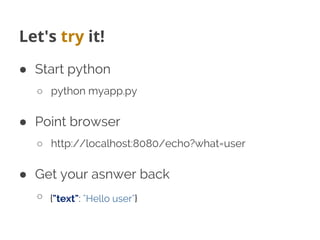
Let's try it!
● Start python
○ python myapp.py
● Point browser
○ http://localhost:8080/echo?what=user
● Get your asnwer back
○ {"text": "Hello user"}
As easy as it can be
Where to store? Try MongoDB
● Many APIs can be mapped to a single
findAndModify call when proper
Document design is in place
● Subdocuments make a lot of sense
● PyMongo works great with gevent
● GridFS for uploaded files
It scales! Really easy to shard
MongoDB on TurboGears
● Available out of the box
○ $ gearbox quickstart --ming myproj
○ http://turbogears.readthedocs.org/en/tg2.3.0
b2/turbogears/mongodb.html
● Ming design similar to SQLAlchemy
○ http://merciless.sourceforge.net/orm.html
○ Unit of Work or go barenone bypassing ODM
● Production on big sites like sourceforge
Testing MongoDB
● Ming provides MongoInMemory
○ much like sqlite://:memory:
● TurboGears quickstart provides a test suite
that uses MIM for every new project with
fixtures to setup models and controllers
● Implements 90% of mongodb, including
javascript execution with spidermonkey
Debugging MongoDB
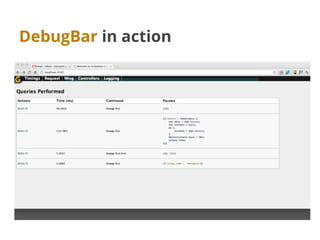
● TurboGears debugbar has builtin support
for MongoDB
○ Executed queries logging and results
○ Queries timing
○ Syntax prettifier and highlight for Map-Reduce and
$where javascript code
○ Queries tracking on logs for performance
reporting of webservices
DebugBar in action
Try tgext.crud
● Sadly most people use it only to prototype
html crud controllers
● Works great to generate REST apis too
● Builtin validation and error reporting
● Can be customized like any RestController
○ Just name your methods like the verbs and
implement them
No, for real!
● Supports both SQLA and MongoDB
● Can perform substring filtering on get_all
● Provides a lot of configurable features
○ Input as urlencoded/multipart params or JSON
body
○ Supports conditional If-Unmodified-Since PUT
○ Can perform automatic relationships serialization
○ Pagination tuning
Great, now how do I use it?
● If you are like me, as soon as you switch
writing the client you totally forgot the api
methods signature.
● Even if you know, other people won't
● Be your team hero: Write documentation!
D11nman, sphinx superpowers
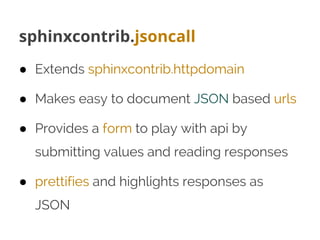
sphinxcontrib.jsoncall
● Extends sphinxcontrib.httpdomain
● Makes easy to document JSON based urls
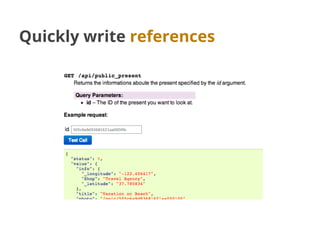
● Provides a form to play with api by
submitting values and reading responses
● prettifies and highlights responses as
JSON
Quickly write references
Using tgjsonautodoc
● Generates documentation for methods
with @expose('json')
● Uses docstring to document the API
● Autogenerates a playground form using
the method definition
● If @validate is used, documents validators
Docstrings everywhere!
@expose('json')
@validate({'player':OptionalPlayerValidator(),
'count':Int(not_empty=True)},
error_handler=fail_with(403))
def leaderboard(self, player, count):
"""
Provides global or relative ranks for the currently active tournament.
If a player is provided, instead of returning the first ``count`` best
players it will return ``count/2`` people before and after
the player. The player itself is also returned
:query player: The ``facebook id`` of the user.
:query count: The number of ranks to return (maximum 20, must be an even number)
.. jsoncall:: /api/leaderboard
{"player": "",
"count": 3}
{
"error": null,
"code": 0,
"result": {
"ranks": [
...
]
}
}
"""
Setup Sphinx
● sphinx-quickstart docs
○ BUILD_DIR = ../myapp/public/doc
● Enable sphinxcontrib.tgjsonautodoc to
automatically generate doc
○ extensions = ['sphinxcontrib.httpdomain',
'sphinxcontrib.jsoncall', 'sphinxcontrib.
tgjsonautodoc']
○ tgjsonautodoc_app = '../development.ini'
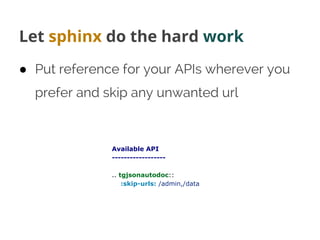
Let sphinx do the hard work
● Put reference for your APIs wherever you
prefer and skip any unwanted url
Available API
------------------
.. tgjsonautodoc::
:skip-urls: /admin,/data
You wrote doc!
Typical team member when he reads your doc!
Deploy
● You don't want to use gearbox serve
● Circus with Chausette is a super-easy and
flexible solution for deployments
○ http://turbogears.readthedocs.org/en/tg2.3.0
b2/cookbook/deploy/circus.html
● Gearbox can automate most of the
configuration steps for circus deployment
Going on Circus and Gevent
● Minimal circus.ini configuration
○ [circus]
include = configs/*.ini
● Enable application virtualenv
● pip install gearbox-tools
● Autogenerate configuration
○ gearbox deploy-circus -b gevent > ../myproj.ini
● circusd circus.ini
○ 2013-01-01 01:01:01 [26589] [INFO] myproj started
Circus Config
[env:myproj]
PATH=/home/amol/venv/tg23py26/bin:$PATH
VIRTUAL_ENV=/home/amol/venv/tg23py26
[watcher:myproj]
working_dir = /tmp/myproj
cmd = chaussette --backend gevent --fd $(circus.sockets.myproj) paste:production.ini
use_sockets = True
warmup_delay = 0
numprocesses = 1
stderr_stream.class = FileStream
stderr_stream.filename = myproj.log
stderr_stream.refresh_time = 0.3
stdout_stream.class = FileStream
stdout_stream.filename = myproj.log
stdout_stream.refresh_time = 0.3
[socket:myproj]
host = localhost
port = 8080
Orchestrating the whole stack
● Apart serving your own application with
chaussette, circus can also start your
dependencies like redis, celery and so on
when starting the app.
● Make sure to have a look at
documentation
○ http://circus.readthedocs.org/en/latest/
Questions?

EuroPython 2013 - FAST, DOCUMENTED AND RELIABLE JSON BASED WEBSERVICES WITH PYTHON

  • 1.
    FAST, DOCUMENTED ANDRELIABLE JSON WEBSERVICES WITH PYTHON Alessandro Molina @__amol__ amol@turbogears.org
  • 2.
    Who am I ●CTO @ Axant.it mostly Python company (with some iOS and Android) ● TurboGears2 development team member ● MongoDB fan and Ming ODM contributor ● Skeptic developer always looking for a better solution
  • 3.
    What's going tocome ● Rapid prototyping of web services ● Tools to quickly document json services ● Using Ming and Mongo In Memory for mongodb based fully tested webservices ● Bunch of tools to deploy TurboGears based services
  • 4.
    Why TurboGears ● Canstart small, easy scale to a full featured environment when required ● RestController makes easy to write REST ● ObjectDispatch makes a lot of sense for non-rest services ● TurboGears validation copes great with API
  • 5.
    Start Small ● TurboGearsminimal mode provides a convenient way to write simple services from wsgiref.simple_server import make_server from tg import expose, TGController, AppConfig class RootController(TGController): @expose('json:') # Render output as JSON def echo(self, what): # ?what=X is passed as a parameter return dict(text='Hello %s' % what) # Will be encoded to JSON due to @expose # Define a minimal mode application that dispatches to RootController config = AppConfig(minimal=True, root_controller=RootController()) print("Serving on port 8080...") httpd = make_server('', 8080, config.make_wsgi_app()) httpd.serve_forever()
  • 6.
    Let's try it! ●Start python ○ python myapp.py ● Point browser ○ http://localhost:8080/echo?what=user ● Get your asnwer back ○ {"text": "Hello user"}
  • 7.
    As easy asit can be
  • 8.
    Where to store?Try MongoDB ● Many APIs can be mapped to a single findAndModify call when proper Document design is in place ● Subdocuments make a lot of sense ● PyMongo works great with gevent ● GridFS for uploaded files
  • 9.
    It scales! Reallyeasy to shard
  • 10.
    MongoDB on TurboGears ●Available out of the box ○ $ gearbox quickstart --ming myproj ○ http://turbogears.readthedocs.org/en/tg2.3.0 b2/turbogears/mongodb.html ● Ming design similar to SQLAlchemy ○ http://merciless.sourceforge.net/orm.html ○ Unit of Work or go barenone bypassing ODM ● Production on big sites like sourceforge
  • 11.
    Testing MongoDB ● Mingprovides MongoInMemory ○ much like sqlite://:memory: ● TurboGears quickstart provides a test suite that uses MIM for every new project with fixtures to setup models and controllers ● Implements 90% of mongodb, including javascript execution with spidermonkey
  • 12.
    Debugging MongoDB ● TurboGearsdebugbar has builtin support for MongoDB ○ Executed queries logging and results ○ Queries timing ○ Syntax prettifier and highlight for Map-Reduce and $where javascript code ○ Queries tracking on logs for performance reporting of webservices
  • 13.
  • 14.
    Try tgext.crud ● Sadlymost people use it only to prototype html crud controllers ● Works great to generate REST apis too ● Builtin validation and error reporting ● Can be customized like any RestController ○ Just name your methods like the verbs and implement them
  • 15.
    No, for real! ●Supports both SQLA and MongoDB ● Can perform substring filtering on get_all ● Provides a lot of configurable features ○ Input as urlencoded/multipart params or JSON body ○ Supports conditional If-Unmodified-Since PUT ○ Can perform automatic relationships serialization ○ Pagination tuning
  • 16.
    Great, now howdo I use it? ● If you are like me, as soon as you switch writing the client you totally forgot the api methods signature. ● Even if you know, other people won't ● Be your team hero: Write documentation!
  • 17.
  • 18.
    sphinxcontrib.jsoncall ● Extends sphinxcontrib.httpdomain ●Makes easy to document JSON based urls ● Provides a form to play with api by submitting values and reading responses ● prettifies and highlights responses as JSON
  • 19.
  • 20.
    Using tgjsonautodoc ● Generatesdocumentation for methods with @expose('json') ● Uses docstring to document the API ● Autogenerates a playground form using the method definition ● If @validate is used, documents validators
  • 21.
    Docstrings everywhere! @expose('json') @validate({'player':OptionalPlayerValidator(), 'count':Int(not_empty=True)}, error_handler=fail_with(403)) def leaderboard(self,player, count): """ Provides global or relative ranks for the currently active tournament. If a player is provided, instead of returning the first ``count`` best players it will return ``count/2`` people before and after the player. The player itself is also returned :query player: The ``facebook id`` of the user. :query count: The number of ranks to return (maximum 20, must be an even number) .. jsoncall:: /api/leaderboard {"player": "", "count": 3} { "error": null, "code": 0, "result": { "ranks": [ ... ] } } """
  • 22.
    Setup Sphinx ● sphinx-quickstartdocs ○ BUILD_DIR = ../myapp/public/doc ● Enable sphinxcontrib.tgjsonautodoc to automatically generate doc ○ extensions = ['sphinxcontrib.httpdomain', 'sphinxcontrib.jsoncall', 'sphinxcontrib. tgjsonautodoc'] ○ tgjsonautodoc_app = '../development.ini'
  • 23.
    Let sphinx dothe hard work ● Put reference for your APIs wherever you prefer and skip any unwanted url Available API ------------------ .. tgjsonautodoc:: :skip-urls: /admin,/data
  • 24.
    You wrote doc! Typicalteam member when he reads your doc!
  • 25.
    Deploy ● You don'twant to use gearbox serve ● Circus with Chausette is a super-easy and flexible solution for deployments ○ http://turbogears.readthedocs.org/en/tg2.3.0 b2/cookbook/deploy/circus.html ● Gearbox can automate most of the configuration steps for circus deployment
  • 26.
    Going on Circusand Gevent ● Minimal circus.ini configuration ○ [circus] include = configs/*.ini ● Enable application virtualenv ● pip install gearbox-tools ● Autogenerate configuration ○ gearbox deploy-circus -b gevent > ../myproj.ini ● circusd circus.ini ○ 2013-01-01 01:01:01 [26589] [INFO] myproj started
  • 27.
    Circus Config [env:myproj] PATH=/home/amol/venv/tg23py26/bin:$PATH VIRTUAL_ENV=/home/amol/venv/tg23py26 [watcher:myproj] working_dir =/tmp/myproj cmd = chaussette --backend gevent --fd $(circus.sockets.myproj) paste:production.ini use_sockets = True warmup_delay = 0 numprocesses = 1 stderr_stream.class = FileStream stderr_stream.filename = myproj.log stderr_stream.refresh_time = 0.3 stdout_stream.class = FileStream stdout_stream.filename = myproj.log stdout_stream.refresh_time = 0.3 [socket:myproj] host = localhost port = 8080
  • 28.
    Orchestrating the wholestack ● Apart serving your own application with chaussette, circus can also start your dependencies like redis, celery and so on when starting the app. ● Make sure to have a look at documentation ○ http://circus.readthedocs.org/en/latest/
  • 29.