20 Tips
for tweaking your website’s performance
Slides: https://nven.tv/web-perf-pdf
22
inventive.io
@InventiveGroup
facebook.com/InventiveGroup
Andrew Siemer
Founder & CEO
(866) 500-2706
hello@inventive.io
@asiemer
http://www.linkedin.com/in/AndrewSiemer
Extreme Example
Performance should be in mind from the start!
(866) 500-2706 - inventive.io - hello@inventive.io | Web Applications & Sites, Mobile Apps, Modernization
Slides: https://nven.tv/web-perf-pdf
IMPROVING LIVES WITH TECHNOLOGY
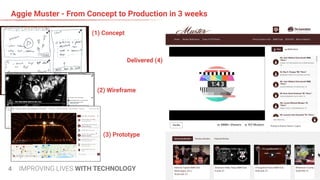
Aggie Muster - From Concept to Production in 3 weeks
4
(1) Concept
(2) Wireframe
(3) Prototype
Delivered (4)
IMPROVING LIVES WITH TECHNOLOGY
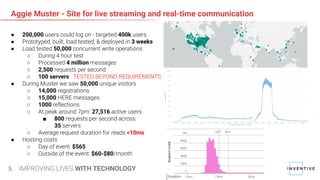
Aggie Muster - Site for live streaming and real-time communication
5
● 200,000 users could log on - targeted 400k users
● Prototyped, built, load tested, & deployed in 3 weeks
● Load tested 50,000 concurrent write operations
○ During 4 hour test
○ Processed 4 million messages
○ 2,500 requests per second
○ 100 servers TESTED BEYOND REQUIREMENTS
● During Muster we saw 50,000 unique visitors
○ 14,000 registrations
○ 15,000 HERE messages
○ 1000 reflections
○ At peak around 7pm: 27,516 active users
■ 800 requests per second across
35 servers
○ Average request duration for reads <10ms
● Hosting costs
○ Day of event: $565
○ Outside of the event: $60-$80/month
What is Performance?
Now let's understand the problem
(866) 500-2706 - inventive.io - hello@inventive.io | Web Applications & Sites, Mobile Apps, Modernization
Slides: https://nven.tv/web-perf-pdf
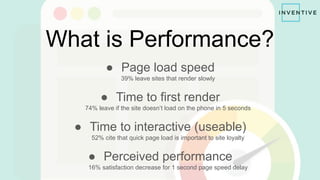
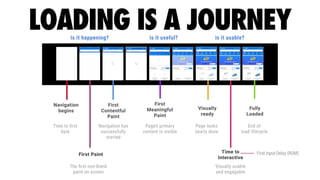
What is Performance?
● Page load speed
39% leave sites that render slowly
● Time to first render
74% leave if the site doesn’t load on the phone in 5 seconds
● Time to interactive (useable)
52% cite that quick page load is important to site loyalty
● Perceived performance
16% satisfaction decrease for 1 second page speed delay
Without performance
● Not an enjoyable experience
A 0.4 second lag time results in decrease of 0.44% traffic
● Users won’t stick around
A 1 second delay in page load time means 11% decline in page views
● Google will demote you
0.5 second in each search page generation causes traffic to drop by 20%
● Now indexes your mobile site
experience by default
● Should provide a 100% identical
experience as desktop
● Render speed of mobile should
be blazing fast and lightweight
● Accessibility friendly
https://search.google.com/test/mobile-friendly
https://nven.tv/web-perf-google-mobile-first
Test with your users in mind
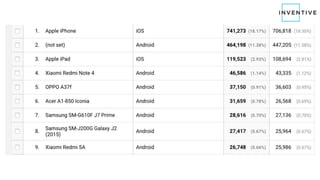
Look at your Google analytics to understand who your users are
- 53% of mobile site visits are abandoned if pages take longer than 3 seconds to load
Device performance varies
Sometimes significantly!
- 75% of users won’t return to a webpage if it takes more than 4 seconds to load
http://buildingadevicelab.com/
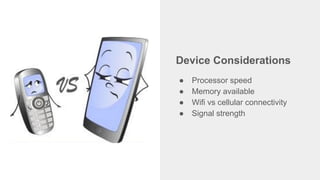
Device Considerations
● Processor speed
● Memory available
● Wifi vs cellular connectivity
● Signal strength
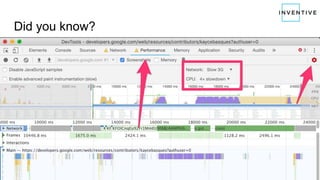
Did you know?
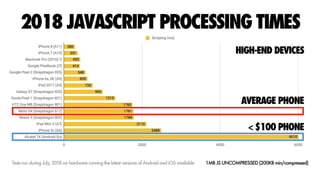
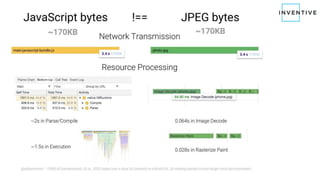
Not all bytes are equal!
100kb of JS “weighs” more than 100kb of image.
Performance Issues
What to look for...
(866) 500-2706 - inventive.io - hello@inventive.io | Web Applications & Sites, Mobile Apps, Modernization
Slides: https://nven.tv/web-perf-pdf
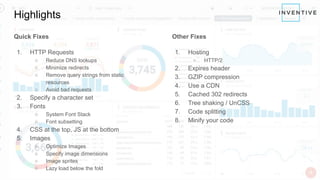
Highlights
Quick Fixes
1. HTTP Requests
○ Reduce DNS lookups
○ Minimize redirects
○ Remove query strings from static
resources
○ Avoid bad requests
2. Specify a character set
3. Fonts
○ System Font Stack
○ Font subsetting
4. CSS at the top, JS at the bottom
5. Images
○ Optimize Images
○ Specify image dimensions
○ Image sprites
○ Lazy load below the fold
Other Fixes
1. Hosting
○ HTTP/2
2. Expires header
3. GZIP compression
4. Use a CDN
5. Cached 302 redirects
6. Tree shaking / UnCSS
7. Code splitting
8. Minify your code
Quick Fixes
Easy fixes that are directly under
your control
Quick Fixes
● HTTP Requests
● Character sets
● Fonts
● External resources
● Images
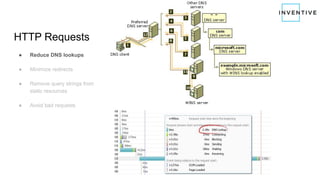
HTTP Requests
● Reduce DNS lookups
● Minimize redirects
● Remove query strings from
static resources
● Avoid bad requests
HTTP Requests
● Reduce DNS lookups
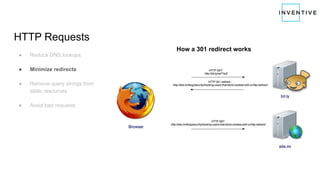
● Minimize redirects
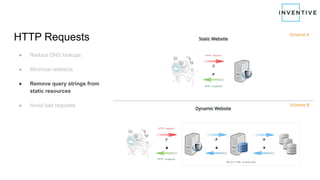
● Remove query strings from
static resources
● Avoid bad requests
How a 301 redirect works
HTTP Requests
● Reduce DNS lookups
● Minimize redirects
● Remove query strings from
static resources
● Avoid bad requests
HTTP Requests
● Reduce DNS lookups
● Minimize redirects
● Remove query strings from
static resources
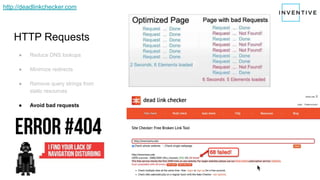
● Avoid bad requests
http://deadlinkchecker.com
Character Sets
● Specify the character set to
make the browser’s job easier!
● Must be in the first 1024 bytes
of the document!
<html …>
<head …>
<meta charset="utf-8">
https://nven.tv/web-perf-character-set
Fonts & Flash of unstyled content
● Consider not loading a font! Or
use “System Font Stack”
● Use CDN for font hosting
● Use WOFF2 format
● Us subset fonts including only needed characters
https://everythingfonts.com/subsetter
External Resources
● Images covered below
● CSS at the top
● JS at the bottom
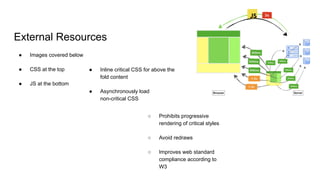
● Inline critical CSS for above the
fold content
● Asynchronously load
non-critical CSS
○ Prohibits progressive
rendering of critical styles
○ Avoid redraws
○ Improves web standard
compliance according to
W3
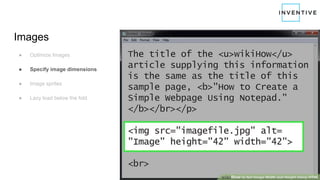
Images
● Optimize Images
● Specify image dimensions
● Image sprites
● Lazy load below the fold
https://css-tricks.com/essential-image-optimization/
Images
● Optimize Images
● Specify image dimensions
● Image sprites
● Lazy load below the fold
Images
● Optimize Images
● Specify image dimensions
● Image sprites
● Lazy load below the fold
● HTTP/1.1 likes one request due
to queuing limitation
● HTTP/2 likes little requests due
to multiplexing
● A sprite with many images in
one file may compress better
that individual images
● If all images in a sprite are used
on one page, that may be a
better option
https://css-tricks.com/css-sprites/
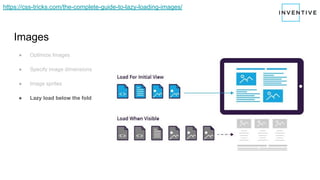
Images
● Optimize Images
● Specify image dimensions
● Image sprites
● Lazy load below the fold
https://css-tricks.com/the-complete-guide-to-lazy-loading-images/
Other Fixes
These fixes may require a team
effort
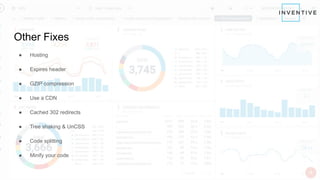
Other Fixes
● Hosting
● Expires header
● GZIP compression
● Use a CDN
● Cached 302 redirects
● Tree shaking & UnCSS
● Code splitting
● Minify your code
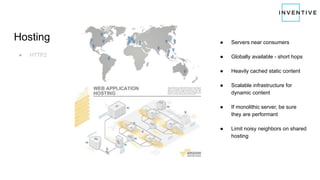
Hosting
● HTTP2
● Servers near consumers
● Globally available - short hops
● Heavily cached static content
● Scalable infrastructure for
dynamic content
● If monolithic server, be sure
they are performant
● Limit noisy neighbors on shared
hosting
Hosting
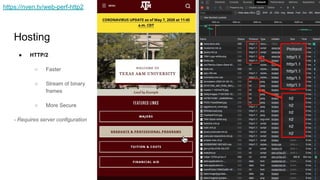
● HTTP/2
○ Faster
○ Stream of binary
frames
○ More Secure
- Requires server configuration
https://nven.tv/web-perf-http2
Expires Header
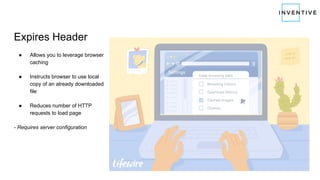
● Allows you to leverage browser
caching
● Instructs browser to use local
copy of an already downloaded
file
● Reduces number of HTTP
requests to load page
- Requires server configuration
GZIP Compression
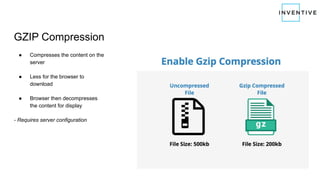
● Compresses the content on the
server
● Less for the browser to
download
● Browser then decompresses
the content for display
- Requires server configuration
CDN for Static Assets
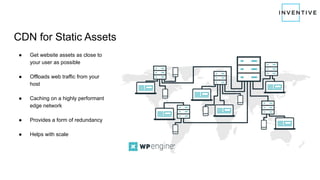
● Get website assets as close to
your user as possible
● Offloads web traffic from your
host
● Caching on a highly performant
edge network
● Provides a form of redundancy
● Helps with scale
Cached 302 Redirects
● Redirects add latency to a
request
● Redirects delay page load time
● Remove redirects if possible
● Cache them if you can’t remove
them
Tree Shaking & UnCSS
● Remove dead code paths
○ From Javascript
○ From CSS
- Best when part of continuous integration
Code Splitting
● Send small specific bundles of code
● Minimizes the size of a request
● Utilize dynamic importing
Minify Your Code
● Removes whitespace
● Shortens variable names
● Shortens function names
Monitoring
Performance must be monitored over time
(866) 500-2706 - inventive.io - hello@inventive.io | Web Applications & Sites, Mobile Apps, Modernization
Slides: https://nven.tv/web-perf-pdf
One-time Audit
Isn’t good enough!
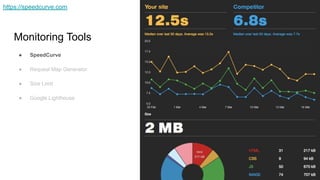
Monitoring Tools
● SpeedCurve
● Request Map Generator
● Size Limit
● Google Lighthouse
https://speedcurve.com
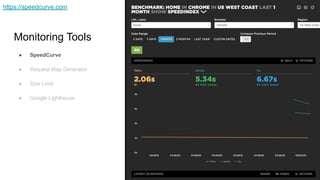
Monitoring Tools
● SpeedCurve
● Request Map Generator
● Size Limit
● Google Lighthouse
https://speedcurve.com
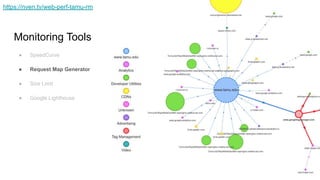
Monitoring Tools
● SpeedCurve
● Request Map Generator
● Size Limit
● Google Lighthouse
https://nven.tv/web-perf-tamu-rm
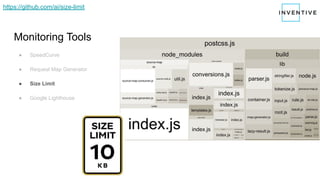
Monitoring Tools
● SpeedCurve
● Request Map Generator
● Size Limit
● Google Lighthouse
https://github.com/ai/size-limit
Monitoring Tools
● SpeedCurve
● Request Map Generator
● Size Limit
● Google Lighthouse
Perceived Performance
Sometimes you can pretend to be performant!
(866) 500-2706 - inventive.io - hello@inventive.io | Web Applications & Sites, Mobile Apps, Modernization
Slides: https://nven.tv/web-perf-pdf
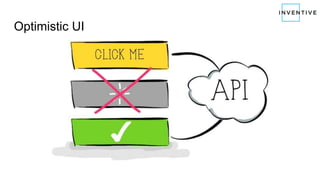
Optimistic UI
Animations
Load and calculate in the
background while showing an
animation
Extras
Some additional considerations
(866) 500-2706 - inventive.io - hello@inventive.io | Web Applications & Sites, Mobile Apps, Modernization
Slides: https://nven.tv/web-perf-pdf
Extras
1. Performance Budget
○ Be 20% faster than your main competitor
2. Performance = Ethics & Accessibility
3. Follow the specialists
○ Performance is an industry
○ Changes over time
Resources Used
● https://nven.tv/web-perf-moz-15
● https://nven.tv/web-perf-35-tips
● https://nven.tv/web-perf-22-tips
● https://nven.tv/web-perf-20-tips
● https://nven.tv/web-perf-18-tips
● https://nven.tv/web-perf-improve-conversion
● https://nven.tv/web-perf-google-mobile-first
An inventive company
solving big problems
with proven solutions
MORE THAN DIGITAL TRANSFORMATION
IMPROVING LIVES WITH TECHNOLOGY60
(866) 500-2706 - inventive.io - hello@inventive.io | Web Applications & Sites, Mobile Apps, Modernization
QUESTIONS?
An inventive company
solving big problems
with proven solutions
MORE THAN DIGITAL TRANSFORMATION
IMPROVING LIVES WITH TECHNOLOGY61
(866) 500-2706 - inventive.io - hello@inventive.io | Web Applications & Sites, Mobile Apps, Modernization
QUESTIONS?

20 tips for website performance

  • 1.
    20 Tips for tweakingyour website’s performance Slides: https://nven.tv/web-perf-pdf
  • 2.
    22 inventive.io @InventiveGroup facebook.com/InventiveGroup Andrew Siemer Founder &CEO (866) 500-2706 hello@inventive.io @asiemer http://www.linkedin.com/in/AndrewSiemer
  • 3.
    Extreme Example Performance shouldbe in mind from the start! (866) 500-2706 - inventive.io - hello@inventive.io | Web Applications & Sites, Mobile Apps, Modernization Slides: https://nven.tv/web-perf-pdf
  • 4.
    IMPROVING LIVES WITHTECHNOLOGY Aggie Muster - From Concept to Production in 3 weeks 4 (1) Concept (2) Wireframe (3) Prototype Delivered (4)
  • 5.
    IMPROVING LIVES WITHTECHNOLOGY Aggie Muster - Site for live streaming and real-time communication 5 ● 200,000 users could log on - targeted 400k users ● Prototyped, built, load tested, & deployed in 3 weeks ● Load tested 50,000 concurrent write operations ○ During 4 hour test ○ Processed 4 million messages ○ 2,500 requests per second ○ 100 servers TESTED BEYOND REQUIREMENTS ● During Muster we saw 50,000 unique visitors ○ 14,000 registrations ○ 15,000 HERE messages ○ 1000 reflections ○ At peak around 7pm: 27,516 active users ■ 800 requests per second across 35 servers ○ Average request duration for reads <10ms ● Hosting costs ○ Day of event: $565 ○ Outside of the event: $60-$80/month
  • 6.
    What is Performance? Nowlet's understand the problem (866) 500-2706 - inventive.io - hello@inventive.io | Web Applications & Sites, Mobile Apps, Modernization Slides: https://nven.tv/web-perf-pdf
  • 7.
    What is Performance? ●Page load speed 39% leave sites that render slowly ● Time to first render 74% leave if the site doesn’t load on the phone in 5 seconds ● Time to interactive (useable) 52% cite that quick page load is important to site loyalty ● Perceived performance 16% satisfaction decrease for 1 second page speed delay
  • 9.
    Without performance ● Notan enjoyable experience A 0.4 second lag time results in decrease of 0.44% traffic ● Users won’t stick around A 1 second delay in page load time means 11% decline in page views ● Google will demote you 0.5 second in each search page generation causes traffic to drop by 20%
  • 10.
    ● Now indexesyour mobile site experience by default ● Should provide a 100% identical experience as desktop ● Render speed of mobile should be blazing fast and lightweight ● Accessibility friendly https://search.google.com/test/mobile-friendly https://nven.tv/web-perf-google-mobile-first
  • 11.
    Test with yourusers in mind Look at your Google analytics to understand who your users are - 53% of mobile site visits are abandoned if pages take longer than 3 seconds to load
  • 13.
    Device performance varies Sometimessignificantly! - 75% of users won’t return to a webpage if it takes more than 4 seconds to load
  • 14.
  • 15.
    Device Considerations ● Processorspeed ● Memory available ● Wifi vs cellular connectivity ● Signal strength
  • 17.
  • 18.
    Not all bytesare equal! 100kb of JS “weighs” more than 100kb of image.
  • 20.
    Performance Issues What tolook for... (866) 500-2706 - inventive.io - hello@inventive.io | Web Applications & Sites, Mobile Apps, Modernization Slides: https://nven.tv/web-perf-pdf
  • 21.
    Highlights Quick Fixes 1. HTTPRequests ○ Reduce DNS lookups ○ Minimize redirects ○ Remove query strings from static resources ○ Avoid bad requests 2. Specify a character set 3. Fonts ○ System Font Stack ○ Font subsetting 4. CSS at the top, JS at the bottom 5. Images ○ Optimize Images ○ Specify image dimensions ○ Image sprites ○ Lazy load below the fold Other Fixes 1. Hosting ○ HTTP/2 2. Expires header 3. GZIP compression 4. Use a CDN 5. Cached 302 redirects 6. Tree shaking / UnCSS 7. Code splitting 8. Minify your code
  • 22.
    Quick Fixes Easy fixesthat are directly under your control
  • 23.
    Quick Fixes ● HTTPRequests ● Character sets ● Fonts ● External resources ● Images
  • 24.
    HTTP Requests ● ReduceDNS lookups ● Minimize redirects ● Remove query strings from static resources ● Avoid bad requests
  • 25.
    HTTP Requests ● ReduceDNS lookups ● Minimize redirects ● Remove query strings from static resources ● Avoid bad requests How a 301 redirect works
  • 26.
    HTTP Requests ● ReduceDNS lookups ● Minimize redirects ● Remove query strings from static resources ● Avoid bad requests
  • 27.
    HTTP Requests ● ReduceDNS lookups ● Minimize redirects ● Remove query strings from static resources ● Avoid bad requests http://deadlinkchecker.com
  • 28.
    Character Sets ● Specifythe character set to make the browser’s job easier! ● Must be in the first 1024 bytes of the document! <html …> <head …> <meta charset="utf-8"> https://nven.tv/web-perf-character-set
  • 29.
    Fonts & Flashof unstyled content ● Consider not loading a font! Or use “System Font Stack” ● Use CDN for font hosting ● Use WOFF2 format ● Us subset fonts including only needed characters https://everythingfonts.com/subsetter
  • 30.
    External Resources ● Imagescovered below ● CSS at the top ● JS at the bottom ● Inline critical CSS for above the fold content ● Asynchronously load non-critical CSS ○ Prohibits progressive rendering of critical styles ○ Avoid redraws ○ Improves web standard compliance according to W3
  • 31.
    Images ● Optimize Images ●Specify image dimensions ● Image sprites ● Lazy load below the fold https://css-tricks.com/essential-image-optimization/
  • 32.
    Images ● Optimize Images ●Specify image dimensions ● Image sprites ● Lazy load below the fold
  • 33.
    Images ● Optimize Images ●Specify image dimensions ● Image sprites ● Lazy load below the fold ● HTTP/1.1 likes one request due to queuing limitation ● HTTP/2 likes little requests due to multiplexing ● A sprite with many images in one file may compress better that individual images ● If all images in a sprite are used on one page, that may be a better option https://css-tricks.com/css-sprites/
  • 34.
    Images ● Optimize Images ●Specify image dimensions ● Image sprites ● Lazy load below the fold https://css-tricks.com/the-complete-guide-to-lazy-loading-images/
  • 35.
    Other Fixes These fixesmay require a team effort
  • 36.
    Other Fixes ● Hosting ●Expires header ● GZIP compression ● Use a CDN ● Cached 302 redirects ● Tree shaking & UnCSS ● Code splitting ● Minify your code
  • 37.
    Hosting ● HTTP2 ● Serversnear consumers ● Globally available - short hops ● Heavily cached static content ● Scalable infrastructure for dynamic content ● If monolithic server, be sure they are performant ● Limit noisy neighbors on shared hosting
  • 38.
    Hosting ● HTTP/2 ○ Faster ○Stream of binary frames ○ More Secure - Requires server configuration https://nven.tv/web-perf-http2
  • 39.
    Expires Header ● Allowsyou to leverage browser caching ● Instructs browser to use local copy of an already downloaded file ● Reduces number of HTTP requests to load page - Requires server configuration
  • 40.
    GZIP Compression ● Compressesthe content on the server ● Less for the browser to download ● Browser then decompresses the content for display - Requires server configuration
  • 41.
    CDN for StaticAssets ● Get website assets as close to your user as possible ● Offloads web traffic from your host ● Caching on a highly performant edge network ● Provides a form of redundancy ● Helps with scale
  • 42.
    Cached 302 Redirects ●Redirects add latency to a request ● Redirects delay page load time ● Remove redirects if possible ● Cache them if you can’t remove them
  • 43.
    Tree Shaking &UnCSS ● Remove dead code paths ○ From Javascript ○ From CSS - Best when part of continuous integration
  • 44.
    Code Splitting ● Sendsmall specific bundles of code ● Minimizes the size of a request ● Utilize dynamic importing
  • 45.
    Minify Your Code ●Removes whitespace ● Shortens variable names ● Shortens function names
  • 46.
    Monitoring Performance must bemonitored over time (866) 500-2706 - inventive.io - hello@inventive.io | Web Applications & Sites, Mobile Apps, Modernization Slides: https://nven.tv/web-perf-pdf
  • 47.
  • 48.
    Monitoring Tools ● SpeedCurve ●Request Map Generator ● Size Limit ● Google Lighthouse https://speedcurve.com
  • 49.
    Monitoring Tools ● SpeedCurve ●Request Map Generator ● Size Limit ● Google Lighthouse https://speedcurve.com
  • 51.
    Monitoring Tools ● SpeedCurve ●Request Map Generator ● Size Limit ● Google Lighthouse https://nven.tv/web-perf-tamu-rm
  • 52.
    Monitoring Tools ● SpeedCurve ●Request Map Generator ● Size Limit ● Google Lighthouse https://github.com/ai/size-limit
  • 53.
    Monitoring Tools ● SpeedCurve ●Request Map Generator ● Size Limit ● Google Lighthouse
  • 54.
    Perceived Performance Sometimes youcan pretend to be performant! (866) 500-2706 - inventive.io - hello@inventive.io | Web Applications & Sites, Mobile Apps, Modernization Slides: https://nven.tv/web-perf-pdf
  • 55.
  • 56.
    Animations Load and calculatein the background while showing an animation
  • 57.
    Extras Some additional considerations (866)500-2706 - inventive.io - hello@inventive.io | Web Applications & Sites, Mobile Apps, Modernization Slides: https://nven.tv/web-perf-pdf
  • 58.
    Extras 1. Performance Budget ○Be 20% faster than your main competitor 2. Performance = Ethics & Accessibility 3. Follow the specialists ○ Performance is an industry ○ Changes over time
  • 59.
    Resources Used ● https://nven.tv/web-perf-moz-15 ●https://nven.tv/web-perf-35-tips ● https://nven.tv/web-perf-22-tips ● https://nven.tv/web-perf-20-tips ● https://nven.tv/web-perf-18-tips ● https://nven.tv/web-perf-improve-conversion ● https://nven.tv/web-perf-google-mobile-first
  • 60.
    An inventive company solvingbig problems with proven solutions MORE THAN DIGITAL TRANSFORMATION IMPROVING LIVES WITH TECHNOLOGY60 (866) 500-2706 - inventive.io - hello@inventive.io | Web Applications & Sites, Mobile Apps, Modernization QUESTIONS?
  • 61.
    An inventive company solvingbig problems with proven solutions MORE THAN DIGITAL TRANSFORMATION IMPROVING LIVES WITH TECHNOLOGY61 (866) 500-2706 - inventive.io - hello@inventive.io | Web Applications & Sites, Mobile Apps, Modernization QUESTIONS?