Droneflow
PX4 Quadcopter Workshop
Todd Stellanova
Founder,
What we’re talking about
• Options for flight control boards
• Key parts of a hackable PX4 multicopter system
• Setting up PX4 and QGroundControl
• Fine tuning and better safety
• Flight modes and automation
• Going further: firmware and hardware hacking
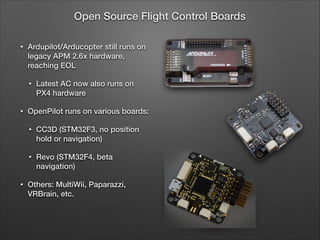
• Ardupilot/Arducopter still runs on
legacy APM 2.6x hardware,
reaching EOL
• Latest AC now also runs on
PX4 hardware
• OpenPilot runs on various boards:
• CC3D (STM32F3, no position
hold or navigation)
• Revo (STM32F4, beta
navigation)
• Others: MultiWii, Paparazzi,
VRBrain, etc.
Open Source Flight Control Boards
Pixhawk Project
• Pixhawk is a research project
of the Computer Vision and
Geometry Lab of ETH Zurich,
an academic institution
• Powers most of the cool
quadcopter demos you’ve
seen on TED and elsewhere
• PX4 is the autopilot hw and
sw, QGroundControl is the
ground control sw, mavlink is
the comms protocol
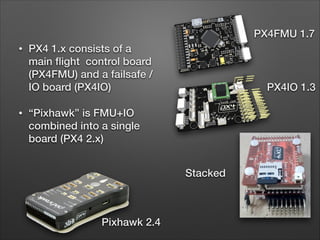
• PX4 1.x consists of a
main flight control board
(PX4FMU) and a failsafe /
IO board (PX4IO)
• “Pixhawk” is FMU+IO
combined into a single
board (PX4 2.x)
PX4FMU 1.7
PX4IO 1.3
Stacked
Pixhawk 2.4
Business of Open Source
• Pixhawk team does most of the hw design work (for free)
• 3DRobotics.com provides early prototypes back to Pixhawk
and iterates to fix bugs, typically releasing the first
commercial version.
• Eventually design files are released on Github. 3DR has been
known to withhold some optimizations and bug fixes.
• Some time later, boards from China and HK start appearing
on eBay and Aliexpress at half the price. YMMV
• Meanwhile, the firmware continues to iterate on Github.
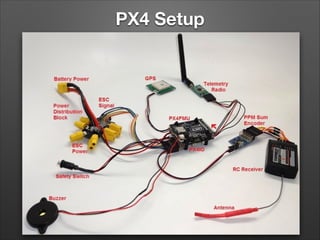
PX4 Setup
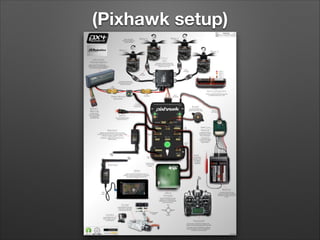
(Pixhawk setup)
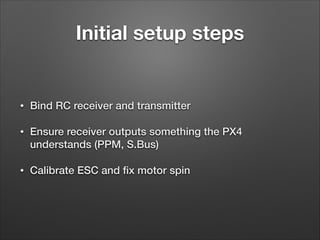
Initial setup steps
• Bind RC receiver and transmitter
• Ensure receiver outputs something the PX4
understands (PPM, S.Bus)
• Calibrate ESC and fix motor spin
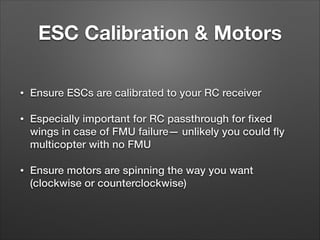
ESC Calibration & Motors
• Ensure ESCs are calibrated to your RC receiver
• Especially important for RC passthrough for fixed
wings in case of FMU failure— unlikely you could fly
multicopter with no FMU
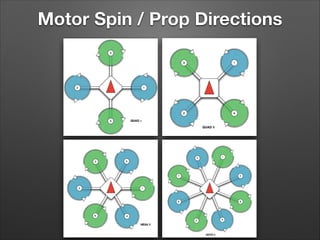
• Ensure motors are spinning the way you want
(clockwise or counterclockwise)
Motor Spin / Prop Directions
Setup: Firmware
• Install empty SD Card
• Connect FMU to QGroundControl via USB cable
• Flash latest FMU firmware from build server
• Reboot holding down arming switch to flash latest
PX4IO firmware
• Select airframe defaults, save and reboot
Sensor Calibration
• Attach power source (eg BEC)
• Attach Telemetry radio and connect to QGC
• Calibrate Gyroscope, Magnetometer (3D compass),
Accelerometer
RC Calibration
• Follow instructions carefully in QGC
• For flight mode switches it helps to understand the
flight modes…
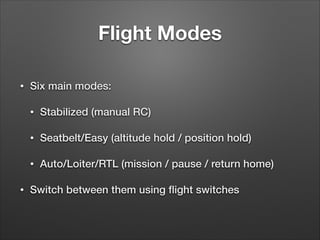
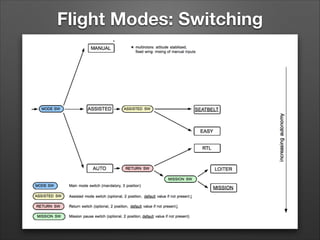
Flight Modes
• Six main modes:
• Stabilized (manual RC)
• Seatbelt/Easy (altitude hold / position hold)
• Auto/Loiter/RTL (mission / pause / return home)
• Switch between them using flight switches
Flight Modes: Switching
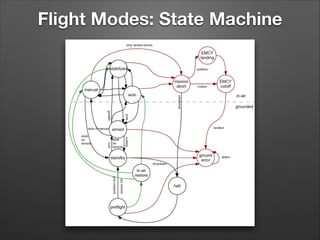
Flight Modes: State Machine
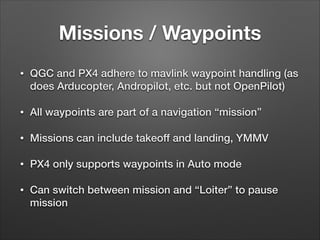
Missions / Waypoints
• QGC and PX4 adhere to mavlink waypoint handling (as
does Arducopter, Andropilot, etc. but not OpenPilot)
• All waypoints are part of a navigation “mission”
• Missions can include takeoff and landing, YMMV
• PX4 only supports waypoints in Auto mode
• Can switch between mission and “Loiter” to pause
mission
Battery Monitoring
• PX4IO onboard voltage sensor warns via mavlink and
buzzer when battery is low, critical. Can configure
warning levels.
• Use battery capacity parameter if you want to estimate
time remaining
• Use a backup charge balance monitor alarm
Failsafes
• RC receiver probably has one (PPM, S.Bus)
• PPM defaults to “hold last before Tx loss”
• PX4FMU can detect RC loss
• PX4IO can also hold PWM levels on FMU loss. Helpful
for midair reboots.
• PX4IO manual RC passthru useful for fixed wings
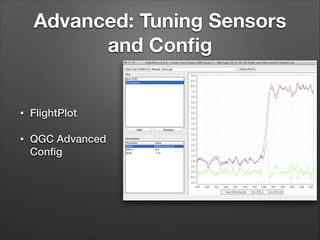
Advanced: Tuning Sensors
and Config
• FlightPlot
• QGC Advanced
Config
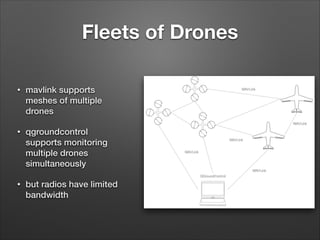
Fleets of Drones
• mavlink supports
meshes of multiple
drones
• qgroundcontrol
supports monitoring
multiple drones
simultaneously
• but radios have limited
bandwidth
Going Further
• Flight control software is entirely open source: 

github.com/PX4/Firmware
• Ground control software is entirely open source: 

github.com/mavlink/qgroundcontrol
• Hardware design is (mostly) open source:

github.com/PX4/Hardware

PX4 Setup Workshop

  • 1.
  • 2.
    What we’re talkingabout • Options for flight control boards • Key parts of a hackable PX4 multicopter system • Setting up PX4 and QGroundControl • Fine tuning and better safety • Flight modes and automation • Going further: firmware and hardware hacking
  • 3.
    • Ardupilot/Arducopter stillruns on legacy APM 2.6x hardware, reaching EOL • Latest AC now also runs on PX4 hardware • OpenPilot runs on various boards: • CC3D (STM32F3, no position hold or navigation) • Revo (STM32F4, beta navigation) • Others: MultiWii, Paparazzi, VRBrain, etc. Open Source Flight Control Boards
  • 4.
    Pixhawk Project • Pixhawkis a research project of the Computer Vision and Geometry Lab of ETH Zurich, an academic institution • Powers most of the cool quadcopter demos you’ve seen on TED and elsewhere • PX4 is the autopilot hw and sw, QGroundControl is the ground control sw, mavlink is the comms protocol
  • 5.
    • PX4 1.xconsists of a main flight control board (PX4FMU) and a failsafe / IO board (PX4IO) • “Pixhawk” is FMU+IO combined into a single board (PX4 2.x) PX4FMU 1.7 PX4IO 1.3 Stacked Pixhawk 2.4
  • 6.
    Business of OpenSource • Pixhawk team does most of the hw design work (for free) • 3DRobotics.com provides early prototypes back to Pixhawk and iterates to fix bugs, typically releasing the first commercial version. • Eventually design files are released on Github. 3DR has been known to withhold some optimizations and bug fixes. • Some time later, boards from China and HK start appearing on eBay and Aliexpress at half the price. YMMV • Meanwhile, the firmware continues to iterate on Github.
  • 7.
  • 8.
  • 9.
    Initial setup steps •Bind RC receiver and transmitter • Ensure receiver outputs something the PX4 understands (PPM, S.Bus) • Calibrate ESC and fix motor spin
  • 10.
    ESC Calibration &Motors • Ensure ESCs are calibrated to your RC receiver • Especially important for RC passthrough for fixed wings in case of FMU failure— unlikely you could fly multicopter with no FMU • Ensure motors are spinning the way you want (clockwise or counterclockwise)
  • 11.
    Motor Spin /Prop Directions
  • 12.
    Setup: Firmware • Installempty SD Card • Connect FMU to QGroundControl via USB cable • Flash latest FMU firmware from build server • Reboot holding down arming switch to flash latest PX4IO firmware • Select airframe defaults, save and reboot
  • 13.
    Sensor Calibration • Attachpower source (eg BEC) • Attach Telemetry radio and connect to QGC • Calibrate Gyroscope, Magnetometer (3D compass), Accelerometer
  • 14.
    RC Calibration • Followinstructions carefully in QGC • For flight mode switches it helps to understand the flight modes…
  • 15.
    Flight Modes • Sixmain modes: • Stabilized (manual RC) • Seatbelt/Easy (altitude hold / position hold) • Auto/Loiter/RTL (mission / pause / return home) • Switch between them using flight switches
  • 16.
  • 17.
  • 18.
    Missions / Waypoints •QGC and PX4 adhere to mavlink waypoint handling (as does Arducopter, Andropilot, etc. but not OpenPilot) • All waypoints are part of a navigation “mission” • Missions can include takeoff and landing, YMMV • PX4 only supports waypoints in Auto mode • Can switch between mission and “Loiter” to pause mission
  • 19.
    Battery Monitoring • PX4IOonboard voltage sensor warns via mavlink and buzzer when battery is low, critical. Can configure warning levels. • Use battery capacity parameter if you want to estimate time remaining • Use a backup charge balance monitor alarm
  • 20.
    Failsafes • RC receiverprobably has one (PPM, S.Bus) • PPM defaults to “hold last before Tx loss” • PX4FMU can detect RC loss • PX4IO can also hold PWM levels on FMU loss. Helpful for midair reboots. • PX4IO manual RC passthru useful for fixed wings
  • 21.
    Advanced: Tuning Sensors andConfig • FlightPlot • QGC Advanced Config
  • 22.
    Fleets of Drones •mavlink supports meshes of multiple drones • qgroundcontrol supports monitoring multiple drones simultaneously • but radios have limited bandwidth
  • 23.
    Going Further • Flightcontrol software is entirely open source: 
 github.com/PX4/Firmware • Ground control software is entirely open source: 
 github.com/mavlink/qgroundcontrol • Hardware design is (mostly) open source:
 github.com/PX4/Hardware