Provisioning with Puppet


Photo: http://www.flickr.com/photos/vasta/4463786284/
$ whoami
    Joe Ray
    Senior Systems Developer
    Future Publishing
    @jr261
Overview

• Why you should use provisioners
• What is Puppet?
• How do you use it?
• Using Puppet with Vagrant
• Using Puppet in production
Why use provisioners?
• Reproducible setup
• Write less documentation
• Same config for multiple platforms
• Scale your setup
  • Easily move from development to
    production
  • Distribute amongst team
  • SSH access not necessary
• Use associated tools
What is Puppet?

•   Configuration management tool

•   Platform-agnostic (supports Linux, Free/OpenBSD,
    OSX, Windows, Solaris)

•   Description of systems' configuration using
    manifests

•   Idempotent
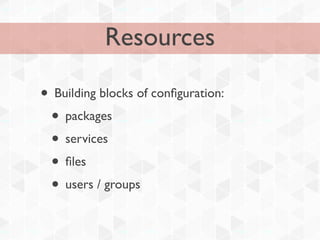
Resources

• Building blocks of configuration:
 • packages
 • services
 • files
 • users / groups
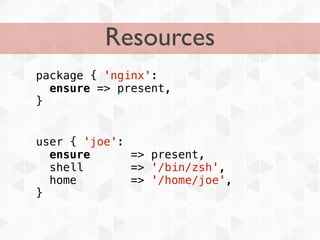
Resources
package { 'nginx':
  ensure => present,
}


user { 'joe':
  ensure      => present,
  shell       => '/bin/zsh',
  home        => '/home/joe',
}
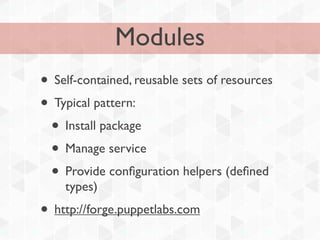
Modules
• Self-contained, reusable sets of resources
• Typical pattern:
 • Install package
 • Manage service
 • Provide configuration helpers (defined
    types)
• http://forge.puppetlabs.com
Modules
class nginx($workers=1, $ensure=present) {
  package { nginx:
    ensure => $ensure,
  }

    service { nginx:
      ensure    => $ensure,
      subscribe => File["/etc/nginx/nginx.conf"],
      require   => File["/etc/nginx/nginx.conf"],
    }

    file { "/etc/nginx/nginx.conf":
      ensure => $ensure,
      content => template("nginx/nginx.conf.erb"),
      require => Package[nginx],
    }
}
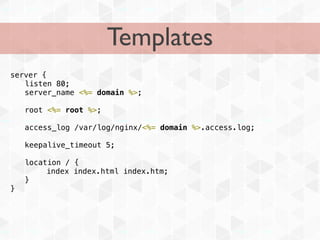
Templates
server {
! listen 80;
! server_name <%= domain %>;

!   root <%= root %>;

!   access_log /var/log/nginx/<%= domain %>.access.log;

!   keepalive_timeout 5;

!   location / {
         index index.html index.htm;
!   }
}
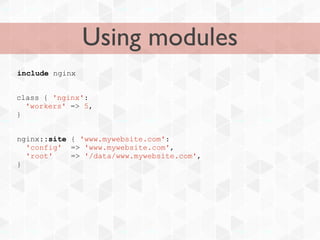
Using modules
include nginx


class { 'nginx':
  'workers' => 5,
}


nginx::site { 'www.mywebsite.com':
  'config' => 'www.mywebsite.com',
  'root'    => '/data/www.mywebsite.com',
}
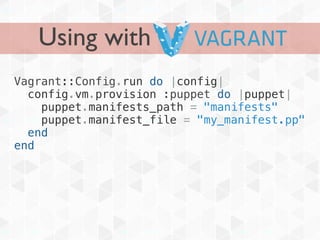
Using with
Vagrant::Config.run do |config|
  config.vm.provision :puppet do |puppet|
    puppet.manifests_path = "manifests"
    puppet.manifest_file = "my_manifest.pp"
  end
end
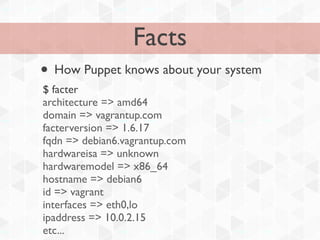
Facts
• How Puppet knows about your system
$ facter
architecture => amd64
domain => vagrantup.com
facterversion => 1.6.17
fqdn => debian6.vagrantup.com
hardwareisa => unknown
hardwaremodel => x86_64
hostname => debian6
id => vagrant
interfaces => eth0,lo
ipaddress => 10.0.2.15
etc...
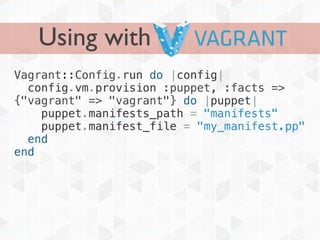
Using with
Vagrant::Config.run do |config|
  config.vm.provision :puppet, :facts =>
{"vagrant" => "vagrant"} do |puppet|
    puppet.manifests_path = "manifests"
    puppet.manifest_file = "my_manifest.pp"
  end
end
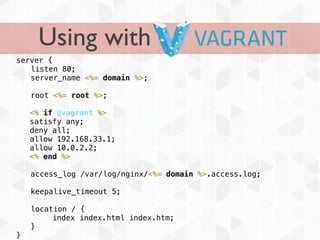
Using with
server {
! listen 80;
! server_name <%= domain %>;

!   root <%= root %>;

    <% if @vagrant %>
    satisfy any;
    deny all;
    allow 192.168.33.1;
    allow 10.0.2.2;
    <% end %>

!   access_log /var/log/nginx/<%= domain %>.access.log;

!   keepalive_timeout 5;

!   location / {
         index index.html index.htm;
!   }
}
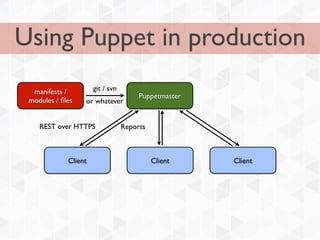
Using Puppet in production
  manifests /         git / svn
                                       Puppetmaster
 modules / files   or whatever


    REST over HTTPS               Reports


             Client                         Client    Client
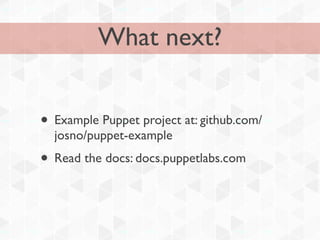
What next?


• Example Puppet project at: github.com/
  josno/puppet-example
• Read the docs: docs.puppetlabs.com

Provisioning with Puppet

  • 1.
    Provisioning with Puppet Photo:http://www.flickr.com/photos/vasta/4463786284/
  • 2.
    $ whoami Joe Ray Senior Systems Developer Future Publishing @jr261
  • 3.
    Overview • Why youshould use provisioners • What is Puppet? • How do you use it? • Using Puppet with Vagrant • Using Puppet in production
  • 4.
    Why use provisioners? •Reproducible setup • Write less documentation • Same config for multiple platforms • Scale your setup • Easily move from development to production • Distribute amongst team • SSH access not necessary • Use associated tools
  • 5.
    What is Puppet? • Configuration management tool • Platform-agnostic (supports Linux, Free/OpenBSD, OSX, Windows, Solaris) • Description of systems' configuration using manifests • Idempotent
  • 6.
    Resources • Building blocksof configuration: • packages • services • files • users / groups
  • 7.
    Resources package { 'nginx': ensure => present, } user { 'joe': ensure => present, shell => '/bin/zsh', home => '/home/joe', }
  • 8.
    Modules • Self-contained, reusablesets of resources • Typical pattern: • Install package • Manage service • Provide configuration helpers (defined types) • http://forge.puppetlabs.com
  • 9.
    Modules class nginx($workers=1, $ensure=present){ package { nginx: ensure => $ensure, } service { nginx: ensure => $ensure, subscribe => File["/etc/nginx/nginx.conf"], require => File["/etc/nginx/nginx.conf"], } file { "/etc/nginx/nginx.conf": ensure => $ensure, content => template("nginx/nginx.conf.erb"), require => Package[nginx], } }
  • 10.
    Templates server { ! listen80; ! server_name <%= domain %>; ! root <%= root %>; ! access_log /var/log/nginx/<%= domain %>.access.log; ! keepalive_timeout 5; ! location / { index index.html index.htm; ! } }
  • 11.
    Using modules include nginx class{ 'nginx': 'workers' => 5, } nginx::site { 'www.mywebsite.com': 'config' => 'www.mywebsite.com', 'root' => '/data/www.mywebsite.com', }
  • 12.
    Using with Vagrant::Config.run do|config| config.vm.provision :puppet do |puppet| puppet.manifests_path = "manifests" puppet.manifest_file = "my_manifest.pp" end end
  • 13.
    Facts • How Puppetknows about your system $ facter architecture => amd64 domain => vagrantup.com facterversion => 1.6.17 fqdn => debian6.vagrantup.com hardwareisa => unknown hardwaremodel => x86_64 hostname => debian6 id => vagrant interfaces => eth0,lo ipaddress => 10.0.2.15 etc...
  • 14.
    Using with Vagrant::Config.run do|config| config.vm.provision :puppet, :facts => {"vagrant" => "vagrant"} do |puppet| puppet.manifests_path = "manifests" puppet.manifest_file = "my_manifest.pp" end end
  • 15.
    Using with server { !listen 80; ! server_name <%= domain %>; ! root <%= root %>; <% if @vagrant %> satisfy any; deny all; allow 192.168.33.1; allow 10.0.2.2; <% end %> ! access_log /var/log/nginx/<%= domain %>.access.log; ! keepalive_timeout 5; ! location / { index index.html index.htm; ! } }
  • 16.
    Using Puppet inproduction manifests / git / svn Puppetmaster modules / files or whatever REST over HTTPS Reports Client Client Client
  • 17.
    What next? • ExamplePuppet project at: github.com/ josno/puppet-example • Read the docs: docs.puppetlabs.com