AStepwise direction to install
ProteusVSM
Version 8
Windows 7 & 8© Imagineering Studio
 Click twice on the
installation exe file.
 Click “Next”.
 On the “License
Agreement” page, check
“I accept terms of this
agreement” and click
“Next”.
 Select “Use locally
installed license” and
click next.
INSTALLATION
© Imagineering Studio
1 2
3 4
 Click Next to find the
License File.
 After opening the
“Labcenter License
Manager” window, click
on “Browse For Key file”.
 Go to the specific folder
where you have copied
all installation folder
before starting
installation of Proteus.
Find the “Crack” named
folder there.
© Imagineering Studio
INSTALLATION
1 2
3 4
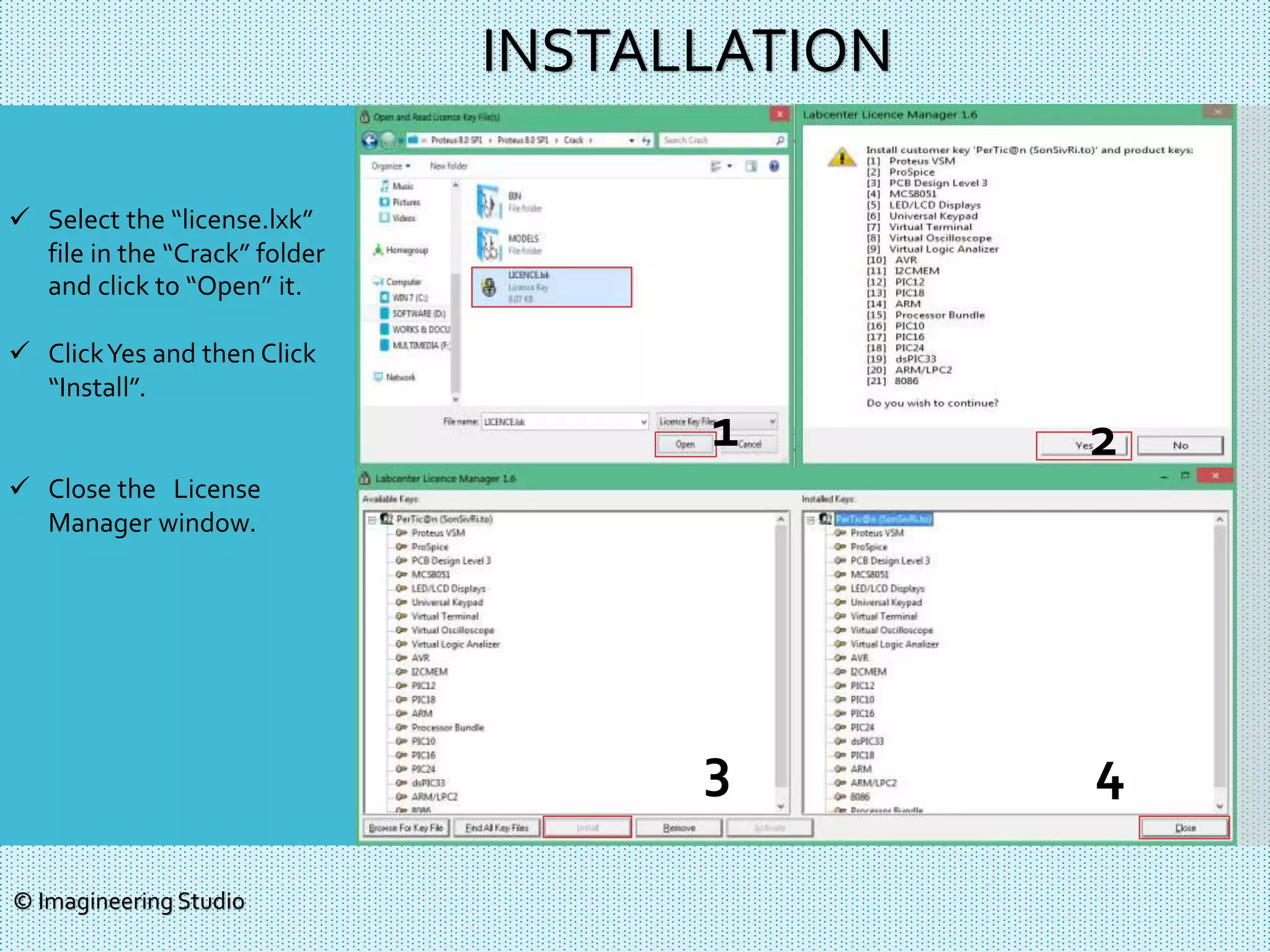
 Select the “license.lxk”
file in the “Crack” folder
and click to “Open” it.
 ClickYes and then Click
“Install”.
 Close the License
Manager window.
© Imagineering Studio
INSTALLATION
1 2
3 4
 If the license file is
installed perfectly, you
will see a window like 1.
 If you have any previous
version of Proteus, then
check all these 3 boxes
and click “Next”.
If it is the first time of your
Proteus using, leave all
three box uncheck and
Click “next”.
 Click “Typical”.
 Proteus Installation will be
started now. After 2/3
minutes, the installation
will be done. DO NOT
RUN Proteus Now !
Click “Close”.
© Imagineering Studio
INSTALLATION
1 2
3 4
CRACK
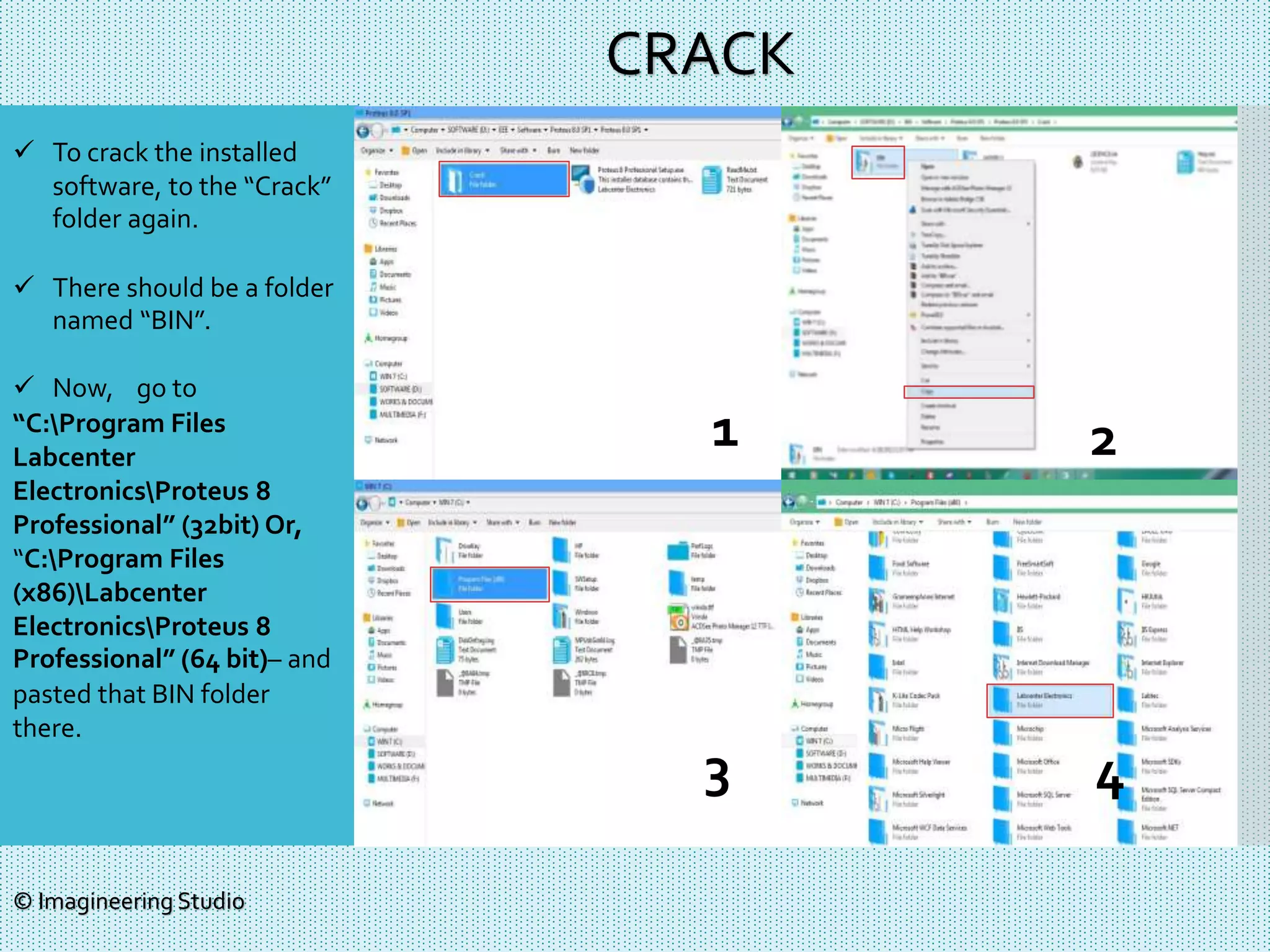
 To crack the installed
software, to the “Crack”
folder again.
 There should be a folder
named “BIN”.
 Now, go to
“C:Program Files
Labcenter
ElectronicsProteus 8
Professional” (32bit) Or,
“C:Program Files
(x86)Labcenter
ElectronicsProteus 8
Professional” (64 bit)– and
pasted that BIN folder
there.
© Imagineering Studio
1 2
3 4
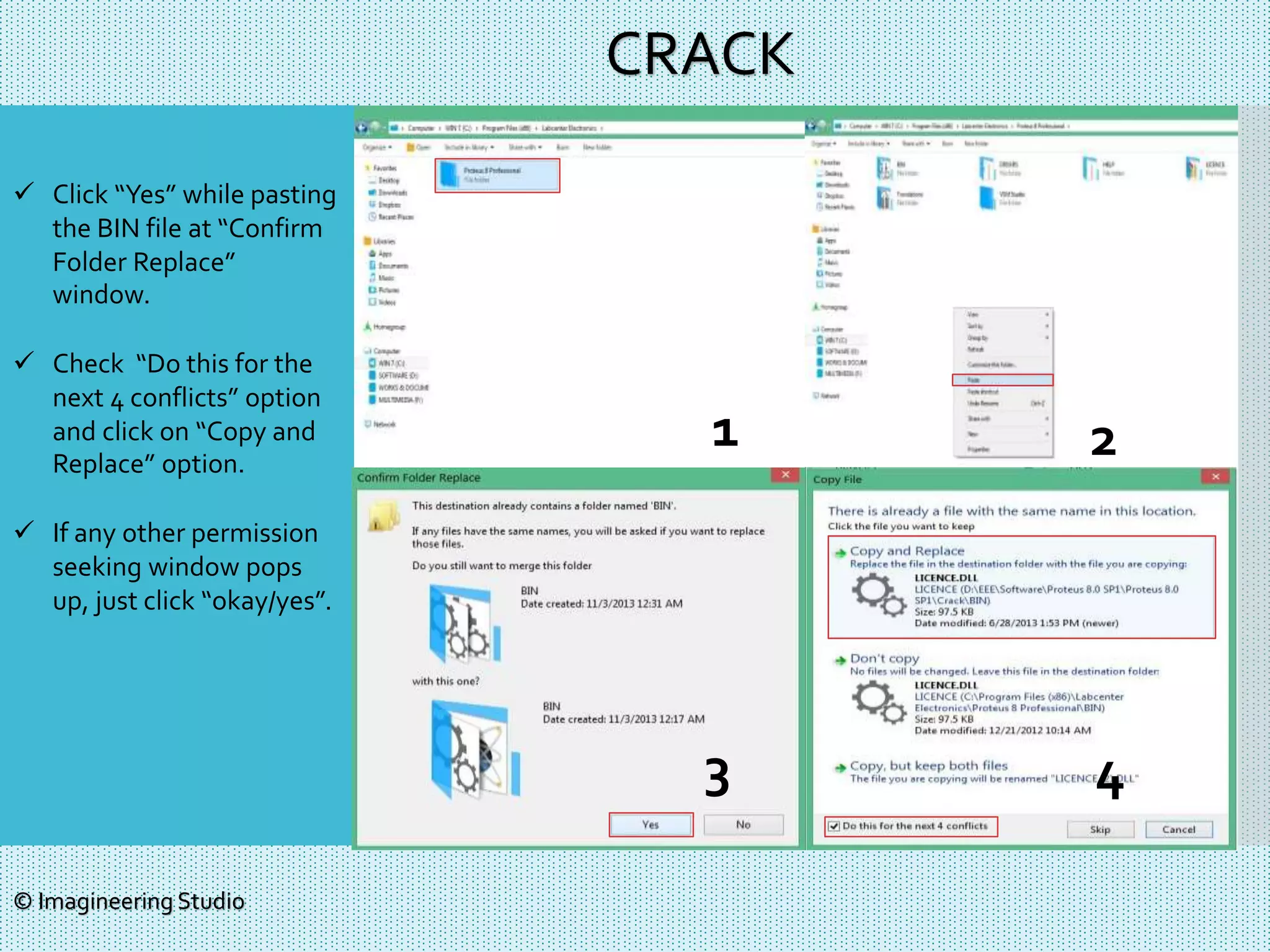
 Click “Yes” while pasting
the BIN file at “Confirm
Folder Replace”
window.
 Check “Do this for the
next 4 conflicts” option
and click on “Copy and
Replace” option.
 If any other permission
seeking window pops
up, just click “okay/yes”.
© Imagineering Studio
CRACK
1 2
3 4
 After being done with copy-
pasting BIN folder, now
come to the previous Crack
folder and Copy “MODELS”
folder.
 The location of pasting this
“MODELS” folder is hidden
by default.You will have to
make it visible to past
MODELS.
 Go to “Organize>Folder and
search option > Folder
Option >View”.
 Select “Show hidden files,
folder and drives” and click
“OK”, the close the window.
 Now if you go to your “C”
drive, you will see
“Program Data” folder.
© Imagineering Studio
CRACK
1 2
3 4
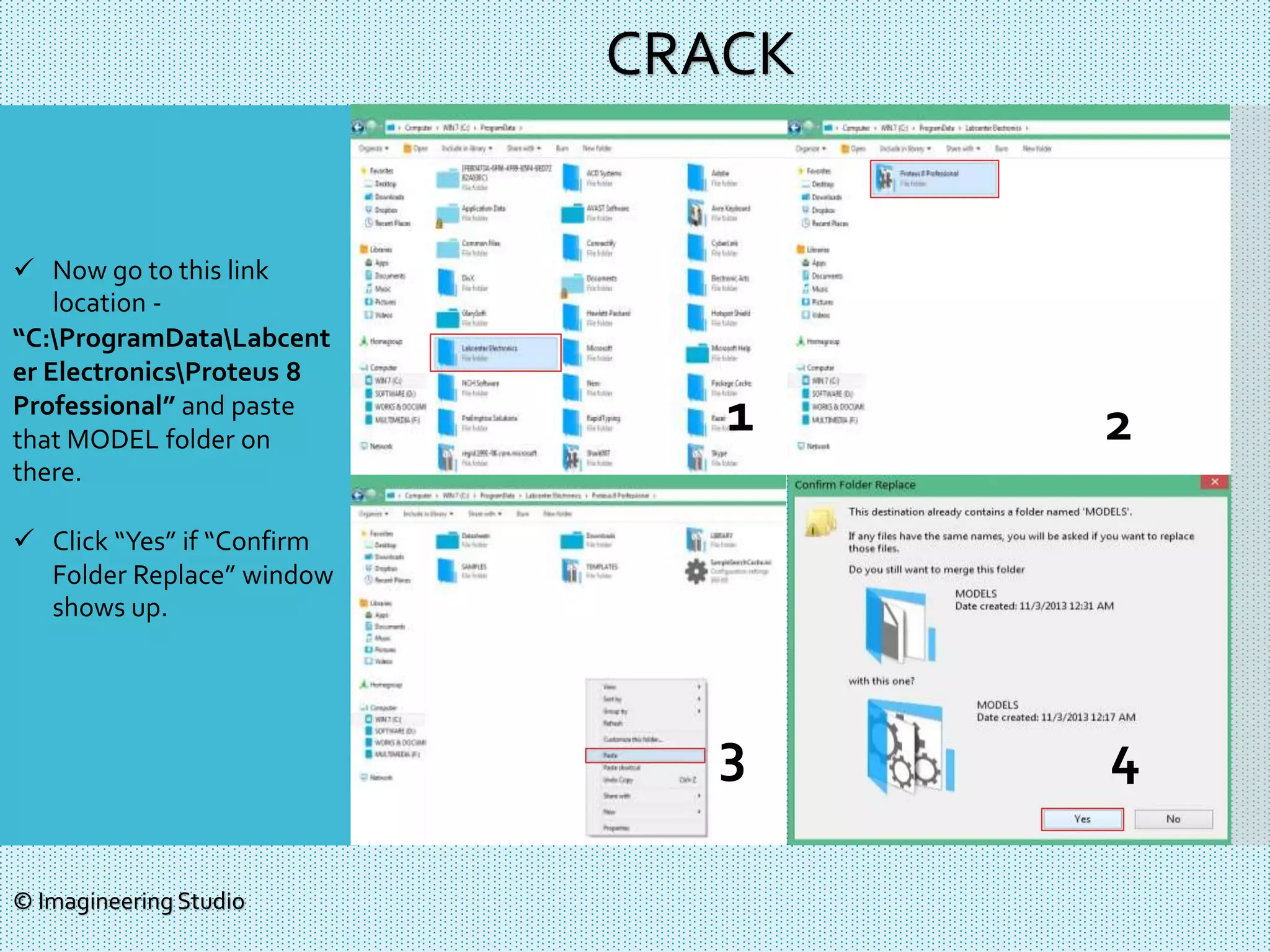
 Now go to this link
location -
“C:ProgramDataLabcent
er ElectronicsProteus 8
Professional” and paste
that MODEL folder on
there.
 Click “Yes” if “Confirm
Folder Replace” window
shows up.
© Imagineering Studio
CRACK
1 2
3 4
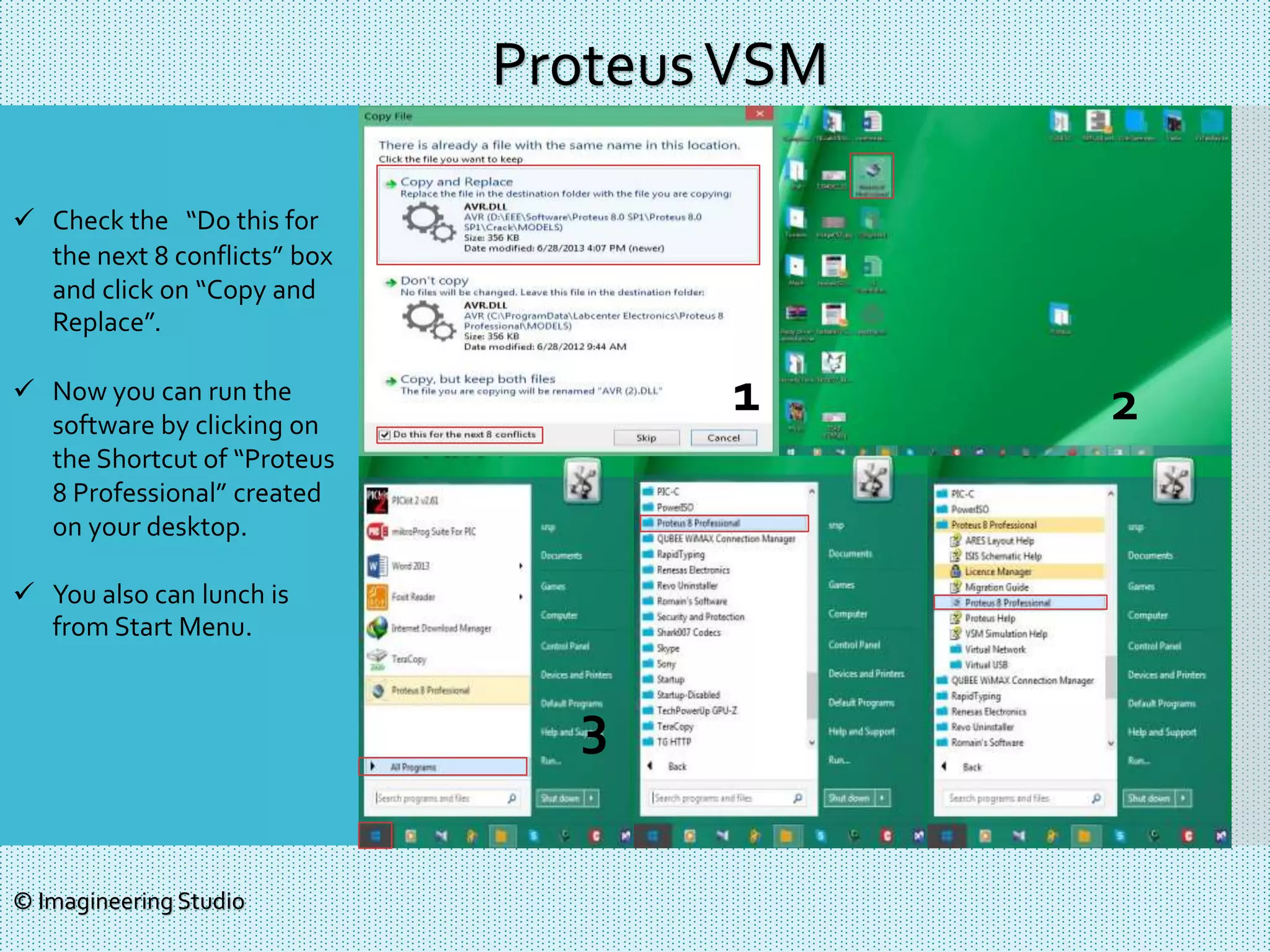
 Check the “Do this for
the next 8 conflicts” box
and click on “Copy and
Replace”.
 Now you can run the
software by clicking on
the Shortcut of “Proteus
8 Professional” created
on your desktop.
 You also can lunch is
from Start Menu.
ProteusVSM
© Imagineering Studio
1 2
3
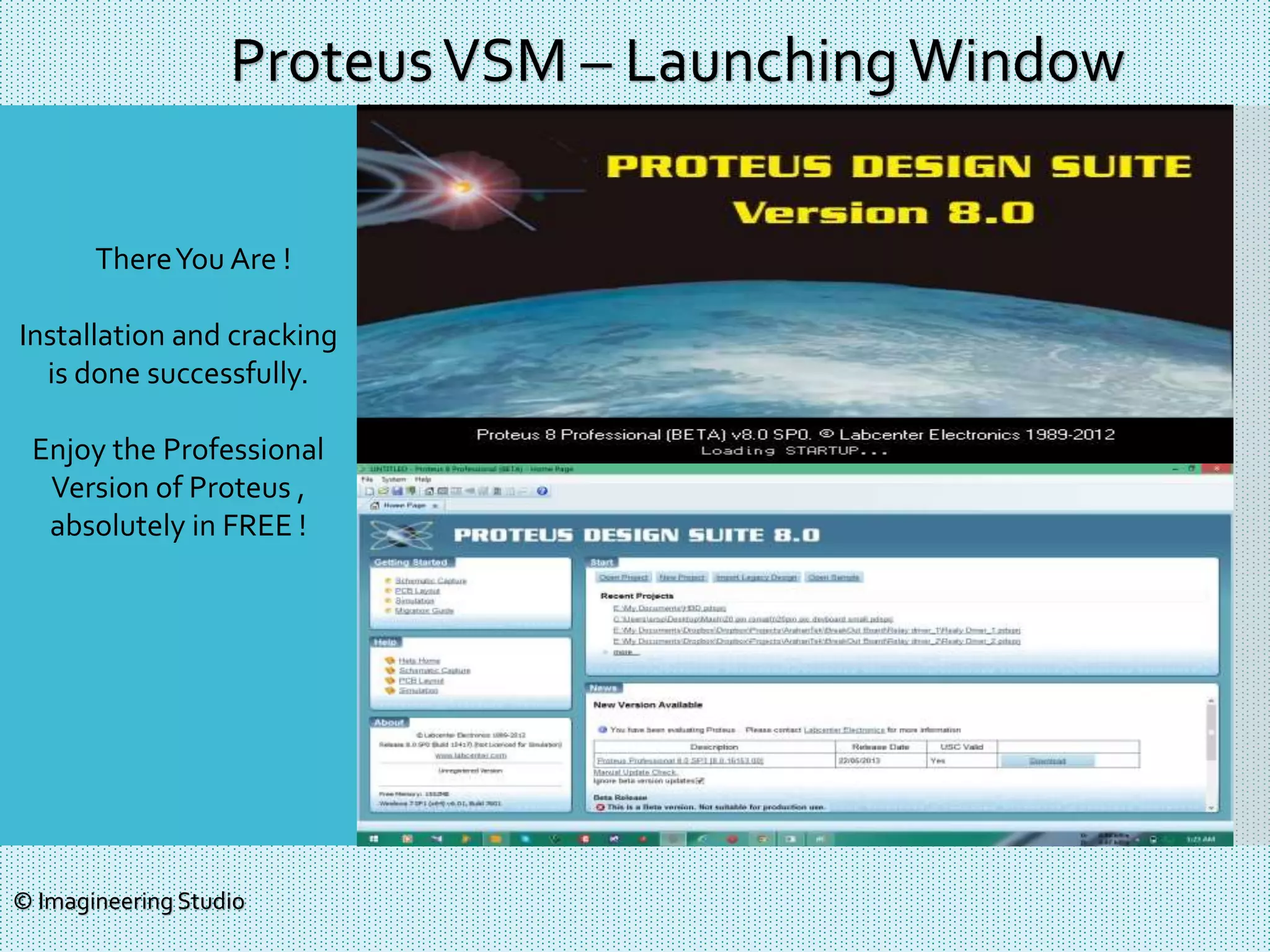
ThereYou Are !
Installation and cracking
is done successfully.
Enjoy the Professional
Version of Proteus ,
absolutely in FREE !
ProteusVSM – LaunchingWindow
© Imagineering Studio
Thanks !
© Imagineering Studio
www.arhantek.com
www.artekbay.com
Fb.com/arahantekbd
Fb.com/Artekbay
Fb.com/Imagineeringstdio

Proteus 8 installation

  • 1.
    AStepwise direction toinstall ProteusVSM Version 8 Windows 7 & 8© Imagineering Studio
  • 2.
     Click twiceon the installation exe file.  Click “Next”.  On the “License Agreement” page, check “I accept terms of this agreement” and click “Next”.  Select “Use locally installed license” and click next. INSTALLATION © Imagineering Studio 1 2 3 4
  • 3.
     Click Nextto find the License File.  After opening the “Labcenter License Manager” window, click on “Browse For Key file”.  Go to the specific folder where you have copied all installation folder before starting installation of Proteus. Find the “Crack” named folder there. © Imagineering Studio INSTALLATION 1 2 3 4
  • 4.
     Select the“license.lxk” file in the “Crack” folder and click to “Open” it.  ClickYes and then Click “Install”.  Close the License Manager window. © Imagineering Studio INSTALLATION 1 2 3 4
  • 5.
     If thelicense file is installed perfectly, you will see a window like 1.  If you have any previous version of Proteus, then check all these 3 boxes and click “Next”. If it is the first time of your Proteus using, leave all three box uncheck and Click “next”.  Click “Typical”.  Proteus Installation will be started now. After 2/3 minutes, the installation will be done. DO NOT RUN Proteus Now ! Click “Close”. © Imagineering Studio INSTALLATION 1 2 3 4
  • 6.
    CRACK  To crackthe installed software, to the “Crack” folder again.  There should be a folder named “BIN”.  Now, go to “C:Program Files Labcenter ElectronicsProteus 8 Professional” (32bit) Or, “C:Program Files (x86)Labcenter ElectronicsProteus 8 Professional” (64 bit)– and pasted that BIN folder there. © Imagineering Studio 1 2 3 4
  • 7.
     Click “Yes”while pasting the BIN file at “Confirm Folder Replace” window.  Check “Do this for the next 4 conflicts” option and click on “Copy and Replace” option.  If any other permission seeking window pops up, just click “okay/yes”. © Imagineering Studio CRACK 1 2 3 4
  • 8.
     After beingdone with copy- pasting BIN folder, now come to the previous Crack folder and Copy “MODELS” folder.  The location of pasting this “MODELS” folder is hidden by default.You will have to make it visible to past MODELS.  Go to “Organize>Folder and search option > Folder Option >View”.  Select “Show hidden files, folder and drives” and click “OK”, the close the window.  Now if you go to your “C” drive, you will see “Program Data” folder. © Imagineering Studio CRACK 1 2 3 4
  • 9.
     Now goto this link location - “C:ProgramDataLabcent er ElectronicsProteus 8 Professional” and paste that MODEL folder on there.  Click “Yes” if “Confirm Folder Replace” window shows up. © Imagineering Studio CRACK 1 2 3 4
  • 10.
     Check the“Do this for the next 8 conflicts” box and click on “Copy and Replace”.  Now you can run the software by clicking on the Shortcut of “Proteus 8 Professional” created on your desktop.  You also can lunch is from Start Menu. ProteusVSM © Imagineering Studio 1 2 3
  • 11.
    ThereYou Are ! Installationand cracking is done successfully. Enjoy the Professional Version of Proteus , absolutely in FREE ! ProteusVSM – LaunchingWindow © Imagineering Studio
  • 12.
    Thanks ! © ImagineeringStudio www.arhantek.com www.artekbay.com Fb.com/arahantekbd Fb.com/Artekbay Fb.com/Imagineeringstdio