One and only unique solution for sending unlimited
email, not just on inbox but also with very rapid speed.
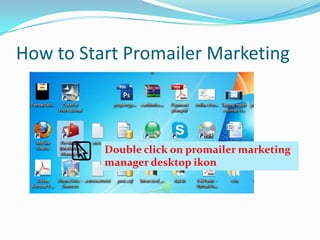
How to Start Promailer Marketing

Double click on promailer marketing
manager desktop ikon
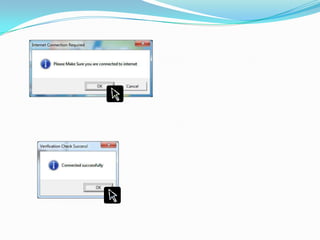
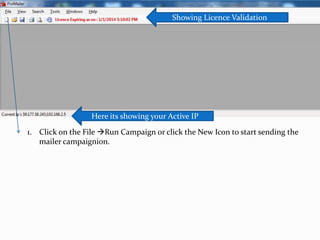
Showing Licence Validation

Here its showing your Active IP
1. Click on the File Run Campaign or click the New Icon to start sending the
mailer campaignion.
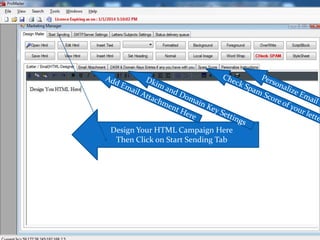
Design Your HTML Campaign Here
Then Click on Start Sending Tab
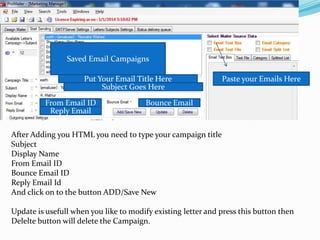
Saved Email Campaigns

Put Your Email Title Here
Subject Goes Here
From Email ID
Reply Email

Paste your Emails Here

Bounce Email

After Adding you HTML you need to type your campaign title
Subject
Display Name
From Email ID
Bounce Email ID
Reply Email Id
And click on to the button ADD/Save New
Update is usefull when you like to modify existing letter and press this button then
Delelte button will delete the Campaign.
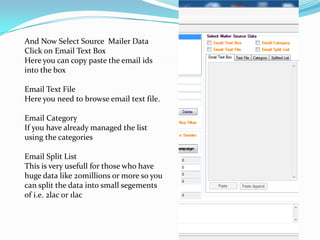
And Now Select Source Mailer Data
Click on Email Text Box
Here you can copy paste the email ids
into the box
Email Text File
Here you need to browse email text file.
Email Category
If you have already managed the list
using the categories
Email Split List
This is very usefull for those who have
huge data like 20millions or more so you
can split the data into small segements
of i.e. 2lac or 1lac
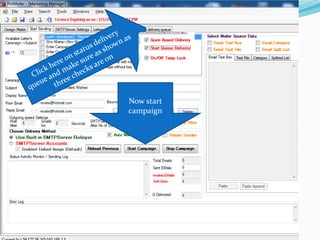
Now start
campaign

Promailer marketing manager

  • 1.
    One and onlyunique solution for sending unlimited email, not just on inbox but also with very rapid speed.
  • 2.
    How to StartPromailer Marketing Double click on promailer marketing manager desktop ikon
  • 4.
    Showing Licence Validation Hereits showing your Active IP 1. Click on the File Run Campaign or click the New Icon to start sending the mailer campaignion.
  • 5.
    Design Your HTMLCampaign Here Then Click on Start Sending Tab
  • 6.
    Saved Email Campaigns PutYour Email Title Here Subject Goes Here From Email ID Reply Email Paste your Emails Here Bounce Email After Adding you HTML you need to type your campaign title Subject Display Name From Email ID Bounce Email ID Reply Email Id And click on to the button ADD/Save New Update is usefull when you like to modify existing letter and press this button then Delelte button will delete the Campaign.
  • 7.
    And Now SelectSource Mailer Data Click on Email Text Box Here you can copy paste the email ids into the box Email Text File Here you need to browse email text file. Email Category If you have already managed the list using the categories Email Split List This is very usefull for those who have huge data like 20millions or more so you can split the data into small segements of i.e. 2lac or 1lac
  • 8.