Project Management
(Overview) Management
(Overview)
Task management made easy
What is a Project?
• A large scale change implementation
• Which organizes Tasks effectively and
• Is useful when Task count becomes impossible to
handle
What does it do?
Bundles Tasks into one big Project which goes
through many phases before reaching completion
Phases of a Project
• Milestone – Phase where you decide what should
be done and also take the necessary steps
• Task – Phase where a specific action is carried out
Phases have a flexible structure
• Milestones & Tasks are given equal importance
• A Task, although considered a sub-unit of
Milestone, can be declared independently
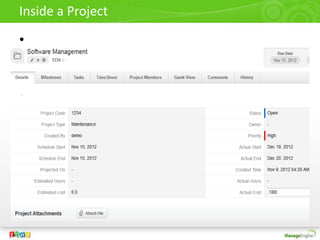
Inside a Project
•
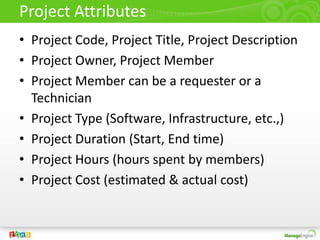
Project Attributes
• Project Code, Project Title, Project Description
• Project Owner, Project Member
• Project Member can be a requester or a
Technician
• Project Type (Software, Infrastructure, etc.,)
• Project Duration (Start, End time)
• Project Hours (hours spent by members)
• Project Cost (estimated & actual cost)
Project Structure
Project
Milestone
Sub-Unit
Task 1
Sub-Unit
Task 2
Independent
Tasks
Task Dependency: Project(s) allows for task dependency configuration;
that is, lets you decide the sequence in which the tasks should be
executed. This is accomplished with the following features:
Mark-Parent Task
Mark-Child Task
Task Dependency Map
Mark-Parent Task: Appears while hovering over a Task in the Task Dependency Map -
allows you to configure Parent to the highlighted task.
Mark-Child Task: Appears while hovering over a Task in the Task Dependency Map -
allows you to configure Child to the highlighted Task.
Gantt Chart
Graphical representation of Project(s), its
members, Milestones and Tasks
Presents a clear picture of Task distribution
Based on Project’s progress lets you change/
reassign Milestones, Tasks and everything
related to the Project
Provides filters to generate Milestone-based,
Task-based or Member-based charts
In short, a quick access to managing/editing
Project(s)
Gantt Chart View
Resource management Vs. Time management (based on Tasks listed)
Gantt chart is not merely a peek into project(s) management but an entity that lets you
decide the course of actions concerning project(s) depending on: the resources available,
time available/elapsed, task’s progress at the time the chart gets generated.
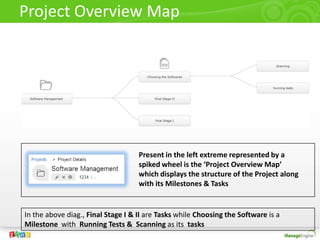
Project Overview Map
In the above diag., Final Stage I & II are Tasks while Choosing the Software is a
Milestone with Running Tests & Scanning as its tasks
Present in the left extreme represented by a
spiked wheel is the ‘Project Overview Map’
which displays the structure of the Project along
with its Milestones & Tasks
• Effective Resource Management (via Gantt
Chart)
• Efficient Time Management (via Worklogs &
Timesheet)
• Minimal Cost Expenditure (by comparing the
Project’s budget with Estimated Cost)
• Uncomplicated design that streamlines
project creation & tracking
• Task Dependency Map for efficient handling
of Tasks
Thank you! for watching!

ServiceDesk Plus Project Management

  • 1.
  • 2.
    What is aProject? • A large scale change implementation • Which organizes Tasks effectively and • Is useful when Task count becomes impossible to handle What does it do? Bundles Tasks into one big Project which goes through many phases before reaching completion
  • 3.
    Phases of aProject • Milestone – Phase where you decide what should be done and also take the necessary steps • Task – Phase where a specific action is carried out Phases have a flexible structure • Milestones & Tasks are given equal importance • A Task, although considered a sub-unit of Milestone, can be declared independently
  • 4.
  • 5.
    Project Attributes • ProjectCode, Project Title, Project Description • Project Owner, Project Member • Project Member can be a requester or a Technician • Project Type (Software, Infrastructure, etc.,) • Project Duration (Start, End time) • Project Hours (hours spent by members) • Project Cost (estimated & actual cost)
  • 6.
    Project Structure Project Milestone Sub-Unit Task 1 Sub-Unit Task2 Independent Tasks Task Dependency: Project(s) allows for task dependency configuration; that is, lets you decide the sequence in which the tasks should be executed. This is accomplished with the following features: Mark-Parent Task Mark-Child Task
  • 7.
    Task Dependency Map Mark-ParentTask: Appears while hovering over a Task in the Task Dependency Map - allows you to configure Parent to the highlighted task. Mark-Child Task: Appears while hovering over a Task in the Task Dependency Map - allows you to configure Child to the highlighted Task.
  • 8.
    Gantt Chart Graphical representationof Project(s), its members, Milestones and Tasks Presents a clear picture of Task distribution Based on Project’s progress lets you change/ reassign Milestones, Tasks and everything related to the Project Provides filters to generate Milestone-based, Task-based or Member-based charts In short, a quick access to managing/editing Project(s)
  • 9.
    Gantt Chart View Resourcemanagement Vs. Time management (based on Tasks listed) Gantt chart is not merely a peek into project(s) management but an entity that lets you decide the course of actions concerning project(s) depending on: the resources available, time available/elapsed, task’s progress at the time the chart gets generated.
  • 10.
    Project Overview Map Inthe above diag., Final Stage I & II are Tasks while Choosing the Software is a Milestone with Running Tests & Scanning as its tasks Present in the left extreme represented by a spiked wheel is the ‘Project Overview Map’ which displays the structure of the Project along with its Milestones & Tasks
  • 11.
    • Effective ResourceManagement (via Gantt Chart) • Efficient Time Management (via Worklogs & Timesheet) • Minimal Cost Expenditure (by comparing the Project’s budget with Estimated Cost) • Uncomplicated design that streamlines project creation & tracking • Task Dependency Map for efficient handling of Tasks
  • 12.
    Thank you! forwatching!