Mobile application development has evolved a lot.
First, there were native mobile applications
developed in Objective C & Swift for IOS and Java &
Kotlin for android. Then came the hybrid apps which
are mobile apps developed using web technologies
like HTML, CSS, & JavaScript, but two years back a
new kind of app start immerging called Progressive
web apps(PWA), it blurs the line between native &
mobile web.
Native apps had very good UI, are very fast & fluent,
do things like sending push notifications, work
offline, look and feel like an app (as Apple and
Google have imagined them), get installed on your
device, load on the home screen, and so on. By
comparison, Historically Mobile Web Apps are
accessed in a mobile browser, doesn't have good UI,
they are very slow & unresponsive, no push
notification support & doesn't work without internet.
Progressive Web Apps fix that with new Web APIs,
new design concepts, and new buzzwords.
PWA characteristics
Progressive Web App uses modern web capabilities
to deliver a native app like user experience, some of
its characteristics are:
1. Progressive - Work for every user, regardless of
browser, if your browser doesn't support PWA, then
it will work like a normal web app.
2. Responsive - Fit any form factor like desktop,
mobile, tablet or any other device.
3. Work offline - A Service Worker can cache the
pages so it can work offline also
4. Native App like - Feels like a native app to the user
with app-style interactions and navigation.
5. Auto Update - Always up-to-date, Service Worker
update it in the background.
Blog
Progressive Web Apps –The Future of Apps
by Yogesh Chand Singhal, Accrete Solutions
6. Safe - PWA can only be served via HTTPS to prevent
snooping and ensure content hasn’t been tampered
with.
7. Discoverable - Are identifiable as “applications”
thanks to W3C manifests & search engines can also find
them.
8. Re-engage able - Like Native apps, it supports Push
Notifications making user reengagement easy.
9. Installable - They appear on home screen like native
installable apps without the hassle of an app store
10. Linkable - Easily shared via a URL and do not require
complex installation from an app store or for developer
does not require submission to an app store.
11. Platform Independent - Since these are web-based
apps, you do not need to develop multiple applications
for the various platform, making developers life easy as
they need to develop and maintain only one code for
all platform. It also takes away the need for separate
mobile web development.
PWA is officially Supported by Google on Android,
Recently Google & Microsoft both announces the PWA
support for the desktop by mid-2018. It’s estimated
that by 2020, 70% of the mobile apps will be PWA and
only very high-performance app will be native. Some of
the best examples of PWA is Flipboard, Twitter, Ali
Express, Google+ etc. Almost all major companies are
now moving towards PWA. In fact, you can convert any
website into PWA with few modifications, by adding
support for App Shell, Service worker, App Manifests
and few more things, but using the newer web
technologies like Angular, React, Node.js will result in
much better user experience. Ionic Framework used for
hybrid app development is based on Angular & support
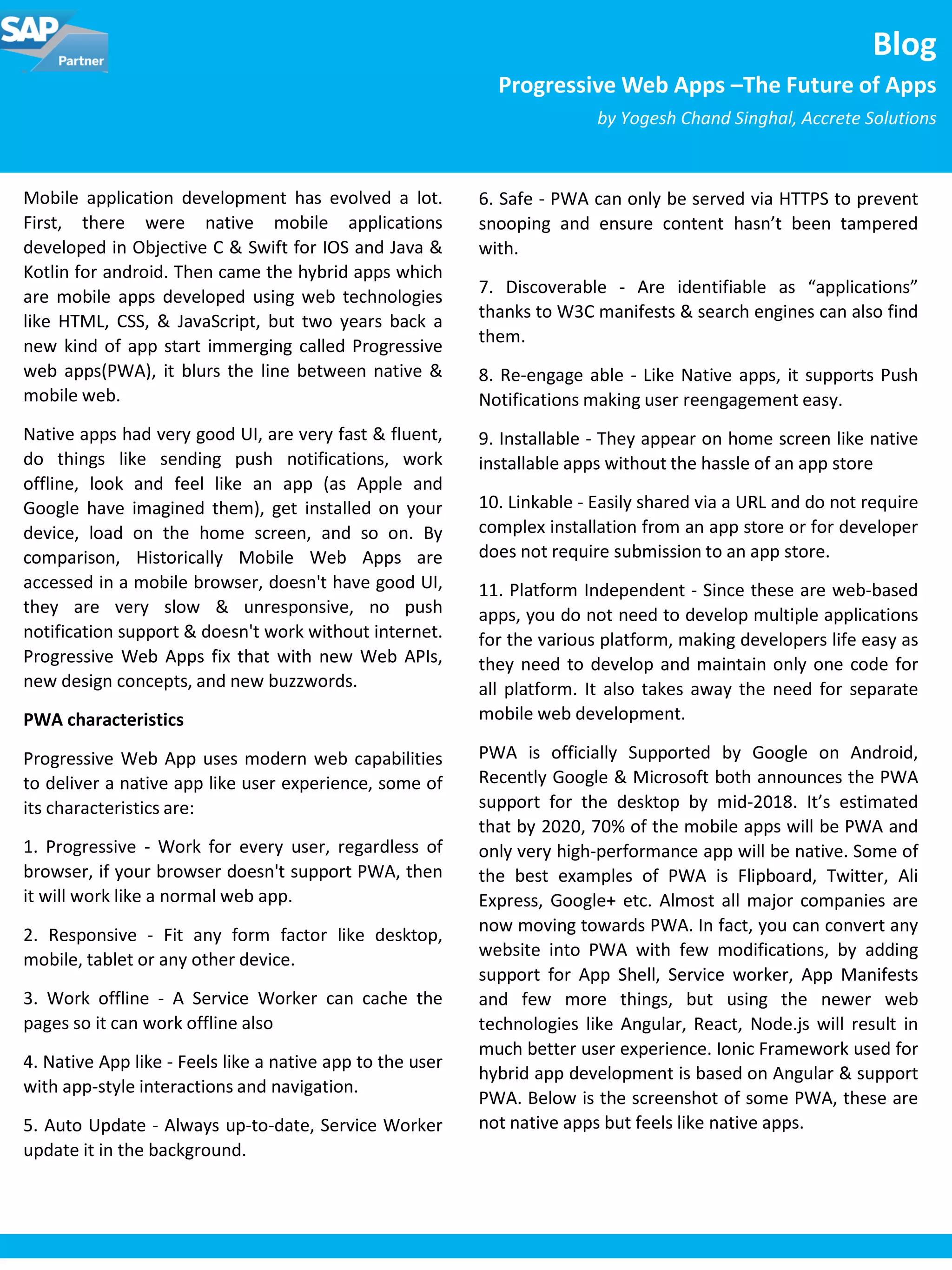
PWA. Below is the screenshot of some PWA, these are
not native apps but feels like native apps.
For all enquiries please contact at : corp@accretesol.com , Tel : +1(877)-849-5838
Visit us at : www.accrete-solutions.com
USA
Head Office
3350 Scott Blvd, Bldg 34
Santa Clara, CA 95054
South Africa
609 Lanseria Corporate Estate,
Falcon Lane, Lanseria,
Gauteng
Chile
Galvarino Gallardo 1638,
Providencia,
Santiago
India
Development Centre
102A, HARTRON, Electronics City,
Gurgaon
Copyright © Accrete Solutions 2018. All rights reserved.
web page or user interaction. They power offline
functionality, push notifications, background content
updating, content caching, and a whole lot more. Service
Worker is a worker script that works behind the scenes,
independent of your app, and runs in response to events
like network requests, push notifications, connectivity
changes, and more. Service Workers are just a JavaScript
file like any other, running in the background and
triggered via events, and it’s up to you to write code to
handle caching, push notifications, content fetching, etc.
3.App Manifest - The web app manifest is a W3C
specification defining a JSON-based manifest to provide
developers a centralized place to put metadata
associated with a web application including the name of
the web application, links to the web app icons or image
objects, preferred URL to launch or open the web app,
web app configuration data for a number of
characteristics, declaration for default orientation of the
web app, enables to set the display mode e.g. full
screen. By setting and manipulating the metadata for
the web manifest file, developers enable user agents to
create seamless native-like mobile experiences through
the Progressive Web App, it also enables native install
banner, just like the native app banners we’re used to.
4.Secure Host - The final step is to deploy our
Progressive web app to a server that supports HTTPS.
PWA can only be served via HTTPS to prevent snooping
and ensure content hasn’t been tampered with.
PWA Architecture
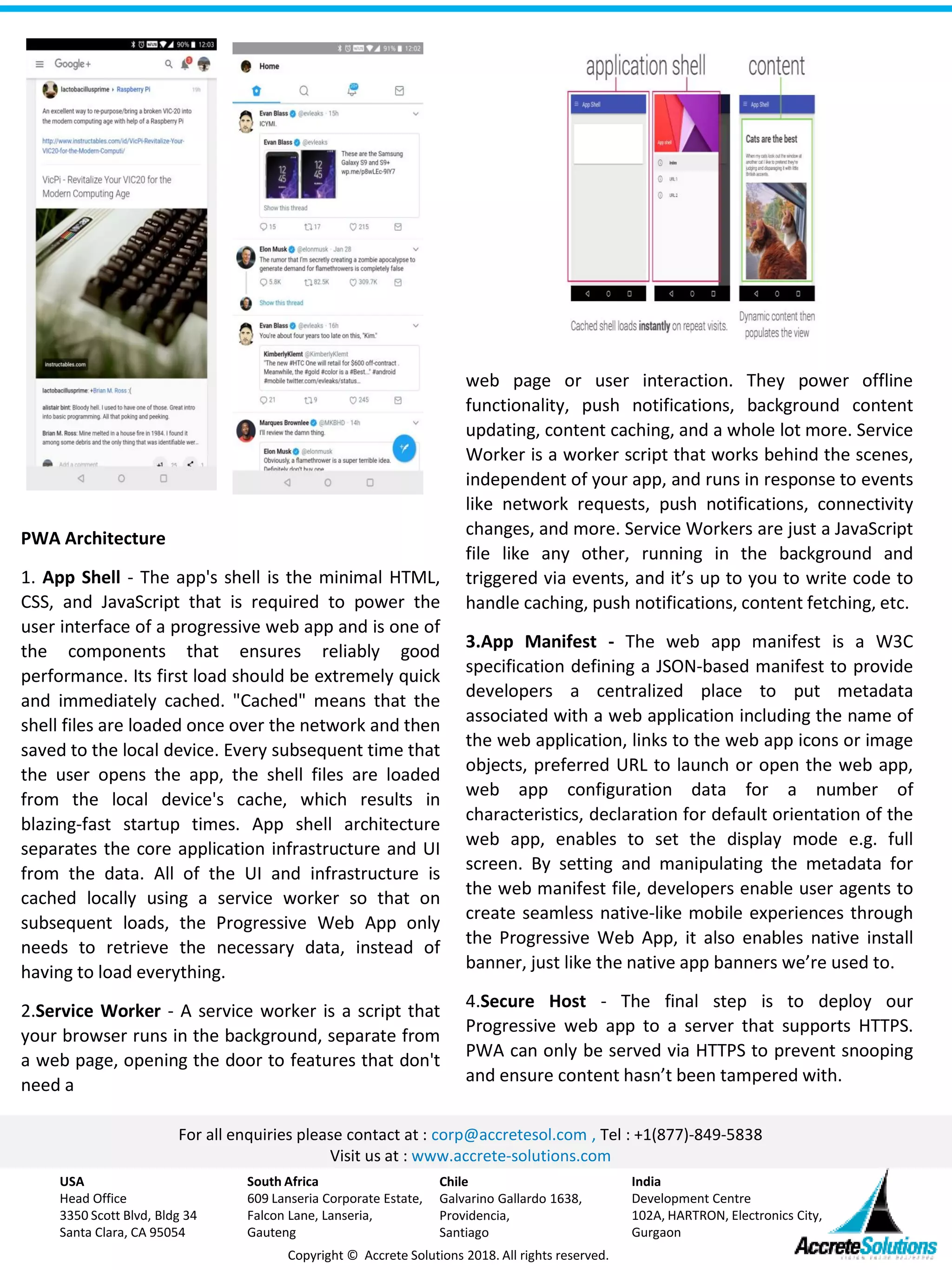
1. App Shell - The app's shell is the minimal HTML,
CSS, and JavaScript that is required to power the
user interface of a progressive web app and is one of
the components that ensures reliably good
performance. Its first load should be extremely quick
and immediately cached. "Cached" means that the
shell files are loaded once over the network and then
saved to the local device. Every subsequent time that
the user opens the app, the shell files are loaded
from the local device's cache, which results in
blazing-fast startup times. App shell architecture
separates the core application infrastructure and UI
from the data. All of the UI and infrastructure is
cached locally using a service worker so that on
subsequent loads, the Progressive Web App only
needs to retrieve the necessary data, instead of
having to load everything.
2.Service Worker - A service worker is a script that
your browser runs in the background, separate from
a web page, opening the door to features that don't
need a

Progressive Web Apps –The Future of Apps

  • 1.
    Mobile application developmenthas evolved a lot. First, there were native mobile applications developed in Objective C & Swift for IOS and Java & Kotlin for android. Then came the hybrid apps which are mobile apps developed using web technologies like HTML, CSS, & JavaScript, but two years back a new kind of app start immerging called Progressive web apps(PWA), it blurs the line between native & mobile web. Native apps had very good UI, are very fast & fluent, do things like sending push notifications, work offline, look and feel like an app (as Apple and Google have imagined them), get installed on your device, load on the home screen, and so on. By comparison, Historically Mobile Web Apps are accessed in a mobile browser, doesn't have good UI, they are very slow & unresponsive, no push notification support & doesn't work without internet. Progressive Web Apps fix that with new Web APIs, new design concepts, and new buzzwords. PWA characteristics Progressive Web App uses modern web capabilities to deliver a native app like user experience, some of its characteristics are: 1. Progressive - Work for every user, regardless of browser, if your browser doesn't support PWA, then it will work like a normal web app. 2. Responsive - Fit any form factor like desktop, mobile, tablet or any other device. 3. Work offline - A Service Worker can cache the pages so it can work offline also 4. Native App like - Feels like a native app to the user with app-style interactions and navigation. 5. Auto Update - Always up-to-date, Service Worker update it in the background. Blog Progressive Web Apps –The Future of Apps by Yogesh Chand Singhal, Accrete Solutions 6. Safe - PWA can only be served via HTTPS to prevent snooping and ensure content hasn’t been tampered with. 7. Discoverable - Are identifiable as “applications” thanks to W3C manifests & search engines can also find them. 8. Re-engage able - Like Native apps, it supports Push Notifications making user reengagement easy. 9. Installable - They appear on home screen like native installable apps without the hassle of an app store 10. Linkable - Easily shared via a URL and do not require complex installation from an app store or for developer does not require submission to an app store. 11. Platform Independent - Since these are web-based apps, you do not need to develop multiple applications for the various platform, making developers life easy as they need to develop and maintain only one code for all platform. It also takes away the need for separate mobile web development. PWA is officially Supported by Google on Android, Recently Google & Microsoft both announces the PWA support for the desktop by mid-2018. It’s estimated that by 2020, 70% of the mobile apps will be PWA and only very high-performance app will be native. Some of the best examples of PWA is Flipboard, Twitter, Ali Express, Google+ etc. Almost all major companies are now moving towards PWA. In fact, you can convert any website into PWA with few modifications, by adding support for App Shell, Service worker, App Manifests and few more things, but using the newer web technologies like Angular, React, Node.js will result in much better user experience. Ionic Framework used for hybrid app development is based on Angular & support PWA. Below is the screenshot of some PWA, these are not native apps but feels like native apps.
  • 2.
    For all enquiriesplease contact at : corp@accretesol.com , Tel : +1(877)-849-5838 Visit us at : www.accrete-solutions.com USA Head Office 3350 Scott Blvd, Bldg 34 Santa Clara, CA 95054 South Africa 609 Lanseria Corporate Estate, Falcon Lane, Lanseria, Gauteng Chile Galvarino Gallardo 1638, Providencia, Santiago India Development Centre 102A, HARTRON, Electronics City, Gurgaon Copyright © Accrete Solutions 2018. All rights reserved. web page or user interaction. They power offline functionality, push notifications, background content updating, content caching, and a whole lot more. Service Worker is a worker script that works behind the scenes, independent of your app, and runs in response to events like network requests, push notifications, connectivity changes, and more. Service Workers are just a JavaScript file like any other, running in the background and triggered via events, and it’s up to you to write code to handle caching, push notifications, content fetching, etc. 3.App Manifest - The web app manifest is a W3C specification defining a JSON-based manifest to provide developers a centralized place to put metadata associated with a web application including the name of the web application, links to the web app icons or image objects, preferred URL to launch or open the web app, web app configuration data for a number of characteristics, declaration for default orientation of the web app, enables to set the display mode e.g. full screen. By setting and manipulating the metadata for the web manifest file, developers enable user agents to create seamless native-like mobile experiences through the Progressive Web App, it also enables native install banner, just like the native app banners we’re used to. 4.Secure Host - The final step is to deploy our Progressive web app to a server that supports HTTPS. PWA can only be served via HTTPS to prevent snooping and ensure content hasn’t been tampered with. PWA Architecture 1. App Shell - The app's shell is the minimal HTML, CSS, and JavaScript that is required to power the user interface of a progressive web app and is one of the components that ensures reliably good performance. Its first load should be extremely quick and immediately cached. "Cached" means that the shell files are loaded once over the network and then saved to the local device. Every subsequent time that the user opens the app, the shell files are loaded from the local device's cache, which results in blazing-fast startup times. App shell architecture separates the core application infrastructure and UI from the data. All of the UI and infrastructure is cached locally using a service worker so that on subsequent loads, the Progressive Web App only needs to retrieve the necessary data, instead of having to load everything. 2.Service Worker - A service worker is a script that your browser runs in the background, separate from a web page, opening the door to features that don't need a