

Progressive Web Apps:
Bridging The Gap
Nitheesh T Ganesh
iamntg@gmail.com
Contents
 Overview of PWA
 Native Apps Vs PWA
 PWA Baseline Implementation
 Case Studies
 Lacking Features
 PWA - Wish lists
 Conclusion
Overview of PWA
Overview
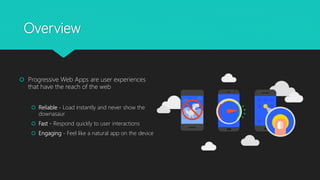
 Progressive Web Apps are user experiences
that have the reach of the web
 Reliable - Load instantly and never show the
downasaur
 Fast - Respond quickly to user interactions
 Engaging - Feel like a natural app on the device
Overview
Native Apps Vs PWA
Native Apps Vs PWA
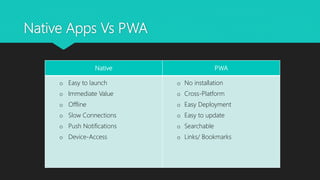
Native PWA
o Easy to launch
o Immediate Value
o Offline
o Slow Connections
o Push Notifications
o Device-Access
o No installation
o Cross-Platform
o Easy Deployment
o Easy to update
o Searchable
o Links/ Bookmarks
Native Apps Vs PWA
 Native apps face two gigantic hurdles trying to compete with PWAs:
 Need to build only one app that works for android, iOS and web.
 App install friction is suffocating native apps.
Native Apps Vs PWA
90%
72%
60%
45%
40%
25%
0%
10%
20%
30%
40%
50%
60%
70%
80%
90%
100%
USERS
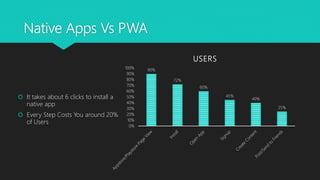
 It takes about 6 clicks to install a
native app
 Every Step Costs You around 20%
of Users
Native Apps Vs PWA
 Why Native Apps are a Gamble?
 60% of apps in the Google Play/App store have never been downloaded.
 The average user downloads less than 3 apps per month.
 Half of US smartphone users download zero apps per month.
 94% of app revenue comes from 1% of publishers, and users spend 80% of their time using
just 5 apps.
 80% of users who download an app fail to become active users.
PWA Baseline Implementation
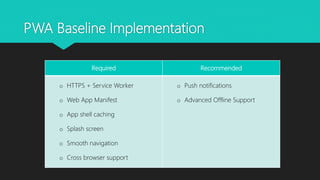
Required Recommended
o HTTPS + Service Worker
o Web App Manifest
o App shell caching
o Splash screen
o Smooth navigation
o Cross browser support
o Push notifications
o Advanced Offline Support
PWA Baseline Implementation
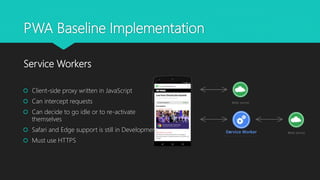
 Client-side proxy written in JavaScript
 Can intercept requests
 Can decide to go idle or to re-activate
themselves
 Safari and Edge support is still in Development
 Must use HTTPS
Service Workers
PWA Baseline Implementation
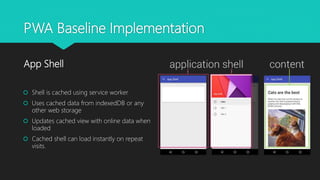
 Shell is cached using service worker
 Uses cached data from indexedDB or any
other web storage
 Updates cached view with online data when
loaded
 Cached shell can load instantly on repeat
visits.
App Shell
PWA Baseline Implementation
 Rich native presence on user’s home screen
 Launch app in full-screen mode
 Control the screen orientation for optimal
viewing
 Define “splash screen” launch, theme colour
for site
Web App Manifests {
"short_name": "My Cool App",
"name": "My Totally Cool Application",
"icons":[
{"src": "launcher-icon-3x.png",
"sizes": "192x192",
"type": "image/png"},
{"src": "launcher-splash.png",
"sizes": "512x512",
"type": "image/png"}],
"start_url": "index.html",
"display": "standalone",
"background_color" : "#aeaeae",
"theme_color" : "#aeaeae",
"orientation" : "landscape"
}
PWA Baseline Implementation
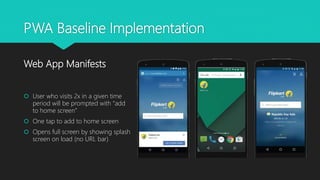
 User who visits 2x in a given time
period will be prompted with “add
to home screen”
 One tap to add to home screen
 Opens full screen by showing splash
screen on load (no URL bar)
Web App Manifests
PWA Baseline Implementation
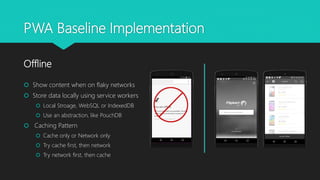
 Show content when on flaky networks
 Store data locally using service workers
 Local Stroage, WebSQL or IndexedDB
 Use an abstraction, like PouchDB
 Caching Pattern
 Cache only or Network only
 Try cache first, then network
 Try network first, then cache
Offline
PWA Baseline Implementation
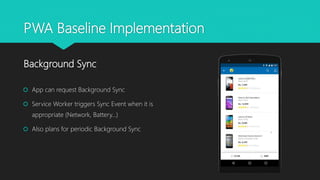
 App can request Background Sync
 Service Worker triggers Sync Event when it is
appropriate (Network, Battery…)
 Also plans for periodic Background Sync
Background Sync
PWA Baseline Implementation
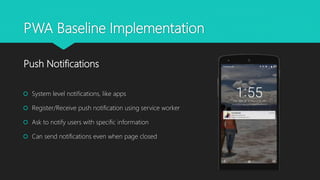
 System level notifications, like apps
 Register/Receive push notification using service worker
 Ask to notify users with specific information
 Can send notifications even when page closed
Push Notifications
PWA Baseline Implementation
 For first-time visitors, load pages in <10s on 3G connections
 For repeat visitors, instant loading of page in <500 milliseconds
 Always scrolling at 60 frames/second
 Content shouldn’t jump as images are loaded
Instant loading and smooth navigation
Case Studies
Case Studies
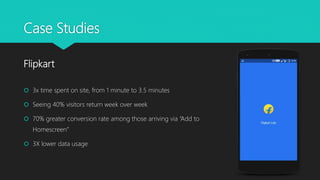
 3x time spent on site, from 1 minute to 3.5 minutes
 Seeing 40% visitors return week over week
 70% greater conversion rate among those arriving via “Add to
Homescreen”
 3X lower data usage
Flipkart
Case Studies
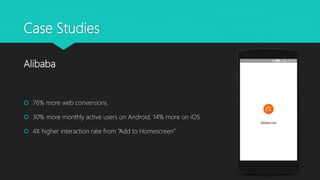
 76% more web conversions
 30% more monthly active users on Android, 14% more on iOS
 4X higher interaction rate from “Add to Homescreen”
Alibaba
Case Studies
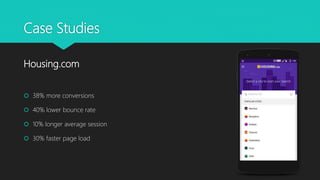
 38% more conversions
 40% lower bounce rate
 10% longer average session
 30% faster page load
Housing.com
Lacking Features
Lacking Features
 Contacts, calendar and browser bookmarks access (lack of access to these could be viewed
as a feature by privacy-conscious users)
 Alarms
 Telephony features - intercept SMS or calls, send SMS/MMS, get the user's phone number,
read voice mail, make phone calls without the Dialler dialog
 Low-level access to some hardware features and sensors: flashlight, atmospheric pressure
sensor
 System access: Task management, modifying system settings, logs
PWA - Wish lists
PWA - Wishlists
 Automatic grant of permissions for Push notification when added to home screen.
 Events to instrument uninstalls
 Deduping between native and web app from the same publisher (Push notification)
 Deep linking into the installed web app
 Some equivalent of Device ID
 More top browsers including progressive features
 Discoverability on the store as well on the user’s phone
Conclusion
Conclusion
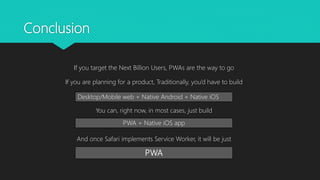
If you target the Next Billion Users, PWAs are the way to go
If you are planning for a product, Traditionally, you’d have to build
You can, right now, in most cases, just build
And once Safari implements Service Worker, it will be just
Desktop/Mobile web + Native Android + Native iOS
PWA + Native iOS app
PWA
Thank You!

Progressive Web Apps

  • 1.
    Progressive Web Apps: BridgingThe Gap Nitheesh T Ganesh iamntg@gmail.com
  • 2.
    Contents  Overview ofPWA  Native Apps Vs PWA  PWA Baseline Implementation  Case Studies  Lacking Features  PWA - Wish lists  Conclusion
  • 3.
  • 4.
    Overview  Progressive WebApps are user experiences that have the reach of the web  Reliable - Load instantly and never show the downasaur  Fast - Respond quickly to user interactions  Engaging - Feel like a natural app on the device
  • 5.
  • 6.
  • 7.
    Native Apps VsPWA Native PWA o Easy to launch o Immediate Value o Offline o Slow Connections o Push Notifications o Device-Access o No installation o Cross-Platform o Easy Deployment o Easy to update o Searchable o Links/ Bookmarks
  • 8.
    Native Apps VsPWA  Native apps face two gigantic hurdles trying to compete with PWAs:  Need to build only one app that works for android, iOS and web.  App install friction is suffocating native apps.
  • 9.
    Native Apps VsPWA 90% 72% 60% 45% 40% 25% 0% 10% 20% 30% 40% 50% 60% 70% 80% 90% 100% USERS  It takes about 6 clicks to install a native app  Every Step Costs You around 20% of Users
  • 10.
    Native Apps VsPWA  Why Native Apps are a Gamble?  60% of apps in the Google Play/App store have never been downloaded.  The average user downloads less than 3 apps per month.  Half of US smartphone users download zero apps per month.  94% of app revenue comes from 1% of publishers, and users spend 80% of their time using just 5 apps.  80% of users who download an app fail to become active users.
  • 11.
  • 12.
    PWA Baseline Implementation RequiredRecommended o HTTPS + Service Worker o Web App Manifest o App shell caching o Splash screen o Smooth navigation o Cross browser support o Push notifications o Advanced Offline Support
  • 13.
    PWA Baseline Implementation Client-side proxy written in JavaScript  Can intercept requests  Can decide to go idle or to re-activate themselves  Safari and Edge support is still in Development  Must use HTTPS Service Workers
  • 14.
    PWA Baseline Implementation Shell is cached using service worker  Uses cached data from indexedDB or any other web storage  Updates cached view with online data when loaded  Cached shell can load instantly on repeat visits. App Shell
  • 15.
    PWA Baseline Implementation Rich native presence on user’s home screen  Launch app in full-screen mode  Control the screen orientation for optimal viewing  Define “splash screen” launch, theme colour for site Web App Manifests { "short_name": "My Cool App", "name": "My Totally Cool Application", "icons":[ {"src": "launcher-icon-3x.png", "sizes": "192x192", "type": "image/png"}, {"src": "launcher-splash.png", "sizes": "512x512", "type": "image/png"}], "start_url": "index.html", "display": "standalone", "background_color" : "#aeaeae", "theme_color" : "#aeaeae", "orientation" : "landscape" }
  • 16.
    PWA Baseline Implementation User who visits 2x in a given time period will be prompted with “add to home screen”  One tap to add to home screen  Opens full screen by showing splash screen on load (no URL bar) Web App Manifests
  • 17.
    PWA Baseline Implementation Show content when on flaky networks  Store data locally using service workers  Local Stroage, WebSQL or IndexedDB  Use an abstraction, like PouchDB  Caching Pattern  Cache only or Network only  Try cache first, then network  Try network first, then cache Offline
  • 18.
    PWA Baseline Implementation App can request Background Sync  Service Worker triggers Sync Event when it is appropriate (Network, Battery…)  Also plans for periodic Background Sync Background Sync
  • 19.
    PWA Baseline Implementation System level notifications, like apps  Register/Receive push notification using service worker  Ask to notify users with specific information  Can send notifications even when page closed Push Notifications
  • 20.
    PWA Baseline Implementation For first-time visitors, load pages in <10s on 3G connections  For repeat visitors, instant loading of page in <500 milliseconds  Always scrolling at 60 frames/second  Content shouldn’t jump as images are loaded Instant loading and smooth navigation
  • 21.
  • 22.
    Case Studies  3xtime spent on site, from 1 minute to 3.5 minutes  Seeing 40% visitors return week over week  70% greater conversion rate among those arriving via “Add to Homescreen”  3X lower data usage Flipkart
  • 23.
    Case Studies  76%more web conversions  30% more monthly active users on Android, 14% more on iOS  4X higher interaction rate from “Add to Homescreen” Alibaba
  • 24.
    Case Studies  38%more conversions  40% lower bounce rate  10% longer average session  30% faster page load Housing.com
  • 25.
  • 26.
    Lacking Features  Contacts,calendar and browser bookmarks access (lack of access to these could be viewed as a feature by privacy-conscious users)  Alarms  Telephony features - intercept SMS or calls, send SMS/MMS, get the user's phone number, read voice mail, make phone calls without the Dialler dialog  Low-level access to some hardware features and sensors: flashlight, atmospheric pressure sensor  System access: Task management, modifying system settings, logs
  • 27.
  • 28.
    PWA - Wishlists Automatic grant of permissions for Push notification when added to home screen.  Events to instrument uninstalls  Deduping between native and web app from the same publisher (Push notification)  Deep linking into the installed web app  Some equivalent of Device ID  More top browsers including progressive features  Discoverability on the store as well on the user’s phone
  • 29.
  • 30.
    Conclusion If you targetthe Next Billion Users, PWAs are the way to go If you are planning for a product, Traditionally, you’d have to build You can, right now, in most cases, just build And once Safari implements Service Worker, it will be just Desktop/Mobile web + Native Android + Native iOS PWA + Native iOS app PWA
  • 31.