All you need to know about
Work Management Service
Maxim Zhvirblya
Natallia Makarevich
Belarus SharePoint User Group
Minsk 2014
Agenda
Overview
High-level architecture
Working demo
WMS for developers
Exchange integration
Our experience
About us:
Maxim Zhvirblya
Senior Software Maintenance
Engineer
Bass guitar player
Natallia Makarevich
Lead Software Engineer
Dancer
Overview
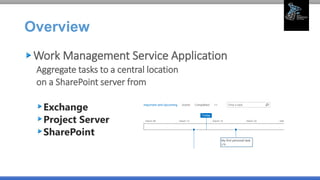
Work Management Service Application
Aggregate tasks to a central location
on a SharePoint server from
Exchange
Project Server
SharePoint
Overview
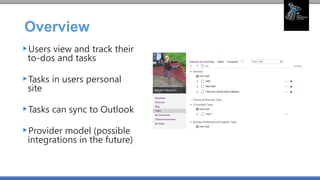
Users view and track their
to-dos and tasks
Tasks in users personal
site
Tasks can sync to Outlook
Provider model (possible
integrations in the future)
Overview
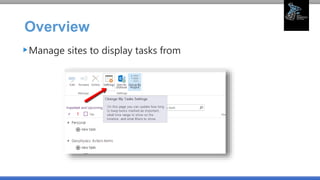
Manage sites to display tasks from
Overview
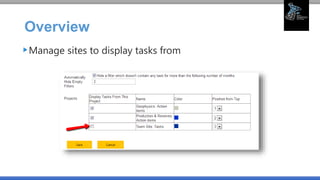
Manage sites to display tasks from
Overview
OOB feature which goes with My Site
Dependencies:
Search Service Application
User Profile Service Application
• Configuration
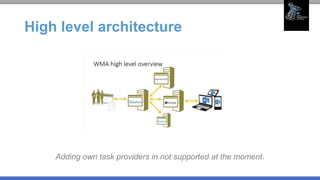
High level architecture
Adding own task providers in not supported at the moment.
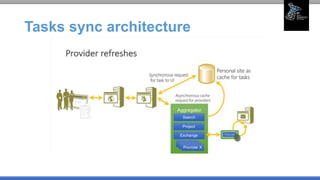
Tasks sync architecture
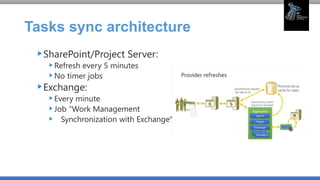
SharePoint/Project Server:
Refresh every 5 minutes
No timer jobs
Exchange:
Every minute
Job "Work Management
Synchronization with Exchange"
Location and hints
Locations - where providers are looking for new
tasks and get the updates.
Hints - collection of locations for providers.
Personal tasks - tasks on My Site w/o locations.
Promotion - personal task can be promoted to
location (only once).
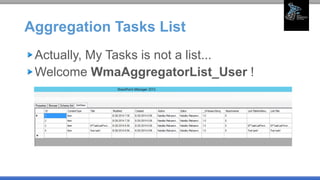
Aggregation Tasks List
Actually, My Tasks is not a list...
Welcome WmaAggregatorList_User !
Aggregation Tasks List
WMA aggregates tasks from SharePoint lists created in SharePoint Server
(internally called TasksWithTimelineAndHierarchy-171) plus upgraded
SharePoint lists from earlier versions of SharePoint (internally called Task-
107 or GanttTasks-150).
Additionally, WMA aggregates all task items (whether or not in a
SharePoint list) created in a library that supports the task content type. For
more information, see: Turn on support for multiple content types in a list
or library.
Note: The Task content type should be marked as the Default Content Type
for your custom list in order for the tasks to be aggregated by the service.
How to configure it properly (to the
end)
create Work Management Service Application
Start Service
Add wms account to UPS full control
Grant My Site app pool acount access to content DBs
$w = Get-SPWebApplication -identity
http://<WebApplication>
$w.GrantAccessToProcessIdentity("<Domain><Username>
")
DEMO: how it works
WMS for DEVS
Available API
No REST endpoints
SSOM
Microsoft.Office.Server.WorkManagement.dll
CSOM
Microsoft.SharePoint.WorkManagement.Client.dll
WMS for DEVS
Querying tasks list
Create/Edit/Delete tasks
Initiate provider refresh
Pin/Unpin from timeline
WMS for DEVS
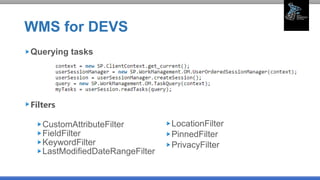
Querying tasks
Filters
CustomAttributeFilter
FieldFilter
KeywordFilter
LastModifiedDateRangeFilter
LocationFilter
PinnedFilter
PrivacyFilter
WMS for DEVS
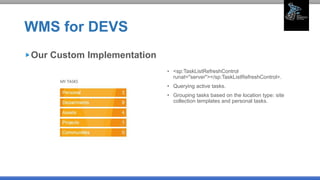
• <sp:TaskListRefreshControl
runat="server"></sp:TaskListRefreshControl>.
• Querying active tasks.
• Grouping tasks based on the location type: site
collection templates and personal tasks.
Our Custom Implementation
WMS for DEVS
Custom implementation
Follow guidelines when configuring
Plan integration with Exchange 2013
Use provided API
WmaAggregatorList_User is not customizable
Does not support App Authentication
Tasks aggregation and Exchange
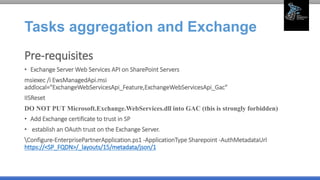
Pre-requisites
• Exchange Server Web Services API on SharePoint Servers
msiexec /i EwsManagedApi.msi
addlocal="ExchangeWebServicesApi_Feature,ExchangeWebServicesApi_Gac"
IISReset
DO NOT PUT Microsoft.Exchange.WebServices.dll into GAC (this is strongly forbidden)
• Add Exchange certificate to trust in SP
• establish an OAuth trust on the Exchange Server.
Configure-EnterprisePartnerApplication.ps1 -ApplicationType Sharepoint -AuthMetadataUrl
https://<SP_FQDN>/_layouts/15/metadata/json/1
Tasks aggregation and Exchange
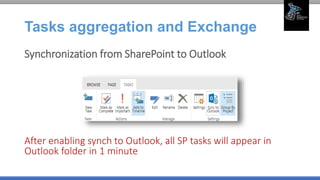
Synchronization from SharePoint to Outlook
After enabling synch to Outlook, all SP tasks will appear in
Outlook folder in 1 minute
Tasks aggregation and Exchange
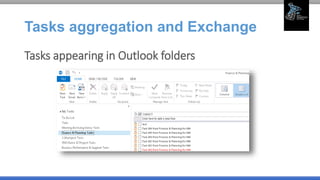
Tasks appearing in Outlook folders
Tasks aggregation and Exchange
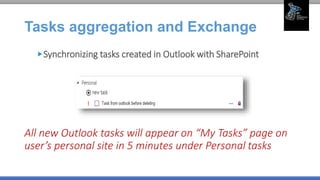
Synchronizing tasks created in Outlook with SharePoint
All new Outlook tasks will appear on “My Tasks” page on
user’s personal site in 5 minutes under Personal tasks
Tasks aggregation and Exchange
Good to know!
If tasks synchronization was configured and
personal site has been moved or re-created for this
user, synchronization for these tasks will stop
working.
If Outlook folder corresponding to the SharePoint
site has been renamed, synchronization for these
tasks will stop working.
Our Experience
Configuration troubles
Custom implementation
Odds: not shown tasks
Production server migration
July CU side-effect: permissions
Links & Resources
My Tasks Aggregation in SharePoint Server and
Exchange Task Integration White Paper
SharePoint 2013: Work Management Service
Application on TechNet
Workthrough SharePoint 2013 features in the work
management service
The WorkManagement And Task Aggregation JSOM
APIs In SharePoint
Questions?
Thank you!

All you need to know about WMS

  • 1.
    All you needto know about Work Management Service Maxim Zhvirblya Natallia Makarevich Belarus SharePoint User Group Minsk 2014
  • 2.
    Agenda Overview High-level architecture Working demo WMSfor developers Exchange integration Our experience
  • 3.
    About us: Maxim Zhvirblya SeniorSoftware Maintenance Engineer Bass guitar player Natallia Makarevich Lead Software Engineer Dancer
  • 4.
    Overview Work Management ServiceApplication Aggregate tasks to a central location on a SharePoint server from Exchange Project Server SharePoint
  • 5.
    Overview Users view andtrack their to-dos and tasks Tasks in users personal site Tasks can sync to Outlook Provider model (possible integrations in the future)
  • 6.
    Overview Manage sites todisplay tasks from
  • 7.
    Overview Manage sites todisplay tasks from
  • 8.
    Overview OOB feature whichgoes with My Site Dependencies: Search Service Application User Profile Service Application • Configuration
  • 9.
    High level architecture Addingown task providers in not supported at the moment.
  • 10.
  • 11.
    Tasks sync architecture SharePoint/ProjectServer: Refresh every 5 minutes No timer jobs Exchange: Every minute Job "Work Management Synchronization with Exchange"
  • 12.
    Location and hints Locations- where providers are looking for new tasks and get the updates. Hints - collection of locations for providers. Personal tasks - tasks on My Site w/o locations. Promotion - personal task can be promoted to location (only once).
  • 13.
    Aggregation Tasks List Actually,My Tasks is not a list... Welcome WmaAggregatorList_User !
  • 14.
    Aggregation Tasks List WMAaggregates tasks from SharePoint lists created in SharePoint Server (internally called TasksWithTimelineAndHierarchy-171) plus upgraded SharePoint lists from earlier versions of SharePoint (internally called Task- 107 or GanttTasks-150). Additionally, WMA aggregates all task items (whether or not in a SharePoint list) created in a library that supports the task content type. For more information, see: Turn on support for multiple content types in a list or library. Note: The Task content type should be marked as the Default Content Type for your custom list in order for the tasks to be aggregated by the service.
  • 15.
    How to configureit properly (to the end) create Work Management Service Application Start Service Add wms account to UPS full control Grant My Site app pool acount access to content DBs $w = Get-SPWebApplication -identity http://<WebApplication> $w.GrantAccessToProcessIdentity("<Domain><Username> ")
  • 16.
  • 17.
    WMS for DEVS AvailableAPI No REST endpoints SSOM Microsoft.Office.Server.WorkManagement.dll CSOM Microsoft.SharePoint.WorkManagement.Client.dll
  • 18.
    WMS for DEVS Queryingtasks list Create/Edit/Delete tasks Initiate provider refresh Pin/Unpin from timeline
  • 19.
    WMS for DEVS Queryingtasks Filters CustomAttributeFilter FieldFilter KeywordFilter LastModifiedDateRangeFilter LocationFilter PinnedFilter PrivacyFilter
  • 20.
    WMS for DEVS •<sp:TaskListRefreshControl runat="server"></sp:TaskListRefreshControl>. • Querying active tasks. • Grouping tasks based on the location type: site collection templates and personal tasks. Our Custom Implementation
  • 21.
    WMS for DEVS Customimplementation Follow guidelines when configuring Plan integration with Exchange 2013 Use provided API WmaAggregatorList_User is not customizable Does not support App Authentication
  • 22.
    Tasks aggregation andExchange Pre-requisites • Exchange Server Web Services API on SharePoint Servers msiexec /i EwsManagedApi.msi addlocal="ExchangeWebServicesApi_Feature,ExchangeWebServicesApi_Gac" IISReset DO NOT PUT Microsoft.Exchange.WebServices.dll into GAC (this is strongly forbidden) • Add Exchange certificate to trust in SP • establish an OAuth trust on the Exchange Server. Configure-EnterprisePartnerApplication.ps1 -ApplicationType Sharepoint -AuthMetadataUrl https://<SP_FQDN>/_layouts/15/metadata/json/1
  • 23.
    Tasks aggregation andExchange Synchronization from SharePoint to Outlook After enabling synch to Outlook, all SP tasks will appear in Outlook folder in 1 minute
  • 24.
    Tasks aggregation andExchange Tasks appearing in Outlook folders
  • 25.
    Tasks aggregation andExchange Synchronizing tasks created in Outlook with SharePoint All new Outlook tasks will appear on “My Tasks” page on user’s personal site in 5 minutes under Personal tasks
  • 26.
    Tasks aggregation andExchange Good to know! If tasks synchronization was configured and personal site has been moved or re-created for this user, synchronization for these tasks will stop working. If Outlook folder corresponding to the SharePoint site has been renamed, synchronization for these tasks will stop working.
  • 27.
    Our Experience Configuration troubles Customimplementation Odds: not shown tasks Production server migration July CU side-effect: permissions
  • 28.
    Links & Resources MyTasks Aggregation in SharePoint Server and Exchange Task Integration White Paper SharePoint 2013: Work Management Service Application on TechNet Workthrough SharePoint 2013 features in the work management service The WorkManagement And Task Aggregation JSOM APIs In SharePoint
  • 29.
  • 30.

Editor's Notes

  • #6 This service is also well-known as “Task aggregation service”. Users can find all their SharePoint, Project and Exchange tasks, aggregated and sorted, under unified “My Tasks” on their personal sites. They can view their tasks, “pin” to timeline, mark as as completed - directly in the aggregated task view. Three views “Active tasks”, “Important and upcoming tasks”, and “Completed tasks” are present. All tasks updates are synced back to their originating systems – the task providers.
  • #8 My Tasks list settings to select locations to show tasks from.
  • #10 The architecture is based on the model of “Task providers”. Task providers are systems from which the WMA can aggregate tasks. This is BI-DIRECT synchronization! At the moment, three tasks providers are supported: Microsoft SharePoint, Microsoft Exchange and Microsoft Project Server. This means, that the users will see the tasks from those three sources, in their “My Tasks” area. 
  • #11 Refresh = task sync. No any scheduled timer jobs that run in background for that in case of MS Project and SharePoint. User on demand requests tasks sync (we can see spinning icon on My Tasks). By default, async request is proceed every 5 minutes (could be changed with PowerShell, but not for Office 365).
  • #13 Example of location is SharePoint tasks list.
  • #18 SOM == SSOM – equal in terms of API.
  • #20 How to use filter: // Create location filter LocationFilter locationFilter = new LocationFilter() { IncludeUncategorizedTasks = false, LocationKeys = locationKeys }; query.LocationFilter = locationFilter;
  • #25 If new task has been created in My Site list, it will appear as Outlook personal task in 1 minute. If the task has been assigned from the different SharePoint site rather than personal, it will be moved to the corresponding Outlook folder as shown on the picture above.
  • #26 (even if they were created in folders corresponding to SharePoint site)
  • #30 Silence