Azure Functions
Serverless in the Microsoft world
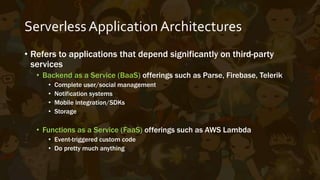
ServerlessApplication Architectures
• Refers to applications with architectures that depend significantly
on third-party services
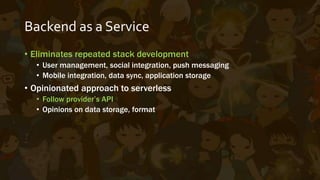
• Backend as a Service (BaaS) - eliminates repeated stack development
• User management, social integration, push messaging
• Mobile integration, data sync, application storage
• Opinionated approach to serverless
• Follow provider’s API
• Functions as a Service (FaaS) offerings such as AWS Lambda, Cloud
Functions for Firebase, Azure Functions
Backend as a Service
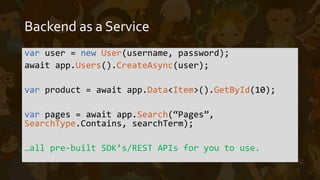
var user = new User(username, password);
await app.Users().CreateAsync(user);
var product = await app.Data<Item>().GetById(10);
var pages = await app.Search(“Pages”,
SearchType.Contains, searchTerm);
Function as a Service
• Triggered by events such as a schedule, an HTTP trigger, manual
calls, among others
• Ephemeral – short lived. Function executes, function exits.
• Completely custom code
• Integrate with any 3rd party dependency, even BaaS
• Stateless – each execution should be designed independent from
each other
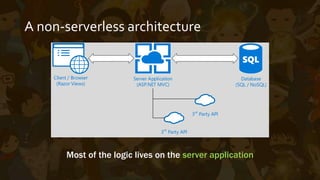
A non-serverless architecture
Most of the logic lives on the server application
Client / Browser
(Razor Views)
Server Application
(ASP.NET MVC)
Database
(SQL / NoSQL)
3rd
Party API
3rd
Party API
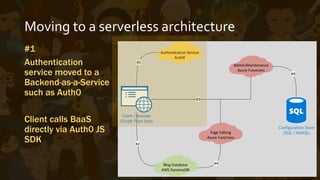
Moving to a serverless architecture
#1
Authentication
service moved to a
Backend-as-a-Service
such as Auth0
Client calls BaaS
directly via Auth0 JS
SDK
Client / Browser
(Single Page App)
Configuration Store
(SQL / NoSQL)
Authentication Service
Auth0
#1
Blog Database
AWS DynamoDB
#2
Admin/Maintenance
Azure Functions
Page Editing
Azure Functions
#3
#4
#4
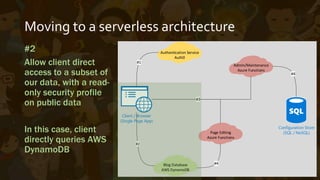
Moving to a serverless architecture
#2
Allow client direct
access to a subset of
our data, with a read-
only security profile
on public data
In this case, client
directly queries AWS
DynamoDB
Client / Browser
(Single Page App)
Configuration Store
(SQL / NoSQL)
Authentication Service
Auth0
#1
Blog Database
AWS DynamoDB
#2
Admin/Maintenance
Azure Functions
Page Editing
Azure Functions
#3
#4
#4
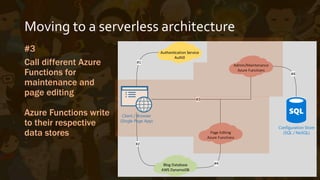
Moving to a serverless architecture
#3
Call different Azure
Functions for
maintenance and
page editing
Azure Functions write
to their respective
data stores
Client / Browser
(Single Page App)
Configuration Store
(SQL / NoSQL)
Authentication Service
Auth0
#1
Blog Database
AWS DynamoDB
#2
Admin/Maintenance
Azure Functions
Page Editing
Azure Functions
#3
#4
#4
Azure Functions
What it’s really like
Use C# syntax (or node.js among others)
• Non-opinionated code – no coding to a framework vs BaaS
• Depending on function, just a slight change to ‘main’ / ‘startup
code’ is necessary
• A lot of input and output triggers and bindings available
• Manual, timer
• Blob, tables, queues, service bus, event hubs
• HTTP, Webhooks
• Output to SMS, another queue, blob, push notification
Pros and Cons
• Based on App Services / Web Jobs
• Code can be written/uploaded on the portal, continuous
deployment via VSTS is available (Git/TFS/etc.)
• Logging and real-time streams available in dashboard
• Debug using VS Tools for Azure Functions (Preview on VS 2015)
• Still under heavy development, still evolving and changing
• Incomplete intellisense for Dynamic C#
• Missing fine-grained controls/settings
Demo Time!
…and some notes afterwards
Notes
• Dynamic C#/ScriptCs - dynamically compiled on execution
• You can also run pre-compiled code
• You can load external dlls and other .csx files via #load
• You can load pre-included libraries via #r
• You can include NuGet packages via project.json and #r
• You can contribute – bug reports, pull requests – fast response
Thank you!
marc@clinkitsolutions.com

MSDN Sessions 032817 - Azure Functions

  • 2.
    Azure Functions Serverless inthe Microsoft world
  • 3.
    ServerlessApplication Architectures • Refersto applications with architectures that depend significantly on third-party services • Backend as a Service (BaaS) - eliminates repeated stack development • User management, social integration, push messaging • Mobile integration, data sync, application storage • Opinionated approach to serverless • Follow provider’s API • Functions as a Service (FaaS) offerings such as AWS Lambda, Cloud Functions for Firebase, Azure Functions
  • 4.
    Backend as aService var user = new User(username, password); await app.Users().CreateAsync(user); var product = await app.Data<Item>().GetById(10); var pages = await app.Search(“Pages”, SearchType.Contains, searchTerm);
  • 5.
    Function as aService • Triggered by events such as a schedule, an HTTP trigger, manual calls, among others • Ephemeral – short lived. Function executes, function exits. • Completely custom code • Integrate with any 3rd party dependency, even BaaS • Stateless – each execution should be designed independent from each other
  • 6.
    A non-serverless architecture Mostof the logic lives on the server application Client / Browser (Razor Views) Server Application (ASP.NET MVC) Database (SQL / NoSQL) 3rd Party API 3rd Party API
  • 7.
    Moving to aserverless architecture #1 Authentication service moved to a Backend-as-a-Service such as Auth0 Client calls BaaS directly via Auth0 JS SDK Client / Browser (Single Page App) Configuration Store (SQL / NoSQL) Authentication Service Auth0 #1 Blog Database AWS DynamoDB #2 Admin/Maintenance Azure Functions Page Editing Azure Functions #3 #4 #4
  • 8.
    Moving to aserverless architecture #2 Allow client direct access to a subset of our data, with a read- only security profile on public data In this case, client directly queries AWS DynamoDB Client / Browser (Single Page App) Configuration Store (SQL / NoSQL) Authentication Service Auth0 #1 Blog Database AWS DynamoDB #2 Admin/Maintenance Azure Functions Page Editing Azure Functions #3 #4 #4
  • 9.
    Moving to aserverless architecture #3 Call different Azure Functions for maintenance and page editing Azure Functions write to their respective data stores Client / Browser (Single Page App) Configuration Store (SQL / NoSQL) Authentication Service Auth0 #1 Blog Database AWS DynamoDB #2 Admin/Maintenance Azure Functions Page Editing Azure Functions #3 #4 #4
  • 10.
  • 11.
    Use C# syntax(or node.js among others) • Non-opinionated code – no coding to a framework vs BaaS • Depending on function, just a slight change to ‘main’ / ‘startup code’ is necessary • A lot of input and output triggers and bindings available • Manual, timer • Blob, tables, queues, service bus, event hubs • HTTP, Webhooks • Output to SMS, another queue, blob, push notification
  • 12.
    Pros and Cons •Based on App Services / Web Jobs • Code can be written/uploaded on the portal, continuous deployment via VSTS is available (Git/TFS/etc.) • Logging and real-time streams available in dashboard • Debug using VS Tools for Azure Functions (Preview on VS 2015) • Still under heavy development, still evolving and changing • Incomplete intellisense for Dynamic C# • Missing fine-grained controls/settings
  • 13.
    Demo Time! …and somenotes afterwards
  • 14.
    Notes • Dynamic C#/ScriptCs- dynamically compiled on execution • You can also run pre-compiled code • You can load external dlls and other .csx files via #load • You can load pre-included libraries via #r • You can include NuGet packages via project.json and #r • You can contribute – bug reports, pull requests – fast response
  • 15.