PROGRAMMING SESSIONS
01
Kick start meeting – setting the scene
Rafael Camacho
PROGRAM
• What are the sessions about
• The method
• Select topic for next week
• Some basic concepts – programming lingo
• Software construction
• Version control
• Introduction to MATLAB
• Installation – licenses from uni for Master and PhD students
• Hello world!
• Introduction to Git – example.
• Setting up a repo – git init, commit, push and pull.
2
THE METHOD
• For each session we will pick up a topic/problem to solve
before hand (in the session before).
• While solving the week’s topic I will introduce general
programing concepts that are relevant.
• This week’s topic: Hello world!
• This week’s general concept:Version control – Git.
• Before we keep going lets make a list of your projects, at
the end of the session we will pick up one.
• Learning by doing is great but reading is also important. I
will give you access to relevant literature at the beginning
of the week.
3
BASIC CONCEPTS
• Getting a computer to do what you want! A program
is a computer readable ’what to do’ list.
Programming is the activity of writing and testing
these programs.
• To tell a computer what to do we need an appropriate
language with special grammar and a standardized
vocabulary – programming language. Eg. MATLAB,
Python, C++,..
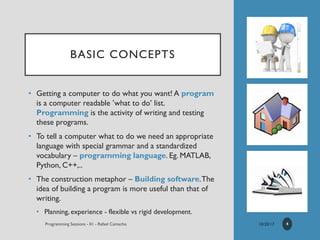
• The construction metaphor – Building software.The
idea of building a program is more useful than that of
writing.
• Planning, experience - flexible vs rigid development.
4
BASIC
CONCEPTS
5
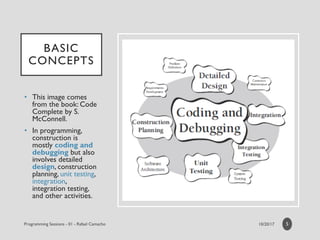
• This image comes
from the book: Code
Complete by S.
McConnell.
• In programming,
construction is
mostly coding and
debugging but also
involves detailed
design, construction
planning, unit testing,
integration,
integration testing,
and other activities.
BASIC CONCEPTS
VERSION CONTROL
• Version control is a system that records changes to a
file or set of files over time so that you can recall
specific versions later.
• LocalVCS (RCS still in use today). CentralizedVCS – we
need to collaborate. DistributedVCS – Server and each
client if a full back up of the data.
• Git comes from the Linux community and is a freeVCS.
• To make life easier and if you are afraid of command
lines on a console you can use Github and Bitbucket.
Both of them have free UI to help you with Git.
6
MATLAB
• Statement from the company:
“MATLAB is a high-level language and interactive
environment for numerical computation, visualization, and
programming. Using MATLAB, you can analyze data,
develop algorithms, and create models and applications.
The , tools, and built-in math functions enable you to
explore multiple approaches and reach a solution faster
than with spreadsheets or traditional programming
languages, such as C/C++ or Java.”
• Now lets go and code our first couple of program(s).
Regarding the licenses contact ICTS, master and PhD
students can have free software from KU Leuven.
7
MATLAB
• The code used for the sessions is available on github.
Look at:
https://github.com/CamachoDejay/ProgrammingSessions
• Ass you can see on the comments of the code the main
idea of this simple program was to get familiar with
MATLAB’s integrated development enviroment and how
to generate output to the user.
• You can copy the files or even better follow the repo, so
you can easily pull the latest updates.This last sentence
will make much more sense as we go along and you learn
more about Git and Github (see next 2 slides).
8
GITHUB
EXAMPLE 1
CREATE REPO
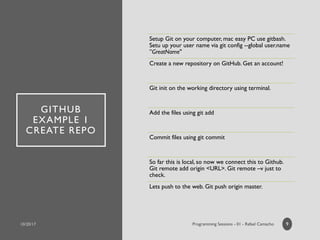
Setup Git on your computer, mac easy PC use gitbash.
Setu up your user name via git config --global user.name
”GreatName"
Create a new repository on GitHub. Get an account!
Git init on the working directory using terminal.
Add the files using git add
Commit files using git commit
So far this is local, so now we connect this to Github.
Git remote add origin <URL>. Git remote –v just to
check.
Lets push to the web. Git push origin master.
9
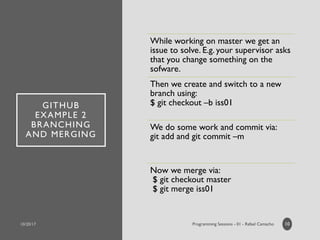
GITHUB
EXAMPLE 2
BRANCHING
AND MERGING
While working on master we get an
issue to solve. E.g. your supervisor asks
that you change something on the
sofware.
Then we create and switch to a new
branch using:
$ git checkout –b iss01
We do some work and commit via:
git add and git commit –m
Now we merge via:
$ git checkout master
$ git merge iss01
10

Programming Sessions KU Leuven - Session 01

  • 1.
    PROGRAMMING SESSIONS 01 Kick startmeeting – setting the scene Rafael Camacho
  • 2.
    PROGRAM • What arethe sessions about • The method • Select topic for next week • Some basic concepts – programming lingo • Software construction • Version control • Introduction to MATLAB • Installation – licenses from uni for Master and PhD students • Hello world! • Introduction to Git – example. • Setting up a repo – git init, commit, push and pull. 2
  • 3.
    THE METHOD • Foreach session we will pick up a topic/problem to solve before hand (in the session before). • While solving the week’s topic I will introduce general programing concepts that are relevant. • This week’s topic: Hello world! • This week’s general concept:Version control – Git. • Before we keep going lets make a list of your projects, at the end of the session we will pick up one. • Learning by doing is great but reading is also important. I will give you access to relevant literature at the beginning of the week. 3
  • 4.
    BASIC CONCEPTS • Gettinga computer to do what you want! A program is a computer readable ’what to do’ list. Programming is the activity of writing and testing these programs. • To tell a computer what to do we need an appropriate language with special grammar and a standardized vocabulary – programming language. Eg. MATLAB, Python, C++,.. • The construction metaphor – Building software.The idea of building a program is more useful than that of writing. • Planning, experience - flexible vs rigid development. 4
  • 5.
    BASIC CONCEPTS 5 • This imagecomes from the book: Code Complete by S. McConnell. • In programming, construction is mostly coding and debugging but also involves detailed design, construction planning, unit testing, integration, integration testing, and other activities.
  • 6.
    BASIC CONCEPTS VERSION CONTROL •Version control is a system that records changes to a file or set of files over time so that you can recall specific versions later. • LocalVCS (RCS still in use today). CentralizedVCS – we need to collaborate. DistributedVCS – Server and each client if a full back up of the data. • Git comes from the Linux community and is a freeVCS. • To make life easier and if you are afraid of command lines on a console you can use Github and Bitbucket. Both of them have free UI to help you with Git. 6
  • 7.
    MATLAB • Statement fromthe company: “MATLAB is a high-level language and interactive environment for numerical computation, visualization, and programming. Using MATLAB, you can analyze data, develop algorithms, and create models and applications. The , tools, and built-in math functions enable you to explore multiple approaches and reach a solution faster than with spreadsheets or traditional programming languages, such as C/C++ or Java.” • Now lets go and code our first couple of program(s). Regarding the licenses contact ICTS, master and PhD students can have free software from KU Leuven. 7
  • 8.
    MATLAB • The codeused for the sessions is available on github. Look at: https://github.com/CamachoDejay/ProgrammingSessions • Ass you can see on the comments of the code the main idea of this simple program was to get familiar with MATLAB’s integrated development enviroment and how to generate output to the user. • You can copy the files or even better follow the repo, so you can easily pull the latest updates.This last sentence will make much more sense as we go along and you learn more about Git and Github (see next 2 slides). 8
  • 9.
    GITHUB EXAMPLE 1 CREATE REPO SetupGit on your computer, mac easy PC use gitbash. Setu up your user name via git config --global user.name ”GreatName" Create a new repository on GitHub. Get an account! Git init on the working directory using terminal. Add the files using git add Commit files using git commit So far this is local, so now we connect this to Github. Git remote add origin <URL>. Git remote –v just to check. Lets push to the web. Git push origin master. 9
  • 10.
    GITHUB EXAMPLE 2 BRANCHING AND MERGING Whileworking on master we get an issue to solve. E.g. your supervisor asks that you change something on the sofware. Then we create and switch to a new branch using: $ git checkout –b iss01 We do some work and commit via: git add and git commit –m Now we merge via: $ git checkout master $ git merge iss01 10