
DevOps and Git Basics
Sourabh Saxena
DevOps
DevOps is a Organizational cultural shift
• Operations traditionally seeks STABILITY
• Developers traditionally seeks CHANGE
• Testers traditionally seeks REDUCE RISKS
How to accomplish DevOps ?
• Strong interdepartmental communication
• Team Building
Why DevOps ?
Inefficiencies existed in both development and operations
• Operations used inefficient tools .
• Developers didn't control the infrastructure .
What was needed ?
• Operations needed to leverage more efficient developer tools .
• Developers needed to manage their own infrastructure .
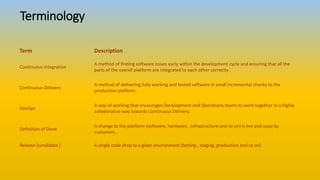
Terminology
Term Description
Continuous Integration
A method of finding software issues early within the development cycle and ensuring that all the
parts of the overall platform are integrated to each other correctly .
Continuous Delivery
A method of delivering fully working and tested software in small incremental chunks to the
production platform .
DevOps
A way of working that encourages Development and Operations teams to work together in a highly
collaborative way towards Continuous Delivery.
Definition of Done
A change to the platform (software, hardware , infrastructure and so on) is live and used by
customers .
Release (candidate ) A single code drop to a given environment (testing , staging ,production and so on)
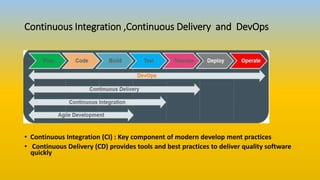
Continuous Integration ,Continuous Delivery and DevOps
• Continuous Integration (CI) : Key component of modern develop ment practices
• Continuous Delivery (CD) provides tools and best practices to deliver quality software
quickly
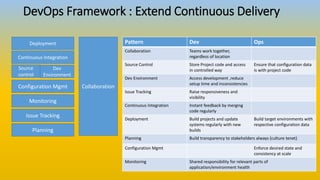
DevOps Framework : Extend Continuous Delivery
Deployment
Continuous Integration
Source
control
Dev
Environment
Configuration Mgmt
Monitoring
Issue Tracking
Collaboration
Pattern Dev Ops
Collaboration Teams work together,
regardless of location
Source Control Store Project code and access
in controlled way
Ensure that configuration data
is with project code
Dev Environment Access development ,reduce
setup time and inconsistencies
Issue Tracking Raise responsiveness and
visibility
Continuous Integration Instant feedback by merging
code regularly
Deployment Build projects and update
systems regularly with new
builds
Build target environments with
respective configuration data
Planning Build transparency to stakeholders always (culture tenet)
Configuration Mgmt Enforce desired state and
consistency at scale
Monitoring Shared responsibility for relevant parts of
application/environment health
Planning
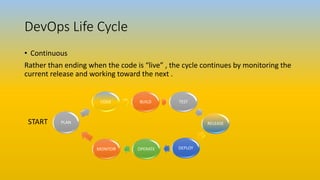
DevOps Life Cycle
• Continuous
Rather than ending when the code is “live” , the cycle continues by monitoring the
current release and working toward the next .
START
BUILD TEST
RELEASE
DEPLOYOPERATEMONITOR
PLAN
CODE
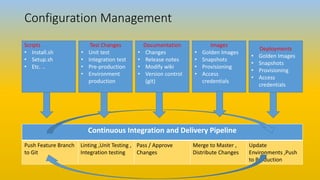
Configuration Management
Scripts
• Install.sh
• Setup.sh
• Etc. ..
Test Changes
• Unit test
• Integration test
• Pre-production
• Environment
production
Documentation
• Changes
• Release notes
• Modify wiki
• Version control
(git)
Images
• Golden Images
• Snapshots
• Provisioning
• Access
credentials
Deployments
• Golden Images
• Snapshots
• Provisioning
• Access
credentials
Continuous Integration and Delivery Pipeline
Push Feature Branch
to Git
Linting ,Unit Testing ,
Integration testing
Pass / Approve
Changes
Merge to Master ,
Distribute Changes
Update
Environments ,Push
to Production
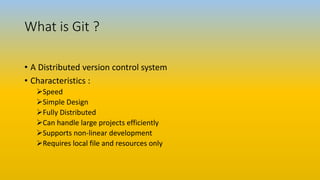
What is Git ?
• A Distributed version control system
• Characteristics :
Speed
Simple Design
Fully Distributed
Can handle large projects efficiently
Supports non-linear development
Requires local file and resources only
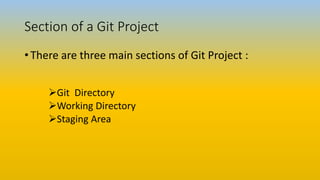
Section of a Git Project
• There are three main sections of Git Project :
Git Directory
Working Directory
Staging Area
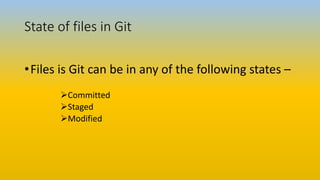
State of files in Git
•Files is Git can be in any of the following states –
Committed
Staged
Modified
Basic Git Operations
• Initialize a new repository in an existing project or Directory or clone
an existing repository from another server
• Start and stop file tracking
• Stage and commit changes
• Set up Git to ignore certain files and file patterns
• Undo mistakes
• Browse history of your project
• View changes between commit
• Push and Pull from remote repositories
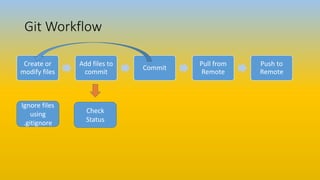
Git Workflow
Create or
modify files
Add files to
commit
Commit
Pull from
Remote
Push to
Remote
Ignore files
using
.gitignore
Check Status
Check
Status
Thanks …

Devops and git basics

  • 1.
    DevOps and GitBasics Sourabh Saxena
  • 2.
    DevOps DevOps is aOrganizational cultural shift • Operations traditionally seeks STABILITY • Developers traditionally seeks CHANGE • Testers traditionally seeks REDUCE RISKS How to accomplish DevOps ? • Strong interdepartmental communication • Team Building
  • 3.
    Why DevOps ? Inefficienciesexisted in both development and operations • Operations used inefficient tools . • Developers didn't control the infrastructure . What was needed ? • Operations needed to leverage more efficient developer tools . • Developers needed to manage their own infrastructure .
  • 4.
    Terminology Term Description Continuous Integration Amethod of finding software issues early within the development cycle and ensuring that all the parts of the overall platform are integrated to each other correctly . Continuous Delivery A method of delivering fully working and tested software in small incremental chunks to the production platform . DevOps A way of working that encourages Development and Operations teams to work together in a highly collaborative way towards Continuous Delivery. Definition of Done A change to the platform (software, hardware , infrastructure and so on) is live and used by customers . Release (candidate ) A single code drop to a given environment (testing , staging ,production and so on)
  • 5.
    Continuous Integration ,ContinuousDelivery and DevOps • Continuous Integration (CI) : Key component of modern develop ment practices • Continuous Delivery (CD) provides tools and best practices to deliver quality software quickly
  • 6.
    DevOps Framework :Extend Continuous Delivery Deployment Continuous Integration Source control Dev Environment Configuration Mgmt Monitoring Issue Tracking Collaboration Pattern Dev Ops Collaboration Teams work together, regardless of location Source Control Store Project code and access in controlled way Ensure that configuration data is with project code Dev Environment Access development ,reduce setup time and inconsistencies Issue Tracking Raise responsiveness and visibility Continuous Integration Instant feedback by merging code regularly Deployment Build projects and update systems regularly with new builds Build target environments with respective configuration data Planning Build transparency to stakeholders always (culture tenet) Configuration Mgmt Enforce desired state and consistency at scale Monitoring Shared responsibility for relevant parts of application/environment health Planning
  • 7.
    DevOps Life Cycle •Continuous Rather than ending when the code is “live” , the cycle continues by monitoring the current release and working toward the next . START BUILD TEST RELEASE DEPLOYOPERATEMONITOR PLAN CODE
  • 8.
    Configuration Management Scripts • Install.sh •Setup.sh • Etc. .. Test Changes • Unit test • Integration test • Pre-production • Environment production Documentation • Changes • Release notes • Modify wiki • Version control (git) Images • Golden Images • Snapshots • Provisioning • Access credentials Deployments • Golden Images • Snapshots • Provisioning • Access credentials Continuous Integration and Delivery Pipeline Push Feature Branch to Git Linting ,Unit Testing , Integration testing Pass / Approve Changes Merge to Master , Distribute Changes Update Environments ,Push to Production
  • 9.
    What is Git? • A Distributed version control system • Characteristics : Speed Simple Design Fully Distributed Can handle large projects efficiently Supports non-linear development Requires local file and resources only
  • 10.
    Section of aGit Project • There are three main sections of Git Project : Git Directory Working Directory Staging Area
  • 11.
    State of filesin Git •Files is Git can be in any of the following states – Committed Staged Modified
  • 12.
    Basic Git Operations •Initialize a new repository in an existing project or Directory or clone an existing repository from another server • Start and stop file tracking • Stage and commit changes • Set up Git to ignore certain files and file patterns • Undo mistakes • Browse history of your project • View changes between commit • Push and Pull from remote repositories
  • 13.
    Git Workflow Create or modifyfiles Add files to commit Commit Pull from Remote Push to Remote Ignore files using .gitignore Check Status Check Status
  • 14.