Process Management System In Operating
System
Name:Jyothi m.d
Jyothika
Santosh
Kalpana
Introduction to Process Management System in
Operating System
• Process management system is a crucial component of operating
systems that handles the execution of processes.
• It involves creating, scheduling, terminating, and managing
processes efficiently.
• The primary goal of process management is to ensure the optimal
utilization of system resources.
Process Creation
• Process creation involves the allocation of resources such as
memory, CPU, and I/O devices to a new process.
• Processes can be created by the operating system itself or by
existing processes through system calls like fork() in Unix-based
systems.
• Each process has its own address space and resources, allowing for
isolation and concurrent execution.
Process Scheduling
• Process scheduling determines the order in which processes are
executed on the CPU.
• Various scheduling algorithms, such as Round Robin, Shortest Job
First, and Priority Scheduling, are used to allocate CPU time to
processes.
• The scheduler aims to optimize system performance by maximizing
CPU utilization and minimizing response time.
Process Termination
• Process termination occurs when a process finishes its execution or
is terminated forcibly due to errors or user intervention.
• During termination, the operating system releases the resources
allocated to the process, such as memory and open files.
• Proper process termination is essential to prevent resource leaks
and ensure system stability.
Process States
In a Process Management System, processes go through various
states during their lifetime. Here's a explanation of the five process
states:
1. Newborn (or New): This is the initial state of a process when it's created.
The operating system allocates memory and resources, and the process is
initialized. The process is not yet ready to run, as it's still being set up.
2. Ready: In this state, the process is waiting for the CPU to become available
to execute its instructions. The process is loaded into memory, and all
necessary resources are allocated. The CPU scheduler will select a ready
process to run when the current process finishes or is interrupted.
3. Running: This is the state where the process is currently being executed by the CPU.
The process is executing its instructions, performing calculations, and accessing
resources. The CPU is devoted to this process until it's interrupted or completes its
tasks.
4. Waiting (or Blocked): A process enters this state when it's waiting for some event to
occur, such as:
- I/O operation (input/output) like reading from a file or network.
- Arrival of data or messages.
- Completion of a task by another process.
- Availability of resources.
• I/O operation (input/output) like reading from a file or network:The process
needs to read or write data from an input/output device, like a file, network, or
hardware device.
• Arrival of data or messages: The process is waiting for data or messages from
another process, network, or external source.
• Completion of a task by another process: The process is dependent on another
process to complete a task or provide a resource.
• Availability of resources: The process requires a specific resource, such as CPU
time, memory, or I/O device, which is currently unavailable.
5. Zombie (or Defunct): When a process finishes execution, it enters this state.
Although the process has terminated, its parent process hasn't been notified yet.
The zombie process still exists in the process table, but it's not executing and is
waiting for its parent to acknowledge its termination. Once the parent process
acknowledges, the zombie process is removed from the process table.
Process Control Block(PCB)
A Process Control Block (PCB) is a data structure used in process
management systems in operating systems to manage and control
processes. It contains information about a process, including its
current state, memory allocation, and other relevant details.
The PCB typically contains the following information:
1. Process ID (PID)
2. Process state
3. Program Counter
4. Registers
5. Memory allocation
6.Open Files
7. I/O Devices
8. CPU Scheduling Information
9. Accounting Information
10. Signal Handling
The PCB is used by the operating system to:
1. Manage process scheduling and context switching.
2. Keep track of process memory allocation and deallocation.
3. Handle process communication and synchronization.
4. Manage process I/O operations.
5. Monitor process performance and resource usage.
6. Enforce process security and access control.
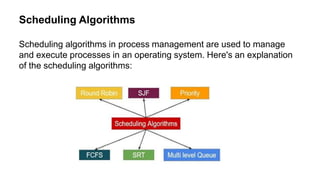
Scheduling Algorithms
Scheduling algorithms in process management are used to manage
and execute processes in an operating system. Here's an explanation
of the scheduling algorithms:
1. First-Come-First-Served (FCFS):
• Processes are executed in the order they arrive in the ready queue.
• No priority or time slice is assigned.
• Simple and easy to implement.
• Disadvantage: Can lead to convoy effect (long processes hold up shorter
ones).
2. Shortest Job First (SJF):
• Processes are executed based on their burst time (execution time).
• Shortest job is executed first.
• Two types:
- Preemptive SJF: Can interrupt and switch between processes.
- Non-Preemptive SJF: Cannot interrupt, must complete the current process.
• Disadvantage: Difficult to estimate burst time, can lead to starvation (long
processes never get executed.
3. Priority Scheduling:
• Processes are assigned a priority based on their priority number.
• Highest priority process is executed first.
• Can be preemptive or non-preemptive.
• Disadvantage: Can lead to starvation, priority inversion (lower priority process
holds up higher priority one).
4. Round Robin (RR)
• Each process is given a fixed time slice (time quantum).
• Processes are executed in a circular order.
• If a process completes before the time slice, the next process is executed.
• Advantages: Fairness, responsiveness.
• Disadvantage: Can lead to context switching overhead.
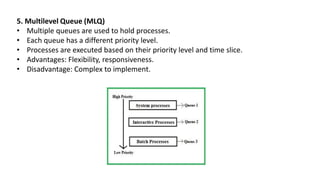
5. Multilevel Queue (MLQ)
• Multiple queues are used to hold processes.
• Each queue has a different priority level.
• Processes are executed based on their priority level and time slice.
• Advantages: Flexibility, responsiveness.
• Disadvantage: Complex to implement.
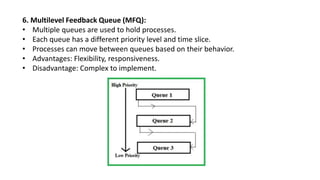
6. Multilevel Feedback Queue (MFQ):
• Multiple queues are used to hold processes.
• Each queue has a different priority level and time slice.
• Processes can move between queues based on their behavior.
• Advantages: Flexibility, responsiveness.
• Disadvantage: Complex to implement.
Inter-process Communication
mechanism and techniques used to facilitate communication and data
exchange between different processes or programs
runningconcurrently on a computersystem.
There are several types in
IPC mechanism:
• Pipes
• Sockets
• Shared memory
• Message queues
• Signals
1.Pipes: A pipe is a unidirectional communication channel that allows
processes to send and receive data in a stream.
2.Sockets: Sockets are bidirectional communication channels that
enable processes to send and receive data in a network.
3.Shared memory: Shared memory allows processes to access a
common memory space, enabling fast data exchange.
4.Message queues: Message queues are data structures that store
messages sent between processes.
5.Signals: Signals are used to send notifications or events to processes.
These IPC mechanisms are essential for various operating system
functionalities, such as:
- Process synchronization
- Data sharing
- Resource sharing
- Communication between client and server processes
- Distributed computing
Conclusion
• A process management system in an operating systemis a crucial
component that manages the creation, execution, and termination of
processes (programs in execution). The following is a conclusion
summarizing its key aspects:
• A process management systemin an operating system efficiently
manages system resources and ensures effective process
execution, synchronization, and communication.
Effective process management is essential for maintaining system
stability, security, and performance. As operating systems continue
to evolve, the importance of process management will only continue
to grow.
By understanding the concepts and techniques of process
management, we can better appreciate the complex interactions
between processes and the operating system, ultimately leading to
improved system design and development. Thank you for your
attention, and we hope this seminar
has provided valuable insights into the importance of process
Process management in operating system, process creation, process sheduling

Process management in operating system, process creation, process sheduling

  • 1.
    Process Management SystemIn Operating System Name:Jyothi m.d Jyothika Santosh Kalpana
  • 2.
    Introduction to ProcessManagement System in Operating System • Process management system is a crucial component of operating systems that handles the execution of processes. • It involves creating, scheduling, terminating, and managing processes efficiently. • The primary goal of process management is to ensure the optimal utilization of system resources.
  • 3.
    Process Creation • Processcreation involves the allocation of resources such as memory, CPU, and I/O devices to a new process. • Processes can be created by the operating system itself or by existing processes through system calls like fork() in Unix-based systems. • Each process has its own address space and resources, allowing for isolation and concurrent execution.
  • 4.
    Process Scheduling • Processscheduling determines the order in which processes are executed on the CPU. • Various scheduling algorithms, such as Round Robin, Shortest Job First, and Priority Scheduling, are used to allocate CPU time to processes. • The scheduler aims to optimize system performance by maximizing CPU utilization and minimizing response time.
  • 5.
    Process Termination • Processtermination occurs when a process finishes its execution or is terminated forcibly due to errors or user intervention. • During termination, the operating system releases the resources allocated to the process, such as memory and open files. • Proper process termination is essential to prevent resource leaks and ensure system stability.
  • 6.
    Process States In aProcess Management System, processes go through various states during their lifetime. Here's a explanation of the five process states: 1. Newborn (or New): This is the initial state of a process when it's created. The operating system allocates memory and resources, and the process is initialized. The process is not yet ready to run, as it's still being set up. 2. Ready: In this state, the process is waiting for the CPU to become available to execute its instructions. The process is loaded into memory, and all necessary resources are allocated. The CPU scheduler will select a ready process to run when the current process finishes or is interrupted.
  • 7.
    3. Running: Thisis the state where the process is currently being executed by the CPU. The process is executing its instructions, performing calculations, and accessing resources. The CPU is devoted to this process until it's interrupted or completes its tasks. 4. Waiting (or Blocked): A process enters this state when it's waiting for some event to occur, such as: - I/O operation (input/output) like reading from a file or network. - Arrival of data or messages. - Completion of a task by another process. - Availability of resources. • I/O operation (input/output) like reading from a file or network:The process needs to read or write data from an input/output device, like a file, network, or hardware device.
  • 8.
    • Arrival ofdata or messages: The process is waiting for data or messages from another process, network, or external source. • Completion of a task by another process: The process is dependent on another process to complete a task or provide a resource. • Availability of resources: The process requires a specific resource, such as CPU time, memory, or I/O device, which is currently unavailable. 5. Zombie (or Defunct): When a process finishes execution, it enters this state. Although the process has terminated, its parent process hasn't been notified yet. The zombie process still exists in the process table, but it's not executing and is waiting for its parent to acknowledge its termination. Once the parent process acknowledges, the zombie process is removed from the process table.
  • 9.
    Process Control Block(PCB) AProcess Control Block (PCB) is a data structure used in process management systems in operating systems to manage and control processes. It contains information about a process, including its current state, memory allocation, and other relevant details. The PCB typically contains the following information: 1. Process ID (PID) 2. Process state 3. Program Counter 4. Registers 5. Memory allocation
  • 10.
    6.Open Files 7. I/ODevices 8. CPU Scheduling Information 9. Accounting Information 10. Signal Handling The PCB is used by the operating system to: 1. Manage process scheduling and context switching. 2. Keep track of process memory allocation and deallocation. 3. Handle process communication and synchronization. 4. Manage process I/O operations. 5. Monitor process performance and resource usage. 6. Enforce process security and access control.
  • 11.
    Scheduling Algorithms Scheduling algorithmsin process management are used to manage and execute processes in an operating system. Here's an explanation of the scheduling algorithms:
  • 12.
    1. First-Come-First-Served (FCFS): •Processes are executed in the order they arrive in the ready queue. • No priority or time slice is assigned. • Simple and easy to implement. • Disadvantage: Can lead to convoy effect (long processes hold up shorter ones). 2. Shortest Job First (SJF): • Processes are executed based on their burst time (execution time). • Shortest job is executed first. • Two types: - Preemptive SJF: Can interrupt and switch between processes. - Non-Preemptive SJF: Cannot interrupt, must complete the current process. • Disadvantage: Difficult to estimate burst time, can lead to starvation (long processes never get executed.
  • 13.
    3. Priority Scheduling: •Processes are assigned a priority based on their priority number. • Highest priority process is executed first. • Can be preemptive or non-preemptive. • Disadvantage: Can lead to starvation, priority inversion (lower priority process holds up higher priority one). 4. Round Robin (RR) • Each process is given a fixed time slice (time quantum). • Processes are executed in a circular order. • If a process completes before the time slice, the next process is executed. • Advantages: Fairness, responsiveness. • Disadvantage: Can lead to context switching overhead.
  • 14.
    5. Multilevel Queue(MLQ) • Multiple queues are used to hold processes. • Each queue has a different priority level. • Processes are executed based on their priority level and time slice. • Advantages: Flexibility, responsiveness. • Disadvantage: Complex to implement.
  • 15.
    6. Multilevel FeedbackQueue (MFQ): • Multiple queues are used to hold processes. • Each queue has a different priority level and time slice. • Processes can move between queues based on their behavior. • Advantages: Flexibility, responsiveness. • Disadvantage: Complex to implement.
  • 16.
    Inter-process Communication mechanism andtechniques used to facilitate communication and data exchange between different processes or programs runningconcurrently on a computersystem. There are several types in IPC mechanism: • Pipes • Sockets • Shared memory • Message queues • Signals
  • 17.
    1.Pipes: A pipeis a unidirectional communication channel that allows processes to send and receive data in a stream. 2.Sockets: Sockets are bidirectional communication channels that enable processes to send and receive data in a network. 3.Shared memory: Shared memory allows processes to access a common memory space, enabling fast data exchange. 4.Message queues: Message queues are data structures that store messages sent between processes. 5.Signals: Signals are used to send notifications or events to processes.
  • 18.
    These IPC mechanismsare essential for various operating system functionalities, such as: - Process synchronization - Data sharing - Resource sharing - Communication between client and server processes - Distributed computing Conclusion • A process management system in an operating systemis a crucial component that manages the creation, execution, and termination of processes (programs in execution). The following is a conclusion summarizing its key aspects:
  • 19.
    • A processmanagement systemin an operating system efficiently manages system resources and ensures effective process execution, synchronization, and communication. Effective process management is essential for maintaining system stability, security, and performance. As operating systems continue to evolve, the importance of process management will only continue to grow. By understanding the concepts and techniques of process management, we can better appreciate the complex interactions between processes and the operating system, ultimately leading to improved system design and development. Thank you for your attention, and we hope this seminar has provided valuable insights into the importance of process