Prof. V. V. Subrahmanyam
Director,
School of Computer and
Information Sciences
IGNOU, New Delhi,
INDIA
Components of QR Codes
 There are two components
involved with QR Codes.
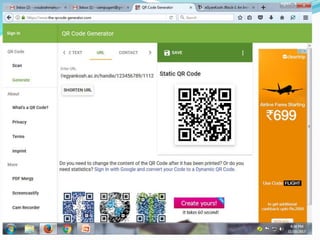
 QR CODE GENERATOR
 QR CODE READER
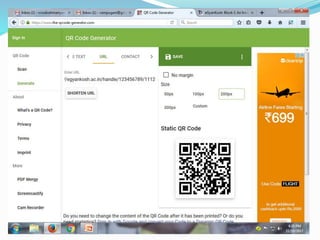
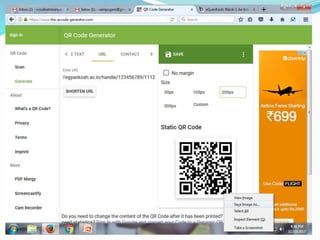
QR Code Generators
 Web-based / desk Generators (Examples:
Kaywa.com QR code generator, QRStuff , GoQR.com,
SnapVu, Bulk QR Code Maker, QR Code Scanner, ,
SnippQR, Scanova QR code generator, Delivr, goqr.me,
QRCode Monkey, Qrcode-generator.com, I-Nigma)
 Mobile- based Creators (Examples: Barcode
Generator (Android OS), Qrafter QR Code Generator
(iOS), QR Code Maker (iOS), QR Code Generator
(Android))
QR Code Readers
 Web-based / desktop QR Code Readers (Examples:
QRreader for Desktop (Adobe Air app), QuickMark QR
Reader for Mac, QuickMark QR Reader for PC, Code
Two for Windows, QR Journal for Mac).
 Mobile-based QR Code Readers (Examples:
Kaywa.com QR code reader, NeoReader, Qrafter QR
Code Reader (optimized for iPad), i-nigma reader ,
Barcode Reader (Android OS), QRDroid (Android),
QR Scanner (iOS), QRReader (iOS), AT&T QR Code
Scanner (iOS, Android, Blackberry), i-nigma , QR
Code Reader (Android)
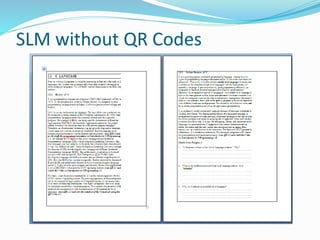
SLM without QR Codes
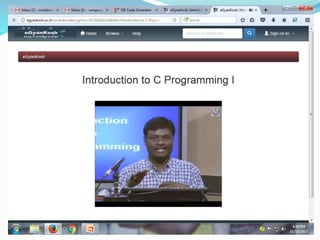
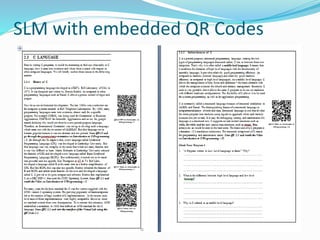
SLM with embedded QR Codes
Other Applications of QR-Codes
 QR codes can provide an alternative access format for
students who need additional support in reading and
writing. Using mobile devices, students can quickly gain
access to the information by just scanning the QR code and
without typing the URL of the websites.
 If a student needs to read the instructions for a task set by
the teacher, scan the QR code created for these instructions
using a mobile device and to listen it, use a text-to speech
app.
 To provide information hotspots throughout the classroom
to access online videos, websites, text that is related to your
syllabus and instructional material.
 To suggest some additional Open Educational Resources
(OERs).
 The student can view his/her assignments, daily schedules
etc.. by scanning the respective QR code.
 Can view the eBooks, Self Instructional Material,
Programme Guides, Old Question Papers etc..
 It can be linked to Flipped Classrooms.
 A QR code can be sent to the parent to view his/her wards
progress.
 To view some YouTube videos on courses or to watch from
the digital arichive / repository.
 To link QR code to hear a book talk.
 To link up an updated Wiki.
FREE STORAGE
 Google Drive (15 GB)
 Media Fire (10GB)
 Mega (50GB)
 Dropbox(2GB)
 pCloud(10GB)
 OneDrive(Microsoft, 10GB)
 iCloud(Apple, 5GB)
PPT HOSTING
FREE STORAGES
 Slideshare
 authorSTREAM
 Speaker Deck
 SlideServe
 Scribd
 SlideSnack
 SlideRocket
PODCAST HOSTING
 SOUNDCLOUD
 Author.fm
 BUZZSPROUT
 LIBSYN
 PODOMATIC
 BLUBRRY
Thank You
Happy QR-Coding Everyone!!!
Email: vvsubrahmanyam@ignou.ac.in
Mobile: +91-9810224390

Creating Quick Response(QR) Codes for the OER

  • 1.
    Prof. V. V.Subrahmanyam Director, School of Computer and Information Sciences IGNOU, New Delhi, INDIA
  • 2.
    Components of QRCodes  There are two components involved with QR Codes.  QR CODE GENERATOR  QR CODE READER
  • 3.
    QR Code Generators Web-based / desk Generators (Examples: Kaywa.com QR code generator, QRStuff , GoQR.com, SnapVu, Bulk QR Code Maker, QR Code Scanner, , SnippQR, Scanova QR code generator, Delivr, goqr.me, QRCode Monkey, Qrcode-generator.com, I-Nigma)  Mobile- based Creators (Examples: Barcode Generator (Android OS), Qrafter QR Code Generator (iOS), QR Code Maker (iOS), QR Code Generator (Android))
  • 4.
    QR Code Readers Web-based / desktop QR Code Readers (Examples: QRreader for Desktop (Adobe Air app), QuickMark QR Reader for Mac, QuickMark QR Reader for PC, Code Two for Windows, QR Journal for Mac).  Mobile-based QR Code Readers (Examples: Kaywa.com QR code reader, NeoReader, Qrafter QR Code Reader (optimized for iPad), i-nigma reader , Barcode Reader (Android OS), QRDroid (Android), QR Scanner (iOS), QRReader (iOS), AT&T QR Code Scanner (iOS, Android, Blackberry), i-nigma , QR Code Reader (Android)
  • 12.
  • 13.
  • 14.
    Other Applications ofQR-Codes  QR codes can provide an alternative access format for students who need additional support in reading and writing. Using mobile devices, students can quickly gain access to the information by just scanning the QR code and without typing the URL of the websites.  If a student needs to read the instructions for a task set by the teacher, scan the QR code created for these instructions using a mobile device and to listen it, use a text-to speech app.  To provide information hotspots throughout the classroom to access online videos, websites, text that is related to your syllabus and instructional material.
  • 15.
     To suggestsome additional Open Educational Resources (OERs).  The student can view his/her assignments, daily schedules etc.. by scanning the respective QR code.  Can view the eBooks, Self Instructional Material, Programme Guides, Old Question Papers etc..  It can be linked to Flipped Classrooms.  A QR code can be sent to the parent to view his/her wards progress.  To view some YouTube videos on courses or to watch from the digital arichive / repository.  To link QR code to hear a book talk.  To link up an updated Wiki.
  • 16.
    FREE STORAGE  GoogleDrive (15 GB)  Media Fire (10GB)  Mega (50GB)  Dropbox(2GB)  pCloud(10GB)  OneDrive(Microsoft, 10GB)  iCloud(Apple, 5GB)
  • 17.
    PPT HOSTING FREE STORAGES Slideshare  authorSTREAM  Speaker Deck  SlideServe  Scribd  SlideSnack  SlideRocket
  • 18.
    PODCAST HOSTING  SOUNDCLOUD Author.fm  BUZZSPROUT  LIBSYN  PODOMATIC  BLUBRRY
  • 19.
    Thank You Happy QR-CodingEveryone!!! Email: vvsubrahmanyam@ignou.ac.in Mobile: +91-9810224390