Process scheduling commands
The UNIX system provides facilities to schedule
jobs to be executed at a specified date and time.
Few process scheduling commands are :
at command
• This command is used to execute UNIX commands at
a future date and time.
• Once the commands are submitted, this command
displays the details regarding the job-id, date and
time at which the command must be executed.
options
-f can be used to specify a file as an argument to the
at command
-l can be used to display different jobs submitted
by user
-r removes a job from the queue, where job-id
must be specified as an argument
batch command
• This command does not need the user to specify
the time at which it should be executed.
• Therefore jobs submitted are executed when the
system load is less and is relatively free.
• The extension .b is added to the job id
indicating that this job is submitted using the
batch command.
The cron daemon
• It is asleep most of the time.
• It wakes up once in every minute and checks the
crontab file for any job to be executed during that
minute.
• The crontab containing one or more lines must be
created in a specific format.
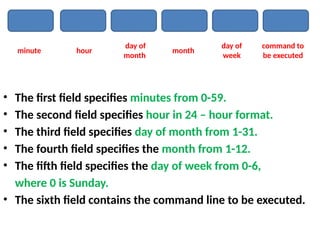
• Each line here contains 6 fields, with each field
separated by a blank.
• The first field specifies minutes from 0-59.
• The second field specifies hour in 24 – hour format.
• The third field specifies day of month from 1-31.
• The fourth field specifies the month from 1-12.
• The fifth field specifies the day of week from 0-6,
where 0 is Sunday.
• The sixth field contains the command line to be executed.
day of
month
month
hour
minute
day of
week
command to
be executed
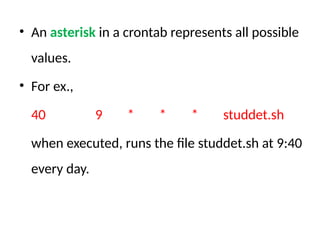
• An asterisk in a crontab represents all possible
values.
• For ex.,
40 9 * * * studdet.sh
when executed, runs the file studdet.sh at 9:40
every day.
The crontab command
• Though at and batch commands are powerful
scheduling command, once submitted, they will
execute the jobs only once.
• Next the jobs will have to be rescheduled if they have
to be executed again.
• The crontab command has great advantage over at and
batch in this respect.
• It can execute a submitted job every day for years
together, without user interference.
• When crontab command is executed, the file contents are
automatically transferred to the crontabs directory
(/var/spool/cron/crontabs)
• -l option is used to display the contents of the crontab file
• -r option is used to remove a submitted file.
• Every user has only one crontab file.
• Two files cron.allow and cron.deny exist, to decide the
users to be allowed and to be denied access the crontab
command.

Process scheduling commands in unix.pptx

  • 1.
    Process scheduling commands TheUNIX system provides facilities to schedule jobs to be executed at a specified date and time. Few process scheduling commands are :
  • 2.
    at command • Thiscommand is used to execute UNIX commands at a future date and time. • Once the commands are submitted, this command displays the details regarding the job-id, date and time at which the command must be executed. options -f can be used to specify a file as an argument to the at command -l can be used to display different jobs submitted by user -r removes a job from the queue, where job-id must be specified as an argument
  • 3.
    batch command • Thiscommand does not need the user to specify the time at which it should be executed. • Therefore jobs submitted are executed when the system load is less and is relatively free. • The extension .b is added to the job id indicating that this job is submitted using the batch command.
  • 4.
    The cron daemon •It is asleep most of the time. • It wakes up once in every minute and checks the crontab file for any job to be executed during that minute. • The crontab containing one or more lines must be created in a specific format. • Each line here contains 6 fields, with each field separated by a blank.
  • 5.
    • The firstfield specifies minutes from 0-59. • The second field specifies hour in 24 – hour format. • The third field specifies day of month from 1-31. • The fourth field specifies the month from 1-12. • The fifth field specifies the day of week from 0-6, where 0 is Sunday. • The sixth field contains the command line to be executed. day of month month hour minute day of week command to be executed
  • 6.
    • An asteriskin a crontab represents all possible values. • For ex., 40 9 * * * studdet.sh when executed, runs the file studdet.sh at 9:40 every day.
  • 7.
    The crontab command •Though at and batch commands are powerful scheduling command, once submitted, they will execute the jobs only once. • Next the jobs will have to be rescheduled if they have to be executed again. • The crontab command has great advantage over at and batch in this respect. • It can execute a submitted job every day for years together, without user interference.
  • 8.
    • When crontabcommand is executed, the file contents are automatically transferred to the crontabs directory (/var/spool/cron/crontabs) • -l option is used to display the contents of the crontab file • -r option is used to remove a submitted file. • Every user has only one crontab file. • Two files cron.allow and cron.deny exist, to decide the users to be allowed and to be denied access the crontab command.