

Piping



Comparison & Pattern search commands



Grep command
Find command

Process Management



Communication Commands



Memory Management Commands



Anil Kumar Kapil



7 February 2014

UNIX

Scheduling Jobs via Crontab

Presented by – Anil Kumar Kapil
Pipes are UNIX constructs that allow us to send the output of a
command as input to other command



You can redirect the output of one command into the input of another
command by using the pipe symbol „|‟

Example
ls –lrt |grep .html
 ps –ef | grep oracle | sort


Anil Kumar Kapil



7 February 2014

UNIX PIPES


The grep generalized regular expression parser, tool searches for lines matching a specific pattern
grep [-nvwx] [-number] { expression} [file1 file2 ... fileN]
Examples :

grep Exception logfile.txt Or
cat logfile.txt |grep Exception



$ grep error ../oracle/Test/ECIS/Log/*



grep Exception logfile.txt | grep -v ERROR



searches only for instances of 'ERROR' that are entire words; it does not match `SysERROR„

grep -w ERROR logfile



Use `<' and `>' to match the start and end of words. If you want only words starting from “ERROR”

grep „<ERROR‟ logfile



$ grep hosts /private/etc/* | grep 'Permission denied' > results.txt



Use “ ^” to match the start of line

ls -lrt |grep '^d'

Note : other associated commands with grep are egrep and fgrep. egrep typically runs faster

Anil Kumar Kapil



7 February 2014

GREP COMMAND
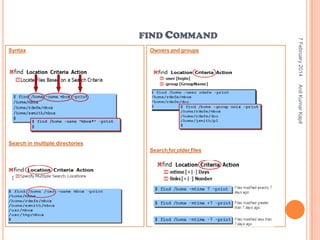
Syntax

Owners and groups

7 February 2014

FIND COMMAND

Anil Kumar Kapil

Search in multiple directories
Search for older files
Search for file type



Looking for files with particular pattern

Searches through only
the /usr and /home directories for any file named
"Chapter1.txt“




List all the files and directories in the box which have
only character in the name




Performing action on the output of find command

find . -name '[a-zA-Z]*.o' –print

Searching for files by permission

If you wanted to look for files that you can execute,
(i.e. shell scripts or programs)

find . -perm -100 -print




find . -iname “Oracle*” -type f

List all the files and directories in the box which
holds the 755 permission in Unix

find . -perm 755 –print

Looking for files by sizes

Find details of files in current directory and subdirectory, greater than 1000 bytes and less than
5000 bytes


find . -size +1000c –size -5000 -exec ls -l {} ;
or
find . -size +1000c –size -5000 | xargs ls –l

Anil Kumar Kapil





find /usr /home -name Chapter1.txt -type

Case sensitive search in the current directory -- and
all subdirectories

7 February 2014

FIND COMMAND



Acting on files you find (exec && xargs)

This command searches through the /usr/local directory for
files that end with the extension .html. When these files are
found, their permission is changed to mode 644 (rw-r--r--)


expr1 -o expr2

find /usr/local -name "*.html" -type f -exec chmod 644 {} ;

Alternation of expression (-o is the or operator)

! Expression

The negation of a expression



find . -type f -name "Foo*" -exec rm {} ;
or
find . -type f -name "Foo*“ | xargs rm –f
or
find . -type f -name "Foo*" -ok rm {} ;

The following command removes all files in your
home directory named a.out or *.o that have
not been accessed for a week




Find all text file which contains word “Exception”


Description

expr1 [-a] expr2 Concatenation of expression

Find all files under the current directory that begin with the
letters 'Foo' and delete them




Expression

To find all files that don't match a filename pattern


find . –name "*.txt" –print | xargs grep “Exception”


find . -type f ! -name "*.html“

Finding files that contain text (find + grep)

how to find all files beneath the current directory
that end with the extension .java, and contain the
characters StringBuffer.




find . ( -name a.out -o -name '*.o' )  -atime +7 exec rm {} ;

find . -type f -name "*.java" -exec grep -l
StringBuffer {} ;

Owners and groups

Anil Kumar Kapil



Logical Expressions

7 February 2014

FIND COMMAND
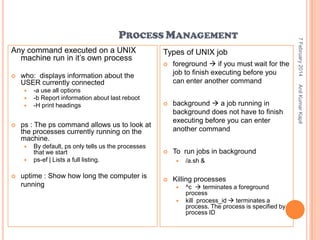
Any command executed on a UNIX
machine run in it‟s own process


foreground  if you must wait for the
job to finish executing before you
can enter another command



background  a job running in
background does not have to finish
executing before you can enter
another command

By default, ps only tells us the processes
that we start
ps-ef | Lists a full listing.



To run jobs in background

uptime : Show how long the computer is
running



who: displays information about the
USER currently connected



ps : The ps command allows us to look at
the processes currently running on the
machine.





-a use all options
-b Report information about last reboot
-H print headings



/a.sh &

Killing processes



^c  terminates a foreground
process
kill process_id  terminates a
process. The process is specified by
process ID

Anil Kumar Kapil







Types of UNIX job

7 February 2014

PROCESS MANAGEMENT
ftp - file transfer program



scp : Secure copy command

Anil Kumar Kapil



7 February 2014

COMMUNICATION COMMANDS

scp afile.txt oracle@10.237.225.78:/cis_app/Projects/


To connect to another networked machine, use the ssh command





ssh –l username remotecomputer

Sftp command ?
telnet command?
Du
du (disk usage) will count the amount of disk space
for a given directory, and all its subdirectories take
up on the disk.



Df
df (disk filling) summarizes the amount of disk space
in use.

Anil Kumar Kapil



7 February 2014

MEMORY MANAGEMENT
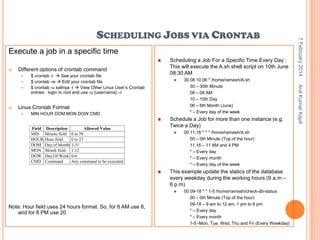
Execute a job in a specific time



Different options of crontab command








Linux Crontab Format


MIN HOUR DOM MON DOW CMD


Field
MIN
HOUR
DOM
MON
DOW
CMD

Description
Minute field
Hour field
Day of Month
Month field
Day Of Week
Command

Allowed Value
0 to 59
0 to 23
1-31
1-12
0-6
Any command to be executed.

Schedule a Job for more than one instance (e.g.
Twice a Day)




00 11,16 * * * /home/ramesh/A.sh
00 – 0th Minute (Top of the hour)
11,16 – 11 AM and 4 PM
* – Every day
* – Every month
* – Every day of the week

This example update the statics of the database
every weekday during the working hours (9 a.m –
6 p.m)


Note: Hour field uses 24 hours format. So, for 8 AM use 8,
and for 8 PM use 20

30 08 10 06 * /home/ramesh/A.sh
30 – 30th Minute
08 – 08 AM
10 – 10th Day
06 – 6th Month (June)
* – Every day of the week

00 09-18 * * 1-5 /home/ramesh/check-db-status
00 – 0th Minute (Top of the hour)
09-18 – 9 am to 12 am, 1 pm to 6 pm
* – Every day
* – Every month
1-5 -Mon, Tue, Wed, Thu and Fri (Every Weekday)

Anil Kumar Kapil



$ crontab -l  See your crontab file
$ crontab –e  Edit your crontab file
$ crontab -u sathiya -l  View Other Linux User‟s Crontab
entries : login to root and use -u {username} –l

Scheduling a Job For a Specific Time Every Day :
This will execute the A.sh shell script on 10th June
08:30 AM

7 February 2014

SCHEDULING JOBS VIA CRONTAB
7 February 2014
Anil Kumar Kapil

QUESTIONS ?
7 February 2014
Anil Kumar Kapil

Thank You ……

Unix training session 3

  • 1.
     Piping  Comparison & Patternsearch commands   Grep command Find command Process Management  Communication Commands  Memory Management Commands  Anil Kumar Kapil  7 February 2014 UNIX Scheduling Jobs via Crontab Presented by – Anil Kumar Kapil
  • 2.
    Pipes are UNIXconstructs that allow us to send the output of a command as input to other command  You can redirect the output of one command into the input of another command by using the pipe symbol „|‟ Example ls –lrt |grep .html  ps –ef | grep oracle | sort  Anil Kumar Kapil  7 February 2014 UNIX PIPES
  • 3.
     The grep generalizedregular expression parser, tool searches for lines matching a specific pattern grep [-nvwx] [-number] { expression} [file1 file2 ... fileN] Examples : grep Exception logfile.txt Or cat logfile.txt |grep Exception  $ grep error ../oracle/Test/ECIS/Log/*  grep Exception logfile.txt | grep -v ERROR  searches only for instances of 'ERROR' that are entire words; it does not match `SysERROR„  grep -w ERROR logfile  Use `<' and `>' to match the start and end of words. If you want only words starting from “ERROR”  grep „<ERROR‟ logfile  $ grep hosts /private/etc/* | grep 'Permission denied' > results.txt  Use “ ^” to match the start of line  ls -lrt |grep '^d' Note : other associated commands with grep are egrep and fgrep. egrep typically runs faster Anil Kumar Kapil  7 February 2014 GREP COMMAND
  • 4.
    Syntax Owners and groups 7February 2014 FIND COMMAND Anil Kumar Kapil Search in multiple directories Search for older files
  • 5.
    Search for filetype  Looking for files with particular pattern  Searches through only the /usr and /home directories for any file named "Chapter1.txt“   List all the files and directories in the box which have only character in the name   Performing action on the output of find command find . -name '[a-zA-Z]*.o' –print Searching for files by permission  If you wanted to look for files that you can execute, (i.e. shell scripts or programs)  find . -perm -100 -print   find . -iname “Oracle*” -type f List all the files and directories in the box which holds the 755 permission in Unix  find . -perm 755 –print Looking for files by sizes  Find details of files in current directory and subdirectory, greater than 1000 bytes and less than 5000 bytes  find . -size +1000c –size -5000 -exec ls -l {} ; or find . -size +1000c –size -5000 | xargs ls –l Anil Kumar Kapil   find /usr /home -name Chapter1.txt -type Case sensitive search in the current directory -- and all subdirectories 7 February 2014 FIND COMMAND
  • 6.
      Acting on filesyou find (exec && xargs)  This command searches through the /usr/local directory for files that end with the extension .html. When these files are found, their permission is changed to mode 644 (rw-r--r--)  expr1 -o expr2 find /usr/local -name "*.html" -type f -exec chmod 644 {} ; Alternation of expression (-o is the or operator) ! Expression The negation of a expression  find . -type f -name "Foo*" -exec rm {} ; or find . -type f -name "Foo*“ | xargs rm –f or find . -type f -name "Foo*" -ok rm {} ; The following command removes all files in your home directory named a.out or *.o that have not been accessed for a week   Find all text file which contains word “Exception”  Description expr1 [-a] expr2 Concatenation of expression Find all files under the current directory that begin with the letters 'Foo' and delete them   Expression To find all files that don't match a filename pattern  find . –name "*.txt" –print | xargs grep “Exception”  find . -type f ! -name "*.html“ Finding files that contain text (find + grep)  how to find all files beneath the current directory that end with the extension .java, and contain the characters StringBuffer.   find . ( -name a.out -o -name '*.o' ) -atime +7 exec rm {} ; find . -type f -name "*.java" -exec grep -l StringBuffer {} ; Owners and groups Anil Kumar Kapil  Logical Expressions 7 February 2014 FIND COMMAND
  • 7.
    Any command executedon a UNIX machine run in it‟s own process  foreground  if you must wait for the job to finish executing before you can enter another command  background  a job running in background does not have to finish executing before you can enter another command By default, ps only tells us the processes that we start ps-ef | Lists a full listing.  To run jobs in background uptime : Show how long the computer is running  who: displays information about the USER currently connected   ps : The ps command allows us to look at the processes currently running on the machine.    -a use all options -b Report information about last reboot -H print headings  /a.sh & Killing processes   ^c  terminates a foreground process kill process_id  terminates a process. The process is specified by process ID Anil Kumar Kapil    Types of UNIX job 7 February 2014 PROCESS MANAGEMENT
  • 8.
    ftp - filetransfer program  scp : Secure copy command Anil Kumar Kapil  7 February 2014 COMMUNICATION COMMANDS scp afile.txt oracle@10.237.225.78:/cis_app/Projects/  To connect to another networked machine, use the ssh command    ssh –l username remotecomputer Sftp command ? telnet command?
  • 9.
    Du du (disk usage)will count the amount of disk space for a given directory, and all its subdirectories take up on the disk.  Df df (disk filling) summarizes the amount of disk space in use. Anil Kumar Kapil  7 February 2014 MEMORY MANAGEMENT
  • 10.
    Execute a jobin a specific time   Different options of crontab command     Linux Crontab Format  MIN HOUR DOM MON DOW CMD  Field MIN HOUR DOM MON DOW CMD Description Minute field Hour field Day of Month Month field Day Of Week Command Allowed Value 0 to 59 0 to 23 1-31 1-12 0-6 Any command to be executed. Schedule a Job for more than one instance (e.g. Twice a Day)   00 11,16 * * * /home/ramesh/A.sh 00 – 0th Minute (Top of the hour) 11,16 – 11 AM and 4 PM * – Every day * – Every month * – Every day of the week This example update the statics of the database every weekday during the working hours (9 a.m – 6 p.m)  Note: Hour field uses 24 hours format. So, for 8 AM use 8, and for 8 PM use 20 30 08 10 06 * /home/ramesh/A.sh 30 – 30th Minute 08 – 08 AM 10 – 10th Day 06 – 6th Month (June) * – Every day of the week 00 09-18 * * 1-5 /home/ramesh/check-db-status 00 – 0th Minute (Top of the hour) 09-18 – 9 am to 12 am, 1 pm to 6 pm * – Every day * – Every month 1-5 -Mon, Tue, Wed, Thu and Fri (Every Weekday) Anil Kumar Kapil  $ crontab -l  See your crontab file $ crontab –e  Edit your crontab file $ crontab -u sathiya -l  View Other Linux User‟s Crontab entries : login to root and use -u {username} –l Scheduling a Job For a Specific Time Every Day : This will execute the A.sh shell script on 10th June 08:30 AM 7 February 2014 SCHEDULING JOBS VIA CRONTAB
  • 11.
    7 February 2014 AnilKumar Kapil QUESTIONS ?
  • 12.
    7 February 2014 AnilKumar Kapil Thank You ……