CRONJOB
EVERYTHING YOU WANT TO
KNOW
BY NIRAJ KUMAR
INSIDELYFE.COM/BLOG
YOUTUBE CHANNEL:
LEARNERFOREVER
1
WHAT IS CRONJOB?
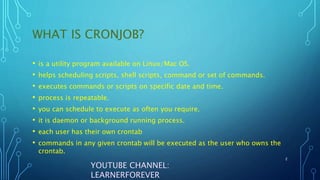
• is a utility program available on Linux/Mac OS.
• helps scheduling scripts, shell scripts, command or set of commands.
• executes commands or scripts on specific date and time.
• process is repeatable.
• you can schedule to execute as often you require.
• it is daemon or background running process.
• each user has their own crontab
• commands in any given crontab will be executed as the user who owns the
crontab.
2
YOUTUBE CHANNEL:
LEARNERFOREVER
WHY CRONJOB IS USED?
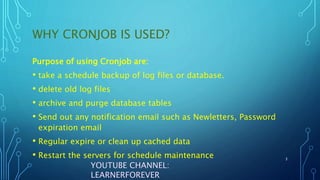
Purpose of using Cronjob are:
• take a schedule backup of log files or database.
• delete old log files
• archive and purge database tables
• Send out any notification email such as Newletters, Password
expiration email
• Regular expire or clean up cached data
• Restart the servers for schedule maintenance 3
YOUTUBE CHANNEL:
LEARNERFOREVER
UNDERSTANDING THE CRONJOB SYNTAX
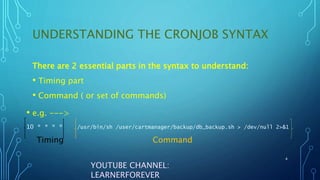
There are 2 essential parts in the syntax to understand:
• Timing part
• Command ( or set of commands)
4
YOUTUBE CHANNEL:
LEARNERFOREVER
• e.g. --->
10 * * * * /usr/bin/sh /user/cartmanager/backup/db_backup.sh > /dev/null 2>&1
Timing Command
UNDERSTANDING THE TIMING SYNTAX
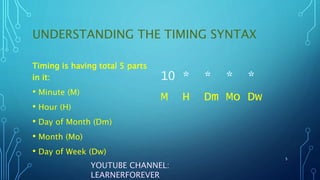
Timing is having total 5 parts
in it:
• Minute (M)
• Hour (H)
• Day of Month (Dm)
• Month (Mo)
• Day of Week (Dw)
5
YOUTUBE CHANNEL:
LEARNERFOREVER
10 * * * *
M H Dm Mo Dw
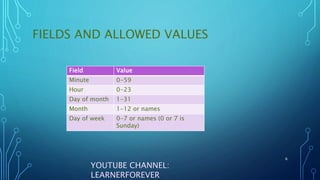
FIELDS AND ALLOWED VALUES
6
YOUTUBE CHANNEL:
LEARNERFOREVER
Field Value
Minute 0-59
Hour 0-23
Day of month 1-31
Month 1-12 or names
Day of week 0-7 or names (0 or 7 is
Sunday)
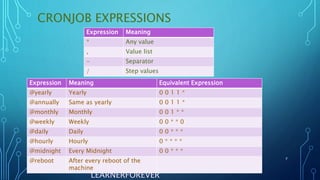
CRONJOB EXPRESSIONS
7
YOUTUBE CHANNEL:
LEARNERFOREVER
Expression Meaning Equivalent Expression
@yearly Yearly 0 0 1 1 *
@annually Same as yearly 0 0 1 1 *
@monthly Monthly 0 0 1 * *
@weekly Weekly 0 0 * * 0
@daily Daily 0 0 * * *
@hourly Hourly 0 * * * *
@midnight Every Midnight 0 0 * * *
@reboot After every reboot of the
machine
Expression Meaning
* Any value
, Value list
- Separator
/ Step values
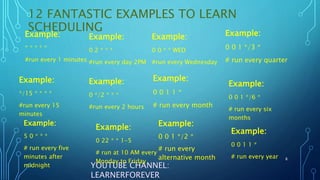
12 FANTASTIC EXAMPLES TO LEARN
SCHEDULING
Example:
0 0 1 1 *
# run every month
8
YOUTUBE CHANNEL:
LEARNERFOREVER
Example:
5 0 * * *
# run every five
minutes after
midnight
Example:
0 0 * * WED
#run every Wednesday
Example:
*/15 * * * *
#run every 15
minutes
Example:
0 */2 * * *
#run every 2 hours
Example:
* * * * *
#run every 1 minutes
Example:
0 2 * * *
#run every day 2PM
Example:
0 0 1 */3 *
# run every quarter
Example:
0 0 1 */6 *
# run every six
months
Example:
0 0 1 1 *
# run every year
Example:
0 22 * * 1-5
# run at 10 AM every
Monday to Friday
Example:
0 0 1 */2 *
# run every
alternative month
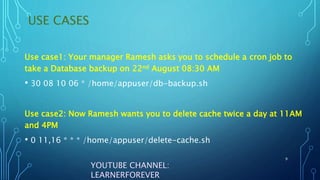
USE CASES
9
YOUTUBE CHANNEL:
LEARNERFOREVER
Use case1: Your manager Ramesh asks you to schedule a cron job to
take a Database backup on 22nd August 08:30 AM
• 30 08 10 06 * /home/appuser/db-backup.sh
Use case2: Now Ramesh wants you to delete cache twice a day at 11AM
and 4PM
• 0 11,16 * * * /home/appuser/delete-cache.sh
USE CASES
10
YOUTUBE CHANNEL:
LEARNERFOREVER
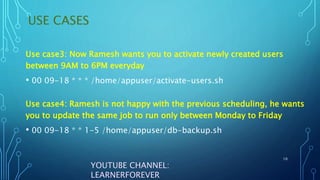
Use case4: Ramesh is not happy with the previous scheduling, he wants
you to update the same job to run only between Monday to Friday
• 00 09-18 * * 1-5 /home/appuser/db-backup.sh
Use case3: Now Ramesh wants you to activate newly created users
between 9AM to 6PM everyday
• 00 09-18 * * * /home/appuser/activate-users.sh
CRONTAB COMMANDS
11
YOUTUBE CHANNEL:
LEARNERFOREVER
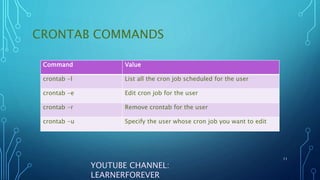
Command Value
crontab -l List all the cron job scheduled for the user
crontab -e Edit cron job for the user
crontab -r Remove crontab for the user
crontab -u Specify the user whose cron job you want to edit
YOUR LEARNING IS
YOUR RESPONSIBILITY.
SUBSCRIBE MY CHANNEL
FOR CONTINUOUS
LEARNING. 12
YOUTUBE CHANNEL:
LEARNERFOREVER

cronjob-180822194232-1.pdf

  • 1.
    CRONJOB EVERYTHING YOU WANTTO KNOW BY NIRAJ KUMAR INSIDELYFE.COM/BLOG YOUTUBE CHANNEL: LEARNERFOREVER 1
  • 2.
    WHAT IS CRONJOB? •is a utility program available on Linux/Mac OS. • helps scheduling scripts, shell scripts, command or set of commands. • executes commands or scripts on specific date and time. • process is repeatable. • you can schedule to execute as often you require. • it is daemon or background running process. • each user has their own crontab • commands in any given crontab will be executed as the user who owns the crontab. 2 YOUTUBE CHANNEL: LEARNERFOREVER
  • 3.
    WHY CRONJOB ISUSED? Purpose of using Cronjob are: • take a schedule backup of log files or database. • delete old log files • archive and purge database tables • Send out any notification email such as Newletters, Password expiration email • Regular expire or clean up cached data • Restart the servers for schedule maintenance 3 YOUTUBE CHANNEL: LEARNERFOREVER
  • 4.
    UNDERSTANDING THE CRONJOBSYNTAX There are 2 essential parts in the syntax to understand: • Timing part • Command ( or set of commands) 4 YOUTUBE CHANNEL: LEARNERFOREVER • e.g. ---> 10 * * * * /usr/bin/sh /user/cartmanager/backup/db_backup.sh > /dev/null 2>&1 Timing Command
  • 5.
    UNDERSTANDING THE TIMINGSYNTAX Timing is having total 5 parts in it: • Minute (M) • Hour (H) • Day of Month (Dm) • Month (Mo) • Day of Week (Dw) 5 YOUTUBE CHANNEL: LEARNERFOREVER 10 * * * * M H Dm Mo Dw
  • 6.
    FIELDS AND ALLOWEDVALUES 6 YOUTUBE CHANNEL: LEARNERFOREVER Field Value Minute 0-59 Hour 0-23 Day of month 1-31 Month 1-12 or names Day of week 0-7 or names (0 or 7 is Sunday)
  • 7.
    CRONJOB EXPRESSIONS 7 YOUTUBE CHANNEL: LEARNERFOREVER ExpressionMeaning Equivalent Expression @yearly Yearly 0 0 1 1 * @annually Same as yearly 0 0 1 1 * @monthly Monthly 0 0 1 * * @weekly Weekly 0 0 * * 0 @daily Daily 0 0 * * * @hourly Hourly 0 * * * * @midnight Every Midnight 0 0 * * * @reboot After every reboot of the machine Expression Meaning * Any value , Value list - Separator / Step values
  • 8.
    12 FANTASTIC EXAMPLESTO LEARN SCHEDULING Example: 0 0 1 1 * # run every month 8 YOUTUBE CHANNEL: LEARNERFOREVER Example: 5 0 * * * # run every five minutes after midnight Example: 0 0 * * WED #run every Wednesday Example: */15 * * * * #run every 15 minutes Example: 0 */2 * * * #run every 2 hours Example: * * * * * #run every 1 minutes Example: 0 2 * * * #run every day 2PM Example: 0 0 1 */3 * # run every quarter Example: 0 0 1 */6 * # run every six months Example: 0 0 1 1 * # run every year Example: 0 22 * * 1-5 # run at 10 AM every Monday to Friday Example: 0 0 1 */2 * # run every alternative month
  • 9.
    USE CASES 9 YOUTUBE CHANNEL: LEARNERFOREVER Usecase1: Your manager Ramesh asks you to schedule a cron job to take a Database backup on 22nd August 08:30 AM • 30 08 10 06 * /home/appuser/db-backup.sh Use case2: Now Ramesh wants you to delete cache twice a day at 11AM and 4PM • 0 11,16 * * * /home/appuser/delete-cache.sh
  • 10.
    USE CASES 10 YOUTUBE CHANNEL: LEARNERFOREVER Usecase4: Ramesh is not happy with the previous scheduling, he wants you to update the same job to run only between Monday to Friday • 00 09-18 * * 1-5 /home/appuser/db-backup.sh Use case3: Now Ramesh wants you to activate newly created users between 9AM to 6PM everyday • 00 09-18 * * * /home/appuser/activate-users.sh
  • 11.
    CRONTAB COMMANDS 11 YOUTUBE CHANNEL: LEARNERFOREVER CommandValue crontab -l List all the cron job scheduled for the user crontab -e Edit cron job for the user crontab -r Remove crontab for the user crontab -u Specify the user whose cron job you want to edit
  • 12.
    YOUR LEARNING IS YOURRESPONSIBILITY. SUBSCRIBE MY CHANNEL FOR CONTINUOUS LEARNING. 12 YOUTUBE CHANNEL: LEARNERFOREVER