PROCESS MANAGEMENT
IN ANDROID
Shrey Verma 190101083
Mayank Chanda
k
190101052
Karan Raj
Sharma
190101043
PROCESS AND APPLICATION
FUNDAMENTALS IN ANDROID
• Android App is a software designed to run on an Android
device.
• They can be written using Kotlin, Java, and C++ languages.
• By default, all components of the same application run in the
same process
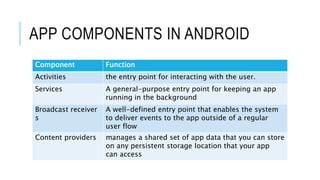
APP COMPONENTS IN ANDROID
Component Function​
Activities the entry point for interacting with the user.
Services A general-purpose entry point for keeping an app
running in the background
Broadcast receiver
s
A well-defined entry point that enables the system
to deliver events to the app outside of a regular
user flow
Content providers manages a shared set of app data that you can store
on any persistent storage location that your app
can access
PROCESSES AND APPLICATION
LIFECYCLE
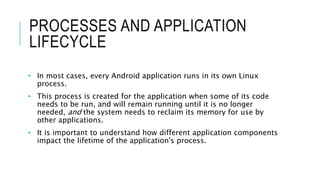
• In most cases, every Android application runs in its own Linux
process.
• This process is created for the application when some of its code
needs to be run, and will remain running until it is no longer
needed, and the system needs to reclaim its memory for use by
other applications.
• It is important to understand how different application components
impact the lifetime of the application's process.
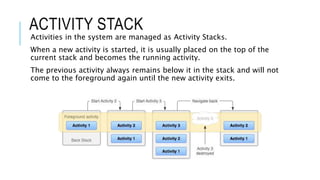
ACTIVITY STACK
Activities in the system are managed as Activity Stacks.
When a new activity is started, it is usually placed on the top of the
current stack and becomes the running activity.
The previous activity always remains below it in the stack and will not
come to the foreground again until the new activity exits.
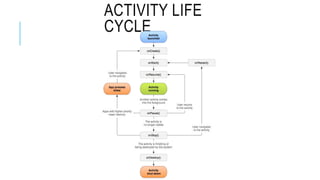
ACTIVITY LIFE
CYCLE
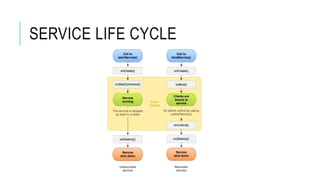
SERVICE LIFE CYCLE
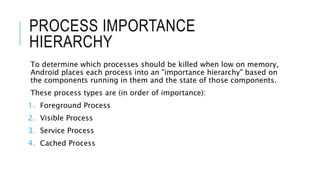
PROCESS IMPORTANCE
HIERARCHY
To determine which processes should be killed when low on memory,
Android places each process into an "importance hierarchy" based on
the components running in them and the state of those components.
These process types are (in order of importance):
1. Foreground Process
2. Visible Process
3. Service Process
4. Cached Process
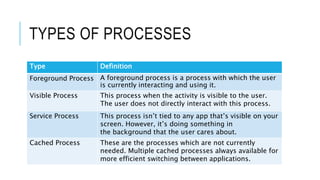
TYPES OF PROCESSES
Type Definition​
Foreground Process A foreground process is a process with which the user
is currently interacting and using it.
Visible Process This process when the activity is visible to the user.
The user does not directly interact with this process.
Service Process This process isn’t tied to any app that’s visible on your
screen. However, it’s doing something in
the background that the user cares about.
Cached Process These are the processes which are not currently
needed. Multiple cached processes always available for
more efficient switching between applications.
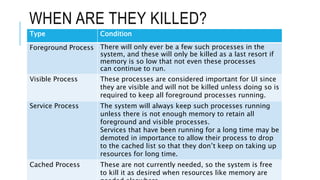
WHEN ARE THEY KILLED?
Type Condition​
Foreground Process There will only ever be a few such processes in the
system, and these will only be killed as a last resort if
memory is so low that not even these processes
can continue to run.
Visible Process These processes are considered important for UI since
they are visible and will not be killed unless doing so is
required to keep all foreground processes running.
Service Process The system will always keep such processes running
unless there is not enough memory to retain all
foreground and visible processes.
Services that have been running for a long time may be
demoted in importance to allow their process to drop
to the cached list so that they don’t keep on taking up
resources for long time.
Cached Process These are not currently needed, so the system is free
to kill it as desired when resources like memory are
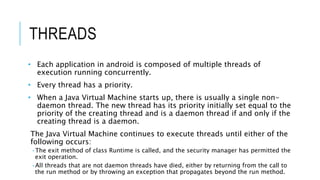
THREADS
• Each application in android is composed of multiple threads of
execution running concurrently.
• Every thread has a priority.
• When a Java Virtual Machine starts up, there is usually a single non-
daemon thread. The new thread has its priority initially set equal to the
priority of the creating thread and is a daemon thread if and only if the
creating thread is a daemon.
The Java Virtual Machine continues to execute threads until either of the
following occurs:
•The exit method of class Runtime is called, and the security manager has permitted the
exit operation.
•All threads that are not daemon threads have died, either by returning from the call to
the run method or by throwing an exception that propagates beyond the run method.
INTER PROCESS COMMUNICATION
There are two ways processes communicate with one another:
• Intents: An intent is used to perform an action on the screen. It is mostly
used to start an activity, send a broadcast receiver, start services and send
messages between two activities.
• Android Interface Definition Language (AIDL): It allows us to define the
programming interface that both the client and service agree upon in order
to communicate with each other using inter process communication (IPC).
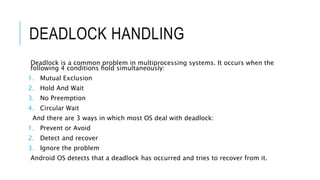
DEADLOCK HANDLING
Deadlock is a common problem in multiprocessing systems. It occurs when the
following 4 conditions hold simultaneously:
1. Mutual Exclusion
2. Hold And Wait
3. No Preemption
4. Circular Wait
And there are 3 ways in which most OS deal with deadlock:
1. Prevent or Avoid
2. Detect and recover
3. Ignore the problem
Android OS detects that a deadlock has occurred and tries to recover from it.
DEADLOCK DETECTION
ALGORITHM AND RECOVERY
In the deadlock detection algorithm, we try to fulfill the requests one
by one where the requested resources can be made available from the
available ones. We do this for every process for whom it is possible. If
we are able to fulfill all the requests there is no deadlock, otherwise
the system is in a deadlocked state.
For recovery, we need to roll back to some safe state and restart
process from that state.
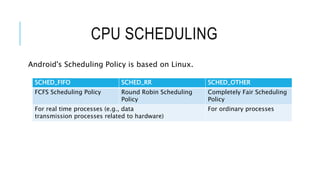
CPU SCHEDULING
Android's Scheduling Policy is based on Linux.
SCHED_FIFO SCHED_RR SCHED_OTHER
FCFS Scheduling Policy Round Robin Scheduling
Policy
Completely Fair Scheduling
Policy
For real time processes (e.g., data
transmission processes related to hardware)
For ordinary processes
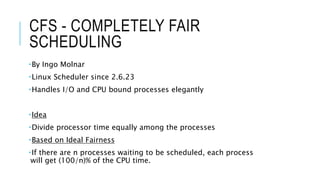
CFS - COMPLETELY FAIR
SCHEDULING
By Ingo Molnar
Linux Scheduler since 2.6.23
Handles I/O and CPU bound processes elegantly
Idea
Divide processor time equally among the processes
Based on Ideal Fairness
If there are n processes waiting to be scheduled, each process
will get (100/n)% of the CPU time.
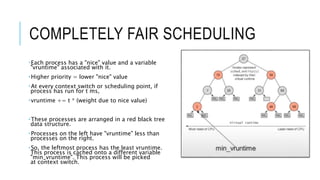
COMPLETELY FAIR SCHEDULING
Each process has a "nice" value and a variable
"vruntime" associated with it.
Higher priority = lower "nice" value
At every context switch or scheduling point, if
process has run for t ms,
vruntime += t * (weight due to nice value)
These processes are arranged in a red black tree
data structure.
Processes on the left have "vruntime" less than
processes on the right.
So, the leftmost process has the least vruntime.
This process is cached onto a different variable
"min_vruntime". This process will be picked
at context switch.
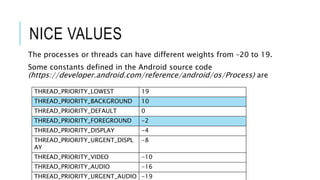
NICE VALUES
The processes or threads can have different weights from –20 to 19.
Some constants defined in the Android source code
(https://developer.android.com/reference/android/os/Process) are
THREAD_PRIORITY_LOWEST 19
THREAD_PRIORITY_BACKGROUND 10
THREAD_PRIORITY_DEFAULT 0
THREAD_PRIORITY_FOREGROUND -2
THREAD_PRIORITY_DISPLAY -4
THREAD_PRIORITY_URGENT_DISPL
AY
-8
THREAD_PRIORITY_VIDEO -10
THREAD_PRIORITY_AUDIO -16
THREAD_PRIORITY_URGENT_AUDIO -19
CONTROL GROUPS
Practically, the Scheduling is not sufficient to ensure smooth
experience for the user.
To further limit the impact of the background processes on the
foreground processes,
Android also uses control groups.
Control groups or cgroups is a Linux kernel feature that organizes
processes into hierarchical groups whose usage of resources can be
limited and monitored.
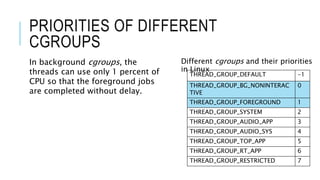
PRIORITIES OF DIFFERENT
CGROUPS
Different cgroups and their priorities
in Linux
THREAD_GROUP_DEFAULT -1
THREAD_GROUP_BG_NONINTERAC
TIVE
0
THREAD_GROUP_FOREGROUND 1
THREAD_GROUP_SYSTEM 2
THREAD_GROUP_AUDIO_APP 3
THREAD_GROUP_AUDIO_SYS 4
THREAD_GROUP_TOP_APP 5
THREAD_GROUP_RT_APP 6
THREAD_GROUP_RESTRICTED 7
In background cgroups, the
threads can use only 1 percent of
CPU so that the foreground jobs
are completed without delay.
SCHEDTUNE AND CPUSET
The cgroup level is adjusted in Android using two subsystems
schedtune and cpuset.
SCHEDTUNE
It is used by Android since 7.1 to allocate CPU resources
It is mainly used
To control process scheduling
Select CPU
Trigger boost
CPUSET
It is used to bind processes to the specified CPU and memory nodes.
Mayank Chandak mchandak@iitg.ac.in 190101052
Shrey Verma v.shrey@iitg.ac.in 190101083
Karan Raj Sharma karan.raj@iitg.ac.in 190101043

Process Management in Android

  • 1.
    PROCESS MANAGEMENT IN ANDROID ShreyVerma 190101083 Mayank Chanda k 190101052 Karan Raj Sharma 190101043
  • 2.
    PROCESS AND APPLICATION FUNDAMENTALSIN ANDROID • Android App is a software designed to run on an Android device. • They can be written using Kotlin, Java, and C++ languages. • By default, all components of the same application run in the same process
  • 3.
    APP COMPONENTS INANDROID Component Function​ Activities the entry point for interacting with the user. Services A general-purpose entry point for keeping an app running in the background Broadcast receiver s A well-defined entry point that enables the system to deliver events to the app outside of a regular user flow Content providers manages a shared set of app data that you can store on any persistent storage location that your app can access
  • 4.
    PROCESSES AND APPLICATION LIFECYCLE •In most cases, every Android application runs in its own Linux process. • This process is created for the application when some of its code needs to be run, and will remain running until it is no longer needed, and the system needs to reclaim its memory for use by other applications. • It is important to understand how different application components impact the lifetime of the application's process.
  • 5.
    ACTIVITY STACK Activities inthe system are managed as Activity Stacks. When a new activity is started, it is usually placed on the top of the current stack and becomes the running activity. The previous activity always remains below it in the stack and will not come to the foreground again until the new activity exits.
  • 6.
  • 7.
  • 8.
    PROCESS IMPORTANCE HIERARCHY To determinewhich processes should be killed when low on memory, Android places each process into an "importance hierarchy" based on the components running in them and the state of those components. These process types are (in order of importance): 1. Foreground Process 2. Visible Process 3. Service Process 4. Cached Process
  • 9.
    TYPES OF PROCESSES TypeDefinition​ Foreground Process A foreground process is a process with which the user is currently interacting and using it. Visible Process This process when the activity is visible to the user. The user does not directly interact with this process. Service Process This process isn’t tied to any app that’s visible on your screen. However, it’s doing something in the background that the user cares about. Cached Process These are the processes which are not currently needed. Multiple cached processes always available for more efficient switching between applications.
  • 10.
    WHEN ARE THEYKILLED? Type Condition​ Foreground Process There will only ever be a few such processes in the system, and these will only be killed as a last resort if memory is so low that not even these processes can continue to run. Visible Process These processes are considered important for UI since they are visible and will not be killed unless doing so is required to keep all foreground processes running. Service Process The system will always keep such processes running unless there is not enough memory to retain all foreground and visible processes. Services that have been running for a long time may be demoted in importance to allow their process to drop to the cached list so that they don’t keep on taking up resources for long time. Cached Process These are not currently needed, so the system is free to kill it as desired when resources like memory are
  • 11.
    THREADS • Each applicationin android is composed of multiple threads of execution running concurrently. • Every thread has a priority. • When a Java Virtual Machine starts up, there is usually a single non- daemon thread. The new thread has its priority initially set equal to the priority of the creating thread and is a daemon thread if and only if the creating thread is a daemon. The Java Virtual Machine continues to execute threads until either of the following occurs: •The exit method of class Runtime is called, and the security manager has permitted the exit operation. •All threads that are not daemon threads have died, either by returning from the call to the run method or by throwing an exception that propagates beyond the run method.
  • 12.
    INTER PROCESS COMMUNICATION Thereare two ways processes communicate with one another: • Intents: An intent is used to perform an action on the screen. It is mostly used to start an activity, send a broadcast receiver, start services and send messages between two activities. • Android Interface Definition Language (AIDL): It allows us to define the programming interface that both the client and service agree upon in order to communicate with each other using inter process communication (IPC).
  • 13.
    DEADLOCK HANDLING Deadlock isa common problem in multiprocessing systems. It occurs when the following 4 conditions hold simultaneously: 1. Mutual Exclusion 2. Hold And Wait 3. No Preemption 4. Circular Wait And there are 3 ways in which most OS deal with deadlock: 1. Prevent or Avoid 2. Detect and recover 3. Ignore the problem Android OS detects that a deadlock has occurred and tries to recover from it.
  • 14.
    DEADLOCK DETECTION ALGORITHM ANDRECOVERY In the deadlock detection algorithm, we try to fulfill the requests one by one where the requested resources can be made available from the available ones. We do this for every process for whom it is possible. If we are able to fulfill all the requests there is no deadlock, otherwise the system is in a deadlocked state. For recovery, we need to roll back to some safe state and restart process from that state.
  • 15.
    CPU SCHEDULING Android's SchedulingPolicy is based on Linux. SCHED_FIFO SCHED_RR SCHED_OTHER FCFS Scheduling Policy Round Robin Scheduling Policy Completely Fair Scheduling Policy For real time processes (e.g., data transmission processes related to hardware) For ordinary processes
  • 16.
    CFS - COMPLETELYFAIR SCHEDULING By Ingo Molnar Linux Scheduler since 2.6.23 Handles I/O and CPU bound processes elegantly Idea Divide processor time equally among the processes Based on Ideal Fairness If there are n processes waiting to be scheduled, each process will get (100/n)% of the CPU time.
  • 17.
    COMPLETELY FAIR SCHEDULING Eachprocess has a "nice" value and a variable "vruntime" associated with it. Higher priority = lower "nice" value At every context switch or scheduling point, if process has run for t ms, vruntime += t * (weight due to nice value) These processes are arranged in a red black tree data structure. Processes on the left have "vruntime" less than processes on the right. So, the leftmost process has the least vruntime. This process is cached onto a different variable "min_vruntime". This process will be picked at context switch.
  • 18.
    NICE VALUES The processesor threads can have different weights from –20 to 19. Some constants defined in the Android source code (https://developer.android.com/reference/android/os/Process) are THREAD_PRIORITY_LOWEST 19 THREAD_PRIORITY_BACKGROUND 10 THREAD_PRIORITY_DEFAULT 0 THREAD_PRIORITY_FOREGROUND -2 THREAD_PRIORITY_DISPLAY -4 THREAD_PRIORITY_URGENT_DISPL AY -8 THREAD_PRIORITY_VIDEO -10 THREAD_PRIORITY_AUDIO -16 THREAD_PRIORITY_URGENT_AUDIO -19
  • 19.
    CONTROL GROUPS Practically, theScheduling is not sufficient to ensure smooth experience for the user. To further limit the impact of the background processes on the foreground processes, Android also uses control groups. Control groups or cgroups is a Linux kernel feature that organizes processes into hierarchical groups whose usage of resources can be limited and monitored.
  • 20.
    PRIORITIES OF DIFFERENT CGROUPS Differentcgroups and their priorities in Linux THREAD_GROUP_DEFAULT -1 THREAD_GROUP_BG_NONINTERAC TIVE 0 THREAD_GROUP_FOREGROUND 1 THREAD_GROUP_SYSTEM 2 THREAD_GROUP_AUDIO_APP 3 THREAD_GROUP_AUDIO_SYS 4 THREAD_GROUP_TOP_APP 5 THREAD_GROUP_RT_APP 6 THREAD_GROUP_RESTRICTED 7 In background cgroups, the threads can use only 1 percent of CPU so that the foreground jobs are completed without delay.
  • 21.
    SCHEDTUNE AND CPUSET Thecgroup level is adjusted in Android using two subsystems schedtune and cpuset. SCHEDTUNE It is used by Android since 7.1 to allocate CPU resources It is mainly used To control process scheduling Select CPU Trigger boost CPUSET It is used to bind processes to the specified CPU and memory nodes.
  • 22.
    Mayank Chandak mchandak@iitg.ac.in190101052 Shrey Verma v.shrey@iitg.ac.in 190101083 Karan Raj Sharma karan.raj@iitg.ac.in 190101043