By E-Learning & IT Training Department, 2014
•TCE 2012 
50 IWBs 
•TCE & SN 2013 
200 IWBs 
•SN 2014 
250 IWBs 
•TCE & SN 2010* 
17 IWBs
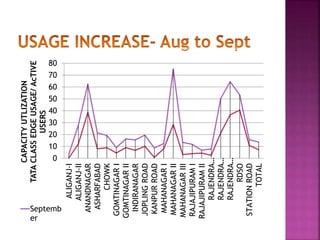
IWB usage declined during July-August 
 Adhyayan teaching style was being absorbed 
 New boards were being installed 
 Old boards had several technical issues 
 Recruitment/ Training of IT Assistants 
 Lack of support/training given to teachers 
 TCE not working on new Smartboards
 Tools and Features 
 Activity Builders 
 Create Resource 
 Link External Resource 
 Create Animation 
 Save lessons for future 
 Smart Exchange
 Scheduling of lessons 
 Planning Lessons with existing TCE 
 Add external resources 
 Adding Smart Notebook Lessons 
 Quiz and Games
 IT Assistants/ Trainers 
 At Campus 
 4 groups- Introductory & Refresher for TCE/ 
Smart Notebook 
 Total No of Sessions- 93 
 Trainees- 1629 
 IT Training Centre 
 Subject-wise teachers from different campus 
 Total No of Sessions- 22 
 Trainees- 516 
 Innovation Wing members
0 
10 
20 
30 
40 
50 
60 
70 
80 
ALIGANJ-I 
ALIGANJ-II 
ANANDNAGAR 
ASHARFABAD 
CHOWK 
GOMTINAGAR I 
GOMTINAGAR II 
INDIRANAGAR 
JOPLING ROAD 
KANPUR ROAD 
MAHANAGAR I 
MAHANAGAR II 
MAHANAGAR III 
RAJAJIPURAM I 
RAJAJIPURAM II 
RAJENDRA… 
RAJENDRA… 
RAJENDRA… 
RDSO 
STATION ROAD 
TOTAL 
CAPACITY UTLIZATION 
TATA CLASS EDGE USAGE/ AcTIVE 
USERS 
Septemb 
er
100 
80 
60 
40 
TATA CLASS EDGE DISTRIBUTION 
0 Non-TCE 
TCE 
20 
No of IWBs 
Pre-Primary Primary Junior Senior 
TCE 20 100 81 64 
Non-TCE 54 94 75 32
Job Profile 
Daily, weekly and monthly tasks 
Review and Support 
Performance of IT Assistant 
Issues faced by IT Assistant
 IWB Training required for supporting teachers 
 IT Training NOT taking place at campuses 
 Every day from 2:30 to 3:30 mandatory 
training to be conducted by IT Asstt
 Institutionalize the Google Apps 
 Sharing and Collaboration 
 Planning Meetings 
 Teaching and Flipping the classrooms 
 Time and Cost Saving 
 Going Green 
 Getting ready for the future
 All staff and students from VIII-XII 
 25 GB Email space 
 Unlimited Google Drive 
Centralised control 
 Easy Adoption 
 Controlled release 
Training and Support
Privacy and Security 
 Intellectual Property 
 Ads free 
 Digital Footprints 
Do we need it?
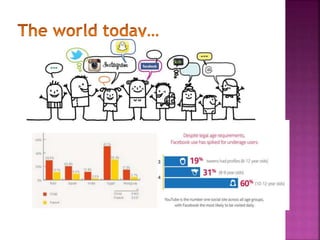
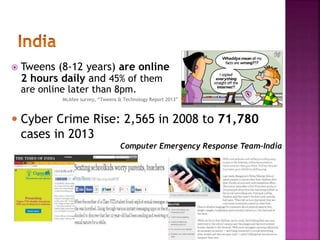
 Tweens (8-12 years) are online 
2 hours daily and 45% of them 
are online later than 8pm. 
McAfee survey, “Tweens & Technology Report 2013” 
 Cyber Crime Rise: 2,565 in 2008 to 71,780 
cases in 2013 
Computer Emergency Response Team-India
CYBER WELLNESS 
 Awareness of Cyber Safety 
 Netiquettes eg Plagiarism 
 Passwords, sharing information 
 Inclusive of Parents, teachers and we get Cyber 
Smart 
 Robust IT/Cyber Policy 
 Teaching to ‘Code’ 
 Cyber Leaders and Champions 
 Structured Approach 
 Intel/McAfee Awareness Program
 Quiz- Do you know about Internet Safety? 
 http://home.mcafee.com/SafetyQuiz/QuizTeen.aspx?culture=en- 
US&cid=40968&ctst=1 
 Resources for internet Safety 
 http://santamariatimes.com/news/opinion/editorial/commentary/pro 
tecting-children-against-cyber-crimes/article_814caaf6-30b5-11e0- 
8f05-001cc4c03286.html#.UN1h-MU_QSw.pinterest 
 http://www.staysafeonline.org/blog/category/social-networking 
 http://mcafeecybered.com/cybered/resources.php 
 https://www.commonsensemedia.org/educators/cyberbullying-toolkit 
 https://www.youtube.com/watch?v=89eCHtFs0XM 
 http://fbhost.promotw.com/fbpages/img/safety_resources/ffeclg.pdf 
 Learn to Code program of UK 
 http://uk.code.org/ 
 http://www.telegraph.co.uk/technology/news/10410036/Teaching-our- 
children-to-code-a-quiet-revolution.html
Your Queries?

Principals' meeting

  • 1.
    By E-Learning &IT Training Department, 2014
  • 2.
    •TCE 2012 50IWBs •TCE & SN 2013 200 IWBs •SN 2014 250 IWBs •TCE & SN 2010* 17 IWBs
  • 3.
    IWB usage declinedduring July-August  Adhyayan teaching style was being absorbed  New boards were being installed  Old boards had several technical issues  Recruitment/ Training of IT Assistants  Lack of support/training given to teachers  TCE not working on new Smartboards
  • 4.
     Tools andFeatures  Activity Builders  Create Resource  Link External Resource  Create Animation  Save lessons for future  Smart Exchange
  • 5.
     Scheduling oflessons  Planning Lessons with existing TCE  Add external resources  Adding Smart Notebook Lessons  Quiz and Games
  • 6.
     IT Assistants/Trainers  At Campus  4 groups- Introductory & Refresher for TCE/ Smart Notebook  Total No of Sessions- 93  Trainees- 1629  IT Training Centre  Subject-wise teachers from different campus  Total No of Sessions- 22  Trainees- 516  Innovation Wing members
  • 7.
    0 10 20 30 40 50 60 70 80 ALIGANJ-I ALIGANJ-II ANANDNAGAR ASHARFABAD CHOWK GOMTINAGAR I GOMTINAGAR II INDIRANAGAR JOPLING ROAD KANPUR ROAD MAHANAGAR I MAHANAGAR II MAHANAGAR III RAJAJIPURAM I RAJAJIPURAM II RAJENDRA… RAJENDRA… RAJENDRA… RDSO STATION ROAD TOTAL CAPACITY UTLIZATION TATA CLASS EDGE USAGE/ AcTIVE USERS Septemb er
  • 8.
    100 80 60 40 TATA CLASS EDGE DISTRIBUTION 0 Non-TCE TCE 20 No of IWBs Pre-Primary Primary Junior Senior TCE 20 100 81 64 Non-TCE 54 94 75 32
  • 9.
    Job Profile Daily,weekly and monthly tasks Review and Support Performance of IT Assistant Issues faced by IT Assistant
  • 10.
     IWB Trainingrequired for supporting teachers  IT Training NOT taking place at campuses  Every day from 2:30 to 3:30 mandatory training to be conducted by IT Asstt
  • 13.
     Institutionalize theGoogle Apps  Sharing and Collaboration  Planning Meetings  Teaching and Flipping the classrooms  Time and Cost Saving  Going Green  Getting ready for the future
  • 14.
     All staffand students from VIII-XII  25 GB Email space  Unlimited Google Drive Centralised control  Easy Adoption  Controlled release Training and Support
  • 15.
    Privacy and Security  Intellectual Property  Ads free  Digital Footprints Do we need it?
  • 20.
     Tweens (8-12years) are online 2 hours daily and 45% of them are online later than 8pm. McAfee survey, “Tweens & Technology Report 2013”  Cyber Crime Rise: 2,565 in 2008 to 71,780 cases in 2013 Computer Emergency Response Team-India
  • 21.
    CYBER WELLNESS Awareness of Cyber Safety  Netiquettes eg Plagiarism  Passwords, sharing information  Inclusive of Parents, teachers and we get Cyber Smart  Robust IT/Cyber Policy  Teaching to ‘Code’  Cyber Leaders and Champions  Structured Approach  Intel/McAfee Awareness Program
  • 22.
     Quiz- Doyou know about Internet Safety?  http://home.mcafee.com/SafetyQuiz/QuizTeen.aspx?culture=en- US&cid=40968&ctst=1  Resources for internet Safety  http://santamariatimes.com/news/opinion/editorial/commentary/pro tecting-children-against-cyber-crimes/article_814caaf6-30b5-11e0- 8f05-001cc4c03286.html#.UN1h-MU_QSw.pinterest  http://www.staysafeonline.org/blog/category/social-networking  http://mcafeecybered.com/cybered/resources.php  https://www.commonsensemedia.org/educators/cyberbullying-toolkit  https://www.youtube.com/watch?v=89eCHtFs0XM  http://fbhost.promotw.com/fbpages/img/safety_resources/ffeclg.pdf  Learn to Code program of UK  http://uk.code.org/  http://www.telegraph.co.uk/technology/news/10410036/Teaching-our- children-to-code-a-quiet-revolution.html
  • 23.

Editor's Notes

  • #19 Cyber stalking Facebook, Twitter, Whatsapp vulnerable to predators Cyber Bullying and Defamation Posting defamatory contents, harassment and blackmailining, Confessions.com Fraud Credit Cards, Emails claiming you have received money Exhibitionism due to Peer Pressure Age of Selfies, Groupies and Tagging Lack of Awareness especially Social Media Facebook legal age is 13+, Adding strangers, Violent Games Games leading to violent behavior, addiction Plagiarism and Piracy Stealing content, Intellectutal property Virus, Trojans and Malware Websites to download songs and movies making the computer vulnerable