1
SAP R/3 version 4.6b and ECC 6.0
Index
Topic Page no.
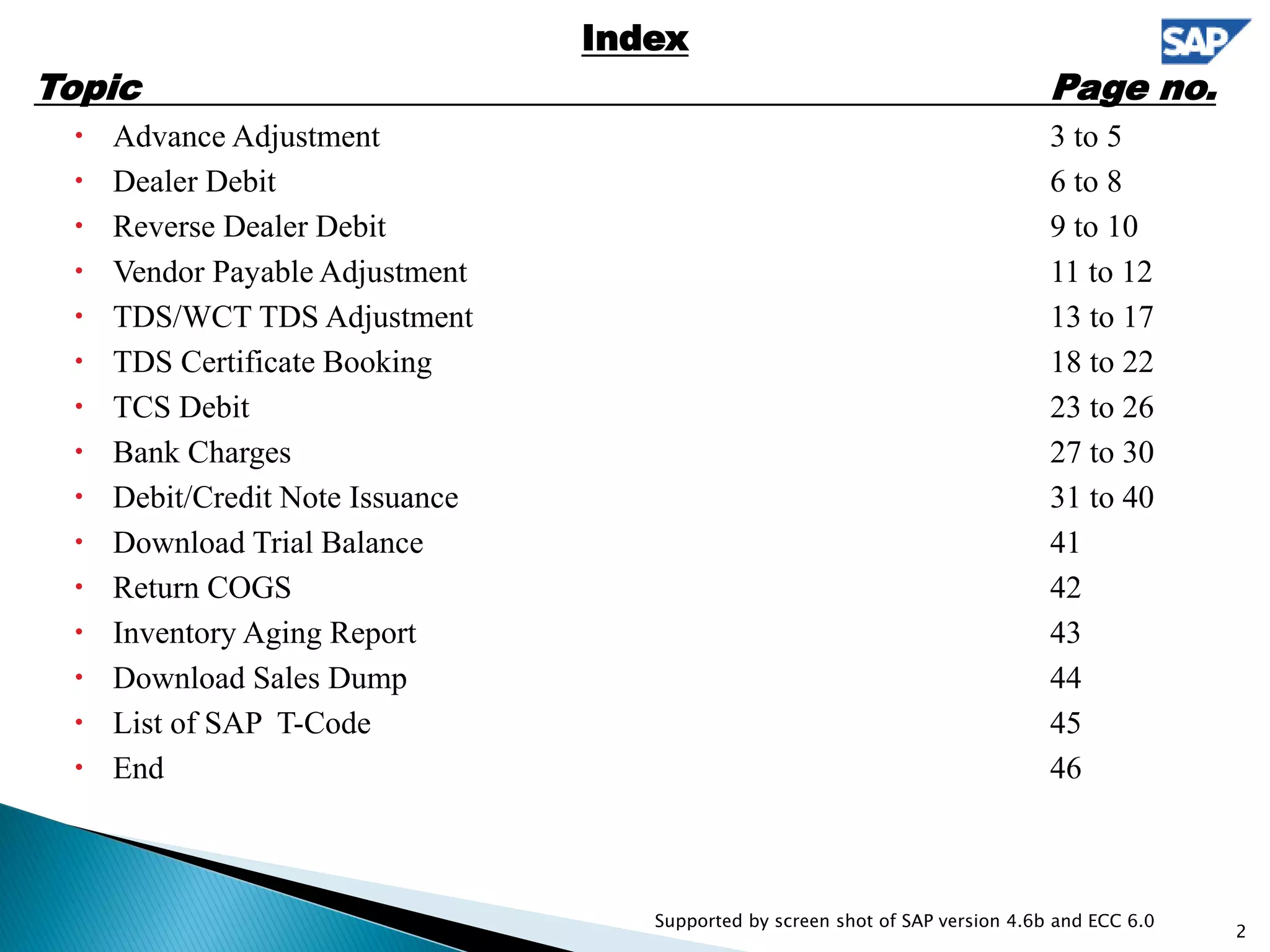
 Advance Adjustment 3 to 5
 Dealer Debit 6 to 8
 Reverse Dealer Debit 9 to 10
 Vendor Payable Adjustment 11 to 12
 TDS/WCT TDS Adjustment 13 to 17
 TDS Certificate Booking 18 to 22
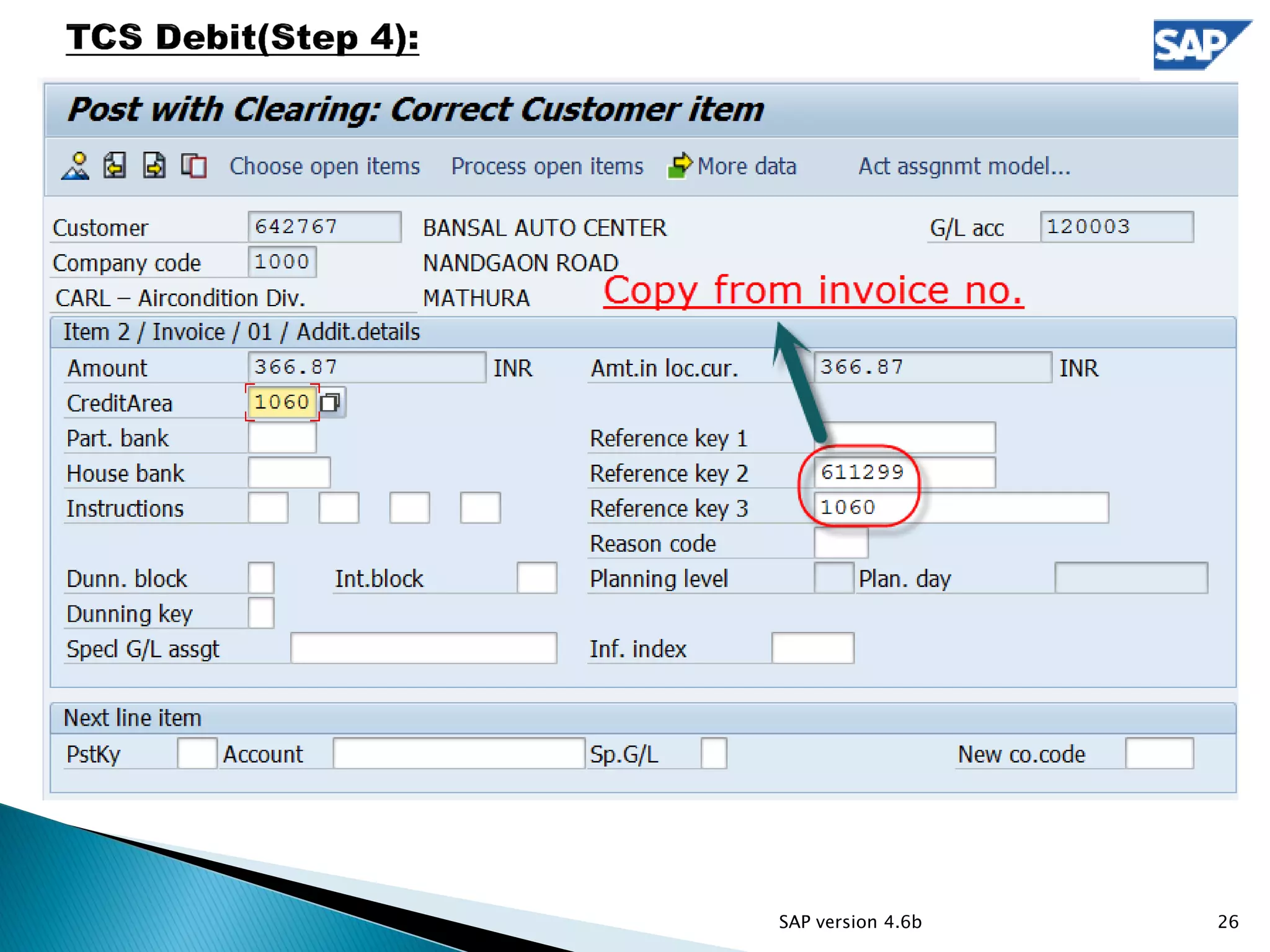
 TCS Debit 23 to 26
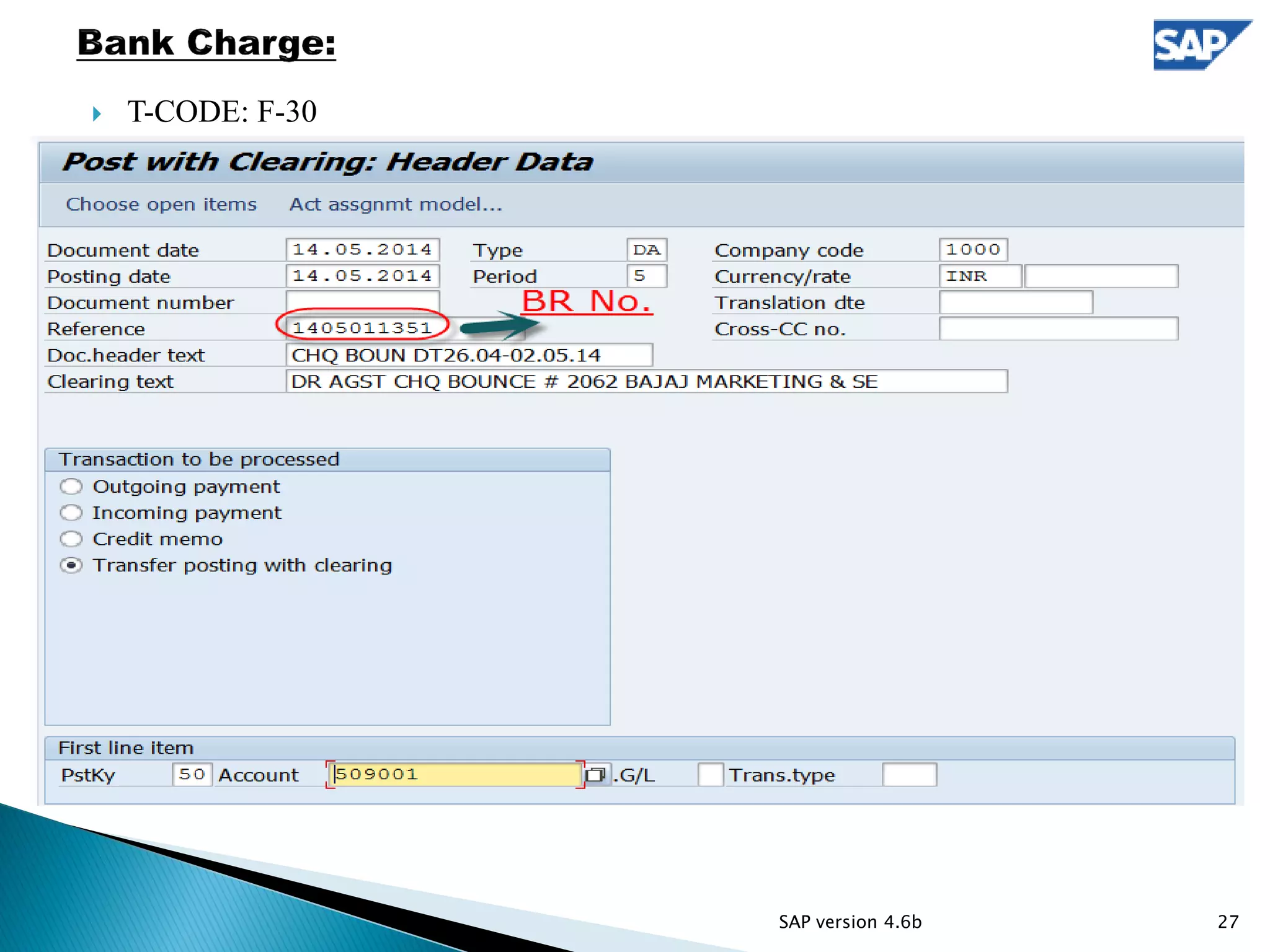
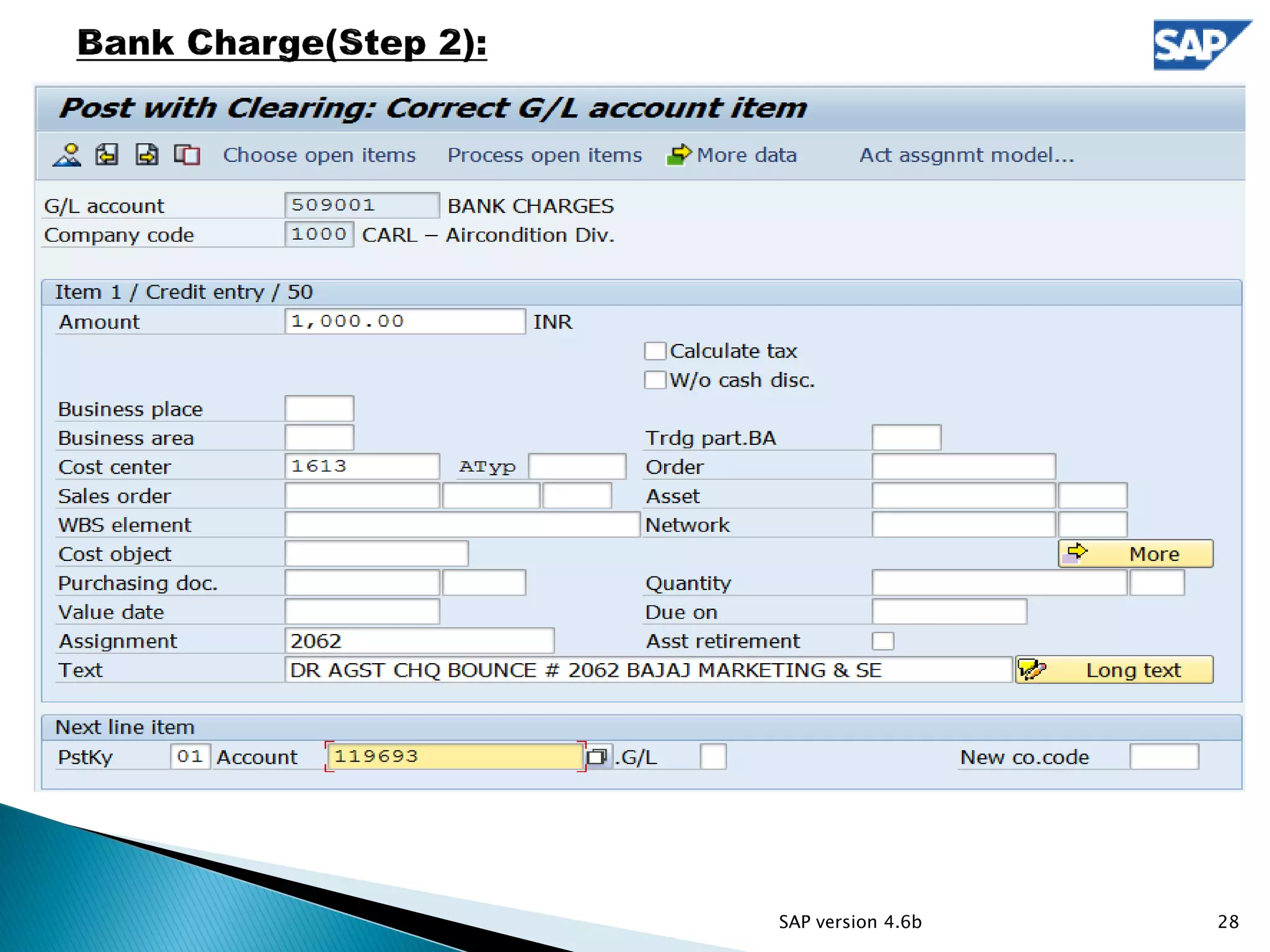
 Bank Charges 27 to 30
 Debit/Credit Note Issuance 31 to 40
 Download Trial Balance 41
 Return COGS 42
 Inventory Aging Report 43
 Download Sales Dump 44
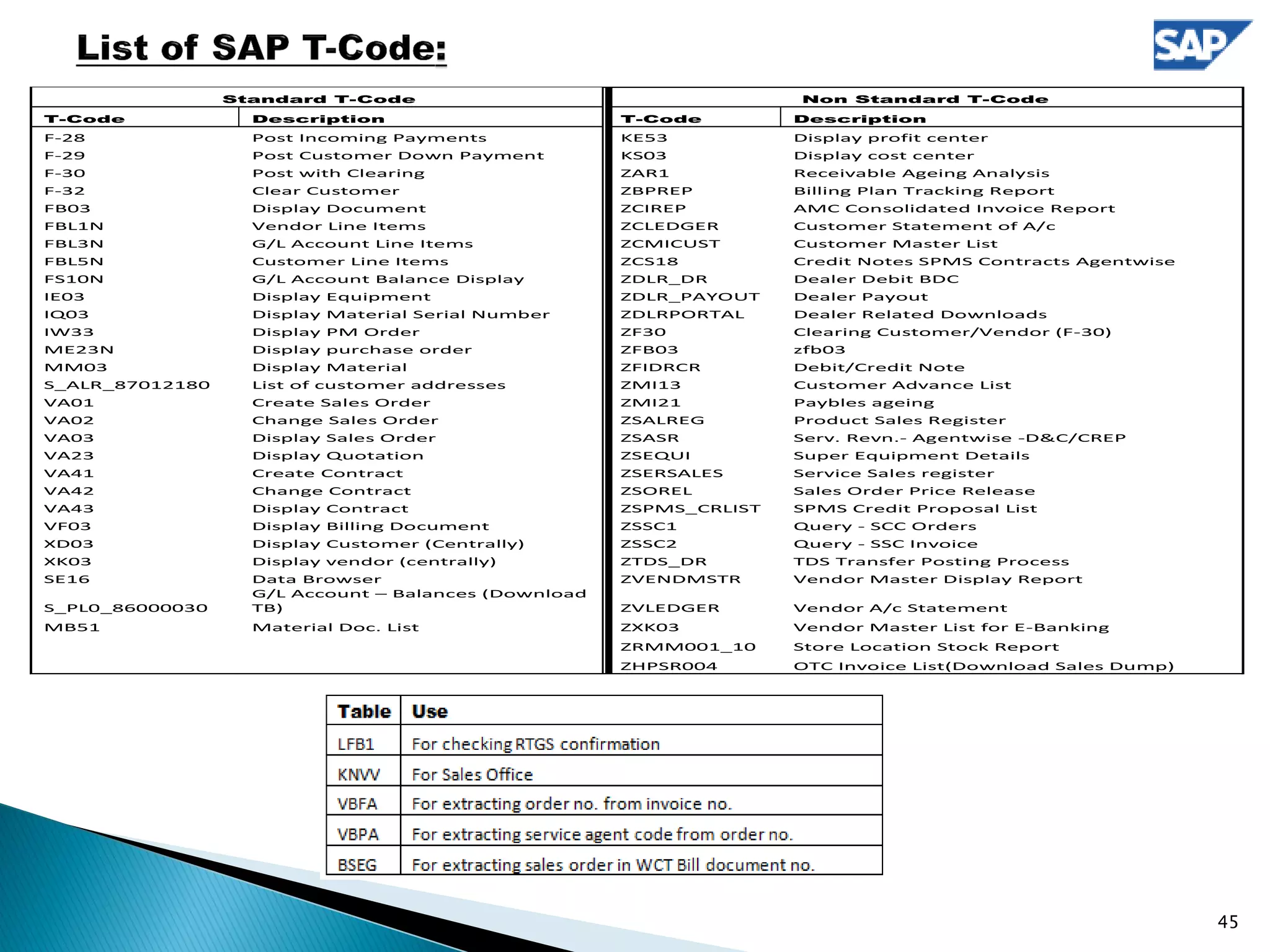
 List of SAP T-Code 45
 End 46
2
Supported by screen shot of SAP version 4.6b and ECC 6.0
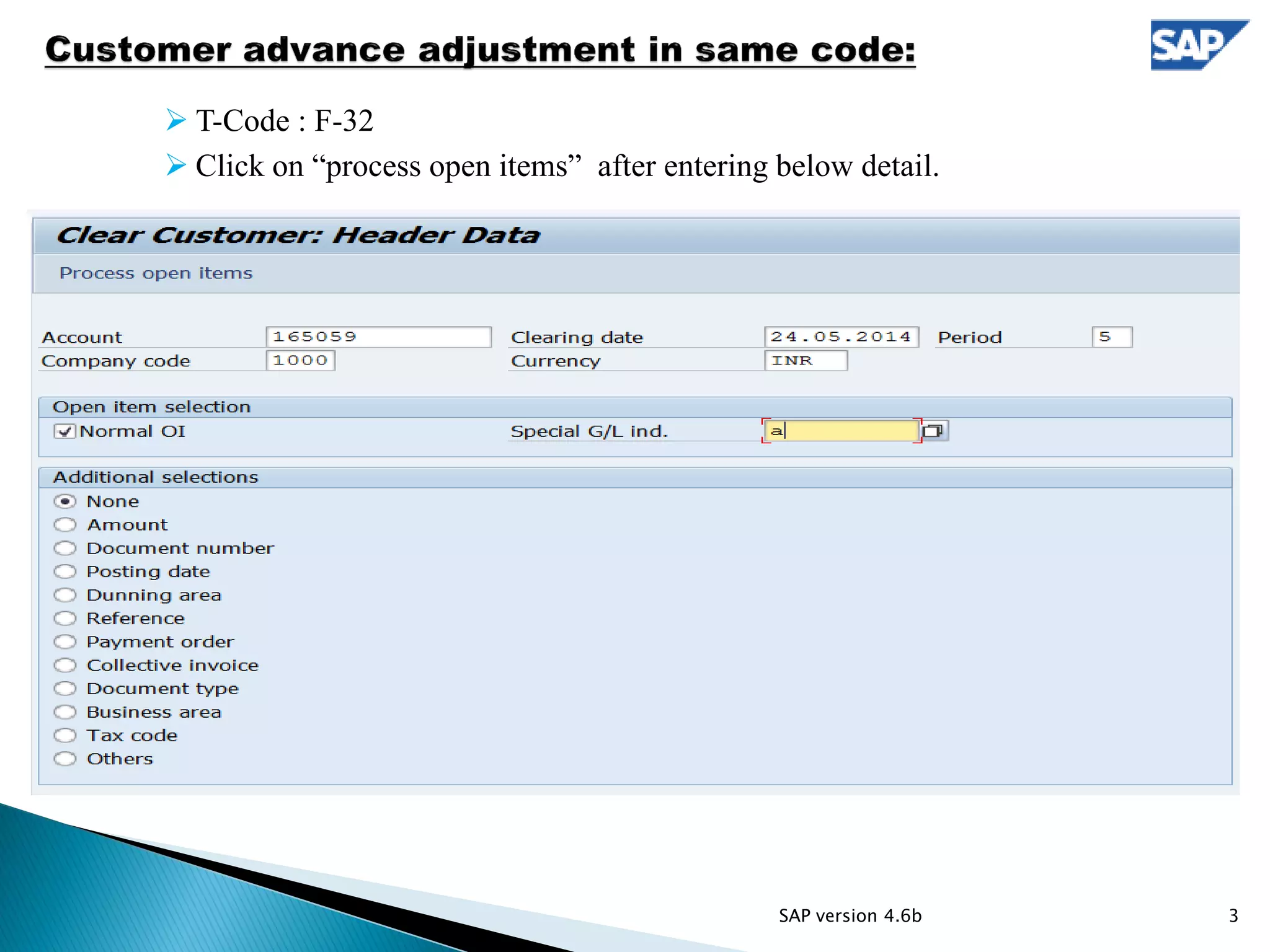
 T-Code : F-32
 Click on “process open items” after entering below detail.
SAP version 4.6b 3
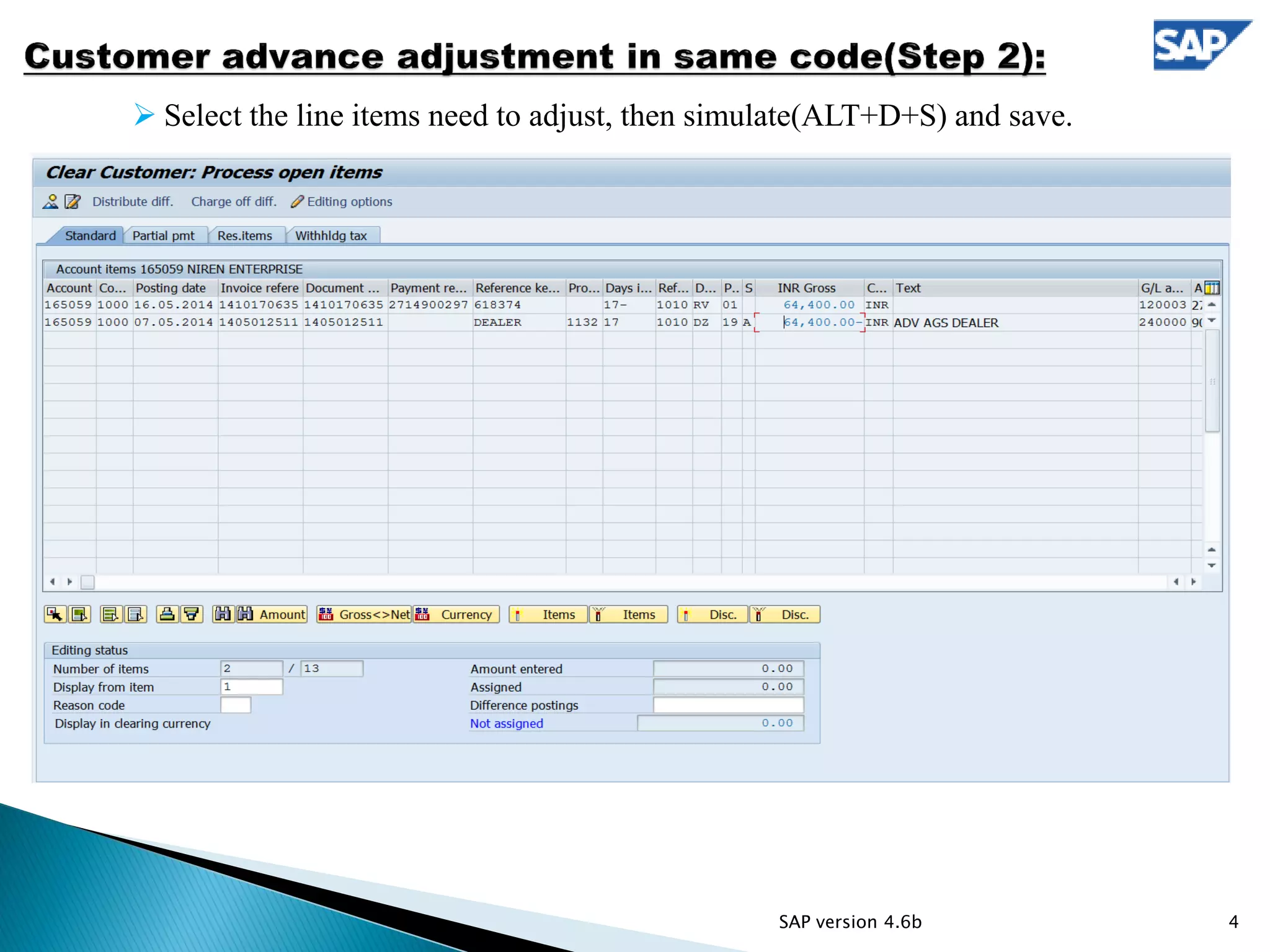
 Select the line items need to adjust, then simulate(ALT+D+S) and save.
4SAP version 4.6b
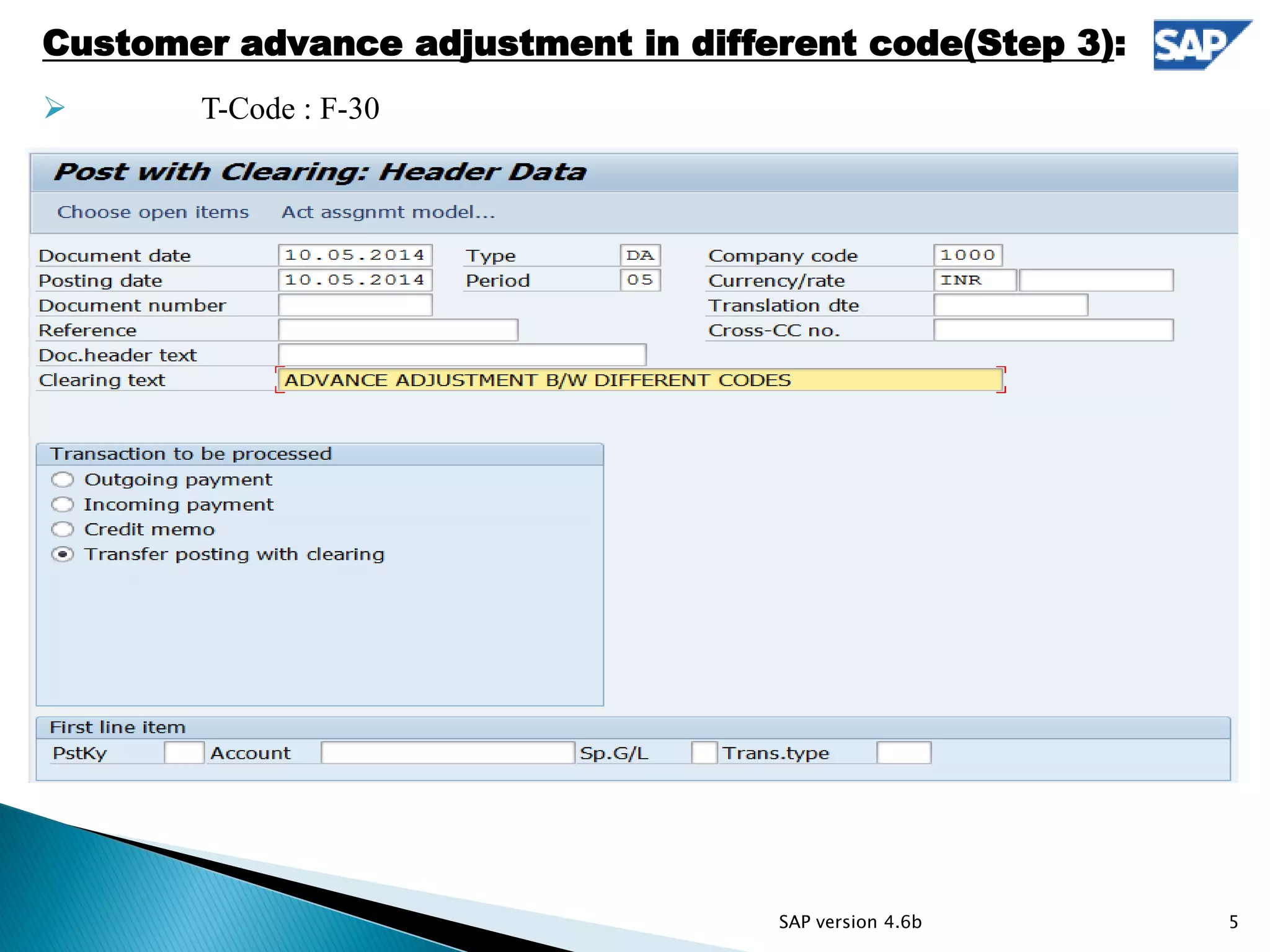
 T-Code: F-30
Customer advance adjustment in different code(Step 3):
 T-Code : F-30
5SAP version 4.6b
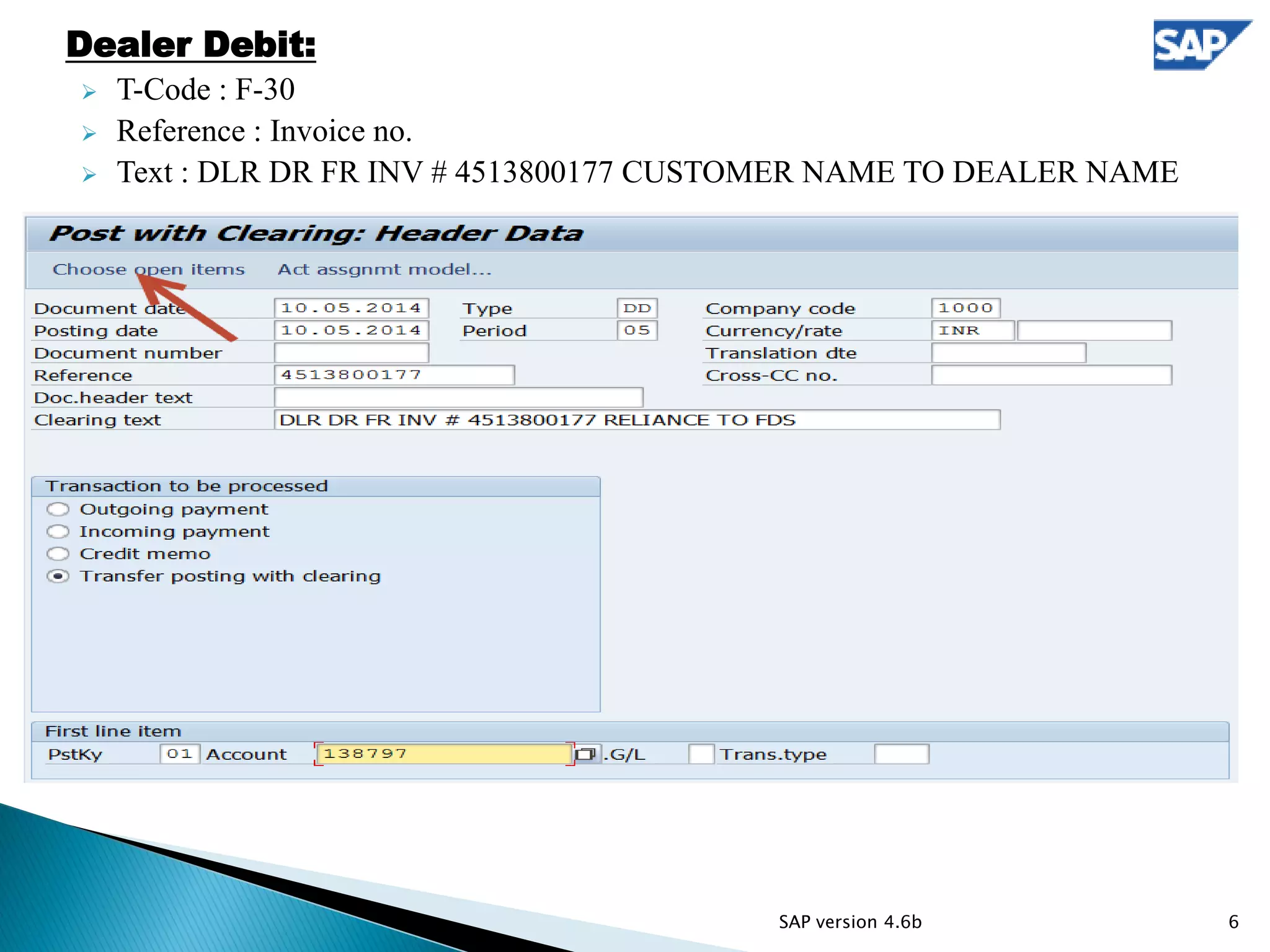
Dealer Debit:
 T-Code : F-30
 Reference : Invoice no.
 Text : DLR DR FR INV # 4513800177 CUSTOMER NAME TO DEALER NAME
6SAP version 4.6b
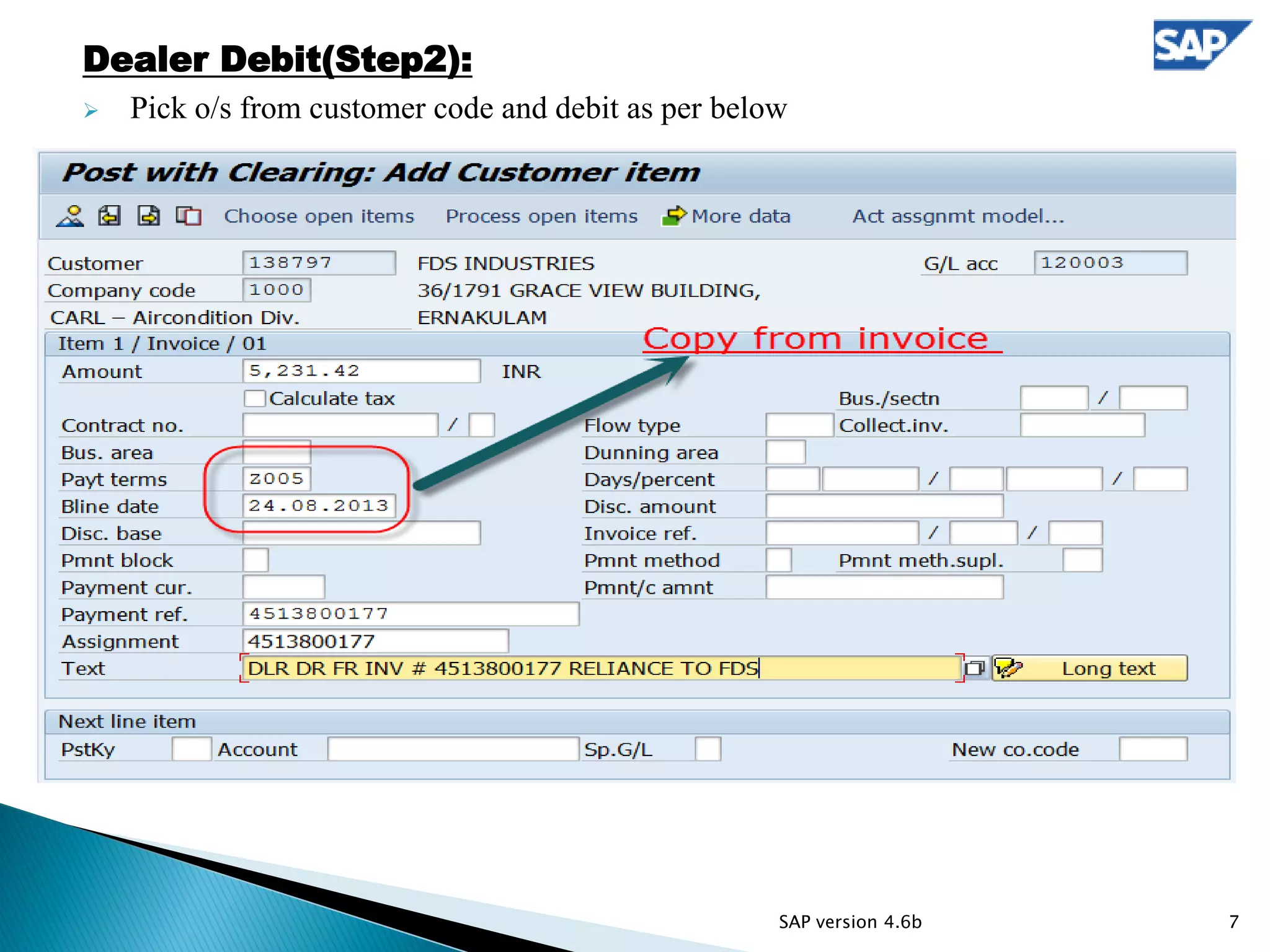
Dealer Debit(Step2):
 Pick o/s from customer code and debit as per below
7SAP version 4.6b
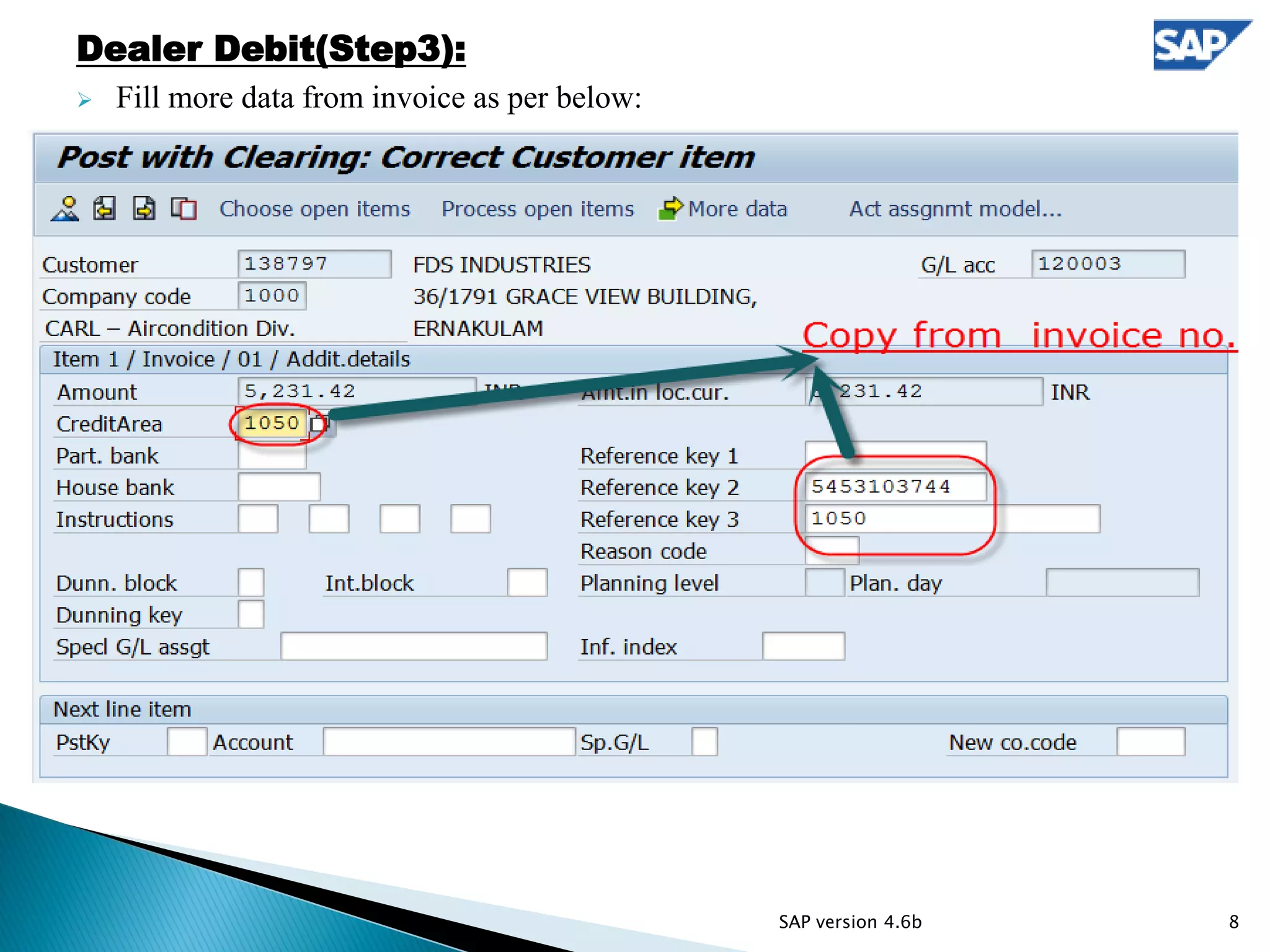
Dealer Debit(Step3):
 Fill more data from invoice as per below:
8SAP version 4.6b
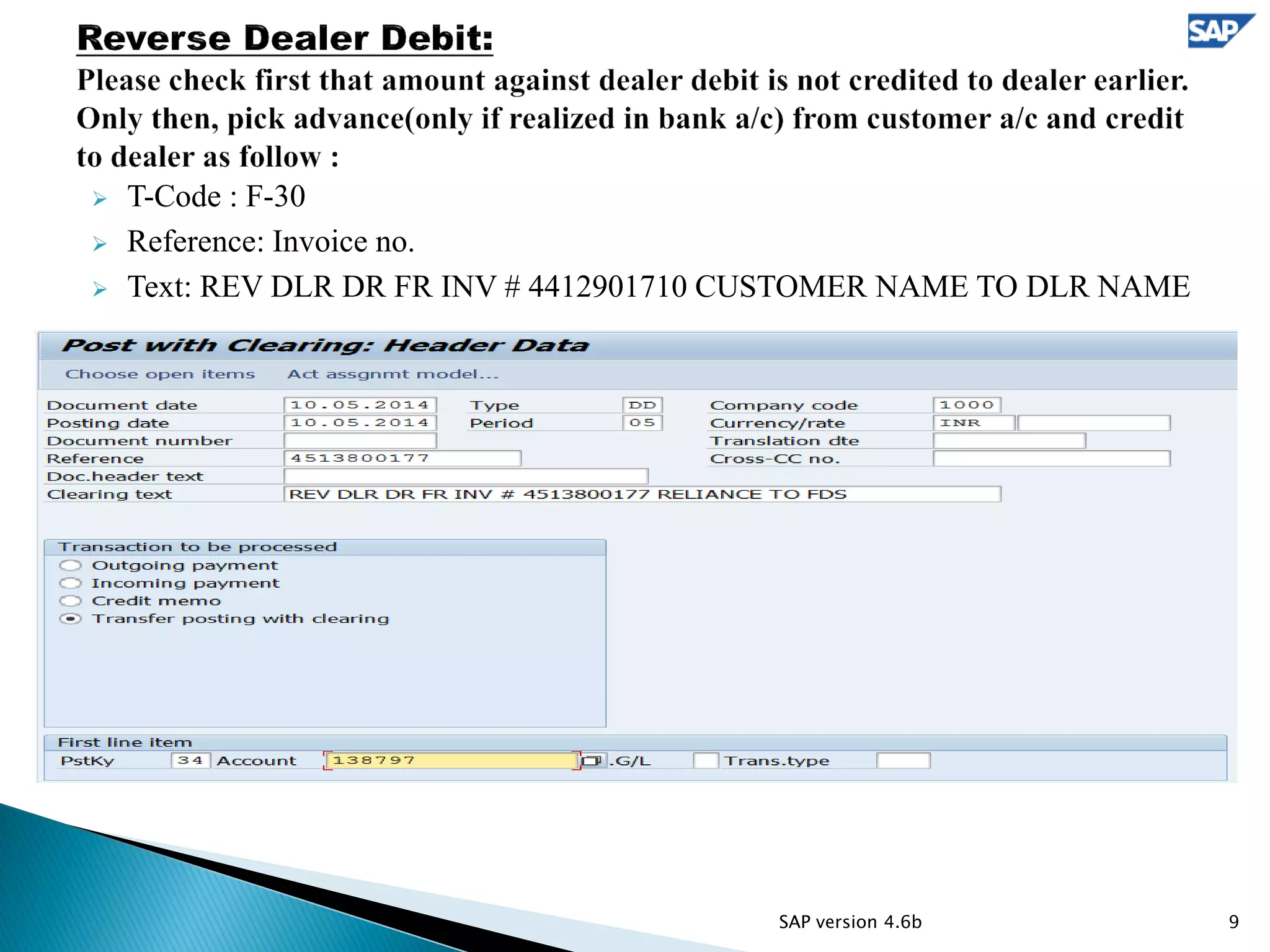
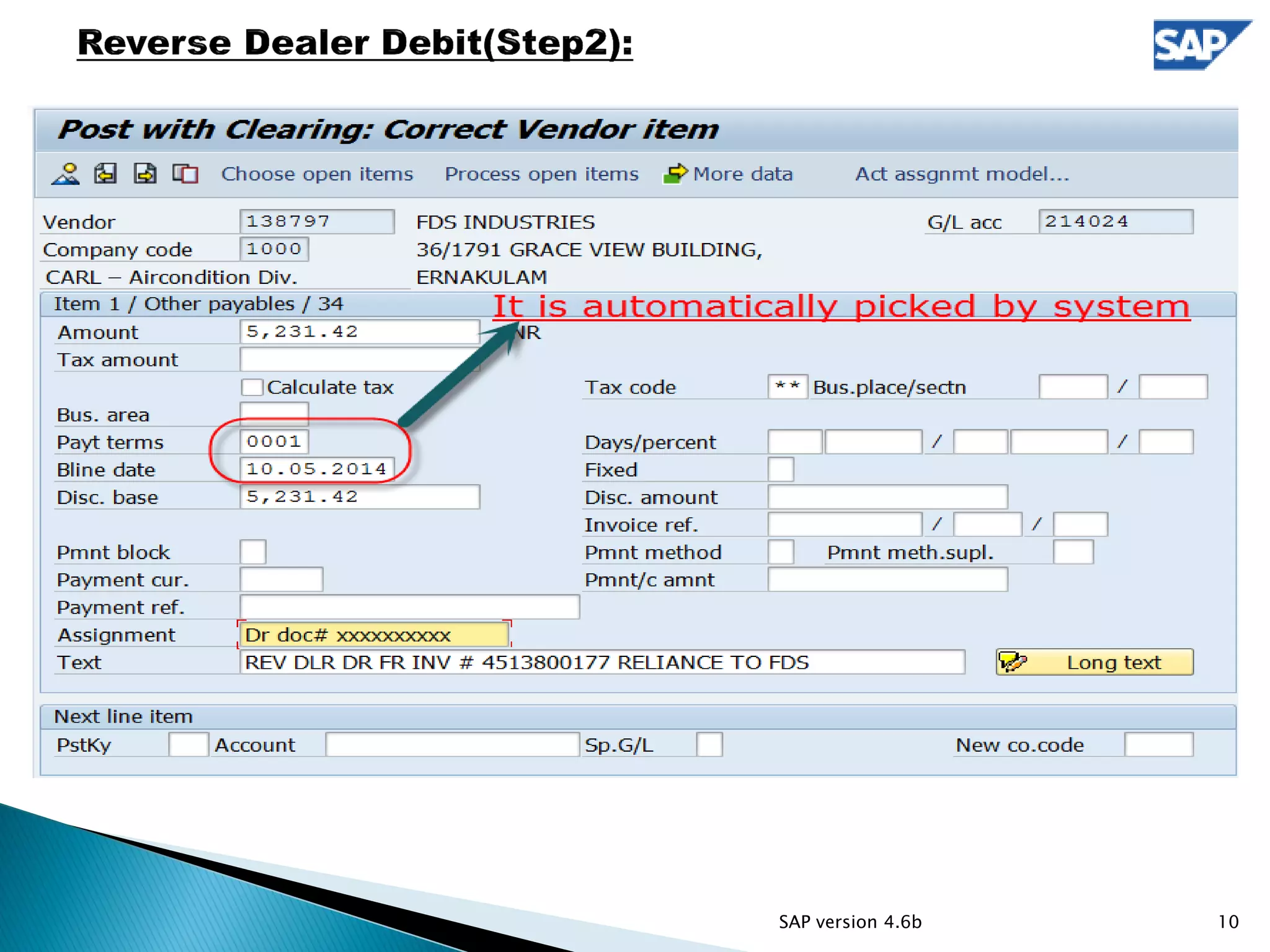
 T-Code : F-30
 Reference: Invoice no.
 Text: REV DLR DR FR INV # 4412901710 CUSTOMER NAME TO DLR NAME
9SAP version 4.6b
10SAP version 4.6b
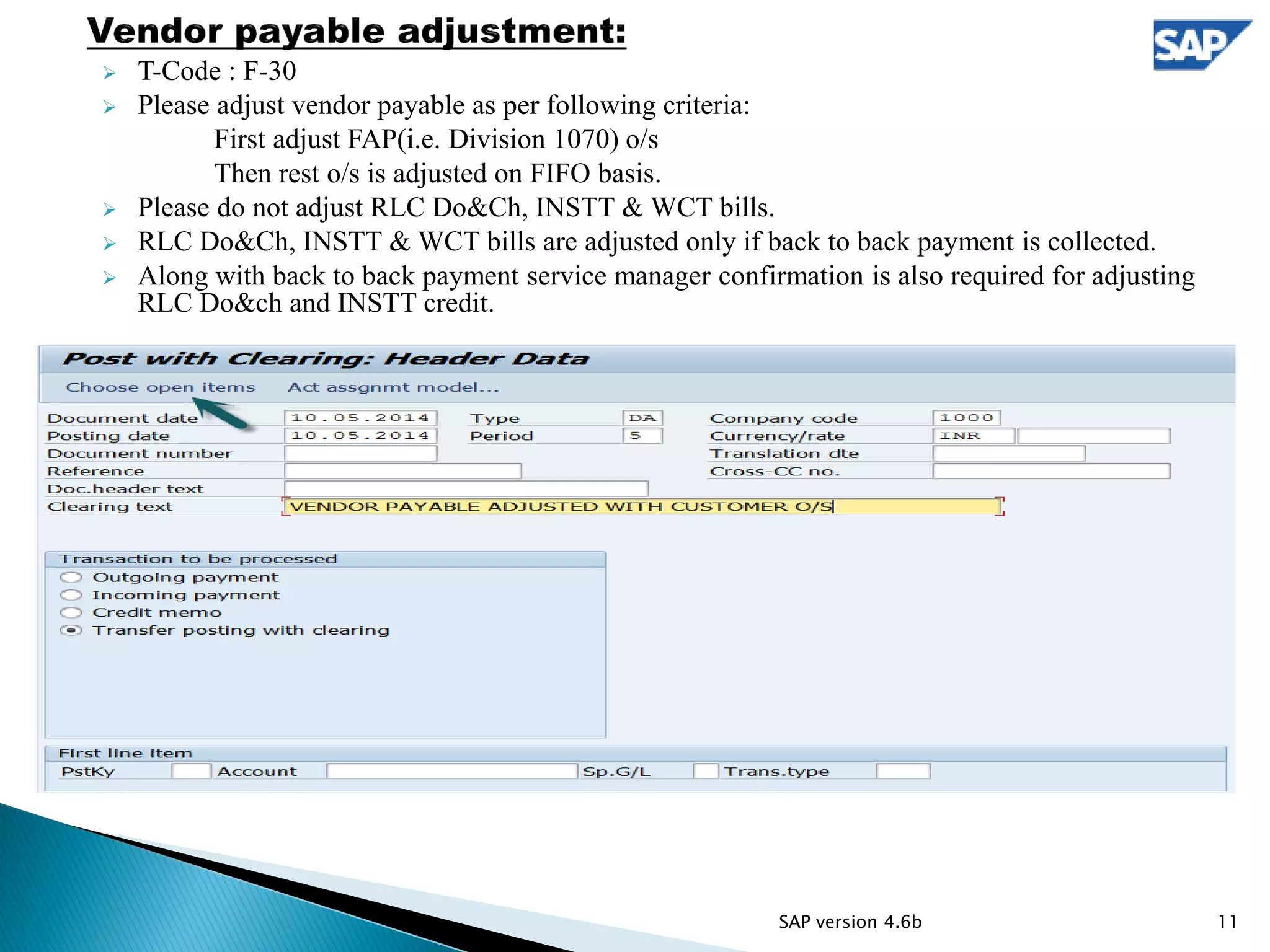
 T-Code : F-30
 Please adjust vendor payable as per following criteria:
First adjust FAP(i.e. Division 1070) o/s
Then rest o/s is adjusted on FIFO basis.
 Please do not adjust RLC Do&Ch, INSTT & WCT bills.
 RLC Do&Ch, INSTT & WCT bills are adjusted only if back to back payment is collected.
 Along with back to back payment service manager confirmation is also required for adjusting
RLC Do&ch and INSTT credit.
11SAP version 4.6b
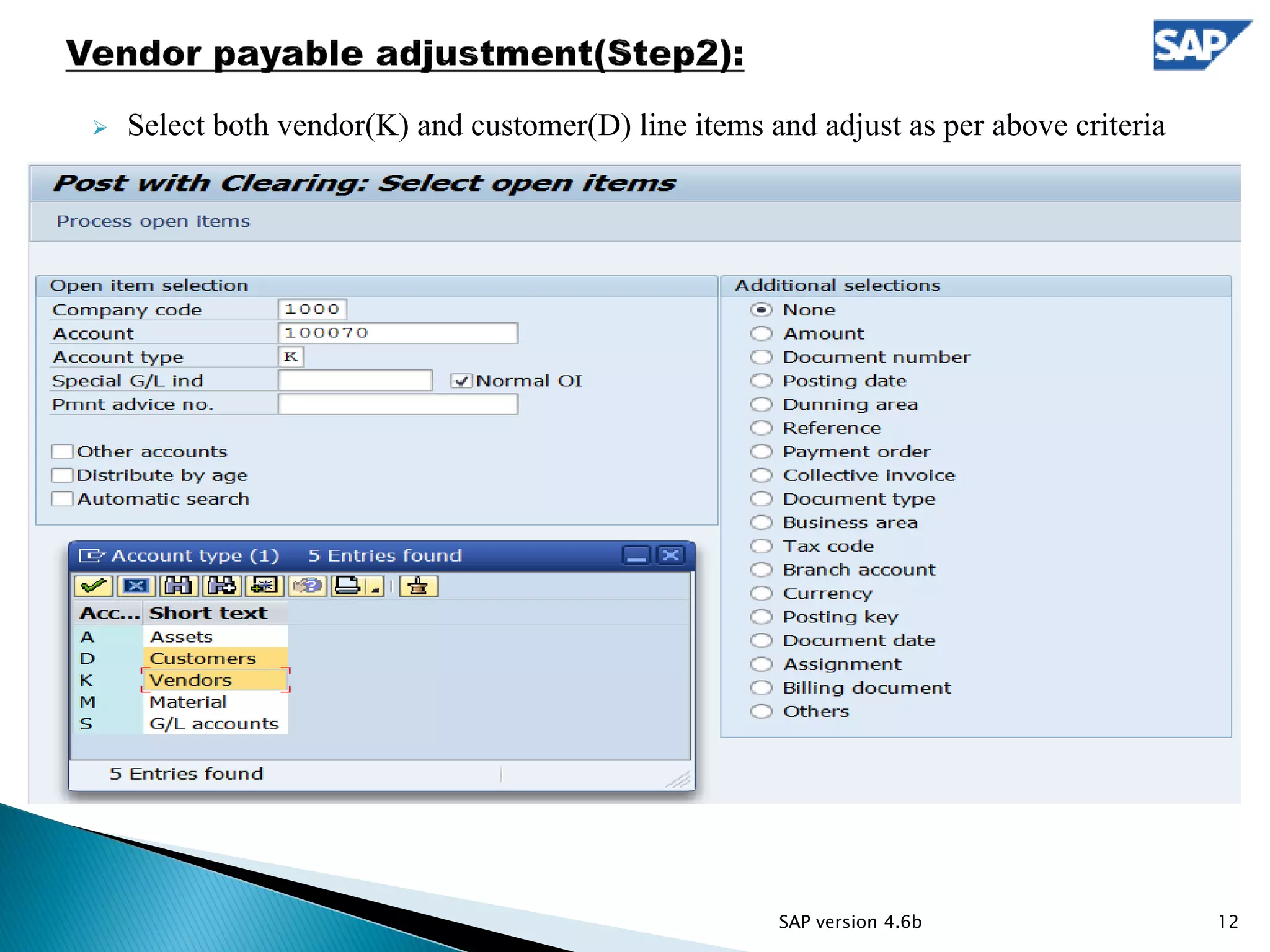
 Select both vendor(K) and customer(D) line items and adjust as per above criteria
12SAP version 4.6b
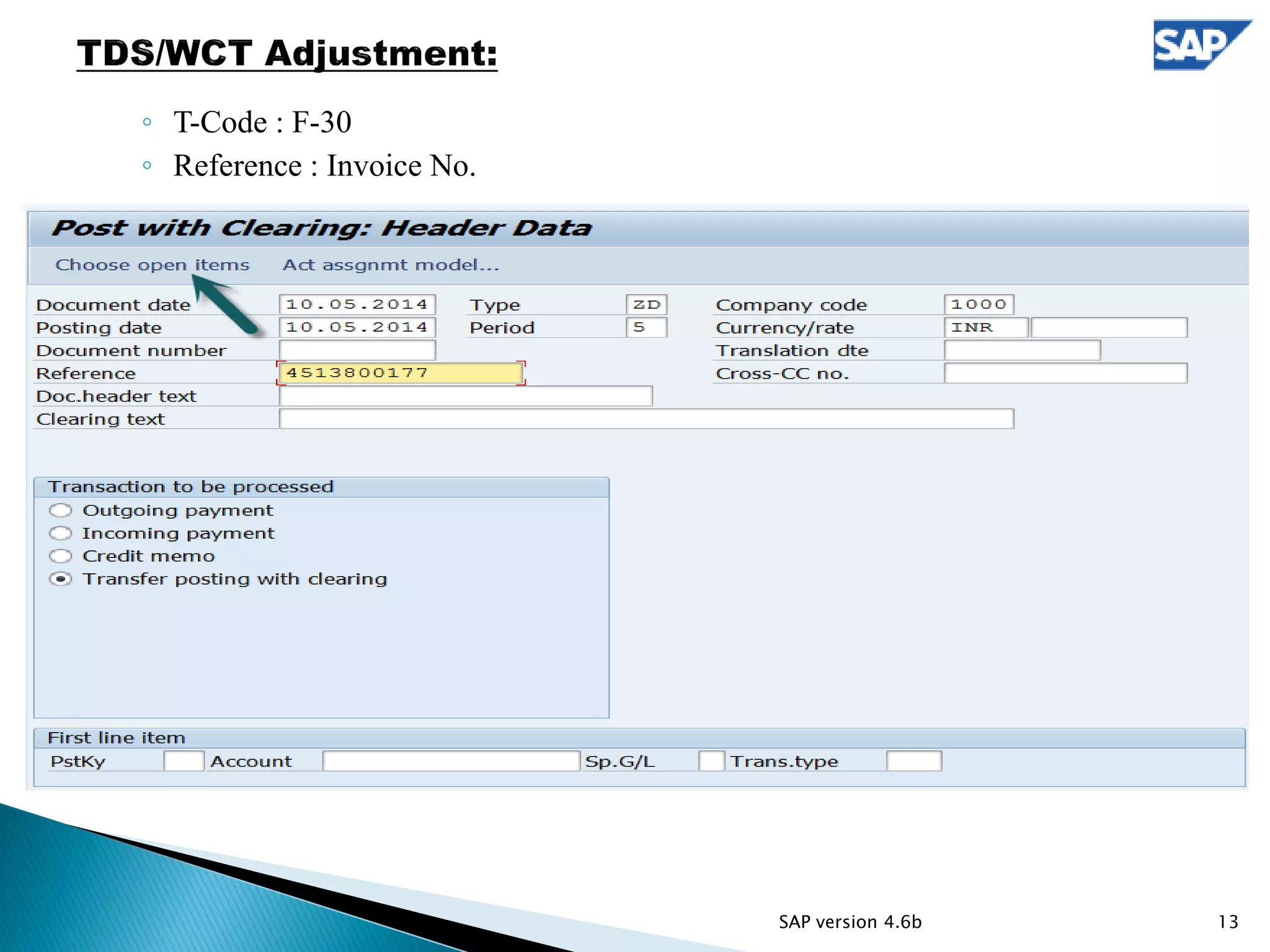
◦ T-Code : F-30
◦ Reference : Invoice No.
13SAP version 4.6b
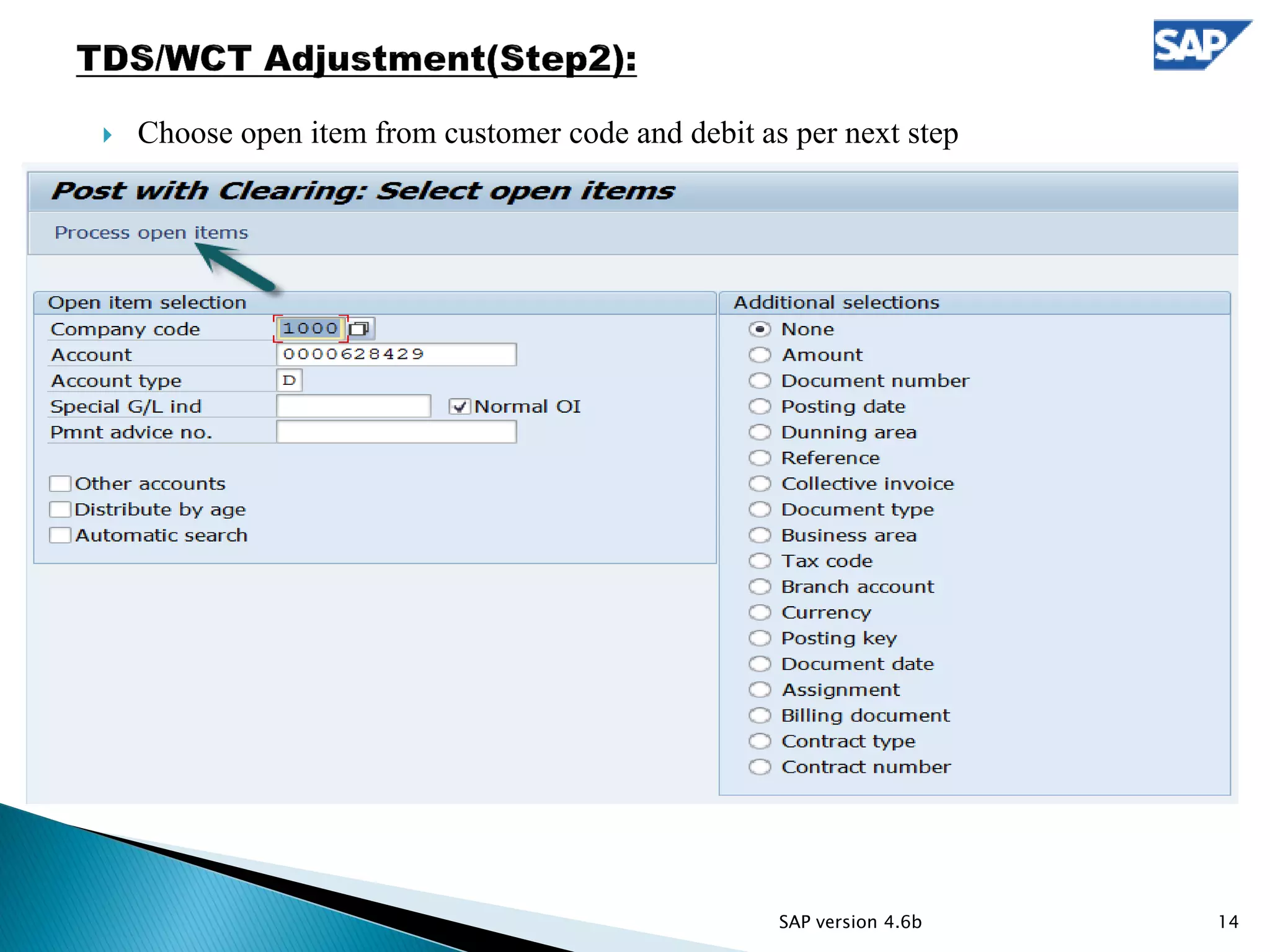
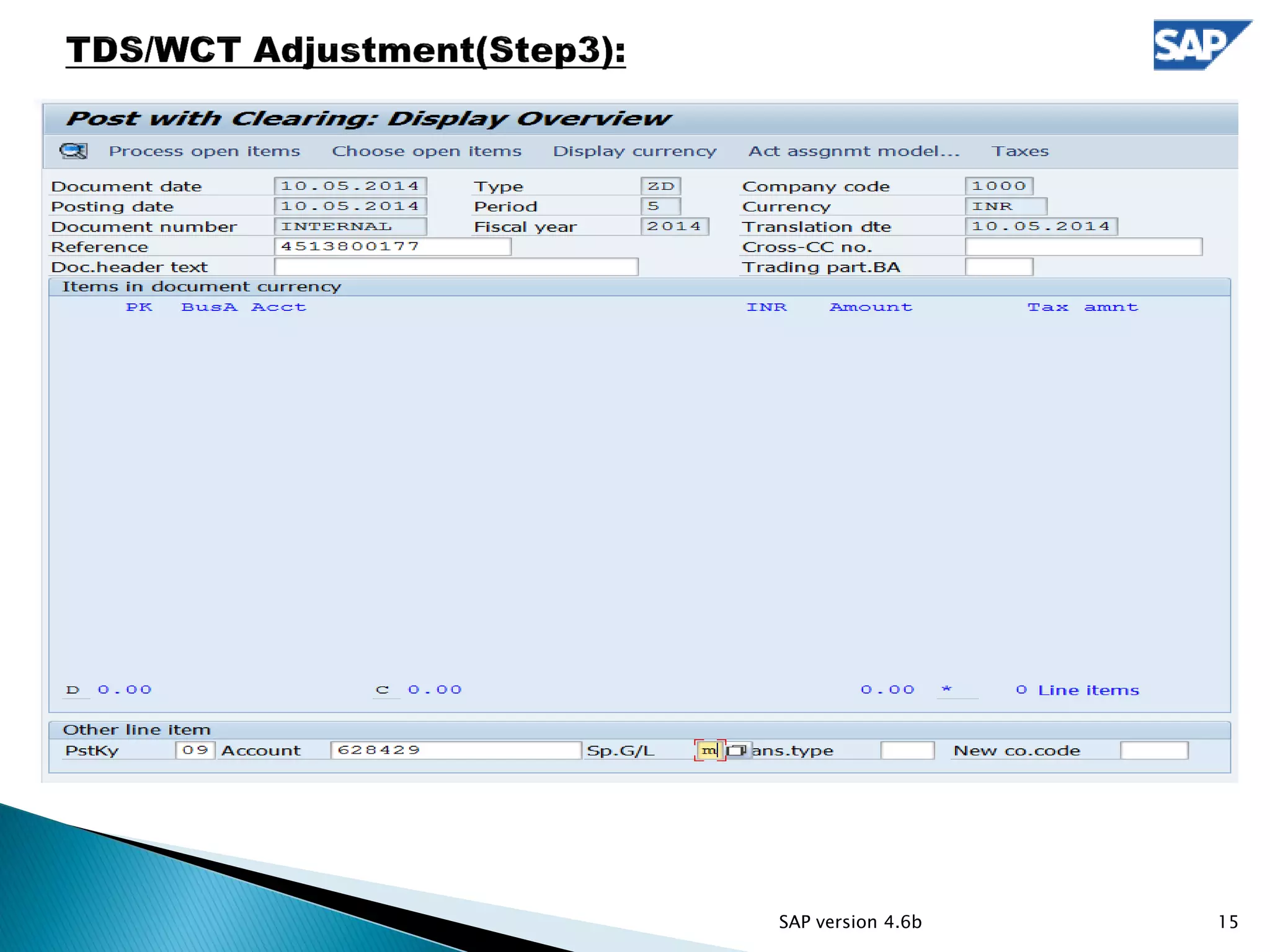
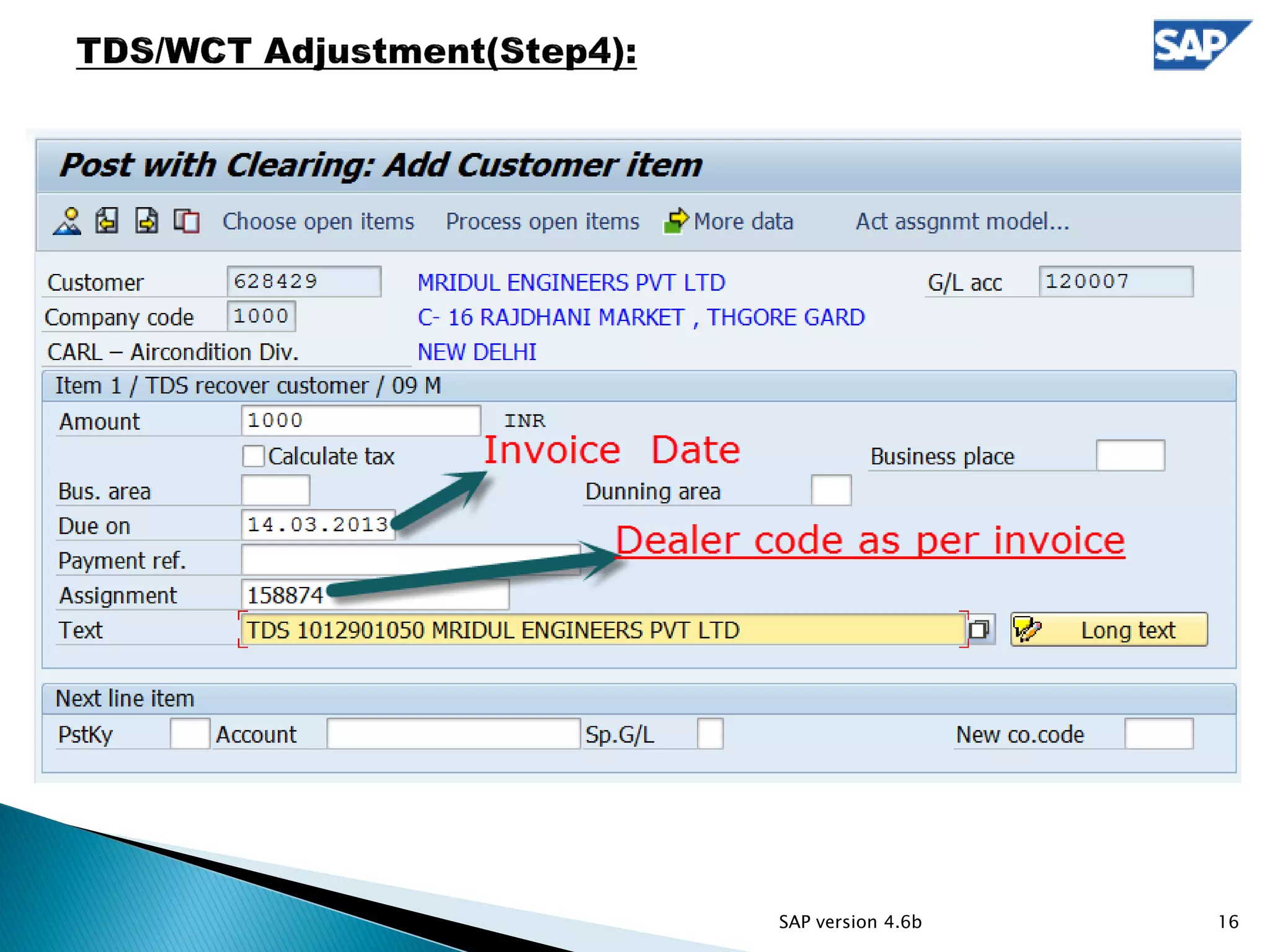
 Choose open item from customer code and debit as per next step
14SAP version 4.6b
15SAP version 4.6b
16SAP version 4.6b
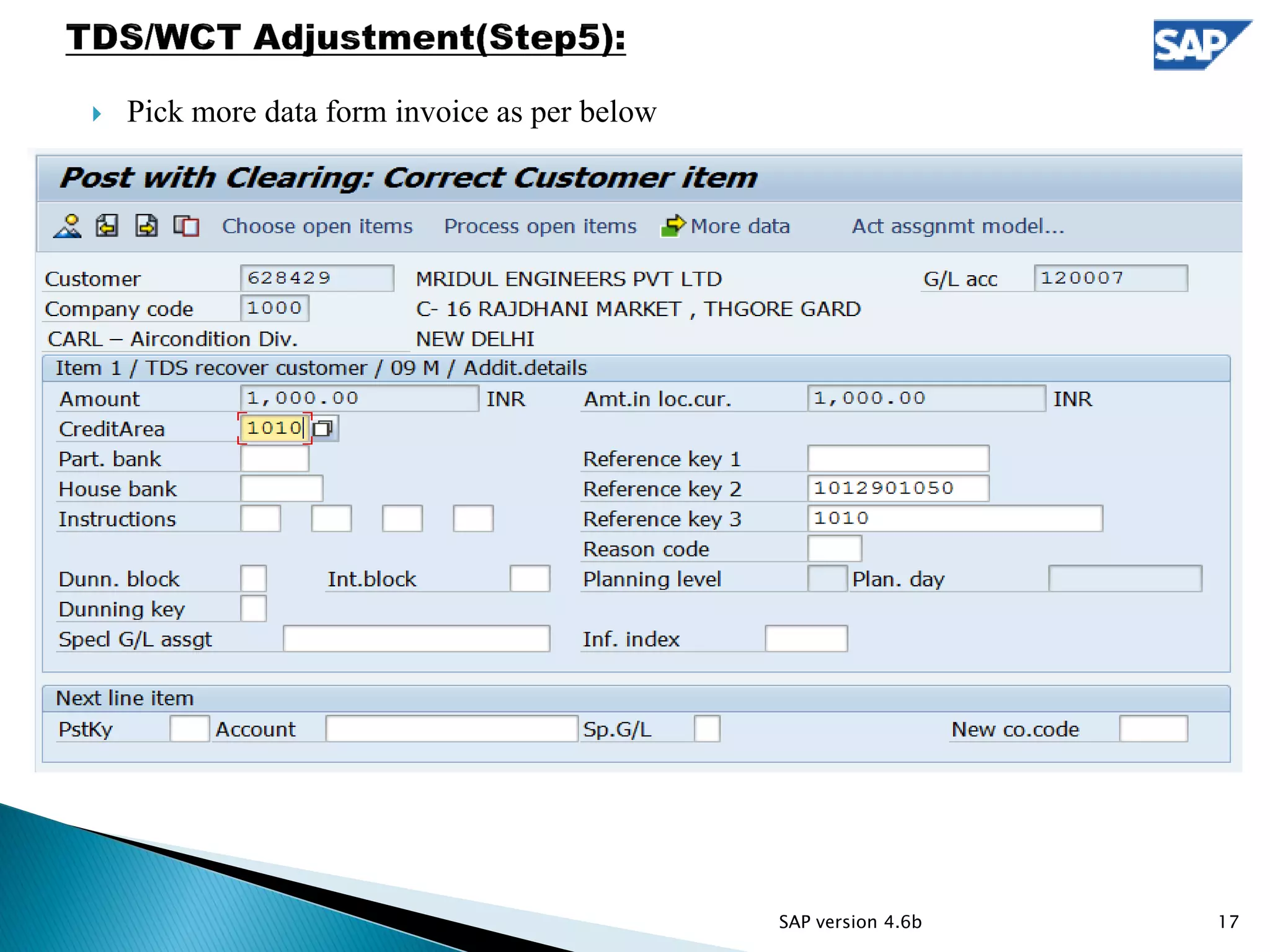
 Pick more data form invoice as per below
17SAP version 4.6b
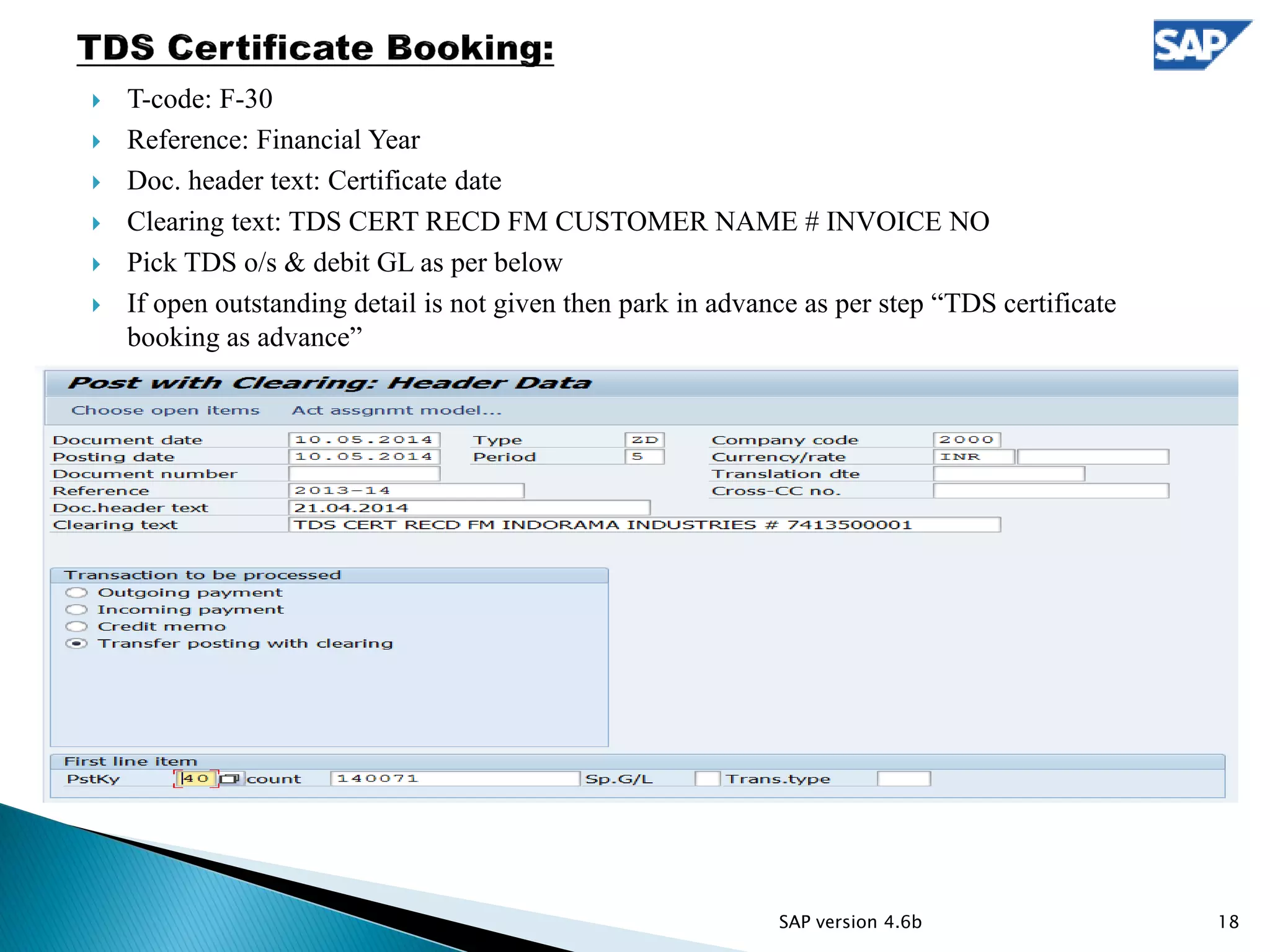
 T-code: F-30
 Reference: Financial Year
 Doc. header text: Certificate date
 Clearing text: TDS CERT RECD FM CUSTOMER NAME # INVOICE NO
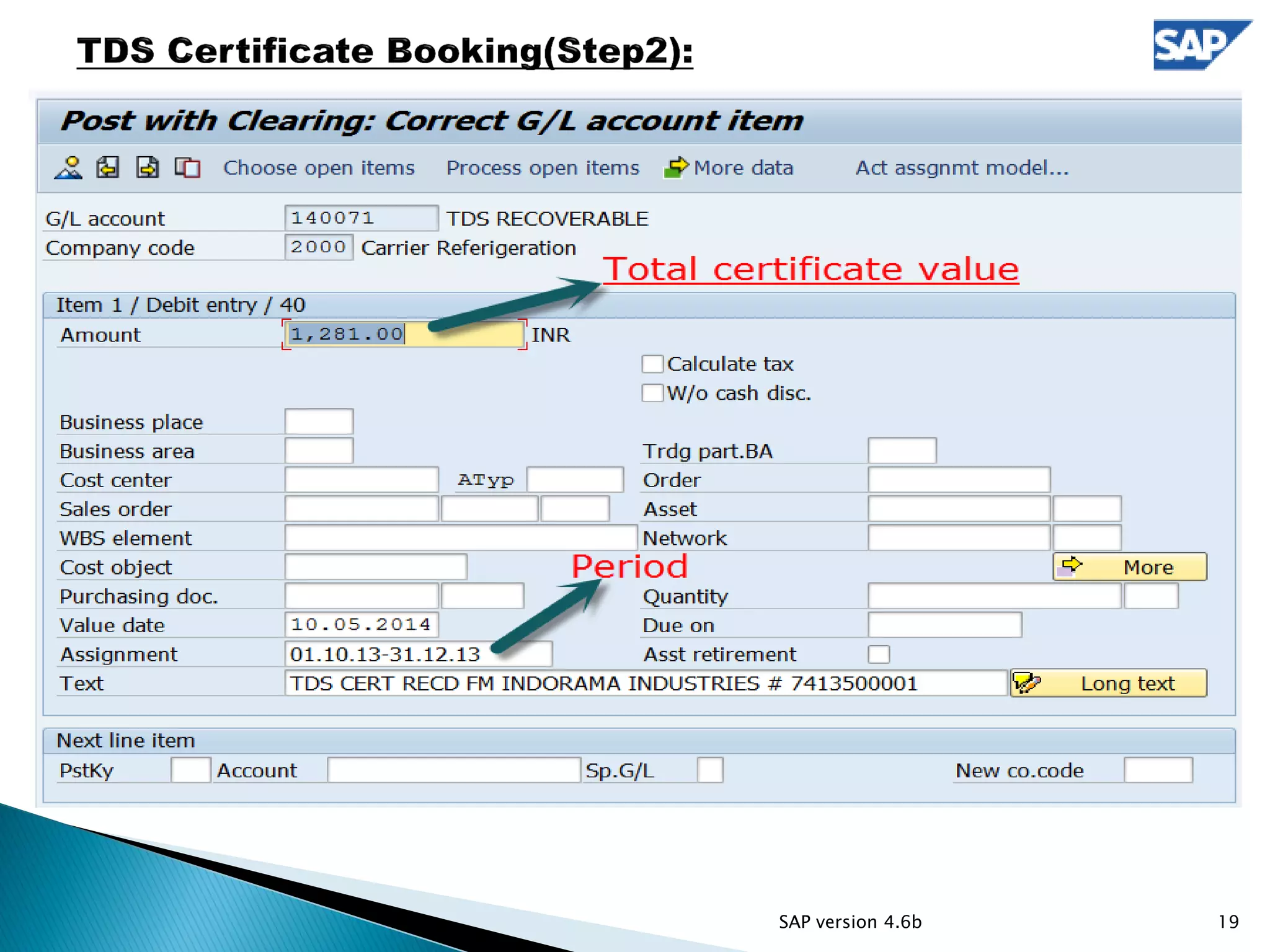
 Pick TDS o/s & debit GL as per below
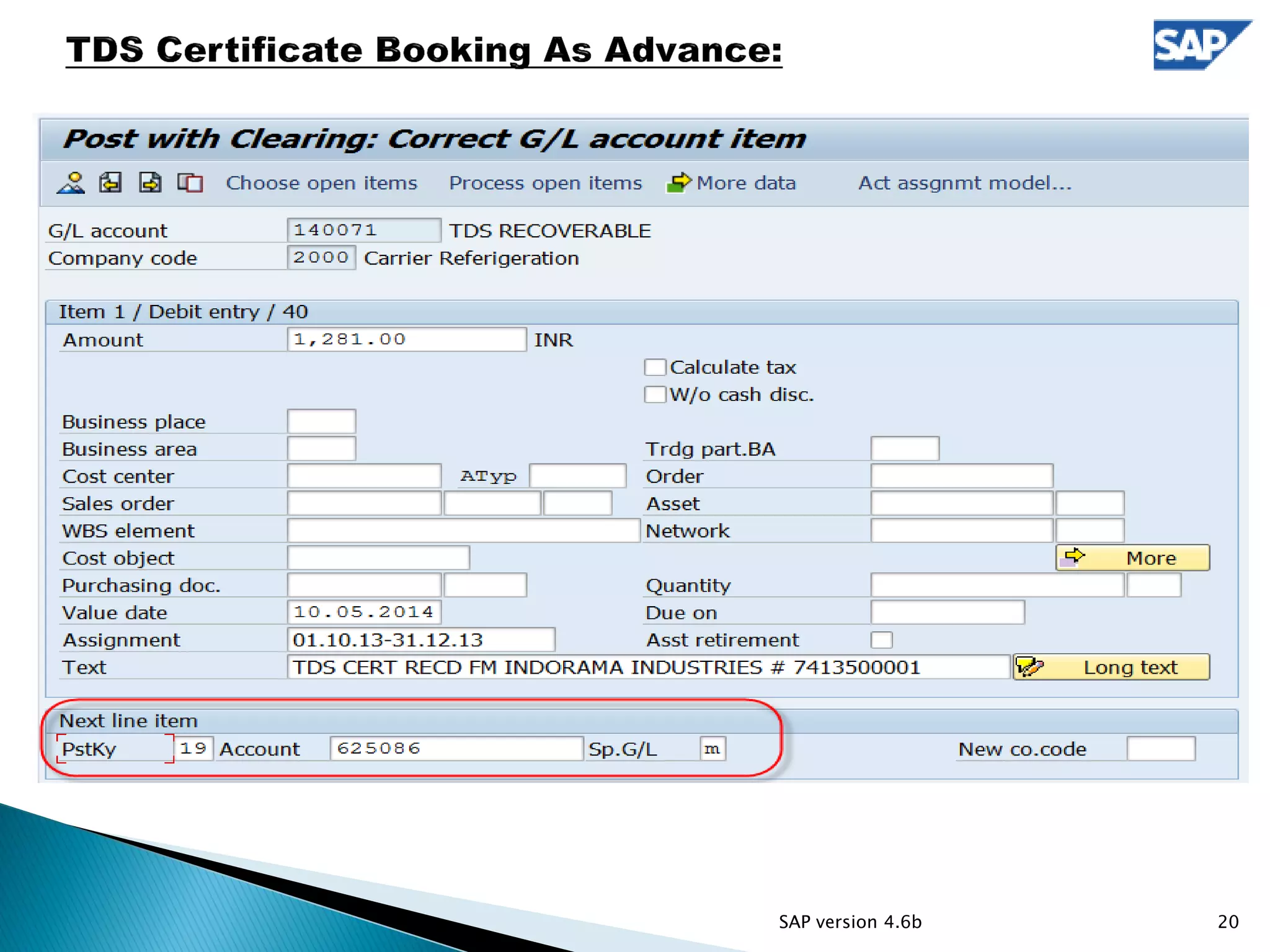
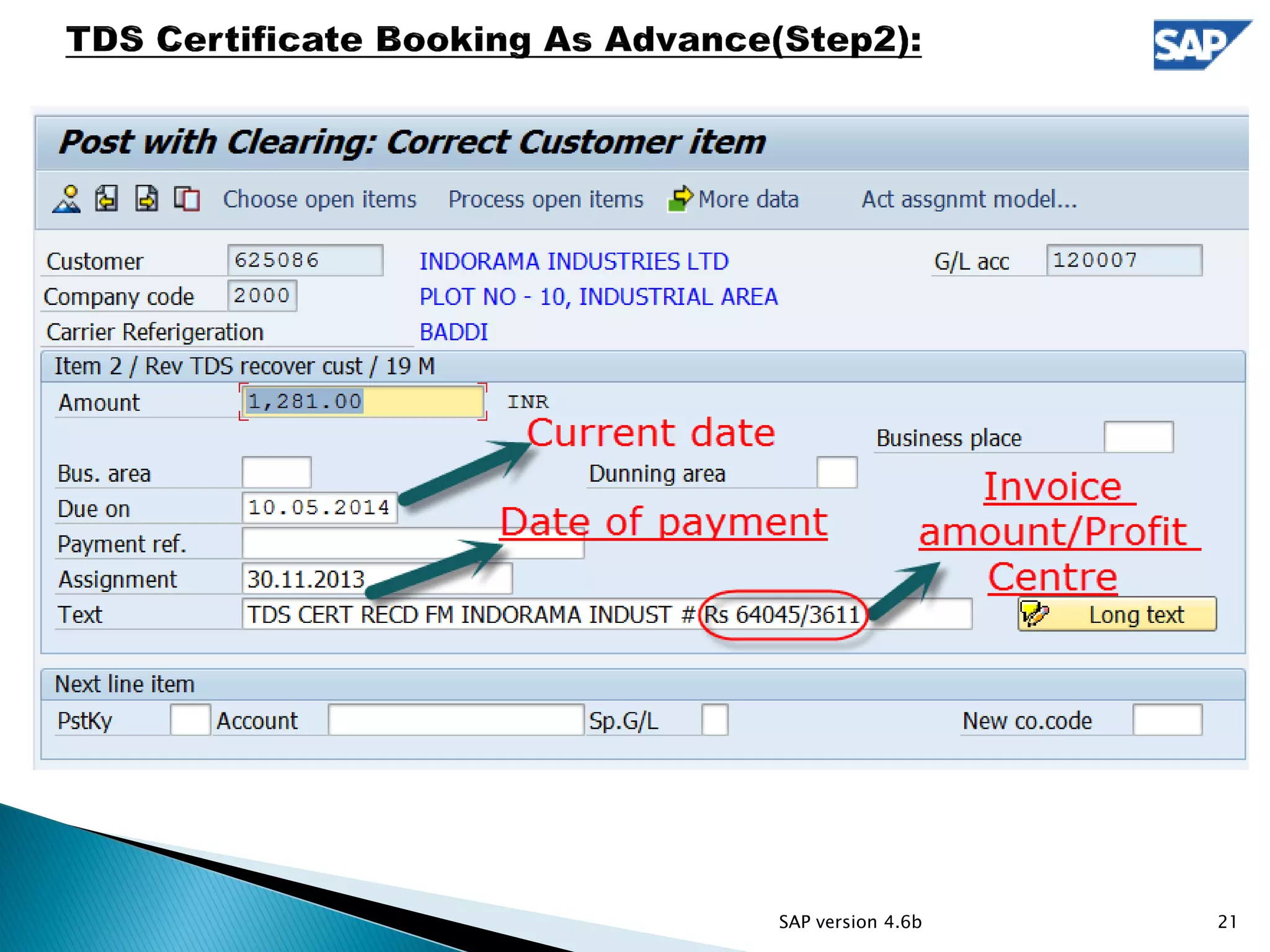
 If open outstanding detail is not given then park in advance as per step “TDS certificate
booking as advance”
18SAP version 4.6b
19SAP version 4.6b
20SAP version 4.6b
21SAP version 4.6b
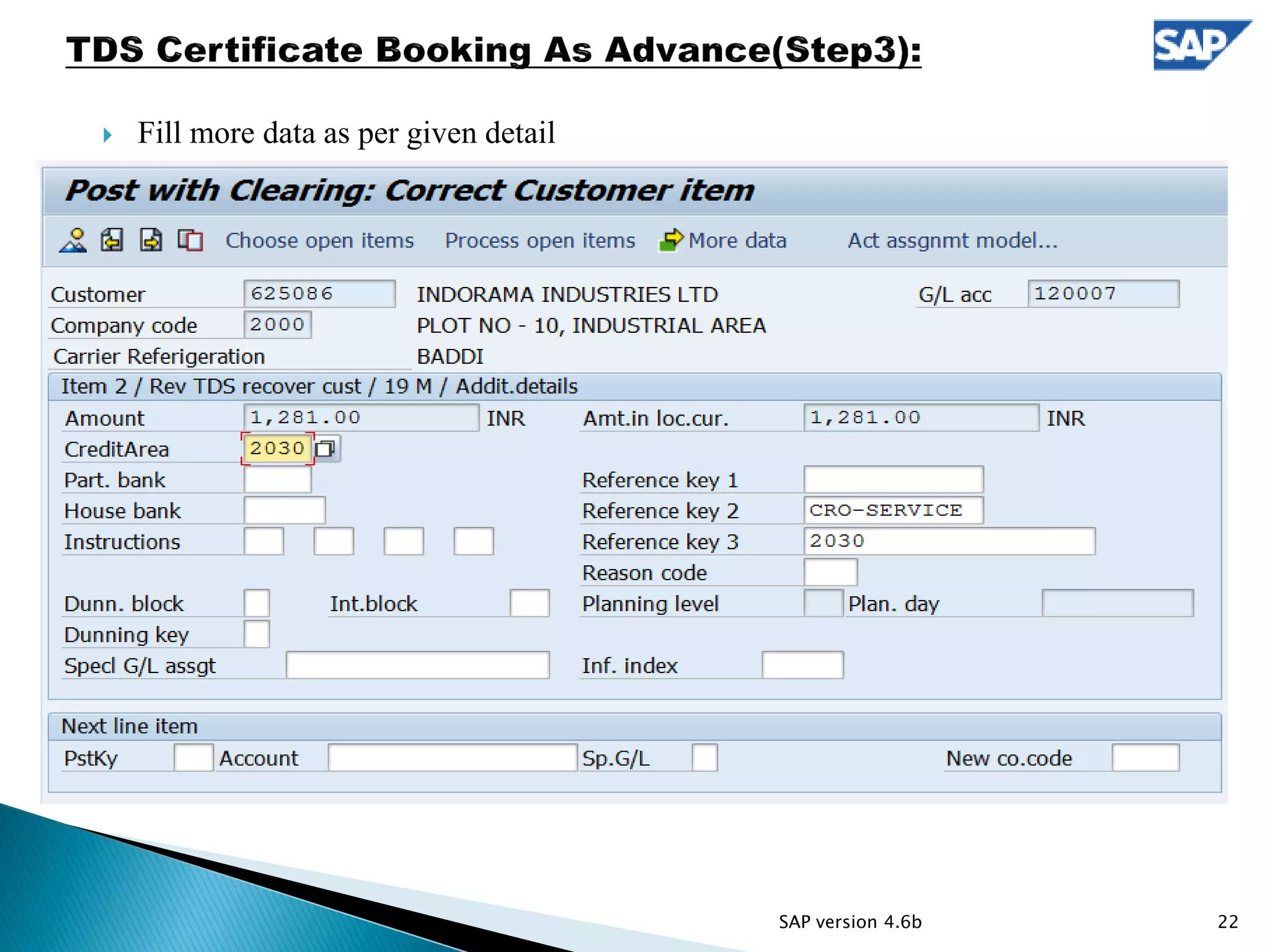
 Fill more data as per given detail
22SAP version 4.6b
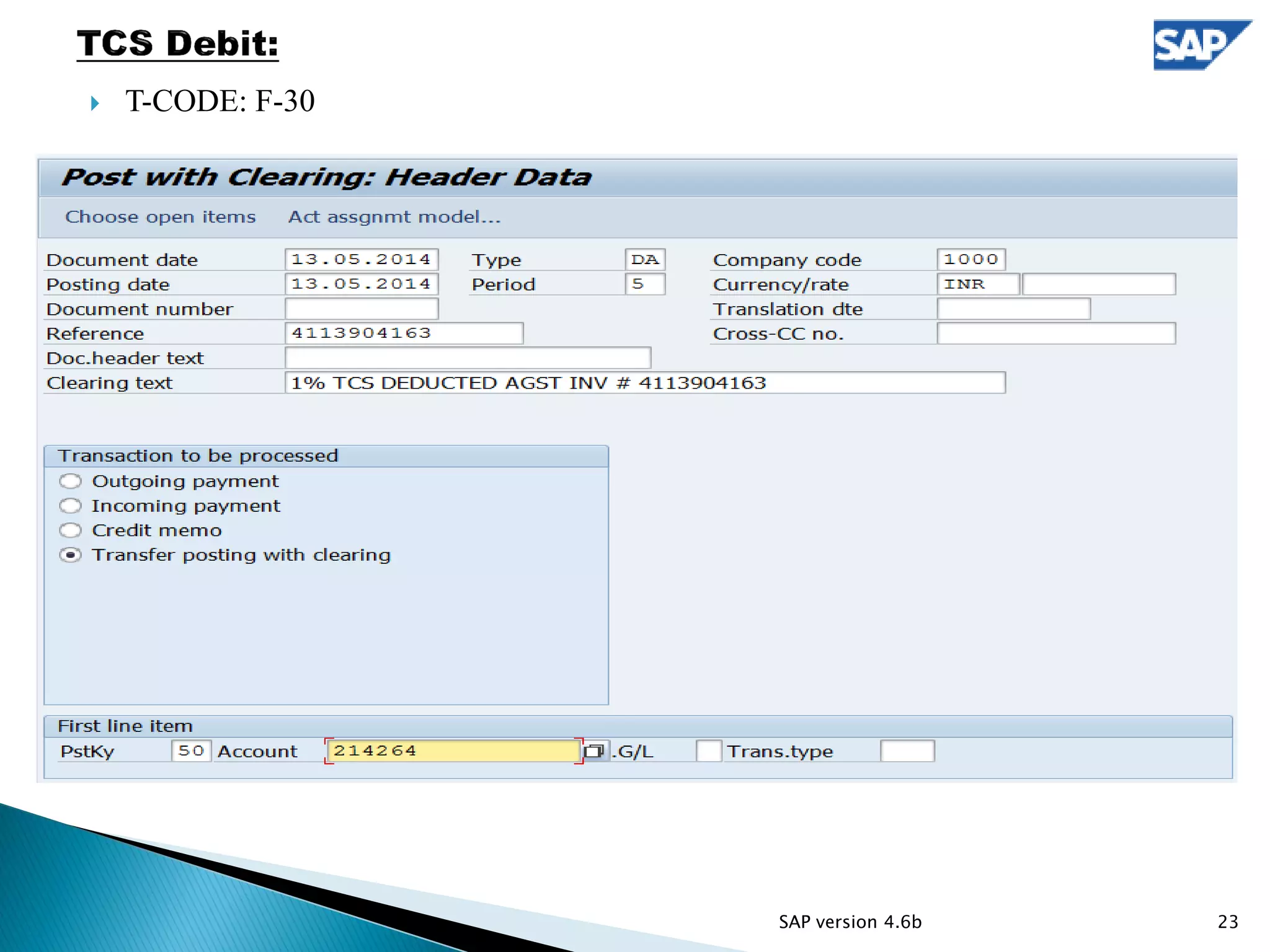
 T-CODE: F-30
23SAP version 4.6b
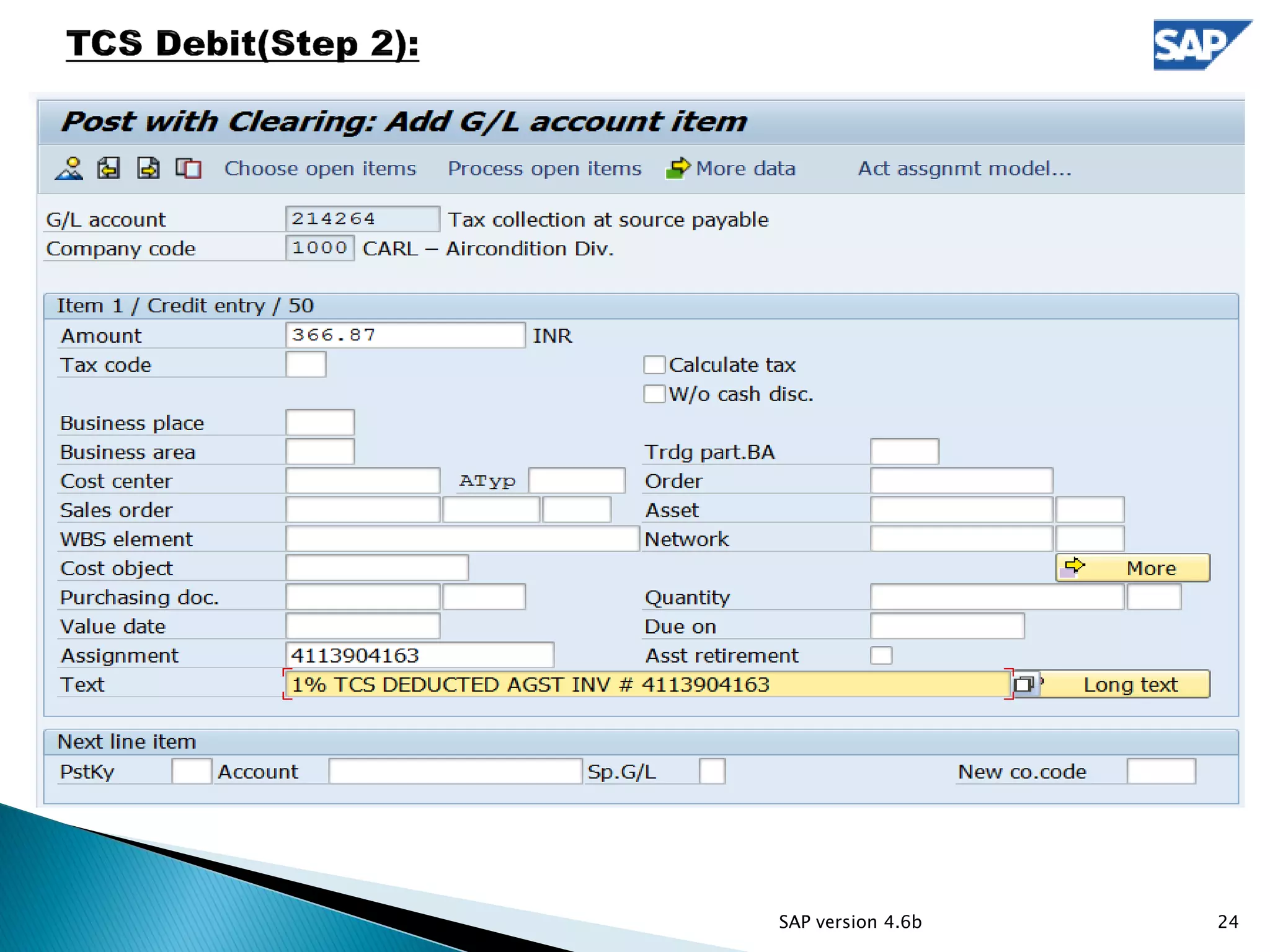
24SAP version 4.6b
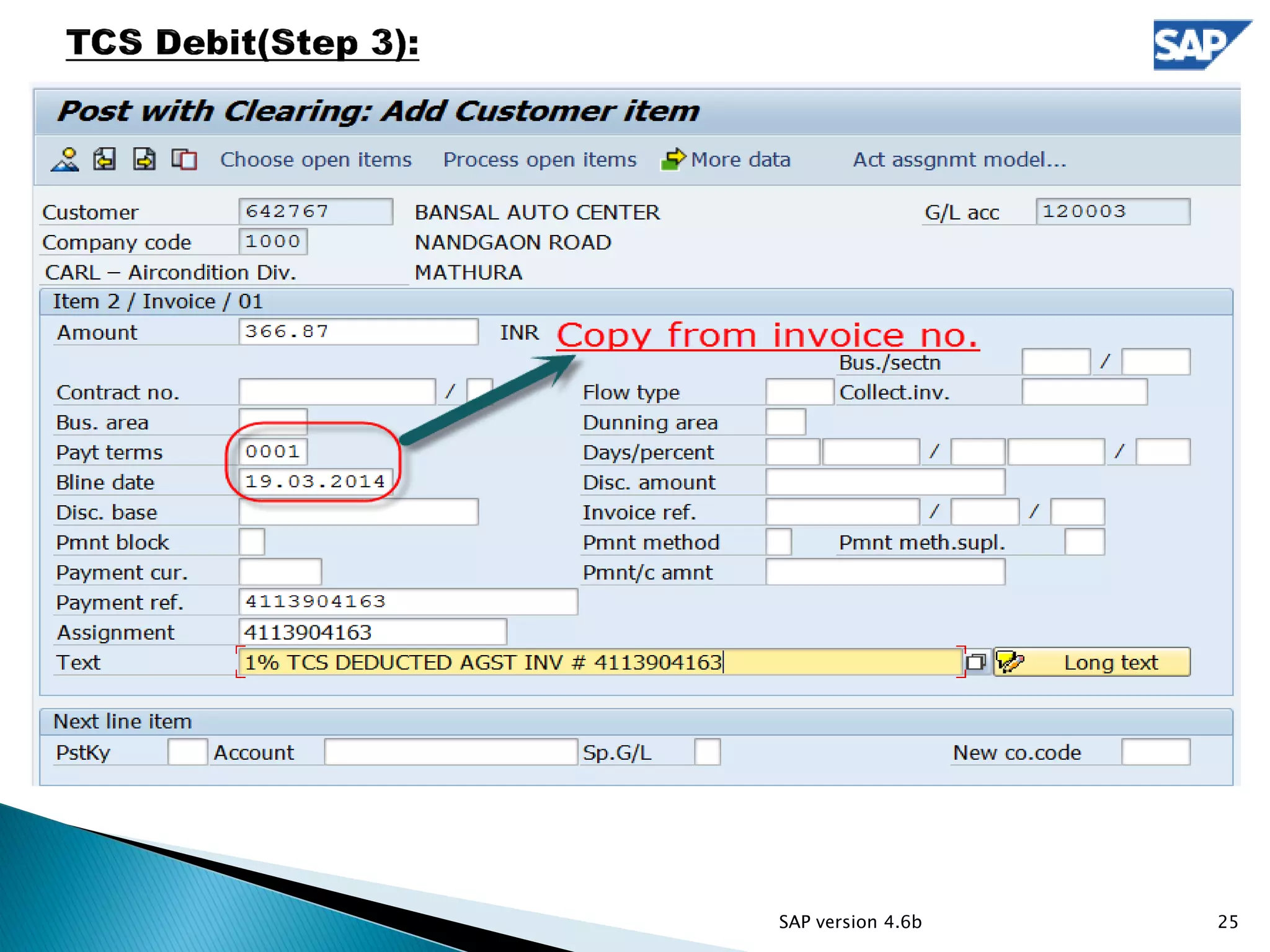
25SAP version 4.6b
26SAP version 4.6b
 T-CODE: F-30
27SAP version 4.6b
28SAP version 4.6b
29SAP version 4.6b
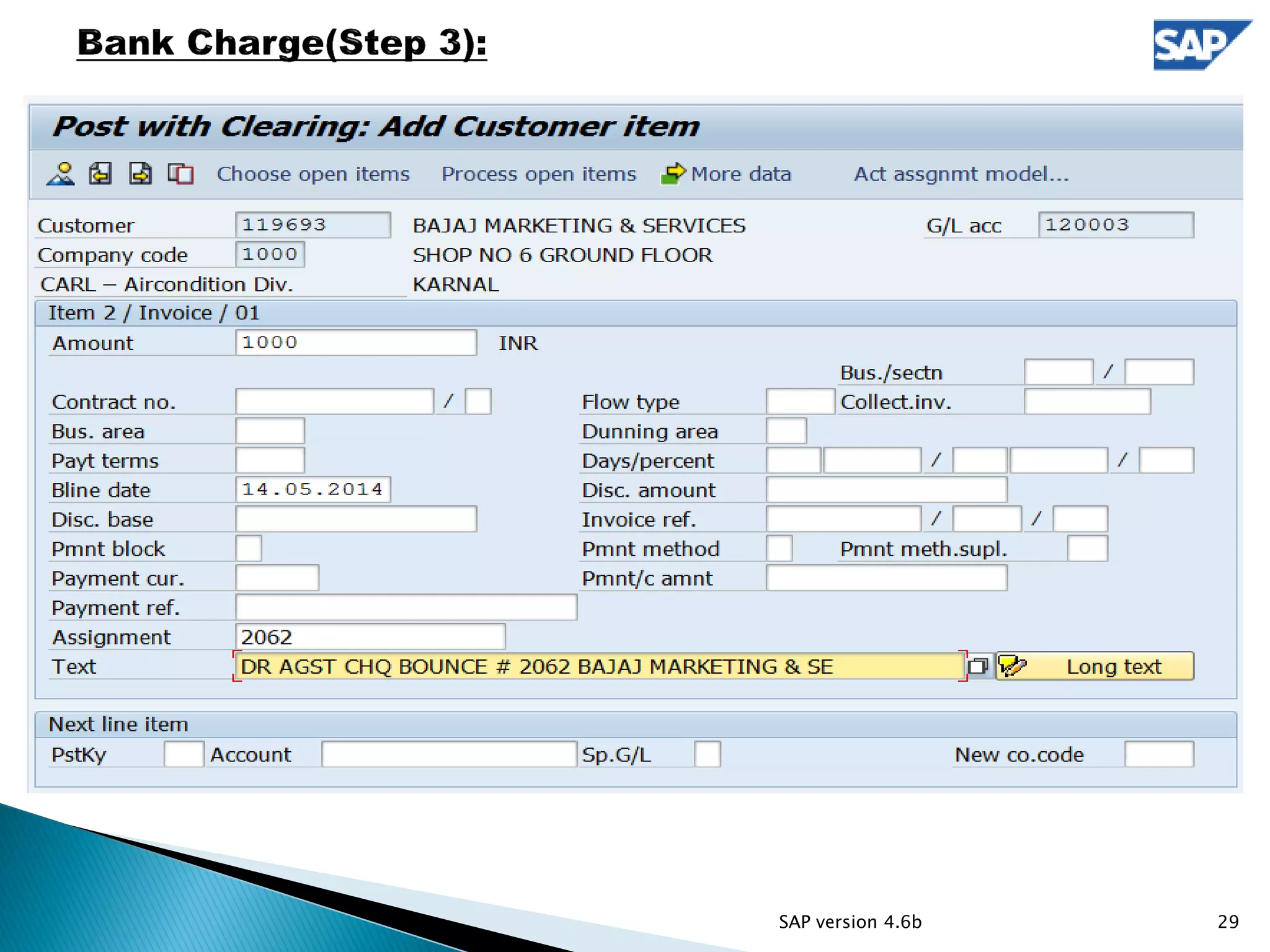
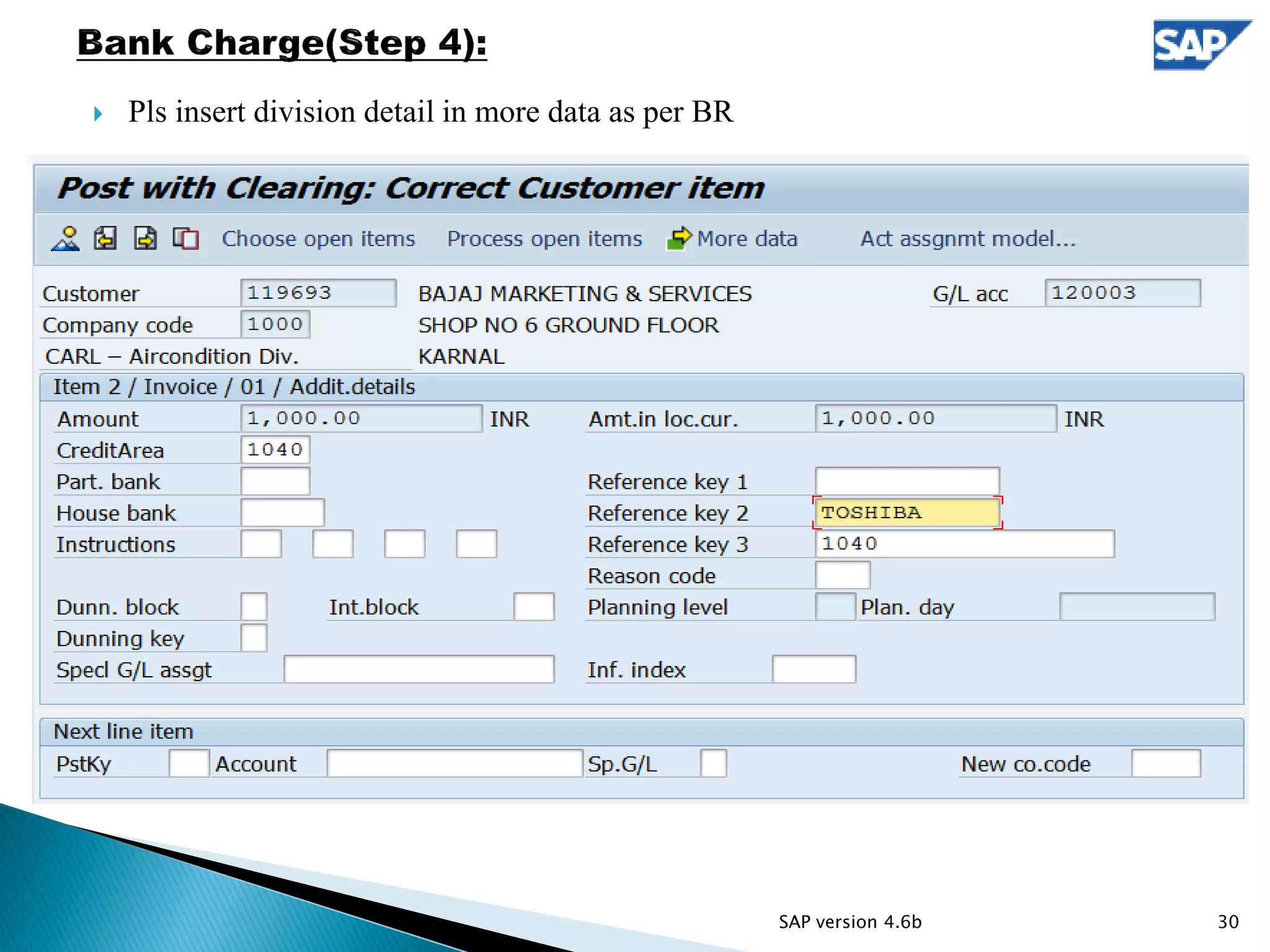
 Pls insert division detail in more data as per BR
30SAP version 4.6b
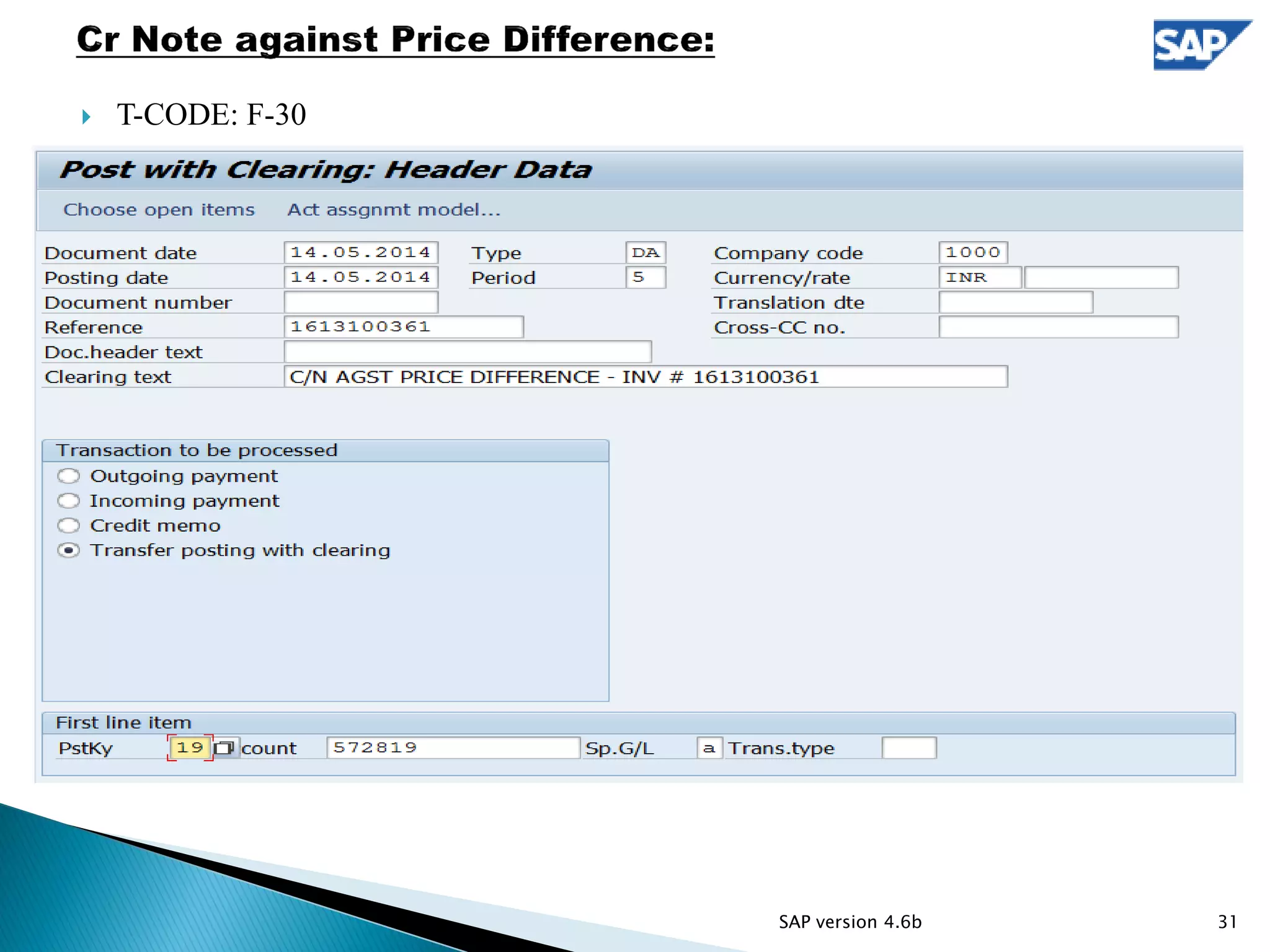
 T-CODE: F-30
31SAP version 4.6b
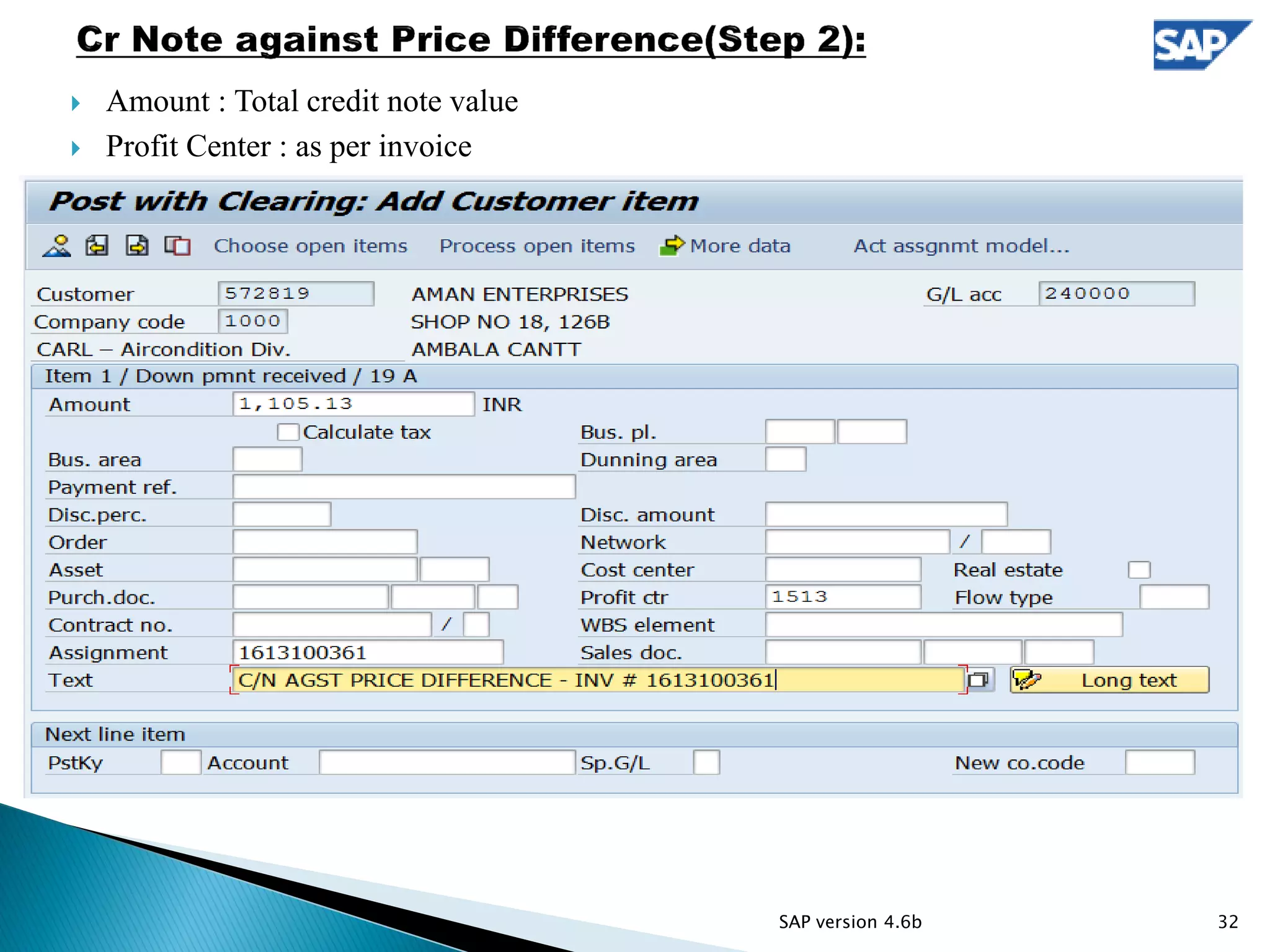
 Amount : Total credit note value
 Profit Center : as per invoice
32SAP version 4.6b
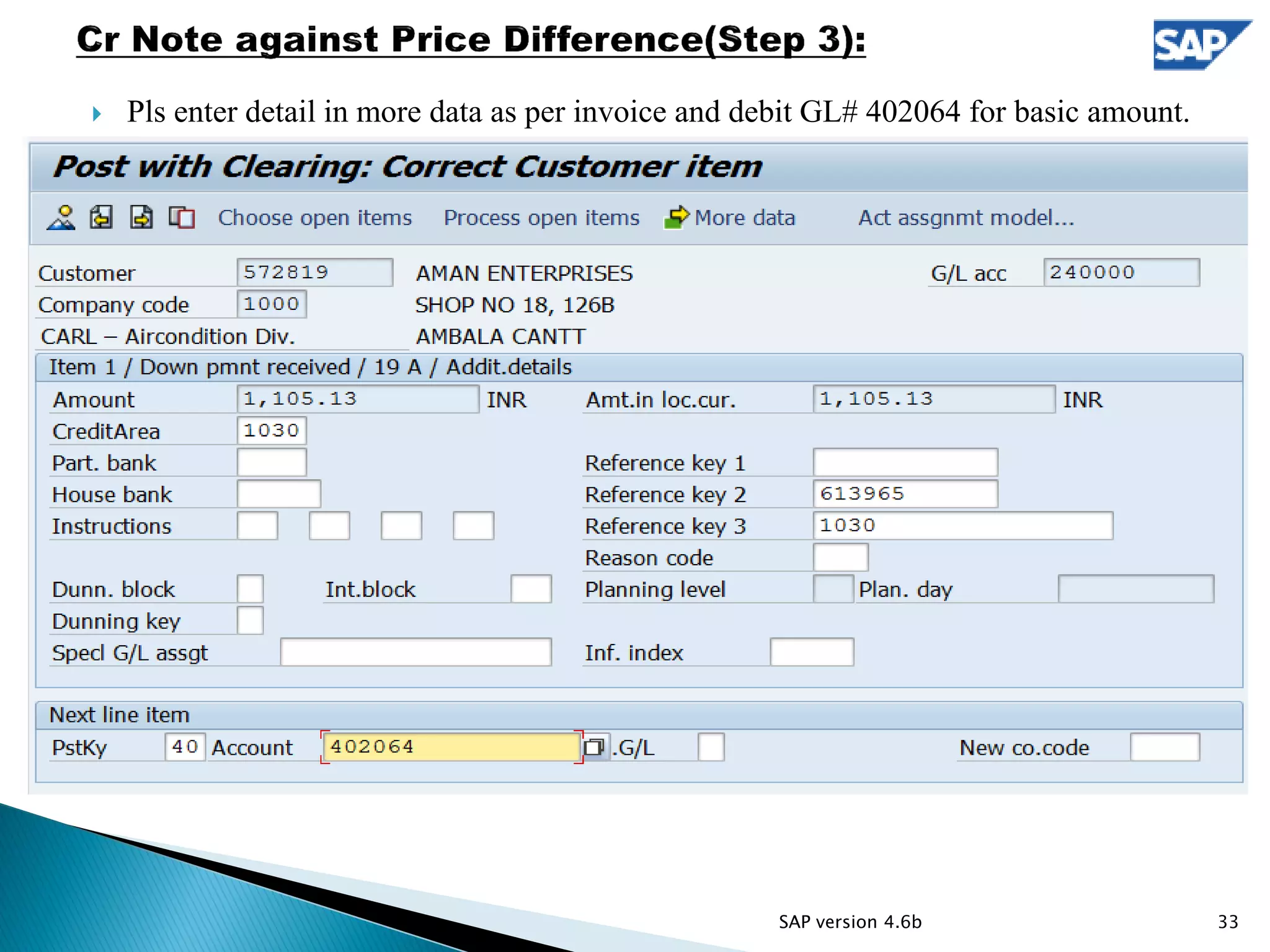
 Pls enter detail in more data as per invoice and debit GL# 402064 for basic amount.
33SAP version 4.6b
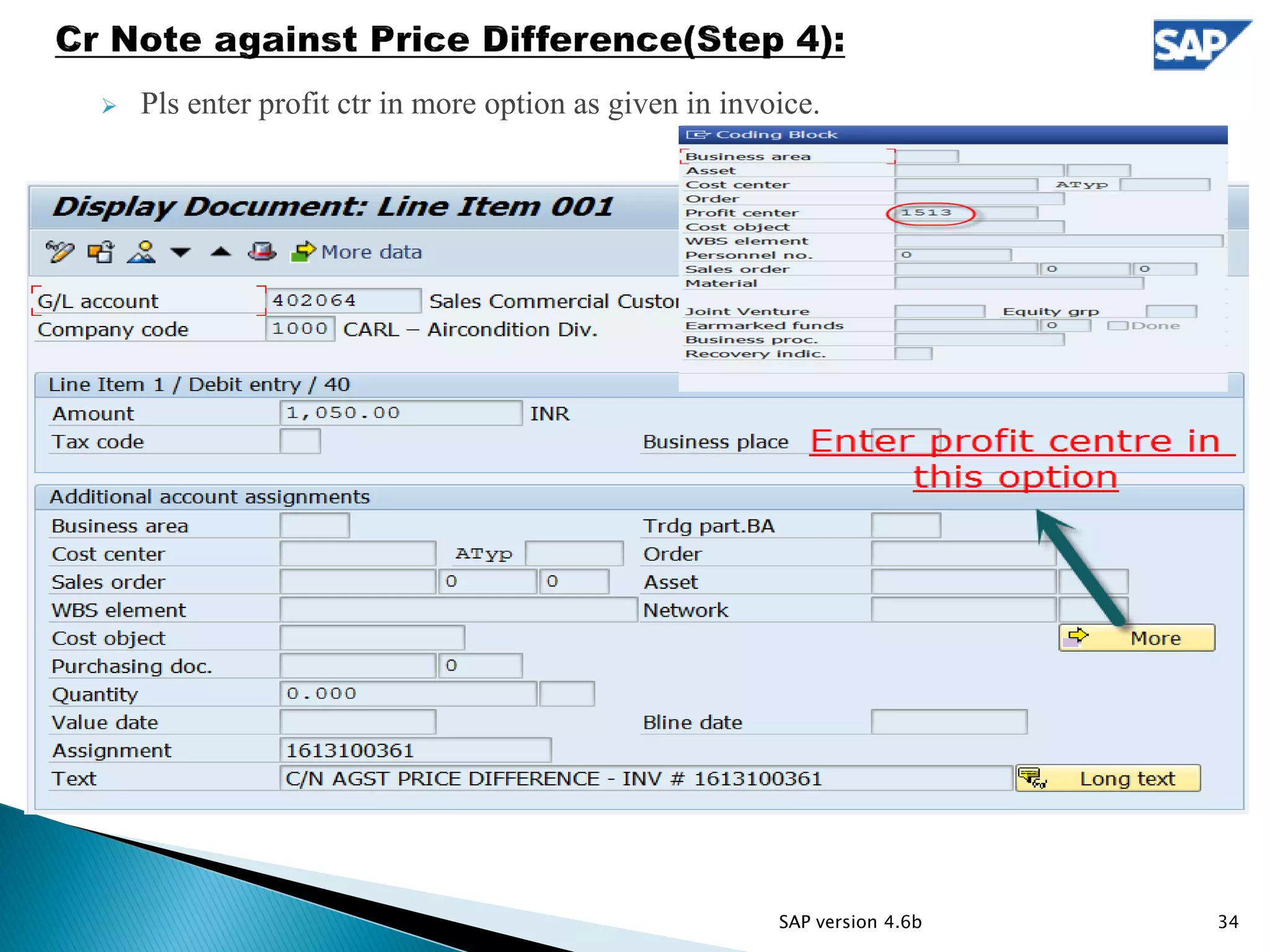
 Pls enter profit ctr in more option as given in invoice.
34SAP version 4.6b
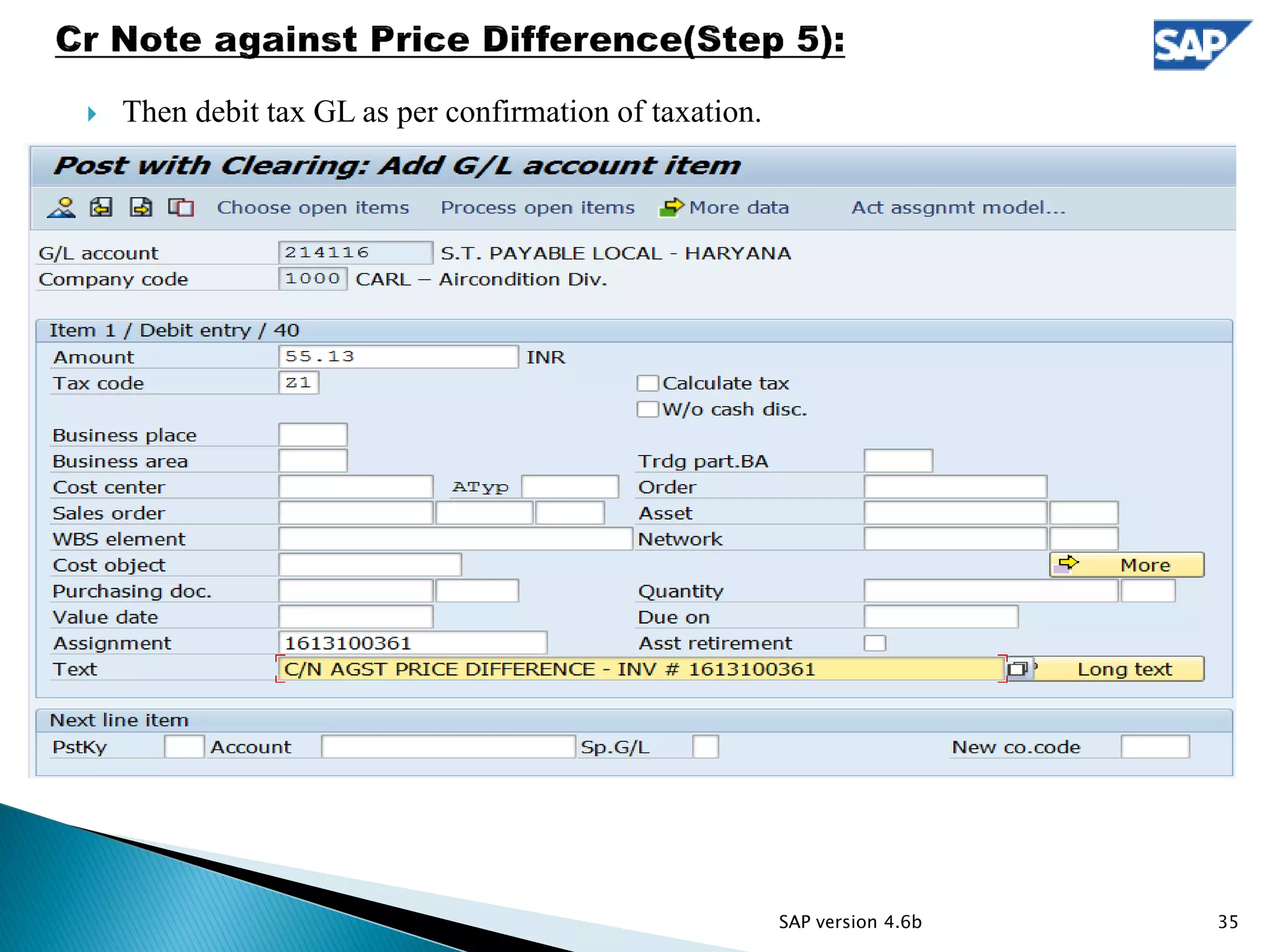
 Then debit tax GL as per confirmation of taxation.
35SAP version 4.6b
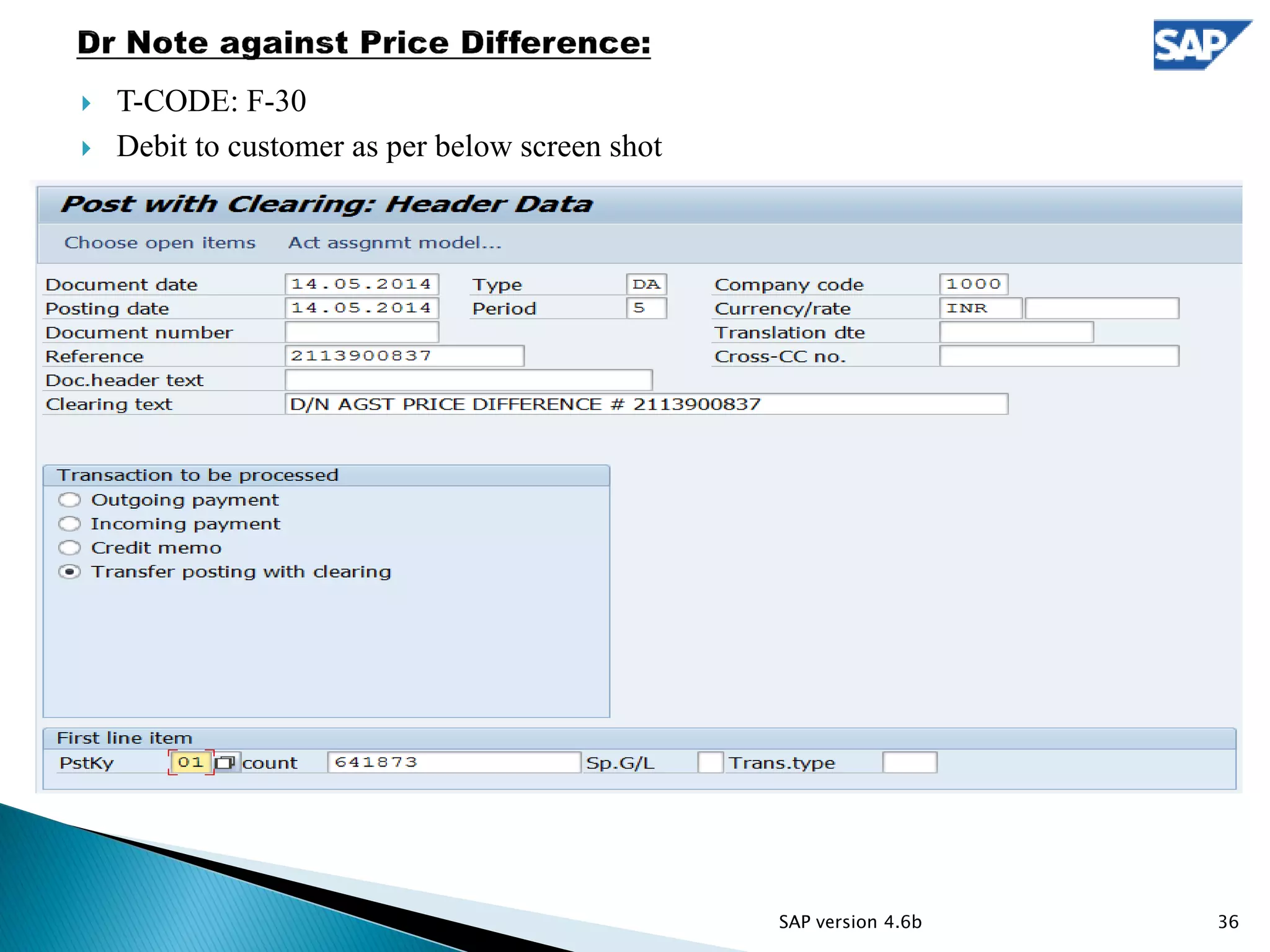
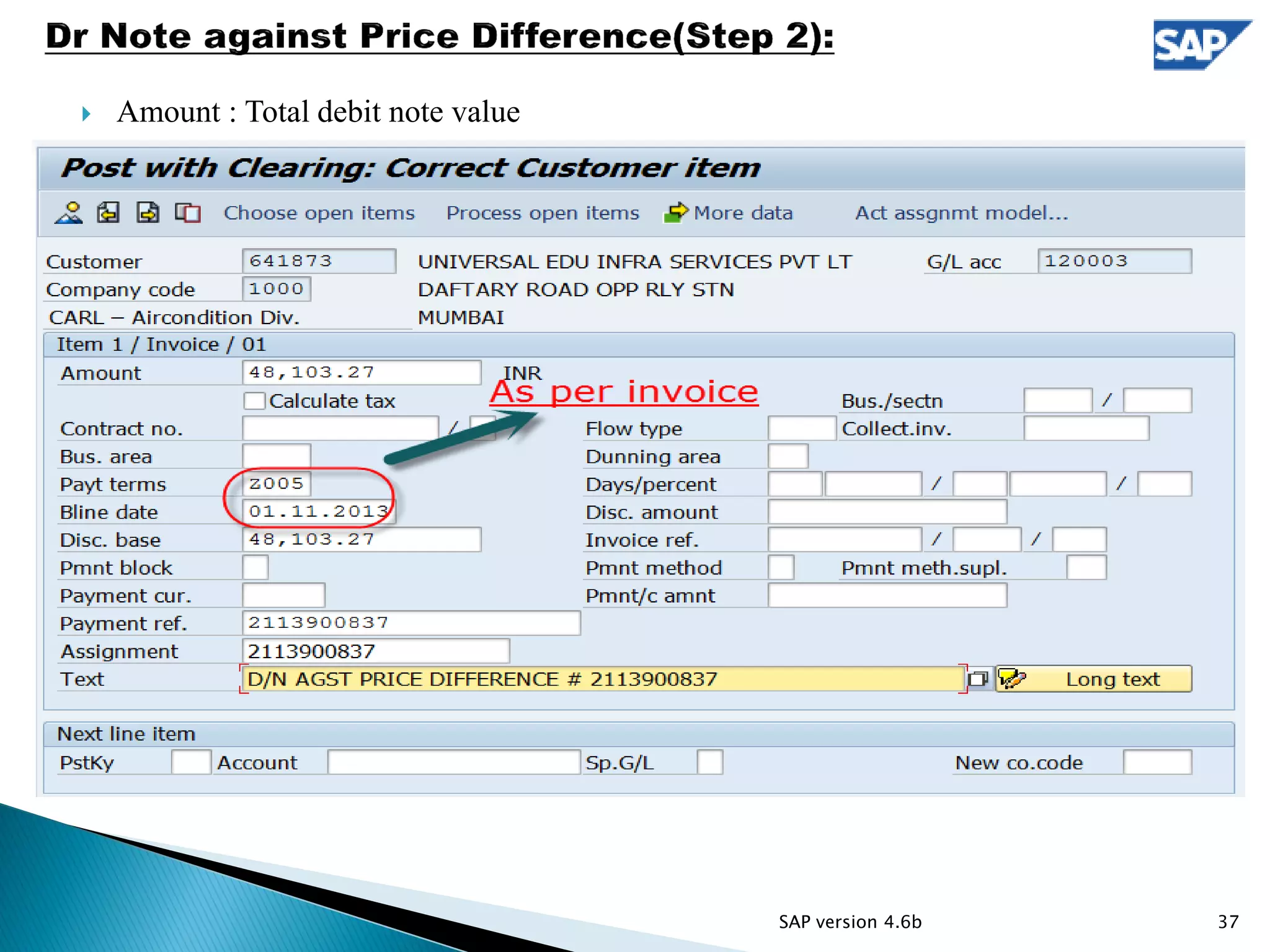
 T-CODE: F-30
 Debit to customer as per below screen shot
36SAP version 4.6b
 Amount : Total debit note value
37SAP version 4.6b
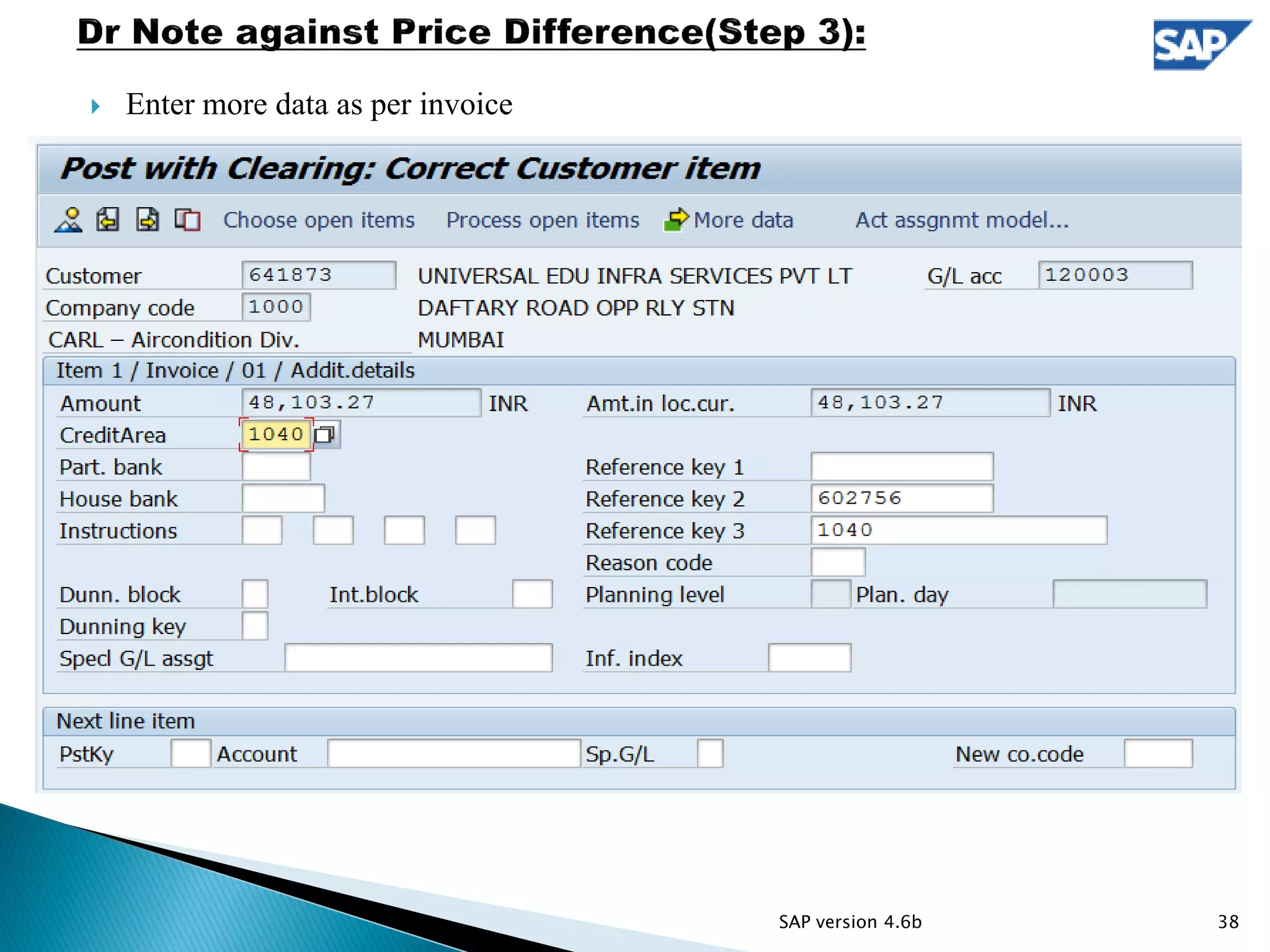
 Enter more data as per invoice
38SAP version 4.6b
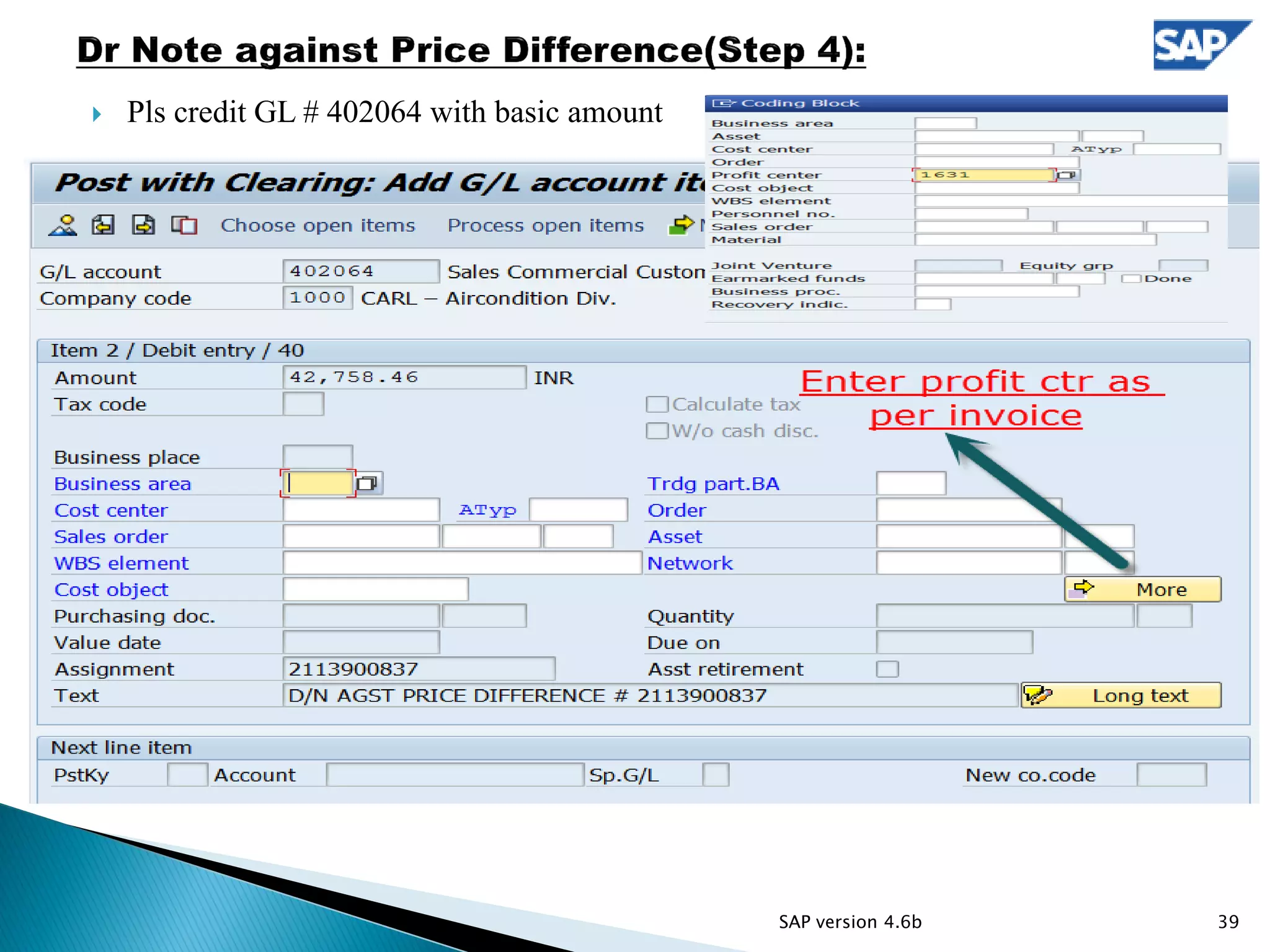
 Pls credit GL # 402064 with basic amount
39SAP version 4.6b
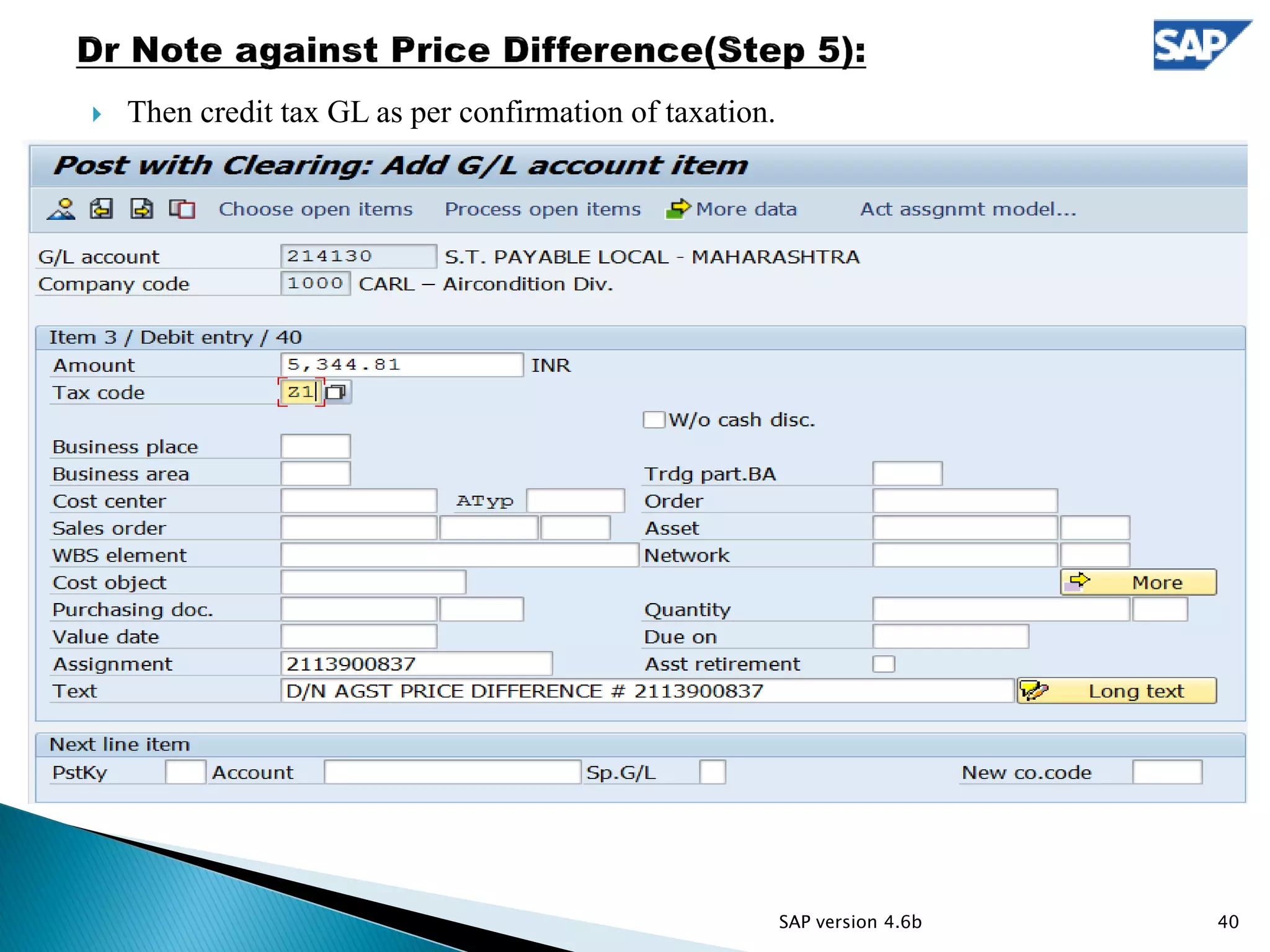
 Then credit tax GL as per confirmation of taxation.
40SAP version 4.6b
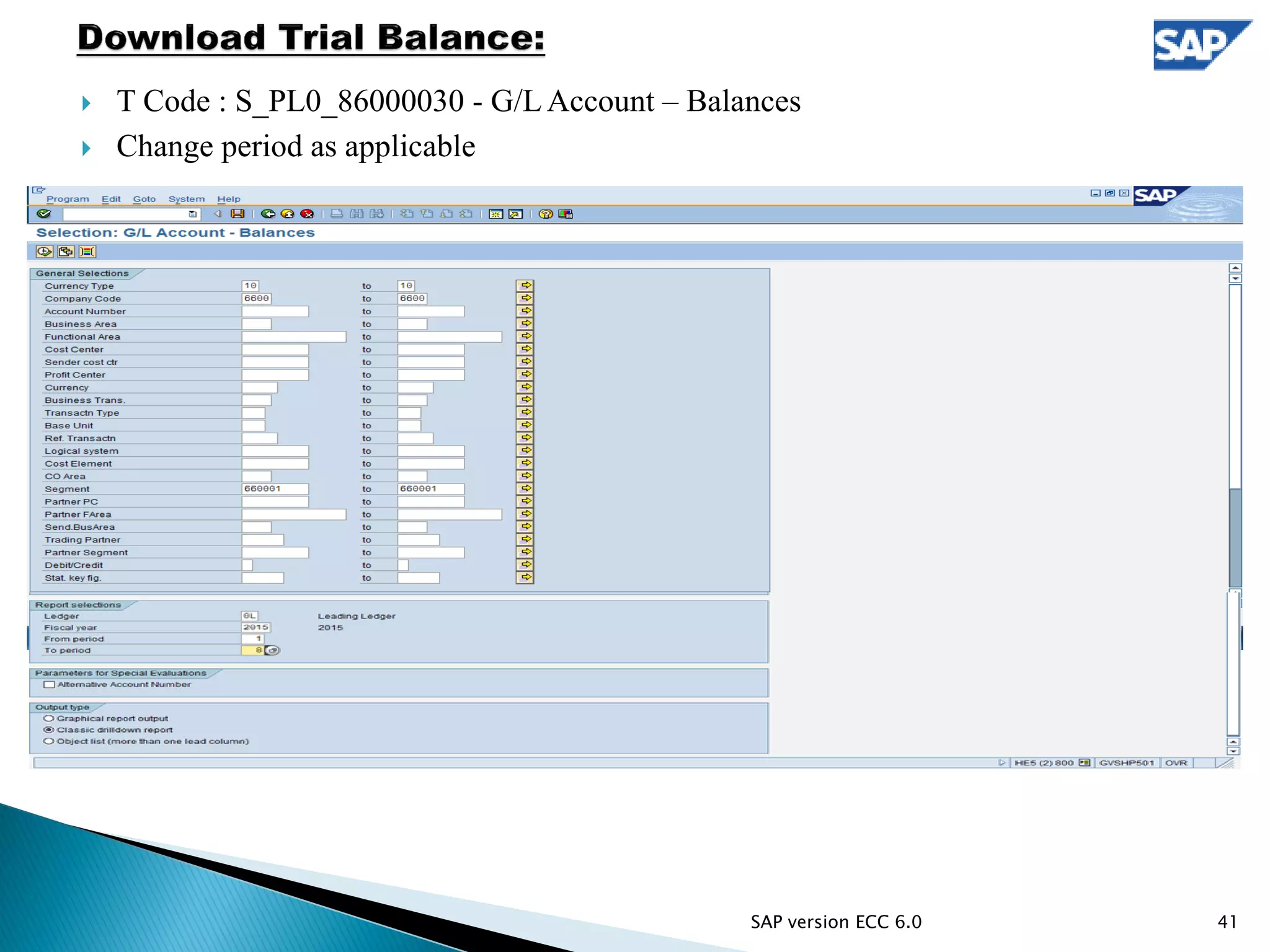
 T Code : S_PL0_86000030 - G/L Account – Balances
 Change period as applicable
41SAP version ECC 6.0
 T Code : MB51 - Material Doc. List
 Change period as applicable
42SAP version ECC 6.0
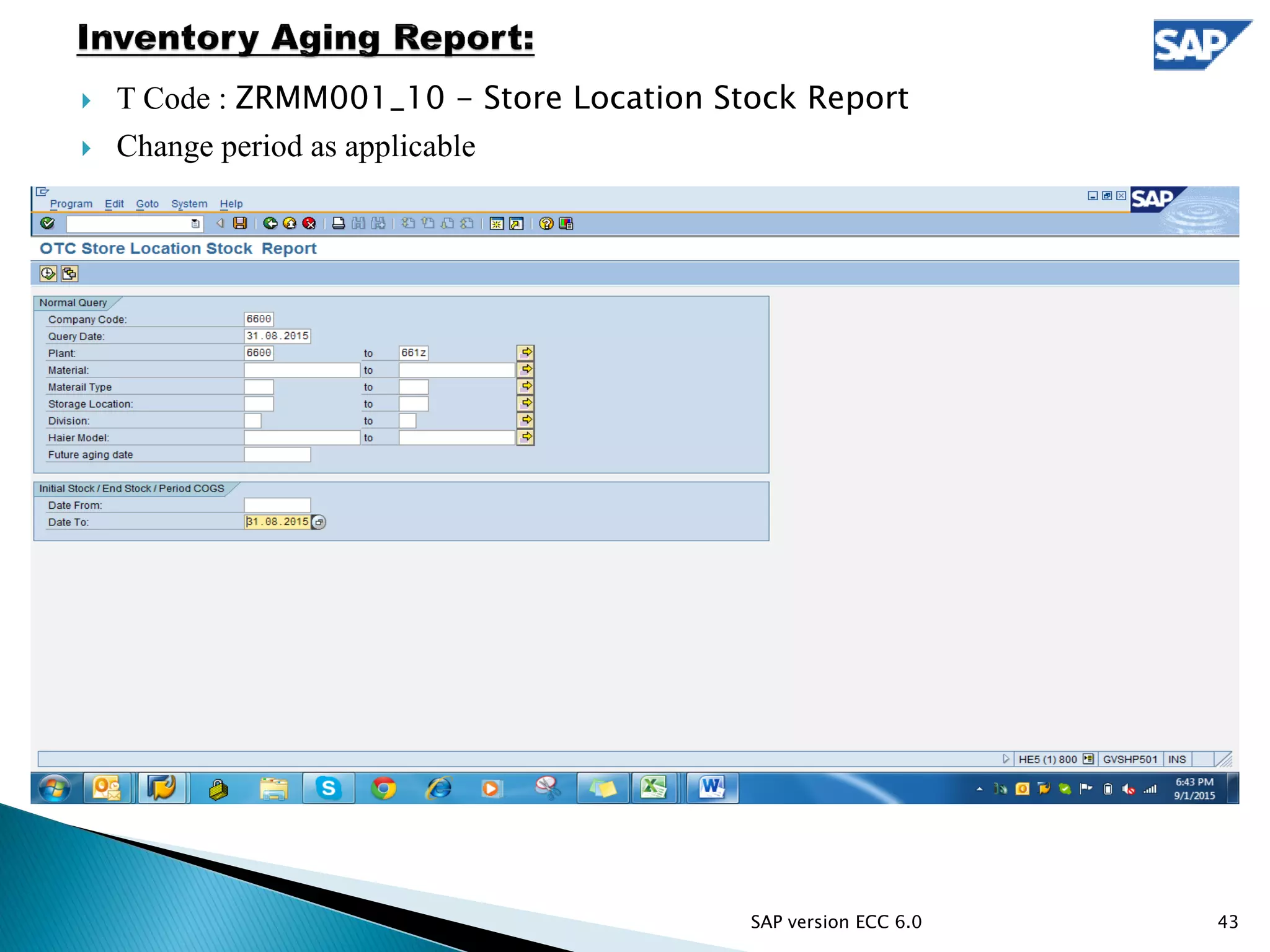
 T Code : ZRMM001_10 - Store Location Stock Report
 Change period as applicable
43SAP version ECC 6.0
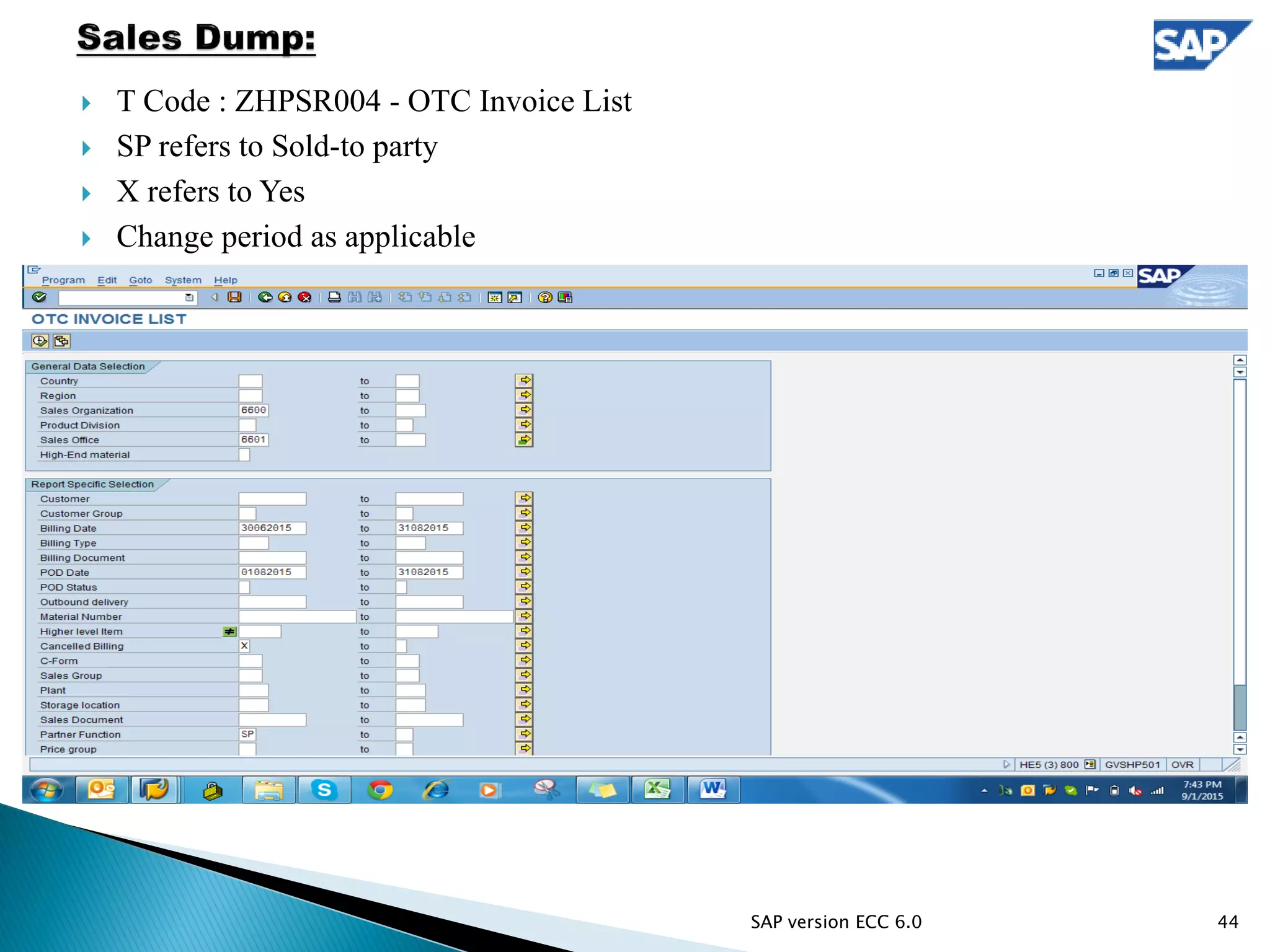
 T Code : ZHPSR004 - OTC Invoice List
 SP refers to Sold-to party
 X refers to Yes
 Change period as applicable
44SAP version ECC 6.0
45
Standard T-Code Non Standard T-Code
T-Code Description T-Code Description
F-28 Post Incoming Payments KE53 Display profit center
F-29 Post Customer Down Payment KS03 Display cost center
F-30 Post with Clearing ZAR1 Receivable Ageing Analysis
F-32 Clear Customer ZBPREP Billing Plan Tracking Report
FB03 Display Document ZCIREP AMC Consolidated Invoice Report
FBL1N Vendor Line Items ZCLEDGER Customer Statement of A/c
FBL3N G/L Account Line Items ZCMICUST Customer Master List
FBL5N Customer Line Items ZCS18 Credit Notes SPMS Contracts Agentwise
FS10N G/L Account Balance Display ZDLR_DR Dealer Debit BDC
IE03 Display Equipment ZDLR_PAYOUT Dealer Payout
IQ03 Display Material Serial Number ZDLRPORTAL Dealer Related Downloads
IW33 Display PM Order ZF30 Clearing Customer/Vendor (F-30)
ME23N Display purchase order ZFB03 zfb03
MM03 Display Material ZFIDRCR Debit/Credit Note
S_ALR_87012180 List of customer addresses ZMI13 Customer Advance List
VA01 Create Sales Order ZMI21 Paybles ageing
VA02 Change Sales Order ZSALREG Product Sales Register
VA03 Display Sales Order ZSASR Serv. Revn.- Agentwise -D&C/CREP
VA23 Display Quotation ZSEQUI Super Equipment Details
VA41 Create Contract ZSERSALES Service Sales register
VA42 Change Contract ZSOREL Sales Order Price Release
VA43 Display Contract ZSPMS_CRLIST SPMS Credit Proposal List
VF03 Display Billing Document ZSSC1 Query - SCC Orders
XD03 Display Customer (Centrally) ZSSC2 Query - SSC Invoice
XK03 Display vendor (centrally) ZTDS_DR TDS Transfer Posting Process
SE16 Data Browser ZVENDMSTR Vendor Master Display Report
S_PL0_86000030
G/L Account – Balances (Download
TB) ZVLEDGER Vendor A/c Statement
MB51 Material Doc. List ZXK03 Vendor Master List for E-Banking
ZRMM001_10 Store Location Stock Report
ZHPSR004 OTC Invoice List(Download Sales Dump)
46

Presentation_SAP

  • 1.
    1 SAP R/3 version4.6b and ECC 6.0
  • 2.
    Index Topic Page no. Advance Adjustment 3 to 5  Dealer Debit 6 to 8  Reverse Dealer Debit 9 to 10  Vendor Payable Adjustment 11 to 12  TDS/WCT TDS Adjustment 13 to 17  TDS Certificate Booking 18 to 22  TCS Debit 23 to 26  Bank Charges 27 to 30  Debit/Credit Note Issuance 31 to 40  Download Trial Balance 41  Return COGS 42  Inventory Aging Report 43  Download Sales Dump 44  List of SAP T-Code 45  End 46 2 Supported by screen shot of SAP version 4.6b and ECC 6.0
  • 3.
     T-Code :F-32  Click on “process open items” after entering below detail. SAP version 4.6b 3
  • 4.
     Select theline items need to adjust, then simulate(ALT+D+S) and save. 4SAP version 4.6b
  • 5.
     T-Code: F-30 Customeradvance adjustment in different code(Step 3):  T-Code : F-30 5SAP version 4.6b
  • 6.
    Dealer Debit:  T-Code: F-30  Reference : Invoice no.  Text : DLR DR FR INV # 4513800177 CUSTOMER NAME TO DEALER NAME 6SAP version 4.6b
  • 7.
    Dealer Debit(Step2):  Picko/s from customer code and debit as per below 7SAP version 4.6b
  • 8.
    Dealer Debit(Step3):  Fillmore data from invoice as per below: 8SAP version 4.6b
  • 9.
     T-Code :F-30  Reference: Invoice no.  Text: REV DLR DR FR INV # 4412901710 CUSTOMER NAME TO DLR NAME 9SAP version 4.6b
  • 10.
  • 11.
     T-Code :F-30  Please adjust vendor payable as per following criteria: First adjust FAP(i.e. Division 1070) o/s Then rest o/s is adjusted on FIFO basis.  Please do not adjust RLC Do&Ch, INSTT & WCT bills.  RLC Do&Ch, INSTT & WCT bills are adjusted only if back to back payment is collected.  Along with back to back payment service manager confirmation is also required for adjusting RLC Do&ch and INSTT credit. 11SAP version 4.6b
  • 12.
     Select bothvendor(K) and customer(D) line items and adjust as per above criteria 12SAP version 4.6b
  • 13.
    ◦ T-Code :F-30 ◦ Reference : Invoice No. 13SAP version 4.6b
  • 14.
     Choose openitem from customer code and debit as per next step 14SAP version 4.6b
  • 15.
  • 16.
  • 17.
     Pick moredata form invoice as per below 17SAP version 4.6b
  • 18.
     T-code: F-30 Reference: Financial Year  Doc. header text: Certificate date  Clearing text: TDS CERT RECD FM CUSTOMER NAME # INVOICE NO  Pick TDS o/s & debit GL as per below  If open outstanding detail is not given then park in advance as per step “TDS certificate booking as advance” 18SAP version 4.6b
  • 19.
  • 20.
  • 21.
  • 22.
     Fill moredata as per given detail 22SAP version 4.6b
  • 23.
  • 24.
  • 25.
  • 26.
  • 27.
  • 28.
  • 29.
  • 30.
     Pls insertdivision detail in more data as per BR 30SAP version 4.6b
  • 31.
  • 32.
     Amount :Total credit note value  Profit Center : as per invoice 32SAP version 4.6b
  • 33.
     Pls enterdetail in more data as per invoice and debit GL# 402064 for basic amount. 33SAP version 4.6b
  • 34.
     Pls enterprofit ctr in more option as given in invoice. 34SAP version 4.6b
  • 35.
     Then debittax GL as per confirmation of taxation. 35SAP version 4.6b
  • 36.
     T-CODE: F-30 Debit to customer as per below screen shot 36SAP version 4.6b
  • 37.
     Amount :Total debit note value 37SAP version 4.6b
  • 38.
     Enter moredata as per invoice 38SAP version 4.6b
  • 39.
     Pls creditGL # 402064 with basic amount 39SAP version 4.6b
  • 40.
     Then credittax GL as per confirmation of taxation. 40SAP version 4.6b
  • 41.
     T Code: S_PL0_86000030 - G/L Account – Balances  Change period as applicable 41SAP version ECC 6.0
  • 42.
     T Code: MB51 - Material Doc. List  Change period as applicable 42SAP version ECC 6.0
  • 43.
     T Code: ZRMM001_10 - Store Location Stock Report  Change period as applicable 43SAP version ECC 6.0
  • 44.
     T Code: ZHPSR004 - OTC Invoice List  SP refers to Sold-to party  X refers to Yes  Change period as applicable 44SAP version ECC 6.0
  • 45.
    45 Standard T-Code NonStandard T-Code T-Code Description T-Code Description F-28 Post Incoming Payments KE53 Display profit center F-29 Post Customer Down Payment KS03 Display cost center F-30 Post with Clearing ZAR1 Receivable Ageing Analysis F-32 Clear Customer ZBPREP Billing Plan Tracking Report FB03 Display Document ZCIREP AMC Consolidated Invoice Report FBL1N Vendor Line Items ZCLEDGER Customer Statement of A/c FBL3N G/L Account Line Items ZCMICUST Customer Master List FBL5N Customer Line Items ZCS18 Credit Notes SPMS Contracts Agentwise FS10N G/L Account Balance Display ZDLR_DR Dealer Debit BDC IE03 Display Equipment ZDLR_PAYOUT Dealer Payout IQ03 Display Material Serial Number ZDLRPORTAL Dealer Related Downloads IW33 Display PM Order ZF30 Clearing Customer/Vendor (F-30) ME23N Display purchase order ZFB03 zfb03 MM03 Display Material ZFIDRCR Debit/Credit Note S_ALR_87012180 List of customer addresses ZMI13 Customer Advance List VA01 Create Sales Order ZMI21 Paybles ageing VA02 Change Sales Order ZSALREG Product Sales Register VA03 Display Sales Order ZSASR Serv. Revn.- Agentwise -D&C/CREP VA23 Display Quotation ZSEQUI Super Equipment Details VA41 Create Contract ZSERSALES Service Sales register VA42 Change Contract ZSOREL Sales Order Price Release VA43 Display Contract ZSPMS_CRLIST SPMS Credit Proposal List VF03 Display Billing Document ZSSC1 Query - SCC Orders XD03 Display Customer (Centrally) ZSSC2 Query - SSC Invoice XK03 Display vendor (centrally) ZTDS_DR TDS Transfer Posting Process SE16 Data Browser ZVENDMSTR Vendor Master Display Report S_PL0_86000030 G/L Account – Balances (Download TB) ZVLEDGER Vendor A/c Statement MB51 Material Doc. List ZXK03 Vendor Master List for E-Banking ZRMM001_10 Store Location Stock Report ZHPSR004 OTC Invoice List(Download Sales Dump)
  • 46.