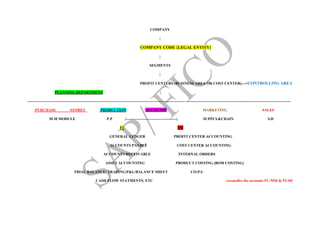
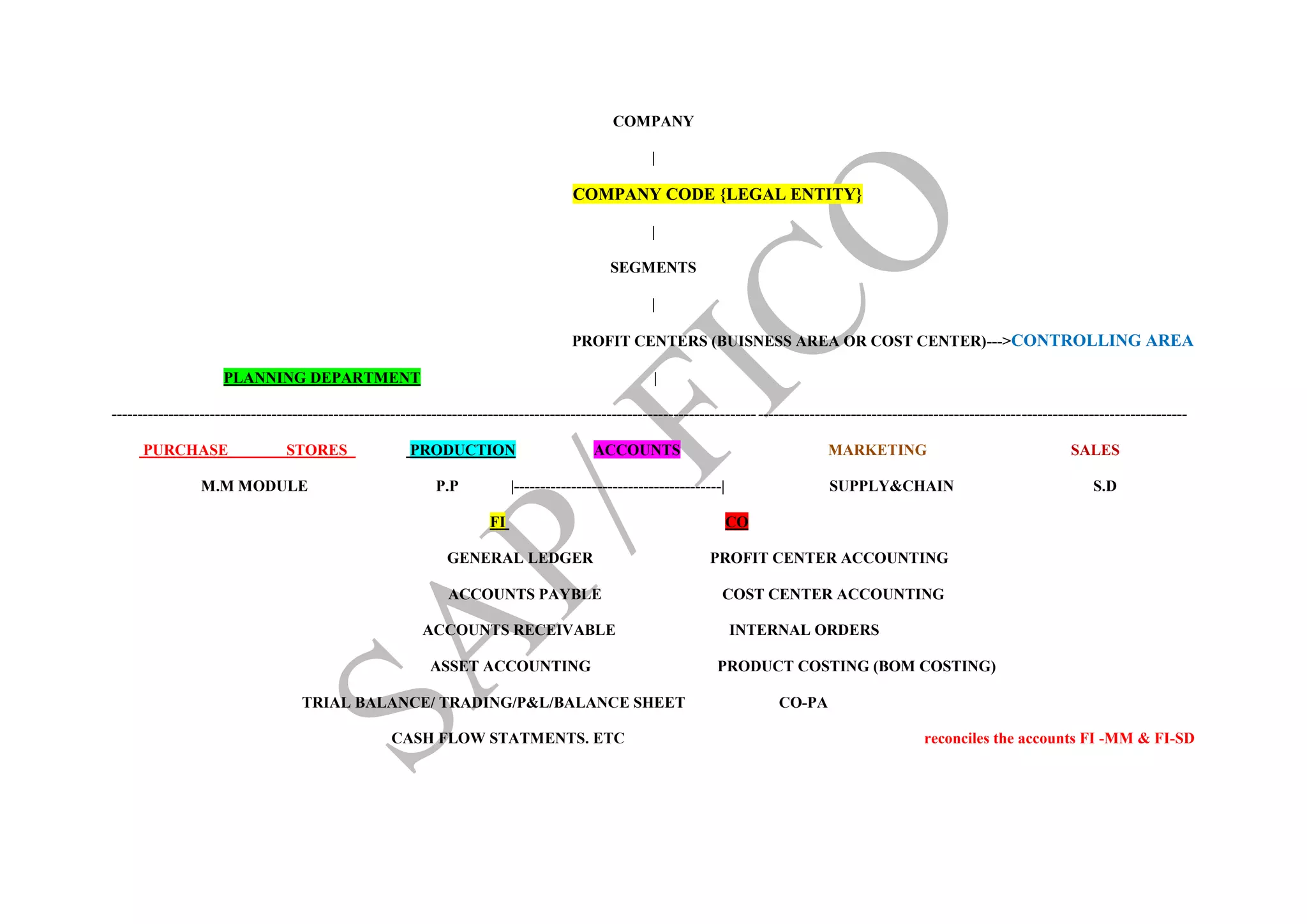
COMPANY
|
COMPANY CODE {LEGAL ENTITY}
|
SEGMENTS
|
PROFIT CENTERS (BUISNESS AREA OR COST CENTER)--->CONTROLLING AREA
PLANNING DEPARTMENT |
----------------------------------------------------------------------------------------------------------------------------------------------------------------------------------------------------------------
PURCHASE STORES PRODUCTION ACCOUNTS MARKETING SALESSALES
M.M MODULE P.P |----------------------------------------| SUPPLY&CHAIN S.D
FI CO
GENERAL LEDGER PROFIT CENTER ACCOUNTING
ACCOUNTS PAYBLE COST CENTER ACCOUNTING
ACCOUNTS RECEIVABLE INTERNAL ORDERS
ASSET ACCOUNTING PRODUCT COSTING (BOM COSTING)
TRIAL BALANCE/ TRADING/P&L/BALANCE SHEET CO-PA
CASH FLOW STATMENTS. ETC reconciles the accounts FI -MM & FI-SD
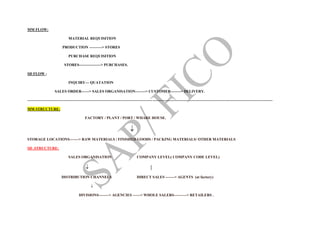
MM FLOW:
MATERIAL REQUISITION
PRODUCTION ----------> STORES
PURCHASE REQUISITION
STORES-----------------> PURCHASES.
SD FLOW :
INQUIRY--- QUATATION
SALES ORDER------> SALES ORGANISATION--------> CUSTOMER--------> DELIVERY.
--------------------------------------------------------------------------------------------------------------------------------------------------------------------------------------------------
MM STRUCTURE:
FACTORY / PLANT / PORT / WHARE HOUSE.

STORAGE LOCATIONS-------> RAW MATERIALS / FINISHED GOODS / PACKING MATERIALS/ OTHER MATERIALS
SD .STRUCTURE:
SALES ORGANISATION COMPANY LEVEL( COMPANY CODE LEVEL)
 |
DISTRIBUTION CHANNELS DIRECT SALES -------> AGENTS (at factory)

DIVISIONS--------> AGENCIES ------> WHOLE SALERS----------> RETAILERS .
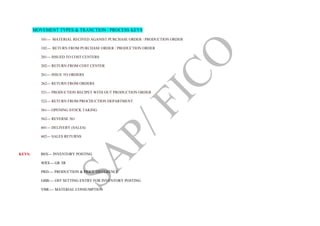
MOVEMENT TYPES & TRANCTION / PROCESS KEYS
101--- MATERIAL RECIVED AGANIST PURCHASE ORDER / PRODUCTION ORDER
102--- RETURN FROM PURCHASE ORDER / PRODUCTION ORDER
201--- ISSUED TO COST CENTERS
202--- RETURN FROM COST CENTER
261--- ISSUE TO ORDERS
262--- RETURN FROM ORDERS
521--- PRODUCTION RECIPET WITH OUT PRODUCTION ORDER
522--- RETURN FROM PROCDUCTION DEPARTMENT
561--- OPENING STOCK TAKING
562--- REVERSE 561
601--- DELIVERY (SALES)
602--- SALES RETURNS
KEYS: BSX--- INVENTORY POSTING
WRX--- GR /IR
PRD---- PRODUCTION & PRICE DIFFERENCE
GBB---- OFF SETTING ENTRY FOR INVENTORY POSTING
VBR---- MATERIAL CONSUMPTION
VNG---- SCRAPPING
BSA--- OPENING STOCK TAKING
ZOF--- PRODUCTION RECEIPT WITH OUT PRODUCTION ORDER
AUF--- " " " WITH " "
VAX--- DELEVERY WHERE SALES ACCOUNT IS NOT CREATED AS REVENUE { CO MODULE NOT IMPLEMENT}
VAY--- " " " " IS CREATED { CO MODULE IS IMPLEMENTED}
AUA--- PRODUCTION ORDERS DIFFERNCES
MATERIAL TYPES:
RAW MATERIAL O.H: V- MOVING AVERAGE
SPARES--- ERSA-- V- MOVING AVERAGE PRICE
PACKING--- VERP--- V- MOVING AVERAGE
FINISHED GOODS--- FERT-- S- STANDARD
SEMI FINISHED GOODS-- HALB
(A) PURCHASE--- V-- MOVING AVERAGE
(B) PRODUCED--- S-- STANDARD PRICE [RMC+OH]
TRADED--- HAWA-- V --
SEVICES--- DIEN.
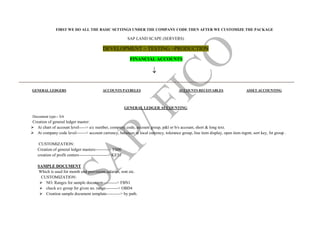
FIRST WE DO ALL THE BASIC SETTINGS UNDER THE COMPANY CODE THEN AFTER WE CUSTOMIZE THE PACKAGE
SAP LAND SCAPE (SERVERS)
DEVELOPMENT > TESTING >PRODUCTION
FINANCIAL ACCOUNTS

--------------------------------------------------------------------------------------------------------------------------------------------------------------------------------------------------------------------------
GENERAL LEDGERS ACCOUNTS PAYBELES ACCOUNTS RECEIVABLES ASSET ACCOUNTING
GENERAL LEDGER ACCOUNTING
Document type-- SA
Creation of general ledger master:
 At chart of account level-----> a/c number, company code, account group, p&l or b/s account, short & long text.
 At company code level-------> account currency, balances in local currency, tolerance group, line item display, open item mgmt, sort key, fst group .
CUSTOMIZATION:
Creation of general ledger masters----------> FS00
creation of profit centers---------------------> KE51
SAMPLE DOCUMENT
Which is used for month end provisions salaries, rent etc.
CUSTOMIZATION:
 NO. Ranges for sample document----------> FBN1
 check a/c group for given no. range---------> OBD4
 Creation sample document template----------> by path.
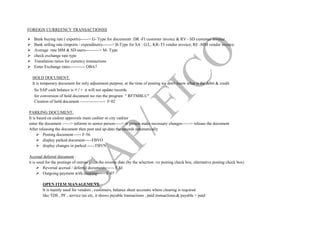
FOREIGN CURREENCY TRANSACTIONSS
 Bank buying rate ( exports)------> G- Type for documents :DR -FI customer invoice & RV - SD customer invoice
 Bank selling rate (imports / expenditure)-------> B-Type for SA : G/L; KR- FI vendor invoice; RE -MM vendor invoice
 Average rate MM & SD users----------> M- Type
 check exchange rate type
 Translation ratios for currency transactions
 Enter Exchange rates----------- OBA7
HOLD DOCUMENT.
It is temporary document for only adjustment purpose, at the time of posting we don't know what is the debit & credit
So SAP cash balance is + / - it will not update records
for conversion of hold document we run the program " RFTMBLU"
Creation of hold document ------------------ F-02
PARKING DOCUMENT.
It is based on cashier approvals main cashier or city cashier
enter the document ------> informs to senior person-----> sr.person make necessary changes------> release the document
After releasing the document then post and up-date the records automatically
 Posting document------ F-56
 display parked document-----FBVO
 display changes in parked ----- FBVN
Accrual deferral document :
it is used for the postings of entries gives the reverse date (by the selection -ve posting check box, alternative posting check box)
 Reversal accrual / deferral documents------ F.81
 Outgoing payment with clearing------ F-07
OPEN ITEM MANAGEMENT.
It is mainly used for vendors , customers, balance sheet accounts where clearing is required
like TDS , PF , service tax etc, it shows payable transactions , paid transactions,& payable + paid
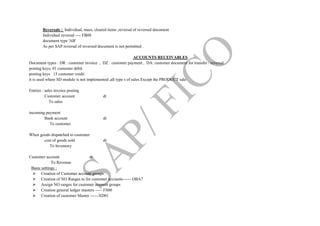
Reversals : Individual, mass, cleared items ,reversal of reversed document
Individual reversal ---- FB08
document type 'AB'
As per SAP reversal of reversed document is not permitted .
ACCOUNTS RECEIVABLES.
Document types : DR : customer invoice , DZ : customer payment , DA: customer document for transfer / reversal
posting keys; 01 customer debit
posting keys 15 customer credit
it is used where SD module is not implemented ,all type s of sales Except the PRODUCT sale
Entries : sales invoice posting
Customer account dr
To sales
incoming payment
Bank account dr
To customer
When goods dispatched to customer
cost of goods sold dr
To Inventory
Customer account dr
To Revenue
Basic settings :
 Creation of Customer account groups
 Creation of NO Ranges to for customer accounts------ OBA7
 Assign NO ranges for customer account groups
 Creation general ledger masters ----- FS00
 Creation of customer Master ------XD01
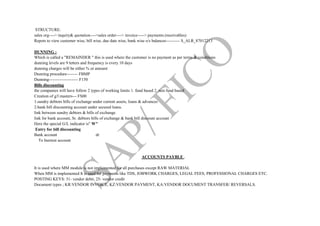
STRUCTURE:
sales org----> inquiry& quotation---->sales order----> invoice-----> payments.(receivables)
Repots to view customer wise, bill wise, due date wise, bank wise o/s balances---------- S_ALR_87012213
DUNNING :
Which is called a "REMAINDER " this is used where the customer is no payment as per terms & conditions
dunning levels are 9 letters and frequency is every 10 days
dunning charges will be either % or amount
Dunning procedure-------- FBMP
Dunning--------------------- F150
Bills discounting
the companies will have follow 2 types of working limits 1. fund based 2. non fund based
Creation of g/l masters--- FS00
1.sundry debtors bills of exchange under current assets, loans & advances
2.bank bill discounting account under secured loans.
link between sundry debtors & bills of exchange
link for bank account, Sr. debtors bills of exchange & bank bill discount account
Here the special G/L indicator is" W"
Entry for bill discounting
Bank account dr
To Inertest account
ACCOUNTS PAYBLE .
It is used where MM module is not implemented for all purchases except RAW MATERIAL
When MM is implemented It is used for payments like TDS, JOBWORK CHARGES, LEGAL FEES, PROFESSIONAL CHARGES ETC.
POSTING KEYS: 31- vendor debit, 25- vendor credit
Document types ; KR:VENDOR INVOICE, KZ:VENDOR PAYMENT, KA:VENDOR DOCUMENT TRANSFER/ REVERSALS.
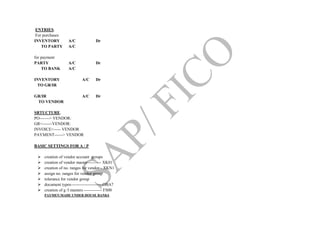
ENTRIES.
For purchases
INVENTORY A/C Dr
TO PARTY A/C
for payment
PARTY A/C Dr
TO BANK A/C
INVENTORY A/C Dr
TO GR/IR
GR/IR A/C Dr
TO VENDOR
SRTUCTURE.
PO-------> VENDOR:
GR<-------VENDOR:
INVOICE<----- VENDOR
PAYMENT------> VENDOR
BASIC SETTINGS FOR A / P
 creation of vendor account groups
 creation of vendor master---------- XK01
 creation of no. ranges for vendor-- XKN1
 assign no. ranges for vendor group
 tolerance for vendor group
 document types---------------------- OBA7
 creation of g /l masters ------------- FS00
PAYMEN MADE UNDER HOUSE BANKS
Here we have two scenarios
1. One main bank which have 1 or more current accounts in that bank
2.current account maintained main branch & another current account another branch in same city .
House banks will be created by BANK Wise
 Creation of G/L masters Bank CA under Current assets loans & advances
 Define house banks
 Creation of check lots i.e check no's
 BANK KEY; enter BSR code of branches [ BASIC STATISTICAL REETURNS] WHERE WE MAKE PAYMENT OF TDS TO SPECIFY IN
CHALLAN.
ADVANCE PAYMENTS TO VENDORS.
Which is called down payment to vendors
In SAP purchases ---------> sundry creditors
advance payment ----------> advance to vendors
so we make link between Sr.creditors <---------> ADV to vendors
Advance to vendors is a special G/L account and have a special G/L indicator "A"
Advance are Three scenarios
 Advance amount and invoice amount are same
 advance amount more than invoice amount
 Advance amount less than invoice amount
Creation of G/L for advance to vendors
Assign the link Sr. creditors <=====A====> advance to creditors ---- OBYR
Advance payment posting------- F-48
transfer of advance from SP G/L to normal clearing by special g/l items ----------- F-54
CASH DISCOUNTS RECEIVED:
Trade discounts are to be adjusted against purchases & and cash discount are to be shown under other incomes
Creation of ledger for other incomes------ FS00
Assignment of accounts for automatic postings for cash discounts {PATH}
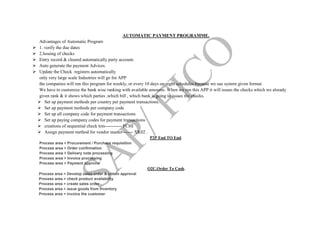
AUTOMATIC PAYMENT PROGRAMME.
Advantages of Automatic Program
 1. verify the due dates
 2.Issuing of checks
 Entry record & cleared automatically party account.
 Auto generate the payment Advices.
 Update the Check registers automatically
only very large scale Industries will go for APP
the companies will run this program for weekly, or every 10 days on night schedules because we use system given format.
We have to customize the bank wise ranking with available amounts. When we run this APP it will issues the checks which we already
given rank & it shows which parties ,which bill , which bank is going to issues the checks.
 Set up payment methods per country per payment transactions.
 Set up payment methods per company code
 Set up all company code for payment transactions
 Set up paying company codes for payment transactions
 creations of sequential check lots----------- FCHI
 Assign payment method for vendor master------- XK02 .
P2P End TO End.
Process area > Procurement / Purchase requisition
Process area > Order confirmation
Process area > Delivery note processing
Process area > Invoice processing
Process area > Payment approval
O2C.Order To Cash.
Process area > Develop sales order & obtain approval
Process area > check product availability
Process area > create sales order
Process area > issue goods from inventory
Process area > invoice the customer.
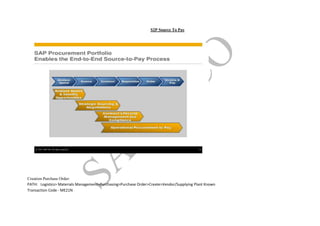
S2P Source To Pay
Creation Purchase Order:
PATH: Logistics> Materials Management>Purchasing>Purchase Order>Create>Vendor/Supplying Plant Known
Transaction Code - ME21N
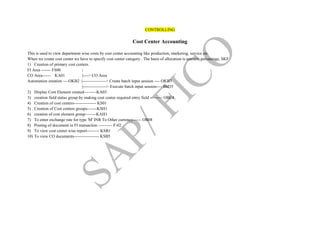
CONTROLLING
Cost Center Accounting
This is used to view department wise costs by cost center accounting like production, marketing, service etc.
When we create cost center we have to specify cost center category . The basis of allocation is amount, percentage, SKF
1) Creation of primary cost centers.
FI Area ------- FS00 |
CO Area------ KA01 |----> CO Area
Automation creation ----OKB2 |-----------------> Create batch input session ---- OKB3
|-----------------> Execute batch input session---- SM35
2) Display Cost Element created---------KA03
3) creation field status group by making cost center required entry field --------- OBC4
4) Creation of cost centers---------------- KS01
5) Creation of Cost centers groups-------KSH1
6) creation of cost element group--------KAH1
7) To enter exchange rate for type 'M' INR To Other currency------ OB08
8) Posting of document in FI transaction ---------- F-02
9) To view cost center wise report--------- KSB1
10) To view CO documents------------------ KSB5

SAP ERP Structure

  • 1.
    COMPANY | COMPANY CODE {LEGALENTITY} | SEGMENTS | PROFIT CENTERS (BUISNESS AREA OR COST CENTER)--->CONTROLLING AREA PLANNING DEPARTMENT | ---------------------------------------------------------------------------------------------------------------------------------------------------------------------------------------------------------------- PURCHASE STORES PRODUCTION ACCOUNTS MARKETING SALESSALES M.M MODULE P.P |----------------------------------------| SUPPLY&CHAIN S.D FI CO GENERAL LEDGER PROFIT CENTER ACCOUNTING ACCOUNTS PAYBLE COST CENTER ACCOUNTING ACCOUNTS RECEIVABLE INTERNAL ORDERS ASSET ACCOUNTING PRODUCT COSTING (BOM COSTING) TRIAL BALANCE/ TRADING/P&L/BALANCE SHEET CO-PA CASH FLOW STATMENTS. ETC reconciles the accounts FI -MM & FI-SD
  • 2.
    MM FLOW: MATERIAL REQUISITION PRODUCTION----------> STORES PURCHASE REQUISITION STORES-----------------> PURCHASES. SD FLOW : INQUIRY--- QUATATION SALES ORDER------> SALES ORGANISATION--------> CUSTOMER--------> DELIVERY. -------------------------------------------------------------------------------------------------------------------------------------------------------------------------------------------------- MM STRUCTURE: FACTORY / PLANT / PORT / WHARE HOUSE.  STORAGE LOCATIONS-------> RAW MATERIALS / FINISHED GOODS / PACKING MATERIALS/ OTHER MATERIALS SD .STRUCTURE: SALES ORGANISATION COMPANY LEVEL( COMPANY CODE LEVEL)  | DISTRIBUTION CHANNELS DIRECT SALES -------> AGENTS (at factory)  DIVISIONS--------> AGENCIES ------> WHOLE SALERS----------> RETAILERS .
  • 3.
    MOVEMENT TYPES &TRANCTION / PROCESS KEYS 101--- MATERIAL RECIVED AGANIST PURCHASE ORDER / PRODUCTION ORDER 102--- RETURN FROM PURCHASE ORDER / PRODUCTION ORDER 201--- ISSUED TO COST CENTERS 202--- RETURN FROM COST CENTER 261--- ISSUE TO ORDERS 262--- RETURN FROM ORDERS 521--- PRODUCTION RECIPET WITH OUT PRODUCTION ORDER 522--- RETURN FROM PROCDUCTION DEPARTMENT 561--- OPENING STOCK TAKING 562--- REVERSE 561 601--- DELIVERY (SALES) 602--- SALES RETURNS KEYS: BSX--- INVENTORY POSTING WRX--- GR /IR PRD---- PRODUCTION & PRICE DIFFERENCE GBB---- OFF SETTING ENTRY FOR INVENTORY POSTING VBR---- MATERIAL CONSUMPTION
  • 4.
    VNG---- SCRAPPING BSA--- OPENINGSTOCK TAKING ZOF--- PRODUCTION RECEIPT WITH OUT PRODUCTION ORDER AUF--- " " " WITH " " VAX--- DELEVERY WHERE SALES ACCOUNT IS NOT CREATED AS REVENUE { CO MODULE NOT IMPLEMENT} VAY--- " " " " IS CREATED { CO MODULE IS IMPLEMENTED} AUA--- PRODUCTION ORDERS DIFFERNCES MATERIAL TYPES: RAW MATERIAL O.H: V- MOVING AVERAGE SPARES--- ERSA-- V- MOVING AVERAGE PRICE PACKING--- VERP--- V- MOVING AVERAGE FINISHED GOODS--- FERT-- S- STANDARD SEMI FINISHED GOODS-- HALB (A) PURCHASE--- V-- MOVING AVERAGE (B) PRODUCED--- S-- STANDARD PRICE [RMC+OH] TRADED--- HAWA-- V -- SEVICES--- DIEN.
  • 5.
    FIRST WE DOALL THE BASIC SETTINGS UNDER THE COMPANY CODE THEN AFTER WE CUSTOMIZE THE PACKAGE SAP LAND SCAPE (SERVERS) DEVELOPMENT > TESTING >PRODUCTION FINANCIAL ACCOUNTS  -------------------------------------------------------------------------------------------------------------------------------------------------------------------------------------------------------------------------- GENERAL LEDGERS ACCOUNTS PAYBELES ACCOUNTS RECEIVABLES ASSET ACCOUNTING GENERAL LEDGER ACCOUNTING Document type-- SA Creation of general ledger master:  At chart of account level-----> a/c number, company code, account group, p&l or b/s account, short & long text.  At company code level-------> account currency, balances in local currency, tolerance group, line item display, open item mgmt, sort key, fst group . CUSTOMIZATION: Creation of general ledger masters----------> FS00 creation of profit centers---------------------> KE51 SAMPLE DOCUMENT Which is used for month end provisions salaries, rent etc. CUSTOMIZATION:  NO. Ranges for sample document----------> FBN1  check a/c group for given no. range---------> OBD4  Creation sample document template----------> by path.
  • 6.
    FOREIGN CURREENCY TRANSACTIONSS Bank buying rate ( exports)------> G- Type for documents :DR -FI customer invoice & RV - SD customer invoice  Bank selling rate (imports / expenditure)-------> B-Type for SA : G/L; KR- FI vendor invoice; RE -MM vendor invoice  Average rate MM & SD users----------> M- Type  check exchange rate type  Translation ratios for currency transactions  Enter Exchange rates----------- OBA7 HOLD DOCUMENT. It is temporary document for only adjustment purpose, at the time of posting we don't know what is the debit & credit So SAP cash balance is + / - it will not update records for conversion of hold document we run the program " RFTMBLU" Creation of hold document ------------------ F-02 PARKING DOCUMENT. It is based on cashier approvals main cashier or city cashier enter the document ------> informs to senior person-----> sr.person make necessary changes------> release the document After releasing the document then post and up-date the records automatically  Posting document------ F-56  display parked document-----FBVO  display changes in parked ----- FBVN Accrual deferral document : it is used for the postings of entries gives the reverse date (by the selection -ve posting check box, alternative posting check box)  Reversal accrual / deferral documents------ F.81  Outgoing payment with clearing------ F-07 OPEN ITEM MANAGEMENT. It is mainly used for vendors , customers, balance sheet accounts where clearing is required like TDS , PF , service tax etc, it shows payable transactions , paid transactions,& payable + paid
  • 7.
    Reversals : Individual,mass, cleared items ,reversal of reversed document Individual reversal ---- FB08 document type 'AB' As per SAP reversal of reversed document is not permitted . ACCOUNTS RECEIVABLES. Document types : DR : customer invoice , DZ : customer payment , DA: customer document for transfer / reversal posting keys; 01 customer debit posting keys 15 customer credit it is used where SD module is not implemented ,all type s of sales Except the PRODUCT sale Entries : sales invoice posting Customer account dr To sales incoming payment Bank account dr To customer When goods dispatched to customer cost of goods sold dr To Inventory Customer account dr To Revenue Basic settings :  Creation of Customer account groups  Creation of NO Ranges to for customer accounts------ OBA7  Assign NO ranges for customer account groups  Creation general ledger masters ----- FS00  Creation of customer Master ------XD01
  • 8.
    STRUCTURE: sales org----> inquiry&quotation---->sales order----> invoice-----> payments.(receivables) Repots to view customer wise, bill wise, due date wise, bank wise o/s balances---------- S_ALR_87012213 DUNNING : Which is called a "REMAINDER " this is used where the customer is no payment as per terms & conditions dunning levels are 9 letters and frequency is every 10 days dunning charges will be either % or amount Dunning procedure-------- FBMP Dunning--------------------- F150 Bills discounting the companies will have follow 2 types of working limits 1. fund based 2. non fund based Creation of g/l masters--- FS00 1.sundry debtors bills of exchange under current assets, loans & advances 2.bank bill discounting account under secured loans. link between sundry debtors & bills of exchange link for bank account, Sr. debtors bills of exchange & bank bill discount account Here the special G/L indicator is" W" Entry for bill discounting Bank account dr To Inertest account ACCOUNTS PAYBLE . It is used where MM module is not implemented for all purchases except RAW MATERIAL When MM is implemented It is used for payments like TDS, JOBWORK CHARGES, LEGAL FEES, PROFESSIONAL CHARGES ETC. POSTING KEYS: 31- vendor debit, 25- vendor credit Document types ; KR:VENDOR INVOICE, KZ:VENDOR PAYMENT, KA:VENDOR DOCUMENT TRANSFER/ REVERSALS.
  • 9.
    ENTRIES. For purchases INVENTORY A/CDr TO PARTY A/C for payment PARTY A/C Dr TO BANK A/C INVENTORY A/C Dr TO GR/IR GR/IR A/C Dr TO VENDOR SRTUCTURE. PO-------> VENDOR: GR<-------VENDOR: INVOICE<----- VENDOR PAYMENT------> VENDOR BASIC SETTINGS FOR A / P  creation of vendor account groups  creation of vendor master---------- XK01  creation of no. ranges for vendor-- XKN1  assign no. ranges for vendor group  tolerance for vendor group  document types---------------------- OBA7  creation of g /l masters ------------- FS00 PAYMEN MADE UNDER HOUSE BANKS
  • 10.
    Here we havetwo scenarios 1. One main bank which have 1 or more current accounts in that bank 2.current account maintained main branch & another current account another branch in same city . House banks will be created by BANK Wise  Creation of G/L masters Bank CA under Current assets loans & advances  Define house banks  Creation of check lots i.e check no's  BANK KEY; enter BSR code of branches [ BASIC STATISTICAL REETURNS] WHERE WE MAKE PAYMENT OF TDS TO SPECIFY IN CHALLAN. ADVANCE PAYMENTS TO VENDORS. Which is called down payment to vendors In SAP purchases ---------> sundry creditors advance payment ----------> advance to vendors so we make link between Sr.creditors <---------> ADV to vendors Advance to vendors is a special G/L account and have a special G/L indicator "A" Advance are Three scenarios  Advance amount and invoice amount are same  advance amount more than invoice amount  Advance amount less than invoice amount Creation of G/L for advance to vendors Assign the link Sr. creditors <=====A====> advance to creditors ---- OBYR Advance payment posting------- F-48 transfer of advance from SP G/L to normal clearing by special g/l items ----------- F-54 CASH DISCOUNTS RECEIVED: Trade discounts are to be adjusted against purchases & and cash discount are to be shown under other incomes Creation of ledger for other incomes------ FS00 Assignment of accounts for automatic postings for cash discounts {PATH}
  • 11.
    AUTOMATIC PAYMENT PROGRAMME. Advantagesof Automatic Program  1. verify the due dates  2.Issuing of checks  Entry record & cleared automatically party account.  Auto generate the payment Advices.  Update the Check registers automatically only very large scale Industries will go for APP the companies will run this program for weekly, or every 10 days on night schedules because we use system given format. We have to customize the bank wise ranking with available amounts. When we run this APP it will issues the checks which we already given rank & it shows which parties ,which bill , which bank is going to issues the checks.  Set up payment methods per country per payment transactions.  Set up payment methods per company code  Set up all company code for payment transactions  Set up paying company codes for payment transactions  creations of sequential check lots----------- FCHI  Assign payment method for vendor master------- XK02 . P2P End TO End. Process area > Procurement / Purchase requisition Process area > Order confirmation Process area > Delivery note processing Process area > Invoice processing Process area > Payment approval O2C.Order To Cash. Process area > Develop sales order & obtain approval Process area > check product availability Process area > create sales order Process area > issue goods from inventory Process area > invoice the customer.
  • 12.
    S2P Source ToPay Creation Purchase Order: PATH: Logistics> Materials Management>Purchasing>Purchase Order>Create>Vendor/Supplying Plant Known Transaction Code - ME21N
  • 13.
    CONTROLLING Cost Center Accounting Thisis used to view department wise costs by cost center accounting like production, marketing, service etc. When we create cost center we have to specify cost center category . The basis of allocation is amount, percentage, SKF 1) Creation of primary cost centers. FI Area ------- FS00 | CO Area------ KA01 |----> CO Area Automation creation ----OKB2 |-----------------> Create batch input session ---- OKB3 |-----------------> Execute batch input session---- SM35 2) Display Cost Element created---------KA03 3) creation field status group by making cost center required entry field --------- OBC4 4) Creation of cost centers---------------- KS01 5) Creation of Cost centers groups-------KSH1 6) creation of cost element group--------KAH1 7) To enter exchange rate for type 'M' INR To Other currency------ OB08 8) Posting of document in FI transaction ---------- F-02 9) To view cost center wise report--------- KSB1 10) To view CO documents------------------ KSB5