Blogspot
I found Blogspot a very useful tool in making my media product. Blogger helps
me organize my work, keep records of when I have started new posts and
primarily organize my work and make my progression clear.

From using BlogSpot I've learned how to re arrange blog posts and edit them
effectively and clearly

As well as learning how to edit posts I’ve also learned how embed other forms of
media such as power points (using Slideshare) and also embedding other image
based media. (glogster)

A negative point of using blogger is that its very time consuming.
Adobe Photoshop
Adobe Photoshop CS5 is the professional software I heavily used to create
Images for the double page spread and the entire front cover . Its helpful to
create professional looking images fast and with ease.

I learnt many skills from Photoshop. Amongst the things i learnt one of them
was resizing images effectively.

I also learnt how to change the colours of my images. Using the colour gradient
tool to edit images to black and white and in some places leaving spots with
colour made my images look much more appealing.

A negative point however is that it is a complicated bit of software and was
difficult to use at first.
Prezi
www.prezi.com was a very useful website. I would say it is the best piece
of equipment I used because it was simple and presented my ideas in an
entertaining interesting way that PowerPoint did not.

I learnt how to use the basics of Prezi. I imported my images and learnt
how to add text and graphics such as arrows making the Prezi more
organised

I also learnt how to add paths to my work to make it run in a chronological
order.

This website was exceptionally useful as I could also embed it in to my
blogger account and further my coursework.
SlideShare
Slide share was a useful piece of technology because it allows me to embed
PowerPoint's into my blogger allowing me to make interesting Blog posts and
answer tasks in new imaginative ways.

I created an account and learned how to upload PowerPoint files easily and
fast.

I found this software very easy to use because its similar to other websites
where you make an account and do the work on that website, such as YouTube
Glogster and blogger.
Youtube
I worked with YouTube while making my media product and didn't’t have
much idea how it worked other than watching random videos.

I made an account and quickly learnt how to upload my videos. So I could
later embed them into my Blog to answer questions.

I learnt specific skills on filling out key information on my video.

A negative point with Youtube is the time it took to upload some of my
videos. The time length to upload videos were ridiculously long in some
cases and were monotonous.
Adobe InDesign
I think Adobe InDesign was a very useful piece of soft ware to use. I used
this software to construct my double page spread an contents page.

I learnt from this experience how to import my final edited images from
Photoshop (The front cover) and place new pages in numerical order. To
keep me organized. InDesign was also very useful because it had
guidelines for my content.

However the images look pixel-y because of how the program uses a
lower resolution than Photoshop
Camera and studio
The camera and studio were very useful because I used both to get images
for my front cover and my double page spread.

I learnt how to do major things like adjust the lights in the studio for when
I was doing my photo shoot which is crucial for the outcome of the image.

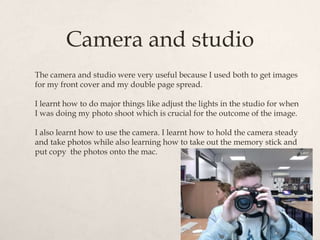
I also learnt how to use the camera. I learnt how to hold the camera steady
and take photos while also learning how to take out the memory stick and
put copy the photos onto the mac.
Glogster
Glogster was an intriguing website I thought would be helpful in answering my
questions.

Glogster was useful because it is an interesting way to present my ides mainly
focusing on images which was especially helpful for question 4.

From using Glogster I learned how to put images into its web based program
and make a collage centered around my target audience.

I also learnt how edit the images in Glogster, there weren't many options other
than a pre built in frame I had to remove.

A weakness of Glogster is that I could have done a similar thing in Photoshop
with less time.
iMac
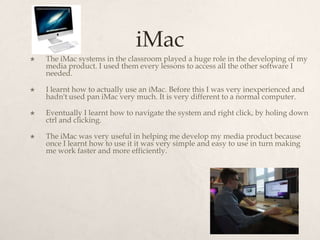
   The iMac systems in the classroom played a huge role in the developing of my
    media product. I used them every lessons to access all the other software I
    needed.

   I learnt how to actually use an iMac. Before this I was very inexperienced and
    hadn't used pan iMac very much. It is very different to a normal computer.

   Eventually I learnt how to navigate the system and right click, by holing down
    ctrl and clicking.

   The iMac was very useful in helping me develop my media product because
    once I learnt how to use it it was very simple and easy to use in turn making
    me work faster and more efficiently.
In Conclusion…
   In conclusion I found all the hardware and software I used
    mostly very useful. There was a rich range of different
    technologies that were available for use to present my work
    through blog posts. It made my blog more appealing and
    led up to my final product.

   Using hardware was important as well such as the camera
    and tripod. Without these I couldn’t have made my actual
    product.

Presentation3

  • 2.
    Blogspot I found Blogspota very useful tool in making my media product. Blogger helps me organize my work, keep records of when I have started new posts and primarily organize my work and make my progression clear. From using BlogSpot I've learned how to re arrange blog posts and edit them effectively and clearly As well as learning how to edit posts I’ve also learned how embed other forms of media such as power points (using Slideshare) and also embedding other image based media. (glogster) A negative point of using blogger is that its very time consuming.
  • 3.
    Adobe Photoshop Adobe PhotoshopCS5 is the professional software I heavily used to create Images for the double page spread and the entire front cover . Its helpful to create professional looking images fast and with ease. I learnt many skills from Photoshop. Amongst the things i learnt one of them was resizing images effectively. I also learnt how to change the colours of my images. Using the colour gradient tool to edit images to black and white and in some places leaving spots with colour made my images look much more appealing. A negative point however is that it is a complicated bit of software and was difficult to use at first.
  • 4.
    Prezi www.prezi.com was avery useful website. I would say it is the best piece of equipment I used because it was simple and presented my ideas in an entertaining interesting way that PowerPoint did not. I learnt how to use the basics of Prezi. I imported my images and learnt how to add text and graphics such as arrows making the Prezi more organised I also learnt how to add paths to my work to make it run in a chronological order. This website was exceptionally useful as I could also embed it in to my blogger account and further my coursework.
  • 5.
    SlideShare Slide share wasa useful piece of technology because it allows me to embed PowerPoint's into my blogger allowing me to make interesting Blog posts and answer tasks in new imaginative ways. I created an account and learned how to upload PowerPoint files easily and fast. I found this software very easy to use because its similar to other websites where you make an account and do the work on that website, such as YouTube Glogster and blogger.
  • 6.
    Youtube I worked withYouTube while making my media product and didn't’t have much idea how it worked other than watching random videos. I made an account and quickly learnt how to upload my videos. So I could later embed them into my Blog to answer questions. I learnt specific skills on filling out key information on my video. A negative point with Youtube is the time it took to upload some of my videos. The time length to upload videos were ridiculously long in some cases and were monotonous.
  • 7.
    Adobe InDesign I thinkAdobe InDesign was a very useful piece of soft ware to use. I used this software to construct my double page spread an contents page. I learnt from this experience how to import my final edited images from Photoshop (The front cover) and place new pages in numerical order. To keep me organized. InDesign was also very useful because it had guidelines for my content. However the images look pixel-y because of how the program uses a lower resolution than Photoshop
  • 8.
    Camera and studio Thecamera and studio were very useful because I used both to get images for my front cover and my double page spread. I learnt how to do major things like adjust the lights in the studio for when I was doing my photo shoot which is crucial for the outcome of the image. I also learnt how to use the camera. I learnt how to hold the camera steady and take photos while also learning how to take out the memory stick and put copy the photos onto the mac.
  • 9.
    Glogster Glogster was anintriguing website I thought would be helpful in answering my questions. Glogster was useful because it is an interesting way to present my ides mainly focusing on images which was especially helpful for question 4. From using Glogster I learned how to put images into its web based program and make a collage centered around my target audience. I also learnt how edit the images in Glogster, there weren't many options other than a pre built in frame I had to remove. A weakness of Glogster is that I could have done a similar thing in Photoshop with less time.
  • 10.
    iMac  The iMac systems in the classroom played a huge role in the developing of my media product. I used them every lessons to access all the other software I needed.  I learnt how to actually use an iMac. Before this I was very inexperienced and hadn't used pan iMac very much. It is very different to a normal computer.  Eventually I learnt how to navigate the system and right click, by holing down ctrl and clicking.  The iMac was very useful in helping me develop my media product because once I learnt how to use it it was very simple and easy to use in turn making me work faster and more efficiently.
  • 11.
    In Conclusion…  In conclusion I found all the hardware and software I used mostly very useful. There was a rich range of different technologies that were available for use to present my work through blog posts. It made my blog more appealing and led up to my final product.  Using hardware was important as well such as the camera and tripod. Without these I couldn’t have made my actual product.