1
A. What is an Operating
System?
2
Operating System is system software which creates an
interface between the user and the computer. Operating
system works as a translator because it translates the
language into Binary Language which computer
hardware understand. Operating system works as a
manager because it manages all the system. Many types
of operating system available at that time like windows
98/2000, windows vista , Linux, UNIX and DOS etc.
B. Functions of
Operating System:-
3
There are 5 functions of operating system.
1. Input / Output Management
2. Process Management
3. Memory Management
4. File Management
5. Administration Management
C. Input / Output
Management
4
Operating system coordinates with
different input / output device.
Operating System manages the
input and output of all programs
running under its control.
D. Process Management
5
Operating system manages the process which is
processed one by one the C.P.U. ( Central Processing
Unit) . This management is again done by the
Operating system and it is proportionally rationed
out by the O.S. to enable each process or program to
run properly.
E. Memory
Management
6
Operating System manage the memory where the
program is stored for future use File Management
Operating System manages all files of computer in
different drives or locations. So , you get back that
file in future. It remembers the memory address of
the location where it saves the different files thus it
serves them at the time of need.
F. Administration
Management
7
Administration management manage
whole the administration of the
computer
G. Types of the
Operating System
8
Operating System can be classified into major parts.
1. According to User based
2. According to Interface based
According to user based:- In the classification Operating
System is studied according to the capacity of serving user.
According to user Operating System can be classified into
two parts:-
1. Single user
2. Multi user
H. Single user
9
In single user Operating System only one user
can work at a time on computer. This Operating
System is widely used with personal computer
installed in home, office etc.
I. Multi-User:-
10
In Multi user Operating System more
than one user can work on computer at a
time, so, we called it Multi-tasking.
For e.g. Linux, UNIX.
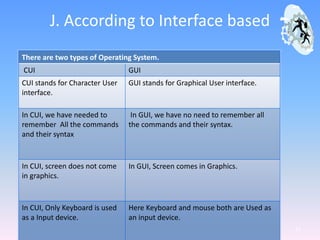
J. According to Interface based
11
There are two types of Operating System.
CUI GUI
CUI stands for Character User
interface.
GUI stands for Graphical User interface.
In CUI, we have needed to
remember All the commands
and their syntax
In GUI, we have no need to remember all
the commands and their syntax.
In CUI, screen does not come
in graphics.
In GUI, Screen comes in Graphics.
In CUI, Only Keyboard is used
as a Input device.
Here Keyboard and mouse both are Used as
an input device.

Presentation1

  • 1.
  • 2.
    A. What isan Operating System? 2 Operating System is system software which creates an interface between the user and the computer. Operating system works as a translator because it translates the language into Binary Language which computer hardware understand. Operating system works as a manager because it manages all the system. Many types of operating system available at that time like windows 98/2000, windows vista , Linux, UNIX and DOS etc.
  • 3.
    B. Functions of OperatingSystem:- 3 There are 5 functions of operating system. 1. Input / Output Management 2. Process Management 3. Memory Management 4. File Management 5. Administration Management
  • 4.
    C. Input /Output Management 4 Operating system coordinates with different input / output device. Operating System manages the input and output of all programs running under its control.
  • 5.
    D. Process Management 5 Operatingsystem manages the process which is processed one by one the C.P.U. ( Central Processing Unit) . This management is again done by the Operating system and it is proportionally rationed out by the O.S. to enable each process or program to run properly.
  • 6.
    E. Memory Management 6 Operating Systemmanage the memory where the program is stored for future use File Management Operating System manages all files of computer in different drives or locations. So , you get back that file in future. It remembers the memory address of the location where it saves the different files thus it serves them at the time of need.
  • 7.
    F. Administration Management 7 Administration managementmanage whole the administration of the computer
  • 8.
    G. Types ofthe Operating System 8 Operating System can be classified into major parts. 1. According to User based 2. According to Interface based According to user based:- In the classification Operating System is studied according to the capacity of serving user. According to user Operating System can be classified into two parts:- 1. Single user 2. Multi user
  • 9.
    H. Single user 9 Insingle user Operating System only one user can work at a time on computer. This Operating System is widely used with personal computer installed in home, office etc.
  • 10.
    I. Multi-User:- 10 In Multiuser Operating System more than one user can work on computer at a time, so, we called it Multi-tasking. For e.g. Linux, UNIX.
  • 11.
    J. According toInterface based 11 There are two types of Operating System. CUI GUI CUI stands for Character User interface. GUI stands for Graphical User interface. In CUI, we have needed to remember All the commands and their syntax In GUI, we have no need to remember all the commands and their syntax. In CUI, screen does not come in graphics. In GUI, Screen comes in Graphics. In CUI, Only Keyboard is used as a Input device. Here Keyboard and mouse both are Used as an input device.