28/10/14 
New School Library System 
NSW DEPARTMENT OF EDUCATION AND COMMUNITIES WWW.SCHOOLS.NSW.EDU.AU
The School Library System (SLS) Project 
The new school library system has arrived for all DEC 
schools! 
New environment highlights. Geoff Jones, Solutions Delivery 
Manager 
•Single Sign on via DEC staff and student portals 
•AMU assigned roles 
•Simplified borrower management for schools 
NSW DEPARTMENT OF EDUCATION AND COMMUNITIES WWW.SCHOOLS.NSW.EDU.AU
Integration with DEC Systems 
Student and Staff Data 
• Student Information required for the Library system will be sourced from ERN 
(Enrolment System) and will be updated in Oliver automatically in real-time. 
• Staff Information required for the Library system will be sourced from the Identity 
Management system and will be updated in Oliver automatically in real-time. 
AMU (Access Management Utility) 
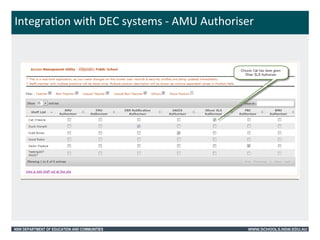
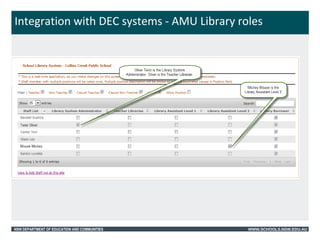
• Principals will be able to nominate access rights to staff for the library system 
 Library system administrator, teacher librarian, library assistant L1 and L2 
• Principals will be able to delegate the access control for the teacher librarian or a 
delegate. 
• Principal or their delegate will be able to add staff not at their location. 
SSO (Single Sign On) 
• Students and staff to access the School Library system from DEC portal. 
• Internal and external access provided via DEC portal. 
• All student and staff will be authenticated in the library system. 
The diagram on the next slide illustrates what AMU will look like. 
NSW DEPARTMENT OF EDUCATION AND COMMUNITIES WWW.SCHOOLS.NSW.EDU.AU
Integration with DEC systems - AMU Authoriser 
NSW DEPARTMENT OF EDUCATION AND COMMUNITIES WWW.SCHOOLS.NSW.EDU.AU
Integration with DEC systems - AMU Library roles 
NSW DEPARTMENT OF EDUCATION AND COMMUNITIES WWW.SCHOOLS.NSW.EDU.AU
Overview of new Oliver environment 
Borrower Management 
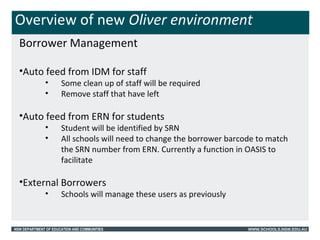
•Auto feed from IDM for staff 
• Some clean up of staff will be required 
• Remove staff that have left 
•Auto feed from ERN for students 
• Student will be identified by SRN 
• All schools will need to change the borrower barcode to match 
the SRN number from ERN. Currently a function in OASIS to 
facilitate 
•External Borrowers 
• Schools will manage these users as previously 
NSW DEPARTMENT OF EDUCATION AND COMMUNITIES WWW.SCHOOLS.NSW.EDU.AU
Implementation approach 
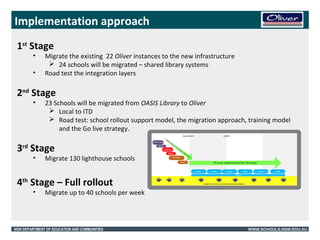
1st Stage 
• Migrate the existing 22 Oliver instances to the new infrastructure 
 24 schools will be migrated – shared library systems 
• Road test the integration layers 
2nd Stage 
• 23 Schools will be migrated from OASIS Library to Oliver 
 Local to ITD 
 Road test: school rollout support model, the migration approach, training model 
and the Go live strategy. 
3rd Stage 
• Migrate 130 lighthouse schools 
4th Stage – Full rollout 
• Migrate up to 40 schools per week 
NSW DEPARTMENT OF EDUCATION AND COMMUNITIES WWW.SCHOOLS.NSW.EDU.AU
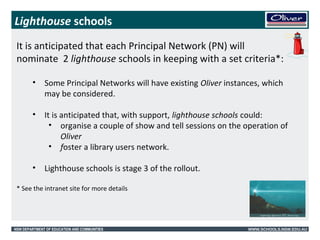
Lighthouse schools 
It is anticipated that each Principal Network (PN) will 
nominate 2 lighthouse schools in keeping with a set criteria*: 
• Some Principal Networks will have existing Oliver instances, which 
may be considered. 
• It is anticipated that, with support, lighthouse schools could: 
• organise a couple of show and tell sessions on the operation of 
Oliver 
• foster a library users network. 
• Lighthouse schools is stage 3 of the rollout. 
* See the intranet site for more details 
NSW DEPARTMENT OF EDUCATION AND COMMUNITIES WWW.SCHOOLS.NSW.EDU.AU
Implementation: a 12 week cycle 
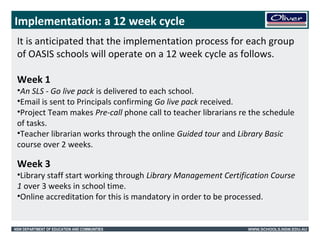
It is anticipated that the implementation process for each group 
of OASIS schools will operate on a 12 week cycle as follows. 
Week 1 
•An SLS - Go live pack is delivered to each school. 
•Email is sent to Principals confirming Go live pack received. 
•Project Team makes Pre-call phone call to teacher librarians re the schedule 
of tasks. 
•Teacher librarian works through the online Guided tour and Library Basic 
course over 2 weeks. 
Week 3 
•Library staff start working through Library Management Certification Course 
1 over 3 weeks in school time. 
•Online accreditation for this is mandatory in order to be processed. 
NSW DEPARTMENT OF EDUCATION AND COMMUNITIES WWW.SCHOOLS.NSW.EDU.AU
Implementation: 12 week cycle contd 
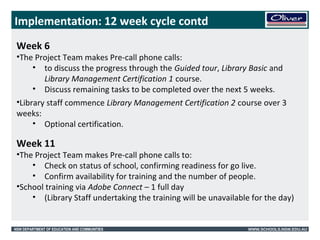
Week 6 
•The Project Team makes Pre-call phone calls: 
• to discuss the progress through the Guided tour, Library Basic and 
Library Management Certification 1 course. 
• Discuss remaining tasks to be completed over the next 5 weeks. 
•Library staff commence Library Management Certification 2 course over 3 
weeks: 
• Optional certification. 
Week 11 
•The Project Team makes Pre-call phone calls to: 
• Check on status of school, confirming readiness for go live. 
• Confirm availability for training and the number of people. 
•School training via Adobe Connect – 1 full day 
• (Library Staff undertaking the training will be unavailable for the day) 
NSW DEPARTMENT OF EDUCATION AND COMMUNITIES WWW.SCHOOLS.NSW.EDU.AU
Implementation: 12 week cycle contd 
Migration process 
Migration day 
• Pre Go-live tasks completed in OASIS Library. 
• School signs-off indicating readiness to migrate. 
• Teacher librarian activates the migration process. 
Oliver Go-live day 
• Oliver post migration tasks 
• Go-live call 
• School sign off 
NSW DEPARTMENT OF EDUCATION AND COMMUNITIES WWW.SCHOOLS.NSW.EDU.AU
Overview of new Oliver environment 
Template structure Wendy Dawson Library SME 
• 3 templates: P-6, P-12, 7-12 
• Standard settings for user roles, parameters, borrower loan 
categories, resource loan categories 
• Provides the ability to push out central content to the appropriate 
template e.g. a reading list for English Stage 6 Area if Study: 
Discovery 
NSW DEPARTMENT OF EDUCATION AND COMMUNITIES WWW.SCHOOLS.NSW.EDU.AU
Overview of Oliver 
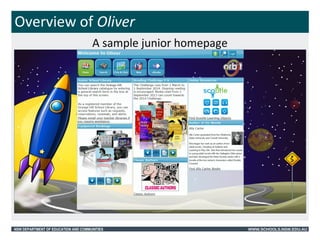
A sample junior homepage 
NSW DEPARTMENT OF EDUCATION AND COMMUNITIES WWW.SCHOOLS.NSW.EDU.AU
The School Library System (SLS) Project 
Oliver features 
• Standard and Orbit Search homepages 
• Federated search 
• User interaction e.g. Interests, messages, reservations, 
• Book reviews and ratings 
• Lists 
• Z- cataloguing 
NSW DEPARTMENT OF EDUCATION AND COMMUNITIES WWW.SCHOOLS.NSW.EDU.AU
The School Library System (SLS) Project 
Oliver support 
• Will be provided by Softlink 
• Training delivered with Adobe connect 
• Web interface 
• Support page login 
• Inbuilt access to How to…. Documents 
• Training manuals 
NSW DEPARTMENT OF EDUCATION AND COMMUNITIES WWW.SCHOOLS.NSW.EDU.AU
The School Library System (SLS) Project 
Preparation 
•Change Borrower barcodes to SRN (Student Registration Number) 
•Download the barcode font 
•Delete school leavers, former staff and external borrowers who no longer 
use the library 
NSW DEPARTMENT OF EDUCATION AND COMMUNITIES WWW.SCHOOLS.NSW.EDU.AU
Questions? 
The latest information is available on the Library systems intranet page 
< https://detwww.det.nsw.edu.au/publicschoolsnsw/learning-technology/library-system 
> 
For additional queries email SLSProject queries 
SLSProjectQueries@det.nsw.edu.au 
To join the discussion access the SLS Forum at DEC Yammer: 
NSW DEPARTMENT OF EDUCATION AND COMMUNITIES WWW.SCHOOLS.NSW.EDU.AU

Presentation sarah redfern hs v3

  • 1.
    28/10/14 New SchoolLibrary System NSW DEPARTMENT OF EDUCATION AND COMMUNITIES WWW.SCHOOLS.NSW.EDU.AU
  • 2.
    The School LibrarySystem (SLS) Project The new school library system has arrived for all DEC schools! New environment highlights. Geoff Jones, Solutions Delivery Manager •Single Sign on via DEC staff and student portals •AMU assigned roles •Simplified borrower management for schools NSW DEPARTMENT OF EDUCATION AND COMMUNITIES WWW.SCHOOLS.NSW.EDU.AU
  • 3.
    Integration with DECSystems Student and Staff Data • Student Information required for the Library system will be sourced from ERN (Enrolment System) and will be updated in Oliver automatically in real-time. • Staff Information required for the Library system will be sourced from the Identity Management system and will be updated in Oliver automatically in real-time. AMU (Access Management Utility) • Principals will be able to nominate access rights to staff for the library system  Library system administrator, teacher librarian, library assistant L1 and L2 • Principals will be able to delegate the access control for the teacher librarian or a delegate. • Principal or their delegate will be able to add staff not at their location. SSO (Single Sign On) • Students and staff to access the School Library system from DEC portal. • Internal and external access provided via DEC portal. • All student and staff will be authenticated in the library system. The diagram on the next slide illustrates what AMU will look like. NSW DEPARTMENT OF EDUCATION AND COMMUNITIES WWW.SCHOOLS.NSW.EDU.AU
  • 4.
    Integration with DECsystems - AMU Authoriser NSW DEPARTMENT OF EDUCATION AND COMMUNITIES WWW.SCHOOLS.NSW.EDU.AU
  • 5.
    Integration with DECsystems - AMU Library roles NSW DEPARTMENT OF EDUCATION AND COMMUNITIES WWW.SCHOOLS.NSW.EDU.AU
  • 6.
    Overview of newOliver environment Borrower Management •Auto feed from IDM for staff • Some clean up of staff will be required • Remove staff that have left •Auto feed from ERN for students • Student will be identified by SRN • All schools will need to change the borrower barcode to match the SRN number from ERN. Currently a function in OASIS to facilitate •External Borrowers • Schools will manage these users as previously NSW DEPARTMENT OF EDUCATION AND COMMUNITIES WWW.SCHOOLS.NSW.EDU.AU
  • 7.
    Implementation approach 1stStage • Migrate the existing 22 Oliver instances to the new infrastructure  24 schools will be migrated – shared library systems • Road test the integration layers 2nd Stage • 23 Schools will be migrated from OASIS Library to Oliver  Local to ITD  Road test: school rollout support model, the migration approach, training model and the Go live strategy. 3rd Stage • Migrate 130 lighthouse schools 4th Stage – Full rollout • Migrate up to 40 schools per week NSW DEPARTMENT OF EDUCATION AND COMMUNITIES WWW.SCHOOLS.NSW.EDU.AU
  • 8.
    Lighthouse schools Itis anticipated that each Principal Network (PN) will nominate 2 lighthouse schools in keeping with a set criteria*: • Some Principal Networks will have existing Oliver instances, which may be considered. • It is anticipated that, with support, lighthouse schools could: • organise a couple of show and tell sessions on the operation of Oliver • foster a library users network. • Lighthouse schools is stage 3 of the rollout. * See the intranet site for more details NSW DEPARTMENT OF EDUCATION AND COMMUNITIES WWW.SCHOOLS.NSW.EDU.AU
  • 9.
    Implementation: a 12week cycle It is anticipated that the implementation process for each group of OASIS schools will operate on a 12 week cycle as follows. Week 1 •An SLS - Go live pack is delivered to each school. •Email is sent to Principals confirming Go live pack received. •Project Team makes Pre-call phone call to teacher librarians re the schedule of tasks. •Teacher librarian works through the online Guided tour and Library Basic course over 2 weeks. Week 3 •Library staff start working through Library Management Certification Course 1 over 3 weeks in school time. •Online accreditation for this is mandatory in order to be processed. NSW DEPARTMENT OF EDUCATION AND COMMUNITIES WWW.SCHOOLS.NSW.EDU.AU
  • 10.
    Implementation: 12 weekcycle contd Week 6 •The Project Team makes Pre-call phone calls: • to discuss the progress through the Guided tour, Library Basic and Library Management Certification 1 course. • Discuss remaining tasks to be completed over the next 5 weeks. •Library staff commence Library Management Certification 2 course over 3 weeks: • Optional certification. Week 11 •The Project Team makes Pre-call phone calls to: • Check on status of school, confirming readiness for go live. • Confirm availability for training and the number of people. •School training via Adobe Connect – 1 full day • (Library Staff undertaking the training will be unavailable for the day) NSW DEPARTMENT OF EDUCATION AND COMMUNITIES WWW.SCHOOLS.NSW.EDU.AU
  • 11.
    Implementation: 12 weekcycle contd Migration process Migration day • Pre Go-live tasks completed in OASIS Library. • School signs-off indicating readiness to migrate. • Teacher librarian activates the migration process. Oliver Go-live day • Oliver post migration tasks • Go-live call • School sign off NSW DEPARTMENT OF EDUCATION AND COMMUNITIES WWW.SCHOOLS.NSW.EDU.AU
  • 12.
    Overview of newOliver environment Template structure Wendy Dawson Library SME • 3 templates: P-6, P-12, 7-12 • Standard settings for user roles, parameters, borrower loan categories, resource loan categories • Provides the ability to push out central content to the appropriate template e.g. a reading list for English Stage 6 Area if Study: Discovery NSW DEPARTMENT OF EDUCATION AND COMMUNITIES WWW.SCHOOLS.NSW.EDU.AU
  • 13.
    NSW DEPARTMENT OFEDUCATION AND COMMUNITIES WWW.SCHOOLS.NSW.EDU.AU
  • 14.
    Overview of Oliver A sample junior homepage NSW DEPARTMENT OF EDUCATION AND COMMUNITIES WWW.SCHOOLS.NSW.EDU.AU
  • 15.
    The School LibrarySystem (SLS) Project Oliver features • Standard and Orbit Search homepages • Federated search • User interaction e.g. Interests, messages, reservations, • Book reviews and ratings • Lists • Z- cataloguing NSW DEPARTMENT OF EDUCATION AND COMMUNITIES WWW.SCHOOLS.NSW.EDU.AU
  • 16.
    The School LibrarySystem (SLS) Project Oliver support • Will be provided by Softlink • Training delivered with Adobe connect • Web interface • Support page login • Inbuilt access to How to…. Documents • Training manuals NSW DEPARTMENT OF EDUCATION AND COMMUNITIES WWW.SCHOOLS.NSW.EDU.AU
  • 17.
    The School LibrarySystem (SLS) Project Preparation •Change Borrower barcodes to SRN (Student Registration Number) •Download the barcode font •Delete school leavers, former staff and external borrowers who no longer use the library NSW DEPARTMENT OF EDUCATION AND COMMUNITIES WWW.SCHOOLS.NSW.EDU.AU
  • 18.
    Questions? The latestinformation is available on the Library systems intranet page < https://detwww.det.nsw.edu.au/publicschoolsnsw/learning-technology/library-system > For additional queries email SLSProject queries SLSProjectQueries@det.nsw.edu.au To join the discussion access the SLS Forum at DEC Yammer: NSW DEPARTMENT OF EDUCATION AND COMMUNITIES WWW.SCHOOLS.NSW.EDU.AU

Editor's Notes

  • #2 Welcome – Doug Introductions Stay on mute Questions at the end of each stage Planned for 90 mins max.
  • #9 Closed and in process of selection
  • #12 For example, library may need ½ day on migration day and a ½ day post migration
  • #13 Why templates? Standardise to make support easier, changing schools, removing errors, things that don’t work.
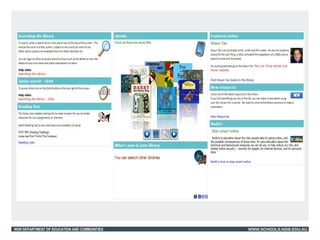
  • #14 The config template for OASIS schools. Illustrates the different functionality available. Refer to the How to’s if you want to implement any of these features.
  • #15 http://v5.softlinkint.com/trainingVideos/videos/orbit.mp4   http://youtu.be/MROPhVk3qxk
  • #17 Information will be provided re: Certification, training, and support login