Digital thermometer using
Aurdino
Group Members
Adnan Ahmed UW-14-EE-BSc-011
Jaweria Umer UW-14-EE-BSc-035
Muhammad Awais UW-14-EE-BSc-039
Overview
 Thermometer is a temperature measuring instrument. There are
different principles that can be used to measure the temperature like
thermal expansion of solids or liquids, pressure of gas, measurement
of infrared energy etc.
 Based on the principle used, the construction and functioning of the
thermometer can change but ultimately it ends up measuring the
temperature. Thermometers are used in industries, weather studies,
medicinal field and scientific research.
Overview
 To make a circuit that monitors temperature and display it on
LCD.
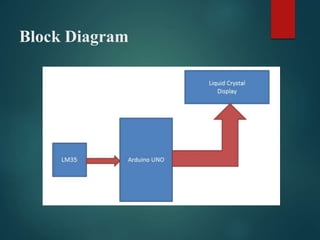
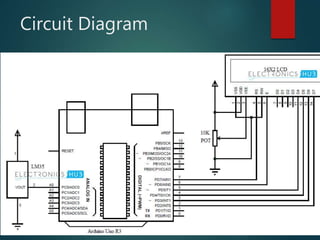
 This project is based on Arduino which communicates here with
LM35 temperature sensor and a 16x2 display unit.
LM-35 sensor
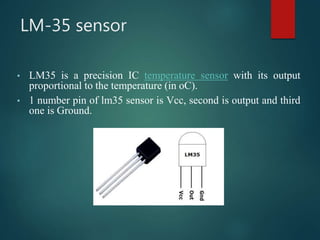
• LM35 is a precision IC temperature sensor with its output
proportional to the temperature (in oC).
• 1 number pin of lm35 sensor is Vcc, second is output and third
one is Ground.
Features of LM-35 sensor
 Calibrated Directly in Celsius (Centigrade)
 Linear + 10-mV/°C Scale Factor
 0.5°C Ensured Accuracy (at 25°C)
 Rated for Full −55°C to 150°C Range
 Suitable for Remote Applications
Arduino
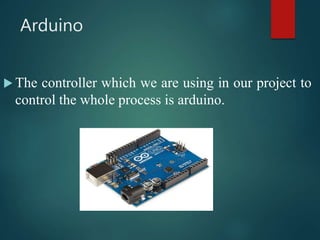
 The controller which we are using in our project to
control the whole process is arduino.
LCD display
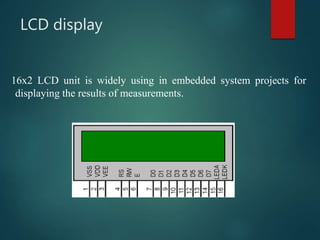
16x2 LCD unit is widely using in embedded system projects for
displaying the results of measurements.
Steps for measurement
There are three steps for the measurement of temperature
through arduino.
1. First, senses the temperature.
2. Second, converts the temperature in Celsius.
3. Third, system displays temperature on LCD.
Block Diagram
Circuit Diagram
Code
 #include<LiquidCrystal.h>
 LiquidCrystal lcd(7,6,5,4,3,2);
 const int Sensor = A0;
 byte degree_symbol[8] =
 {0b00111,
 0b00101,
 0b00111,
 0b00000,
 0b00000,
 0b00000,
 0b00000,
 0b00000
 };
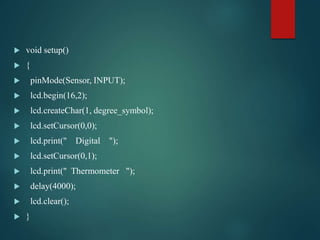
 void setup()
 {
 pinMode(Sensor, INPUT);
 lcd.begin(16,2);
 lcd.createChar(1, degree_symbol);
 lcd.setCursor(0,0);
 lcd.print(" Digital ");
 lcd.setCursor(0,1);
 lcd.print(" Thermometer ");
 delay(4000);
 lcd.clear();
 }
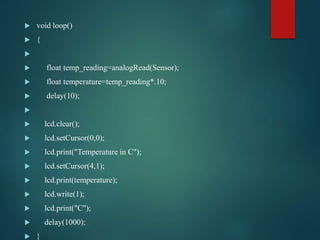
 void loop()
 {

 float temp_reading=analogRead(Sensor);
 float temperature=temp_reading*.10;
 delay(10);

 lcd.clear();
 lcd.setCursor(0,0);
 lcd.print("Temperature in C");
 lcd.setCursor(4,1);
 lcd.print(temperature);
 lcd.write(1);
 lcd.print("C");
 delay(1000);
 }
Conclusion
•This project can be used to monitor temperature of a
room with in a range of -550C to +1500C with very
accurate readings.
•The temperature sensor used (LM35) is a precision
centigrade temperature sensor. If the readings of the
temperature are required in Fahrenheit, then either
Fahrenheit temperature sensor (LM34) can be used or
simply modify the code for converting Centigrade to
Fahrenheit.
Conclusion
 The thermometer can be powered by a 9V battery making it a
portable device that can be easily moved between different
rooms or locations.
 Can be used in transportation vehicles to determine the icing
conditions of the road.
 Based on the readings of the thermometer, the air conditioning
systems, heating and cooling systems can be controlled either
manually or automatically.
Presentation i-m

Presentation i-m

  • 2.
  • 3.
    Group Members Adnan AhmedUW-14-EE-BSc-011 Jaweria Umer UW-14-EE-BSc-035 Muhammad Awais UW-14-EE-BSc-039
  • 4.
    Overview  Thermometer isa temperature measuring instrument. There are different principles that can be used to measure the temperature like thermal expansion of solids or liquids, pressure of gas, measurement of infrared energy etc.  Based on the principle used, the construction and functioning of the thermometer can change but ultimately it ends up measuring the temperature. Thermometers are used in industries, weather studies, medicinal field and scientific research.
  • 5.
    Overview  To makea circuit that monitors temperature and display it on LCD.  This project is based on Arduino which communicates here with LM35 temperature sensor and a 16x2 display unit.
  • 6.
    LM-35 sensor • LM35is a precision IC temperature sensor with its output proportional to the temperature (in oC). • 1 number pin of lm35 sensor is Vcc, second is output and third one is Ground.
  • 7.
    Features of LM-35sensor  Calibrated Directly in Celsius (Centigrade)  Linear + 10-mV/°C Scale Factor  0.5°C Ensured Accuracy (at 25°C)  Rated for Full −55°C to 150°C Range  Suitable for Remote Applications
  • 8.
    Arduino  The controllerwhich we are using in our project to control the whole process is arduino.
  • 9.
    LCD display 16x2 LCDunit is widely using in embedded system projects for displaying the results of measurements.
  • 10.
    Steps for measurement Thereare three steps for the measurement of temperature through arduino. 1. First, senses the temperature. 2. Second, converts the temperature in Celsius. 3. Third, system displays temperature on LCD.
  • 11.
  • 12.
  • 13.
    Code  #include<LiquidCrystal.h>  LiquidCrystallcd(7,6,5,4,3,2);  const int Sensor = A0;  byte degree_symbol[8] =  {0b00111,  0b00101,  0b00111,  0b00000,  0b00000,  0b00000,  0b00000,  0b00000  };
  • 14.
     void setup() {  pinMode(Sensor, INPUT);  lcd.begin(16,2);  lcd.createChar(1, degree_symbol);  lcd.setCursor(0,0);  lcd.print(" Digital ");  lcd.setCursor(0,1);  lcd.print(" Thermometer ");  delay(4000);  lcd.clear();  }
  • 15.
     void loop() {   float temp_reading=analogRead(Sensor);  float temperature=temp_reading*.10;  delay(10);   lcd.clear();  lcd.setCursor(0,0);  lcd.print("Temperature in C");  lcd.setCursor(4,1);  lcd.print(temperature);  lcd.write(1);  lcd.print("C");  delay(1000);  }
  • 16.
    Conclusion •This project canbe used to monitor temperature of a room with in a range of -550C to +1500C with very accurate readings. •The temperature sensor used (LM35) is a precision centigrade temperature sensor. If the readings of the temperature are required in Fahrenheit, then either Fahrenheit temperature sensor (LM34) can be used or simply modify the code for converting Centigrade to Fahrenheit.
  • 17.
    Conclusion  The thermometercan be powered by a 9V battery making it a portable device that can be easily moved between different rooms or locations.  Can be used in transportation vehicles to determine the icing conditions of the road.  Based on the readings of the thermometer, the air conditioning systems, heating and cooling systems can be controlled either manually or automatically.