Digital Thermometer with
Arduino Nano
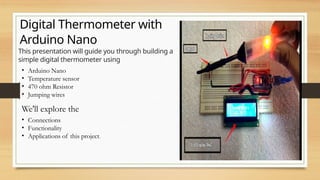
This presentation will guide you through building a
simple digital thermometer using
RG
• Arduino Nano
• Temperature sensor
• 470 ohm Resistor
• Jumping wires
We'll explore the
• Connections
• Functionality
• Applications of this project.
Components used
Arduino Nano
The microcontroller
brain of the
thermometer, handling
data processing and
communication.
Temperature Sensor
Measures the ambient
temperature and sends
the data to the Arduino
Nano.
470 Ohm Resistor
Used for limiting
current flow to the
temperature sensor.
Wiring the Components
Temperature Sensor
Connect the sensor's VCC pin to
Arduino's 5V pin, GND to Arduino's
GND, and the signal pin to Arduino's
analog input pin A0.
Resistor
Connect one end of the resistor to the
sensor's signal pin and the other end
to Arduino's analog input pin A0.
Display
Connect the USB pin to Arduino
nano and the temperature is
shown in display.
Block Diagram
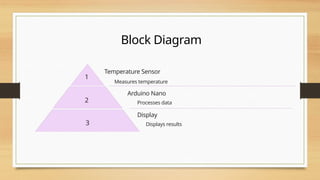
1
Temperature Sensor
Measures temperature
2
Arduino Nano
Processes data
3
Display
Displays results
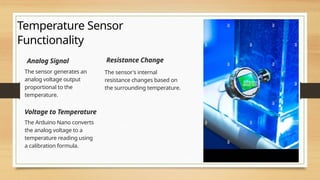
Temperature Sensor
Functionality
Analog Signal
The sensor generates an
analog voltage output
proportional to the
temperature.
Resistance Change
The sensor's internal
resistance changes based on
the surrounding temperature.
Voltage to Temperature
The Arduino Nano converts
the analog voltage to a
temperature reading using
a calibration formula.
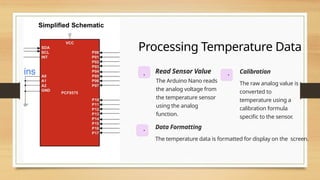
Processing Temperature Data
. Read Sensor Value
The Arduino Nano reads
the analog voltage from
the temperature sensor
using the analog
function.
. Calibration
The raw analog value is
converted to
temperature using a
calibration formula
specific to the sensor.
. Data Formatting
The temperature data is formatted for display on the screen.
Applications and Uses
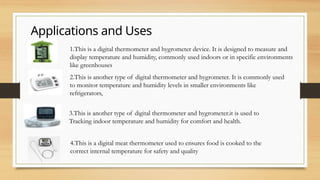
1.This is a digital thermometer and hygrometer device. It is designed to measure and
display temperature and humidity, commonly used indoors or in specific environments
like greenhouses
2.This is another type of digital thermometer and hygrometer. It is commonly used
to monitor temperature and humidity levels in smaller environments like
refrigerators,
3.This is another type of digital thermometer and hygrometer.it is used to
Tracking indoor temperature and humidity for comfort and health.
4.This is a digital meat thermometer used to ensures food is cooked to the
correct internal temperature for safety and quality
Conclusion
Building a digital thermometer with an Arduino Nano is a fun and rewarding project that teaches us about basic
electronics, data processing, and display technologies.

7676.pptx dcbhb dbjnjjdbjdbbdjbcbjdbcbdcdcbj

  • 1.
    Digital Thermometer with ArduinoNano This presentation will guide you through building a simple digital thermometer using RG • Arduino Nano • Temperature sensor • 470 ohm Resistor • Jumping wires We'll explore the • Connections • Functionality • Applications of this project.
  • 2.
    Components used Arduino Nano Themicrocontroller brain of the thermometer, handling data processing and communication. Temperature Sensor Measures the ambient temperature and sends the data to the Arduino Nano. 470 Ohm Resistor Used for limiting current flow to the temperature sensor.
  • 3.
    Wiring the Components TemperatureSensor Connect the sensor's VCC pin to Arduino's 5V pin, GND to Arduino's GND, and the signal pin to Arduino's analog input pin A0. Resistor Connect one end of the resistor to the sensor's signal pin and the other end to Arduino's analog input pin A0. Display Connect the USB pin to Arduino nano and the temperature is shown in display.
  • 4.
    Block Diagram 1 Temperature Sensor Measurestemperature 2 Arduino Nano Processes data 3 Display Displays results
  • 5.
    Temperature Sensor Functionality Analog Signal Thesensor generates an analog voltage output proportional to the temperature. Resistance Change The sensor's internal resistance changes based on the surrounding temperature. Voltage to Temperature The Arduino Nano converts the analog voltage to a temperature reading using a calibration formula.
  • 6.
    Processing Temperature Data .Read Sensor Value The Arduino Nano reads the analog voltage from the temperature sensor using the analog function. . Calibration The raw analog value is converted to temperature using a calibration formula specific to the sensor. . Data Formatting The temperature data is formatted for display on the screen.
  • 7.
    Applications and Uses 1.Thisis a digital thermometer and hygrometer device. It is designed to measure and display temperature and humidity, commonly used indoors or in specific environments like greenhouses 2.This is another type of digital thermometer and hygrometer. It is commonly used to monitor temperature and humidity levels in smaller environments like refrigerators, 3.This is another type of digital thermometer and hygrometer.it is used to Tracking indoor temperature and humidity for comfort and health. 4.This is a digital meat thermometer used to ensures food is cooked to the correct internal temperature for safety and quality
  • 8.
    Conclusion Building a digitalthermometer with an Arduino Nano is a fun and rewarding project that teaches us about basic electronics, data processing, and display technologies.