Video in Teacher Performance
Assessment
Take 2 – Jan ‘14
Joe Fahs- jfahs@elmira.edu
Director of Academic Technology Services
Elmira College

http://sites.elmira.edu/edtpa
http://sites.elmira.edu/classrooms
http://sites.elmira.edu/it/edtpa
Not Enough Student Voice
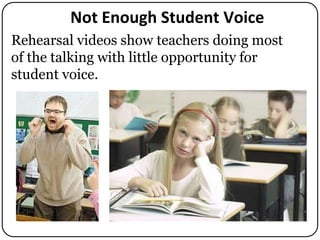
Rehearsal videos show teachers doing most
of the talking with little opportunity for
student voice.
https://twitter.com/alfiekohn/statuses/420171255828869120

https://www.teachingchannel.org/videos/strategies-for-student-centered-discussion
Content ==> Engagement
Start with content information (e.g. 5 minutes)
and then engage students (they do most of the
talking) for the rest of the video

http://edtech2.boisestate.edu/robertsona/506/finalProject/
DividingFractions.html

http://www.flickr.com/photos/audiolucistore/740373
1050/
Engaging Students
Active engagement of students in their own
understanding of concepts, skills, and/or
processes related to the learning objectives.
 Instruction with student-teacher and/or student-student

interaction
 An opportunity for teacher to respond to student questions,
concerns, or needs.
 Choose clips that reveal student thinking, analysis, and judgment.

https://www.teachingchannel.org/videos/improving-teacher-practice
Interact with Students
Good for teacher to roam to interact with
small groups talking with students. That
would mean someone panning with the
camera, presumably the cooperating teacher.

http://debbiediller.wordpress.com/tag/small-group-area
Deepening Student Learning
 Highlight in the video how you listen to students and

respond in such a way that you are supporting them
and building on their thinking and ideas.
 Deepening student understanding will depend upon
the strategies you have chosen.
 Focus a discussion following a mini-lecture rather than
the lecture itself (which can be described in writing).
Discussion should
represent an
opportunity for students
to display or further
their depth of
understanding.
http://www.edutopia.org/math-social-activity-cooperative-learning-video
Path to Deeper Learning

https://www.teachingchannel.org/videos/teaching-higher-order-thinking-skills
Avoid
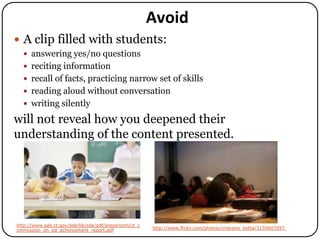
 A clip filled with students:
 answering yes/no questions
 reciting information
 recall of facts, practicing narrow set of skills
 reading aloud without conversation

 writing silently

will not reveal how you deepened their
understanding of the content presented.

http://www.sde.ct.gov/sde/lib/sde/pdf/pressroom/ct_c
ommission_on_ed_achievement_report.pdf

http://www.flickr.com/photos/cristiano_betta/3159607097
Student Engagement

http://ni.oc.edu/2011/03/what-does-student-engagement-mean-to-you
Too soft or unclear
Narrative
If student responses are unclear, teacher will
need to include that in their narrative
associated with the video.
Example of Narrative
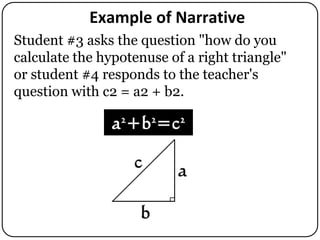
Student #3 asks the question "how do you
calculate the hypotenuse of a right triangle"
or student #4 responds to the teacher's
question with c2 = a2 + b2.
Avoid Positioning Camera Behind Students
Positioning of the camera with built-in mic behind
students may pick up the teacher's voice if loud
enough. However student voice often unclear.
Wireless Microphone
 Great for teachers to roam around classroom speaking at a

normal voice
 The lapel microphone will not clearly capture what
students are saying unless it is pointed near them
 A wireless microphone must be set up precisely or it may
not capture any audio at all.
 Both transmitter & receiver should have newish
batteries, set to the same frequency, and be turned on.
 The antenna & microphone must be snugly clipped to the
transmitter
 Plug one end of the curly audio cable into the receiver’s
MIKE OUT jack and the other end directly to a video
camera’s external MIC jack. If you are using an iPhone,
the adapter cable is also required.
Transmitter

Setting up a Wireless Microphone

Plug into
MIKE INPUT
jack

Receiver
Position to the Side or Front
Need to position the camera to the side or
towards the front capturing the teacher and
students together.

http://joshblackman.com/blog/wp-content/uploads/2012/10/IMAG0286.jpg
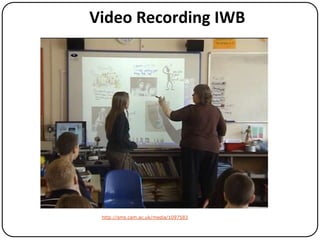
Video Recording IWB

http://sms.cam.ac.uk/media/1097583
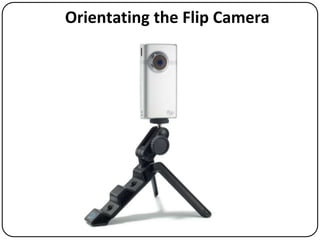
Orientating the Flip Camera
No Vertical Video Recording!

http://www.youtube.com/watch?v=Bt9zSfinwFA
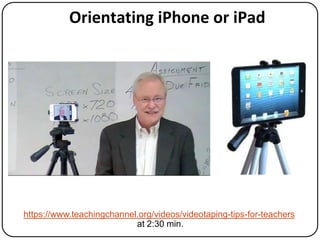
Orientating iPhone or iPad

https://www.teachingchannel.org/videos/videotaping-tips-for-teachers
at 2:30 min.
Record More Than One Video
Editing Video
All videos need to be continuous (no cutting
out in between) although start and end
segments can be trimmed.
General Advice
 Avoid zooming and make sure you the

teacher and students are in the video.
 The teacher needs to have a precise lesson
that has been rehearsed several times
over.
 Be dynamic, fast-paced, and make sure
students are engaged under your
direction.
 Rehearse your lesson with other students
in your class.
http://sites.elmira.edu/it/classrooms
IT Conference Room, GT-1, GT-2
Promethean and SMART boards:
During Library Open Hours the IT Conference Room is usually
available by drop-in after 6 pm or on weekends.
Epson Interactive Projectors
During Library open hours GT-1 and GT-2 are available after 9
pm Monday through Thursday, after 6 pm on Fridays, and
during open Library hours on weekends.
Video Recording
Check out video cameras from the IT Help Desk (three days
advance notice) or use a smart phone camera to record your
rehearsals in the IT Conference Room, GT-1, or GT-2.
How to Get Help
References
• Portions of text taken from A Support Guide for
edTPA Candidates (PDF)
• edTPA Web site for candidates
• Elmira College edTPA Web site:
http://sites.elmira.edu/edtpa
• Elmira College Technology Classrooms Web site:
http://sites.elmira.edu/classrooms
• Teaching Channel Web
site:https://www.teachingchannel.org .
•
End of Presentation

Preparing for edTPA Video

  • 1.
    Video in TeacherPerformance Assessment Take 2 – Jan ‘14 Joe Fahs- jfahs@elmira.edu Director of Academic Technology Services Elmira College http://sites.elmira.edu/edtpa http://sites.elmira.edu/classrooms
  • 2.
  • 3.
    Not Enough StudentVoice Rehearsal videos show teachers doing most of the talking with little opportunity for student voice.
  • 4.
  • 5.
    Content ==> Engagement Startwith content information (e.g. 5 minutes) and then engage students (they do most of the talking) for the rest of the video http://edtech2.boisestate.edu/robertsona/506/finalProject/ DividingFractions.html http://www.flickr.com/photos/audiolucistore/740373 1050/
  • 6.
    Engaging Students Active engagementof students in their own understanding of concepts, skills, and/or processes related to the learning objectives.  Instruction with student-teacher and/or student-student interaction  An opportunity for teacher to respond to student questions, concerns, or needs.  Choose clips that reveal student thinking, analysis, and judgment. https://www.teachingchannel.org/videos/improving-teacher-practice
  • 7.
    Interact with Students Goodfor teacher to roam to interact with small groups talking with students. That would mean someone panning with the camera, presumably the cooperating teacher. http://debbiediller.wordpress.com/tag/small-group-area
  • 8.
    Deepening Student Learning Highlight in the video how you listen to students and respond in such a way that you are supporting them and building on their thinking and ideas.  Deepening student understanding will depend upon the strategies you have chosen.  Focus a discussion following a mini-lecture rather than the lecture itself (which can be described in writing). Discussion should represent an opportunity for students to display or further their depth of understanding. http://www.edutopia.org/math-social-activity-cooperative-learning-video
  • 9.
    Path to DeeperLearning https://www.teachingchannel.org/videos/teaching-higher-order-thinking-skills
  • 10.
    Avoid  A clipfilled with students:  answering yes/no questions  reciting information  recall of facts, practicing narrow set of skills  reading aloud without conversation  writing silently will not reveal how you deepened their understanding of the content presented. http://www.sde.ct.gov/sde/lib/sde/pdf/pressroom/ct_c ommission_on_ed_achievement_report.pdf http://www.flickr.com/photos/cristiano_betta/3159607097
  • 11.
  • 12.
    Too soft orunclear
  • 13.
    Narrative If student responsesare unclear, teacher will need to include that in their narrative associated with the video.
  • 14.
    Example of Narrative Student#3 asks the question "how do you calculate the hypotenuse of a right triangle" or student #4 responds to the teacher's question with c2 = a2 + b2.
  • 15.
    Avoid Positioning CameraBehind Students Positioning of the camera with built-in mic behind students may pick up the teacher's voice if loud enough. However student voice often unclear.
  • 16.
    Wireless Microphone  Greatfor teachers to roam around classroom speaking at a normal voice  The lapel microphone will not clearly capture what students are saying unless it is pointed near them  A wireless microphone must be set up precisely or it may not capture any audio at all.  Both transmitter & receiver should have newish batteries, set to the same frequency, and be turned on.  The antenna & microphone must be snugly clipped to the transmitter  Plug one end of the curly audio cable into the receiver’s MIKE OUT jack and the other end directly to a video camera’s external MIC jack. If you are using an iPhone, the adapter cable is also required.
  • 17.
    Transmitter Setting up aWireless Microphone Plug into MIKE INPUT jack Receiver
  • 18.
    Position to theSide or Front Need to position the camera to the side or towards the front capturing the teacher and students together. http://joshblackman.com/blog/wp-content/uploads/2012/10/IMAG0286.jpg
  • 19.
  • 20.
  • 21.
    No Vertical VideoRecording! http://www.youtube.com/watch?v=Bt9zSfinwFA
  • 22.
    Orientating iPhone oriPad https://www.teachingchannel.org/videos/videotaping-tips-for-teachers at 2:30 min.
  • 23.
  • 24.
    Editing Video All videosneed to be continuous (no cutting out in between) although start and end segments can be trimmed.
  • 25.
    General Advice  Avoidzooming and make sure you the teacher and students are in the video.  The teacher needs to have a precise lesson that has been rehearsed several times over.  Be dynamic, fast-paced, and make sure students are engaged under your direction.  Rehearse your lesson with other students in your class.
  • 26.
  • 27.
    IT Conference Room,GT-1, GT-2 Promethean and SMART boards: During Library Open Hours the IT Conference Room is usually available by drop-in after 6 pm or on weekends. Epson Interactive Projectors During Library open hours GT-1 and GT-2 are available after 9 pm Monday through Thursday, after 6 pm on Fridays, and during open Library hours on weekends. Video Recording Check out video cameras from the IT Help Desk (three days advance notice) or use a smart phone camera to record your rehearsals in the IT Conference Room, GT-1, or GT-2.
  • 28.
  • 29.
    References • Portions oftext taken from A Support Guide for edTPA Candidates (PDF) • edTPA Web site for candidates • Elmira College edTPA Web site: http://sites.elmira.edu/edtpa • Elmira College Technology Classrooms Web site: http://sites.elmira.edu/classrooms • Teaching Channel Web site:https://www.teachingchannel.org . •
  • 30.

Editor's Notes

  • #2 Introduction 
  • #3 http://sites.elmira.edu/it/edtpa
  • #4 Time how long teachers were talking during rehearsal videos.
  • #5 Alfie Kohn tweet: https://twitter.com/alfiekohn/statuses/420171255828869120Image source: http://technorati.com/social-media/article/twitter-fakes-tweets-to-promote-twitterImage source: https://www.teachingchannel.org/videos/strategies-for-student-centered-discussion
  • #6 http://edtech2.boisestate.edu/robertsona/506/finalProject/DividingFractions.html
  • #7 Have students write down three words that apply to engagement and then collect words to build a Wordle.https://www.teachingchannel.org/videos/improving-teacher-practice by Sarah Brown Wessling. Play the first two minutes.
  • #8 http://www.edutopia.org/math-social-activity-cooperative-learning-video . Play from 4:30 to 6:00 minutes.
  • #9 Video: https://www.teachingchannel.org/videos/teaching-higher-order-thinking-skills
  • #10 http://www.flickr.com/photos/cristiano_betta/3159607097and http://www.sde.ct.gov/sde/lib/sde/pdf/pressroom/ct_commission_on_ed_achievement_report.pdf
  • #13 Go to http://sites.elmira.edu/it/edtpa and choose Wireless Microphone
  • #14 http://joshblackman.com/blog/wp-content/uploads/2012/10/IMAG0286.jpg
  • #15 http://sms.cam.ac.uk/media/1097583 and http://www.youtube.com/watch?v=wAOwGWRW-o4
  • #19 http://sites.elmira.edu/it/edtpa