





Unity 3D
your team
Object.Instantiate(„Christoph Becher“);
var homepage = new WWW(„www.cupworks.net“);
Agenda
• About Mii
• The red thread
• INDIE-ana Jones
• Know your enemy
• Rules of peace
• Build a pipeline
About Mii
I know… the picture is my Live Avatar… because he is simply
beautiful 
About Mii
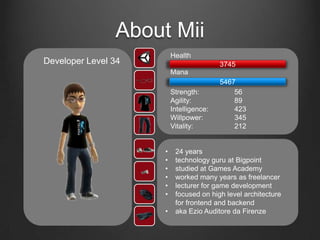
• 24 years
• technology guru at Bigpoint
• studied at Games Academy
• worked many years as freelancer
• lecturer for game development
• focused on high level architecture
for frontend and backend
• aka Ezio Auditore da Firenze
Health
Mana
3745
Strength: 56
Agility: 89
Intelligence: 423
Willpower: 345
Vitality: 212
5467
Developer Level 34
The red thread
*meow*
The red thread
• whenever you see this icon I will reference to the red thread
• for this presentation we create a small example “Game Project”
The red thread
Angry Students
• game like Angry Birds
• students defeat the Exam-Monsters in their fortresses
• use stones, explosive mixtures and other cool things to
destroy your enemies
• 3D graphics and animated story movies
• cross platform and DLC
INDIE-ana Jones
"X" never, ever marks the spot
INDIE-ana Jones
• Unity is perfect for one-man-armies and smaller teams
• all workflows and tools are optimized to achieve fast
results
• the editor is a good combination of a development and
asset management tool
• the usability and simplicity are state of the art
• many things are extensible and customizable
• one solution to create games
• in short: Unity is a good choice for your team
INDIE-ana Jones
• most customers are indie developers or smaller teams
• thus these people are the root of the company
• the success speaks for itself
• Unity also wants to reach major and professional
developers in the future
• for this reason they work closely together with companies
to optimize the engine and editor for bigger teams
• I am part of this board 
INDIE-ana Jones
Angry Students
• our team is part of a big company
• we have many cooperating departments
• many of our assets come from external teams
• we are always using the newest version for our tools
and programs
• not every employee has licenses for all of them
Know your enemy
weakness: fire
immunity: ice
characteristics: slow and powerful attacks
Know your enemy
your team
• What is your production environment?
• Where do the assets come from?
• What are the key technology features of the project?
• cross platform, DLC, asset streaming, quality
settings
• How is the team set up and what are the strengths and
weaknesses?
• What are the needs of your team?
• development, 3D and 2D art, audio, game design,
balancing, level design, Tech art
Know your enemy
Unity 3D
• Do you use the “Professional” version?
• Which tools and features would you like to use?
• Which programming language do you want to use?
• Boo, JavaScript aka UnityScript, C#
• Who will use it?
• Do you develop on Mac or Windows?
• Does it support your version control system?
• What external tools do you want to use?
• What are the typical pitfalls?
Know your enemy
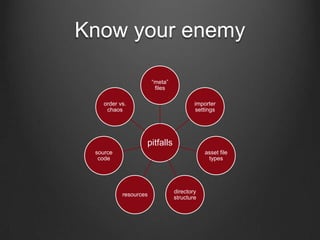
pitfalls
“meta”
files
importer
settings
asset file
types
directory
structure
resources
source
code
order vs.
chaos
Know your enemy
Angry Students
• the team has experience with Unity and game
development
• our artists are only working with Maya and Photoshop
• our developers prefer the use of C#
• we want to build the complete game with the Unity
tools
• only our core development team has a Unity license
Rules of peace
I don’t want to set the world on fire…
Rules of peace
• welcome Visual Studio and .Net/Mono
• develop your code with Visual Studio
• deploy your code and components as *.dll
• use the full power of C# and the framework
• abstract as far as possible from the engine
• separate productive code from your extensions or tests
• forget public variables because there are nicer possibilities
• standardize
• naming and coding conventions
• asset handling
Rules of peace
• Keep your project clean!
• remove unneeded assets
• don’t use program specific file formats: PSD, MB, MAX, …
• the project is not the right place for work in progress assets
• clear directory structure
• keep the overview
• “power of two”
• Extend!
• automatize as much as possible (What must I do to re-create
the project and how long does it take?)
• write your own importer
• use the right tool for each job
Rules of peace
• the project as a puzzle
• “Prefabs” are your friend
• scenes should not contain persistent data
• Unity should be the container for all the parts of your project
• the right settings
• enable external version control
• use text file parsing
• insert only necessary files to your version control system
• damn meta files
• Write a tool to handle meta files and external version control!
Build a pipeline
I have found oil!
Build a pipeline
• the best method is building a content and asset pipeline
• this automates many of your steps
• tools or scripts ensure the correct handling of the assets
• adaption to the different requirements of the platform
• manage our project rules and contentions
• the pipeline can also be a part of a control system
• Steve Jobs: “Simplicity is the ultimate sophistication”
Build a pipeline
• running CI system
• builds our hole project
• necessary for the automation
• asset importer for Unity
• global settings for our assets
• generates Prefabs, Materials and other thinks
• asset management tool
• processed our assets and adds it to our project
• build scripts and configurations
• for our assets
• for our code
What do I need for a minimal environment?
Build a pipeline
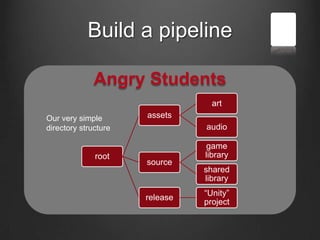
Angry Students
root
assets
art
audio
source
game
library
shared
library
release
“Unity”
project
Our very simple
directory structure
Build a pipeline
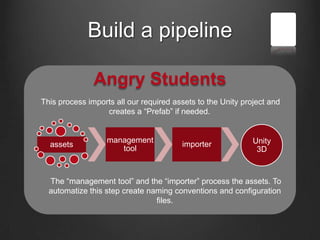
Angry Students
assets
management
tool
importer Unity
3D
This process imports all our required assets to the Unity project and
creates a “Prefab” if needed.
The “management tool” and the “importer” process the assets. To
automatize this step create naming conventions and configuration
files.
Build a pipeline
Angry Students
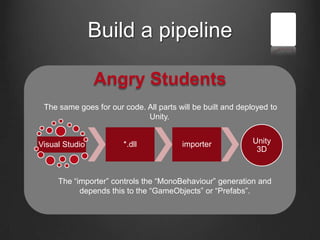
Visual Studio *.dll importer Unity
3D
The same goes for our code. All parts will be built and deployed to
Unity.
The “importer” controls the “MonoBehaviour” generation and
depends this to the “GameObjects” or “Prefabs”.
Build a pipeline
Angry Students
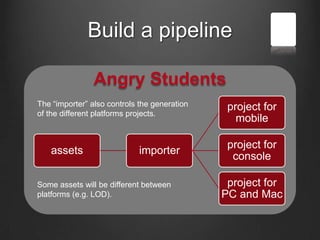
assets importer
project for
mobile
project for
console
project for
PC and Mac
The “importer” also controls the generation
of the different platforms projects.
Some assets will be different between
platforms (e.g. LOD).
Build a pipeline
Angry Students
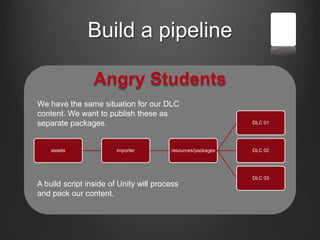
assets importer resources/packages
DLC 01
DLC 02
DLC 03
We have the same situation for our DLC
content. We want to publish these as
separate packages.
A build script inside of Unity will process
and pack our content.
Build a pipeline
Angry Students
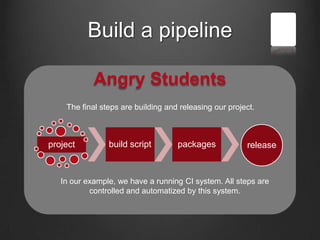
project build script packages release
The final steps are building and releasing our project.
In our example, we have a running CI system. All steps are
controlled and automatized by this system.
Wake up!
We are at the end
Questions?
Suggestions? Rumors?
Thank you
for all the fish!
& Christoph Becher
www.CupWorks.net
@CupWorks /CupWorks

Unity 3D VS your team

  • 1.
    Unity 3D your team Object.Instantiate(„ChristophBecher“); var homepage = new WWW(„www.cupworks.net“);
  • 2.
    Agenda • About Mii •The red thread • INDIE-ana Jones • Know your enemy • Rules of peace • Build a pipeline
  • 3.
    About Mii I know…the picture is my Live Avatar… because he is simply beautiful 
  • 4.
    About Mii • 24years • technology guru at Bigpoint • studied at Games Academy • worked many years as freelancer • lecturer for game development • focused on high level architecture for frontend and backend • aka Ezio Auditore da Firenze Health Mana 3745 Strength: 56 Agility: 89 Intelligence: 423 Willpower: 345 Vitality: 212 5467 Developer Level 34
  • 5.
  • 6.
    The red thread •whenever you see this icon I will reference to the red thread • for this presentation we create a small example “Game Project”
  • 7.
    The red thread AngryStudents • game like Angry Birds • students defeat the Exam-Monsters in their fortresses • use stones, explosive mixtures and other cool things to destroy your enemies • 3D graphics and animated story movies • cross platform and DLC
  • 8.
    INDIE-ana Jones "X" never,ever marks the spot
  • 9.
    INDIE-ana Jones • Unityis perfect for one-man-armies and smaller teams • all workflows and tools are optimized to achieve fast results • the editor is a good combination of a development and asset management tool • the usability and simplicity are state of the art • many things are extensible and customizable • one solution to create games • in short: Unity is a good choice for your team
  • 10.
    INDIE-ana Jones • mostcustomers are indie developers or smaller teams • thus these people are the root of the company • the success speaks for itself • Unity also wants to reach major and professional developers in the future • for this reason they work closely together with companies to optimize the engine and editor for bigger teams • I am part of this board 
  • 11.
    INDIE-ana Jones Angry Students •our team is part of a big company • we have many cooperating departments • many of our assets come from external teams • we are always using the newest version for our tools and programs • not every employee has licenses for all of them
  • 12.
    Know your enemy weakness:fire immunity: ice characteristics: slow and powerful attacks
  • 13.
    Know your enemy yourteam • What is your production environment? • Where do the assets come from? • What are the key technology features of the project? • cross platform, DLC, asset streaming, quality settings • How is the team set up and what are the strengths and weaknesses? • What are the needs of your team? • development, 3D and 2D art, audio, game design, balancing, level design, Tech art
  • 14.
    Know your enemy Unity3D • Do you use the “Professional” version? • Which tools and features would you like to use? • Which programming language do you want to use? • Boo, JavaScript aka UnityScript, C# • Who will use it? • Do you develop on Mac or Windows? • Does it support your version control system? • What external tools do you want to use? • What are the typical pitfalls?
  • 15.
    Know your enemy pitfalls “meta” files importer settings assetfile types directory structure resources source code order vs. chaos
  • 16.
    Know your enemy AngryStudents • the team has experience with Unity and game development • our artists are only working with Maya and Photoshop • our developers prefer the use of C# • we want to build the complete game with the Unity tools • only our core development team has a Unity license
  • 17.
    Rules of peace Idon’t want to set the world on fire…
  • 18.
    Rules of peace •welcome Visual Studio and .Net/Mono • develop your code with Visual Studio • deploy your code and components as *.dll • use the full power of C# and the framework • abstract as far as possible from the engine • separate productive code from your extensions or tests • forget public variables because there are nicer possibilities • standardize • naming and coding conventions • asset handling
  • 19.
    Rules of peace •Keep your project clean! • remove unneeded assets • don’t use program specific file formats: PSD, MB, MAX, … • the project is not the right place for work in progress assets • clear directory structure • keep the overview • “power of two” • Extend! • automatize as much as possible (What must I do to re-create the project and how long does it take?) • write your own importer • use the right tool for each job
  • 20.
    Rules of peace •the project as a puzzle • “Prefabs” are your friend • scenes should not contain persistent data • Unity should be the container for all the parts of your project • the right settings • enable external version control • use text file parsing • insert only necessary files to your version control system • damn meta files • Write a tool to handle meta files and external version control!
  • 21.
    Build a pipeline Ihave found oil!
  • 22.
    Build a pipeline •the best method is building a content and asset pipeline • this automates many of your steps • tools or scripts ensure the correct handling of the assets • adaption to the different requirements of the platform • manage our project rules and contentions • the pipeline can also be a part of a control system • Steve Jobs: “Simplicity is the ultimate sophistication”
  • 23.
    Build a pipeline •running CI system • builds our hole project • necessary for the automation • asset importer for Unity • global settings for our assets • generates Prefabs, Materials and other thinks • asset management tool • processed our assets and adds it to our project • build scripts and configurations • for our assets • for our code What do I need for a minimal environment?
  • 24.
    Build a pipeline AngryStudents root assets art audio source game library shared library release “Unity” project Our very simple directory structure
  • 25.
    Build a pipeline AngryStudents assets management tool importer Unity 3D This process imports all our required assets to the Unity project and creates a “Prefab” if needed. The “management tool” and the “importer” process the assets. To automatize this step create naming conventions and configuration files.
  • 26.
    Build a pipeline AngryStudents Visual Studio *.dll importer Unity 3D The same goes for our code. All parts will be built and deployed to Unity. The “importer” controls the “MonoBehaviour” generation and depends this to the “GameObjects” or “Prefabs”.
  • 27.
    Build a pipeline AngryStudents assets importer project for mobile project for console project for PC and Mac The “importer” also controls the generation of the different platforms projects. Some assets will be different between platforms (e.g. LOD).
  • 28.
    Build a pipeline AngryStudents assets importer resources/packages DLC 01 DLC 02 DLC 03 We have the same situation for our DLC content. We want to publish these as separate packages. A build script inside of Unity will process and pack our content.
  • 29.
    Build a pipeline AngryStudents project build script packages release The final steps are building and releasing our project. In our example, we have a running CI system. All steps are controlled and automatized by this system.
  • 30.
    Wake up! We areat the end
  • 31.
  • 32.
  • 33.