Chapter 1
                        Background


                            Fundamentals of Java:
                            AP Computer Science
                            Essentials, 4th Edition


1   Lambert / Osborne
About the Presentations

               The presentations cover the objectives found in
                the opening of each chapter.
               All chapter objectives are listed in the beginning
                of each presentation.
               You may customize the presentations to fit your
                class needs.
Chapter 1


               Some figures from the chapters are included. A
                complete set of images from the book can be
                found on the Instructor Resources disc.

2           Lambert / Osborne                   Fundamentals of Java 4E
Objectives

               Give a brief history of computers.
               Describe how hardware and software make
                up computer architecture.
               Explain the binary representation of data and
                program in computers.
Chapter 1


3           Lambert / Osborne                Fundamentals of Java 4E
Objectives (continued)

               Discuss the evolution of programming
                languages.
               Describe the software developmental
                process.
               Discuss the fundamental concepts of object-
Chapter 1


                oriented programming.


4           Lambert / Osborne               Fundamentals of Java 4E
Vocabulary

               application software      central processing
               assembly language          unit (CPU)
               auxiliary                 hardware
                input/output (I/O)        information hiding
               auxiliary storage         instance variables
Chapter 1


                device                    internal memory
               bit                       machine language
               byte
5           Lambert / Osborne                  Fundamentals of Java 4E
Vocabulary (continued)

               network connection      software
               object-oriented          development life
                programming              cycle (SDLC)
               primary memory          system software
               RAM                     ubiquitous
Chapter 1


               secondary memory         computing
               software                user interface
                                        waterfall model
6           Lambert / Osborne                Fundamentals of Java 4E
History of Computers

               ENIAC (1940s) was one of the world’s first
                digital electronic computers.
               IBM sold its first business computer in the
                1950s.
                –   It was thought the world needed no more than 10.
Chapter 1


                –   Power was 1/2000 of the typical laptop of today.
               Today there are hundreds of millions of
                laptop and desktop computers in the world.
7           Lambert / Osborne                    Fundamentals of Java 4E
History of Computers (continued)

               The first computers could perform only a
                single task at a time.
                –   Paper cards and tape used for input and output.
               In 1960s, time-sharing computers were sold
                for businesses.
Chapter 1


                –   Cost up to millions of dollars.
                –   30 people could work at once.
                –   Teletypes used phone wires.

8           Lambert / Osborne                         Fundamentals of Java 4E
History of Computers (continued)

               In 1970s, e-mail and file transfers were born.
               In 1980s, personal computers and local area
                networks were available.
               In 1990s, an explosion of computer use and
                availability of Internet access.
Chapter 1


               Computing has become ubiquitous.
                –   Cell phones, cameras, PDAs, music players


9           Lambert / Osborne                   Fundamentals of Java 4E
Computer Hardware and Software

                Computers are machines that process information.
                Hardware are the physical devices on your desktop.
                Software are the programs that give the hardware
                 functionality.
                Bits and Bytes:
                Bits are the smallest unit of information processed by
 Chapter 1


                 a computer (0s and 1s).
                Bytes are eight bits.


10           Lambert / Osborne                     Fundamentals of Java 4E
Computer Hardware and Software
             (continued)

                Computer Hardware:
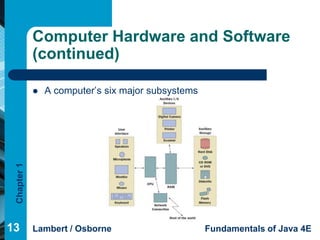
                Computers have six major subsystems:
                 –   User interface
                 –   Auxiliary input/output (I/O)
                         Keyboard, monitor, printer, digital camera, joystick
                 –   Auxiliary storage devices
 Chapter 1


                         Secondary memory
                         Hard disks, DVDs, flash memory
                 –   Network connection
                         Modem, TV cable, satellite dish, Ethernet cards
11           Lambert / Osborne                              Fundamentals of Java 4E
Computer Hardware and Software
             (continued)

                Computer Hardware (cont):
                  – Internal memory (RAM)
                         RAM (random access memory) is primary memory
                         ROM (read-only memory)
                 –   Central processing unit (CPU)
                         Performs basic tasks using complex hardware.
 Chapter 1


                         Moore’s Law: speed is doubled every two years
                         Transistor is the building block of the CPU and RAM.


12           Lambert / Osborne                             Fundamentals of Java 4E
Computer Hardware and Software
             (continued)

                A computer’s six major subsystems
 Chapter 1


13           Lambert / Osborne                       Fundamentals of Java 4E
Computer Hardware and Software
             (continued)

                Computer Software:
                 –   System software
                         Supports the operations of the computer.
                         Includes the operating system, communication software,
                          compilers, and the user interface subsystem.
                 –   Application software
 Chapter 1


                         Allows users to accomplish tasks.
                         Types include Word processors, spreadsheets, databases,
                          and multimedia.


14           Lambert / Osborne                            Fundamentals of Java 4E
Binary Representation of Information
             and Computer Memory

                Computer memory stores patterns of electronic
                 signals.
                The patterns are strings of binary digits or bits.
                Computers use binary (base 2) notation.
                 –   Two bases: On/Off
 Chapter 1


                 –   Computer scientists also use bases octal (8) and
                     hexadecimal (16).


15           Lambert / Osborne                     Fundamentals of Java 4E
Binary Representation of Information
             and Computer Memory (continued)

                Floating-Point numbers
                 –   Fractions
                 –   Use mantissa/exponent notation
                Characters and Strings
                 –   ASCII, represents patterns as bytes
 Chapter 1


                Java uses Unicode
                 –   Patterns of 15 bits from 0000 0000 0000 0000 to
                     1111 1111 1111 1111

16           Lambert / Osborne                     Fundamentals of Java 4E
Binary Representation of Information
             and Computer Memory (continued)

                Floating-Point numbers
                 –   Fractions
                 –   Use mantissa/exponent notation
                Characters and Strings
                 –   ASCII, represents patterns as bytes
 Chapter 1


                Java uses Unicode
                 –   Patterns of 15 bits from 0000 0000 0000 0000 to
                     1111 1111 1111 1111

17           Lambert / Osborne                     Fundamentals of Java 4E
Binary Representation of Information
             and Computer Memory (continued)

                Sound is analog data.
                 –   Analog information has a continuous range of infinite
                     values.
                 –   Sampling reads the waveform at intervals.
                 –   Memory requirements for sound are higher than text.
 Chapter 1


                Images
                 –   Sampling measures color values as pixels in a two-
                     dimensional grid.
                 –   Grayscale, black-and-white, RGB, true-color
18           Lambert / Osborne                      Fundamentals of Java 4E
Binary Representation of Information
             and Computer Memory (continued)

                Video
                 –   Video includes a soundtrack and a set of images
                     called frames.
                 –   Data compression is difficult.
                Program instructions
 Chapter 1


                 –   A sequence of bits in RAM
                Computer Memory
                 –   A gigantic sequence of bytes, each with an address.

19           Lambert / Osborne                     Fundamentals of Java 4E
Programming Languages

                Generation 1 (Late 1940s to Early 1950s)-
                 Machine Languages:
                Programs were coded in machine language,
                 whose only symbols are binary digits.
                Coding was tedious, slow, and error-prone.
 Chapter 1


                It was difficult to modify programs.
                 Each type had its own machine language so
                 programs were not portable.
20           Lambert / Osborne              Fundamentals of Java 4E
Programming Languages
             (continued)

                Generation 2 (Early 1950s to Present)-Assembly
                 Languages:
                Assembly languages use mnemonic symbols to
                 represent instructions & data.
                Programs are translated by assembler and loaded
                 and run using a loader.
                 Assembly language is more programmer friendly, but
 Chapter 1


             
                 still tedious.
                Like machine language, it is not portable as each
                 computer has its own unique language.

21           Lambert / Osborne                  Fundamentals of Java 4E
Programming Languages
             (continued)

                Generation 3 (Mid-1950s to Present)-High-Level
                 Languages:
                Examples of high-level languages are FORTRAN,
                 COBOL, BASIC, C, Pascal, C++, Python, Smalltalk,
                 and Java.
                High-level languages are easy to write, read,
                 understand.
 Chapter 1


                Translation to machine language is done using a
                 compiler.
                Java does not need to be recompiled for each type
                 of computer.

22           Lambert / Osborne                   Fundamentals of Java 4E
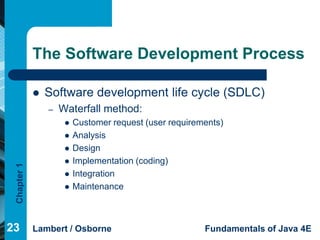
The Software Development Process

                Software development life cycle (SDLC)
                 –   Waterfall method:
                         Customer request (user requirements)
                         Analysis
                         Design
                         Implementation (coding)
 Chapter 1


                         Integration
                         Maintenance


23           Lambert / Osborne                           Fundamentals of Java 4E
The Software Development Process
             (continued)

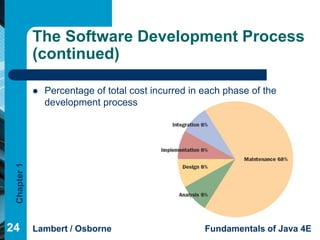
                Percentage of total cost incurred in each phase of the
                 development process
 Chapter 1


24           Lambert / Osborne                        Fundamentals of Java 4E
Basic Concepts of Object-Oriented
             Programming

                High-level programming languages fall into
                 two major groups.
                The older languages, COBOL, FORTRAN,
                 BASIC, C, and Pascal, all use a procedural
                 approach.
 Chapter 1


                New languages, Smalltalk, C++, Python, and
                 Java use an object-oriented approach.
                 –   Object-oriented is considered superior.

25           Lambert / Osborne                      Fundamentals of Java 4E
Basic Concepts of Object-Oriented
             Programming (continued)

                Object-oriented programming (OOP) process is the
                 process of programming with objects.
                 –   Steps: planning, execution, outcome
                Programs are composed of different types of
                 software components called classes.
                Classes define:
 Chapter 1


                 –   Instance variables (data resources)
                 –   Methods (rules of behavior)
                Combining resources and behaviors into a single
                 software entity is encapsulation.
26           Lambert / Osborne                             Fundamentals of Java 4E
Basic Concepts of Object-Oriented
             Programming (continued)

                An executing program is composed of
                 interacting objects.
                 –   An object is an instance of the class that
                     describes its resources and behavior.
                Objects send messages to each other to
 Chapter 1


                 accomplish the mission of the program.
                Information hiding provides access to
                 services but not data resources.

27           Lambert / Osborne                       Fundamentals of Java 4E
Basic Concepts of Object-Oriented
             Programming (continued)

                Classes are organized into hierarchies.
                Subclasses share methods and instance
                 variables with the root class using
                 inheritance.
                Different types of objects can understand the
 Chapter 1


                 same message, called polymorphism.
                An object’s response to a message depends
                 on its class.
28           Lambert / Osborne                Fundamentals of Java 4E
Summary

             In this chapter, you learned:
              The modern computer age began in the late 1940s
                with the development of ENIAC. Business computing
                became practical in the 1950s, and time-sharing
                computers advanced computing in large organizations
                in the 1960s and 1970s. The 1980s saw the
 Chapter 1


                development and first widespread sales of personal
                computers, and the 1990s saw personal computers
                connected in networks. During the first decade of the
                twenty-first century, computing has become ubiquitous.
29           Lambert / Osborne                   Fundamentals of Java 4E
Summary (continued)

                Modern computers consist of two primary
                 components: hardware and software.
                 Computer hardware is the physical component
                 of the system. Computer software consists of
                 programs that enable us to use the hardware.
 Chapter 1


                All information used by a computer is
                 represented in binary form. This information
                 includes numbers, text, images, sound, and
                 program instructions.
30           Lambert / Osborne              Fundamentals of Java 4E
Summary (continued)

                Programming languages have been developed
                 over the course of three generations: generation
                 1 is machine language, generation 2 is assembly
                 language, and generation 3 is high-level
                 language.
                The waterfall model of the software development
 Chapter 1


                 process consists of several standard phases:
                 customer request, analysis, design,
                 implementation, integration, and maintenance.
31           Lambert / Osborne                 Fundamentals of Java 4E
Summary (continued)

                Object-oriented programming is a style of
                 programming that can lead to better-quality
                 software. Breaking code into easily handled
                 components simplifies the job of writing a
                 large program.
 Chapter 1


32           Lambert / Osborne               Fundamentals of Java 4E

Chapter 01

  • 1.
    Chapter 1 Background Fundamentals of Java: AP Computer Science Essentials, 4th Edition 1 Lambert / Osborne
  • 2.
    About the Presentations  The presentations cover the objectives found in the opening of each chapter.  All chapter objectives are listed in the beginning of each presentation.  You may customize the presentations to fit your class needs. Chapter 1  Some figures from the chapters are included. A complete set of images from the book can be found on the Instructor Resources disc. 2 Lambert / Osborne Fundamentals of Java 4E
  • 3.
    Objectives  Give a brief history of computers.  Describe how hardware and software make up computer architecture.  Explain the binary representation of data and program in computers. Chapter 1 3 Lambert / Osborne Fundamentals of Java 4E
  • 4.
    Objectives (continued)  Discuss the evolution of programming languages.  Describe the software developmental process.  Discuss the fundamental concepts of object- Chapter 1 oriented programming. 4 Lambert / Osborne Fundamentals of Java 4E
  • 5.
    Vocabulary  application software  central processing  assembly language unit (CPU)  auxiliary  hardware input/output (I/O)  information hiding  auxiliary storage  instance variables Chapter 1 device  internal memory  bit  machine language  byte 5 Lambert / Osborne Fundamentals of Java 4E
  • 6.
    Vocabulary (continued)  network connection  software  object-oriented development life programming cycle (SDLC)  primary memory  system software  RAM  ubiquitous Chapter 1  secondary memory computing  software  user interface  waterfall model 6 Lambert / Osborne Fundamentals of Java 4E
  • 7.
    History of Computers  ENIAC (1940s) was one of the world’s first digital electronic computers.  IBM sold its first business computer in the 1950s. – It was thought the world needed no more than 10. Chapter 1 – Power was 1/2000 of the typical laptop of today.  Today there are hundreds of millions of laptop and desktop computers in the world. 7 Lambert / Osborne Fundamentals of Java 4E
  • 8.
    History of Computers(continued)  The first computers could perform only a single task at a time. – Paper cards and tape used for input and output.  In 1960s, time-sharing computers were sold for businesses. Chapter 1 – Cost up to millions of dollars. – 30 people could work at once. – Teletypes used phone wires. 8 Lambert / Osborne Fundamentals of Java 4E
  • 9.
    History of Computers(continued)  In 1970s, e-mail and file transfers were born.  In 1980s, personal computers and local area networks were available.  In 1990s, an explosion of computer use and availability of Internet access. Chapter 1  Computing has become ubiquitous. – Cell phones, cameras, PDAs, music players 9 Lambert / Osborne Fundamentals of Java 4E
  • 10.
    Computer Hardware andSoftware  Computers are machines that process information.  Hardware are the physical devices on your desktop.  Software are the programs that give the hardware functionality.  Bits and Bytes:  Bits are the smallest unit of information processed by Chapter 1 a computer (0s and 1s).  Bytes are eight bits. 10 Lambert / Osborne Fundamentals of Java 4E
  • 11.
    Computer Hardware andSoftware (continued)  Computer Hardware:  Computers have six major subsystems: – User interface – Auxiliary input/output (I/O)  Keyboard, monitor, printer, digital camera, joystick – Auxiliary storage devices Chapter 1  Secondary memory  Hard disks, DVDs, flash memory – Network connection  Modem, TV cable, satellite dish, Ethernet cards 11 Lambert / Osborne Fundamentals of Java 4E
  • 12.
    Computer Hardware andSoftware (continued)  Computer Hardware (cont): – Internal memory (RAM)  RAM (random access memory) is primary memory  ROM (read-only memory) – Central processing unit (CPU)  Performs basic tasks using complex hardware. Chapter 1  Moore’s Law: speed is doubled every two years  Transistor is the building block of the CPU and RAM. 12 Lambert / Osborne Fundamentals of Java 4E
  • 13.
    Computer Hardware andSoftware (continued)  A computer’s six major subsystems Chapter 1 13 Lambert / Osborne Fundamentals of Java 4E
  • 14.
    Computer Hardware andSoftware (continued)  Computer Software: – System software  Supports the operations of the computer.  Includes the operating system, communication software, compilers, and the user interface subsystem. – Application software Chapter 1  Allows users to accomplish tasks.  Types include Word processors, spreadsheets, databases, and multimedia. 14 Lambert / Osborne Fundamentals of Java 4E
  • 15.
    Binary Representation ofInformation and Computer Memory  Computer memory stores patterns of electronic signals.  The patterns are strings of binary digits or bits.  Computers use binary (base 2) notation. – Two bases: On/Off Chapter 1 – Computer scientists also use bases octal (8) and hexadecimal (16). 15 Lambert / Osborne Fundamentals of Java 4E
  • 16.
    Binary Representation ofInformation and Computer Memory (continued)  Floating-Point numbers – Fractions – Use mantissa/exponent notation  Characters and Strings – ASCII, represents patterns as bytes Chapter 1  Java uses Unicode – Patterns of 15 bits from 0000 0000 0000 0000 to 1111 1111 1111 1111 16 Lambert / Osborne Fundamentals of Java 4E
  • 17.
    Binary Representation ofInformation and Computer Memory (continued)  Floating-Point numbers – Fractions – Use mantissa/exponent notation  Characters and Strings – ASCII, represents patterns as bytes Chapter 1  Java uses Unicode – Patterns of 15 bits from 0000 0000 0000 0000 to 1111 1111 1111 1111 17 Lambert / Osborne Fundamentals of Java 4E
  • 18.
    Binary Representation ofInformation and Computer Memory (continued)  Sound is analog data. – Analog information has a continuous range of infinite values. – Sampling reads the waveform at intervals. – Memory requirements for sound are higher than text. Chapter 1  Images – Sampling measures color values as pixels in a two- dimensional grid. – Grayscale, black-and-white, RGB, true-color 18 Lambert / Osborne Fundamentals of Java 4E
  • 19.
    Binary Representation ofInformation and Computer Memory (continued)  Video – Video includes a soundtrack and a set of images called frames. – Data compression is difficult.  Program instructions Chapter 1 – A sequence of bits in RAM  Computer Memory – A gigantic sequence of bytes, each with an address. 19 Lambert / Osborne Fundamentals of Java 4E
  • 20.
    Programming Languages  Generation 1 (Late 1940s to Early 1950s)- Machine Languages:  Programs were coded in machine language, whose only symbols are binary digits.  Coding was tedious, slow, and error-prone. Chapter 1  It was difficult to modify programs.  Each type had its own machine language so programs were not portable. 20 Lambert / Osborne Fundamentals of Java 4E
  • 21.
    Programming Languages (continued)  Generation 2 (Early 1950s to Present)-Assembly Languages:  Assembly languages use mnemonic symbols to represent instructions & data.  Programs are translated by assembler and loaded and run using a loader. Assembly language is more programmer friendly, but Chapter 1  still tedious.  Like machine language, it is not portable as each computer has its own unique language. 21 Lambert / Osborne Fundamentals of Java 4E
  • 22.
    Programming Languages (continued)  Generation 3 (Mid-1950s to Present)-High-Level Languages:  Examples of high-level languages are FORTRAN, COBOL, BASIC, C, Pascal, C++, Python, Smalltalk, and Java.  High-level languages are easy to write, read, understand. Chapter 1  Translation to machine language is done using a compiler.  Java does not need to be recompiled for each type of computer. 22 Lambert / Osborne Fundamentals of Java 4E
  • 23.
    The Software DevelopmentProcess  Software development life cycle (SDLC) – Waterfall method:  Customer request (user requirements)  Analysis  Design  Implementation (coding) Chapter 1  Integration  Maintenance 23 Lambert / Osborne Fundamentals of Java 4E
  • 24.
    The Software DevelopmentProcess (continued)  Percentage of total cost incurred in each phase of the development process Chapter 1 24 Lambert / Osborne Fundamentals of Java 4E
  • 25.
    Basic Concepts ofObject-Oriented Programming  High-level programming languages fall into two major groups.  The older languages, COBOL, FORTRAN, BASIC, C, and Pascal, all use a procedural approach. Chapter 1  New languages, Smalltalk, C++, Python, and Java use an object-oriented approach. – Object-oriented is considered superior. 25 Lambert / Osborne Fundamentals of Java 4E
  • 26.
    Basic Concepts ofObject-Oriented Programming (continued)  Object-oriented programming (OOP) process is the process of programming with objects. – Steps: planning, execution, outcome  Programs are composed of different types of software components called classes.  Classes define: Chapter 1 – Instance variables (data resources) – Methods (rules of behavior)  Combining resources and behaviors into a single software entity is encapsulation. 26 Lambert / Osborne Fundamentals of Java 4E
  • 27.
    Basic Concepts ofObject-Oriented Programming (continued)  An executing program is composed of interacting objects. – An object is an instance of the class that describes its resources and behavior.  Objects send messages to each other to Chapter 1 accomplish the mission of the program.  Information hiding provides access to services but not data resources. 27 Lambert / Osborne Fundamentals of Java 4E
  • 28.
    Basic Concepts ofObject-Oriented Programming (continued)  Classes are organized into hierarchies.  Subclasses share methods and instance variables with the root class using inheritance.  Different types of objects can understand the Chapter 1 same message, called polymorphism.  An object’s response to a message depends on its class. 28 Lambert / Osborne Fundamentals of Java 4E
  • 29.
    Summary In this chapter, you learned:  The modern computer age began in the late 1940s with the development of ENIAC. Business computing became practical in the 1950s, and time-sharing computers advanced computing in large organizations in the 1960s and 1970s. The 1980s saw the Chapter 1 development and first widespread sales of personal computers, and the 1990s saw personal computers connected in networks. During the first decade of the twenty-first century, computing has become ubiquitous. 29 Lambert / Osborne Fundamentals of Java 4E
  • 30.
    Summary (continued)  Modern computers consist of two primary components: hardware and software. Computer hardware is the physical component of the system. Computer software consists of programs that enable us to use the hardware. Chapter 1  All information used by a computer is represented in binary form. This information includes numbers, text, images, sound, and program instructions. 30 Lambert / Osborne Fundamentals of Java 4E
  • 31.
    Summary (continued)  Programming languages have been developed over the course of three generations: generation 1 is machine language, generation 2 is assembly language, and generation 3 is high-level language.  The waterfall model of the software development Chapter 1 process consists of several standard phases: customer request, analysis, design, implementation, integration, and maintenance. 31 Lambert / Osborne Fundamentals of Java 4E
  • 32.
    Summary (continued)  Object-oriented programming is a style of programming that can lead to better-quality software. Breaking code into easily handled components simplifies the job of writing a large program. Chapter 1 32 Lambert / Osborne Fundamentals of Java 4E