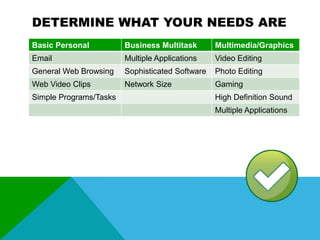
DETERMINE WHAT YOUR NEEDS ARE
Basic Personal

Business Multitask

Multimedia/Graphics

Email

Multiple Applications

Video Editing

General Web Browsing

Sophisticated Software

Photo Editing

Web Video Clips

Network Size

Gaming

Simple Programs/Tasks

High Definition Sound
Multiple Applications
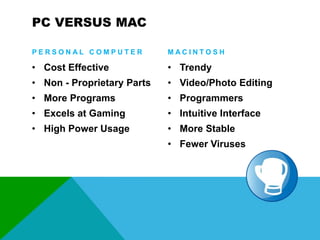
PC VERSUS MAC
PERSONAL COMPUTER

MACINTOSH

• Cost Effective

• Trendy

• Non - Proprietary Parts

• Video/Photo Editing

• More Programs

• Programmers

• Excels at Gaming

• Intuitive Interface

• High Power Usage

• More Stable
• Fewer Viruses
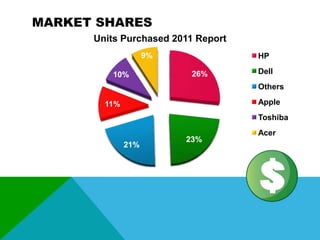
MARKET SHARES
Units Purchased 2011 Report
9%
10%

HP
26%

Dell
Others
Apple

11%

Toshiba
21%

23%

Acer
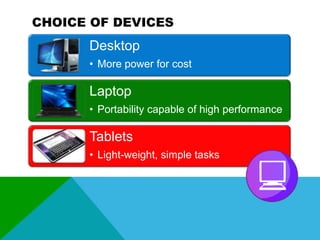
CHOICE OF DEVICES

Desktop
• More power for cost

Laptop
• Portability capable of high performance

Tablets
• Light-weight, simple tasks
PROCESSOR
Tells your computer what to do and when
to do it. The Brain of your computer.
• Processor Type
• (AMD, Intel Pentium, Intel Celeron)
• Number of Cores
• (Dual, Triple, Quad)
• Speed
• Cache
STORAGE & MEMORY
This is where information is uploaded to
temporarily, allowing instant access.
• Hard Drive Capacity
• RAM Size (Random Access Memory)
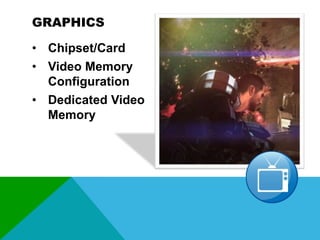
GRAPHICS
• Chipset/Card
• Video Memory
Configuration
• Dedicated Video
Memory
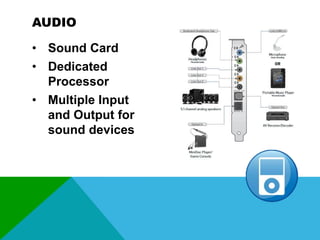
AUDIO
• Sound Card
• Dedicated
Processor
• Multiple Input
and Output for
sound devices
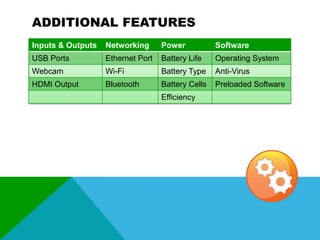
ADDITIONAL FEATURES
Inputs & Outputs

Networking

Power

Software

USB Ports

Ethernet Port

Battery Life

Operating System

Webcam

Wi-Fi

Battery Type

Anti-Virus

HDMI Output

Bluetooth

Battery Cells

Preloaded Software

Efficiency
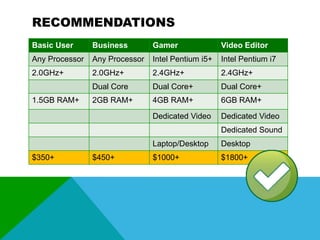
RECOMMENDATIONS
Basic User

Business

Gamer

Video Editor

Any Processor

Any Processor

Intel Pentium i5+

Intel Pentium i7

2.0GHz+

2.0GHz+

2.4GHz+

2.4GHz+

Dual Core

Dual Core+

Dual Core+

2GB RAM+

4GB RAM+

6GB RAM+

Dedicated Video

Dedicated Video

1.5GB RAM+

Dedicated Sound
Laptop/Desktop
$350+

$450+

Desktop

$1000+

$1800+
LATEST AND UPCOMING TRENDS
RESOURCES
www.notebookcheck.net – Reviews about all things regarding laptops
www.pcmag.com – Information and reviews about all computers
www.pcworld.com – Great resource for upcoming technologies

www.bestbuy.ca – Short term definitions to specifications
www.wikipedia.org – In-depth explanations of computer components
Power point final project

Power point final project

  • 2.
    DETERMINE WHAT YOURNEEDS ARE Basic Personal Business Multitask Multimedia/Graphics Email Multiple Applications Video Editing General Web Browsing Sophisticated Software Photo Editing Web Video Clips Network Size Gaming Simple Programs/Tasks High Definition Sound Multiple Applications
  • 3.
    PC VERSUS MAC PERSONALCOMPUTER MACINTOSH • Cost Effective • Trendy • Non - Proprietary Parts • Video/Photo Editing • More Programs • Programmers • Excels at Gaming • Intuitive Interface • High Power Usage • More Stable • Fewer Viruses
  • 4.
    MARKET SHARES Units Purchased2011 Report 9% 10% HP 26% Dell Others Apple 11% Toshiba 21% 23% Acer
  • 5.
    CHOICE OF DEVICES Desktop •More power for cost Laptop • Portability capable of high performance Tablets • Light-weight, simple tasks
  • 7.
    PROCESSOR Tells your computerwhat to do and when to do it. The Brain of your computer. • Processor Type • (AMD, Intel Pentium, Intel Celeron) • Number of Cores • (Dual, Triple, Quad) • Speed • Cache
  • 8.
    STORAGE & MEMORY Thisis where information is uploaded to temporarily, allowing instant access. • Hard Drive Capacity • RAM Size (Random Access Memory)
  • 9.
    GRAPHICS • Chipset/Card • VideoMemory Configuration • Dedicated Video Memory
  • 10.
    AUDIO • Sound Card •Dedicated Processor • Multiple Input and Output for sound devices
  • 11.
    ADDITIONAL FEATURES Inputs &Outputs Networking Power Software USB Ports Ethernet Port Battery Life Operating System Webcam Wi-Fi Battery Type Anti-Virus HDMI Output Bluetooth Battery Cells Preloaded Software Efficiency
  • 12.
    RECOMMENDATIONS Basic User Business Gamer Video Editor AnyProcessor Any Processor Intel Pentium i5+ Intel Pentium i7 2.0GHz+ 2.0GHz+ 2.4GHz+ 2.4GHz+ Dual Core Dual Core+ Dual Core+ 2GB RAM+ 4GB RAM+ 6GB RAM+ Dedicated Video Dedicated Video 1.5GB RAM+ Dedicated Sound Laptop/Desktop $350+ $450+ Desktop $1000+ $1800+
  • 13.
  • 14.
    RESOURCES www.notebookcheck.net – Reviewsabout all things regarding laptops www.pcmag.com – Information and reviews about all computers www.pcworld.com – Great resource for upcoming technologies www.bestbuy.ca – Short term definitions to specifications www.wikipedia.org – In-depth explanations of computer components

Editor's Notes

  • #3 Ask yourself these questions to determine what your needs are.For Business mention:Large businesses, such as BC Liquor use an extensive Excel File that requires lots of memory to store their vast inventoryIn regards to Network, businesses have to think about costs
  • #4 Age old question.Personal Computers:When mentioning cost, $500-$600 for a basic computer, the mac equivalent is about $1000+Businesses requiring multiple computers, prefer PCsMost programs are developed to run on WindowsIf you like to tinker and replace parts, then that option is open to PCs because of the non-proprietary partsGreat at overclocking, which basically means the computer is capable of processing beyond it’s original specifications better, but be sure not to test the stress too much as it will burn out your computer fasterMacs:Video/Editing: Final Cut, Adobe Suite Programs like Photoshop, etc. Truer Color representation technology supported by ColorSync, industry standardProfessional Recording Studios prefer Macs.Macs aren’t less susceptible to viruses, there are just more viruses written for PCS, can change in futureBoth systems will require anti-virus if you browse random sites and download files from the Internet
  • #5 PC’s make up of 89%
  • #6 Three main types.Rule of thumb, the more mobile, the higher the cost for performance.
  • #8 The brain of your computer. It decides which tasks are more important and prioritizes them to your computer’s needs.Processor Types(AMD Athlon, Intel Pentium, Intel Celeron)Intel Celeron, Low end budget friendly version of the PentiumCoresDual, Triple and Quadruple available, most notably, the i3-i7 that are out right now, all multi-coreEquivalent of running multiple CPU’s depending on number (brains)Funnel, higher efficiency = speedSpeedStandard now is measured in GHz, most are over 2GHz 1GHz=1 million cycles per second of instructions your computer can carry outCacheImmediate memory between the processor and main memory (RAM)Processor can read data so much faster than the main memoryWithout the cache, the speed of your processor would be limited by the speed of your memory.
  • #9 Hard Drive CapacityHow much information your computer can hold. (Programs, software, files)RAM SizeThis is where your primary workspace memory is stored. When you run a program, it runs through the RAM. The larger the RAM, the more applications you can run at the same time as they all access this temporary memory space. (Undos, Redos, clipboard, current steps and preferences, are stored in the RAM)
  • #10 Chipset/CardWhat model of video card (Intel, Nvidia, ATI)Allows for your computer to handle video applications at specified resolutionsWhen choosing a video card, make sure your monitor can optimize on the resolution that your card offers for best results.The higher the resolution, the sharper the images.Video Memory ConfigurationIntegrated models (Intel), will run the video graphics off of the motherboard, relying on the computer’s RAMDedicated models will run off the video card itself, allowing your RAM room to process other things, these are recommended for video and graphic heavy application usersDedicated models will also have their own fans to keep a computer cool, however a heating plate and extra fans should be considered if you are a gamer or video editorDedicated Video MemoryHow much memory your video card has.
  • #11 Most premade systems have an integrated sound system, which runs off the motherboard.Sound cards are mainly manufactured for desktops that can support a more powerful and bigger system, however there are options available for laptops as well, but may not be as extensive due to the available space for parts in them.
  • #12 Some additional features that may interest you.
  • #13 With processor speed, it can vary for the basic user, but 2.0Ghz will be more than enough for your needs. Netbooks and tablets will have lower processor speeds as they were made to do simple tasks.Tablets and iPads most likely won’t have much more than 1.5GB of RAM
  • #14 PC’s currently have a response to Mac’s Air, The Ultrabooks, which are designed to feature reduced size and weight, and extended battery life without compromising performance.Touchscreen technology has really taken a leap with Mac iphones and ipads. This trend is still on the rise with developers moving towards more compact desktop solutions, working with plexiglass type monitors.Microsoft in partnership with Samsung have developed a tabletop computer that can be used for personal and business usages.Responds to devices simply by placing them on the surface. It’ll read files in the device.Order and pay for food on one at a restaurant, bar or caféChat with a stranger a few tables away and make new friendsWas in development since 2001, and the first launch of Surface introduced in 2007. In 2011 the Surface 2 was announced and is now ready for purchase.In Europe, developers have made prototypes for flexible computers, so we may see, not only small units, but bendable and foldable ones too.