Computer Specifications
Identify Device &
Specification
What is Specification?
- a list of the key components that make up
the computer. It is provided by retailers to help
buyers decide which PC, and which combination
of features, they need. When buying a PC, it is
important to start by deciding what it is you want
the PC to do.
SPEC-TACULAR QUEST
When reviewing a computer
specification, the most important
components to take account of are the
processor, the amount of RAM and the size
of the hard drive as these are central to
the overall capability of the system.
Specifications
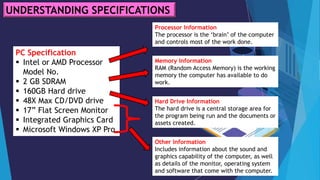
UNDERSTANDING SPECIFICATIONS
PC Specification
 Intel or AMD Processor
Model No.
 2 GB SDRAM
 160GB Hard drive
 48X Max CD/DVD drive
 17” Flat Screen Monitor
 Integrated Graphics Card
 Microsoft Windows XP Pro
Processor Information
The processor is the ‘brain’ of the computer
and controls most of the work done.
Memory Information
RAM (Random Access Memory) is the working
memory the computer has available to do
work.
Hard Drive Information
The hard drive is a central storage area for
the program being run and the documents or
assets created.
Other Information
Includes information about the sound and
graphics capability of the computer, as well
as details of the monitor, operating system
and software that come with the computer.
Two companies - Intel Inc. and AMD Inc. -
manufacture most of today’s PC processors and
both offer a range that balances price and
performance. Processors are generally defined
by their speed - in megahertz (MHz) or in
gigahertz (GHz) - and this relates to the
number of operations they can perform per
second.
Processors
The higher the value, the faster
the PC will perform and the more
expensive it generally is.
Processors
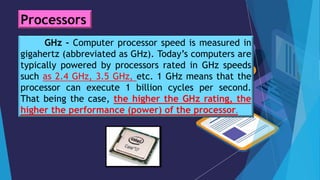
GHz – Computer processor speed is measured in
gigahertz (abbreviated as GHz). Today’s computers are
typically powered by processors rated in GHz speeds
such as 2.4 GHz, 3.5 GHz, etc. 1 GHz means that the
processor can execute 1 billion cycles per second.
That being the case, the higher the GHz rating, the
higher the performance (power) of the processor.
Processors
The main working memory in a
computer is called random access memory
or RAM. The processor uses this memory
to run programs. RAM is measured in
megabytes (MB/GB).
Memory (RAM)
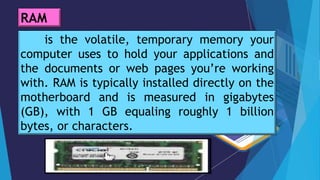
is the volatile, temporary memory your
computer uses to hold your applications and
the documents or web pages you’re working
with. RAM is typically installed directly on the
motherboard and is measured in gigabytes
(GB), with 1 GB equaling roughly 1 billion
bytes, or characters.
RAM
- the computer’s primary storage area.
It stores the applications and programs that
run on the PC, as well as any work created
by users. From a school’s perspective, the
capacity of the hard drive, measured in
gigabytes (GB), is a key criterion and
should be given due consideration when
reviewing PC specifications.
Storage – The Hard Drive
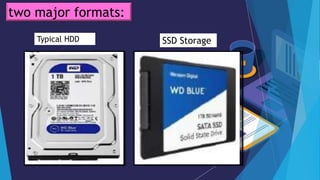
HDD (hard disk drives) consists of
spinning platters and moving heads that
read and write data to the storage media.
HDD storage has become increasingly
inexpensive, with 1TB (1,000 GB) drives
now included in many computers with very
acceptable performance.
Storage is now available in two major formats:
SDD (solid state drives) storage units are
now utilized in many lightweight, high-
performance laptop computers due to their
many advantages:
· Performance: With no moving parts, SSD drives
exceed the performance of HDD storage.
· Size: SDDs are extremely thin and lightweight
The drawback to SSD use is that they are more
expensive, although prices are becoming
comparable to HDDs in recent months.
Storage is now available in two major formats:
Typical HDD SSD Storage
two major formats:
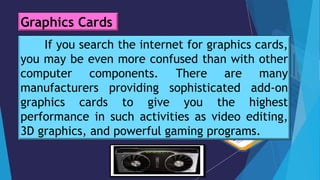
If you search the internet for graphics cards,
you may be even more confused than with other
computer components. There are many
manufacturers providing sophisticated add-on
graphics cards to give you the highest
performance in such activities as video editing,
3D graphics, and powerful gaming programs.
Graphics Cards
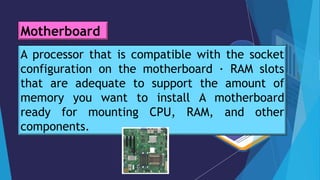
If you’re going to build your own desktop
computer, you will need to purchase a
motherboard to mount your electronic
components on. This will include the RAM,
Processor (also referred to as the CPU), and other
components. Your online retailer or local
computer store can help you determine the right
motherboard for the mix of items you intend to
install, ensuring you don’t run into any surprises·
Motherboard
A processor that is compatible with the socket
configuration on the motherboard · RAM slots
that are adequate to support the amount of
memory you want to install A motherboard
ready for mounting CPU, RAM, and other
components.
Motherboard
You will also need other hardware
components to complete your system:
· Case: You need a tower or desktop case to
house the system. Pick a case that is easy
to open for access to the internal workings
of your system.
Other System Components
· Power Supply: Your system will need a
power supply to run the processor, cooling
fans, and storage. Don’t underestimate the
power needed.
· Peripherals: You will need the usual
mouse, keyboard, monitor, and such items
as gaming controllers
Other System Components
BUILD YOUR DREAM COMPUTER SYSTEM
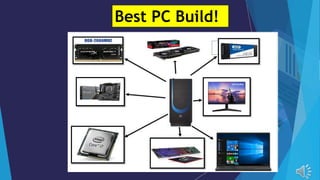
You are task to provide a propose PC to
purchase. The computer should be best for online
gaming application.
Use the provided picture of the proposed PC parts
specification. The group will explain/defend their
answer/build.(advertisement, infomercial, poster,
song, poem, etc…)
Group activity
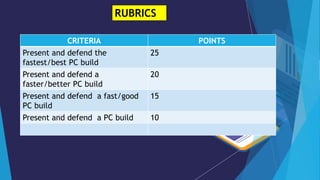
RUBRICS
CRITERIA POINTS
Present and defend the
fastest/best PC build
25
Present and defend a
faster/better PC build
20
Present and defend a fast/good
PC build
15
Present and defend a PC build 10
Best PC Build!
TECH - HARMONY
TECH - HARMONY
TECH - HARMONY
TECH - HARMONY
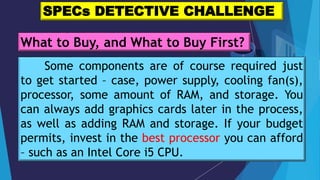
Some components are of course required just
to get started – case, power supply, cooling fan(s),
processor, some amount of RAM, and storage. You
can always add graphics cards later in the process,
as well as adding RAM and storage. If your budget
permits, invest in the best processor you can afford
– such as an Intel Core i5 CPU.
SPECs DETECTIVE CHALLENGE
What to Buy, and What to Buy First?
SPECs DETECTIVE CHALLENGE
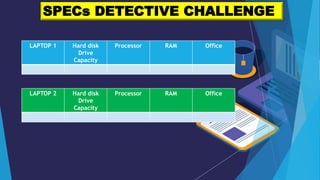
LAPTOP 1 Hard disk
Drive
Capacity
Processor RAM Office
LAPTOP 2 Hard disk
Drive
Capacity
Processor RAM Office
This processor is even suitable for most
gaming systems. Additional RAM and
storage are easily added, so if you’re on a
budget, you can save a little on the initial
expense on those items (within reason –
don’t shortcut RAM under 4GB).
What to Buy, and What to Buy First?
Laptop System PC Specs –Laptop
computers come with a wide array of
options including processors,
memory, storage, screen size, battery
life, and portability (weight). How do
you know what’s best for your needs?
What’s Right for You?
Laptop Use: Are you using it for basic
computing and internet use, video
streaming, or gaming?
Cost: Your budget will play an important role
in the features you select.
Portability: If you intend to travel regularly
with your laptop, weight and battery life will
mean a great deal to you. Some guidelines for
selecting the right mix of features for your
laptop include: CPUs with respectable
performance are processors in the Intel Core
series such as i5 processors. You can achieve
better performance by stepping up to i7
processors, but at an increased cost.
Good specs for a gaming PC are
somewhat different from their non-gaming
counterparts. Serious gaming activity will
benefit greatly from additional power:
Graphic cards: Add-on graphics cards with
their own processors and video memory is
the lifeblood of a quality gaming system.
What About Gaming System
Specifications?
RAM speed: Make sure your memory
rating is fast enough to keep pace with your
processor. For gaming, make 8GB RAM a
requirement, with 12 or 16GB even better.
If you have specific games in mind, check
the minimum RAM requirements for that
game, to avoid surprises.
What About Gaming System
Specifications?
HDD vs. SSD: SSD storage is faster and lighter,
but you can store more for your dollar with HDD.
Games and add-on features can use a considerable
amount of storage space, but keep in mind that if
you’re using a desktop gaming system, you can
always install additional drives later, if needed.
Whatever your choices, the goal is to have a
gleaming, powerful computer ready to tackle your
workload or entertainment needs.
What About Gaming System
Specifications?
What to Buy, and What to Buy First?
Some components are of course required
just to get started – case, power supply,
cooling fan(s), processor, some amount of RAM,
and storage. You can always add graphics cards
later in the process, as well as adding RAM and
storage. If your budget permits, invest in the
best processor you can afford – such as an Intel
Core i5 CPU.
EVALUATION
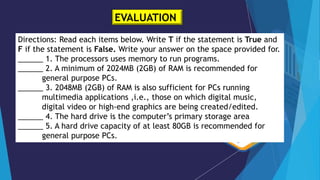
Directions: Read each items below. Write T if the statement is True and
F if the statement is False. Write your answer on the space provided for.
______ 1. The processors uses memory to run programs.
______ 2. A minimum of 2024MB (2GB) of RAM is recommended for
general purpose PCs.
______ 3. 2048MB (2GB) of RAM is also sufficient for PCs running
multimedia applications ,i.e., those on which digital music,
digital video or high-end graphics are being created/edited.
______ 4. The hard drive is the computer’s primary storage area
______ 5. A hard drive capacity of at least 80GB is recommended for
general purpose PCs.
EVALUATION
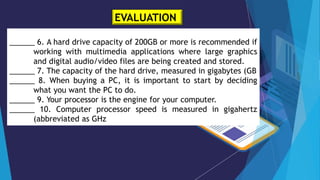
______ 6. A hard drive capacity of 200GB or more is recommended if
working with multimedia applications where large graphics
and digital audio/video files are being created and stored.
______ 7. The capacity of the hard drive, measured in gigabytes (GB
______ 8. When buying a PC, it is important to start by deciding
what you want the PC to do.
______ 9. Your processor is the engine for your computer.
______ 10. Computer processor speed is measured in gigahertz
(abbreviated as GHz
Additional Activities/Assignment
Make a short reflection about this;
““ Life is a matter of choices,
and every choice you make, makes
you.”

Identify Device &Specification-Computer Specifications

  • 1.
  • 10.
    What is Specification? -a list of the key components that make up the computer. It is provided by retailers to help buyers decide which PC, and which combination of features, they need. When buying a PC, it is important to start by deciding what it is you want the PC to do. SPEC-TACULAR QUEST
  • 11.
    When reviewing acomputer specification, the most important components to take account of are the processor, the amount of RAM and the size of the hard drive as these are central to the overall capability of the system. Specifications
  • 12.
    UNDERSTANDING SPECIFICATIONS PC Specification Intel or AMD Processor Model No.  2 GB SDRAM  160GB Hard drive  48X Max CD/DVD drive  17” Flat Screen Monitor  Integrated Graphics Card  Microsoft Windows XP Pro Processor Information The processor is the ‘brain’ of the computer and controls most of the work done. Memory Information RAM (Random Access Memory) is the working memory the computer has available to do work. Hard Drive Information The hard drive is a central storage area for the program being run and the documents or assets created. Other Information Includes information about the sound and graphics capability of the computer, as well as details of the monitor, operating system and software that come with the computer.
  • 13.
    Two companies -Intel Inc. and AMD Inc. - manufacture most of today’s PC processors and both offer a range that balances price and performance. Processors are generally defined by their speed - in megahertz (MHz) or in gigahertz (GHz) - and this relates to the number of operations they can perform per second. Processors
  • 14.
    The higher thevalue, the faster the PC will perform and the more expensive it generally is. Processors
  • 15.
    GHz – Computerprocessor speed is measured in gigahertz (abbreviated as GHz). Today’s computers are typically powered by processors rated in GHz speeds such as 2.4 GHz, 3.5 GHz, etc. 1 GHz means that the processor can execute 1 billion cycles per second. That being the case, the higher the GHz rating, the higher the performance (power) of the processor. Processors
  • 16.
    The main workingmemory in a computer is called random access memory or RAM. The processor uses this memory to run programs. RAM is measured in megabytes (MB/GB). Memory (RAM)
  • 17.
    is the volatile,temporary memory your computer uses to hold your applications and the documents or web pages you’re working with. RAM is typically installed directly on the motherboard and is measured in gigabytes (GB), with 1 GB equaling roughly 1 billion bytes, or characters. RAM
  • 18.
    - the computer’sprimary storage area. It stores the applications and programs that run on the PC, as well as any work created by users. From a school’s perspective, the capacity of the hard drive, measured in gigabytes (GB), is a key criterion and should be given due consideration when reviewing PC specifications. Storage – The Hard Drive
  • 19.
    HDD (hard diskdrives) consists of spinning platters and moving heads that read and write data to the storage media. HDD storage has become increasingly inexpensive, with 1TB (1,000 GB) drives now included in many computers with very acceptable performance. Storage is now available in two major formats:
  • 20.
    SDD (solid statedrives) storage units are now utilized in many lightweight, high- performance laptop computers due to their many advantages: · Performance: With no moving parts, SSD drives exceed the performance of HDD storage. · Size: SDDs are extremely thin and lightweight The drawback to SSD use is that they are more expensive, although prices are becoming comparable to HDDs in recent months. Storage is now available in two major formats:
  • 21.
    Typical HDD SSDStorage two major formats:
  • 22.
    If you searchthe internet for graphics cards, you may be even more confused than with other computer components. There are many manufacturers providing sophisticated add-on graphics cards to give you the highest performance in such activities as video editing, 3D graphics, and powerful gaming programs. Graphics Cards
  • 23.
    If you’re goingto build your own desktop computer, you will need to purchase a motherboard to mount your electronic components on. This will include the RAM, Processor (also referred to as the CPU), and other components. Your online retailer or local computer store can help you determine the right motherboard for the mix of items you intend to install, ensuring you don’t run into any surprises· Motherboard
  • 24.
    A processor thatis compatible with the socket configuration on the motherboard · RAM slots that are adequate to support the amount of memory you want to install A motherboard ready for mounting CPU, RAM, and other components. Motherboard
  • 25.
    You will alsoneed other hardware components to complete your system: · Case: You need a tower or desktop case to house the system. Pick a case that is easy to open for access to the internal workings of your system. Other System Components
  • 26.
    · Power Supply:Your system will need a power supply to run the processor, cooling fans, and storage. Don’t underestimate the power needed. · Peripherals: You will need the usual mouse, keyboard, monitor, and such items as gaming controllers Other System Components
  • 27.
    BUILD YOUR DREAMCOMPUTER SYSTEM You are task to provide a propose PC to purchase. The computer should be best for online gaming application. Use the provided picture of the proposed PC parts specification. The group will explain/defend their answer/build.(advertisement, infomercial, poster, song, poem, etc…) Group activity
  • 28.
    RUBRICS CRITERIA POINTS Present anddefend the fastest/best PC build 25 Present and defend a faster/better PC build 20 Present and defend a fast/good PC build 15 Present and defend a PC build 10
  • 29.
  • 30.
  • 31.
  • 32.
  • 33.
  • 34.
    Some components areof course required just to get started – case, power supply, cooling fan(s), processor, some amount of RAM, and storage. You can always add graphics cards later in the process, as well as adding RAM and storage. If your budget permits, invest in the best processor you can afford – such as an Intel Core i5 CPU. SPECs DETECTIVE CHALLENGE What to Buy, and What to Buy First?
  • 35.
    SPECs DETECTIVE CHALLENGE LAPTOP1 Hard disk Drive Capacity Processor RAM Office LAPTOP 2 Hard disk Drive Capacity Processor RAM Office
  • 36.
    This processor iseven suitable for most gaming systems. Additional RAM and storage are easily added, so if you’re on a budget, you can save a little on the initial expense on those items (within reason – don’t shortcut RAM under 4GB). What to Buy, and What to Buy First?
  • 37.
    Laptop System PCSpecs –Laptop computers come with a wide array of options including processors, memory, storage, screen size, battery life, and portability (weight). How do you know what’s best for your needs? What’s Right for You?
  • 38.
    Laptop Use: Areyou using it for basic computing and internet use, video streaming, or gaming? Cost: Your budget will play an important role in the features you select.
  • 39.
    Portability: If youintend to travel regularly with your laptop, weight and battery life will mean a great deal to you. Some guidelines for selecting the right mix of features for your laptop include: CPUs with respectable performance are processors in the Intel Core series such as i5 processors. You can achieve better performance by stepping up to i7 processors, but at an increased cost.
  • 40.
    Good specs fora gaming PC are somewhat different from their non-gaming counterparts. Serious gaming activity will benefit greatly from additional power: Graphic cards: Add-on graphics cards with their own processors and video memory is the lifeblood of a quality gaming system. What About Gaming System Specifications?
  • 41.
    RAM speed: Makesure your memory rating is fast enough to keep pace with your processor. For gaming, make 8GB RAM a requirement, with 12 or 16GB even better. If you have specific games in mind, check the minimum RAM requirements for that game, to avoid surprises. What About Gaming System Specifications?
  • 42.
    HDD vs. SSD:SSD storage is faster and lighter, but you can store more for your dollar with HDD. Games and add-on features can use a considerable amount of storage space, but keep in mind that if you’re using a desktop gaming system, you can always install additional drives later, if needed. Whatever your choices, the goal is to have a gleaming, powerful computer ready to tackle your workload or entertainment needs. What About Gaming System Specifications?
  • 43.
    What to Buy,and What to Buy First? Some components are of course required just to get started – case, power supply, cooling fan(s), processor, some amount of RAM, and storage. You can always add graphics cards later in the process, as well as adding RAM and storage. If your budget permits, invest in the best processor you can afford – such as an Intel Core i5 CPU.
  • 44.
    EVALUATION Directions: Read eachitems below. Write T if the statement is True and F if the statement is False. Write your answer on the space provided for. ______ 1. The processors uses memory to run programs. ______ 2. A minimum of 2024MB (2GB) of RAM is recommended for general purpose PCs. ______ 3. 2048MB (2GB) of RAM is also sufficient for PCs running multimedia applications ,i.e., those on which digital music, digital video or high-end graphics are being created/edited. ______ 4. The hard drive is the computer’s primary storage area ______ 5. A hard drive capacity of at least 80GB is recommended for general purpose PCs.
  • 45.
    EVALUATION ______ 6. Ahard drive capacity of 200GB or more is recommended if working with multimedia applications where large graphics and digital audio/video files are being created and stored. ______ 7. The capacity of the hard drive, measured in gigabytes (GB ______ 8. When buying a PC, it is important to start by deciding what you want the PC to do. ______ 9. Your processor is the engine for your computer. ______ 10. Computer processor speed is measured in gigahertz (abbreviated as GHz
  • 46.
    Additional Activities/Assignment Make ashort reflection about this; ““ Life is a matter of choices, and every choice you make, makes you.”