
February Update
&
Cool Feature's
• 9 + years of experience in Complete Microsoft BI Stack
• BI Solution Architect (Email – VishalPawar@live.com, @Vishal_bi)
• Blogging @ http://bimentalist.com , http://sqlmentalist.com
• Knowledge sharing - 350+ BI Articles ,400 SQL Article , 350+ SQL Script
• 4 Complex SQL tool innovator on Codeplex & open source all- https://goo.gl/OI3sB4
• Slide share publication - http://www.slideshare.net/VishalPawar_BI
• 2 LinkedIn Post - https://www.linkedin.com/today/author/120635304
• Free Power BI Course publish on Udemy - https://goo.gl/ArL0qe , 2000 + Student
• Founder & Leader of Global Power BI User Group http://goo.gl/oV7IHz , 1200+ Member
• Professional Microsoft BI Trainer Mentalist Network
• Founder & BI Consulting Partner of Right Click Info
• NMUG Community Founder Leader , Speaker - http://nmug.org/
• Microsoft Community Representative for Navi Mumbai region.
• SQL PASS Chapter Lead for Mumbai & Navi Mumbai
• MCTS: Microsoft® Certified Technology Specialist -SQL Server 2008 R2, BI
• MCSA: Microsoft® Certified Solutions Associate
• CSM: Certified Scrum Master from Scrum Alliance, US
• SQL Server Expert in Architecting and Optimization
• BE - Computer Science & Engineering , RAIT , Mumbai
• MBA-Information System, Arianth College , Pune
About Me
Quick & Short Agenda with Demo
1. Quick Insights
2. Sharing
3. Web content widget
4. Publish to web
5. General Update
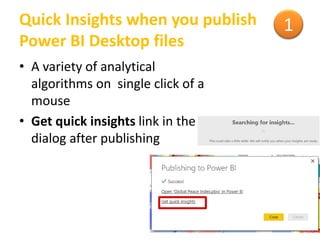
Quick Insights when you publish
Power BI Desktop files
• A variety of analytical
algorithms on single click of a
mouse
• Get quick insights link in the
dialog after publishing
1
Share with users outside your
organization
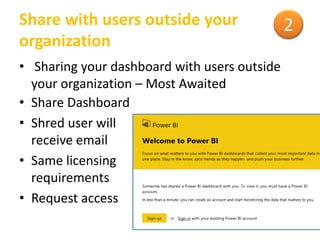
• Sharing your dashboard with users outside
your organization – Most Awaited
• Share Dashboard
• Shred user will
receive email
• Same licensing
requirements
• Request access
2
Widget
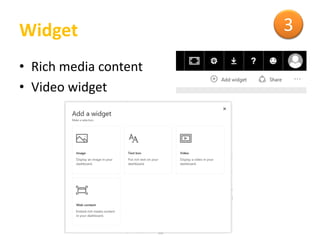
• Rich media content
• Video widget
3
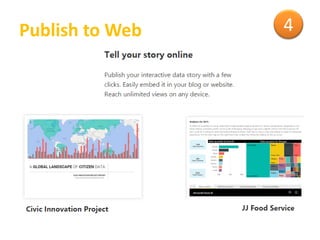
Publish to Web 4
All General Update 5
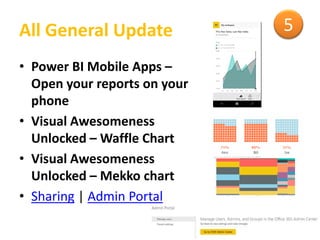
• Power BI Mobile Apps –
Open your reports on your
phone
• Visual Awesomeness
Unlocked – Waffle Chart
• Visual Awesomeness
Unlocked – Mekko chart
• Sharing | Admin Portal
Resource Link
Reference
• https://powerbi.microsoft.com/en-us/blog/power-bi-mobile-apps-open-your-reports-on-
phone/
• https://powerbi.microsoft.com/en-us/blog/
• https://powerbi.microsoft.com/en-us/blog/visual-awesomeness-unlocked-waffle-chart/
• https://powerbi.microsoft.com/en-us/blog/visual-awesomeness-unlocked-mekko-chart/
• https://powerbi.microsoft.com/en-us/blog/visualize-your-insightly-crm-data-with-power-bi/
• https://powerbi.microsoft.com/en-us/blog/power-bi-february-service-update/
• https://powerbi.microsoft.com/en-us/
• https://support.office.com
• https://technet.microsoft.com
• http://bimentalist.com/
Feedback
Please send you feedback –vishalpawar@live.com

Power BI February update with Recent Cool features

  • 1.
  • 2.
    • 9 +years of experience in Complete Microsoft BI Stack • BI Solution Architect (Email – VishalPawar@live.com, @Vishal_bi) • Blogging @ http://bimentalist.com , http://sqlmentalist.com • Knowledge sharing - 350+ BI Articles ,400 SQL Article , 350+ SQL Script • 4 Complex SQL tool innovator on Codeplex & open source all- https://goo.gl/OI3sB4 • Slide share publication - http://www.slideshare.net/VishalPawar_BI • 2 LinkedIn Post - https://www.linkedin.com/today/author/120635304 • Free Power BI Course publish on Udemy - https://goo.gl/ArL0qe , 2000 + Student • Founder & Leader of Global Power BI User Group http://goo.gl/oV7IHz , 1200+ Member • Professional Microsoft BI Trainer Mentalist Network • Founder & BI Consulting Partner of Right Click Info • NMUG Community Founder Leader , Speaker - http://nmug.org/ • Microsoft Community Representative for Navi Mumbai region. • SQL PASS Chapter Lead for Mumbai & Navi Mumbai • MCTS: Microsoft® Certified Technology Specialist -SQL Server 2008 R2, BI • MCSA: Microsoft® Certified Solutions Associate • CSM: Certified Scrum Master from Scrum Alliance, US • SQL Server Expert in Architecting and Optimization • BE - Computer Science & Engineering , RAIT , Mumbai • MBA-Information System, Arianth College , Pune About Me
  • 3.
    Quick & ShortAgenda with Demo 1. Quick Insights 2. Sharing 3. Web content widget 4. Publish to web 5. General Update
  • 4.
    Quick Insights whenyou publish Power BI Desktop files • A variety of analytical algorithms on single click of a mouse • Get quick insights link in the dialog after publishing 1
  • 5.
    Share with usersoutside your organization • Sharing your dashboard with users outside your organization – Most Awaited • Share Dashboard • Shred user will receive email • Same licensing requirements • Request access 2
  • 6.
    Widget • Rich mediacontent • Video widget 3
  • 7.
  • 8.
    All General Update5 • Power BI Mobile Apps – Open your reports on your phone • Visual Awesomeness Unlocked – Waffle Chart • Visual Awesomeness Unlocked – Mekko chart • Sharing | Admin Portal
  • 9.
    Resource Link Reference • https://powerbi.microsoft.com/en-us/blog/power-bi-mobile-apps-open-your-reports-on- phone/ •https://powerbi.microsoft.com/en-us/blog/ • https://powerbi.microsoft.com/en-us/blog/visual-awesomeness-unlocked-waffle-chart/ • https://powerbi.microsoft.com/en-us/blog/visual-awesomeness-unlocked-mekko-chart/ • https://powerbi.microsoft.com/en-us/blog/visualize-your-insightly-crm-data-with-power-bi/ • https://powerbi.microsoft.com/en-us/blog/power-bi-february-service-update/ • https://powerbi.microsoft.com/en-us/ • https://support.office.com • https://technet.microsoft.com • http://bimentalist.com/ Feedback Please send you feedback –vishalpawar@live.com