My Magazine
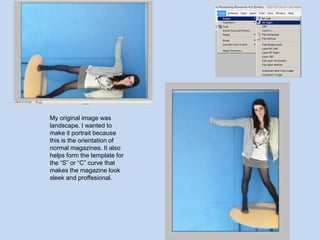
My original image was landscape. I wanted to make it portrait because this is the orientation of normal magazines. It also helps form the template for the “S” or “C” curve that makes the magazine look sleek and proffesional.
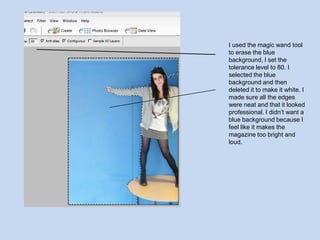
I used the magic wand tool to erase the blue background, I set the tolerance level to 80. I selected the blue background and then deleted it to make it white. I made sure all the edges were neat and that it looked professional. I didn’t want a blue background because I feel like it makes the magazine too bright and loud.
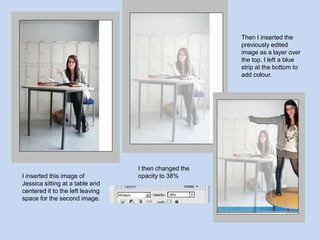
Then I inserted the previously edited image as a layer over the top. I left a blue strip at the bottom to add colour.I then changed the opacity to 38%I inserted this image of Jessica sitting at a table and centered it to the left leaving space for the second image.
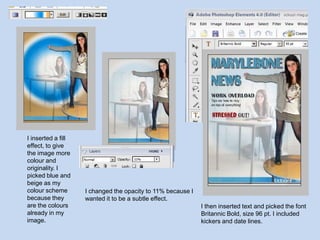
I inserted a fill effect, to give the image more colour and originality. I picked blue and beige as my colour scheme because they are the colours already in my image.I changed the opacity to 11% because I wanted it to be a subtle effect.I then inserted text and picked the font Britannic Bold, size 96 pt. I included kickers and date lines.
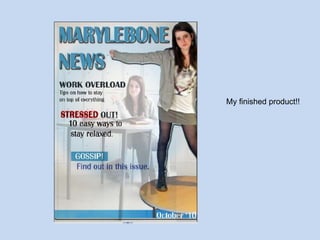
My finished product!!
School magazine comparision
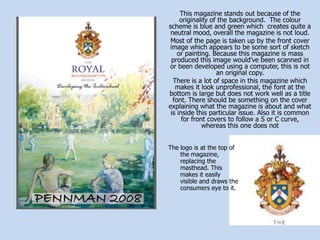
This magazine stands out because of the originality of the background.  The colour scheme is blue and green which  creates quite a neutral mood, overall the magazine is not loud.Most of the page is taken up by the front cover image which appears to be some sort of sketch or painting. Because this magazine is mass produced this image would’ve been scanned in or been developed using a computer, this is not an original copy.There is a lot of space in this magazine which makes it look unprofessional, the font at the bottom is large but does not work well as a title font. There should be something on the cover explaining what the magazine is about and what is inside this particular issue. Also it is common for front covers to follow a S or C curve, whereas this one does notThe logo is at the top of the magazine, replacing the masthead. This makes it easily visible and draws the consumers eye to it.
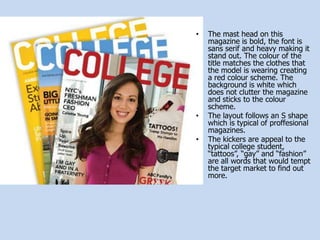
The mast head on this magazine is bold, the font is sans serif and heavy making it stand out. The colour of the title matches the clothes that the model is wearing creating a red colour scheme. The background is white which does not clutter the magazine and sticks to the colour scheme.
The layout follows an S shape which is typical of proffesional magazines.
The kickers are appeal to the typical college student, “tattoos”, “gay” and “fashion” are all words that would tempt the target market to find out more.Basic Photoshop skills
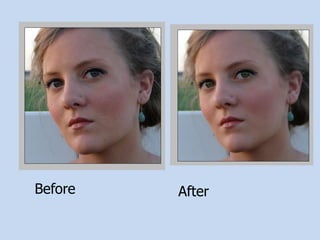
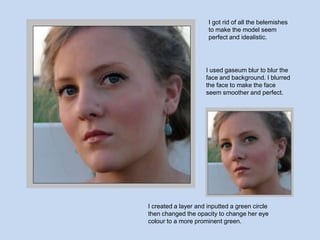
BeforeAfter
I got rid of all the belemishesto make the model seem perfect and idealistic.I used gaseum blur to blur the face and background. I blurred the face to make the face seem smoother and perfect.I created a layer and inputted a green circle then changed the opacity to change her eye colour to a more prominent green.
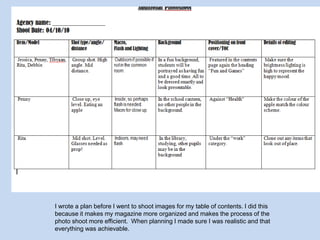
Table of Contents Planning

Planning and resarch presentation

  • 1.
  • 2.
    My original imagewas landscape. I wanted to make it portrait because this is the orientation of normal magazines. It also helps form the template for the “S” or “C” curve that makes the magazine look sleek and proffesional.
  • 3.
    I used themagic wand tool to erase the blue background, I set the tolerance level to 80. I selected the blue background and then deleted it to make it white. I made sure all the edges were neat and that it looked professional. I didn’t want a blue background because I feel like it makes the magazine too bright and loud.
  • 4.
    Then I insertedthe previously edited image as a layer over the top. I left a blue strip at the bottom to add colour.I then changed the opacity to 38%I inserted this image of Jessica sitting at a table and centered it to the left leaving space for the second image.
  • 5.
    I inserted afill effect, to give the image more colour and originality. I picked blue and beige as my colour scheme because they are the colours already in my image.I changed the opacity to 11% because I wanted it to be a subtle effect.I then inserted text and picked the font Britannic Bold, size 96 pt. I included kickers and date lines.
  • 6.
  • 7.
  • 8.
    This magazine standsout because of the originality of the background. The colour scheme is blue and green which creates quite a neutral mood, overall the magazine is not loud.Most of the page is taken up by the front cover image which appears to be some sort of sketch or painting. Because this magazine is mass produced this image would’ve been scanned in or been developed using a computer, this is not an original copy.There is a lot of space in this magazine which makes it look unprofessional, the font at the bottom is large but does not work well as a title font. There should be something on the cover explaining what the magazine is about and what is inside this particular issue. Also it is common for front covers to follow a S or C curve, whereas this one does notThe logo is at the top of the magazine, replacing the masthead. This makes it easily visible and draws the consumers eye to it.
  • 9.
    The mast headon this magazine is bold, the font is sans serif and heavy making it stand out. The colour of the title matches the clothes that the model is wearing creating a red colour scheme. The background is white which does not clutter the magazine and sticks to the colour scheme.
  • 10.
    The layout followsan S shape which is typical of proffesional magazines.
  • 11.
    The kickers areappeal to the typical college student, “tattoos”, “gay” and “fashion” are all words that would tempt the target market to find out more.Basic Photoshop skills
  • 12.
  • 13.
    I got ridof all the belemishesto make the model seem perfect and idealistic.I used gaseum blur to blur the face and background. I blurred the face to make the face seem smoother and perfect.I created a layer and inputted a green circle then changed the opacity to change her eye colour to a more prominent green.
  • 14.