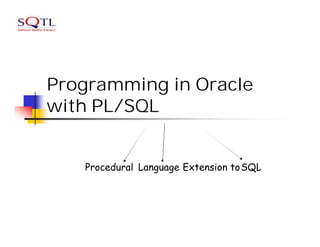
Programming in Oracle
with PL/SQL


   Procedural Language Extension toSQL
n   PL/SQL
n   PL/SQL Blocks
n   Anonymous blocks
    n   Using select statement
    n   Using conditions
    n   Loops
    n   Printing output
n   Named blocks
    n   Functions
    n   Procedures
    n   Triggers
PL/SQL
n   Allows using general programming tools with
    SQL, for example: loops, conditions,
    functions, etc.
n   This allows a lot more freedom than general
    SQL, and is lighter-weight than JDBC.
n   We write PL/SQL code in a regular file, for
    example PL.sql, and load it with @PL in the
    sqlplus console.
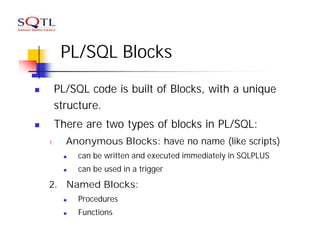
PL/SQL Blocks
n        PL/SQL code is built of Blocks, with a unique
         structure.
n        There are two types of blocks in PL/SQL:
    1.     Anonymous Blocks: have no name (like scripts)
          n   can be written and executed immediately in SQLPLUS
          n   can be used in a trigger
    2. Named Blocks:
          n   Procedures
          n   Functions
Anonymous Block Structure:
DECLARE        (optional)
   /* Here you declare the variables you will use in this block */

BEGIN          (mandatory)
   /* Here you define the executable statements (what the block
      DOES!)*/

EXCEPTION (optional)
   /* Here you define the actions that take place if an exception is
      thrown during the run of this block */

END;             (mandatory)
/
A correct completion of a block will generate the following message:
PL/SQL procedure successfully completed
DECLARE
Syntax
identifier [CONSTANT] datatype [NOT NULL]
    [:= | DEFAULT expr];

Examples

Declare
  birthday   DATE;
  age        NUMBER(2) NOT NULL := 27;
  name       VARCHAR2(13) := 'Levi';
  magic      CONSTANT NUMBER := 77;
  valid      BOOLEAN NOT NULL := TRUE;
SELECT Statements
DECLARE
  v_sname VARCHAR2(10);
  v_rating NUMBER(3);
BEGIN
  SELECT sname, rating
    INTO v_sname, v_rating
    FROM Sailors
   WHERE sid = '112';
END;
/ n INTO clause is required.
   n   Query must return exactly one row.
   n   Otherwise, a NO_DATA_FOUND or
       TOO_MANY_ROWS exception is thrown
Conditional logic
Condition:           Nested conditions:
 If <cond>            If <cond>
    then <command>       then
                           if <cond2>
 elsif <cond2>
                              then
    then                       <command1>
 <command2>                 end if;
 else                  else <command2>
       <command3>      end if;
 end if;
IF-THEN-ELSIF Statements
. . .
IF rating > 7 THEN
  v_message := 'You are great';
ELSIF rating >= 5 THEN
  v_message := 'Not bad';
ELSE
  v_message := 'Pretty bad';
END IF;
. . .
Suppose we have the
       following table:                   mylog
    create table mylog(                      logon_nu
                                  who            m
         who varchar2(30),
         logon_num number         Peter           3
    );
n   Want to keep track of how     John            4
    many times someone            Moshe           2
    logged on to the DB
n   When running, if user is
    already in table, increment
    logon_num. Otherwise,
    insert user into table
Solution
DECLARE
  cnt NUMBER;
BEGIN
  select count(*)
   into cnt
   from mylog
  where who = user;
  if cnt > 0 then
    update mylog
      set logon_num = logon_num + 1
    where who = user;
  else
    insert into mylog values(user, 1);
  end if;
  commit;
end;
/
Loops: FOR Loop
DECLARE
  i      number_table.num%TYPE;
BEGIN
  FOR i IN 1..10 LOOP
    INSERT INTO number_table VALUES(i);
  END LOOP;
END;


    Notice that i is incremented
    automatically
Loops: WHILE Loop
DECLARE
TEN number:=10;
i      number_table.num%TYPE:=1;
BEGIN
  WHILE i <= TEN LOOP
     INSERT INTO number_table
     VALUES(i);
     i := i + 1;
  END LOOP;
END;
Printing Output
n   You need to use a function in the DBMS_OUTPUT
    package in order to print to the output
n   If you want to see the output on the screen, you
    must type the following (before starting):
    set serveroutput on format wrapped size 1000000
n   Then print using
    n   dbms_output. put_line(your_string);
    n   dbms_output.put(your_string);
Functions and Procedures
n   Up until now, our code was in an anonymous
    block
n   It was run immediately
n   It is useful to put code in a function or
    procedure so it can be called several times
n   Once we create a procedure or function in a
    Database, it will remain until deleted (like a
    table).
Creating Procedures
       CREATE [OR REPLACE] PROCEDURE
       procedure_name
        [(parameter1 [mode1] datatype1,
         parameter2 [mode2] datatype2,
         . . .)]
       IS|AS
       PL/SQL Block;
n   Modes:
    n   IN: procedure must be called with a value for the parameter.
        Value cannot be changed
    n   OUT: procedure must be called with a variable for the
        parameter. Changes to the parameter are seen by the user (i.e.,
        call by reference)
    n   IN OUT: value can be sent, and changes to the parameter are
        seen by the user
n   Default Mode is: IN
Example- what does this do?
Table mylog
                  create or replace procedure
        logon_    num_logged
who
         num      (person IN mylog.who%TYPE,
                   num OUT mylog.logon_num%TYPE)
                  IS
Pete          3
                  BEGIN
                      select logon_num
                      into num
John          4       from mylog
                      where who = person;
                  END;
Joe           2   /
Calling the Procedure

declare
    howmany mylog.logon_num%TYPE;
begin
    num_logged(‘John',howmany);
    dbms_output.put_line(howmany);
end;
/
Errors in a Procedure
n   When creating the procedure, if there are
    errors in its definition, they will not be shown
n   To see the errors of a procedure called
    myProcedure, type
       SHOW ERRORS PROCEDURE myProcedure
    in the SQLPLUS prompt
n   For functions, type
       SHOW ERRORS FUNCTION myFunction
Creating a Function
  n   Almost exactly like creating a
      procedure, but you supply a return type
CREATE [OR REPLACE] FUNCTION
function_name
 [(parameter1 [mode1] datatype1,
  parameter2 [mode2] datatype2,
  . . .)]
RETURN datatype
IS|AS
PL/SQL Block;
A Function
create or replace function
rating_message(rating IN NUMBER) YOU
                         NOTE THAT
return VARCHAR2         DON'T SPECIFY THE
AS                             SIZE
BEGIN
  IF rating > 7 THEN
    return 'You are great';
  ELSIF rating >= 5 THEN
    return 'Not bad';
  ELSE
    return 'Pretty bad';
  END IF;
END;
/
Calling the function

declare
    paulRate:=9;
Begin
dbms_output.put_line(ratingMessage(paulRate));
end;
/
Creating a function:
create or replace function squareFunc(num in number)
return number
is
BEGIN
return num*num;
End;
/
 Using the function:
BEGIN
dbms_output.put_line(squareFunc(3.5));
END;
/
Triggers
n   A trigger is a statement that is executed
    automatically by the system as a side effect
    of a modification to the database.
n   To design a trigger mechanism, we must:
    n   Specify the conditions under which the trigger is
        to be executed.
    n   Specify the actions to be taken when the trigger
        executes.
Trigger Example
n   Suppose that instead of allowing negative
    account balances, the bank deals with
    overdrafts by
    n   setting the account balance to zero
    n   creating a loan in the amount of the overdraft
    n   giving this loan a loan number identical to the
        account number of the overdrawn account
n   The condition for executing the trigger is an
    update to the account relation that results in
    a negative balance value.
Trigger Example
create trigger overdraft-trigger after update on account
referencing new row as nrow
for each row
when nrow.balance < 0
begin atomic
     insert into borrower
        (select customer-name, account-number
         from depositor
         where nrow.account-number =
                   depositor.account-number);
      insert into loan values
        (n.row.account-number, nrow.branch-name,
                                            – nrow.balance);
      update account set balance = 0
     where account.account-number = nrow.account-number
end

Programming in Oracle with PL/SQL

  • 1.
    Programming in Oracle withPL/SQL Procedural Language Extension toSQL
  • 2.
    n PL/SQL n PL/SQL Blocks n Anonymous blocks n Using select statement n Using conditions n Loops n Printing output n Named blocks n Functions n Procedures n Triggers
  • 3.
    PL/SQL n Allows using general programming tools with SQL, for example: loops, conditions, functions, etc. n This allows a lot more freedom than general SQL, and is lighter-weight than JDBC. n We write PL/SQL code in a regular file, for example PL.sql, and load it with @PL in the sqlplus console.
  • 4.
    PL/SQL Blocks n PL/SQL code is built of Blocks, with a unique structure. n There are two types of blocks in PL/SQL: 1. Anonymous Blocks: have no name (like scripts) n can be written and executed immediately in SQLPLUS n can be used in a trigger 2. Named Blocks: n Procedures n Functions
  • 5.
    Anonymous Block Structure: DECLARE (optional) /* Here you declare the variables you will use in this block */ BEGIN (mandatory) /* Here you define the executable statements (what the block DOES!)*/ EXCEPTION (optional) /* Here you define the actions that take place if an exception is thrown during the run of this block */ END; (mandatory) / A correct completion of a block will generate the following message: PL/SQL procedure successfully completed
  • 6.
    DECLARE Syntax identifier [CONSTANT] datatype[NOT NULL] [:= | DEFAULT expr]; Examples Declare birthday DATE; age NUMBER(2) NOT NULL := 27; name VARCHAR2(13) := 'Levi'; magic CONSTANT NUMBER := 77; valid BOOLEAN NOT NULL := TRUE;
  • 7.
    SELECT Statements DECLARE v_sname VARCHAR2(10); v_rating NUMBER(3); BEGIN SELECT sname, rating INTO v_sname, v_rating FROM Sailors WHERE sid = '112'; END; / n INTO clause is required. n Query must return exactly one row. n Otherwise, a NO_DATA_FOUND or TOO_MANY_ROWS exception is thrown
  • 8.
    Conditional logic Condition: Nested conditions: If <cond> If <cond> then <command> then if <cond2> elsif <cond2> then then <command1> <command2> end if; else else <command2> <command3> end if; end if;
  • 9.
    IF-THEN-ELSIF Statements . .. IF rating > 7 THEN v_message := 'You are great'; ELSIF rating >= 5 THEN v_message := 'Not bad'; ELSE v_message := 'Pretty bad'; END IF; . . .
  • 10.
    Suppose we havethe following table: mylog create table mylog( logon_nu who m who varchar2(30), logon_num number Peter 3 ); n Want to keep track of how John 4 many times someone Moshe 2 logged on to the DB n When running, if user is already in table, increment logon_num. Otherwise, insert user into table
  • 11.
    Solution DECLARE cntNUMBER; BEGIN select count(*) into cnt from mylog where who = user; if cnt > 0 then update mylog set logon_num = logon_num + 1 where who = user; else insert into mylog values(user, 1); end if; commit; end; /
  • 12.
    Loops: FOR Loop DECLARE i number_table.num%TYPE; BEGIN FOR i IN 1..10 LOOP INSERT INTO number_table VALUES(i); END LOOP; END; Notice that i is incremented automatically
  • 13.
    Loops: WHILE Loop DECLARE TENnumber:=10; i number_table.num%TYPE:=1; BEGIN WHILE i <= TEN LOOP INSERT INTO number_table VALUES(i); i := i + 1; END LOOP; END;
  • 14.
    Printing Output n You need to use a function in the DBMS_OUTPUT package in order to print to the output n If you want to see the output on the screen, you must type the following (before starting): set serveroutput on format wrapped size 1000000 n Then print using n dbms_output. put_line(your_string); n dbms_output.put(your_string);
  • 15.
    Functions and Procedures n Up until now, our code was in an anonymous block n It was run immediately n It is useful to put code in a function or procedure so it can be called several times n Once we create a procedure or function in a Database, it will remain until deleted (like a table).
  • 16.
    Creating Procedures CREATE [OR REPLACE] PROCEDURE procedure_name [(parameter1 [mode1] datatype1, parameter2 [mode2] datatype2, . . .)] IS|AS PL/SQL Block; n Modes: n IN: procedure must be called with a value for the parameter. Value cannot be changed n OUT: procedure must be called with a variable for the parameter. Changes to the parameter are seen by the user (i.e., call by reference) n IN OUT: value can be sent, and changes to the parameter are seen by the user n Default Mode is: IN
  • 17.
    Example- what doesthis do? Table mylog create or replace procedure logon_ num_logged who num (person IN mylog.who%TYPE, num OUT mylog.logon_num%TYPE) IS Pete 3 BEGIN select logon_num into num John 4 from mylog where who = person; END; Joe 2 /
  • 18.
    Calling the Procedure declare howmany mylog.logon_num%TYPE; begin num_logged(‘John',howmany); dbms_output.put_line(howmany); end; /
  • 19.
    Errors in aProcedure n When creating the procedure, if there are errors in its definition, they will not be shown n To see the errors of a procedure called myProcedure, type SHOW ERRORS PROCEDURE myProcedure in the SQLPLUS prompt n For functions, type SHOW ERRORS FUNCTION myFunction
  • 20.
    Creating a Function n Almost exactly like creating a procedure, but you supply a return type CREATE [OR REPLACE] FUNCTION function_name [(parameter1 [mode1] datatype1, parameter2 [mode2] datatype2, . . .)] RETURN datatype IS|AS PL/SQL Block;
  • 21.
    A Function create orreplace function rating_message(rating IN NUMBER) YOU NOTE THAT return VARCHAR2 DON'T SPECIFY THE AS SIZE BEGIN IF rating > 7 THEN return 'You are great'; ELSIF rating >= 5 THEN return 'Not bad'; ELSE return 'Pretty bad'; END IF; END; /
  • 22.
    Calling the function declare paulRate:=9; Begin dbms_output.put_line(ratingMessage(paulRate)); end; /
  • 23.
    Creating a function: createor replace function squareFunc(num in number) return number is BEGIN return num*num; End; / Using the function: BEGIN dbms_output.put_line(squareFunc(3.5)); END; /
  • 24.
    Triggers n A trigger is a statement that is executed automatically by the system as a side effect of a modification to the database. n To design a trigger mechanism, we must: n Specify the conditions under which the trigger is to be executed. n Specify the actions to be taken when the trigger executes.
  • 25.
    Trigger Example n Suppose that instead of allowing negative account balances, the bank deals with overdrafts by n setting the account balance to zero n creating a loan in the amount of the overdraft n giving this loan a loan number identical to the account number of the overdrawn account n The condition for executing the trigger is an update to the account relation that results in a negative balance value.
  • 26.
    Trigger Example create triggeroverdraft-trigger after update on account referencing new row as nrow for each row when nrow.balance < 0 begin atomic insert into borrower (select customer-name, account-number from depositor where nrow.account-number = depositor.account-number); insert into loan values (n.row.account-number, nrow.branch-name, – nrow.balance); update account set balance = 0 where account.account-number = nrow.account-number end