NAME : TARUNIKAH
SUNDRAJAH PILLAI
NUM.MATRIK:18070199
PROGRAM : DCF 3
PHISHING
• Definition
Phishing is the act of sending an email to a user falsely claiming
to be an established legitimate enterprise in an attempt to scam the
user into surrendering private information that will be used for identity
theft.Phishing email will typically direct the user to visit a website where
they are asked to update personal information, such as a password,
credit card, social security, or bank account numbers, that the legitimate
organization already has.
FLOW OF THE CRIME
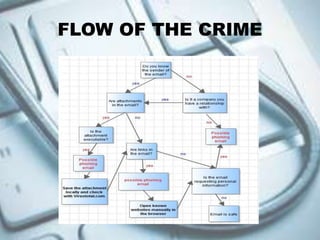
The flow chart addresses the three biggest email
dangers: Attachments, links and social engineering.
The chart has been color coded for easier recognition
of safe and dangerous elements in emails. All red
elements in the flow chart are considered dangerous
while blue elements are considered safe.
The chart furthermore provides basic suggestions on
how to react when possible dangerous elements are
encountered, for attachments it is to save them locally
and check them with a service like Virus total online.
That is better than opening them right away and
hoping that the resident antivirus solution, if one is
installed, catches any attack that gets carried out in
the process.
THE STEPS OF THE CRIME
 Embedding a link in an email that redirects your employee to
an unsecure website that requests sensitive information.
 Installing a Trojan via a malicious email attachment or ad
which will allow the intruder to exploit loopholes and obtain
sensitive information.
 Spoofing the sender address in an email to appear as a
reputable source and request sensitive information.
 Attempting to obtain company information over the phone by
impersonating a known company vendor or IT department.
THANK YOU

Phishing

  • 1.
    NAME : TARUNIKAH SUNDRAJAHPILLAI NUM.MATRIK:18070199 PROGRAM : DCF 3
  • 2.
    PHISHING • Definition Phishing isthe act of sending an email to a user falsely claiming to be an established legitimate enterprise in an attempt to scam the user into surrendering private information that will be used for identity theft.Phishing email will typically direct the user to visit a website where they are asked to update personal information, such as a password, credit card, social security, or bank account numbers, that the legitimate organization already has.
  • 3.
  • 4.
    The flow chartaddresses the three biggest email dangers: Attachments, links and social engineering. The chart has been color coded for easier recognition of safe and dangerous elements in emails. All red elements in the flow chart are considered dangerous while blue elements are considered safe. The chart furthermore provides basic suggestions on how to react when possible dangerous elements are encountered, for attachments it is to save them locally and check them with a service like Virus total online. That is better than opening them right away and hoping that the resident antivirus solution, if one is installed, catches any attack that gets carried out in the process.
  • 5.
    THE STEPS OFTHE CRIME  Embedding a link in an email that redirects your employee to an unsecure website that requests sensitive information.  Installing a Trojan via a malicious email attachment or ad which will allow the intruder to exploit loopholes and obtain sensitive information.  Spoofing the sender address in an email to appear as a reputable source and request sensitive information.  Attempting to obtain company information over the phone by impersonating a known company vendor or IT department.
  • 6.