Personal Kanban:

    A worshop for an effective 2011

    ...or how to make your goals flow
    into achievements :-)


    LeanAgileMachine.com
                     
Goals
    ●   Define the problems faced when learning and 
         developing
    ●   Cover the basic of Kanban
    ●   Discuss the design choices for my Kanban
           ●   The layout & values of my personal kanban boards
           ●   Explain how cards are designed to add greater value
    ●   Give people confidence to try for themselves


What is the problem...
    ●   Never have enought time to get everything done
    ●   Always more to learn
    ●   Something urgent comes up
    ●   New opportunities arise
    ●   Friends dragging you to the pub
    ●   Work to do, bills to pay, kids to feed...
    ●   Window of opportunity for ”Getting stuf done” 
         is limited
                                   
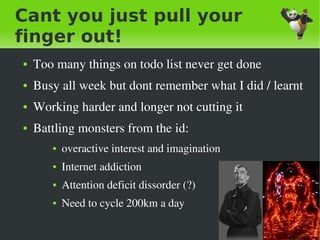
Cant you just pull your
finger out!
    ●   Too many things on todo list never get done
    ●   Busy all week but dont remember what I did / learnt
    ●   Working harder and longer not cutting it
    ●   Battling monsters from the id: 
           ●   overactive interest and imagination
           ●   Internet addiction
           ●   Attention deficit dissorder (?)
           ●   Need to cycle 200km a day

                                      
So workload is a problem
    ●   What techniques could I used to help?
           ●   Muddle along and hope for the best
           ●   Change my career (tube driver)
           ●   Change my life (retreat to monestry)


    ●   2 techniques used to manage activities
           ●   Personal Kanban
           ●   Pomedero – Time boxing

                                     
Why try Personal Kanban
    ●   To lean more about Kanban
           ●   Be able to introduce kanban technique to others
    ●   To focus my training so I learn more
           ●   Study one thing at a time
           ●   Make sure I have learnt something – achieve goals
    ●   It seemed like a good idea at the time
    ●   Kanban is fun, cool, creative and viral 


What is Kanban ?
    ●   A way to manage dependant events
    ●   Make your work visible
    ●   Limit your work in progress
           ●   Avoiding multi­tasking – its inefficient 
    ●   Pull system
           ●   only work on a task once previous task is complete
    ●   Help work to flow 
           ●   continuously and predictably deliver value

                                      
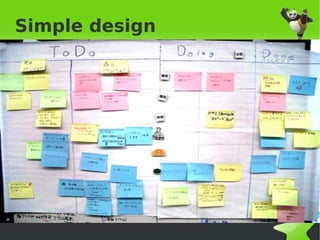
Simple design


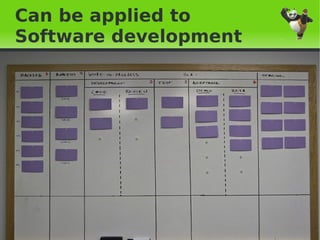
Can be applied to
Software development


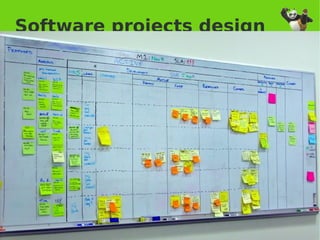
Software projects design


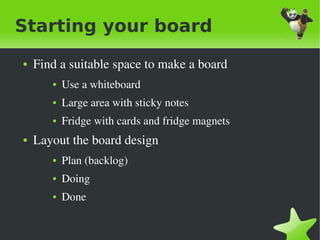
Starting your board
    ●   Find a suitable space to make a board
           ●   Use a whiteboard
           ●   Large area with sticky notes
           ●   Fridge with cards and fridge magnets
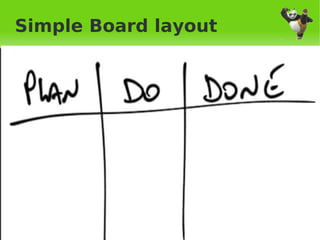
    ●   Layout the board design
           ●   Plan (backlog)
           ●   Doing
           ●   Done 

                                     
Simple Board layout


Visualising your situation
    ●   Add all your current work
           ●   Things should get messy


    ●   Add things you just recently completed
           ●   Helps with sense of achievement / gives confidence


    ●   Put all the things you know you want to start doing 
         in planning

                                     
Messy board example
    ●   JR0cket board messy


Starting to organise your board


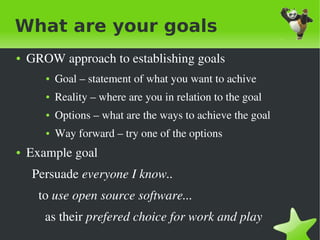
What are your goals
●   GROW approach to establishing goals
       ●   Goal – statement of what you want to achive
       ●   Reality – where are you in relation to the goal
       ●   Options – what are the ways to achieve the goal
       ●   Way forward – try one of the options
●   Example goal
      Persuade everyone I know..
        to use open source software...
          as their prefered choice for work and play
                                   
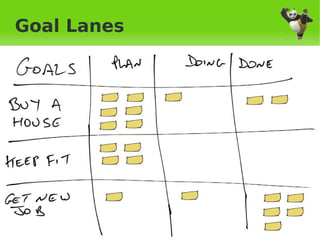
Goal Lanes


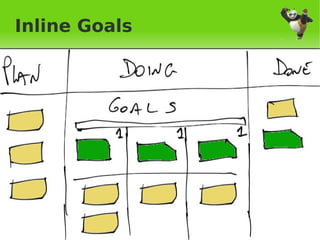
Inline Goals


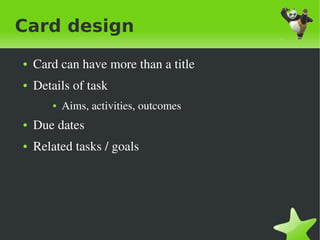
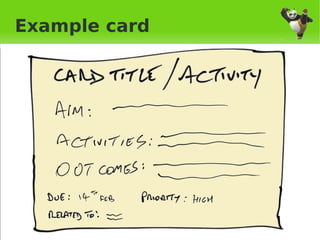
Card design
    ●   Card can have more than a title
    ●   Details of task
           ●   Aims, activities, outcomes
    ●   Due dates
    ●   Related tasks / goals


Example card


Lane design
    ●   Value Stream mapping
           ●   What activies do you do to get things done


    ●   Example:
           ●   Personal study / development
           ●   Any suggestions from the audience ??


Adapt and change
    ●   Think about your WIP limits


    ●   Think about your card design (write on both sides if 
         you need)


    ●   Where you keep your board 
           ●   Should be visible but not distracting


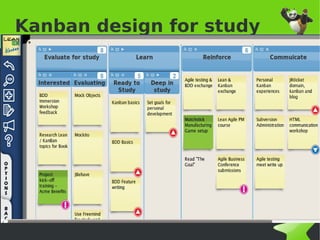
Kanban design for study


How did I build my Kanban
    ●   Started simple with: Plan – Do – Done 
           ●   Used scrap of paper for initial design
           ●   Built a simple board and started using it
    ●   Evolved into Plan – Do – Check – Act 
           ●   Evaluated deficits in board and enhanced
    ●   Used online Kanban
           ●   So I dont need to cary a large whiteboard around
    ●   Blogged what I had done to get feedback

                                      
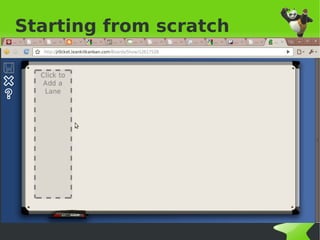
Starting from scratch


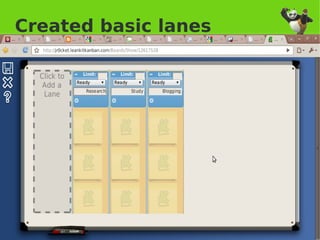
Created basic lanes


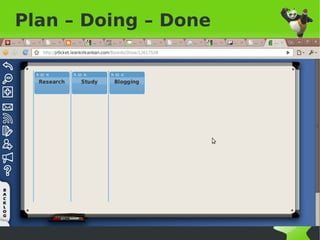
Plan – Doing – Done


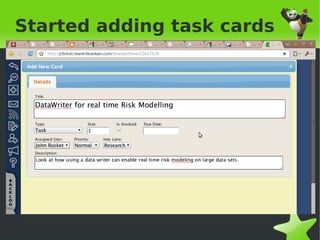
Started adding task cards


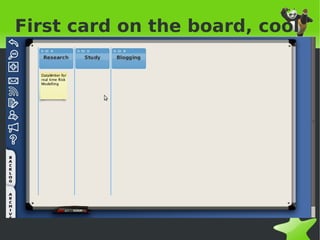
First card on the board, cool


Is something ready to
study?
    ●   Identify completed work between seperate board 
          lanes
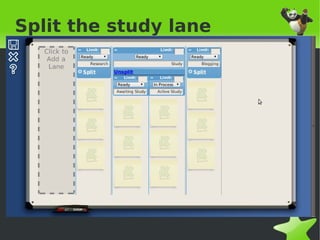
    ●   Spilt the study board lane into two 
           ●   First new lane is the waiting state 
           ●   Second lane is the study activity


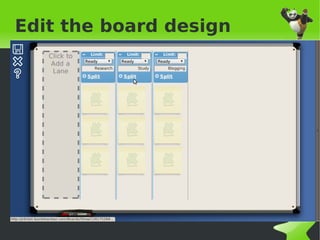
Edit the board design


Split the study lane


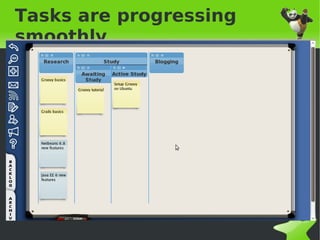
Tasks are progressing
smoothly


Several minutes later


    After adding a few tasks to the 
     board....


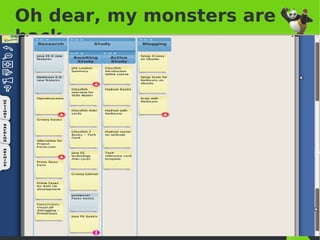
Oh dear, my monsters are
back


So What is missing ?
    ●   I have a Kanban board
    ●   I am breaking my tasks down into relatively small 
          chunks


    ●   But I still have far too much to do...


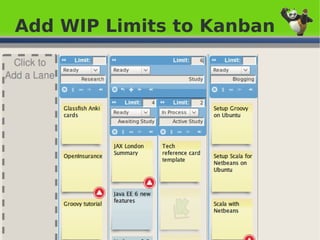
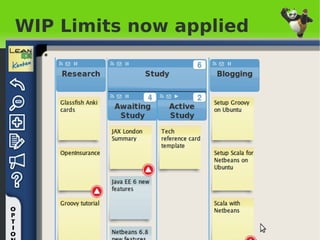
Lets apply the WIP !!!
    ●   To sudy effectively I need to focus
    ●   To focus I need to work on 1 thing at 
         once
    ●   To work on 1 thing at once I need:


        Work In Progress 
         Limits
                                 
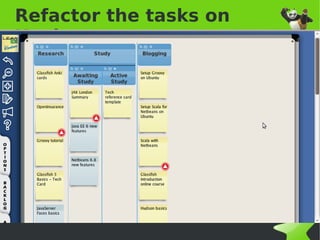
Refactor the tasks on
Kanban


Add WIP Limits to Kanban


WIP Limits now applied


How do I know if I've learnt?
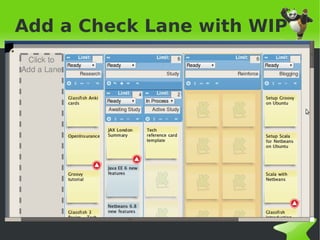
    ●   Need a Check step after study
    ●   Encourages continuous improvement
           ●   A lean principle


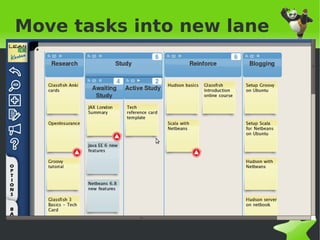
    ●   Lets create a new lane on the board as a review 
         stage


Add a Check Lane with WIP


Move tasks into new lane


Have a board, what next?
    ●   Defined task cards in more detail
           ●   Limited by the tool I'm using though
    ●   Pomodoro technique for time boxing tasks
    ●   Value stream mapping?
           ●   Considered overkill for simple set of events


Defining the task card
    ●   Set goal of task
    ●   Identify measure to check if goal reached
           ●   eg. Can write a Kata in Scala
           ●   eg. Can design a Kanban board using VSM
           ●   eg. Write a summary of the book on blog, stating 
                 why it is a valuable read
    ●   Identify resources to assist training
    ●   Identify scope of training
           ●   refactor task into multiple cards if too big 
                                       
Why Pomodoro
    ●   Limited time helps concentration
           ●   starting this presentation this morning focused me 
    ●   Easier to set and measure goals for a time boxed 
         activity
    ●   Helps break down tasks into managable chuncks


Pomodero – Timeboxing
tasks
    ●   Useful tool to focus mind on a goal
    ●   Helps stick to WIP limits and Idea of flow
    ●   Tasks have varying time limits during flow 
         dependant on size of task
           ●   Review: 5 – 15 minutes
           ●   Study: 30 minutes – half a day
           ●   Evaluate: 15 minutes – 1 hour
           ●   Blogging: continuous activity

                                     
Other learning techniques
    ●    For programming languages
           ●   Kata
           ●   Dojo's
           ●   TDD / BDD
    ●   Speed reading
    ●   Attending / Giving SkillsMatter talks & courses
    ●   Blogging and Tweeting 
           ●   leanagilemachine.com
           ●   @JR0cket
                                   
Summary
    ●   I found Kanban increased my training effectiveness
    ●   I learnt alot about Kanban
    ●   I got feedback on my techniques by blogging
    ●   I got lots of feedback from this talk (hopefully)


    ●   Its time for the pub if you dont have any 
          questions ?


Resources
    ●   LeanAgileMachine.com – lean agile blog
    ●   JR0cket.com / JR0cket.co.uk – tech stuff
    ●   SkillsMatter.com – podcasts, talks, courses
    ●   PersonalKanban.com – the resource for personal 
          kanban
    ●   LimitedWIPSociety.org – please get involved
    ●   The Goal – Eliyahu M. Goldratt – great read
    ●   Theory of Constraints – Eliyahu M. Goldratt
                                 
PUB
    ●   Hat and Feathers
           ●   Left out of SkillsMatter
           ●   On the corner at main crossroads 


           ●   Walk to bar and buy several drinks – if you ask me a 
                good question I may buy you a drink or two


Personal kanban-workshop

  • 1.
    Personal Kanban: A worshop for an effective 2011 ...or how to make your goals flow into achievements :-) LeanAgileMachine.com    
  • 2.
    Goals ● Define the problems faced when learning and  developing ● Cover the basic of Kanban ● Discuss the design choices for my Kanban ● The layout & values of my personal kanban boards ● Explain how cards are designed to add greater value ● Give people confidence to try for themselves    
  • 3.
    What is theproblem... ● Never have enought time to get everything done ● Always more to learn ● Something urgent comes up ● New opportunities arise ● Friends dragging you to the pub ● Work to do, bills to pay, kids to feed... ● Window of opportunity for ”Getting stuf done”  is limited    
  • 4.
    Cant you justpull your finger out! ● Too many things on todo list never get done ● Busy all week but dont remember what I did / learnt ● Working harder and longer not cutting it ● Battling monsters from the id:  ● overactive interest and imagination ● Internet addiction ● Attention deficit dissorder (?) ● Need to cycle 200km a day    
  • 5.
    So workload isa problem ● What techniques could I used to help? ● Muddle along and hope for the best ● Change my career (tube driver) ● Change my life (retreat to monestry) ● 2 techniques used to manage activities ● Personal Kanban ● Pomedero – Time boxing    
  • 6.
    Why try PersonalKanban ● To lean more about Kanban ● Be able to introduce kanban technique to others ● To focus my training so I learn more ● Study one thing at a time ● Make sure I have learnt something – achieve goals ● It seemed like a good idea at the time ● Kanban is fun, cool, creative and viral     
  • 7.
    What is Kanban? ● A way to manage dependant events ● Make your work visible ● Limit your work in progress ● Avoiding multi­tasking – its inefficient  ● Pull system ● only work on a task once previous task is complete ● Help work to flow  ● continuously and predictably deliver value    
  • 8.
  • 9.
    Can be appliedto Software development    
  • 10.
  • 11.
    Starting your board ● Find a suitable space to make a board ● Use a whiteboard ● Large area with sticky notes ● Fridge with cards and fridge magnets ● Layout the board design ● Plan (backlog) ● Doing ● Done     
  • 12.
  • 13.
    Visualising your situation ● Add all your current work ● Things should get messy ● Add things you just recently completed ● Helps with sense of achievement / gives confidence ● Put all the things you know you want to start doing  in planning    
  • 14.
    Messy board example ● JR0cket board messy    
  • 15.
    Starting to organiseyour board    
  • 16.
    What are yourgoals ● GROW approach to establishing goals ● Goal – statement of what you want to achive ● Reality – where are you in relation to the goal ● Options – what are the ways to achieve the goal ● Way forward – try one of the options ● Example goal       Persuade everyone I know..         to use open source software...           as their prefered choice for work and play    
  • 17.
  • 18.
  • 19.
    Card design ● Card can have more than a title ● Details of task ● Aims, activities, outcomes ● Due dates ● Related tasks / goals    
  • 20.
  • 21.
    Lane design ● Value Stream mapping ● What activies do you do to get things done ● Example: ● Personal study / development ● Any suggestions from the audience ??    
  • 22.
    Adapt and change ● Think about your WIP limits ● Think about your card design (write on both sides if  you need) ● Where you keep your board  ● Should be visible but not distracting    
  • 23.
    Kanban design forstudy    
  • 24.
    How did Ibuild my Kanban ● Started simple with: Plan – Do – Done  ● Used scrap of paper for initial design ● Built a simple board and started using it ● Evolved into Plan – Do – Check – Act  ● Evaluated deficits in board and enhanced ● Used online Kanban ● So I dont need to cary a large whiteboard around ● Blogged what I had done to get feedback    
  • 25.
  • 26.
  • 27.
    Plan – Doing– Done    
  • 28.
  • 29.
    First card onthe board, cool    
  • 30.
    Is something readyto study? ● Identify completed work between seperate board  lanes ● Spilt the study board lane into two  ● First new lane is the waiting state  ● Second lane is the study activity    
  • 31.
    Edit the boarddesign    
  • 32.
    Split the studylane    
  • 33.
  • 34.
    Several minutes later After adding a few tasks to the  board....    
  • 35.
    Oh dear, mymonsters are back    
  • 36.
    So What ismissing ? ● I have a Kanban board ● I am breaking my tasks down into relatively small  chunks ● But I still have far too much to do...    
  • 37.
    Lets apply theWIP !!! ● To sudy effectively I need to focus ● To focus I need to work on 1 thing at  once ● To work on 1 thing at once I need: Work In Progress  Limits    
  • 38.
    Refactor the taskson Kanban    
  • 39.
    Add WIP Limitsto Kanban    
  • 40.
    WIP Limits nowapplied    
  • 41.
    How do Iknow if I've learnt? ● Need a Check step after study ● Encourages continuous improvement ● A lean principle ● Lets create a new lane on the board as a review  stage    
  • 42.
    Add a CheckLane with WIP    
  • 43.
    Move tasks intonew lane    
  • 44.
    Have a board,what next? ● Defined task cards in more detail ● Limited by the tool I'm using though ● Pomodoro technique for time boxing tasks ● Value stream mapping? ● Considered overkill for simple set of events    
  • 45.
    Defining the taskcard ● Set goal of task ● Identify measure to check if goal reached ● eg. Can write a Kata in Scala ● eg. Can design a Kanban board using VSM ● eg. Write a summary of the book on blog, stating  why it is a valuable read ● Identify resources to assist training ● Identify scope of training ● refactor task into multiple cards if too big     
  • 46.
    Why Pomodoro ● Limited time helps concentration ● starting this presentation this morning focused me  ● Easier to set and measure goals for a time boxed  activity ● Helps break down tasks into managable chuncks    
  • 47.
    Pomodero – Timeboxing tasks ● Useful tool to focus mind on a goal ● Helps stick to WIP limits and Idea of flow ● Tasks have varying time limits during flow  dependant on size of task ● Review: 5 – 15 minutes ● Study: 30 minutes – half a day ● Evaluate: 15 minutes – 1 hour ● Blogging: continuous activity    
  • 48.
    Other learning techniques ●  For programming languages ● Kata ● Dojo's ● TDD / BDD ● Speed reading ● Attending / Giving SkillsMatter talks & courses ● Blogging and Tweeting  ● leanagilemachine.com ● @JR0cket    
  • 49.
    Summary ● I found Kanban increased my training effectiveness ● I learnt alot about Kanban ● I got feedback on my techniques by blogging ● I got lots of feedback from this talk (hopefully) ● Its time for the pub if you dont have any  questions ?    
  • 50.
    Resources ● LeanAgileMachine.com – lean agile blog ● JR0cket.com / JR0cket.co.uk – tech stuff ● SkillsMatter.com – podcasts, talks, courses ● PersonalKanban.com – the resource for personal  kanban ● LimitedWIPSociety.org – please get involved ● The Goal – Eliyahu M. Goldratt – great read ● Theory of Constraints – Eliyahu M. Goldratt    
  • 51.
    PUB ● Hat and Feathers ● Left out of SkillsMatter ● On the corner at main crossroads  ● Walk to bar and buy several drinks – if you ask me a  good question I may buy you a drink or two