People Management Center
Educative Material
1 Why did we create it?
✓ In order to organize and improve information;
✓ Empower the network to be more analytic;
✓ Generate simple and automatic data;
✓ Evaluate the entire network based in one tool;
2 The most important indicators and concepts
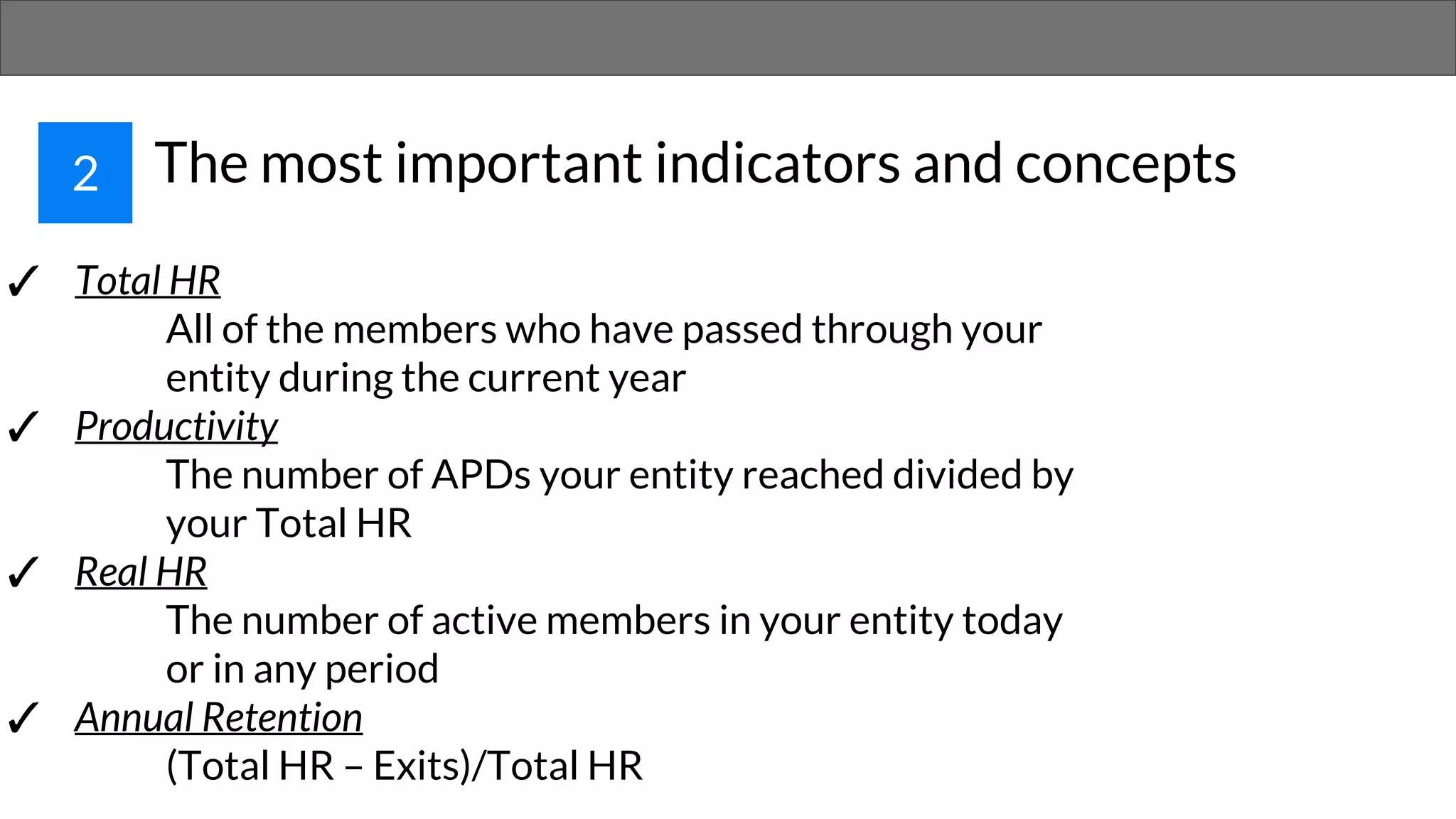
✓ Total HR
All of the members who have passed through your
entity during the current year
✓ Productivity
The number of APDs your entity reached divided by
your Total HR
✓ Real HR
The number of active members in your entity today
or in any period
✓ Annual Retention
(Total HR – Exits)/Total HR
3 Some principles to make it awesome
✓ Fullfill it every week or in every three days
✓ Explain it to your CX VPs and the role between
you and them to make it happen
✓ Respect the formulas! There are many automatic
references and any wrong move will harm the
entire sheet
✓ Use it to think. The sheet wont give you answers
but the right data to take the best decisions
4 How to work with the sheets
There are two kind of spaces on the sheet:
✓ The ones you’ll put data
✓ The ones which’ll analyse it
Good News:
You are totally free to edit the ones you’ll
put data in!!!!!
More Good News:
The analysis are authomatic and you don’t
need to edit those spaces ☺
But how can I identify the ones I can edit and
the ones I can’t?
The white ones you can
edit!
Any other color you can’t
edit!
And the striped ones will
provide you analysis
THE
SHEETS IN DETAILS
5
5.1 HR Analytics
In this sheet you’ll put membership information that’ll provide to the Center all the names you’ll work with. The
sheet will use it this names to HR Control and Membership Criteria.
In some columns you’re going to find
icons that’ll allow you to select one
option to describre members.
By choosing one of this options you’ll
have more patterns in the information
about your LC
It’s important to highlight
that you’ll keep information
about all members who
entered the LC even if
they’re not members
anymore!
5.2 Membership Criteria
This sheet you’ll manage information about
membership criteria.
In this image you see the OH control of VP and
TL. Each square means a week.
Here you won’t insert the number of OH they
did during the week but only if they did it or
not.
In case it’s done you insert 1. If not, 0.
Once he got 75% or more in the
criteria per semesterhis Status
turns to OK
All the results from this sheet will generate
analysis in Central KPIs.
Those results per area are going to make you
more able to analyse and track the entire LC
situation
Both VP Name and TL Name will
show automatically once you
fullfill the HR Control sheet
5.3 HR Control
HR Control is the sheet
to simply control your
HR situation and see
your entity
organogram.
Once you insert a
member in HR Analytics
his name we’ll be
available to be inserted
in HR Control
Those are the colors that’ll
represent the status of your
members
Example of an HR Control using
membership status. There are no
members in IXP, two in Alert and
two remaning positions.
5.4 Team Standards
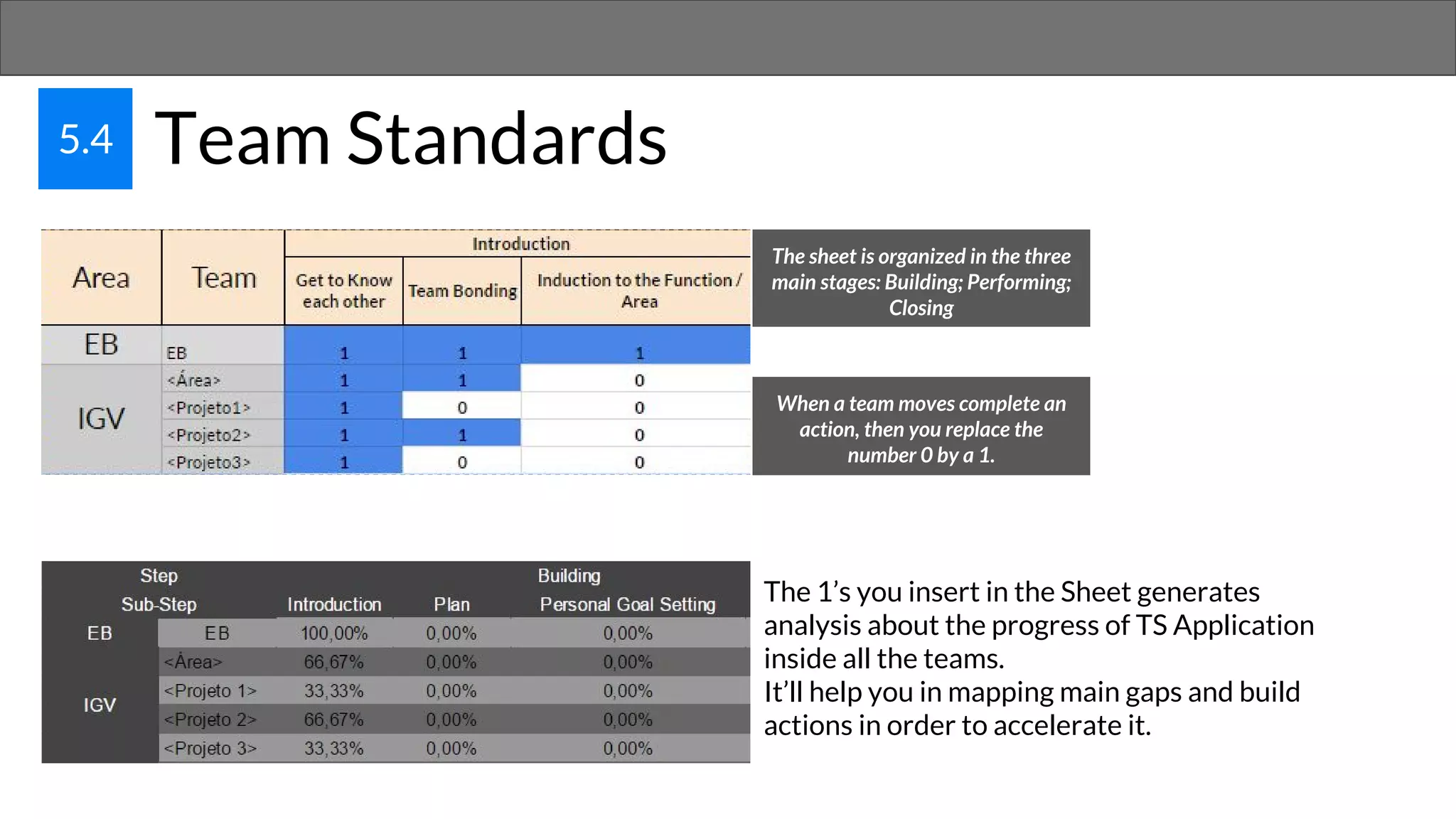
The sheet is organized in the three
main stages: Building; Performing;
Closing
When a team moves complete an
action, then you replace the
number 0 by a 1.
The 1’s you insert in the Sheet generates
analysis about the progress of TS Application
inside all the teams.
It’ll help you in mapping main gaps and build
actions in order to accelerate it.
5.5 Plano de Educação
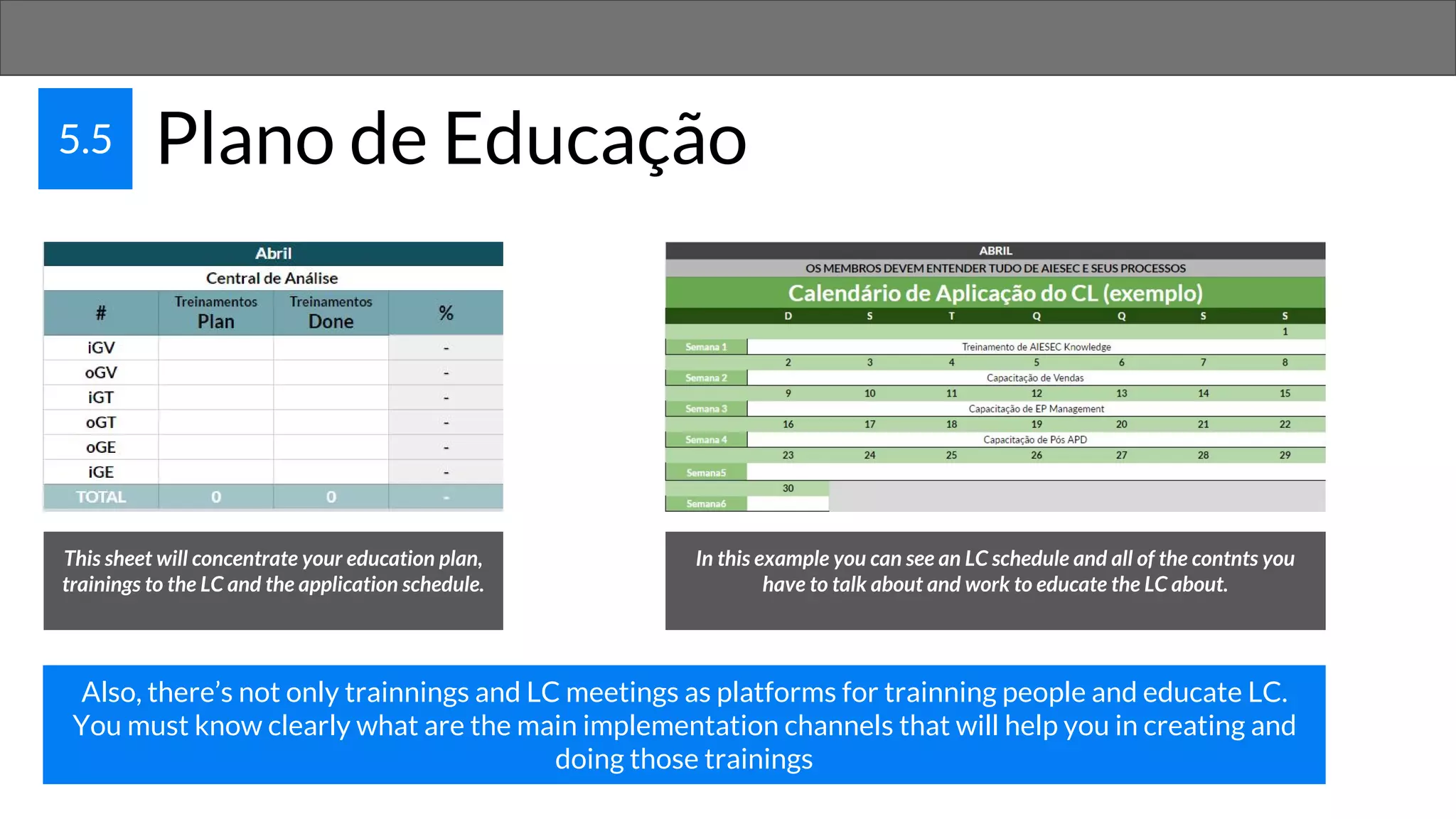
This sheet will concentrate your education plan,
trainings to the LC and the application schedule.
In this example you can see an LC schedule and all of the contnts you
have to talk about and work to educate the LC about.
Also, there’s not only trainnings and LC meetings as platforms for trainning people and educate LC.
You must know clearly what are the main implementation channels that will help you in creating and
doing those trainings
PERFORMANCE
6
5.5 Plano de Educação: OKR
The higher the performance the
higher the results
How to do it:
✓ Plan with your team
✓ Define team ambitions, delivereables
and key performance indicators
✓ Have clear and aligned DDLs and
responsibles
✓ Evaluate the results
Performance is the production of
valid results with value delivery.
How will the Performance sheet help me on it?
Using a method:
Objective and Key Results
In this method, you set a goal and define what are the
key-achievements that will guide you to achieve it.
The goals must be measurable and clearly aligned with the
processes and indicators you and your LC work.
If it doesn’t lead you to do more exchanges it’s going be
useless.
If you want to learn about it for real, then read the book!
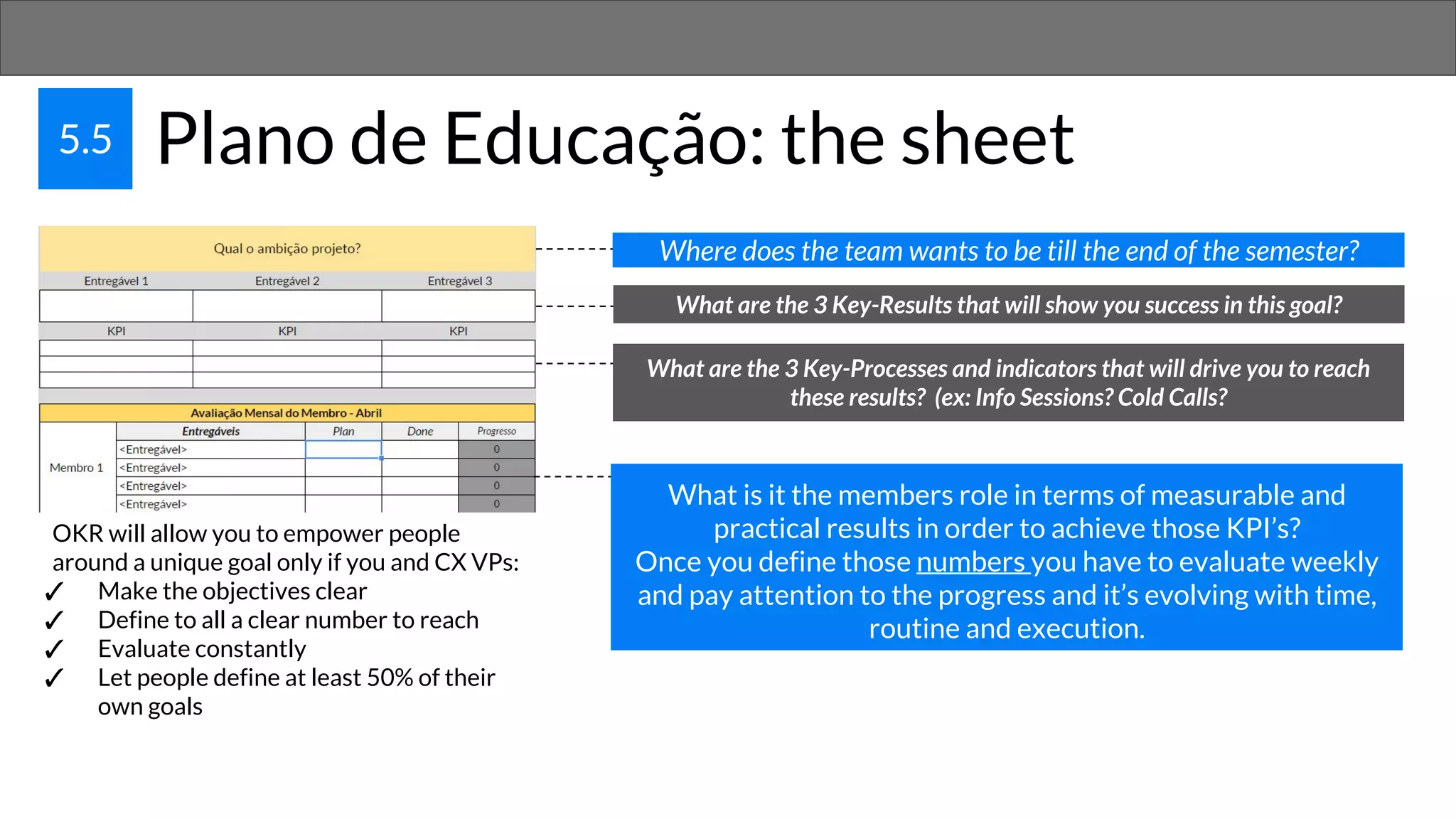
5.5 Plano de Educação: the sheet
What are the 3 Key-Results that will show you success in this goal?
Where does the team wants to be till the end of the semester?
What are the 3 Key-Processes and indicators that will drive you to reach
these results? (ex: Info Sessions? Cold Calls?
What is it the members role in terms of measurable and
practical results in order to achieve those KPI’s?
Once you define those numbers you have to evaluate weekly
and pay attention to the progress and it’s evolving with time,
routine and execution.
OKR will allow you to empower people
around a unique goal only if you and CX VPs:
✓ Make the objectives clear
✓ Define to all a clear number to reach
✓ Evaluate constantly
✓ Let people define at least 50% of their
own goals
People Manager Center

People Manager Center

  • 1.
  • 2.
    1 Why didwe create it? ✓ In order to organize and improve information; ✓ Empower the network to be more analytic; ✓ Generate simple and automatic data; ✓ Evaluate the entire network based in one tool;
  • 3.
    2 The mostimportant indicators and concepts ✓ Total HR All of the members who have passed through your entity during the current year ✓ Productivity The number of APDs your entity reached divided by your Total HR ✓ Real HR The number of active members in your entity today or in any period ✓ Annual Retention (Total HR – Exits)/Total HR
  • 4.
    3 Some principlesto make it awesome ✓ Fullfill it every week or in every three days ✓ Explain it to your CX VPs and the role between you and them to make it happen ✓ Respect the formulas! There are many automatic references and any wrong move will harm the entire sheet ✓ Use it to think. The sheet wont give you answers but the right data to take the best decisions
  • 5.
    4 How towork with the sheets There are two kind of spaces on the sheet: ✓ The ones you’ll put data ✓ The ones which’ll analyse it Good News: You are totally free to edit the ones you’ll put data in!!!!! More Good News: The analysis are authomatic and you don’t need to edit those spaces ☺ But how can I identify the ones I can edit and the ones I can’t? The white ones you can edit! Any other color you can’t edit! And the striped ones will provide you analysis
  • 6.
  • 7.
    5.1 HR Analytics Inthis sheet you’ll put membership information that’ll provide to the Center all the names you’ll work with. The sheet will use it this names to HR Control and Membership Criteria. In some columns you’re going to find icons that’ll allow you to select one option to describre members. By choosing one of this options you’ll have more patterns in the information about your LC It’s important to highlight that you’ll keep information about all members who entered the LC even if they’re not members anymore!
  • 8.
    5.2 Membership Criteria Thissheet you’ll manage information about membership criteria. In this image you see the OH control of VP and TL. Each square means a week. Here you won’t insert the number of OH they did during the week but only if they did it or not. In case it’s done you insert 1. If not, 0. Once he got 75% or more in the criteria per semesterhis Status turns to OK All the results from this sheet will generate analysis in Central KPIs. Those results per area are going to make you more able to analyse and track the entire LC situation Both VP Name and TL Name will show automatically once you fullfill the HR Control sheet
  • 9.
    5.3 HR Control HRControl is the sheet to simply control your HR situation and see your entity organogram. Once you insert a member in HR Analytics his name we’ll be available to be inserted in HR Control Those are the colors that’ll represent the status of your members Example of an HR Control using membership status. There are no members in IXP, two in Alert and two remaning positions.
  • 10.
    5.4 Team Standards Thesheet is organized in the three main stages: Building; Performing; Closing When a team moves complete an action, then you replace the number 0 by a 1. The 1’s you insert in the Sheet generates analysis about the progress of TS Application inside all the teams. It’ll help you in mapping main gaps and build actions in order to accelerate it.
  • 11.
    5.5 Plano deEducação This sheet will concentrate your education plan, trainings to the LC and the application schedule. In this example you can see an LC schedule and all of the contnts you have to talk about and work to educate the LC about. Also, there’s not only trainnings and LC meetings as platforms for trainning people and educate LC. You must know clearly what are the main implementation channels that will help you in creating and doing those trainings
  • 12.
  • 13.
    5.5 Plano deEducação: OKR The higher the performance the higher the results How to do it: ✓ Plan with your team ✓ Define team ambitions, delivereables and key performance indicators ✓ Have clear and aligned DDLs and responsibles ✓ Evaluate the results Performance is the production of valid results with value delivery. How will the Performance sheet help me on it? Using a method: Objective and Key Results In this method, you set a goal and define what are the key-achievements that will guide you to achieve it. The goals must be measurable and clearly aligned with the processes and indicators you and your LC work. If it doesn’t lead you to do more exchanges it’s going be useless. If you want to learn about it for real, then read the book!
  • 14.
    5.5 Plano deEducação: the sheet What are the 3 Key-Results that will show you success in this goal? Where does the team wants to be till the end of the semester? What are the 3 Key-Processes and indicators that will drive you to reach these results? (ex: Info Sessions? Cold Calls? What is it the members role in terms of measurable and practical results in order to achieve those KPI’s? Once you define those numbers you have to evaluate weekly and pay attention to the progress and it’s evolving with time, routine and execution. OKR will allow you to empower people around a unique goal only if you and CX VPs: ✓ Make the objectives clear ✓ Define to all a clear number to reach ✓ Evaluate constantly ✓ Let people define at least 50% of their own goals