
DERBYCON 2012
PENETRATION TESTING FROM A HOT TUB
TIME MACHINE
Presented by:
Eric Smith
Chris Gates
ABOUT US
• Senior Partners – LARES Consulting
• Penetration Testers
• Professional Unicorn Hunters
• Mostly trouble makers
• Twitter
• Chris Gates: @carnal0wnage
• Eric Smith: @infosecmafia
• Blog
• carnal0wnage.attackresearch.com
DISCLAIMER
• Not releasing 0days, not releasing tools
• Zero exploits will be shown
• Not demoing lab projects that fail IRL
• Security isn’t that sexy
• This is not a demo of MS08-067
• 1 part flashback + 2 parts reminder
MOTIVATION
• We see a lot of dirty/scary/shocking <adjective>
• Corporations are NOT getting better over time
• Penetration testers ARE getting lazier over time
• Basic shit gets you owned, if you don’t test it, others
will eventually
• Stop with smoke and mirrors to sell your value.
RESULTS sell value
• Step away from the scan + exploit mentality
NEWS FLASH: 0-DAYS DON’T MATTER!
• I <3 0day, why?
• It keeps people on edge!
• BUT
• 0days never seem to f* work IRL, well 1 days do - Maybe
• If its in an exploit framework then AV is blocking it. THAT
they are actually good at.
• If I had a (good) 0day I wouldn’t waste it on a pen-test
• 0days provide ZERO value to your client
REALITY CHECK
• Good hackers don’t use expensive vulnerability
scanners
• Good hackers don’t use automated penetration
testing
• Attackers don’t have a scope or timeframes
• Attackers don’t stop after first successful exploit
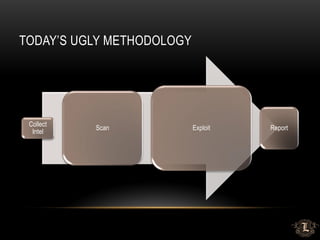
TODAY’S UGLY METHODOLOGY
Collect
Intel
Scan Exploit Report
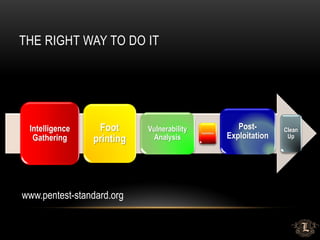
THE RIGHT WAY TO DO IT
Intelligence
Gathering
Foot
printing
Vulnerability
Analysis
Exploitation
Post-
Exploitation
Clean
Up
www.pentest-standard.org
OSINT: OPEN SOURCE INTELLIGENCE GATHERING
• Often excluded from penetration testing
• It’s the easiest way to learn about your target w/o being
detected
• Hackers do it, so should you
• Profiling will expedite your chances for success
• Basis to formulate your own attack matrix
OSINT VALUE
• It’s free!
• Someone/Something else already did most of it for you
• Develop a Process/Methodology == Habit
• Do it EVERY time: *Unicorns* show up occasionally. You can’t
take the attitude that “I'll never find/see X”
• Put eyes on EVERYTHING!
• Don't rely on $OSINT-tool to tell you what’s important
• Don’t rely on $scanner to tell you what’s vulnerable
OSINT - EXTERNAL
• Support Tools
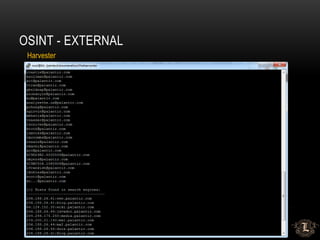
• Harvester, FOCA, Shodan, Maltego, Deep Magic
• Metasploit Auxiliary Modules
• Nmap scripts (NSE)
• Roll your own (ruby, python, bash)
• No substitute for your eyes and brain
• Is information X important or not?
• How can it be applied throughout an engagement?
• What’s the value and potential damage of the Intel?
OSINT - EXTERNAL
Harvester
OSINT -- EXTERNAL
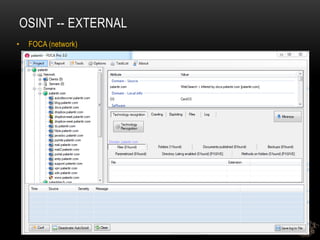
• FOCA (network)
OSINT -- EXTERNAL
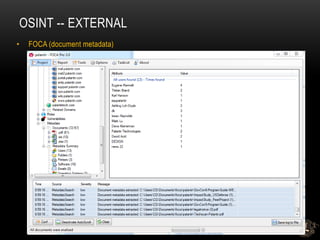
• FOCA (document metadata)
OSINT -- EXTERNAL
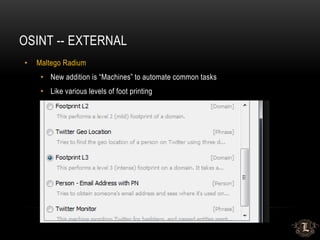
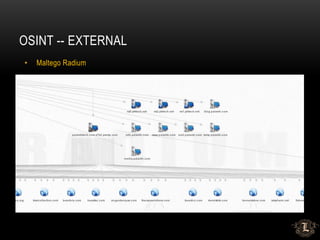
• Maltego Radium
• New addition is “Machines” to automate common tasks
• Like various levels of foot printing
OSINT -- EXTERNAL
• Maltego Radium
OSINT -- EXTERNAL
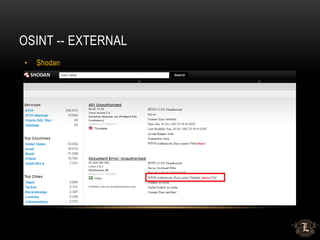
• Shodan
OSINT -- EXTERNAL
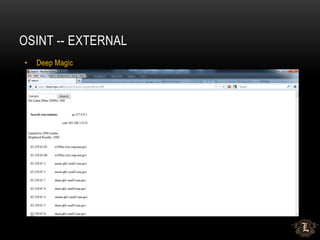
• Deep Magic
OSINT -- EXTERNAL
• Metasploit Auxiliary Modules
• Email Enumeration
• DNS enumeration
• SMTP
• Etc…
OSINT -- EXTERNAL
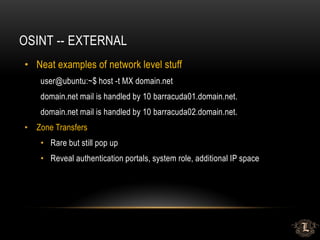
• Neat examples of network level stuff
user@ubuntu:~$ host -t MX domain.net
domain.net mail is handled by 10 barracuda01.domain.net.
domain.net mail is handled by 10 barracuda02.domain.net.
• Zone Transfers
• Rare but still pop up
• Reveal authentication portals, system role, additional IP space
OSINT -- EXTERNAL
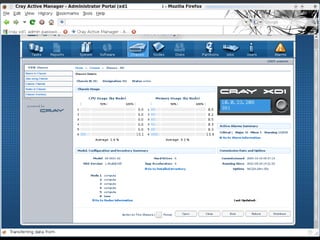
• You need to put eyes on everything!
• SVN/CVS repos – usernames/file access/source code/passwords/keys
• Directory listing – info leakage – credentials, etc.
• Internal IP leakage – useful later during compromise, targeted attacks
• Send bounce email – get internal IPs, server names, system type, etc.
• Eyes on everything + Default passwords ==
OSINT -- EXTERNAL
OSINT -- EXTERNAL
• LinkedIN
• See my talk from yesterday 
• New Hires – EXCELLENT targets
• Minimal training
• Weaker Passwords – Changme1[23], Welcome1[23]]
• Unfamiliar with personnel, policies and procedures
OSINT -- EXTERNAL
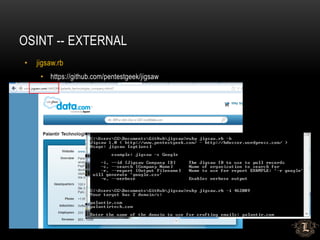
• jigsaw.rb
• https://github.com/pentestgeek/jigsaw
OSINT -- EXTERNAL
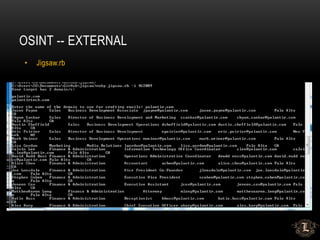
• Jigsaw.rb
OSINT -- EXTERNAL
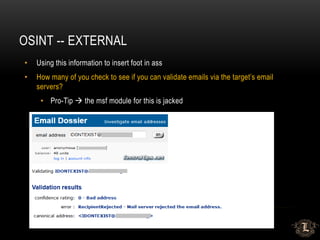
• Using this information to insert foot in ass
• How many of you check to see if you can validate emails via the target’s email
servers?
• Pro-Tip  the msf module for this is jacked
OSINT -- EXTERNAL
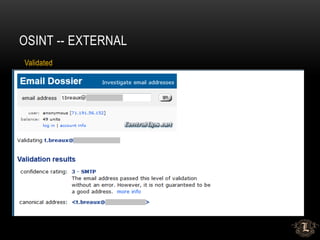
Validated
OSINT – DESIRED RESULTS
• Attack/Threat Matrix
• IP Ranges/Host names
• Authentication Portals and Types
• Username/Email List
• Contact Information/Geo Data
• Credentials (possible)
• The list is endless…
OSINT -- INTERNAL
• Just as important as external profiling
• Follow a repeatable methodology/develop a habit
• Prioritize the value of your targets and task lists
• Intel from external OSINT applies to internal systems (file server
names, usernames, etc.)
• DHCP leases, DNS zone xfer/lookups, packet captures, ARP, etc.
ATTACK TIME!
SMART BRUTE FORCING
• Throw away the 600MB dictionary files
• You will most likely lock accounts if you blow your wad
• Build a generic accounts list
• Take old SAM files, pull out common names
• Build a generic account list
• Lucky punches are common
• Invoices/invoices, training/training, helpdesk/helpdesk
• Go build your own 
• Space out your runs. 2-3 passwords every few hours.
• Smarter Passwords – Welcome1[23], Password1[23], Summer12, Company1[23]
• CeWL – Custom Wordlist Generator – Robin Wood
• Use your intelligence from OSINT activities
OWA BRUTING
• Tons of ways to do it but they all have limitations
• Owabf.py
• Wmat – custom pattern files
• Metasploit auxiliary module
• Burp Intruder
• PRO TIP: Cookie needs to be reset after a successful login
• Major Content Length change = successful login
OWA GAL DUMPING
• Useful if you land a weak password and want to try it on more users
• OWA 2007 and older have the GAL available for downloading (sometimes)
• OWA 2010 requires another step:
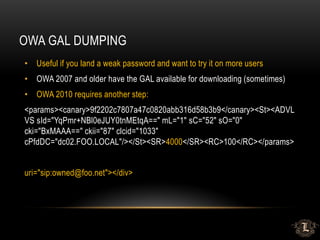
<params><canary>9f2202c7807a47c0820abb316d58b3b9</canary><St><ADVL
VS sId="YqPmr+NBl0eJUY0tnMEtqA==" mL="1" sC="52" sO="0"
cki="BxMAAA==" ckii="87" clcid="1033"
cPfdDC="dc02.FOO.LOCAL"/></St><SR>4000</SR><RC>100</RC></params>
uri="sip:owned@foo.net"></div>
LOTUS NOTES BRUTING
• Penetration Tester’s WET DREAM
• Names.nsf == GOLD!
• Since forever Lotus Notes has suffered from hash disclosure via one account
• Tons of ways to do it but they all have limitations
• Metasploit auxiliary module
• Domino Hunter script
• Nmap NSE script
• Burp Intruder
• JtR hash cracking – dominosec/lotus5
CITRIX ACCESS
• Published Application Enumeration
• IP address/System name enumeration
• Username enumeration (sometimes)
• Burp Intruder
• Other tools:
• Metasploit auxillary modules
• Nmap NSE scripts
• Defcon 10: Citrix PA Scan/Proxy
• Citrix Access Gateway software – ICA creation
CITRIX – APPLICATION BREAKOUT
• One published application is usually all you need
• Old tricks still work
• File open – force browse %SYSTEMROOT%
• Help file – search
• Unknown file type – open with – explorer
• IKAT
• See old talks on Citrix for refresher 
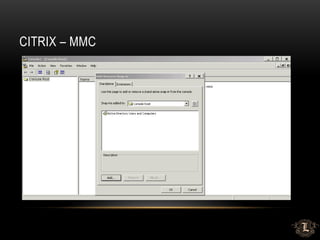
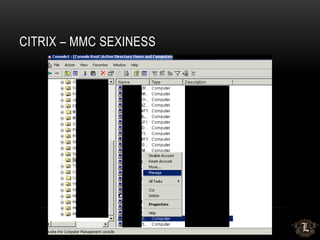
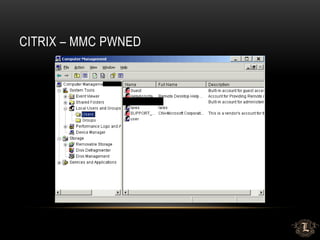
CITRIX – NEW(ER) DIRTY SECRETS
• System Information – File Open
• Explorer -> mmc.exe
• Remote manage system
• Add local administrator account
• Remote Desktop access
• Drop binary -> exploit -> pivot -> ….
CITRIX – MMC
CITRIX – MMC SEXINESS
CITRIX – MMC PWNED
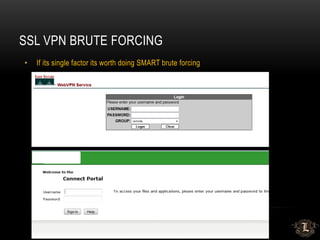
SSL VPN BRUTE FORCING
• If its single factor its worth doing SMART brute forcing
VPN PRIVILEGES
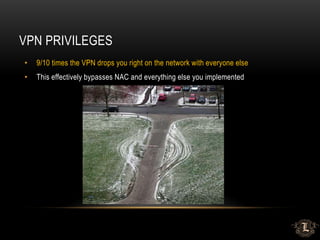
• 9/10 times the VPN drops you right on the network with everyone else
• This effectively bypasses NAC and everything else you implemented
FILE UPLOAD
• WebDav
• HTTP METHOD Abuse (PUT/DELETE)
• RFI/LFI
• The List goes on…
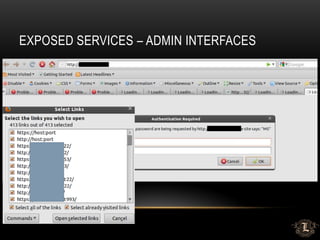
EXPOSED SERVICES – ADMIN INTERFACES
• Admin Interfaces listening on random ports can be gold.
• Finding them amongst all the crap can be challenging.
• Possible Methodology
• Nmap your range
• Import into metasploit
• Use the db_ searches to pull out all hosts you want
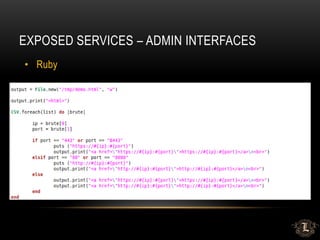
• Some ruby to make them into a piece of html
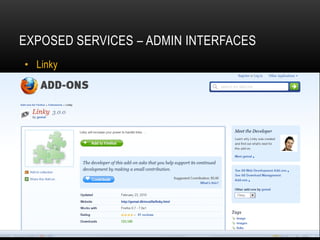
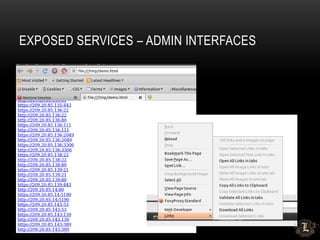
• Use linky to open everything
EXPOSED SERVICES – ADMIN INTERFACES
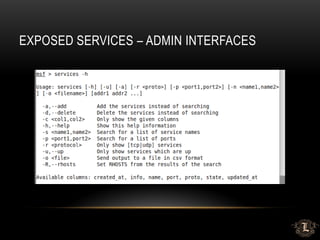
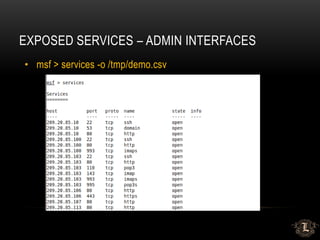
• msf > services -o /tmp/demo.csv
EXPOSED SERVICES – ADMIN INTERFACES
• Ruby
EXPOSED SERVICES – ADMIN INTERFACES
• Linky
EXPOSED SERVICES – ADMIN INTERFACES
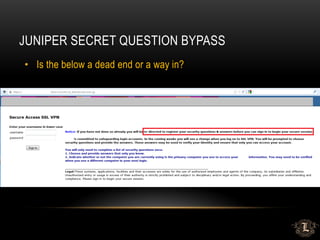
JUNIPER SECRET QUESTION BYPASS
• Is the below a dead end or a way in?
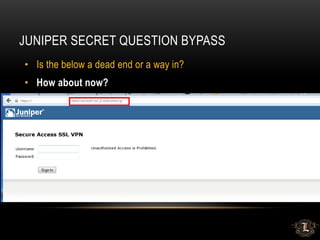
JUNIPER SECRET QUESTION BYPASS
• Is the below a dead end or a way in?
• How about now?
SHAREPOINT VALUE
• Misconfigured SharePoint can be *really* useful
• User/Domain Enumeration
• Access to useful files
• Authenticated access to SharePoint is *always* useful
• That’s really another talk…but its mint
• Go ask Nickerson
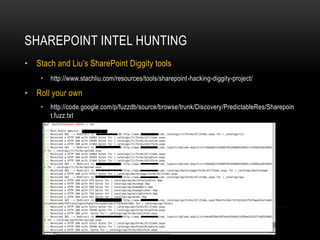
SHAREPOINT INTEL HUNTING
• Stach and Liu’s SharePoint Diggity tools
• http://www.stachliu.com/resources/tools/sharepoint-hacking-diggity-project/
• Roll your own
• http://code.google.com/p/fuzzdb/source/browse/trunk/Discovery/PredictableRes/Sharepoin
t.fuzz.txt
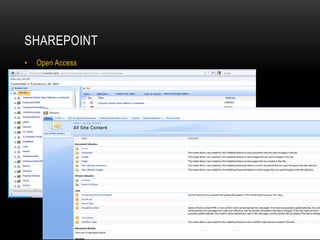
SHAREPOINT
• Open Access
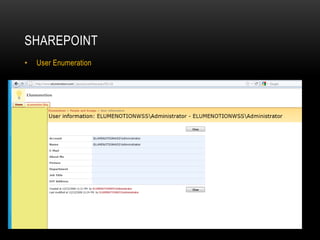
SHAREPOINT
• User Enumeration
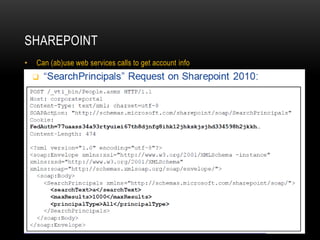
SHAREPOINT
• Can (ab)use web services calls to get account info
INTERNAL PWNAGE
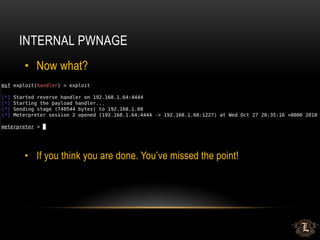
• Now what?
• If you think you are done. You’ve missed the point!
DOMAIN ENUMERATION (OLD SCHOOL)
• Ipconfig/ifconfig
• Tells you:
• Dual homed?
• Ipv6?
• Domain Controllers/Domain Name(s)
• Net commands
• Still works most of the time
• Disabled? Use dsquery/dsget
• Internal Zone Transfers
DOMAIN ENUMERATION (NEW SCHOOL)
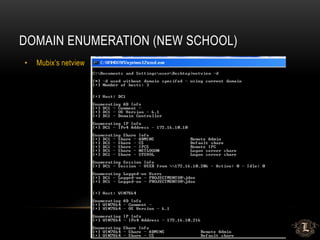
• Mubix’s netview
DOMAIN ENUMERATION
• Subnets with DC’s are usually the server / production subnets
• You at least have a quick starting point for looking for low hanging fruit.
• Net view /domain:DOMAINNAME
• Dsquery/dsget
• Windows server
• dsquery * -scope subtree -attr "cn" "operatingSystem"
"operatingSystemServicePack" -filter
"(&(objectclass=computer)(objectcategory=computer)(operatingSystem=Windows
Server*))" -limit 0 > mylist.txt
• Window XP
• dsquery * -scope subtree -attr "cn" "operatingSystem"
"operatingSystemServicePack" -filter
"(&(objectclass=computer)(objectcategory=computer)(operatingSystem=Windows
XP*))" -limit 0 > mylist.txt
USER ENUMERATION
• Net commands
• Net user /domain
• Dsquery | dsget
• List users and comments
• dsquery user “DC=company,DC=NET" -limit 0 | dsget user -samid -display -desc >
company-user-and-comments.txt
• Metasploit Aux modules
• use auxiliary/scanner/smb/smb_enumusers
• use auxiliary/scanner/smb/smb_enumusers_domain
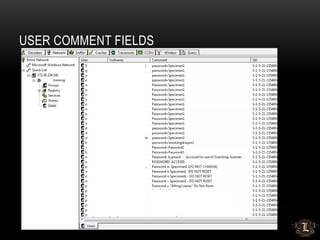
• Cain still works great
• Plus gives you nuggets of gold like…
USER COMMENT FIELDS
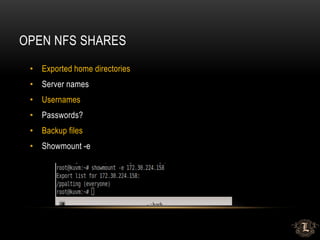
OPEN NFS SHARES
• Exported home directories
• Server names
• Usernames
• Passwords?
• Backup files
• Showmount -e
OPEN SMB SHARES
• You have to look in them to find useful stuff
• Scanner wont tell you that documentX is important
• Metasploit
• use auxiliary/scanner/smb/smb_enumshares
• Enum.exe
• Loose permissions on file servers
• World readable user home directories on SAN/NAS devices
FILE MOVEMENT
• Clipboard/Buffer
• Remote Desktop
• Network mapped drives
• External drop sites
• WebDAV file server
• BITS
MSSQL ENUMERATION
• OSQL -L
MSSQL
msf auxiliary(mssql_ping) > run
[*] SQL Server information for 172.30.0.70:
[+] ServerName = RBRLIVE12
[+] InstanceName = MSSQLSERVER
[+] IsClustered = No
[+] Version = 8.00.194
[+] tcp = 1433
[+] np = RBRLIVE12pipesqlquery
[*] SQL Server information for 172.30.0.162:
[+] ServerName = LOGISTICS02
[+] InstanceName = SQL1
[*] SQL Server information for 172.30.0.185:
[+] ServerName = RBRLIVE11
ORACLE
• Outdated Oracle on Windows can yield shell
• Can be difficult to get it to play nice with metasploit
• Isqlplus doesn’t honor routes in metasploit
QUICK ELEVATION
• Group Policy Preference Exploit
• Metasploit Post Module
• Post/windows/gather/credentials/gpp
• Domain users part of local administrator group
• Similar usernames with Domain Admin accounts
• Password reuse
INTERNAL PWNAGE RECAP
• Resist the urge to scan all things
• Use OSINT and enumeration to your advantage
• DHCP leases are awesome
• Dns zone xfer – what do we learn again from external slides?
• Dig/nslookup domains – reveal server subnets, system naming convention,
system role, etc
• Dsquery examples
• Enumeration against systems (enum.exe, dsquery, cain, msf aux, etc)
• NetBIOS never left
INTERNAL PWNAGE RECAP
• Active Directory comment fields
• SQL enumeration (Cain, dsquery, sqlrecon, msf aux)
• Be smart about SA account (blank, password, SA, etc.) and lockouts
• Terminal Servers enumeration (Cain, dsquery)
• NFS shares/mounts/info leakage (files, users, server names, etc)
• SVN/CVS entries – access to source code – web.config files – immediate access
• SharePoint – basic user/weak permissions/easy searchable for info to
elevate/backups
• Citrix access with basic user – great way to elevate (shown during external
slides)
• File servers – weak permissions/easy searching for “password” files, ssh keys,
home directories, etc.
POOR MAN’S PERSISTENCE
• Sticky keys / magnifier
• Cat passwords.txt
• Cisco PCF file
• VPN/GRE Tunnel
• All user’s startup
• Pasword1 
THE DOCTOR IS IN
• Are you positive your last assessment
was accurate?
• Password auditing
• Data discovery/classification
• System hardening
• Segmentation
• Egress filtering
• Least privilege models

PENETRATION TESTING FROM A HOT TUB TIME MACHINE

  • 1.
    DERBYCON 2012 PENETRATION TESTINGFROM A HOT TUB TIME MACHINE Presented by: Eric Smith Chris Gates
  • 2.
    ABOUT US • SeniorPartners – LARES Consulting • Penetration Testers • Professional Unicorn Hunters • Mostly trouble makers • Twitter • Chris Gates: @carnal0wnage • Eric Smith: @infosecmafia • Blog • carnal0wnage.attackresearch.com
  • 3.
    DISCLAIMER • Not releasing0days, not releasing tools • Zero exploits will be shown • Not demoing lab projects that fail IRL • Security isn’t that sexy • This is not a demo of MS08-067 • 1 part flashback + 2 parts reminder
  • 4.
    MOTIVATION • We seea lot of dirty/scary/shocking <adjective> • Corporations are NOT getting better over time • Penetration testers ARE getting lazier over time • Basic shit gets you owned, if you don’t test it, others will eventually • Stop with smoke and mirrors to sell your value. RESULTS sell value • Step away from the scan + exploit mentality
  • 5.
    NEWS FLASH: 0-DAYSDON’T MATTER! • I <3 0day, why? • It keeps people on edge! • BUT • 0days never seem to f* work IRL, well 1 days do - Maybe • If its in an exploit framework then AV is blocking it. THAT they are actually good at. • If I had a (good) 0day I wouldn’t waste it on a pen-test • 0days provide ZERO value to your client
  • 6.
    REALITY CHECK • Goodhackers don’t use expensive vulnerability scanners • Good hackers don’t use automated penetration testing • Attackers don’t have a scope or timeframes • Attackers don’t stop after first successful exploit
  • 7.
  • 8.
    THE RIGHT WAYTO DO IT Intelligence Gathering Foot printing Vulnerability Analysis Exploitation Post- Exploitation Clean Up www.pentest-standard.org
  • 9.
    OSINT: OPEN SOURCEINTELLIGENCE GATHERING • Often excluded from penetration testing • It’s the easiest way to learn about your target w/o being detected • Hackers do it, so should you • Profiling will expedite your chances for success • Basis to formulate your own attack matrix
  • 10.
    OSINT VALUE • It’sfree! • Someone/Something else already did most of it for you • Develop a Process/Methodology == Habit • Do it EVERY time: *Unicorns* show up occasionally. You can’t take the attitude that “I'll never find/see X” • Put eyes on EVERYTHING! • Don't rely on $OSINT-tool to tell you what’s important • Don’t rely on $scanner to tell you what’s vulnerable
  • 11.
    OSINT - EXTERNAL •Support Tools • Harvester, FOCA, Shodan, Maltego, Deep Magic • Metasploit Auxiliary Modules • Nmap scripts (NSE) • Roll your own (ruby, python, bash) • No substitute for your eyes and brain • Is information X important or not? • How can it be applied throughout an engagement? • What’s the value and potential damage of the Intel?
  • 12.
  • 13.
    OSINT -- EXTERNAL •FOCA (network)
  • 14.
    OSINT -- EXTERNAL •FOCA (document metadata)
  • 15.
    OSINT -- EXTERNAL •Maltego Radium • New addition is “Machines” to automate common tasks • Like various levels of foot printing
  • 16.
    OSINT -- EXTERNAL •Maltego Radium
  • 17.
  • 18.
  • 19.
    OSINT -- EXTERNAL •Metasploit Auxiliary Modules • Email Enumeration • DNS enumeration • SMTP • Etc…
  • 20.
    OSINT -- EXTERNAL •Neat examples of network level stuff user@ubuntu:~$ host -t MX domain.net domain.net mail is handled by 10 barracuda01.domain.net. domain.net mail is handled by 10 barracuda02.domain.net. • Zone Transfers • Rare but still pop up • Reveal authentication portals, system role, additional IP space
  • 21.
    OSINT -- EXTERNAL •You need to put eyes on everything! • SVN/CVS repos – usernames/file access/source code/passwords/keys • Directory listing – info leakage – credentials, etc. • Internal IP leakage – useful later during compromise, targeted attacks • Send bounce email – get internal IPs, server names, system type, etc. • Eyes on everything + Default passwords ==
  • 22.
  • 23.
    OSINT -- EXTERNAL •LinkedIN • See my talk from yesterday  • New Hires – EXCELLENT targets • Minimal training • Weaker Passwords – Changme1[23], Welcome1[23]] • Unfamiliar with personnel, policies and procedures
  • 24.
    OSINT -- EXTERNAL •jigsaw.rb • https://github.com/pentestgeek/jigsaw
  • 25.
  • 26.
    OSINT -- EXTERNAL •Using this information to insert foot in ass • How many of you check to see if you can validate emails via the target’s email servers? • Pro-Tip  the msf module for this is jacked
  • 27.
  • 28.
    OSINT – DESIREDRESULTS • Attack/Threat Matrix • IP Ranges/Host names • Authentication Portals and Types • Username/Email List • Contact Information/Geo Data • Credentials (possible) • The list is endless…
  • 29.
    OSINT -- INTERNAL •Just as important as external profiling • Follow a repeatable methodology/develop a habit • Prioritize the value of your targets and task lists • Intel from external OSINT applies to internal systems (file server names, usernames, etc.) • DHCP leases, DNS zone xfer/lookups, packet captures, ARP, etc.
  • 30.
  • 31.
    SMART BRUTE FORCING •Throw away the 600MB dictionary files • You will most likely lock accounts if you blow your wad • Build a generic accounts list • Take old SAM files, pull out common names • Build a generic account list • Lucky punches are common • Invoices/invoices, training/training, helpdesk/helpdesk • Go build your own  • Space out your runs. 2-3 passwords every few hours. • Smarter Passwords – Welcome1[23], Password1[23], Summer12, Company1[23] • CeWL – Custom Wordlist Generator – Robin Wood • Use your intelligence from OSINT activities
  • 32.
    OWA BRUTING • Tonsof ways to do it but they all have limitations • Owabf.py • Wmat – custom pattern files • Metasploit auxiliary module • Burp Intruder • PRO TIP: Cookie needs to be reset after a successful login • Major Content Length change = successful login
  • 33.
    OWA GAL DUMPING •Useful if you land a weak password and want to try it on more users • OWA 2007 and older have the GAL available for downloading (sometimes) • OWA 2010 requires another step: <params><canary>9f2202c7807a47c0820abb316d58b3b9</canary><St><ADVL VS sId="YqPmr+NBl0eJUY0tnMEtqA==" mL="1" sC="52" sO="0" cki="BxMAAA==" ckii="87" clcid="1033" cPfdDC="dc02.FOO.LOCAL"/></St><SR>4000</SR><RC>100</RC></params> uri="sip:owned@foo.net"></div>
  • 34.
    LOTUS NOTES BRUTING •Penetration Tester’s WET DREAM • Names.nsf == GOLD! • Since forever Lotus Notes has suffered from hash disclosure via one account • Tons of ways to do it but they all have limitations • Metasploit auxiliary module • Domino Hunter script • Nmap NSE script • Burp Intruder • JtR hash cracking – dominosec/lotus5
  • 35.
    CITRIX ACCESS • PublishedApplication Enumeration • IP address/System name enumeration • Username enumeration (sometimes) • Burp Intruder • Other tools: • Metasploit auxillary modules • Nmap NSE scripts • Defcon 10: Citrix PA Scan/Proxy • Citrix Access Gateway software – ICA creation
  • 36.
    CITRIX – APPLICATIONBREAKOUT • One published application is usually all you need • Old tricks still work • File open – force browse %SYSTEMROOT% • Help file – search • Unknown file type – open with – explorer • IKAT • See old talks on Citrix for refresher 
  • 37.
    CITRIX – NEW(ER)DIRTY SECRETS • System Information – File Open • Explorer -> mmc.exe • Remote manage system • Add local administrator account • Remote Desktop access • Drop binary -> exploit -> pivot -> ….
  • 38.
  • 39.
  • 40.
  • 41.
    SSL VPN BRUTEFORCING • If its single factor its worth doing SMART brute forcing
  • 42.
    VPN PRIVILEGES • 9/10times the VPN drops you right on the network with everyone else • This effectively bypasses NAC and everything else you implemented
  • 43.
    FILE UPLOAD • WebDav •HTTP METHOD Abuse (PUT/DELETE) • RFI/LFI • The List goes on…
  • 44.
    EXPOSED SERVICES –ADMIN INTERFACES • Admin Interfaces listening on random ports can be gold. • Finding them amongst all the crap can be challenging. • Possible Methodology • Nmap your range • Import into metasploit • Use the db_ searches to pull out all hosts you want • Some ruby to make them into a piece of html • Use linky to open everything
  • 45.
    EXPOSED SERVICES –ADMIN INTERFACES
  • 46.
    EXPOSED SERVICES –ADMIN INTERFACES • msf > services -o /tmp/demo.csv
  • 47.
    EXPOSED SERVICES –ADMIN INTERFACES • Ruby
  • 48.
    EXPOSED SERVICES –ADMIN INTERFACES • Linky
  • 49.
    EXPOSED SERVICES –ADMIN INTERFACES
  • 50.
    EXPOSED SERVICES –ADMIN INTERFACES
  • 51.
    JUNIPER SECRET QUESTIONBYPASS • Is the below a dead end or a way in?
  • 52.
    JUNIPER SECRET QUESTIONBYPASS • Is the below a dead end or a way in? • How about now?
  • 53.
    SHAREPOINT VALUE • MisconfiguredSharePoint can be *really* useful • User/Domain Enumeration • Access to useful files • Authenticated access to SharePoint is *always* useful • That’s really another talk…but its mint • Go ask Nickerson
  • 54.
    SHAREPOINT INTEL HUNTING •Stach and Liu’s SharePoint Diggity tools • http://www.stachliu.com/resources/tools/sharepoint-hacking-diggity-project/ • Roll your own • http://code.google.com/p/fuzzdb/source/browse/trunk/Discovery/PredictableRes/Sharepoin t.fuzz.txt
  • 55.
  • 56.
  • 57.
    SHAREPOINT • Can (ab)useweb services calls to get account info
  • 58.
    INTERNAL PWNAGE • Nowwhat? • If you think you are done. You’ve missed the point!
  • 59.
    DOMAIN ENUMERATION (OLDSCHOOL) • Ipconfig/ifconfig • Tells you: • Dual homed? • Ipv6? • Domain Controllers/Domain Name(s) • Net commands • Still works most of the time • Disabled? Use dsquery/dsget • Internal Zone Transfers
  • 60.
    DOMAIN ENUMERATION (NEWSCHOOL) • Mubix’s netview
  • 61.
    DOMAIN ENUMERATION • Subnetswith DC’s are usually the server / production subnets • You at least have a quick starting point for looking for low hanging fruit. • Net view /domain:DOMAINNAME • Dsquery/dsget • Windows server • dsquery * -scope subtree -attr "cn" "operatingSystem" "operatingSystemServicePack" -filter "(&(objectclass=computer)(objectcategory=computer)(operatingSystem=Windows Server*))" -limit 0 > mylist.txt • Window XP • dsquery * -scope subtree -attr "cn" "operatingSystem" "operatingSystemServicePack" -filter "(&(objectclass=computer)(objectcategory=computer)(operatingSystem=Windows XP*))" -limit 0 > mylist.txt
  • 62.
    USER ENUMERATION • Netcommands • Net user /domain • Dsquery | dsget • List users and comments • dsquery user “DC=company,DC=NET" -limit 0 | dsget user -samid -display -desc > company-user-and-comments.txt • Metasploit Aux modules • use auxiliary/scanner/smb/smb_enumusers • use auxiliary/scanner/smb/smb_enumusers_domain • Cain still works great • Plus gives you nuggets of gold like…
  • 63.
  • 64.
    OPEN NFS SHARES •Exported home directories • Server names • Usernames • Passwords? • Backup files • Showmount -e
  • 65.
    OPEN SMB SHARES •You have to look in them to find useful stuff • Scanner wont tell you that documentX is important • Metasploit • use auxiliary/scanner/smb/smb_enumshares • Enum.exe • Loose permissions on file servers • World readable user home directories on SAN/NAS devices
  • 66.
    FILE MOVEMENT • Clipboard/Buffer •Remote Desktop • Network mapped drives • External drop sites • WebDAV file server • BITS
  • 67.
  • 68.
    MSSQL msf auxiliary(mssql_ping) >run [*] SQL Server information for 172.30.0.70: [+] ServerName = RBRLIVE12 [+] InstanceName = MSSQLSERVER [+] IsClustered = No [+] Version = 8.00.194 [+] tcp = 1433 [+] np = RBRLIVE12pipesqlquery [*] SQL Server information for 172.30.0.162: [+] ServerName = LOGISTICS02 [+] InstanceName = SQL1 [*] SQL Server information for 172.30.0.185: [+] ServerName = RBRLIVE11
  • 69.
    ORACLE • Outdated Oracleon Windows can yield shell • Can be difficult to get it to play nice with metasploit • Isqlplus doesn’t honor routes in metasploit
  • 70.
    QUICK ELEVATION • GroupPolicy Preference Exploit • Metasploit Post Module • Post/windows/gather/credentials/gpp • Domain users part of local administrator group • Similar usernames with Domain Admin accounts • Password reuse
  • 71.
    INTERNAL PWNAGE RECAP •Resist the urge to scan all things • Use OSINT and enumeration to your advantage • DHCP leases are awesome • Dns zone xfer – what do we learn again from external slides? • Dig/nslookup domains – reveal server subnets, system naming convention, system role, etc • Dsquery examples • Enumeration against systems (enum.exe, dsquery, cain, msf aux, etc) • NetBIOS never left
  • 72.
    INTERNAL PWNAGE RECAP •Active Directory comment fields • SQL enumeration (Cain, dsquery, sqlrecon, msf aux) • Be smart about SA account (blank, password, SA, etc.) and lockouts • Terminal Servers enumeration (Cain, dsquery) • NFS shares/mounts/info leakage (files, users, server names, etc) • SVN/CVS entries – access to source code – web.config files – immediate access • SharePoint – basic user/weak permissions/easy searchable for info to elevate/backups • Citrix access with basic user – great way to elevate (shown during external slides) • File servers – weak permissions/easy searching for “password” files, ssh keys, home directories, etc.
  • 73.
    POOR MAN’S PERSISTENCE •Sticky keys / magnifier • Cat passwords.txt • Cisco PCF file • VPN/GRE Tunnel • All user’s startup • Pasword1 
  • 74.
    THE DOCTOR ISIN • Are you positive your last assessment was accurate? • Password auditing • Data discovery/classification • System hardening • Segmentation • Egress filtering • Least privilege models