PDF (Portable Document Format) By Raveesh S   IKM Trainee NCSI, IISc
Content Introduction  What is PDF? Why PDF?  Acrobat Components  Creating PDF Files   Editing PDF Documents   Advantages   Free and Proprietary Software  Conclusion
Introduction PDF  is a file format that has captured all the elements of a printed document as an electronic image that you can view, navigate, print, or forward to someone else.
PDF files are created using Adobe Acrobat, Acrobat Capture, or similar products. To view and use the files, you need the free Acrobat Reader, which you can easily download. Once you've downloaded the Reader, it will start automatically whenever you want to look at a PDF file. It’s developed by  Adobe Systems
PDF is standard for the secure and reliable distribution and exchange around the world. PDF is a universal file format that preserves the fonts, images, graphics, and layout of any source document
PDF is an open file format created by Adobe Systems in 1993 and is now being prepared for submission as an ISO standard.
The PDF file format has undergone several changes, generally as new versions of Adobe Acrobat have been released. There have been eight versions of PDF, 1.0 (1993), 1.1 (1994), 1.2 (1996), 1.3 (1999), 1.4 (2001), 1.5 (2003), 1.6 (2005), and 1.7 (2006). The format is not fully backward-compatible, and older reader software may not be able to open newer files
Technology used PDF is primarily the combination of three  technologies: A sub-set of the  PostScript  page description programming language, for generating the layout and graphics. A  font-embedding/replacement system  to allow fonts to travel with the documents. A  structured storage system  to bundle these elements and any associated content into a single file, with data compression where appropriate.
PDF Can … Can be shared, viewed, and printed by anyone with free Adobe Reader¨ software can be read by any computer (Macintosh, Windows or UNIX) platform conflicts. A way of displaying documents in the form in which they will be print Can describe documents containing any combination of text, graphics, and images
Why PDF? readable by  anyone  with free Acrobat Reader  platform and software independence  high-visibility markup options for grading comments  accessibility option via Access plugin and screen readers  safe format, virus-free  single file delivery of elaborate documents in a compact format, e.g. for slide presentations or web sites
Acrobat Components Adobe Reader  (free): view/print PDF, copy text from PDF to word processor; includes web-browser plugin  Acrobat  (formerly known as Acrobat Exchange): Reader plus editing and annotation features, web-capture, scan-and-OCR tool, and ability to save, sign, and secure
Acrobat Distiller : high-quality printer and PS(post Script)-to-PDF converter; indispensable component of PDFmaker; includes the AdobePS printer driver PDFmaker : macros for Word and Power point to create PDF while preserving document structure and other features
Acrobat Catalog :  creates index for the search tool  PDFwriter : simple printer to make PDF from any application Paper Capture :  plugin for Optical Character Recognition (OCR) within Acrobat.
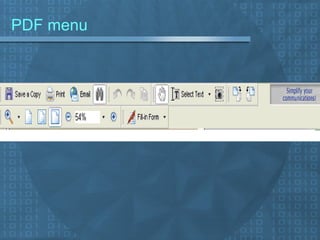
PDF menu
Creating PDF Files From any application, simply print to  pdf choose PDFwriter or Acrobat Distiller as printer PDFwriter printer options are set in print dialogue Distiller job options are set in the Distiller program In Word/Power point/Excel, use toolbar button to   create PDF
Editing PDF Documents   re-typing some text with the text-  touchup tool  move text or graphics— but only on a  per-line basis!  change font face, size, color for (part of) a line of text  delete graphics with the object select tool  insert a new line of text:  cont…
cont… Insert new page  Delete page Create Bookmark Delete Bookmark  Create Hyperlink Rotate pages  Change page number(1,2,3,…i,ii,iii…a,b,c…) Change Font Color
Advantages Smaller files :  smaller the file, the quicker the transfer,  10 megabytes to 187 kilobytes (0.187 megabytes)   Free " Reader " Software   Cross-Platform Compatibility .    Security vs Viral Infection   Security vs. Changes   PDF can contain hyperlinks
Free and open source Ghostscript  – viewer, creator and converter GSPdf  – viewer for  GNUstep , based on Ghostscript iText  –  Java -based creator, editor and converter KPDF  –  KDE 's viewer; based on Xpdf. Multivalent  – Java-based viewer OpenOffice .org  – office suite, can export to PDF PDFBox  – Java library PdfTeX  – converter (from  TeX ) Pdftk  – creator, editor and converter (iText frontend) ReportLab  –  Python -based creator Scribus  – creator Xpdf  - PDF view for Xwindows
Proprietary Software Adobe Acrobat  –  Adobe 's official PDF creator, commercial Adobe  LiveCycle  PDF Generator  –  Adobe 's official SERVER SIDE PDF generator, commercial Adobe Reader  – Adobe's official PDF reader, offered at no cost Foxit  – viewer PDFNet  SDK  – PDF library for reading, writing, editing, printing and viewing PDFs RasterMaster  – viewer and conversion toolkit txt2pdf  – old textual reports to nice pdfs converter
 
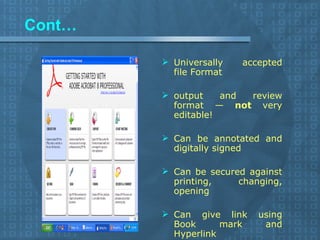
Cont… Universally accepted file Format output and review format —  not  very editable! Can be annotated and digitally signed Can be secured against printing, changing, opening Can give link using Book mark and Hyperlink
References http://www.webopedia.com/ http://en.wikipedia.org/wiki/Portable_Document_Format http://www.adobe.com/ http://www.pdfonline.com/
THANK YOU

PDF

  • 1.
    PDF (Portable DocumentFormat) By Raveesh S IKM Trainee NCSI, IISc
  • 2.
    Content Introduction What is PDF? Why PDF? Acrobat Components Creating PDF Files Editing PDF Documents Advantages Free and Proprietary Software Conclusion
  • 3.
    Introduction PDF is a file format that has captured all the elements of a printed document as an electronic image that you can view, navigate, print, or forward to someone else.
  • 4.
    PDF files arecreated using Adobe Acrobat, Acrobat Capture, or similar products. To view and use the files, you need the free Acrobat Reader, which you can easily download. Once you've downloaded the Reader, it will start automatically whenever you want to look at a PDF file. It’s developed by Adobe Systems
  • 5.
    PDF is standardfor the secure and reliable distribution and exchange around the world. PDF is a universal file format that preserves the fonts, images, graphics, and layout of any source document
  • 6.
    PDF is anopen file format created by Adobe Systems in 1993 and is now being prepared for submission as an ISO standard.
  • 7.
    The PDF fileformat has undergone several changes, generally as new versions of Adobe Acrobat have been released. There have been eight versions of PDF, 1.0 (1993), 1.1 (1994), 1.2 (1996), 1.3 (1999), 1.4 (2001), 1.5 (2003), 1.6 (2005), and 1.7 (2006). The format is not fully backward-compatible, and older reader software may not be able to open newer files
  • 8.
    Technology used PDFis primarily the combination of three technologies: A sub-set of the PostScript page description programming language, for generating the layout and graphics. A font-embedding/replacement system to allow fonts to travel with the documents. A structured storage system to bundle these elements and any associated content into a single file, with data compression where appropriate.
  • 9.
    PDF Can …Can be shared, viewed, and printed by anyone with free Adobe Reader¨ software can be read by any computer (Macintosh, Windows or UNIX) platform conflicts. A way of displaying documents in the form in which they will be print Can describe documents containing any combination of text, graphics, and images
  • 10.
    Why PDF? readableby anyone with free Acrobat Reader platform and software independence high-visibility markup options for grading comments accessibility option via Access plugin and screen readers safe format, virus-free single file delivery of elaborate documents in a compact format, e.g. for slide presentations or web sites
  • 11.
    Acrobat Components AdobeReader (free): view/print PDF, copy text from PDF to word processor; includes web-browser plugin Acrobat (formerly known as Acrobat Exchange): Reader plus editing and annotation features, web-capture, scan-and-OCR tool, and ability to save, sign, and secure
  • 12.
    Acrobat Distiller :high-quality printer and PS(post Script)-to-PDF converter; indispensable component of PDFmaker; includes the AdobePS printer driver PDFmaker : macros for Word and Power point to create PDF while preserving document structure and other features
  • 13.
    Acrobat Catalog : creates index for the search tool PDFwriter : simple printer to make PDF from any application Paper Capture : plugin for Optical Character Recognition (OCR) within Acrobat.
  • 14.
  • 15.
    Creating PDF FilesFrom any application, simply print to pdf choose PDFwriter or Acrobat Distiller as printer PDFwriter printer options are set in print dialogue Distiller job options are set in the Distiller program In Word/Power point/Excel, use toolbar button to create PDF
  • 16.
    Editing PDF Documents re-typing some text with the text- touchup tool move text or graphics— but only on a per-line basis! change font face, size, color for (part of) a line of text delete graphics with the object select tool insert a new line of text: cont…
  • 17.
    cont… Insert newpage Delete page Create Bookmark Delete Bookmark Create Hyperlink Rotate pages Change page number(1,2,3,…i,ii,iii…a,b,c…) Change Font Color
  • 18.
    Advantages Smaller files: smaller the file, the quicker the transfer, 10 megabytes to 187 kilobytes (0.187 megabytes) Free " Reader " Software Cross-Platform Compatibility .  Security vs Viral Infection Security vs. Changes PDF can contain hyperlinks
  • 19.
    Free and opensource Ghostscript – viewer, creator and converter GSPdf – viewer for GNUstep , based on Ghostscript iText – Java -based creator, editor and converter KPDF – KDE 's viewer; based on Xpdf. Multivalent – Java-based viewer OpenOffice .org – office suite, can export to PDF PDFBox – Java library PdfTeX – converter (from TeX ) Pdftk – creator, editor and converter (iText frontend) ReportLab – Python -based creator Scribus – creator Xpdf - PDF view for Xwindows
  • 20.
    Proprietary Software AdobeAcrobat – Adobe 's official PDF creator, commercial Adobe LiveCycle PDF Generator – Adobe 's official SERVER SIDE PDF generator, commercial Adobe Reader – Adobe's official PDF reader, offered at no cost Foxit – viewer PDFNet SDK – PDF library for reading, writing, editing, printing and viewing PDFs RasterMaster – viewer and conversion toolkit txt2pdf – old textual reports to nice pdfs converter
  • 21.
  • 22.
    Cont… Universally acceptedfile Format output and review format — not very editable! Can be annotated and digitally signed Can be secured against printing, changing, opening Can give link using Book mark and Hyperlink
  • 23.
  • 24.