


Monal Daxini
11/ 6 / 2018 @ monaldax
Patterns Of
Streaming Applications
P
O
S
A
InfoQ.com: News & Community Site
• Over 1,000,000 software developers, architects and CTOs read the site world-
wide every month
• 250,000 senior developers subscribe to our weekly newsletter
• Published in 4 languages (English, Chinese, Japanese and Brazilian
Portuguese)
• Post content from our QCon conferences
• 2 dedicated podcast channels: The InfoQ Podcast, with a focus on
Architecture and The Engineering Culture Podcast, with a focus on building
• 96 deep dives on innovative topics packed as downloadable emags and
minibooks
• Over 40 new content items per week
Watch the video with slide
synchronization on InfoQ.com!
https://www.infoq.com/presentations/
apache-flink-streaming-app
Purpose of QCon
- to empower software development by facilitating the spread of
knowledge and innovation
Strategy
- practitioner-driven conference designed for YOU: influencers of
change and innovation in your teams
- speakers and topics driving the evolution and innovation
- connecting and catalyzing the influencers and innovators
Highlights
- attended by more than 12,000 delegates since 2007
- held in 9 cities worldwide
Presented at QCon San Francisco
www.qconsf.com
• 4+ years building stream processing platform at Netflix
• Drove technical vision, roadmap, led implementation
• 17+ years building distributed systems
Profile
@monaldax
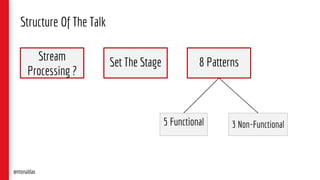
Set The Stage 8 Patterns
5 Functional 3 Non-Functional
Structure Of The Talk
Stream
Processing ?
@monaldax
Disclaimer
Inspired by True Events encountered building and operating a
Stream Processing platform, and use cases that are in
production or in ideation phase in the cloud.
Some code and identifying details have been changed, artistic
liberties have been taken, to protect the privacy of streaming
applications, and for sharing the know-how. Some use cases
may have been simplified.
@monaldax
Stream Processing?
Processing Data-In-Motion
@monaldax
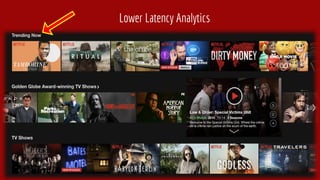
Lower Latency Analytics
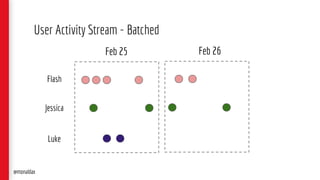
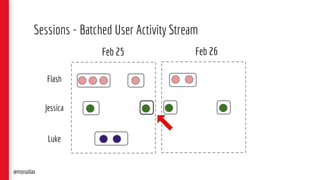
User Activity Stream - Batched
Flash
Jessica
Luke
Feb 25 Feb 26
@monaldax
Sessions - Batched User Activity Stream
Feb 25 Feb 26
@monaldax
Flash
Jessica
Luke
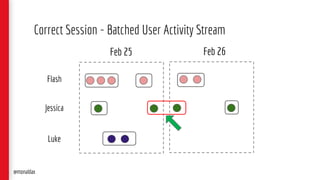
Correct Session - Batched User Activity Stream
Feb 25 Feb 26
@monaldax
Flash
Jessica
Luke
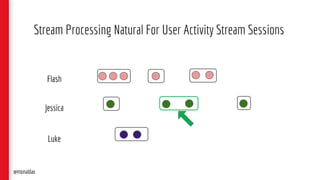
Stream Processing Natural For User Activity Stream Sessions
@monaldax
Flash
Jessica
Luke
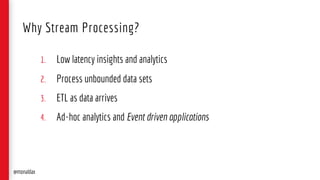
1. Low latency insights and analytics
2. Process unbounded data sets
3. ETL as data arrives
4. Ad-hoc analytics and Event driven applications
Why Stream Processing?
@monaldax
Set The Stage
Architecture & Flink
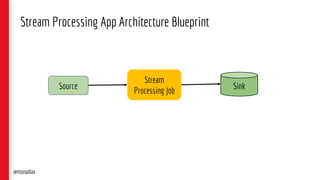
Stream Processing App Architecture Blueprint
Stream
Processing Job
Source
@monaldax
Sink
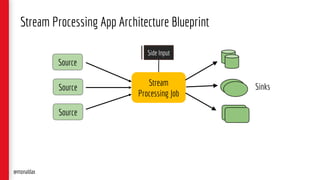
Stream Processing App Architecture Blueprint
Stream
Processing Job
Source
@monaldax
Sinks
Source
Source
Side Input
Why Flink?
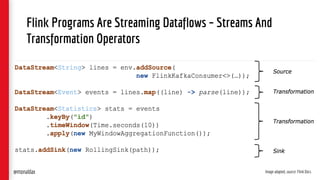
Flink Programs Are Streaming Dataflows – Streams And
Transformation Operators
Image adapted, source: Flink Docs@monaldax
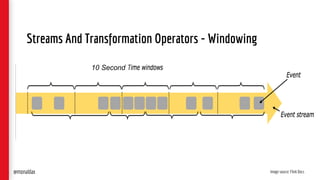
Streams And Transformation Operators - Windowing
Image source: Flink Docs
10 Second
@monaldax
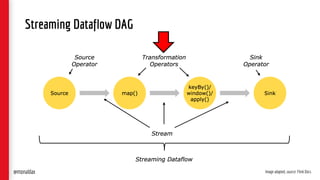
Streaming Dataflow DAG
Image adapted, source: Flink Docs@monaldax
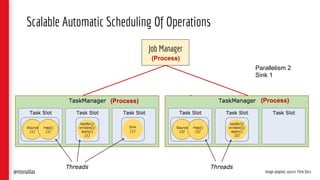
Scalable Automatic Scheduling Of Operations
Image adapted, source: Flink Docs
Job Manager
(Process)(Process)
(Process)
@monaldax
Parallelism 2
Sink 1
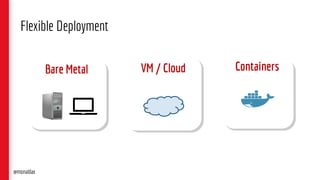
Flexible Deployment
Bare Metal VM / Cloud Containers
@monaldax
Image adapted from: Stephan Ewen@monaldax
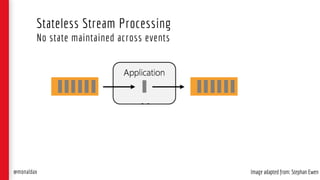
Stateless Stream Processing
No state maintained across events
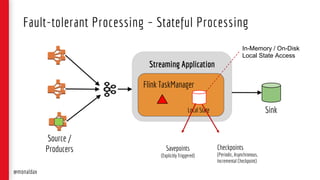
Streaming Application
Flink TaskManager
Local State
Fault-tolerant Processing – Stateful Processing
Sink
Savepoints
(Explicitly Triggered)
Checkpoints
(Periodic, Asynchronous,
Incremental Checkpoint)
Source /
Producers
@monaldax
In-Memory / On-Disk
Local State Access
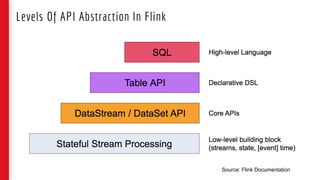
Levels Of API Abstraction In Flink
Source: Flink Documentation
Describing Patterns
@monaldax
● Use Case / Motivation
● Pattern
● Code Snippet & Deployment mechanism
● Related Pattern, if any
Describing Design Patterns
@monaldax
Patterns
Functional
1. Configurable Router
@monaldax
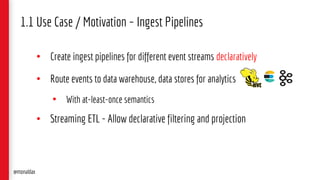
• Create ingest pipelines for different event streams declaratively
• Route events to data warehouse, data stores for analytics
• With at-least-once semantics
• Streaming ETL - Allow declarative filtering and projection
1.1 Use Case / Motivation – Ingest Pipelines
@monaldax
1.1 Keystone Pipeline – A Self-serve Product
• SERVERLESS
• Turnkey – ready to use
• 100% in the cloud
• No code, Managed Code & Operations
@monaldax
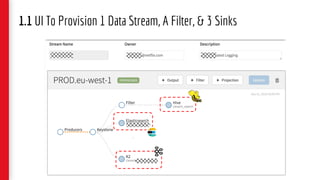
1.1 UI To Provision 1 Data Stream, A Filter, & 3 Sinks
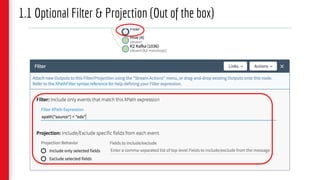
1.1 Optional Filter & Projection (Out of the box)
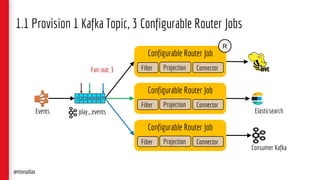
1.1 Provision 1 Kafka Topic, 3 Configurable Router Jobs
play_events
Consumer Kafka
Elasticsearch
@monaldax
Events
Configurable Router Job
Filter Projection Connector
Configurable Router Job
Filter Projection Connector
Configurable Router Job
Filter Projection Connector
1 2 3 4 5 6 7
Fan-out: 3
R
@monaldax
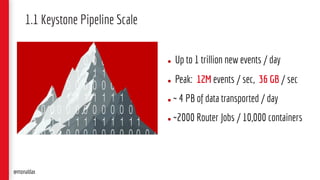
1.1 Keystone Pipeline Scale
● Up to 1 trillion new events / day
● Peak: 12M events / sec, 36 GB / sec
● ̴ 4 PB of data transported / day
● ̴ 2000 Router Jobs / 10,000 containers
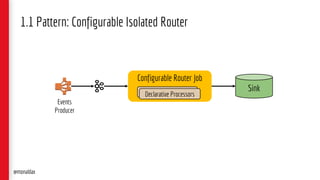
1.1 Pattern: Configurable Isolated Router
@monaldax
Sink
Configurable Router Job
Declarative ProcessorsDeclarative Processors
Events
Producer
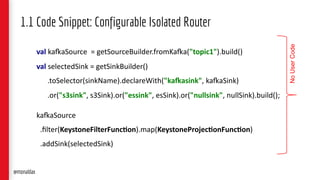
val ka#aSource = getSourceBuilder.fromKa#a("topic1").build()
val selectedSink = getSinkBuilder()
.toSelector(sinkName).declareWith("ka,asink", ka#aSink)
.or("s3sink", s3Sink).or("essink", esSink).or("nullsink", nullSink).build();
ka#aSource
.filter(KeystoneFilterFunc6on).map(KeystoneProjec6onFunc6on)
.addSink(selectedSink)
1.1 Code Snippet: Configurable Isolated Router
NoUserCode
@monaldax
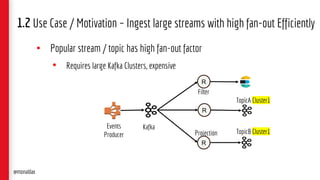
• Popular stream / topic has high fan-out factor
• Requires large Kafka Clusters, expensive
1.2 Use Case / Motivation – Ingest large streams with high fan-out Efficiently
@monaldax
R
R
Filter
Projection
Kafka
R
TopicA Cluster1
TopicB Cluster1
Events
Producer
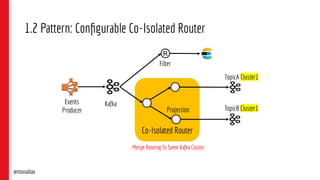
1.2 Pattern: Configurable Co-Isolated Router
@monaldax
Co-Isolated Router
R
Filter
Projection
Kafka
TopicA Cluster1
TopicB Cluster1
Merge Routing To Same Kafka Cluster
Events
Producer
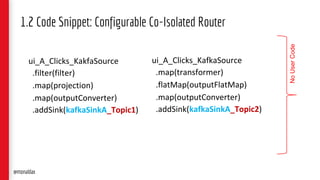
ui_A_Clicks_KakfaSource
.filter(filter)
.map(projection)
.map(outputConverter)
.addSink(kafkaSinkA_Topic1)
1.2 Code Snippet: Configurable Co-Isolated Router
ui_A_Clicks_KafkaSource
.map(transformer)
.flatMap(outputFlatMap)
.map(outputConverter)
.addSink(kafkaSinkA_Topic2)
NoUserCode
@monaldax
2. Script UDF* Component
[Static / Dynamic]
*UDF – User Defined Function
@monaldax
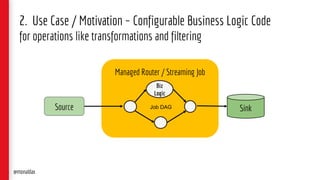
2. Use Case / Motivation – Configurable Business Logic Code
for operations like transformations and filtering
Managed Router / Streaming Job
Source Sink
Biz
Logic
Job DAG
@monaldax
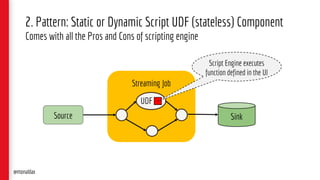
2. Pattern: Static or Dynamic Script UDF (stateless) Component
Comes with all the Pros and Cons of scripting engine
Streaming Job
Source Sink
UDF
Script Engine executes
function defined in the UI
@monaldax
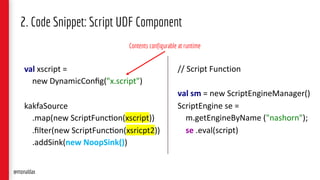
val xscript =
new DynamicConfig("x.script")
kakfaSource
.map(new ScriptFunc>on(xscript))
.filter(new ScriptFunc>on(xsricpt2))
.addSink(new NoopSink())
2. Code Snippet: Script UDF Component
// Script Function
val sm = new ScriptEngineManager()
ScriptEngine se =
m.getEngineByName ("nashorn");
se .eval(script)
Contents configurable at runtime
@monaldax
3. The Enricher
@monaldax
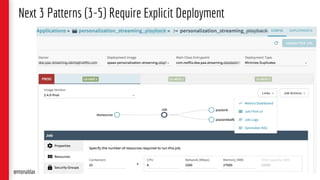
Next 3 Patterns (3-5) Require Explicit Deployment
@monaldax
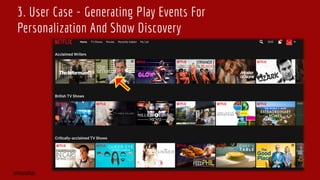
3. User Case - Generating Play Events For
Personalization And Show Discovery
@monaldax
@monaldax
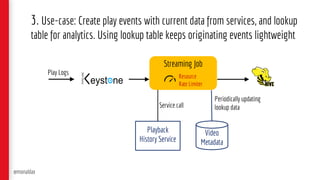
3. Use-case: Create play events with current data from services, and lookup
table for analytics. Using lookup table keeps originating events lightweight
Playback
History Service
Video
Metadata
Play Logs
Service call
Periodically updating
lookup data
Streaming Job
Resource
Rate Limiter
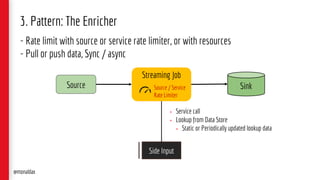
3. Pattern: The Enricher
- Rate limit with source or service rate limiter, or with resources
- Pull or push data, Sync / async
Streaming Job
Source Sink
Side Input
• Service call
• Lookup from Data Store
• Static or Periodically updated lookup data
@monaldax
Source / Service
Rate Limiter
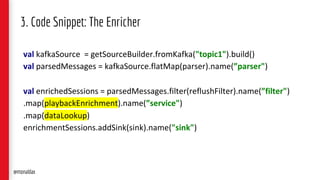
3. Code Snippet: The Enricher
val kafkaSource = getSourceBuilder.fromKafka("topic1").build()
val parsedMessages = kafkaSource.flatMap(parser).name(”parser")
val enrichedSessions = parsedMessages.filter(reflushFilter).name(”filter")
.map(playbackEnrichment).name(”service")
.map(dataLookup)
enrichmentSessions.addSink(sink).name("sink")
@monaldax
4. The Co-process Joiner
@monaldax
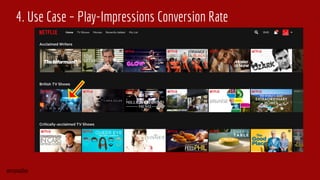
4. Use Case – Play-Impressions Conversion Rate
@monaldax
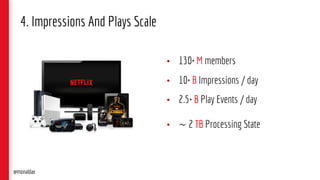
• 130+ M members
• 10+ B Impressions / day
• 2.5+ B Play Events / day
• ~ 2 TB Processing State
4. Impressions And Plays Scale
@monaldax
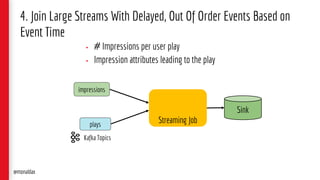
Streaming Job
• # Impressions per user play
• Impression attributes leading to the play
4. Join Large Streams With Delayed, Out Of Order Events Based on
Event Time
@monaldax
P1P3
I2I1
Sink
Kafka Topics
plays
impressions
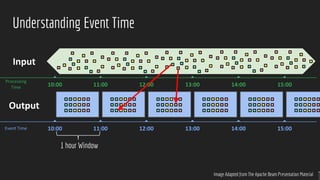
Understanding Event Time
Image Adapted from The Apache Beam Presentation Material
Event Time
Processing
Time 11:0010:00 15:0014:0013:0012:00
11:0010:00 15:0014:0013:0012:00
Input
Output
1 hour Window
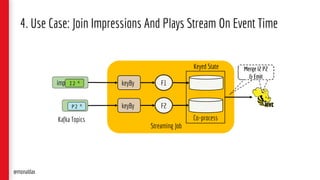
impressions
Streaming Job
keyBy F1
4. Use Case: Join Impressions And Plays Stream On Event Time
Co-process
@monaldax
Kafka Topics
keyBy F2playsP2 K
Keyed State
I1 K
I2 K
Merge I2 P2
& Emit
Merge I2 P2
& Emit
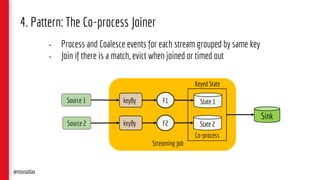
Source 1
Streaming Job
keyBy F1
Co-process
State 1
State 2
@monaldax
keyBy F2Source 2
Keyed State
Sink
4. Pattern: The Co-process Joiner
• Process and Coalesce events for each stream grouped by same key
• Join if there is a match, evict when joined or timed out
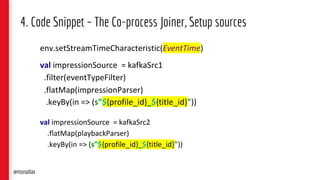
4. Code Snippet – The Co-process Joiner, Setup sources
env.setStreamTimeCharacteristic(EventTime)
val impressionSource = kafkaSrc1
.filter(eventTypeFilter)
.flatMap(impressionParser)
.keyBy(in => (s"${profile_id}_${title_id}"))
val impressionSource = kafkaSrc2
.flatMap(playbackParser)
.keyBy(in => (s"${profile_id}_${title_id}"))
@monaldax
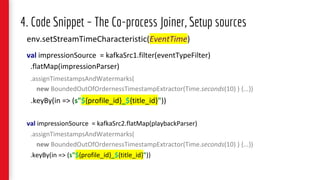
env.setStreamTimeCharacteristic(EventTime)
val impressionSource = kafkaSrc1.filter(eventTypeFilter)
.flatMap(impressionParser)
.assignTimestampsAndWatermarks(
new BoundedOutOfOrdernessTimestampExtractor(Time.seconds(10) ) {...})
.keyBy(in => (s"${profile_id}_${title_id}"))
val impressionSource = kafkaSrc2.flatMap(playbackParser)
.assignTimestampsAndWatermarks(
new BoundedOutOfOrdernessTimestampExtractor(Time.seconds(10) ) {...})
.keyBy(in => (s"${profile_id}_${title_id}"))
4. Code Snippet – The Co-process Joiner, Setup sources
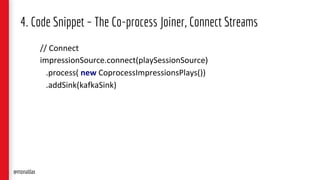
4. Code Snippet – The Co-process Joiner, Connect Streams
// Connect
impressionSource.connect(playSessionSource)
.process( new CoprocessImpressionsPlays())
.addSink(kafkaSink)
@monaldax
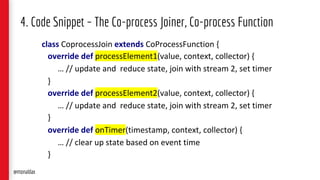
4. Code Snippet – The Co-process Joiner, Co-process Function
class CoprocessJoin extends CoProcessFunction {
override def processElement1(value, context, collector) {
… // update and reduce state, join with stream 2, set timer
}
override def processElement2(value, context, collector) {
… // update and reduce state, join with stream 2, set timer
}
override def onTimer(timestamp, context, collector) {
… // clear up state based on event time
}
@monaldax
5. Event-Sourced Materialized View
[Event Driven Application]
@monaldax
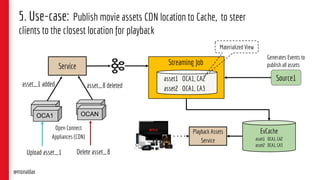
5. Use-case: Publish movie assets CDN location to Cache, to steer
clients to the closest location for playback
EvCache
asset1 OCA1, CA2
asset2 OCA1, CA3
Playback Assets
Service
Service
asset_1 added asset_8 deleted
OCA
OCA1
OCA
OCAN
Open Connect
Appliances (CDN)
Upload asset_1 Delete asset_8
Streaming Job
Source1
Generates Events to
publish all assets
asset1 OCA1, CA2….
asset2 OCA1, CA3 …
@monaldax
Materialized View
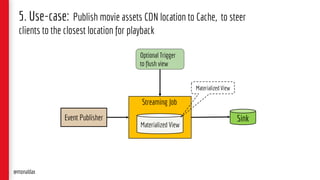
5. Use-case: Publish movie assets CDN location to Cache, to steer
clients to the closest location for playback
Streaming Job
Event Publisher
Optional Trigger
to flush view
Materialized View
@monaldax
Materialized View
Sink
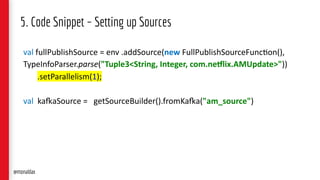
5. Code Snippet – Setting up Sources
val fullPublishSource = env .addSource(new FullPublishSourceFunc7on(),
TypeInfoParser.parse("Tuple3<String, Integer, com.ne7lix.AMUpdate>"))
.setParallelism(1);
val kaCaSource = getSourceBuilder().fromKaCa("am_source")
@monaldax
5. Code Snippet – Union Source & Processing
val kafkaSource
.flatMap(new FlatmapFunction())) //split by movie
.assignTimestampsAndWatermarks(new AssignerWithPunctuatedWatermarks[...]())
.union(fullPublishSource) // union with full publish source
.keyBy(0, 1) // (cdn stack, movie)
.process(new UpdateFunction())) // update in-memory state, output at intervals.
.keyBy(0, 1) // (cdn stack, movie)
.process(new PublishToEvCacheFunction())); // publish to evcache
@monaldax
Patterns
Non-Functional
6. Elastic Dev Interface
@monaldax
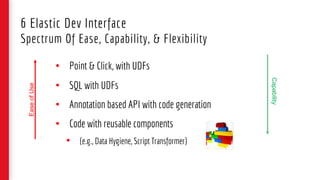
6 Elastic Dev Interface
Spectrum Of Ease, Capability, & Flexibility
• Point & Click, with UDFs
• SQL with UDFs
• Annotation based API with code generation
• Code with reusable components
• (e.g., Data Hygiene, Script Transformer)
EaseofUse
Capability
7. Stream Processing Platform
@monaldax
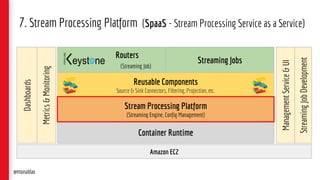
7. Stream Processing Platform (SpaaS - Stream Processing Service as a Service)
Amazon EC2
Container Runtime
Reusable Components
Source & Sink Connectors, Filtering, Projection, etc.
Routers
(Streaming Job)
Streaming Jobs
ManagementService&UI
Metrics&Monitoring
StreamingJobDevelopment
Dashboards
@monaldax
Stream Processing Platform
(Streaming Engine, Config Management)
8. Rewind & Restatement
@monaldax
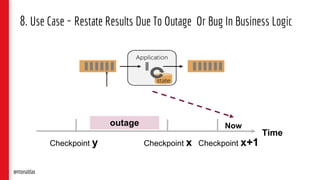
8. Use Case - Restate Results Due To Outage Or Bug In Business Logic
@monaldax
Time
Checkpoint y Checkpoint x
outage
Checkpoint x+1
Now
Time
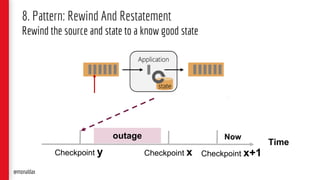
8. Pattern: Rewind And Restatement
Rewind the source and state to a know good state
@monaldax
Checkpoint y Checkpoint x
outage
Checkpoint x+1
Now
Summary
@monaldax
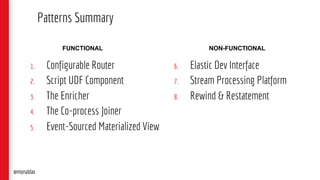
1. Configurable Router
2. Script UDF Component
3. The Enricher
4. The Co-process Joiner
5. Event-Sourced Materialized View
Patterns Summary
@monaldax
6. Elastic Dev Interface
7. Stream Processing Platform
8. Rewind & Restatement
FUNCTIONAL NON-FUNCTIONAL
Q & A
Thank you
If you would like to discuss more
• @monaldax
• linkedin.com/in/monaldax
• Flink at Netflix, Paypal speaker series, 2018– http://bit.ly/monal-paypal
• Unbounded Data Processing Systems, Strangeloop, 2016 - http://bit.ly/monal-sloop
• AWS Re-Invent 2017 Netflix Keystone SPaaS, 2017 – http://bit.ly/monal-reInvent
• Keynote - Stream Processing with Flink, 2017 - http://bit.ly/monal-ff2017
• Dataflow Paper - http://bit.ly/dataflow-paper
Additional Stream Processing Material
@monaldax
Watch the video with slide
synchronization on InfoQ.com!
https://www.infoq.com/presentations/
apache-flink-streaming-app

Patterns of Streaming Applications

  • 1.
    Monal Daxini 11/ 6/ 2018 @ monaldax Patterns Of Streaming Applications P O S A
  • 2.
    InfoQ.com: News &Community Site • Over 1,000,000 software developers, architects and CTOs read the site world- wide every month • 250,000 senior developers subscribe to our weekly newsletter • Published in 4 languages (English, Chinese, Japanese and Brazilian Portuguese) • Post content from our QCon conferences • 2 dedicated podcast channels: The InfoQ Podcast, with a focus on Architecture and The Engineering Culture Podcast, with a focus on building • 96 deep dives on innovative topics packed as downloadable emags and minibooks • Over 40 new content items per week Watch the video with slide synchronization on InfoQ.com! https://www.infoq.com/presentations/ apache-flink-streaming-app
  • 3.
    Purpose of QCon -to empower software development by facilitating the spread of knowledge and innovation Strategy - practitioner-driven conference designed for YOU: influencers of change and innovation in your teams - speakers and topics driving the evolution and innovation - connecting and catalyzing the influencers and innovators Highlights - attended by more than 12,000 delegates since 2007 - held in 9 cities worldwide Presented at QCon San Francisco www.qconsf.com
  • 4.
    • 4+ yearsbuilding stream processing platform at Netflix • Drove technical vision, roadmap, led implementation • 17+ years building distributed systems Profile @monaldax
  • 5.
    Set The Stage8 Patterns 5 Functional 3 Non-Functional Structure Of The Talk Stream Processing ? @monaldax
  • 6.
    Disclaimer Inspired by TrueEvents encountered building and operating a Stream Processing platform, and use cases that are in production or in ideation phase in the cloud. Some code and identifying details have been changed, artistic liberties have been taken, to protect the privacy of streaming applications, and for sharing the know-how. Some use cases may have been simplified. @monaldax
  • 7.
  • 9.
  • 10.
    User Activity Stream- Batched Flash Jessica Luke Feb 25 Feb 26 @monaldax
  • 11.
    Sessions - BatchedUser Activity Stream Feb 25 Feb 26 @monaldax Flash Jessica Luke
  • 12.
    Correct Session -Batched User Activity Stream Feb 25 Feb 26 @monaldax Flash Jessica Luke
  • 13.
    Stream Processing NaturalFor User Activity Stream Sessions @monaldax Flash Jessica Luke
  • 14.
    1. Low latencyinsights and analytics 2. Process unbounded data sets 3. ETL as data arrives 4. Ad-hoc analytics and Event driven applications Why Stream Processing? @monaldax
  • 15.
  • 16.
    Stream Processing AppArchitecture Blueprint Stream Processing Job Source @monaldax Sink
  • 17.
    Stream Processing AppArchitecture Blueprint Stream Processing Job Source @monaldax Sinks Source Source Side Input
  • 18.
  • 19.
    Flink Programs AreStreaming Dataflows – Streams And Transformation Operators Image adapted, source: Flink Docs@monaldax
  • 20.
    Streams And TransformationOperators - Windowing Image source: Flink Docs 10 Second @monaldax
  • 21.
    Streaming Dataflow DAG Imageadapted, source: Flink Docs@monaldax
  • 22.
    Scalable Automatic SchedulingOf Operations Image adapted, source: Flink Docs Job Manager (Process)(Process) (Process) @monaldax Parallelism 2 Sink 1
  • 23.
    Flexible Deployment Bare MetalVM / Cloud Containers @monaldax
  • 24.
    Image adapted from:Stephan Ewen@monaldax Stateless Stream Processing No state maintained across events
  • 25.
    Streaming Application Flink TaskManager LocalState Fault-tolerant Processing – Stateful Processing Sink Savepoints (Explicitly Triggered) Checkpoints (Periodic, Asynchronous, Incremental Checkpoint) Source / Producers @monaldax In-Memory / On-Disk Local State Access
  • 26.
    Levels Of APIAbstraction In Flink Source: Flink Documentation
  • 27.
  • 28.
    ● Use Case/ Motivation ● Pattern ● Code Snippet & Deployment mechanism ● Related Pattern, if any Describing Design Patterns @monaldax
  • 29.
  • 30.
  • 33.
    • Create ingestpipelines for different event streams declaratively • Route events to data warehouse, data stores for analytics • With at-least-once semantics • Streaming ETL - Allow declarative filtering and projection 1.1 Use Case / Motivation – Ingest Pipelines @monaldax
  • 34.
    1.1 Keystone Pipeline– A Self-serve Product • SERVERLESS • Turnkey – ready to use • 100% in the cloud • No code, Managed Code & Operations @monaldax
  • 35.
    1.1 UI ToProvision 1 Data Stream, A Filter, & 3 Sinks
  • 36.
    1.1 Optional Filter& Projection (Out of the box)
  • 37.
    1.1 Provision 1Kafka Topic, 3 Configurable Router Jobs play_events Consumer Kafka Elasticsearch @monaldax Events Configurable Router Job Filter Projection Connector Configurable Router Job Filter Projection Connector Configurable Router Job Filter Projection Connector 1 2 3 4 5 6 7 Fan-out: 3 R
  • 38.
    @monaldax 1.1 Keystone PipelineScale ● Up to 1 trillion new events / day ● Peak: 12M events / sec, 36 GB / sec ● ̴ 4 PB of data transported / day ● ̴ 2000 Router Jobs / 10,000 containers
  • 39.
    1.1 Pattern: ConfigurableIsolated Router @monaldax Sink Configurable Router Job Declarative ProcessorsDeclarative Processors Events Producer
  • 40.
    val ka#aSource =getSourceBuilder.fromKa#a("topic1").build() val selectedSink = getSinkBuilder() .toSelector(sinkName).declareWith("ka,asink", ka#aSink) .or("s3sink", s3Sink).or("essink", esSink).or("nullsink", nullSink).build(); ka#aSource .filter(KeystoneFilterFunc6on).map(KeystoneProjec6onFunc6on) .addSink(selectedSink) 1.1 Code Snippet: Configurable Isolated Router NoUserCode @monaldax
  • 41.
    • Popular stream/ topic has high fan-out factor • Requires large Kafka Clusters, expensive 1.2 Use Case / Motivation – Ingest large streams with high fan-out Efficiently @monaldax R R Filter Projection Kafka R TopicA Cluster1 TopicB Cluster1 Events Producer
  • 42.
    1.2 Pattern: ConfigurableCo-Isolated Router @monaldax Co-Isolated Router R Filter Projection Kafka TopicA Cluster1 TopicB Cluster1 Merge Routing To Same Kafka Cluster Events Producer
  • 43.
    ui_A_Clicks_KakfaSource .filter(filter) .map(projection) .map(outputConverter) .addSink(kafkaSinkA_Topic1) 1.2 Code Snippet:Configurable Co-Isolated Router ui_A_Clicks_KafkaSource .map(transformer) .flatMap(outputFlatMap) .map(outputConverter) .addSink(kafkaSinkA_Topic2) NoUserCode @monaldax
  • 44.
    2. Script UDF*Component [Static / Dynamic] *UDF – User Defined Function @monaldax
  • 45.
    2. Use Case/ Motivation – Configurable Business Logic Code for operations like transformations and filtering Managed Router / Streaming Job Source Sink Biz Logic Job DAG @monaldax
  • 46.
    2. Pattern: Staticor Dynamic Script UDF (stateless) Component Comes with all the Pros and Cons of scripting engine Streaming Job Source Sink UDF Script Engine executes function defined in the UI @monaldax
  • 47.
    val xscript = newDynamicConfig("x.script") kakfaSource .map(new ScriptFunc>on(xscript)) .filter(new ScriptFunc>on(xsricpt2)) .addSink(new NoopSink()) 2. Code Snippet: Script UDF Component // Script Function val sm = new ScriptEngineManager() ScriptEngine se = m.getEngineByName ("nashorn"); se .eval(script) Contents configurable at runtime @monaldax
  • 48.
  • 49.
    Next 3 Patterns(3-5) Require Explicit Deployment @monaldax
  • 50.
    3. User Case- Generating Play Events For Personalization And Show Discovery @monaldax
  • 51.
    @monaldax 3. Use-case: Createplay events with current data from services, and lookup table for analytics. Using lookup table keeps originating events lightweight Playback History Service Video Metadata Play Logs Service call Periodically updating lookup data Streaming Job Resource Rate Limiter
  • 52.
    3. Pattern: TheEnricher - Rate limit with source or service rate limiter, or with resources - Pull or push data, Sync / async Streaming Job Source Sink Side Input • Service call • Lookup from Data Store • Static or Periodically updated lookup data @monaldax Source / Service Rate Limiter
  • 53.
    3. Code Snippet:The Enricher val kafkaSource = getSourceBuilder.fromKafka("topic1").build() val parsedMessages = kafkaSource.flatMap(parser).name(”parser") val enrichedSessions = parsedMessages.filter(reflushFilter).name(”filter") .map(playbackEnrichment).name(”service") .map(dataLookup) enrichmentSessions.addSink(sink).name("sink") @monaldax
  • 54.
    4. The Co-processJoiner @monaldax
  • 55.
    4. Use Case– Play-Impressions Conversion Rate @monaldax
  • 56.
    • 130+ Mmembers • 10+ B Impressions / day • 2.5+ B Play Events / day • ~ 2 TB Processing State 4. Impressions And Plays Scale @monaldax
  • 57.
    Streaming Job • #Impressions per user play • Impression attributes leading to the play 4. Join Large Streams With Delayed, Out Of Order Events Based on Event Time @monaldax P1P3 I2I1 Sink Kafka Topics plays impressions
  • 58.
    Understanding Event Time ImageAdapted from The Apache Beam Presentation Material Event Time Processing Time 11:0010:00 15:0014:0013:0012:00 11:0010:00 15:0014:0013:0012:00 Input Output 1 hour Window
  • 59.
    impressions Streaming Job keyBy F1 4.Use Case: Join Impressions And Plays Stream On Event Time Co-process @monaldax Kafka Topics keyBy F2playsP2 K Keyed State I1 K I2 K Merge I2 P2 & Emit Merge I2 P2 & Emit
  • 60.
    Source 1 Streaming Job keyByF1 Co-process State 1 State 2 @monaldax keyBy F2Source 2 Keyed State Sink 4. Pattern: The Co-process Joiner • Process and Coalesce events for each stream grouped by same key • Join if there is a match, evict when joined or timed out
  • 61.
    4. Code Snippet– The Co-process Joiner, Setup sources env.setStreamTimeCharacteristic(EventTime) val impressionSource = kafkaSrc1 .filter(eventTypeFilter) .flatMap(impressionParser) .keyBy(in => (s"${profile_id}_${title_id}")) val impressionSource = kafkaSrc2 .flatMap(playbackParser) .keyBy(in => (s"${profile_id}_${title_id}")) @monaldax
  • 62.
    env.setStreamTimeCharacteristic(EventTime) val impressionSource =kafkaSrc1.filter(eventTypeFilter) .flatMap(impressionParser) .assignTimestampsAndWatermarks( new BoundedOutOfOrdernessTimestampExtractor(Time.seconds(10) ) {...}) .keyBy(in => (s"${profile_id}_${title_id}")) val impressionSource = kafkaSrc2.flatMap(playbackParser) .assignTimestampsAndWatermarks( new BoundedOutOfOrdernessTimestampExtractor(Time.seconds(10) ) {...}) .keyBy(in => (s"${profile_id}_${title_id}")) 4. Code Snippet – The Co-process Joiner, Setup sources
  • 63.
    4. Code Snippet– The Co-process Joiner, Connect Streams // Connect impressionSource.connect(playSessionSource) .process( new CoprocessImpressionsPlays()) .addSink(kafkaSink) @monaldax
  • 64.
    4. Code Snippet– The Co-process Joiner, Co-process Function class CoprocessJoin extends CoProcessFunction { override def processElement1(value, context, collector) { … // update and reduce state, join with stream 2, set timer } override def processElement2(value, context, collector) { … // update and reduce state, join with stream 2, set timer } override def onTimer(timestamp, context, collector) { … // clear up state based on event time } @monaldax
  • 65.
    5. Event-Sourced MaterializedView [Event Driven Application] @monaldax
  • 66.
    5. Use-case: Publishmovie assets CDN location to Cache, to steer clients to the closest location for playback EvCache asset1 OCA1, CA2 asset2 OCA1, CA3 Playback Assets Service Service asset_1 added asset_8 deleted OCA OCA1 OCA OCAN Open Connect Appliances (CDN) Upload asset_1 Delete asset_8 Streaming Job Source1 Generates Events to publish all assets asset1 OCA1, CA2…. asset2 OCA1, CA3 … @monaldax Materialized View
  • 67.
    5. Use-case: Publishmovie assets CDN location to Cache, to steer clients to the closest location for playback Streaming Job Event Publisher Optional Trigger to flush view Materialized View @monaldax Materialized View Sink
  • 68.
    5. Code Snippet– Setting up Sources val fullPublishSource = env .addSource(new FullPublishSourceFunc7on(), TypeInfoParser.parse("Tuple3<String, Integer, com.ne7lix.AMUpdate>")) .setParallelism(1); val kaCaSource = getSourceBuilder().fromKaCa("am_source") @monaldax
  • 69.
    5. Code Snippet– Union Source & Processing val kafkaSource .flatMap(new FlatmapFunction())) //split by movie .assignTimestampsAndWatermarks(new AssignerWithPunctuatedWatermarks[...]()) .union(fullPublishSource) // union with full publish source .keyBy(0, 1) // (cdn stack, movie) .process(new UpdateFunction())) // update in-memory state, output at intervals. .keyBy(0, 1) // (cdn stack, movie) .process(new PublishToEvCacheFunction())); // publish to evcache @monaldax
  • 70.
  • 71.
    6. Elastic DevInterface @monaldax
  • 72.
    6 Elastic DevInterface Spectrum Of Ease, Capability, & Flexibility • Point & Click, with UDFs • SQL with UDFs • Annotation based API with code generation • Code with reusable components • (e.g., Data Hygiene, Script Transformer) EaseofUse Capability
  • 73.
    7. Stream ProcessingPlatform @monaldax
  • 74.
    7. Stream ProcessingPlatform (SpaaS - Stream Processing Service as a Service) Amazon EC2 Container Runtime Reusable Components Source & Sink Connectors, Filtering, Projection, etc. Routers (Streaming Job) Streaming Jobs ManagementService&UI Metrics&Monitoring StreamingJobDevelopment Dashboards @monaldax Stream Processing Platform (Streaming Engine, Config Management)
  • 75.
    8. Rewind &Restatement @monaldax
  • 76.
    8. Use Case- Restate Results Due To Outage Or Bug In Business Logic @monaldax Time Checkpoint y Checkpoint x outage Checkpoint x+1 Now
  • 77.
    Time 8. Pattern: RewindAnd Restatement Rewind the source and state to a know good state @monaldax Checkpoint y Checkpoint x outage Checkpoint x+1 Now
  • 78.
  • 79.
    1. Configurable Router 2.Script UDF Component 3. The Enricher 4. The Co-process Joiner 5. Event-Sourced Materialized View Patterns Summary @monaldax 6. Elastic Dev Interface 7. Stream Processing Platform 8. Rewind & Restatement FUNCTIONAL NON-FUNCTIONAL
  • 80.
    Q & A Thankyou If you would like to discuss more • @monaldax • linkedin.com/in/monaldax
  • 81.
    • Flink atNetflix, Paypal speaker series, 2018– http://bit.ly/monal-paypal • Unbounded Data Processing Systems, Strangeloop, 2016 - http://bit.ly/monal-sloop • AWS Re-Invent 2017 Netflix Keystone SPaaS, 2017 – http://bit.ly/monal-reInvent • Keynote - Stream Processing with Flink, 2017 - http://bit.ly/monal-ff2017 • Dataflow Paper - http://bit.ly/dataflow-paper Additional Stream Processing Material @monaldax
  • 82.
    Watch the videowith slide synchronization on InfoQ.com! https://www.infoq.com/presentations/ apache-flink-streaming-app