PassBYOP: Bring Your Own Picture for
Securing Graphical Passwords
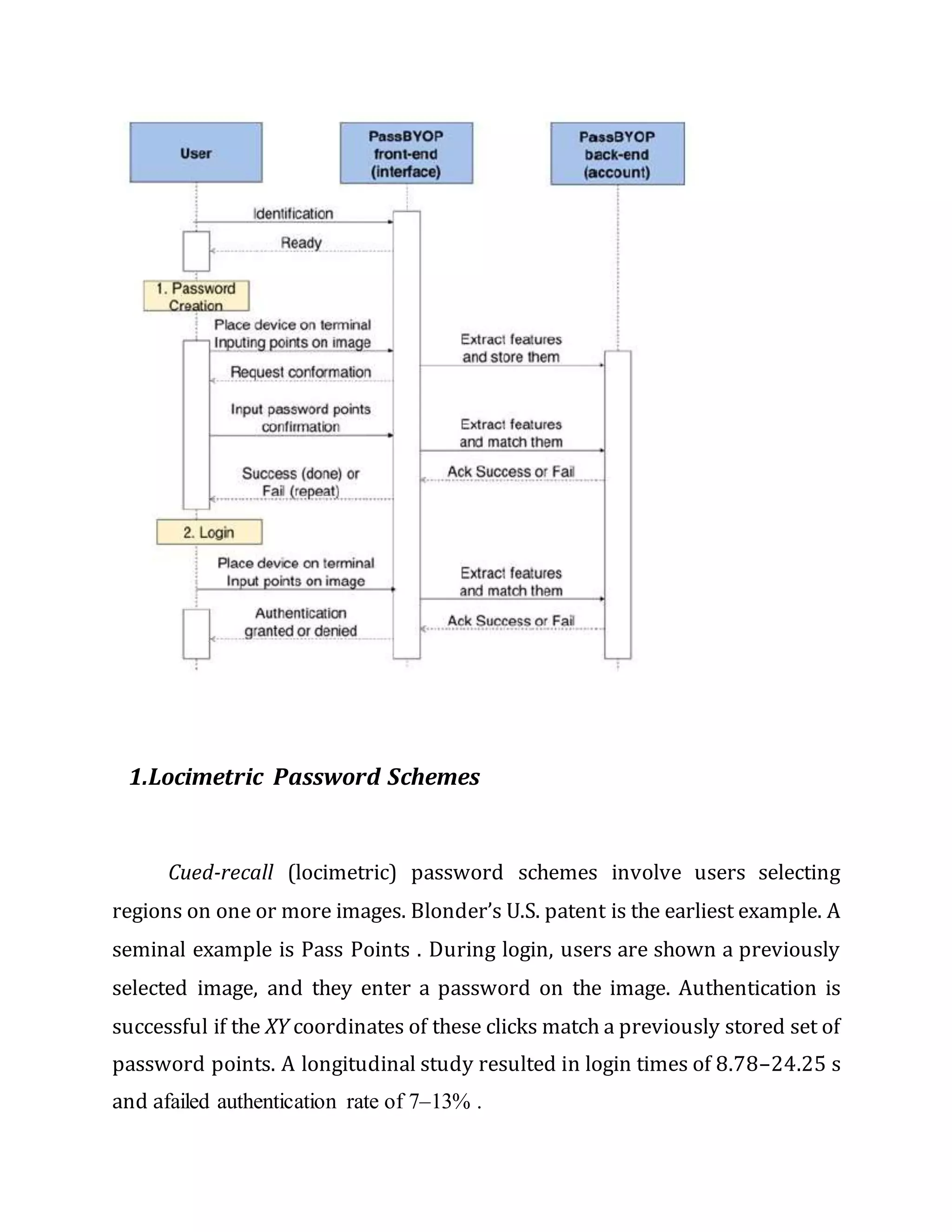
PassBYOP is a new graphical password scheme for public terminals that
replaces the static digital images typically used in graphical password systems
with personalized physical tokens, herein in the form of digital pictures
displayed on a physical user-owned device such as a mobile phone. Users
present these images to a system camera and then enter their password as a
sequence of selections on live video of the token. Highly distinctive optical
features are extracted from these selections and used as the password. We
present three feasibility studies of PassBYOP examining its reliability,
usability, and security against observation. The reliability study shows that
image-feature based passwords are viable and suggests appropriate system
thresholds—password items should contain a minimum of seven features,
40% of which must geometrically match originals stored on an authentication
server in order to be judged equivalent. The usability study measures task
completion times and error rates, revealing these to be 7.5 s and 9%, broadly
comparable with prior graphical password systems that use static digital
images. Finally, the security study highlights PassBYOP’s resistance to
observation attack—three attackers are unable to compromise a password
using shoulder surfing, camera based observation, or malware. These results
indicate that Pass- BYOP shows promise for security while maintaining the
usability of current graphical password schemes.
Existing System
TEXTUAL passwords have been the most widely used authentication
method for decades. Comprised of number sand upper-and lower-caseletters,
textual passwords are considered strong enough to resist against brute force
attacks. However, a strong textual password is hard to memorize and
recollect. Therefore, users tend to choose passwords that are either short or
from the dictionary, rather than random alphanumeric strings.
.
Proposed System
Various graphical password authentication schemes
were developed to address the problems and weaknesses associated with
textual passwords. Based on some studies such as those in , humans have a
better ability to memorize images with long-term memory(LTM) than verbal
representations. Image-based passwords were proved to be easier to recollect
in several user studies As a result, users can set up a complex authentication
password and are capable of recollecting it after a long time even if the
memory is not activated periodically.
The human actions such as choosing bad passwords for
new accounts and inputting passwords in an insecure way for later logins are
regarded as the weakest link in the authentication chain . Therefore, an
authentication scheme should be designed to overcome these vulnerabilities.
In this paper, we present a secure graphical authentication system named
Pass Matrix that protects users from becoming victims of shoulder surfing
attacks when inputting passwords in public through the usage of one-time
login indicators. A login indicator is randomly generated for each pass-image
and will be useless after the session terminates. The login indicator provides
better security against shoulder surfing attacks, since users use a dynamic
pointer to point out the position of their passwords rather than clicking on
the password object directly.
Module Description
1. Locimetric Password Schemes
2. Usability Evaluation
3. Draw line Authentication
4. Random Guess Attack
5. Login / Register
6. Upload Image
7. View Status
8. View Requests
9. Approve / Cancel
1.Locimetric Password Schemes
Cued-recall (locimetric) password schemes involve users selecting
regions on one or more images. Blonder’s U.S. patent is the earliest example. A
seminal example is Pass Points . During login, users are shown a previously
selected image, and they enter a password on the image. Authentication is
successful if the XY coordinates of these clicks match a previously stored set of
password points. A longitudinal study resulted in login times of 8.78–24.25 s
and afailed authentication rate of 7–13% .
2. Usability Evaluation
In this module system user both public and private images for
authentication. Here is the comparison take place between public and private
images. This module is divides in to two modules
1.1 Public images
1.2 Private Images
2.1 Public Images
In Publicimages modulehaveThe system providetwo or three
images default to the system. User can select any of the images from
the system and can select any point from the selected image and set as
password to the system
The system says that public images are hard to remember than
privateimages. The pointwe marked in publicimages are hard to
remember because the image published in public images are new to
users.
2.2 Private Images
In this module have user can set their own image as
setting password. System will not provide any images for setting the
password. User can brows their images from gallery and select any
point from the image for setting password. Private image
Authentications are more efficient than public image authentication.
Because In this Authentication User will select their own images from
gallery. It will easy to remember.
3. Draw line Authentication
In this type the authentication user draw a line by connecting two points
from the given image. For this system will take the starting and ending point
for Authentication. During login only allow in to the system when both the
lines are equal.
4. Random Guess Attack
To perform a random guess attack, the attacker randomly
tries each square as a possible pass-square for each pass image until a
successful login occurs. The key security determinants of the system are the
number of pass-images and the degree of discretization of each image. To
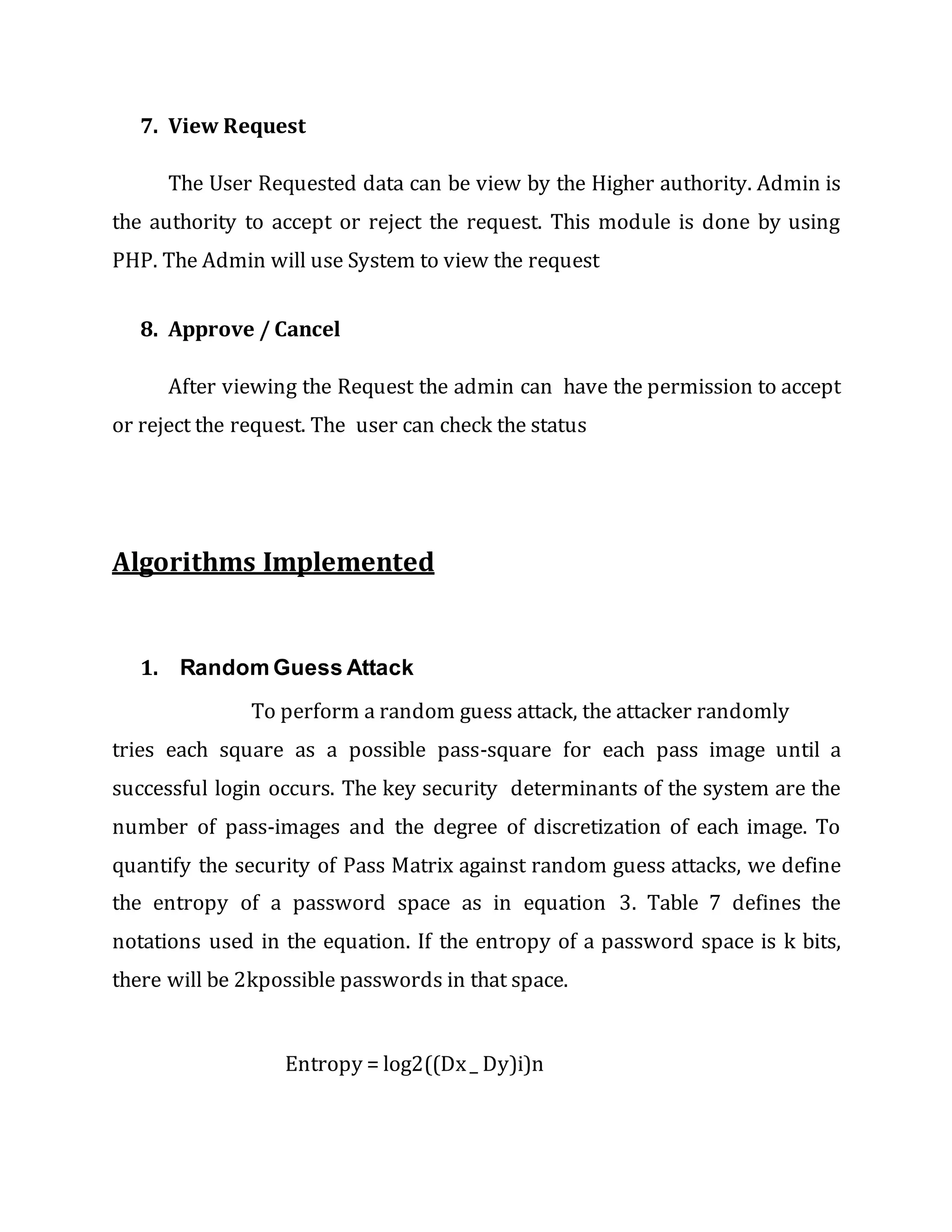
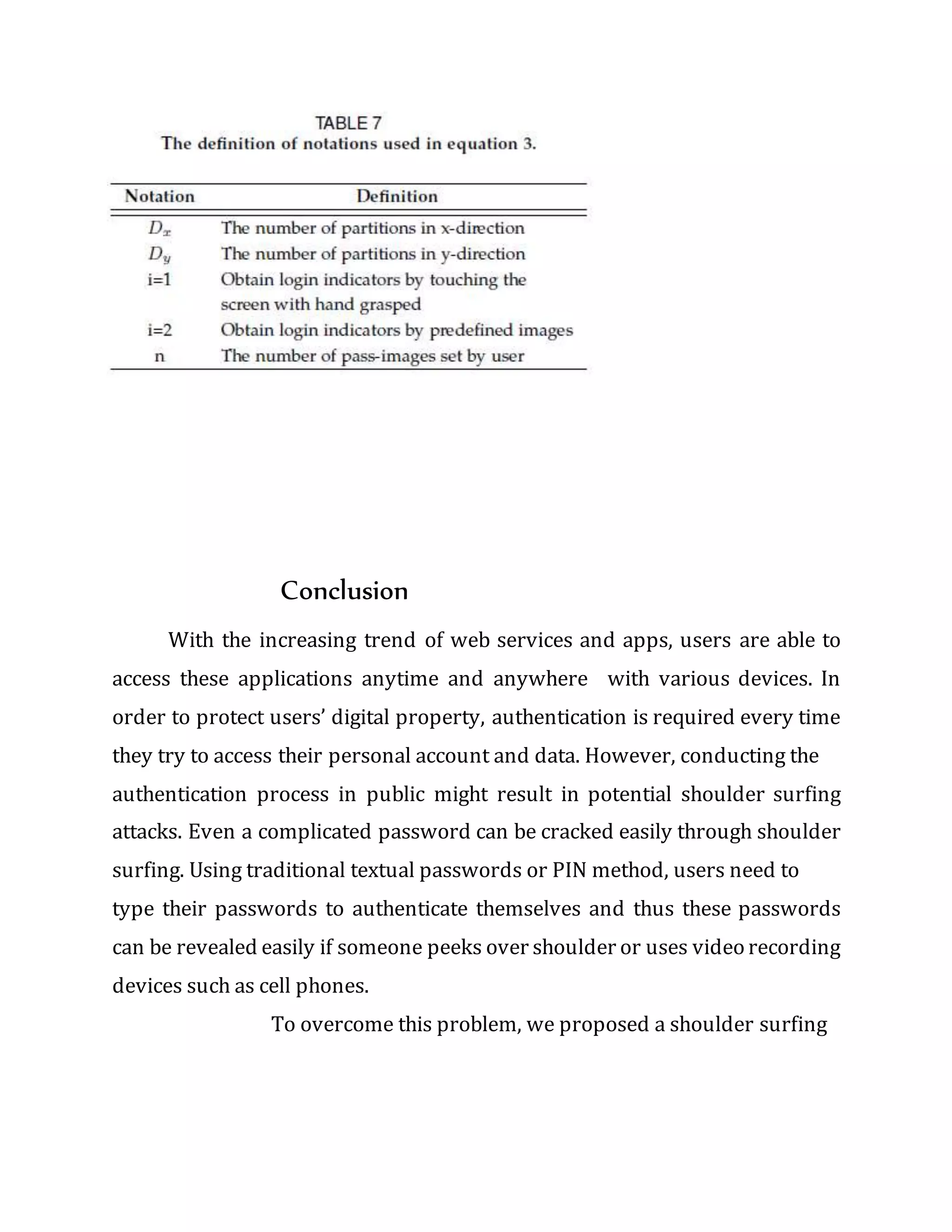
quantify the security of Pass Matrix against random guess attacks, we define
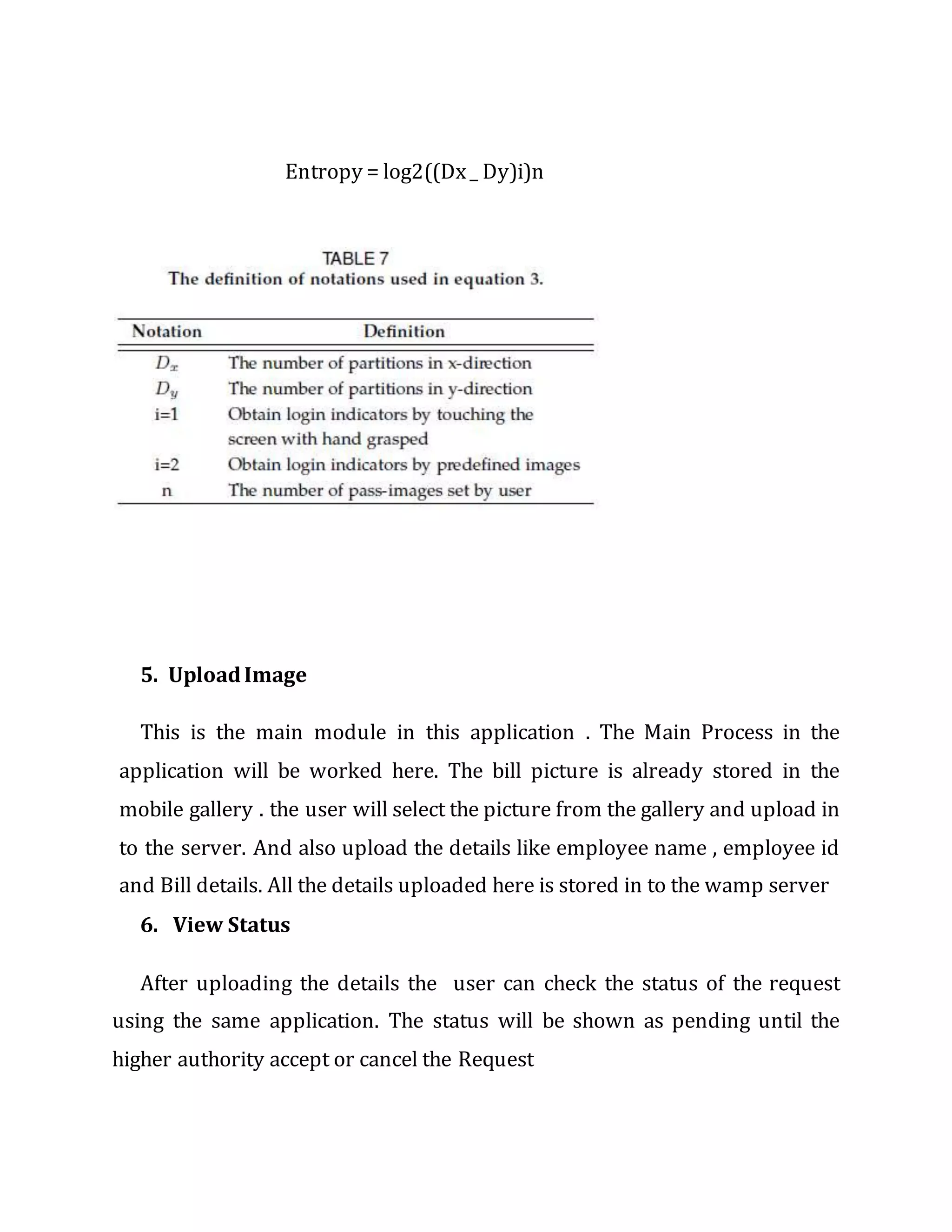
the entropy of a password space as in equation 3. Table 7 defines the
notations used in the equation. If the entropy of a password space is k bits,
there will be 2kpossible passwords in that space.
Entropy = log2((Dx_ Dy)i)n
5. UploadImage
This is the main module in this application . The Main Process in the
application will be worked here. The bill picture is already stored in the
mobile gallery . the user will select the picture from the gallery and upload in
to the server. And also upload the details like employee name , employee id
and Bill details. All the details uploaded here is stored in to the wamp server
6. View Status
After uploading the details the user can check the status of the request
using the same application. The status will be shown as pending until the
higher authority accept or cancel the Request
7. View Request
The User Requested data can be view by the Higher authority. Admin is
the authority to accept or reject the request. This module is done by using
PHP. The Admin will use System to view the request
8. Approve / Cancel
After viewing the Request the admin can have the permission to accept
or reject the request. The user can check the status
Algorithms Implemented
1. Random Guess Attack
To perform a random guess attack, the attacker randomly
tries each square as a possible pass-square for each pass image until a
successful login occurs. The key security determinants of the system are the
number of pass-images and the degree of discretization of each image. To
quantify the security of Pass Matrix against random guess attacks, we define
the entropy of a password space as in equation 3. Table 7 defines the
notations used in the equation. If the entropy of a password space is k bits,
there will be 2kpossible passwords in that space.
Entropy = log2((Dx_ Dy)i)n
Conclusion
With the increasing trend of web services and apps, users are able to
access these applications anytime and anywhere with various devices. In
order to protect users’ digital property, authentication is required every time
they try to access their personal account and data. However, conducting the
authentication process in public might result in potential shoulder surfing
attacks. Even a complicated password can be cracked easily through shoulder
surfing. Using traditional textual passwords or PIN method, users need to
type their passwords to authenticate themselves and thus these passwords
can be revealed easily if someone peeks over shoulder or uses video recording
devices such as cell phones.
To overcome this problem, we proposed a shoulder surfing
resistant authentication system based on graphical passwords, named Pass
Matrix. Using a one-time login indicator per image, users can point out the
location of their pass-square without directly clicking or touching it,
which is an action vulnerable to shoulder surfing attacks. Because of the
design of the horizontal and vertical bars that cover the entire pass-image, it
offers no clue for attackers to narrow down the password space even if they
have more than one login records of that account. Furthermore,
we implemented a Pass Matrix prototype on Android and carried out user
experiments to evaluate the memorability and usability. The experimental
result showed that users can log into the system with an average of 1:64 tries
(Median=1), and the Total Accuracy of all login trials is 93:33% even two
weeks after registration. The total time consumed to log into Pass Matrix with
an average of 3:2 pass-images is between 31:31 and 37:11 seconds and is
considered acceptable by 83:33% of participants in our user study.
Based on the experimental results and survey data, Pass Matrix is a novel and
easy-to-use graphical password authentication system, which can effectively
alleviate shoulder-surfing attacks. In addition, Pass Matrix can be applied To
any authentication scenario and device with simple input and output
capabilities. The survey data in the user study also showed that Pass Matrix is
practical in the real world.
The Application is one of the useful application in the
current situation. This is the easy way to communicate with the admin.
Employee expense claim workflow became an early candidate for
enablement as it could eliminate handling of supporting expense bills and
instead use the camera of Smartphone to capture the bill
PassBYOP: Bring Your Own Picture for Securing Graphical Passwords

PassBYOP: Bring Your Own Picture for Securing Graphical Passwords

  • 1.
    PassBYOP: Bring YourOwn Picture for Securing Graphical Passwords PassBYOP is a new graphical password scheme for public terminals that replaces the static digital images typically used in graphical password systems with personalized physical tokens, herein in the form of digital pictures displayed on a physical user-owned device such as a mobile phone. Users present these images to a system camera and then enter their password as a sequence of selections on live video of the token. Highly distinctive optical features are extracted from these selections and used as the password. We present three feasibility studies of PassBYOP examining its reliability, usability, and security against observation. The reliability study shows that image-feature based passwords are viable and suggests appropriate system thresholds—password items should contain a minimum of seven features, 40% of which must geometrically match originals stored on an authentication server in order to be judged equivalent. The usability study measures task completion times and error rates, revealing these to be 7.5 s and 9%, broadly comparable with prior graphical password systems that use static digital images. Finally, the security study highlights PassBYOP’s resistance to observation attack—three attackers are unable to compromise a password using shoulder surfing, camera based observation, or malware. These results indicate that Pass- BYOP shows promise for security while maintaining the usability of current graphical password schemes. Existing System
  • 2.
    TEXTUAL passwords havebeen the most widely used authentication method for decades. Comprised of number sand upper-and lower-caseletters, textual passwords are considered strong enough to resist against brute force attacks. However, a strong textual password is hard to memorize and recollect. Therefore, users tend to choose passwords that are either short or from the dictionary, rather than random alphanumeric strings. . Proposed System Various graphical password authentication schemes were developed to address the problems and weaknesses associated with textual passwords. Based on some studies such as those in , humans have a better ability to memorize images with long-term memory(LTM) than verbal representations. Image-based passwords were proved to be easier to recollect in several user studies As a result, users can set up a complex authentication password and are capable of recollecting it after a long time even if the memory is not activated periodically. The human actions such as choosing bad passwords for new accounts and inputting passwords in an insecure way for later logins are regarded as the weakest link in the authentication chain . Therefore, an authentication scheme should be designed to overcome these vulnerabilities. In this paper, we present a secure graphical authentication system named Pass Matrix that protects users from becoming victims of shoulder surfing attacks when inputting passwords in public through the usage of one-time login indicators. A login indicator is randomly generated for each pass-image and will be useless after the session terminates. The login indicator provides
  • 3.
    better security againstshoulder surfing attacks, since users use a dynamic pointer to point out the position of their passwords rather than clicking on the password object directly. Module Description 1. Locimetric Password Schemes 2. Usability Evaluation 3. Draw line Authentication 4. Random Guess Attack 5. Login / Register 6. Upload Image 7. View Status 8. View Requests 9. Approve / Cancel
  • 4.
    1.Locimetric Password Schemes Cued-recall(locimetric) password schemes involve users selecting regions on one or more images. Blonder’s U.S. patent is the earliest example. A seminal example is Pass Points . During login, users are shown a previously selected image, and they enter a password on the image. Authentication is successful if the XY coordinates of these clicks match a previously stored set of password points. A longitudinal study resulted in login times of 8.78–24.25 s and afailed authentication rate of 7–13% .
  • 5.
    2. Usability Evaluation Inthis module system user both public and private images for authentication. Here is the comparison take place between public and private images. This module is divides in to two modules 1.1 Public images 1.2 Private Images 2.1 Public Images In Publicimages modulehaveThe system providetwo or three images default to the system. User can select any of the images from the system and can select any point from the selected image and set as password to the system The system says that public images are hard to remember than privateimages. The pointwe marked in publicimages are hard to remember because the image published in public images are new to users. 2.2 Private Images In this module have user can set their own image as setting password. System will not provide any images for setting the password. User can brows their images from gallery and select any point from the image for setting password. Private image Authentications are more efficient than public image authentication.
  • 6.
    Because In thisAuthentication User will select their own images from gallery. It will easy to remember. 3. Draw line Authentication In this type the authentication user draw a line by connecting two points from the given image. For this system will take the starting and ending point for Authentication. During login only allow in to the system when both the lines are equal. 4. Random Guess Attack To perform a random guess attack, the attacker randomly tries each square as a possible pass-square for each pass image until a successful login occurs. The key security determinants of the system are the number of pass-images and the degree of discretization of each image. To quantify the security of Pass Matrix against random guess attacks, we define the entropy of a password space as in equation 3. Table 7 defines the notations used in the equation. If the entropy of a password space is k bits, there will be 2kpossible passwords in that space.
  • 7.
    Entropy = log2((Dx_Dy)i)n 5. UploadImage This is the main module in this application . The Main Process in the application will be worked here. The bill picture is already stored in the mobile gallery . the user will select the picture from the gallery and upload in to the server. And also upload the details like employee name , employee id and Bill details. All the details uploaded here is stored in to the wamp server 6. View Status After uploading the details the user can check the status of the request using the same application. The status will be shown as pending until the higher authority accept or cancel the Request
  • 8.
    7. View Request TheUser Requested data can be view by the Higher authority. Admin is the authority to accept or reject the request. This module is done by using PHP. The Admin will use System to view the request 8. Approve / Cancel After viewing the Request the admin can have the permission to accept or reject the request. The user can check the status Algorithms Implemented 1. Random Guess Attack To perform a random guess attack, the attacker randomly tries each square as a possible pass-square for each pass image until a successful login occurs. The key security determinants of the system are the number of pass-images and the degree of discretization of each image. To quantify the security of Pass Matrix against random guess attacks, we define the entropy of a password space as in equation 3. Table 7 defines the notations used in the equation. If the entropy of a password space is k bits, there will be 2kpossible passwords in that space. Entropy = log2((Dx_ Dy)i)n
  • 9.
    Conclusion With the increasingtrend of web services and apps, users are able to access these applications anytime and anywhere with various devices. In order to protect users’ digital property, authentication is required every time they try to access their personal account and data. However, conducting the authentication process in public might result in potential shoulder surfing attacks. Even a complicated password can be cracked easily through shoulder surfing. Using traditional textual passwords or PIN method, users need to type their passwords to authenticate themselves and thus these passwords can be revealed easily if someone peeks over shoulder or uses video recording devices such as cell phones. To overcome this problem, we proposed a shoulder surfing
  • 10.
    resistant authentication systembased on graphical passwords, named Pass Matrix. Using a one-time login indicator per image, users can point out the location of their pass-square without directly clicking or touching it, which is an action vulnerable to shoulder surfing attacks. Because of the design of the horizontal and vertical bars that cover the entire pass-image, it offers no clue for attackers to narrow down the password space even if they have more than one login records of that account. Furthermore, we implemented a Pass Matrix prototype on Android and carried out user experiments to evaluate the memorability and usability. The experimental result showed that users can log into the system with an average of 1:64 tries (Median=1), and the Total Accuracy of all login trials is 93:33% even two weeks after registration. The total time consumed to log into Pass Matrix with an average of 3:2 pass-images is between 31:31 and 37:11 seconds and is considered acceptable by 83:33% of participants in our user study. Based on the experimental results and survey data, Pass Matrix is a novel and easy-to-use graphical password authentication system, which can effectively alleviate shoulder-surfing attacks. In addition, Pass Matrix can be applied To any authentication scenario and device with simple input and output capabilities. The survey data in the user study also showed that Pass Matrix is practical in the real world. The Application is one of the useful application in the current situation. This is the easy way to communicate with the admin. Employee expense claim workflow became an early candidate for enablement as it could eliminate handling of supporting expense bills and instead use the camera of Smartphone to capture the bill