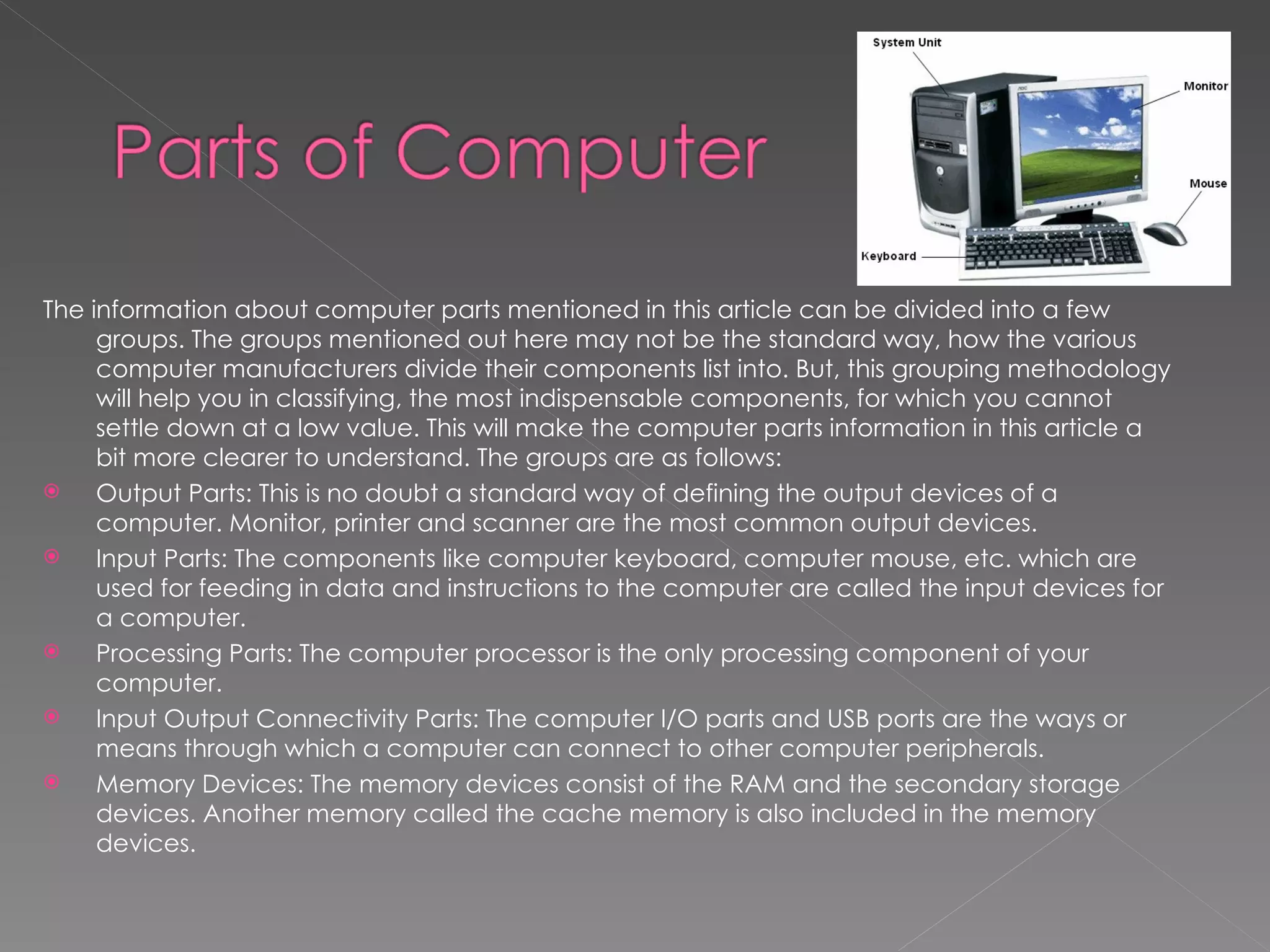
The information about computer parts mentioned in this article can be divided into a few
     groups. The groups mentioned out here may not be the standard way, how the various
     computer manufacturers divide their components list into. But, this grouping methodology
     will help you in classifying, the most indispensable components, for which you cannot
     settle down at a low value. This will make the computer parts information in this article a
     bit more clearer to understand. The groups are as follows:
    Output Parts: This is no doubt a standard way of defining the output devices of a
     computer. Monitor, printer and scanner are the most common output devices.
    Input Parts: The components like computer keyboard, computer mouse, etc. which are
     used for feeding in data and instructions to the computer are called the input devices for
     a computer.
    Processing Parts: The computer processor is the only processing component of your
     computer.
    Input Output Connectivity Parts: The computer I/O parts and USB ports are the ways or
     means through which a computer can connect to other computer peripherals.
    Memory Devices: The memory devices consist of the RAM and the secondary storage
     devices. Another memory called the cache memory is also included in the memory
     devices.
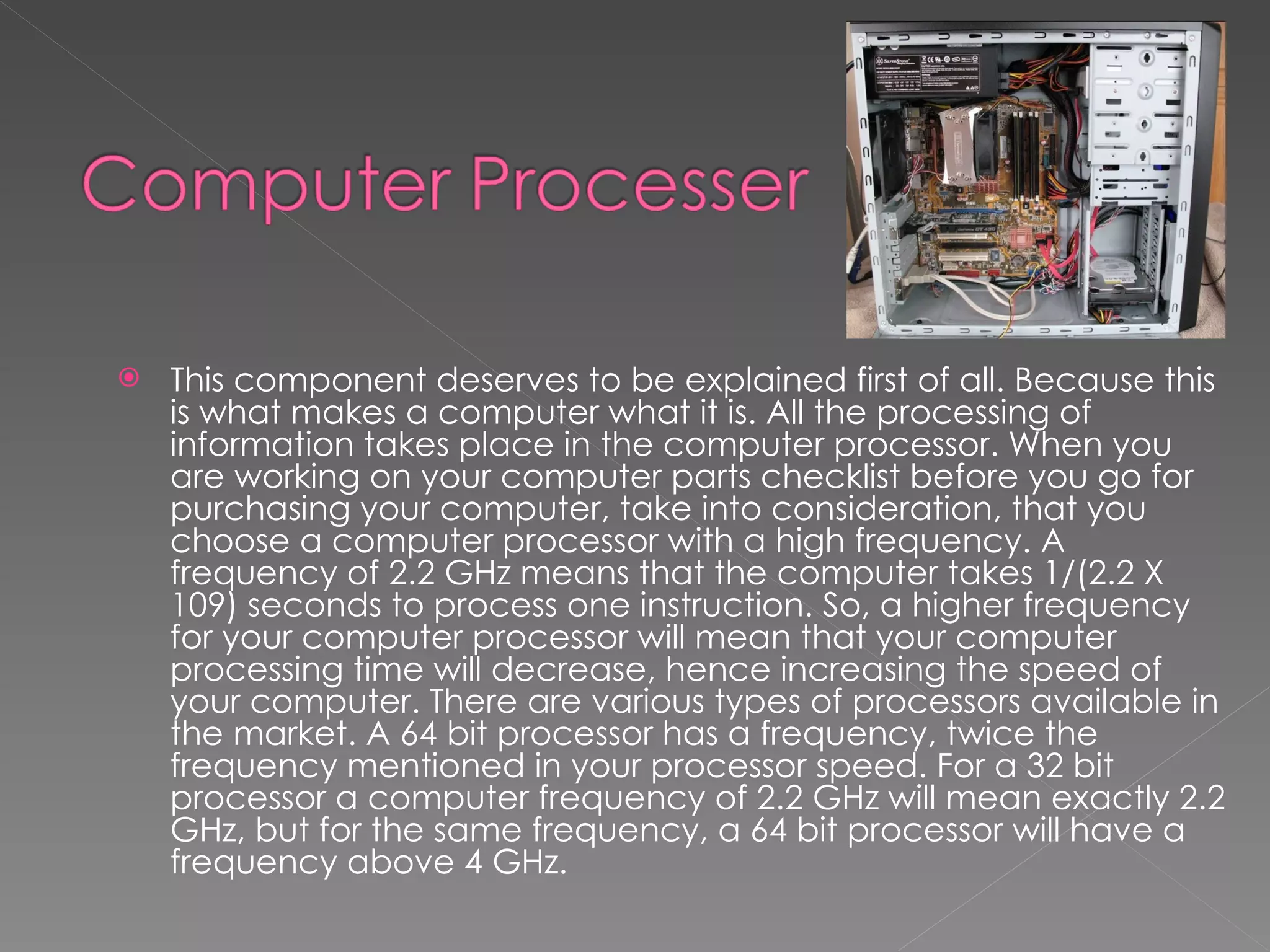
   This component deserves to be explained first of all. Because this
    is what makes a computer what it is. All the processing of
    information takes place in the computer processor. When you
    are working on your computer parts checklist before you go for
    purchasing your computer, take into consideration, that you
    choose a computer processor with a high frequency. A
    frequency of 2.2 GHz means that the computer takes 1/(2.2 X
    109) seconds to process one instruction. So, a higher frequency
    for your computer processor will mean that your computer
    processing time will decrease, hence increasing the speed of
    your computer. There are various types of processors available in
    the market. A 64 bit processor has a frequency, twice the
    frequency mentioned in your processor speed. For a 32 bit
    processor a computer frequency of 2.2 GHz will mean exactly 2.2
    GHz, but for the same frequency, a 64 bit processor will have a
    frequency above 4 GHz.
   The Random Access Memory of computer is
    the primary memory of your computer. This is
    often also referred to as the main memory of
    your computer. In fact, when the term
    computer memory is used, it does not mean
    the computer hard drive, but the RAM of your
    computer. Any information that you want to
    access from the secondary storage devices,
    first needs to be loaded into the RAM before
    being accessed by the computer processor.
    Thus, it can be easily understood that a good
    amount of computer RAM will definitely
    enhance the performance of your computer.
   All the information that you want to store in
    your computer is stored in the hard drives.
    The computer hard disks can be broadly
    classified into two types, SATA hard disks
    and PATA hard disks. The SATA hard disk is a
    serial device, while a PATA hard disk is a
    parallel device. SATA hard disks are faster
    than PATA. The information can be stored
    and accessed from the computer at a very
    high speed. Owing to the age of
    digitalization, it is important that you see to
    it that your hard disks have good amount of
    memory capacity.
   This is the memory that comes in between
    the RAM and the computer processor. The
    size of the memory is not very large. It is
    usually in single digit MB. Certain logics are
    used to enter the most used information to
    the cache. The computer processor can
    access the cache memory, even before
    accessing the RAM. Hence, see to it that
    the computer you are willing to purchase
    has a sufficient amount of cache too.
   If you are into gaming then, a graphics
    card is something that will help you a lot.
    It takes off a whole lot of pressure from
    the computer RAM. It makes the
    processing speed faster and can handle
    graphics. The size of the graphics card
    comes in MB. There are in fact some
    games which won't run in your
    computer, without a graphics card.
   This is among the input devices of a
    computer. The computer keyboard is used
    for entering data into the computer.
    Obviously, nobody needs an explanation as
    to what a computer keyboard is. The
    question is what to look for in a computer
    keyboard. Computer keyboards nowadays,
    provide a wide array of other functional
    keys, besides the normal keyboard keys.
    There are keys to handle multimedia
    applications as well as gaming applications
    too. Purchase a computer keyboard that
    has all these functionalities included in it.
   The pointing device of your computer,
    the mouse is the reason why most of us
    have forgot almost all the keyboard
    shortcuts. The application of a mouse
    mainly relies on the graphical user
    interface. The light detection computer
    mouse is something that anyone buying
    a computer is interested in. In fact, the
    roll wheel mouse is almost out of use.
   What if you want to feed in information into
    the computer through some pages.
    Suppose you want a photograph to be
    uploaded in your profile on the social
    networking sites. What would you do? The
    answer is a scanner. A computer scanner
    allows you to scan hard copy of documents
    and feed them into your computer. Browse
    over the Internet to find out which are the
    best scanners available in the market.
   A computer monitor is an output device. Definitely
    this is another device that does not need an
    explanation as to what it exactly is. Now, the
    question is, what are the features that you need in a
    computer monitor. There are basically two types of
    computer monitors, LCD monitors and CRT monitors. If
    you are a gaming enthusiast and give a lot of
    importance to graphics and look and feel, then
    probably an LCD monitor is what you would want.
    LCD monitors may be a bit costlier than the CRT
    monitors, but the cost is worth it. As far as CRT
    monitors are concerned, if you are a bit tight on
    budget, you can settle down for a flat screen CRT
    monitor, which will of course cost far lesser than an
    LCD monitor.
   This is a printing device through which you
    can print out hard copies of documents.
    Though not extremely necessary that you
    should get so, but it is always preferable to
    get a printer for your computer, if you are
    into desktop publication. Besides, computer
    printers do not cost much nowadays. A
    laser printer gives you high performance as
    well as good quality hard copies of your
    documents at a very fast speed. So, if you
    are going to purchase a printer for your
    computer, try to get a laser printer.
   Input output ports are required by the
    computer for connecting to the external
    peripherals. A good number of input/output
    ports is very much important. Now, it is the
    age of USB devices. See that you have
    sufficient number of USB ports to your
    computer. After all, you may need to
    attach an external USB mouse, your USB
    flash drive and your mobile phone at the
    same time to the computer. Hence, it is
    important that you have sufficient number
    of USB ports.
   This can be considered as an input as well as, an
    output device. You can get information through the
    CD or DVDs into your computer, or you can also write
    information into the same. It is very important that
    you have it in your computer. Take into
    consideration, that you take a CD/DVD ROM which
    can read as well as write DVDs.

    This is basically the pc parts checklist, that you need
    with you when you go for purchasing a computer. If
    you are going for a desktop computer, you can in
    fact ask for assembling the individual components.
    But if you are going for a laptop computer, you will
    have to check a lot more configurations and find out
    the best laptop deals
Pepared By:
            Gaurab Bhandari
            Class : Six ‘B’
            Roll No : Thirteen
          Sumbited To:
                       Shiva Ram Shigdel
                      Computer Teacher
                       Class : Six ‘B’

Parts of Computer

  • 2.
    The information aboutcomputer parts mentioned in this article can be divided into a few groups. The groups mentioned out here may not be the standard way, how the various computer manufacturers divide their components list into. But, this grouping methodology will help you in classifying, the most indispensable components, for which you cannot settle down at a low value. This will make the computer parts information in this article a bit more clearer to understand. The groups are as follows:  Output Parts: This is no doubt a standard way of defining the output devices of a computer. Monitor, printer and scanner are the most common output devices.  Input Parts: The components like computer keyboard, computer mouse, etc. which are used for feeding in data and instructions to the computer are called the input devices for a computer.  Processing Parts: The computer processor is the only processing component of your computer.  Input Output Connectivity Parts: The computer I/O parts and USB ports are the ways or means through which a computer can connect to other computer peripherals.  Memory Devices: The memory devices consist of the RAM and the secondary storage devices. Another memory called the cache memory is also included in the memory devices.
  • 3.
    This component deserves to be explained first of all. Because this is what makes a computer what it is. All the processing of information takes place in the computer processor. When you are working on your computer parts checklist before you go for purchasing your computer, take into consideration, that you choose a computer processor with a high frequency. A frequency of 2.2 GHz means that the computer takes 1/(2.2 X 109) seconds to process one instruction. So, a higher frequency for your computer processor will mean that your computer processing time will decrease, hence increasing the speed of your computer. There are various types of processors available in the market. A 64 bit processor has a frequency, twice the frequency mentioned in your processor speed. For a 32 bit processor a computer frequency of 2.2 GHz will mean exactly 2.2 GHz, but for the same frequency, a 64 bit processor will have a frequency above 4 GHz.
  • 4.
    The Random Access Memory of computer is the primary memory of your computer. This is often also referred to as the main memory of your computer. In fact, when the term computer memory is used, it does not mean the computer hard drive, but the RAM of your computer. Any information that you want to access from the secondary storage devices, first needs to be loaded into the RAM before being accessed by the computer processor. Thus, it can be easily understood that a good amount of computer RAM will definitely enhance the performance of your computer.
  • 5.
    All the information that you want to store in your computer is stored in the hard drives. The computer hard disks can be broadly classified into two types, SATA hard disks and PATA hard disks. The SATA hard disk is a serial device, while a PATA hard disk is a parallel device. SATA hard disks are faster than PATA. The information can be stored and accessed from the computer at a very high speed. Owing to the age of digitalization, it is important that you see to it that your hard disks have good amount of memory capacity.
  • 6.
    This is the memory that comes in between the RAM and the computer processor. The size of the memory is not very large. It is usually in single digit MB. Certain logics are used to enter the most used information to the cache. The computer processor can access the cache memory, even before accessing the RAM. Hence, see to it that the computer you are willing to purchase has a sufficient amount of cache too.
  • 7.
    If you are into gaming then, a graphics card is something that will help you a lot. It takes off a whole lot of pressure from the computer RAM. It makes the processing speed faster and can handle graphics. The size of the graphics card comes in MB. There are in fact some games which won't run in your computer, without a graphics card.
  • 8.
    This is among the input devices of a computer. The computer keyboard is used for entering data into the computer. Obviously, nobody needs an explanation as to what a computer keyboard is. The question is what to look for in a computer keyboard. Computer keyboards nowadays, provide a wide array of other functional keys, besides the normal keyboard keys. There are keys to handle multimedia applications as well as gaming applications too. Purchase a computer keyboard that has all these functionalities included in it.
  • 9.
    The pointing device of your computer, the mouse is the reason why most of us have forgot almost all the keyboard shortcuts. The application of a mouse mainly relies on the graphical user interface. The light detection computer mouse is something that anyone buying a computer is interested in. In fact, the roll wheel mouse is almost out of use.
  • 10.
    What if you want to feed in information into the computer through some pages. Suppose you want a photograph to be uploaded in your profile on the social networking sites. What would you do? The answer is a scanner. A computer scanner allows you to scan hard copy of documents and feed them into your computer. Browse over the Internet to find out which are the best scanners available in the market.
  • 11.
    A computer monitor is an output device. Definitely this is another device that does not need an explanation as to what it exactly is. Now, the question is, what are the features that you need in a computer monitor. There are basically two types of computer monitors, LCD monitors and CRT monitors. If you are a gaming enthusiast and give a lot of importance to graphics and look and feel, then probably an LCD monitor is what you would want. LCD monitors may be a bit costlier than the CRT monitors, but the cost is worth it. As far as CRT monitors are concerned, if you are a bit tight on budget, you can settle down for a flat screen CRT monitor, which will of course cost far lesser than an LCD monitor.
  • 12.
    This is a printing device through which you can print out hard copies of documents. Though not extremely necessary that you should get so, but it is always preferable to get a printer for your computer, if you are into desktop publication. Besides, computer printers do not cost much nowadays. A laser printer gives you high performance as well as good quality hard copies of your documents at a very fast speed. So, if you are going to purchase a printer for your computer, try to get a laser printer.
  • 13.
    Input output ports are required by the computer for connecting to the external peripherals. A good number of input/output ports is very much important. Now, it is the age of USB devices. See that you have sufficient number of USB ports to your computer. After all, you may need to attach an external USB mouse, your USB flash drive and your mobile phone at the same time to the computer. Hence, it is important that you have sufficient number of USB ports.
  • 14.
    This can be considered as an input as well as, an output device. You can get information through the CD or DVDs into your computer, or you can also write information into the same. It is very important that you have it in your computer. Take into consideration, that you take a CD/DVD ROM which can read as well as write DVDs.  This is basically the pc parts checklist, that you need with you when you go for purchasing a computer. If you are going for a desktop computer, you can in fact ask for assembling the individual components. But if you are going for a laptop computer, you will have to check a lot more configurations and find out the best laptop deals
  • 15.
    Pepared By: Gaurab Bhandari Class : Six ‘B’ Roll No : Thirteen Sumbited To: Shiva Ram Shigdel Computer Teacher Class : Six ‘B’