SharePoint 2016 Adoption
Lessons Learned and Advanced Troubleshooting
Level 300 / Technical
About Me
• SharePoint / .NET solution and technical architect
• Over 20 years experience developing business solutions for private
industry & government
• Recent clients include DND, StatCan, HoC, Justice, NRC, NSERC, DFAIT,
CFPSA, MCC, OSFI
• Specialize in Microsoft technologies
• Speaker at user groups and conferences
Thank you to my sponsor
• CloudShare – Environments Made Easy
• http://www.cloudshare.com/
Overview
• Lessons Learned
• Advanced Troubleshooting
Adoption
• Very simple / smooth
• No major differences in project core workloads
• Publishing Portal site collection with EN / FR variations
• Design Manager package
• WET 4
• BDC .NET Connector
• Search service app
• Display templates
What Is New and Sort-Of Useful
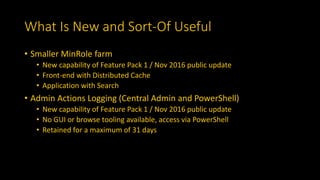
• Smaller MinRole farm
• New capability of Feature Pack 1 / Nov 2016 public update
• Front-end with Distributed Cache
• Application with Search
• Admin Actions Logging (Central Admin and PowerShell)
• New capability of Feature Pack 1 / Nov 2016 public update
• No GUI or browse tooling available, access via PowerShell
• Retained for a maximum of 31 days
What Has Improved?
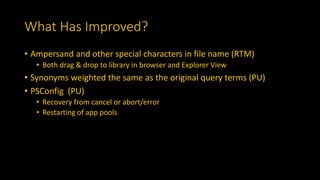
• Ampersand and other special characters in file name (RTM)
• Both drag & drop to library in browser and Explorer View
• Synonyms weighted the same as the original query terms (PU)
• PSConfig (PU)
• Recovery from cancel or abort/error
• Restarting of app pools
What Got Worse?
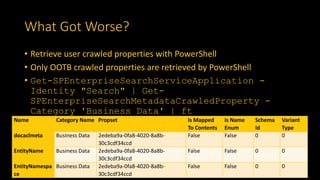
• Retrieve user crawled properties with PowerShell
• Only OOTB crawled properties are retrieved by PowerShell
• Get-SPEnterpriseSearchServiceApplication -
Identity "Search" | Get-
SPEnterpriseSearchMetadataCrawledProperty -
Category 'Business Data' | ft
Name Category Name Propset Is Mapped
To Contents
Is Name
Enum
Schema
Id
Variant
Type
docaclmeta Business Data 2edeba9a-0fa8-4020-8a8b-
30c3cdf34ccd
False False 0 0
EntityName Business Data 2edeba9a-0fa8-4020-8a8b-
30c3cdf34ccd
False False 0 0
EntityNamespa
ce
Business Data 2edeba9a-0fa8-4020-8a8b-
30c3cdf34ccd
False False 0 0
MinRole / Service Instances
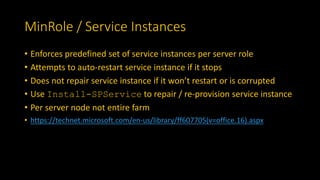
• Enforces predefined set of service instances per server role
• Attempts to auto-restart service instance if it stops
• Does not repair service instance if it won’t restart or is corrupted
• Use Install-SPService to repair / re-provision service instance
• Per server node not entire farm
• https://technet.microsoft.com/en-us/library/ff607705(v=office.16).aspx
Admin vs Farm Account
• Admin account is not the same as Farm account
• Admin account
• Farm setup and patching
• PSCONFIG
• Configure and manage farm and servers
• Farm account
• Central Admin app pool identity
• Timer Service identity
Admin vs Farm Account
• Account logged in when SharePoint farm is created (psconfig)
becomes db_owner for farm config and central admin databases
• Account logged in when service apps and web apps are created in
PowerShell becomes db_owner for their databases, with limited
exceptions
• However, Farm account is automatically owner for some of these
• Important when SQL is hosted and SP admins have limited access /
permissions to SQL Server
• Important when installing and configuring those service apps that
have Farm account as dbo
Admin vs Farm Account
Services with Farm Account as dbo no matter what:
• Business Connectivity
• Secure Store
• Why?
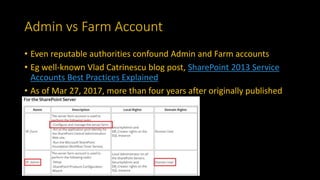
Admin vs Farm Account
• Even reputable authorities confound Admin and Farm accounts
• Eg well-known Vlad Catrinescu blog post, SharePoint 2013 Service
Accounts Best Practices Explained
• As of Mar 27, 2017, more than four years after originally published
FQDN versus Non-FQDN
• Modern DNS config resolves both to same host
• However HTTP request still carries original hostname
• SharePoint and IIS may need AAM / bindings defined for both
otherwise won’t respond
• Do you really want / need to support both?
• If not, consider a rewrite rule to canonical form
• Use generic bindings
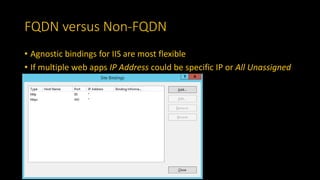
FQDN versus Non-FQDN
• Agnostic bindings for IIS are most flexible
• If multiple web apps IP Address could be specific IP or All Unassigned
FQDN versus Non-FQDN
• Rewrite Non-FQDN to canonical FQDN
• CACHE_URL is to capture protocol, no server variable for that
<rule name="Non-FQDN to FQDN" enabled="true" stopProcessing="true">
<match url=".*" />
<conditions logicalGrouping="MatchAll" trackAllCaptures="false">
<add input="{SERVER_NAME}" pattern="^hnsc-group$" negate="true" />
<add input="{SERVER_NAME}" pattern="^[^.]*$" />
<add input="{CACHE_URL}" pattern="^(.+)://" />
</conditions>
<action type="Redirect"
url="{C:1}://{SERVER_NAME}.XXX.ca:{SERVER_PORT}{PATH_INFO}" />
</rule>
Advanced Troubleshooting Tools
• Google! + Experience + Intuition
• ULS Viewer
• PowerShell
• F12 Developer Tools in browser / Developer Dashboard
• SharePoint Manager 2013
• SharePoint 2013 Search Tool
• dotPeek
• Fiddler and Wireshark
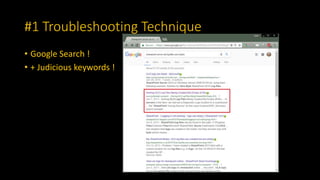
#1 Troubleshooting Technique
• Google Search !
• + Judicious keywords !
Central Admin On The Blink
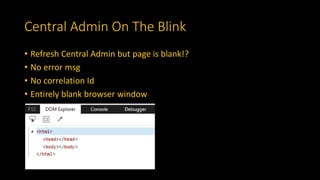
• Refresh Central Admin but page is blank!?
• No error msg
• No correlation Id
• Entirely blank browser window
Central Admin On The Blink
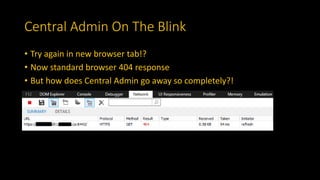
• Try again in new browser tab!?
• Now standard browser 404 response
• But how does Central Admin go away so completely?!
Central Admin On The Blink
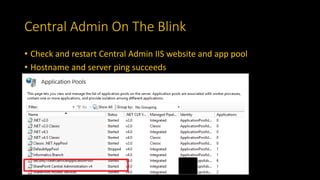
• Check and restart Central Admin IIS website and app pool
• Hostname and server ping succeeds
Central Admin On The Blink
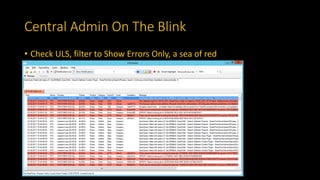
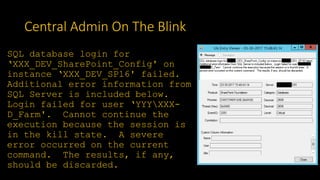
• Check ULS, filter to Show Errors Only, a sea of red
Central Admin On The Blink
SQL database login for
‘XXX_DEV_SharePoint_Config' on
instance ‘XXX_DEV_SP16' failed.
Additional error information from
SQL Server is included below.
Login failed for user ‘YYYXXX-
D_Farm'. Cannot continue the
execution because the session is
in the kill state. A severe
error occurred on the current
command. The results, if any,
should be discarded.
Central Admin On The Blink
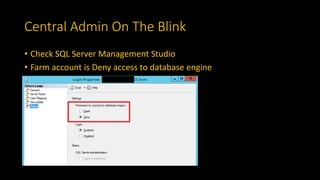
• Check SQL Server Management Studio
• Farm account is Deny access to database engine
Central Admin On The Blink
• There were numerous legacy service accounts
• In the process of disabling these we went one too far!
• Denied the Farm account access to the farm SQL server
• Reset Farm account to:
• Permission to connect to database engine: Grant
• Central Admin came back online
Conclusion
• ULS log had a simple and straightforward error msg
• Sometimes you get lucky with ULS!
• But not often!
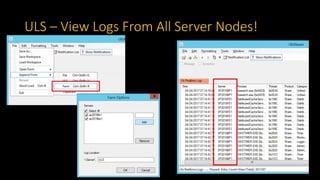
ULS – View Logs From All Server Nodes!
BDC Service App Issue
• Dev team reports BDC .NET Connector deployment fails
• Dev team workaround:
• Switch web app service app associations from Default to Custom and include
BDC service app
• Even though Default and Custom groups show the same service app
associations
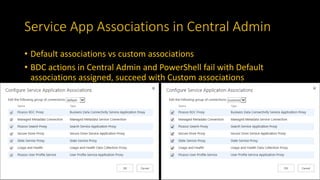
Service App Associations in Central Admin
• Default associations vs custom associations
• BDC actions in Central Admin and PowerShell fail with Default
associations assigned, succeed with Custom associations
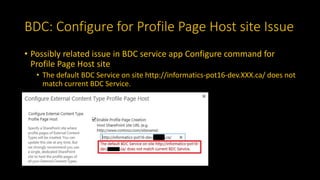
BDC: Configure for Profile Page Host site Issue
• Possibly related issue in BDC service app Configure command for
Profile Page Host site
• The default BDC Service on site http://informatics-pot16-dev.XXX.ca/ does not
match current BDC Service.
BDC: Configure for Profile Page Host site Issue
• ULS logs show a divergence but no clear leads for troubleshooting
PowerShell Discrepancy vs Central Admin
• Discrepancy in default proxy group: PowerShell compared to Central
Admin
• SPWebApplication.ServiceApplicationProxyGroup.DefaultPr
oxies
• Picasso BDC Proxy is missing!
Display Name Type Name
Managed Metadata Connection Managed Metadata Service Connection
Picasso Search Proxy Search Service Application Proxy
Picasso User Profile Service User Profile Service Application Proxy
Secure Store Proxy Secure Store Service Application Proxy
State Service Proxy State Service Proxy
Usage and Health Usage and Health Data Collection Proxy
Fix: Force Add Service App Proxy to Default
Group
• PowerShell to add Picasso BDC Proxy to Default associations group
• Add-SPServiceApplicationProxyGroupMember $pg -
Member 5b29056d-2206-426a-b9db-096a3a43fd60 #
Picasso BDC Proxy
• No change in how Central Admin displays Default service app
associations list
• Resolves issue in BDC service app Configure command for Profile Page
Host site
• True fix versus using Custom association group work around
Root Cause – Solution Deployment Script
• BDC service app deployed by solution PowerShell script
• New-SPBusinessDataCatalogServiceApplication
cmdlet also creates a proxy but does not permit assigning it’s name
• New-SPBusinessDataCatalogServiceApplicationProxy
cmdlet permits assigning the proxy name
• Solution deployment script combined these and Remove-
SPServiceApplicationProxy cmdlet
• In a funky way that left the farm confused about the state of the
Default association group
Conclusion
• Inspect farm config with PowerShell as it may be more accurate than
Central Admin
F12 Developer Tools
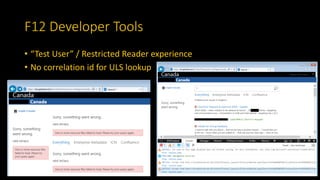
• “Test User” / Restricted Reader experience
• No correlation id for ULS lookup
F12 Developer Tools
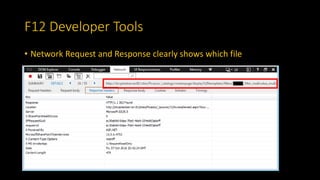
• Network Request and Response clearly shows which file
F12 Developer Tools
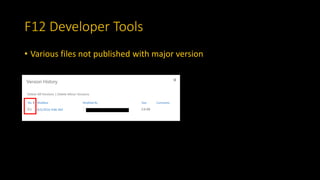
• Various files not published with major version
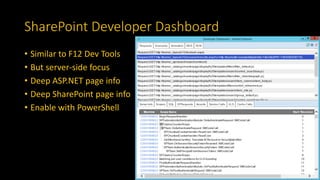
SharePoint Developer Dashboard
• Similar to F12 Dev Tools
• But server-side focus
• Deep ASP.NET page info
• Deep SharePoint page info
• Enable with PowerShell
Conclusion
• Inspect HTTP requests, responses, content, and browser errors
• Rapidly zero in on page or item related problems
• Inspect ASP.NET / SharePoint page lifecycle and Server Object Model
(SSOM) API calls
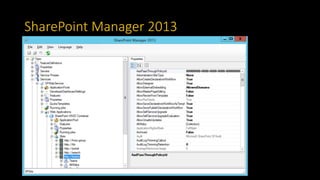
SharePoint Manager 2013
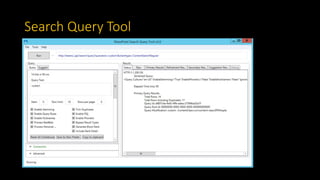
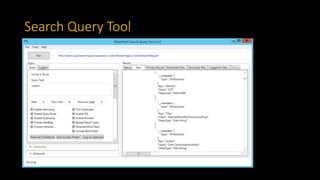
Search Query Tool
Search Query Tool
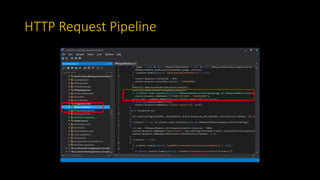
HTTP Request Pipeline
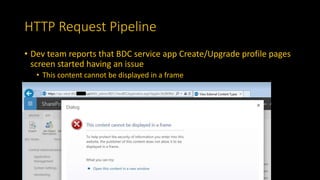
• Dev team reports that BDC service app Create/Upgrade profile pages
screen started having an issue
• This content cannot be displayed in a frame
HTTP Request Pipeline
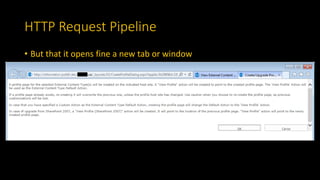
• But that it opens fine a new tab or window
HTTP Request Pipeline
• You might recognize the issue immediately:
• Same Origin policy for framing
• Or Google
• Request domain is sps-adds-d01.XXX.ca
• Target domain is informatics-pot16-dev.XXX.ca
• But can F12 Dev Tools tell us more about root cause / resolution?
HTTP Request Pipeline
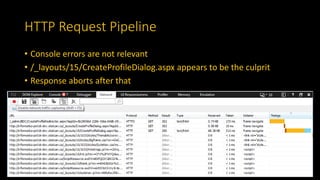
• Console errors are not relevant
• /_layouts/15/CreateProfileDialog.aspx appears to be the culprit
• Response aborts after that
HTTP Request Pipeline
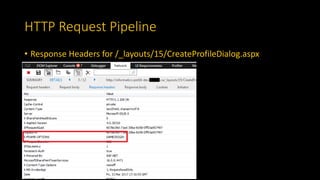
• Response Headers for /_layouts/15/CreateProfileDialog.aspx
HTTP Request Pipeline
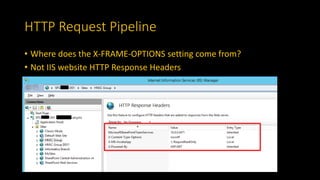
• Where does the X-FRAME-OPTIONS setting come from?
• Not IIS website HTTP Response Headers
HTTP Request Pipeline
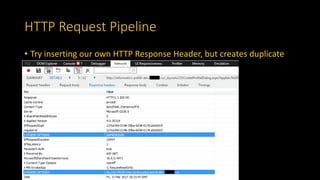
• Try inserting our own HTTP Response Header, but creates duplicate
HTTP Request Pipeline
• Add control to master page:
• <WebPartPages:AllowFraming runat=”server” />
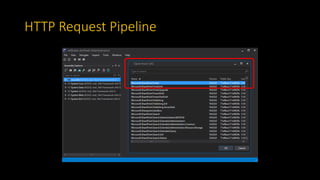
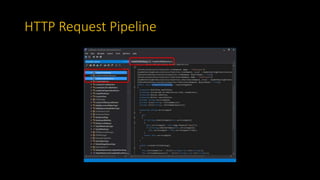
• But what is going on under the covers?
HTTP Request Pipeline
Conclusion
• SharePoint forces X-FRAME-OPTIONS: SAMEORIGIN
• No farm or IIS config will override this
• HttpModule can override
• Or just live with browser framing warning msg
HTTP Protocol of New Site Collection
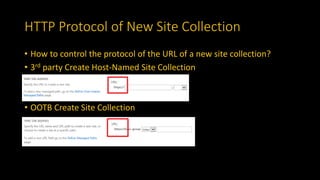
• How to control the protocol of the URL of a new site collection?
• 3rd party Create Host-Named Site Collection
• OOTB Create Site Collection
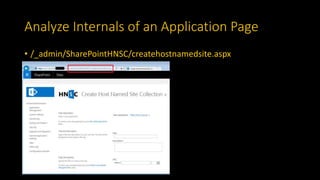
Analyze Internals of an Application Page
• /_admin/SharePointHNSC/createhostnamedsite.aspx
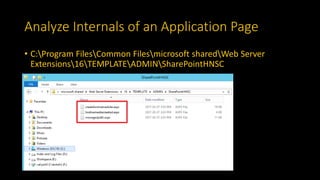
Analyze Internals of an Application Page
• C:Program FilesCommon Filesmicrosoft sharedWeb Server
Extensions16TEMPLATEADMINSharePointHNSC
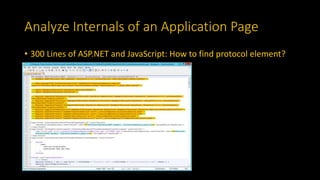
Analyze Internals of an Application Page
• 300 Lines of ASP.NET and JavaScript: How to find protocol element?
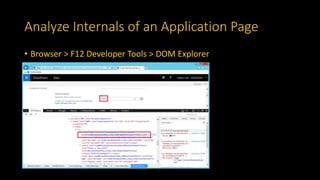
Analyze Internals of an Application Page
• Browser > F12 Developer Tools > DOM Explorer
Analyze Internals of an Application Page
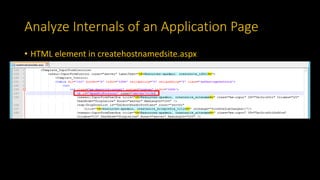
• HTML element in createhostnamedsite.aspx
Analyze Internals of an Application Page
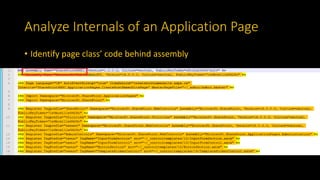
• Identify page class’ code behind assembly
Analyze Internals of an Application Page
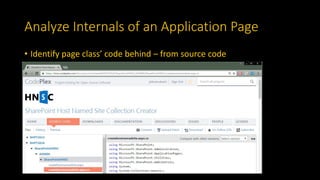
• Identify page class’ code behind – from source code
Analyze Internals of an Application Page
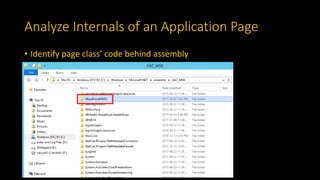
• Identify page class’ code behind assembly
Analyze Internals of an Application Page
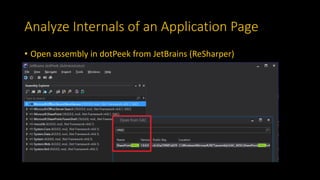
• Open assembly in dotPeek from JetBrains (ReSharper)
Analyze Internals of an Application Page
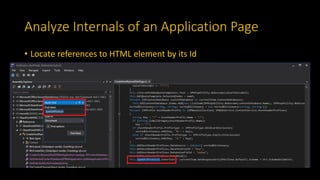
• Locate references to HTML element by its Id
Analyze Internals of an Application Page
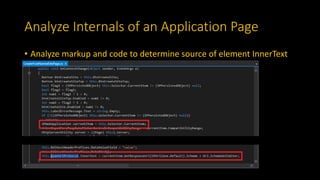
• Analyze markup and code to determine source of element InnerText
Analyze Internals of an Application Page
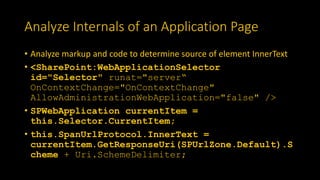
• Analyze markup and code to determine source of element InnerText
• <SharePoint:WebApplicationSelector
id="Selector" runat="server“
OnContextChange="OnContextChange"
AllowAdministrationWebApplication="false" />
• SPWebApplication currentItem =
this.Selector.CurrentItem;
• this.SpanUrlProtocol.InnerText =
currentItem.GetResponseUri(SPUrlZone.Default).S
cheme + Uri.SchemeDelimiter;
HTTP Protocol of New Site Collection
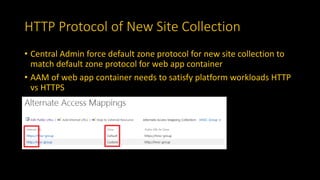
• Central Admin force default zone protocol for new site collection to
match default zone protocol for web app container
• AAM of web app container needs to satisfy platform workloads HTTP
vs HTTPS
HTTP Protocol of New Site Collection
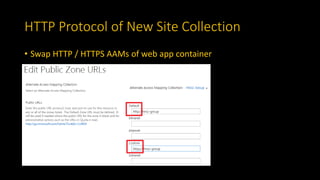
• Swap HTTP / HTTPS AAMs of web app container
HTTP Protocol of New Site Collection
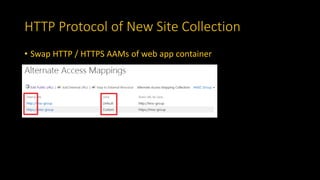
• Swap HTTP / HTTPS AAMs of web app container
HTTP Protocol of New Site Collection
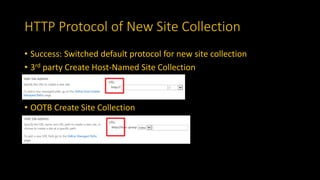
• Success: Switched default protocol for new site collection
• 3rd party Create Host-Named Site Collection
• OOTB Create Site Collection
Conclusion
• Get comfortable with reading disassembled Microsoft assemblies to
delve into actual logic of Central Admin application pages
• Also works for PowerShell cmdlets which are often written in C# /
.NET
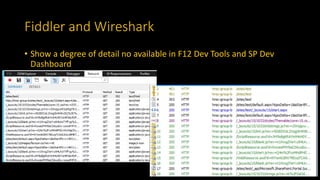
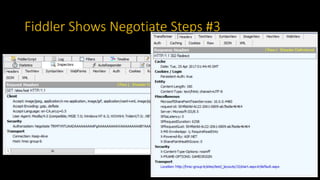
Fiddler and Wireshark
• Show a degree of detail no available in F12 Dev Tools and SP Dev
Dashboard
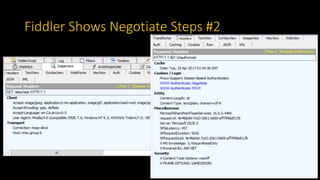
Fiddler Shows Negotiate Steps #2
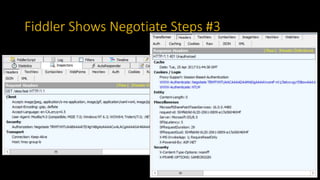
Fiddler Shows Negotiate Steps #3
Next Steps – Try Out These Tools
• ULS Viewer
• PowerShell
• F12 Developer Tools in browser / Developer Dashboard
• SharePoint Manager 2013
• SharePoint 2013 Search Tool
• dotPeek
• Fiddler and Wireshark
Contact Me
• John Calvert, Chief Architect
• Software Craft, Inc.
• john (a) softwarecraft dot ca
• softwarecraft dot ca
• (a) softwarecraft99

SharePoint 2016 Adoption - Lessons Learned and Advanced Troubleshooting

  • 1.
    SharePoint 2016 Adoption LessonsLearned and Advanced Troubleshooting Level 300 / Technical
  • 2.
    About Me • SharePoint/ .NET solution and technical architect • Over 20 years experience developing business solutions for private industry & government • Recent clients include DND, StatCan, HoC, Justice, NRC, NSERC, DFAIT, CFPSA, MCC, OSFI • Specialize in Microsoft technologies • Speaker at user groups and conferences
  • 3.
    Thank you tomy sponsor • CloudShare – Environments Made Easy • http://www.cloudshare.com/
  • 4.
    Overview • Lessons Learned •Advanced Troubleshooting
  • 5.
    Adoption • Very simple/ smooth • No major differences in project core workloads • Publishing Portal site collection with EN / FR variations • Design Manager package • WET 4 • BDC .NET Connector • Search service app • Display templates
  • 6.
    What Is Newand Sort-Of Useful • Smaller MinRole farm • New capability of Feature Pack 1 / Nov 2016 public update • Front-end with Distributed Cache • Application with Search • Admin Actions Logging (Central Admin and PowerShell) • New capability of Feature Pack 1 / Nov 2016 public update • No GUI or browse tooling available, access via PowerShell • Retained for a maximum of 31 days
  • 7.
    What Has Improved? •Ampersand and other special characters in file name (RTM) • Both drag & drop to library in browser and Explorer View • Synonyms weighted the same as the original query terms (PU) • PSConfig (PU) • Recovery from cancel or abort/error • Restarting of app pools
  • 8.
    What Got Worse? •Retrieve user crawled properties with PowerShell • Only OOTB crawled properties are retrieved by PowerShell • Get-SPEnterpriseSearchServiceApplication - Identity "Search" | Get- SPEnterpriseSearchMetadataCrawledProperty - Category 'Business Data' | ft Name Category Name Propset Is Mapped To Contents Is Name Enum Schema Id Variant Type docaclmeta Business Data 2edeba9a-0fa8-4020-8a8b- 30c3cdf34ccd False False 0 0 EntityName Business Data 2edeba9a-0fa8-4020-8a8b- 30c3cdf34ccd False False 0 0 EntityNamespa ce Business Data 2edeba9a-0fa8-4020-8a8b- 30c3cdf34ccd False False 0 0
  • 9.
    MinRole / ServiceInstances • Enforces predefined set of service instances per server role • Attempts to auto-restart service instance if it stops • Does not repair service instance if it won’t restart or is corrupted • Use Install-SPService to repair / re-provision service instance • Per server node not entire farm • https://technet.microsoft.com/en-us/library/ff607705(v=office.16).aspx
  • 10.
    Admin vs FarmAccount • Admin account is not the same as Farm account • Admin account • Farm setup and patching • PSCONFIG • Configure and manage farm and servers • Farm account • Central Admin app pool identity • Timer Service identity
  • 11.
    Admin vs FarmAccount • Account logged in when SharePoint farm is created (psconfig) becomes db_owner for farm config and central admin databases • Account logged in when service apps and web apps are created in PowerShell becomes db_owner for their databases, with limited exceptions • However, Farm account is automatically owner for some of these • Important when SQL is hosted and SP admins have limited access / permissions to SQL Server • Important when installing and configuring those service apps that have Farm account as dbo
  • 12.
    Admin vs FarmAccount Services with Farm Account as dbo no matter what: • Business Connectivity • Secure Store • Why?
  • 13.
    Admin vs FarmAccount • Even reputable authorities confound Admin and Farm accounts • Eg well-known Vlad Catrinescu blog post, SharePoint 2013 Service Accounts Best Practices Explained • As of Mar 27, 2017, more than four years after originally published
  • 14.
    FQDN versus Non-FQDN •Modern DNS config resolves both to same host • However HTTP request still carries original hostname • SharePoint and IIS may need AAM / bindings defined for both otherwise won’t respond • Do you really want / need to support both? • If not, consider a rewrite rule to canonical form • Use generic bindings
  • 15.
    FQDN versus Non-FQDN •Agnostic bindings for IIS are most flexible • If multiple web apps IP Address could be specific IP or All Unassigned
  • 16.
    FQDN versus Non-FQDN •Rewrite Non-FQDN to canonical FQDN • CACHE_URL is to capture protocol, no server variable for that <rule name="Non-FQDN to FQDN" enabled="true" stopProcessing="true"> <match url=".*" /> <conditions logicalGrouping="MatchAll" trackAllCaptures="false"> <add input="{SERVER_NAME}" pattern="^hnsc-group$" negate="true" /> <add input="{SERVER_NAME}" pattern="^[^.]*$" /> <add input="{CACHE_URL}" pattern="^(.+)://" /> </conditions> <action type="Redirect" url="{C:1}://{SERVER_NAME}.XXX.ca:{SERVER_PORT}{PATH_INFO}" /> </rule>
  • 17.
    Advanced Troubleshooting Tools •Google! + Experience + Intuition • ULS Viewer • PowerShell • F12 Developer Tools in browser / Developer Dashboard • SharePoint Manager 2013 • SharePoint 2013 Search Tool • dotPeek • Fiddler and Wireshark
  • 18.
    #1 Troubleshooting Technique •Google Search ! • + Judicious keywords !
  • 19.
    Central Admin OnThe Blink • Refresh Central Admin but page is blank!? • No error msg • No correlation Id • Entirely blank browser window
  • 20.
    Central Admin OnThe Blink • Try again in new browser tab!? • Now standard browser 404 response • But how does Central Admin go away so completely?!
  • 21.
    Central Admin OnThe Blink • Check and restart Central Admin IIS website and app pool • Hostname and server ping succeeds
  • 22.
    Central Admin OnThe Blink • Check ULS, filter to Show Errors Only, a sea of red
  • 23.
    Central Admin OnThe Blink SQL database login for ‘XXX_DEV_SharePoint_Config' on instance ‘XXX_DEV_SP16' failed. Additional error information from SQL Server is included below. Login failed for user ‘YYYXXX- D_Farm'. Cannot continue the execution because the session is in the kill state. A severe error occurred on the current command. The results, if any, should be discarded.
  • 24.
    Central Admin OnThe Blink • Check SQL Server Management Studio • Farm account is Deny access to database engine
  • 25.
    Central Admin OnThe Blink • There were numerous legacy service accounts • In the process of disabling these we went one too far! • Denied the Farm account access to the farm SQL server • Reset Farm account to: • Permission to connect to database engine: Grant • Central Admin came back online
  • 26.
    Conclusion • ULS loghad a simple and straightforward error msg • Sometimes you get lucky with ULS! • But not often!
  • 27.
    ULS – ViewLogs From All Server Nodes!
  • 28.
    BDC Service AppIssue • Dev team reports BDC .NET Connector deployment fails • Dev team workaround: • Switch web app service app associations from Default to Custom and include BDC service app • Even though Default and Custom groups show the same service app associations
  • 29.
    Service App Associationsin Central Admin • Default associations vs custom associations • BDC actions in Central Admin and PowerShell fail with Default associations assigned, succeed with Custom associations
  • 30.
    BDC: Configure forProfile Page Host site Issue • Possibly related issue in BDC service app Configure command for Profile Page Host site • The default BDC Service on site http://informatics-pot16-dev.XXX.ca/ does not match current BDC Service.
  • 31.
    BDC: Configure forProfile Page Host site Issue • ULS logs show a divergence but no clear leads for troubleshooting
  • 32.
    PowerShell Discrepancy vsCentral Admin • Discrepancy in default proxy group: PowerShell compared to Central Admin • SPWebApplication.ServiceApplicationProxyGroup.DefaultPr oxies • Picasso BDC Proxy is missing! Display Name Type Name Managed Metadata Connection Managed Metadata Service Connection Picasso Search Proxy Search Service Application Proxy Picasso User Profile Service User Profile Service Application Proxy Secure Store Proxy Secure Store Service Application Proxy State Service Proxy State Service Proxy Usage and Health Usage and Health Data Collection Proxy
  • 33.
    Fix: Force AddService App Proxy to Default Group • PowerShell to add Picasso BDC Proxy to Default associations group • Add-SPServiceApplicationProxyGroupMember $pg - Member 5b29056d-2206-426a-b9db-096a3a43fd60 # Picasso BDC Proxy • No change in how Central Admin displays Default service app associations list • Resolves issue in BDC service app Configure command for Profile Page Host site • True fix versus using Custom association group work around
  • 34.
    Root Cause –Solution Deployment Script • BDC service app deployed by solution PowerShell script • New-SPBusinessDataCatalogServiceApplication cmdlet also creates a proxy but does not permit assigning it’s name • New-SPBusinessDataCatalogServiceApplicationProxy cmdlet permits assigning the proxy name • Solution deployment script combined these and Remove- SPServiceApplicationProxy cmdlet • In a funky way that left the farm confused about the state of the Default association group
  • 35.
    Conclusion • Inspect farmconfig with PowerShell as it may be more accurate than Central Admin
  • 36.
    F12 Developer Tools •“Test User” / Restricted Reader experience • No correlation id for ULS lookup
  • 37.
    F12 Developer Tools •Network Request and Response clearly shows which file
  • 38.
    F12 Developer Tools •Various files not published with major version
  • 39.
    SharePoint Developer Dashboard •Similar to F12 Dev Tools • But server-side focus • Deep ASP.NET page info • Deep SharePoint page info • Enable with PowerShell
  • 40.
    Conclusion • Inspect HTTPrequests, responses, content, and browser errors • Rapidly zero in on page or item related problems • Inspect ASP.NET / SharePoint page lifecycle and Server Object Model (SSOM) API calls
  • 41.
  • 42.
  • 43.
  • 44.
    HTTP Request Pipeline •Dev team reports that BDC service app Create/Upgrade profile pages screen started having an issue • This content cannot be displayed in a frame
  • 45.
    HTTP Request Pipeline •But that it opens fine a new tab or window
  • 46.
    HTTP Request Pipeline •You might recognize the issue immediately: • Same Origin policy for framing • Or Google • Request domain is sps-adds-d01.XXX.ca • Target domain is informatics-pot16-dev.XXX.ca • But can F12 Dev Tools tell us more about root cause / resolution?
  • 47.
    HTTP Request Pipeline •Console errors are not relevant • /_layouts/15/CreateProfileDialog.aspx appears to be the culprit • Response aborts after that
  • 48.
    HTTP Request Pipeline •Response Headers for /_layouts/15/CreateProfileDialog.aspx
  • 49.
    HTTP Request Pipeline •Where does the X-FRAME-OPTIONS setting come from? • Not IIS website HTTP Response Headers
  • 50.
    HTTP Request Pipeline •Try inserting our own HTTP Response Header, but creates duplicate
  • 51.
    HTTP Request Pipeline •Add control to master page: • <WebPartPages:AllowFraming runat=”server” /> • But what is going on under the covers?
  • 52.
  • 53.
  • 54.
  • 55.
    Conclusion • SharePoint forcesX-FRAME-OPTIONS: SAMEORIGIN • No farm or IIS config will override this • HttpModule can override • Or just live with browser framing warning msg
  • 56.
    HTTP Protocol ofNew Site Collection • How to control the protocol of the URL of a new site collection? • 3rd party Create Host-Named Site Collection • OOTB Create Site Collection
  • 57.
    Analyze Internals ofan Application Page • /_admin/SharePointHNSC/createhostnamedsite.aspx
  • 58.
    Analyze Internals ofan Application Page • C:Program FilesCommon Filesmicrosoft sharedWeb Server Extensions16TEMPLATEADMINSharePointHNSC
  • 59.
    Analyze Internals ofan Application Page • 300 Lines of ASP.NET and JavaScript: How to find protocol element?
  • 60.
    Analyze Internals ofan Application Page • Browser > F12 Developer Tools > DOM Explorer
  • 61.
    Analyze Internals ofan Application Page • HTML element in createhostnamedsite.aspx
  • 62.
    Analyze Internals ofan Application Page • Identify page class’ code behind assembly
  • 63.
    Analyze Internals ofan Application Page • Identify page class’ code behind – from source code
  • 64.
    Analyze Internals ofan Application Page • Identify page class’ code behind assembly
  • 65.
    Analyze Internals ofan Application Page • Open assembly in dotPeek from JetBrains (ReSharper)
  • 66.
    Analyze Internals ofan Application Page • Locate references to HTML element by its Id
  • 67.
    Analyze Internals ofan Application Page • Analyze markup and code to determine source of element InnerText
  • 68.
    Analyze Internals ofan Application Page • Analyze markup and code to determine source of element InnerText • <SharePoint:WebApplicationSelector id="Selector" runat="server“ OnContextChange="OnContextChange" AllowAdministrationWebApplication="false" /> • SPWebApplication currentItem = this.Selector.CurrentItem; • this.SpanUrlProtocol.InnerText = currentItem.GetResponseUri(SPUrlZone.Default).S cheme + Uri.SchemeDelimiter;
  • 69.
    HTTP Protocol ofNew Site Collection • Central Admin force default zone protocol for new site collection to match default zone protocol for web app container • AAM of web app container needs to satisfy platform workloads HTTP vs HTTPS
  • 70.
    HTTP Protocol ofNew Site Collection • Swap HTTP / HTTPS AAMs of web app container
  • 71.
    HTTP Protocol ofNew Site Collection • Swap HTTP / HTTPS AAMs of web app container
  • 72.
    HTTP Protocol ofNew Site Collection • Success: Switched default protocol for new site collection • 3rd party Create Host-Named Site Collection • OOTB Create Site Collection
  • 73.
    Conclusion • Get comfortablewith reading disassembled Microsoft assemblies to delve into actual logic of Central Admin application pages • Also works for PowerShell cmdlets which are often written in C# / .NET
  • 74.
    Fiddler and Wireshark •Show a degree of detail no available in F12 Dev Tools and SP Dev Dashboard
  • 75.
  • 76.
  • 77.
  • 78.
    Next Steps –Try Out These Tools • ULS Viewer • PowerShell • F12 Developer Tools in browser / Developer Dashboard • SharePoint Manager 2013 • SharePoint 2013 Search Tool • dotPeek • Fiddler and Wireshark
  • 79.
    Contact Me • JohnCalvert, Chief Architect • Software Craft, Inc. • john (a) softwarecraft dot ca • softwarecraft dot ca • (a) softwarecraft99

Editor's Notes

  • #7 MinRole – Feature Pack 1 2 core servers before SQL / OOS / HA / DR, etc Planning for a MinRole server deployment in SharePoint Server 2016 https://technet.microsoft.com/en-ca/library/mt743704(v=office.16).aspx Admin Logging Using Administrative Actions logging in SharePoint Server 2016 https://technet.microsoft.com/en-us/library/mt790698(v=office.16).aspx Feature Pack 1 / Nov 2016 Public Update Same regression testing as standard Public Update, less than Service Pack, install at your own risk Get-SPServer | FT -Property Address, Role, CompliantWithMinRole
  • #8 Recent Public Updates include improvement to PSConfig and Search synonym weighting: Restarts services that it stopped even if cancelled or aborted due to error Streamlines stopping and starting of IIS app pools
  • #10 Install-SPService, per Trevor Seward, MVP, in answers.microsoft.com
  • #12 SQL + SAN storage: assign both dbo to database and also rights to storage folder BDC .NET Connector deployment woes when not logged in as Farm account, even with permissions granted to Admin account
  • #13 TODO: T-SQL to view database owners Why: Security perhaps?
  • #14 Errors in this blog post: SP_Admin not SP_Farm should have “Configure and manage the server farm”, probably a copy & paste error SP_Admin should be clearly marked as a user account not a service account Important if you User Rights Assignments “Log on as a service” and not “Log on locally as a user”
  • #17 {CACHE_URL} is used to capture protocol since there is no IIS server variable for this, at least as of IIS 8.x
  • #18 https://blogs.technet.microsoft.com/wbaer/2014/08/22/uls-viewing-like-a-boss-uls-viewer-is-now-available/ http://spm.codeplex.com http://sp2013searchtool.codeplex.com/ https://www.jetbrains.com/decompiler/ http://www.telerik.com/fiddler https://www.wireshark.org/ https://zimmergren.net/tools-for-your-sharepoint-2013-development-toolbox/
  • #28 ULS Viewing Like a Boss (ULS Viewer is now available) – MSDN Blogs https://blogs.technet.microsoft.com/wbaer/2014/08/22/uls-viewing-like-a-boss-uls-viewer-is-now-available/
  • #29 PowerShell script error msg and ULS log: TBD
  • #41 Using the Developer Dashboard https://msdn.microsoft.com/en-us/library/office/ff512745(v=office.14).aspx SharePoint Developer Dashbord https://andikrueger.wordpress.com/2016/05/11/sharepoint-developer-dashbord/ (SPWebService.ContentService).SPDeveloperDashboardSettings.DisplayLevel = [On | OnDemand | Off]
  • #43 SharePoint Manager 2013 https://spm.codeplex.com/ Sometimes allows you to see and modify items that you can’t via the browser and it would take a bunch of code via API
  • #44 SharePoint Search Query Tool https://sp2013searchtool.codeplex.com/ Works with SharePoint 2013 / 2016 / Online
  • #53 IFraming SharePoint-hosted pages in apps https://blogs.msdn.microsoft.com/officeapps/2012/12/12/iframing-sharepoint-hosted-pages-in-apps/
  • #57 IFraming SharePoint-hosted pages in apps (MSDN Blogs) https://blogs.msdn.microsoft.com/officeapps/2012/12/12/iframing-sharepoint-hosted-pages-in-apps/ Permissive XFrame Header http://ventigrate.codeplex.com/wikipage?title=Permissive%20XFrame%20Header
  • #58 Technique: Use dotPeek to examine code in page load of: * /_admin/createsite.aspx * /_admin/SharePointHNSC/createhostnamedsite.aspx
  • #59 Technique: Use dotPeek to examine code behind / assembly of: /_admin/createsite.aspx /_admin/SharePointHNSC/createhostnamedsite.aspx Story is more complicated with createsite.aspx because: Assembly is not in GAC, instead at C:\Program Files\Common Files\microsoft shared\Web Server Extensions\16\CONFIG\ADMINBIN\Microsoft.SharePoint.ApplicationPages.Administration.dll HTML element is modified client-side by JavaScript from a hidden form variable, rather than being set from SharePoint web control Microsoft.SharePoint.WebControls:WebApplicationSelector The latter because OOTB page is designed for two contexts, one during Farm Config Wizard Mode
  • #60 Technique: Use dotPeek to examine code in page load of: * /_admin/createsite.aspx * /_admin/SharePointHNSC/createhostnamedsite.aspx
  • #62 Plain HTML element not an ASP.NET control or JavaScript
  • #63 Plain HTML element not an ASP.NET control or JavaScript
  • #64 Delve deeper into page class’ code behind and assembly
  • #65 Delve deeper into page class’ code behind and assembly
  • #66 Delve deeper into page class’ code behind and assembly
  • #74 Technique: Use dotPeek to examine code in page load of: * /_admin/createsite.aspx * /_admin/SharePointHNSC/createhostnamedsite.aspx