Ring Documentation, Release 1.9
setclickevent(Method(:OpenAction))
settooltip("Open File")
} ,
new qtoolbutton(win) {
setbtnimage(self,AppFile("image/save.png"))
setclickevent(Method(:SaveAction))
settooltip("Save")
} ,
new qtoolbutton(win) {
setbtnimage(self,AppFile("image/saveas.png"))
setclickevent(Method(:SaveAsAction))
settooltip("Save As")
} ,
new qtoolbutton(win) {
setbtnimage(self,AppFile("image/close.png"))
setclickevent(Method(:ExitAction))
settooltip("Exit")
}
]
tool1 = win.addtoolbar("files") {
for x in aBtns { addwidget(x) addseparator() }
}
From this example, We know that we can use sub folders for images.
76.12 Creating the Qt resource file using Folder2qrc
When we have large RingQt project that contains a lot of images and files, We need to add these files to the resource
file ( *.qrc ) when distributing applications for Mobile devices.
Instead of adding these files one by one, Ring 1.6 comes with a simple tool that save our time, It’s called Folder2qrc.
Example:
folder2qrc formdesigner.ring
We determine the main source file while we are in the application folder, and Folder2qrc will check all of the files in
the current folder and sub folders, Then add them to the resource file after the mainfile.ringo (In our example this will
be formdesigner.ringo)
The output file will be : project.qrc
You can open it and remove the files that you don’t need in the resources!
76.13 Important Information about Ring2EXE
• Using Ring2EXE to prepare distribution will delete all of the files in the old distribution
for example, if you have target/windows folder then used
ring2exe test3.ring -dist -allruntime
The files in target/windows will be deleted before adding the files again
This is important when you prepare a distribution for Mobile devices
76.12. Creating the Qt resource file using Folder2qrc 859
Ring Documentation, Release 1.9
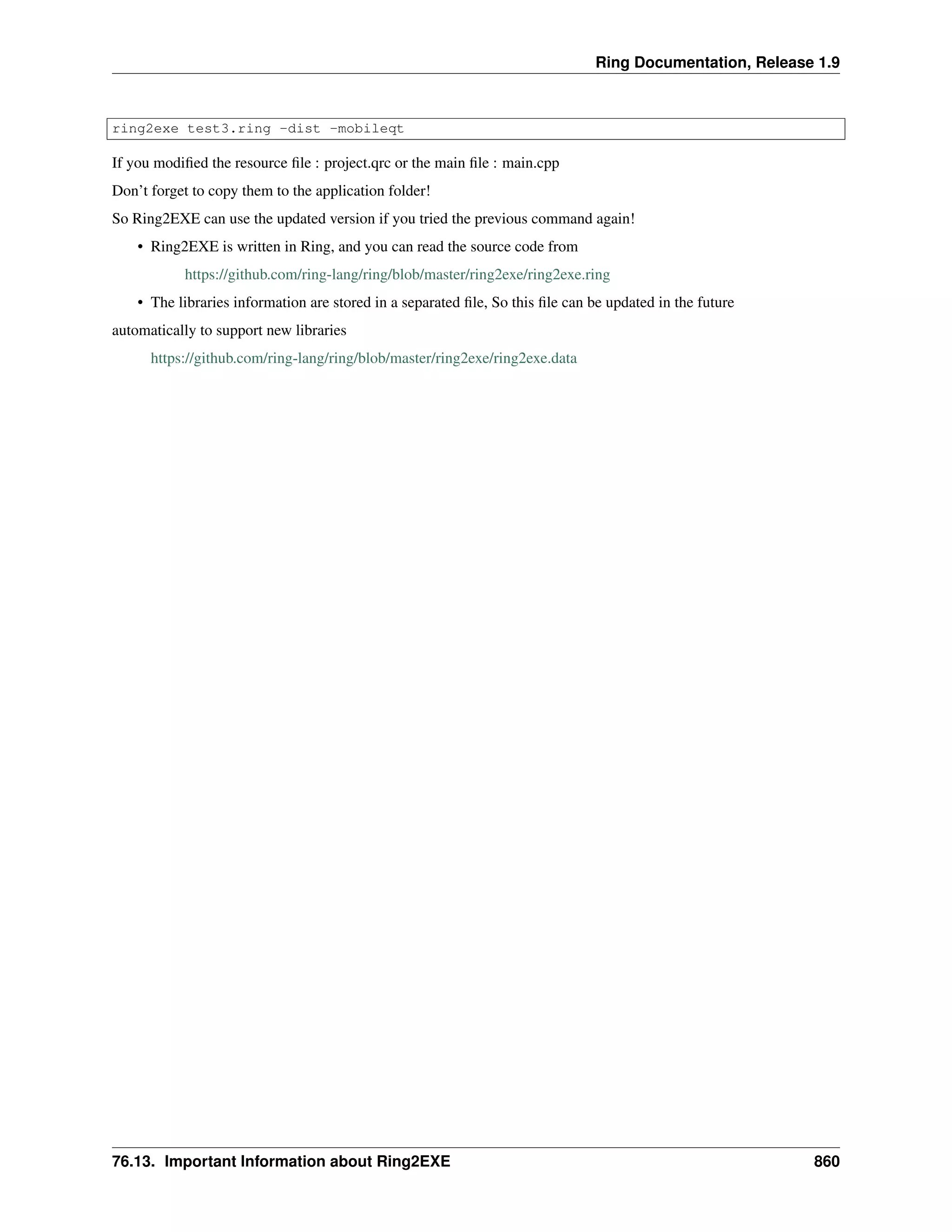
ring2exe test3.ring -dist -mobileqt
If you modified the resource file : project.qrc or the main file : main.cpp
Don’t forget to copy them to the application folder!
So Ring2EXE can use the updated version if you tried the previous command again!
• Ring2EXE is written in Ring, and you can read the source code from
https://github.com/ring-lang/ring/blob/master/ring2exe/ring2exe.ring
• The libraries information are stored in a separated file, So this file can be updated in the future
automatically to support new libraries
https://github.com/ring-lang/ring/blob/master/ring2exe/ring2exe.data
76.13. Important Information about Ring2EXE 860
CHAPTER
SEVENTYSEVEN
LOW LEVEL FUNCTIONS
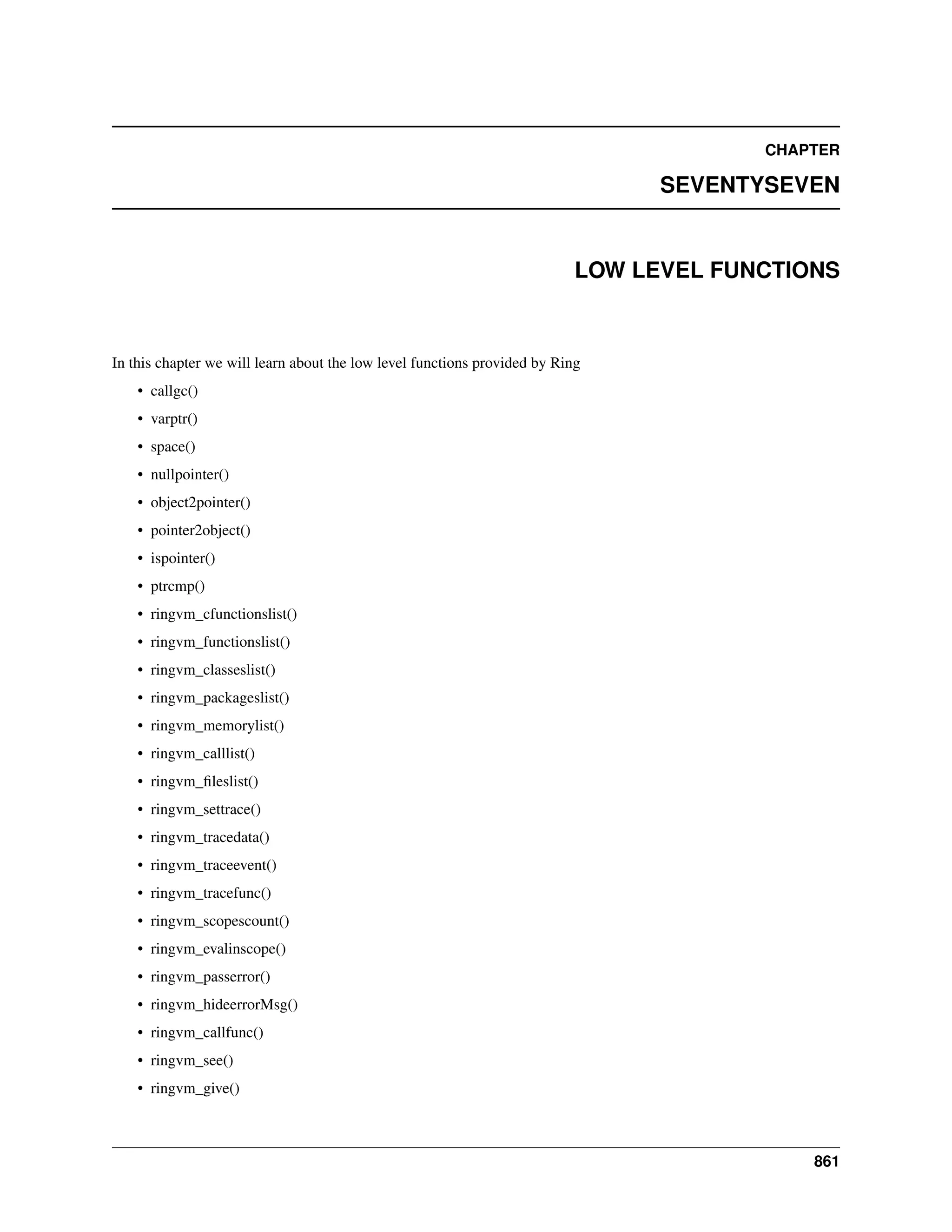
In this chapter we will learn about the low level functions provided by Ring
• callgc()
• varptr()
• space()
• nullpointer()
• object2pointer()
• pointer2object()
• ispointer()
• ptrcmp()
• ringvm_cfunctionslist()
• ringvm_functionslist()
• ringvm_classeslist()
• ringvm_packageslist()
• ringvm_memorylist()
• ringvm_calllist()
• ringvm_fileslist()
• ringvm_settrace()
• ringvm_tracedata()
• ringvm_traceevent()
• ringvm_tracefunc()
• ringvm_scopescount()
• ringvm_evalinscope()
• ringvm_passerror()
• ringvm_hideerrorMsg()
• ringvm_callfunc()
• ringvm_see()
• ringvm_give()
861
Ring Documentation, Release 1.9
• ringvm_info()
77.1 callgc() function
Use this function to force calling the garbage collector during function execution when you use a loop that create temp.
variables that you don’t free using the assignment operation.
It’s very rare to need this function but it’s useful when you create something like event-loop for your game engine and
start creating lists on the fly when you call functions.
Example
While True
# process events
# call functions using temp. lists like myfunc(["temp list"])
# call the garbage collector
callgc()
End
Tip: In Ring the garbage collector works automatically in the end of function execution or when you use the assign-
ment statement.
77.2 varptr() function
Use the varptr() function when you need to pass a pointer to a C/C++ function.
Syntax:
varptr(cVariableName,cPointerType) —> Low Level Object (C Pointer)
example:
r = 10
z = 20
see r + nl
see varptr("r","int")
see varptr("z","int")
Output:
10
00E3C740
int
2
00E3BEC0
int
2
Note: the low level object is a list contains three items (The Pointer, The Type, The Status)
77.1. callgc() function 862
Ring Documentation, Release 1.9
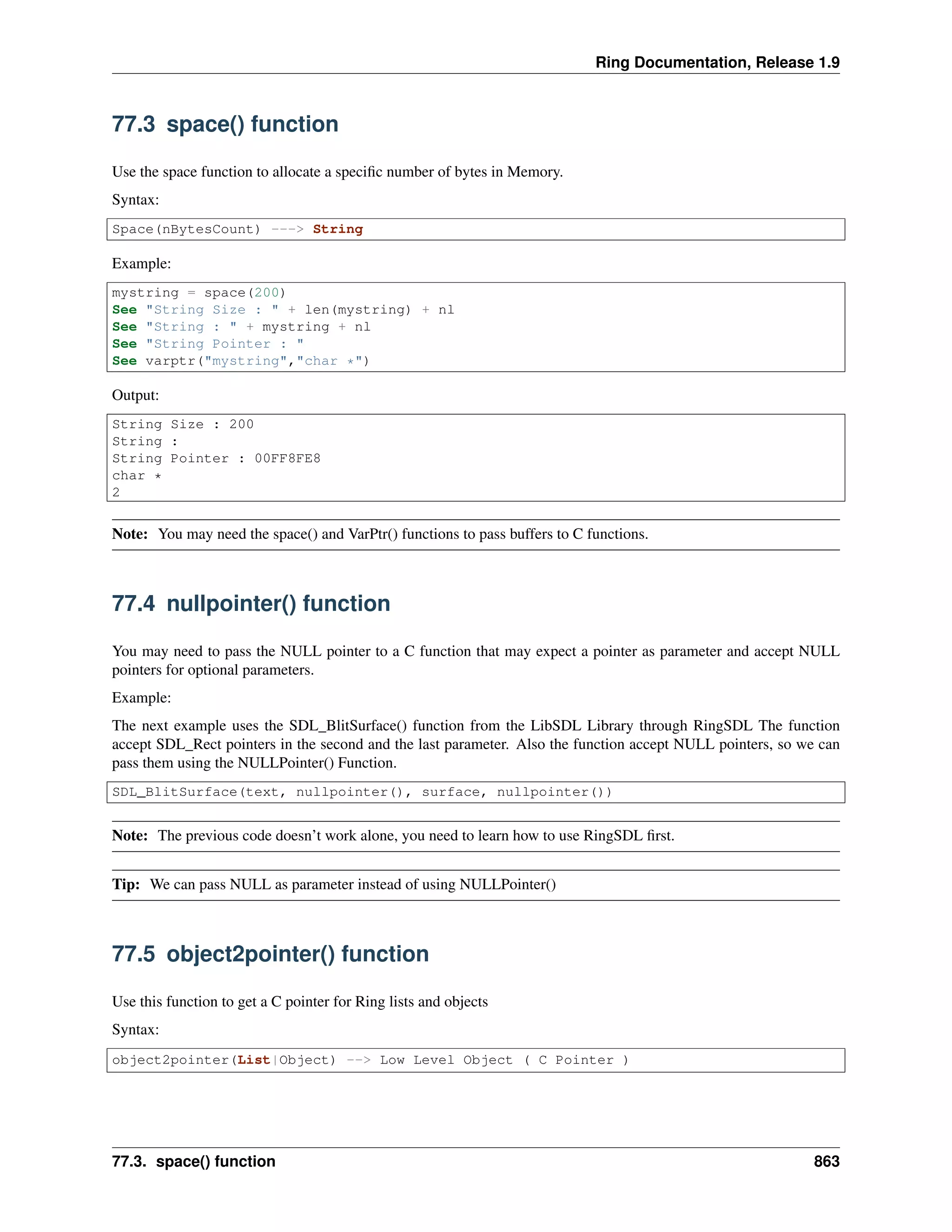
77.3 space() function
Use the space function to allocate a specific number of bytes in Memory.
Syntax:
Space(nBytesCount) ---> String
Example:
mystring = space(200)
See "String Size : " + len(mystring) + nl
See "String : " + mystring + nl
See "String Pointer : "
See varptr("mystring","char *")
Output:
String Size : 200
String :
String Pointer : 00FF8FE8
char *
2
Note: You may need the space() and VarPtr() functions to pass buffers to C functions.
77.4 nullpointer() function
You may need to pass the NULL pointer to a C function that may expect a pointer as parameter and accept NULL
pointers for optional parameters.
Example:
The next example uses the SDL_BlitSurface() function from the LibSDL Library through RingSDL The function
accept SDL_Rect pointers in the second and the last parameter. Also the function accept NULL pointers, so we can
pass them using the NULLPointer() Function.
SDL_BlitSurface(text, nullpointer(), surface, nullpointer())
Note: The previous code doesn’t work alone, you need to learn how to use RingSDL first.
Tip: We can pass NULL as parameter instead of using NULLPointer()
77.5 object2pointer() function
Use this function to get a C pointer for Ring lists and objects
Syntax:
object2pointer(List|Object) --> Low Level Object ( C Pointer )
77.3. space() function 863
Ring Documentation, Release 1.9
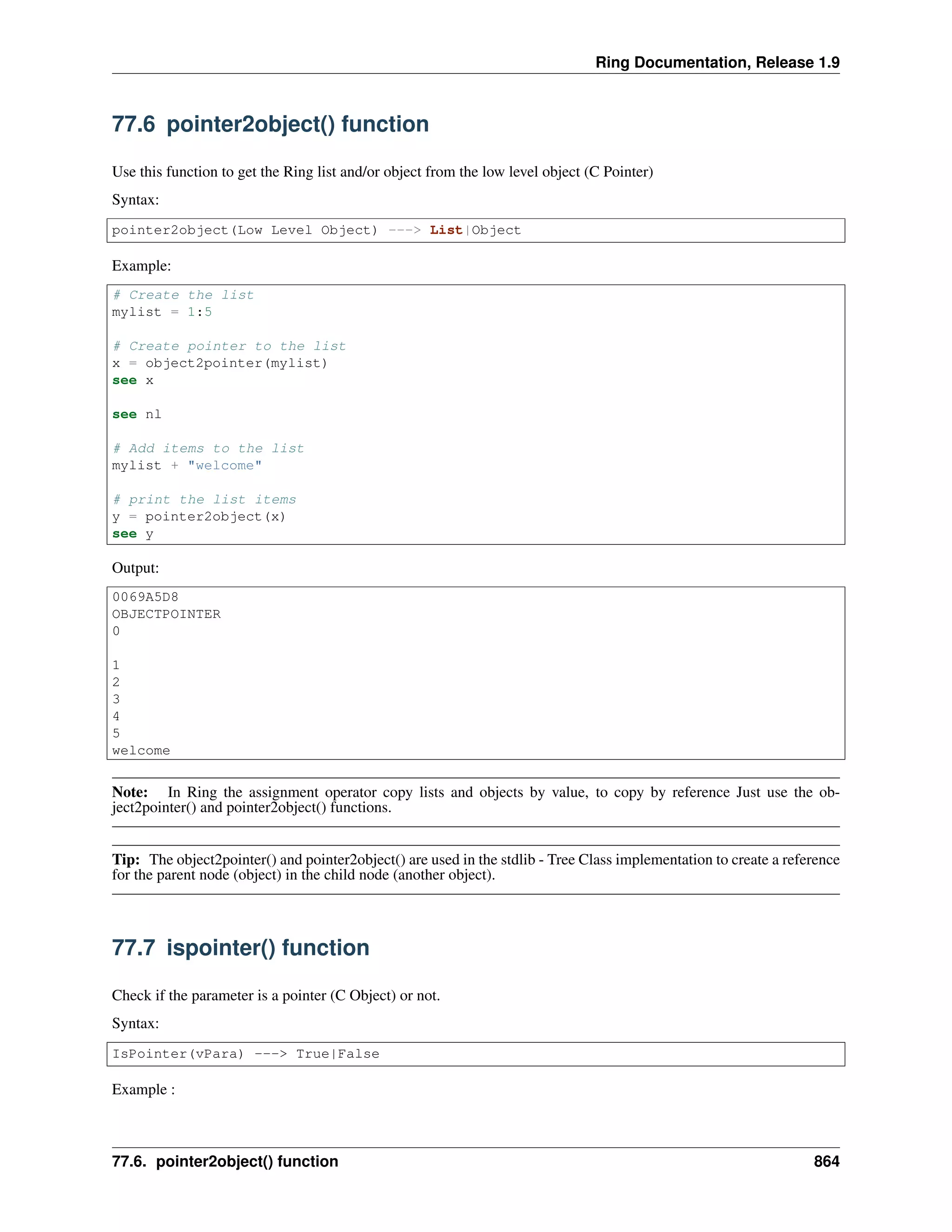
77.6 pointer2object() function
Use this function to get the Ring list and/or object from the low level object (C Pointer)
Syntax:
pointer2object(Low Level Object) ---> List|Object
Example:
# Create the list
mylist = 1:5
# Create pointer to the list
x = object2pointer(mylist)
see x
see nl
# Add items to the list
mylist + "welcome"
# print the list items
y = pointer2object(x)
see y
Output:
0069A5D8
OBJECTPOINTER
0
1
2
3
4
5
welcome
Note: In Ring the assignment operator copy lists and objects by value, to copy by reference Just use the ob-
ject2pointer() and pointer2object() functions.
Tip: The object2pointer() and pointer2object() are used in the stdlib - Tree Class implementation to create a reference
for the parent node (object) in the child node (another object).
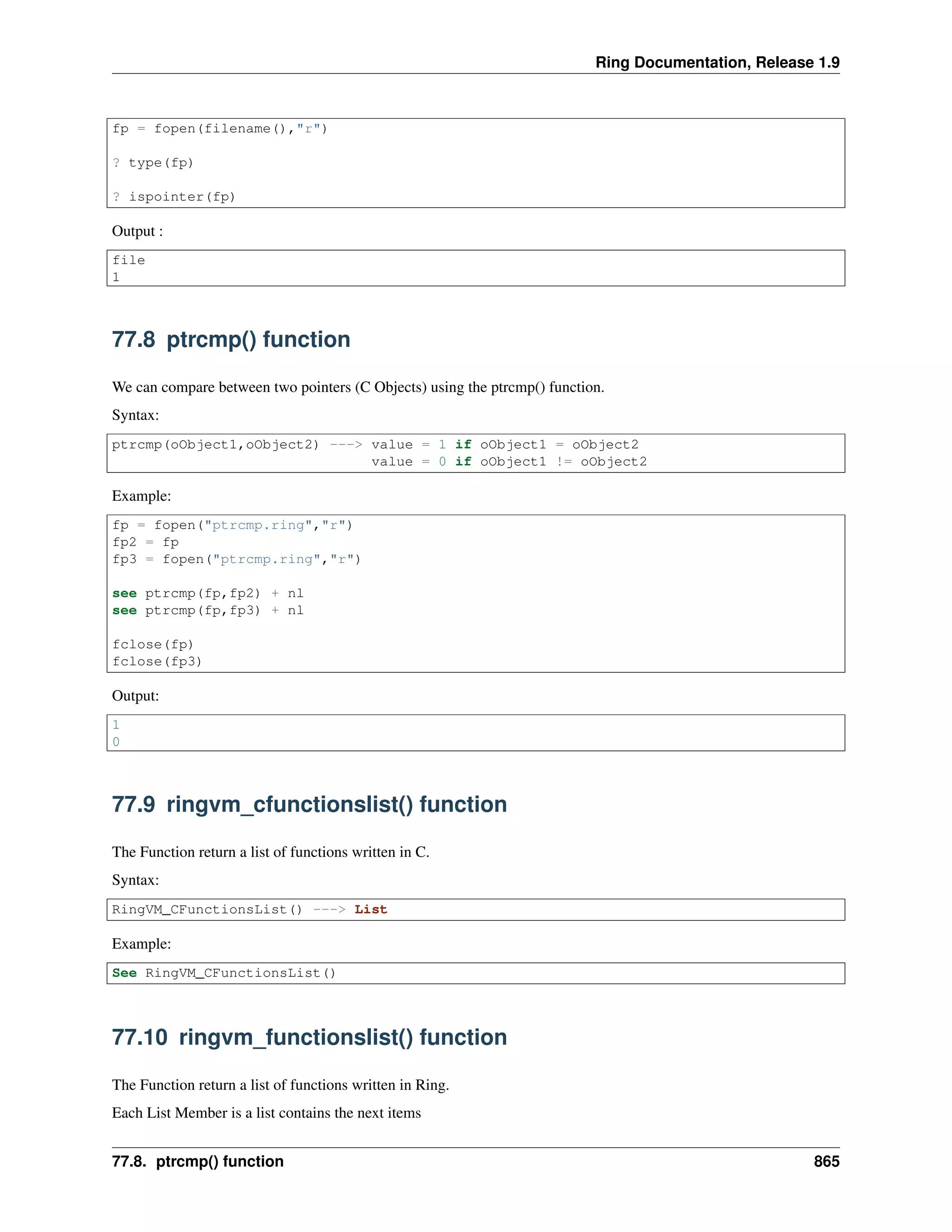
77.7 ispointer() function
Check if the parameter is a pointer (C Object) or not.
Syntax:
IsPointer(vPara) ---> True|False
Example :
77.6. pointer2object() function 864
Ring Documentation, Release 1.9
fp = fopen(filename(),"r")
? type(fp)
? ispointer(fp)
Output :
file
1
77.8 ptrcmp() function
We can compare between two pointers (C Objects) using the ptrcmp() function.
Syntax:
ptrcmp(oObject1,oObject2) ---> value = 1 if oObject1 = oObject2
value = 0 if oObject1 != oObject2
Example:
fp = fopen("ptrcmp.ring","r")
fp2 = fp
fp3 = fopen("ptrcmp.ring","r")
see ptrcmp(fp,fp2) + nl
see ptrcmp(fp,fp3) + nl
fclose(fp)
fclose(fp3)
Output:
1
0
77.9 ringvm_cfunctionslist() function
The Function return a list of functions written in C.
Syntax:
RingVM_CFunctionsList() ---> List
Example:
See RingVM_CFunctionsList()
77.10 ringvm_functionslist() function
The Function return a list of functions written in Ring.
Each List Member is a list contains the next items
77.8. ptrcmp() function 865
Ring Documentation, Release 1.9
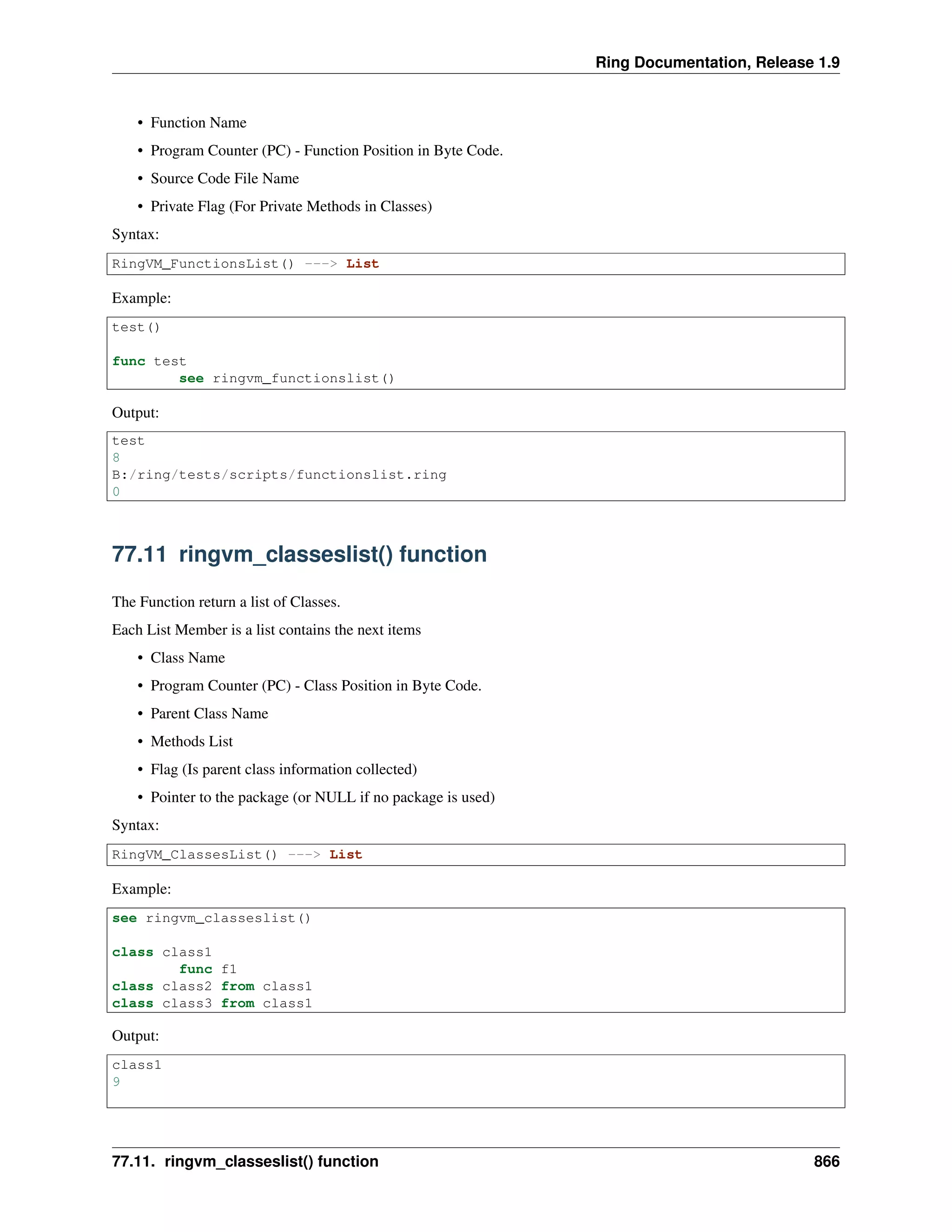
• Function Name
• Program Counter (PC) - Function Position in Byte Code.
• Source Code File Name
• Private Flag (For Private Methods in Classes)
Syntax:
RingVM_FunctionsList() ---> List
Example:
test()
func test
see ringvm_functionslist()
Output:
test
8
B:/ring/tests/scripts/functionslist.ring
0
77.11 ringvm_classeslist() function
The Function return a list of Classes.
Each List Member is a list contains the next items
• Class Name
• Program Counter (PC) - Class Position in Byte Code.
• Parent Class Name
• Methods List
• Flag (Is parent class information collected)
• Pointer to the package (or NULL if no package is used)
Syntax:
RingVM_ClassesList() ---> List
Example:
see ringvm_classeslist()
class class1
func f1
class class2 from class1
class class3 from class1
Output:
class1
9
77.11. ringvm_classeslist() function 866
Ring Documentation, Release 1.9
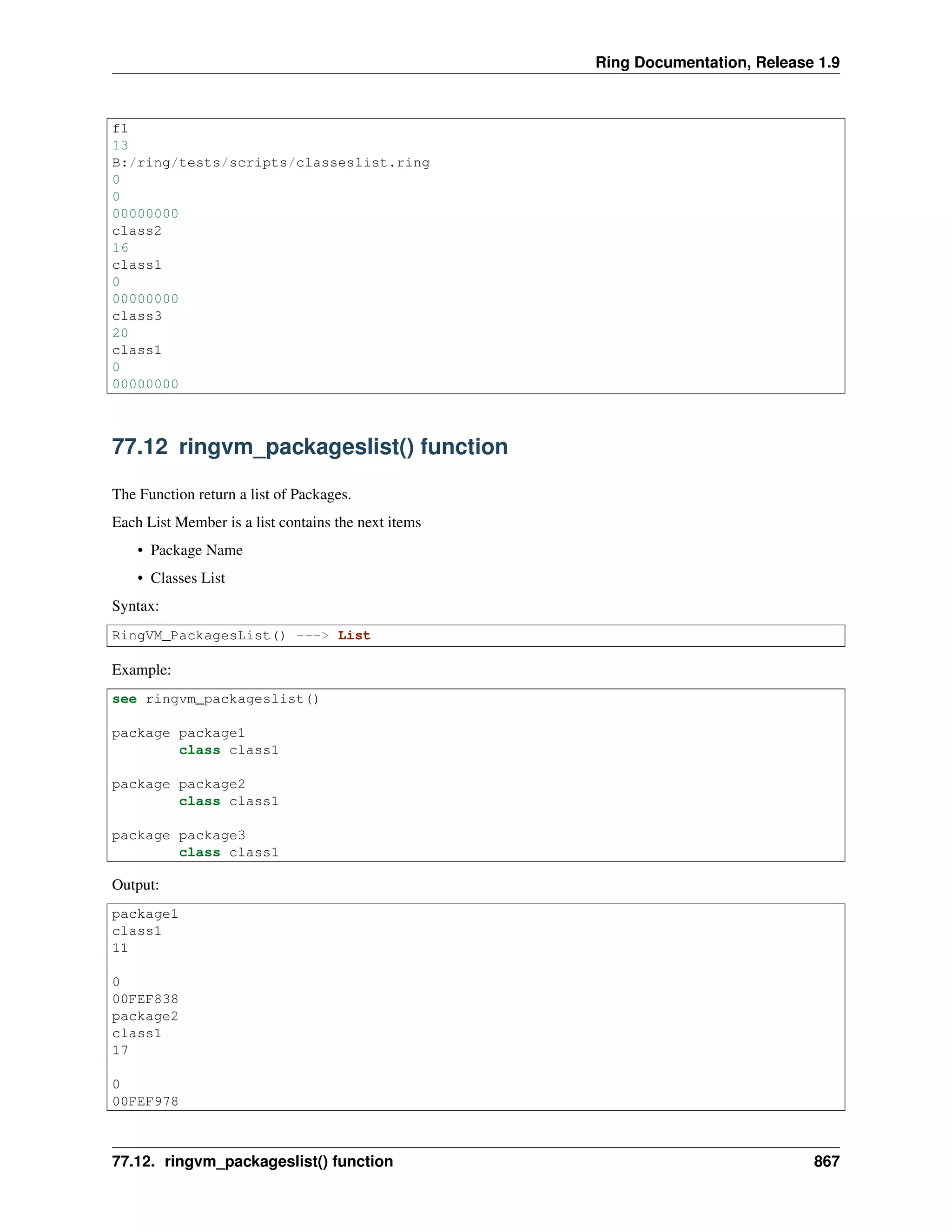
f1
13
B:/ring/tests/scripts/classeslist.ring
0
0
00000000
class2
16
class1
0
00000000
class3
20
class1
0
00000000
77.12 ringvm_packageslist() function
The Function return a list of Packages.
Each List Member is a list contains the next items
• Package Name
• Classes List
Syntax:
RingVM_PackagesList() ---> List
Example:
see ringvm_packageslist()
package package1
class class1
package package2
class class1
package package3
class class1
Output:
package1
class1
11
0
00FEF838
package2
class1
17
0
00FEF978
77.12. ringvm_packageslist() function 867
Ring Documentation, Release 1.9
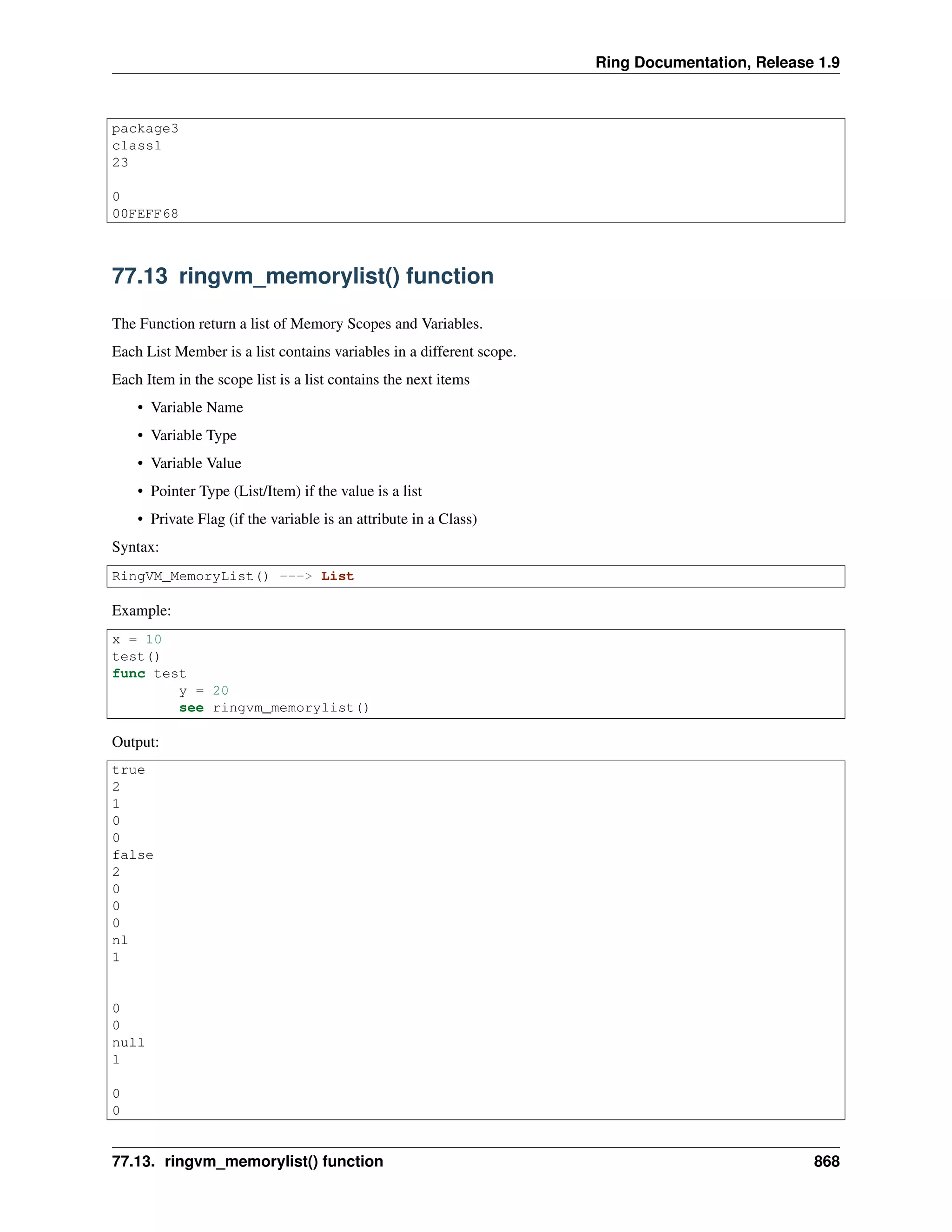
package3
class1
23
0
00FEFF68
77.13 ringvm_memorylist() function
The Function return a list of Memory Scopes and Variables.
Each List Member is a list contains variables in a different scope.
Each Item in the scope list is a list contains the next items
• Variable Name
• Variable Type
• Variable Value
• Pointer Type (List/Item) if the value is a list
• Private Flag (if the variable is an attribute in a Class)
Syntax:
RingVM_MemoryList() ---> List
Example:
x = 10
test()
func test
y = 20
see ringvm_memorylist()
Output:
true
2
1
0
0
false
2
0
0
0
nl
1
0
0
null
1
0
0
77.13. ringvm_memorylist() function 868

The Ring programming language version 1.9 book - Part 90 of 210

  • 1.
    Ring Documentation, Release1.9 setclickevent(Method(:OpenAction)) settooltip("Open File") } , new qtoolbutton(win) { setbtnimage(self,AppFile("image/save.png")) setclickevent(Method(:SaveAction)) settooltip("Save") } , new qtoolbutton(win) { setbtnimage(self,AppFile("image/saveas.png")) setclickevent(Method(:SaveAsAction)) settooltip("Save As") } , new qtoolbutton(win) { setbtnimage(self,AppFile("image/close.png")) setclickevent(Method(:ExitAction)) settooltip("Exit") } ] tool1 = win.addtoolbar("files") { for x in aBtns { addwidget(x) addseparator() } } From this example, We know that we can use sub folders for images. 76.12 Creating the Qt resource file using Folder2qrc When we have large RingQt project that contains a lot of images and files, We need to add these files to the resource file ( *.qrc ) when distributing applications for Mobile devices. Instead of adding these files one by one, Ring 1.6 comes with a simple tool that save our time, It’s called Folder2qrc. Example: folder2qrc formdesigner.ring We determine the main source file while we are in the application folder, and Folder2qrc will check all of the files in the current folder and sub folders, Then add them to the resource file after the mainfile.ringo (In our example this will be formdesigner.ringo) The output file will be : project.qrc You can open it and remove the files that you don’t need in the resources! 76.13 Important Information about Ring2EXE • Using Ring2EXE to prepare distribution will delete all of the files in the old distribution for example, if you have target/windows folder then used ring2exe test3.ring -dist -allruntime The files in target/windows will be deleted before adding the files again This is important when you prepare a distribution for Mobile devices 76.12. Creating the Qt resource file using Folder2qrc 859
  • 2.
    Ring Documentation, Release1.9 ring2exe test3.ring -dist -mobileqt If you modified the resource file : project.qrc or the main file : main.cpp Don’t forget to copy them to the application folder! So Ring2EXE can use the updated version if you tried the previous command again! • Ring2EXE is written in Ring, and you can read the source code from https://github.com/ring-lang/ring/blob/master/ring2exe/ring2exe.ring • The libraries information are stored in a separated file, So this file can be updated in the future automatically to support new libraries https://github.com/ring-lang/ring/blob/master/ring2exe/ring2exe.data 76.13. Important Information about Ring2EXE 860
  • 3.
    CHAPTER SEVENTYSEVEN LOW LEVEL FUNCTIONS Inthis chapter we will learn about the low level functions provided by Ring • callgc() • varptr() • space() • nullpointer() • object2pointer() • pointer2object() • ispointer() • ptrcmp() • ringvm_cfunctionslist() • ringvm_functionslist() • ringvm_classeslist() • ringvm_packageslist() • ringvm_memorylist() • ringvm_calllist() • ringvm_fileslist() • ringvm_settrace() • ringvm_tracedata() • ringvm_traceevent() • ringvm_tracefunc() • ringvm_scopescount() • ringvm_evalinscope() • ringvm_passerror() • ringvm_hideerrorMsg() • ringvm_callfunc() • ringvm_see() • ringvm_give() 861
  • 4.
    Ring Documentation, Release1.9 • ringvm_info() 77.1 callgc() function Use this function to force calling the garbage collector during function execution when you use a loop that create temp. variables that you don’t free using the assignment operation. It’s very rare to need this function but it’s useful when you create something like event-loop for your game engine and start creating lists on the fly when you call functions. Example While True # process events # call functions using temp. lists like myfunc(["temp list"]) # call the garbage collector callgc() End Tip: In Ring the garbage collector works automatically in the end of function execution or when you use the assign- ment statement. 77.2 varptr() function Use the varptr() function when you need to pass a pointer to a C/C++ function. Syntax: varptr(cVariableName,cPointerType) —> Low Level Object (C Pointer) example: r = 10 z = 20 see r + nl see varptr("r","int") see varptr("z","int") Output: 10 00E3C740 int 2 00E3BEC0 int 2 Note: the low level object is a list contains three items (The Pointer, The Type, The Status) 77.1. callgc() function 862
  • 5.
    Ring Documentation, Release1.9 77.3 space() function Use the space function to allocate a specific number of bytes in Memory. Syntax: Space(nBytesCount) ---> String Example: mystring = space(200) See "String Size : " + len(mystring) + nl See "String : " + mystring + nl See "String Pointer : " See varptr("mystring","char *") Output: String Size : 200 String : String Pointer : 00FF8FE8 char * 2 Note: You may need the space() and VarPtr() functions to pass buffers to C functions. 77.4 nullpointer() function You may need to pass the NULL pointer to a C function that may expect a pointer as parameter and accept NULL pointers for optional parameters. Example: The next example uses the SDL_BlitSurface() function from the LibSDL Library through RingSDL The function accept SDL_Rect pointers in the second and the last parameter. Also the function accept NULL pointers, so we can pass them using the NULLPointer() Function. SDL_BlitSurface(text, nullpointer(), surface, nullpointer()) Note: The previous code doesn’t work alone, you need to learn how to use RingSDL first. Tip: We can pass NULL as parameter instead of using NULLPointer() 77.5 object2pointer() function Use this function to get a C pointer for Ring lists and objects Syntax: object2pointer(List|Object) --> Low Level Object ( C Pointer ) 77.3. space() function 863
  • 6.
    Ring Documentation, Release1.9 77.6 pointer2object() function Use this function to get the Ring list and/or object from the low level object (C Pointer) Syntax: pointer2object(Low Level Object) ---> List|Object Example: # Create the list mylist = 1:5 # Create pointer to the list x = object2pointer(mylist) see x see nl # Add items to the list mylist + "welcome" # print the list items y = pointer2object(x) see y Output: 0069A5D8 OBJECTPOINTER 0 1 2 3 4 5 welcome Note: In Ring the assignment operator copy lists and objects by value, to copy by reference Just use the ob- ject2pointer() and pointer2object() functions. Tip: The object2pointer() and pointer2object() are used in the stdlib - Tree Class implementation to create a reference for the parent node (object) in the child node (another object). 77.7 ispointer() function Check if the parameter is a pointer (C Object) or not. Syntax: IsPointer(vPara) ---> True|False Example : 77.6. pointer2object() function 864
  • 7.
    Ring Documentation, Release1.9 fp = fopen(filename(),"r") ? type(fp) ? ispointer(fp) Output : file 1 77.8 ptrcmp() function We can compare between two pointers (C Objects) using the ptrcmp() function. Syntax: ptrcmp(oObject1,oObject2) ---> value = 1 if oObject1 = oObject2 value = 0 if oObject1 != oObject2 Example: fp = fopen("ptrcmp.ring","r") fp2 = fp fp3 = fopen("ptrcmp.ring","r") see ptrcmp(fp,fp2) + nl see ptrcmp(fp,fp3) + nl fclose(fp) fclose(fp3) Output: 1 0 77.9 ringvm_cfunctionslist() function The Function return a list of functions written in C. Syntax: RingVM_CFunctionsList() ---> List Example: See RingVM_CFunctionsList() 77.10 ringvm_functionslist() function The Function return a list of functions written in Ring. Each List Member is a list contains the next items 77.8. ptrcmp() function 865
  • 8.
    Ring Documentation, Release1.9 • Function Name • Program Counter (PC) - Function Position in Byte Code. • Source Code File Name • Private Flag (For Private Methods in Classes) Syntax: RingVM_FunctionsList() ---> List Example: test() func test see ringvm_functionslist() Output: test 8 B:/ring/tests/scripts/functionslist.ring 0 77.11 ringvm_classeslist() function The Function return a list of Classes. Each List Member is a list contains the next items • Class Name • Program Counter (PC) - Class Position in Byte Code. • Parent Class Name • Methods List • Flag (Is parent class information collected) • Pointer to the package (or NULL if no package is used) Syntax: RingVM_ClassesList() ---> List Example: see ringvm_classeslist() class class1 func f1 class class2 from class1 class class3 from class1 Output: class1 9 77.11. ringvm_classeslist() function 866
  • 9.
    Ring Documentation, Release1.9 f1 13 B:/ring/tests/scripts/classeslist.ring 0 0 00000000 class2 16 class1 0 00000000 class3 20 class1 0 00000000 77.12 ringvm_packageslist() function The Function return a list of Packages. Each List Member is a list contains the next items • Package Name • Classes List Syntax: RingVM_PackagesList() ---> List Example: see ringvm_packageslist() package package1 class class1 package package2 class class1 package package3 class class1 Output: package1 class1 11 0 00FEF838 package2 class1 17 0 00FEF978 77.12. ringvm_packageslist() function 867
  • 10.
    Ring Documentation, Release1.9 package3 class1 23 0 00FEFF68 77.13 ringvm_memorylist() function The Function return a list of Memory Scopes and Variables. Each List Member is a list contains variables in a different scope. Each Item in the scope list is a list contains the next items • Variable Name • Variable Type • Variable Value • Pointer Type (List/Item) if the value is a list • Private Flag (if the variable is an attribute in a Class) Syntax: RingVM_MemoryList() ---> List Example: x = 10 test() func test y = 20 see ringvm_memorylist() Output: true 2 1 0 0 false 2 0 0 0 nl 1 0 0 null 1 0 0 77.13. ringvm_memorylist() function 868